Why Isn’t My App Ranking? An ASO Diagnostic
Your app is live, the listing looks fine, and it appears nowhere. "Not ranking" is not one problem — it is at least six, and they fail in a fixed order. Work the fault tree from indexing upward and most teams find the answer two branches before they reach keyword strategy.
On this page
- Is your app actually available to the person searching?
- Does your app rank for its own name?
- Is your metadata carrying any keywords at all?
- Are you breaking a metadata rule without realising it?
- Are you competing for terms you cannot win?
- Is technical quality suppressing you?
- Is your app simply too new?
- Is ranking even the problem you have?
- What order should you work this in?
- Frequently Asked Questions
Is your app actually available to the person searching?
Before you touch a single keyword, confirm the app is published, out of review, and distributed to the country whose store you are searching — a large share of "we do not rank" reports are availability problems wearing an ASO costume. This branch costs ten minutes to rule out and it is the only one where the fix is a checkbox.
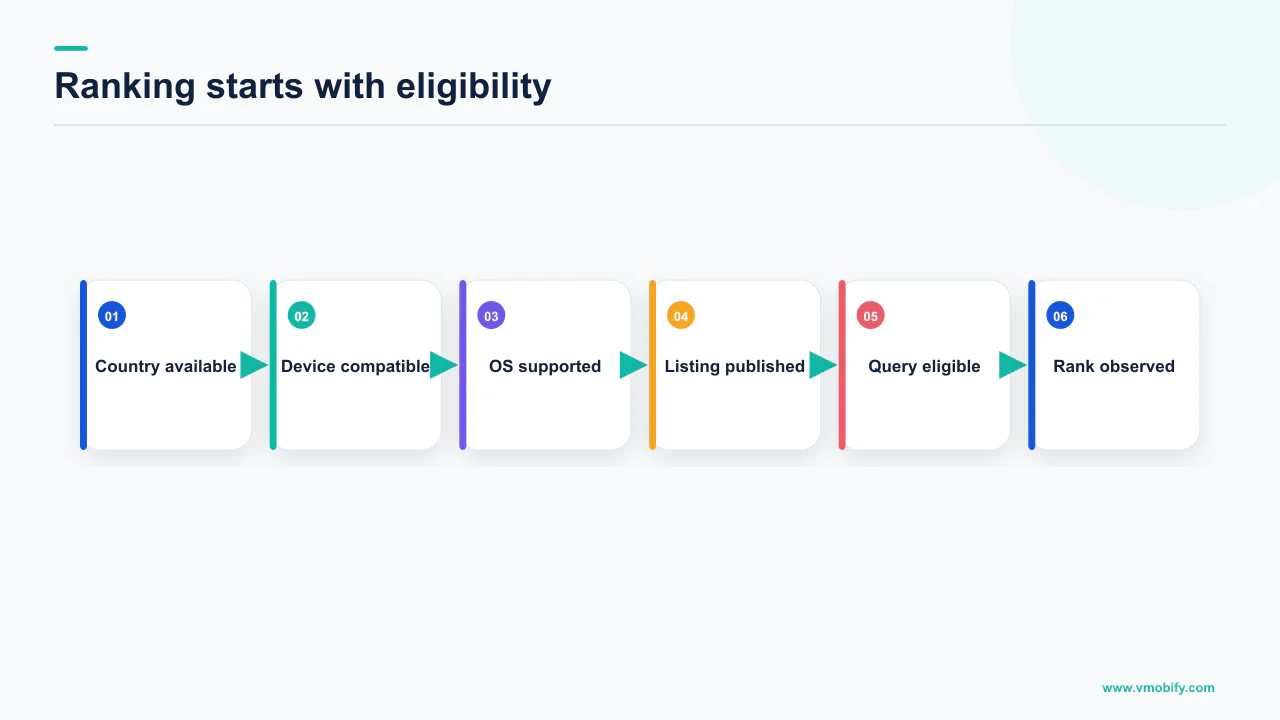
Three things break here, and none of them look like a search problem from the outside.
- The release is still in review. Google's publishing status documentation states that certain apps may be subject to extended reviews, which may result in review times of up to 7 days or longer in exceptional cases. A team that assumes a same-day publish and starts diagnosing search on day two is diagnosing nothing.
- The country you are searching in is not a country you selected. Availability applies to the production track, and Google is precise about how it is decided: country targeting is based on the user's Play country — that is, where their account is registered — not their current location. A colleague in Dubai with an Indian Play account is searching the Indian store, whatever their handset thinks.
- You are searching from a device the listing excludes. Device catalogue restrictions, minimum SDK levels and hardware requirements all remove your listing from a specific person's store without removing it from the store.
Your developer account and your test devices see your app under rules that ordinary users do not. Search from a phone signed into an account with no relationship to the app, registered in the target country. Across the 300+ apps we have managed since 2013, this single step has resolved more "invisible app" escalations than every keyword change we have ever shipped.
If the app appears when you search its exact package name or full title from a clean account in the target country, availability is fine and you can move down the tree. If it does not, stop here — nothing further in this article applies until it does.
Does your app rank for its own name?
Search your exact app name first: if you do not appear for that, you have an indexing or naming problem, not a ranking problem, and no amount of keyword work will help. This is the diagnostic that separates the two failure modes that get lumped together as "not ranking".
Apple is explicit that the app name is one of the text-relevance inputs to search. Its App Store search guidance states that search results are based on a number of factors, including text relevance — matches for your app's title, subtitle, keywords and primary category — as well as user behaviour such as downloads, ratings and reviews. If your own title does not retrieve you, the text-relevance side is not doing what it should.
Three causes account for nearly all of it:
- The name is a generic phrase. If your app is called "Budget Planner", you are not searching a brand — you are searching a category with hundreds of competitors, and you are ranked among them like anyone else. Nothing is broken; the name simply carries no distinguishing signal.
- The name you are searching is not the name you shipped. Teams routinely search the marketing name while the store carries the legal one, or the other way round. Open the live listing and copy the string from it.
- The change has not propagated. On iOS the name is not a free-text field you edit at will. Apple's App Store Connect reference sets the name at a minimum of 2 and a maximum of 30 characters, and states it can be edited until you submit the app to App Review — after that you change it when you create a new version, or when the version's status permits editing. A name change you made in a draft that was never submitted is not live.
If you do rank for your own name and nothing else, the tree branches cleanly: indexing works, and you have a metadata or competition problem. That is the far more common case, and it is the rest of this article. Our breakdown of how the two store algorithms differ covers why the same app can pass this test on one store and fail it on the other.
Is your metadata carrying any keywords at all?
Most apps that "cannot rank" have simply never told the store what they are for — the fields that carry text relevance are short, few, and usually filled with brand poetry instead of the words people type. Open your listing and audit the fields as fields, not as copy.
The character budget you are working with is small enough to write out in full, and every number below is quoted from platform documentation rather than estimated:
App Store
- Name: 2–30 characters
- Subtitle: up to 30 characters
- Keywords: 100 characters total, comma-separated with no spaces
- Name, subtitle, keywords and primary category are named by Apple as text-relevance inputs
Google Play
- App title: 30 characters or less, per Play policy
- Short description: 80-character limit
- Long description: limit shown in Play Console
- Google does not publish which fields feed Play search, so we do not claim it
Apple's keyword field has rules that quietly waste half of it if you do not know them. Apple advises not repeating any words already included in your app name, subtitle or category, and — to maximise the number of words that fit — avoiding plurals of words you have already included, since "climbs" and "climb" are considered duplicates; generic terms that are too broad for your app or category, such as "app" or "game"; filler words like "the" and "to", as these do not add any additional value; and special characters such as # or @ unless they are part of your brand identity.
That is the entire documented text-relevance surface on iOS. Spending it on a tagline nobody searches is the most common ASO mistake in our portfolio.
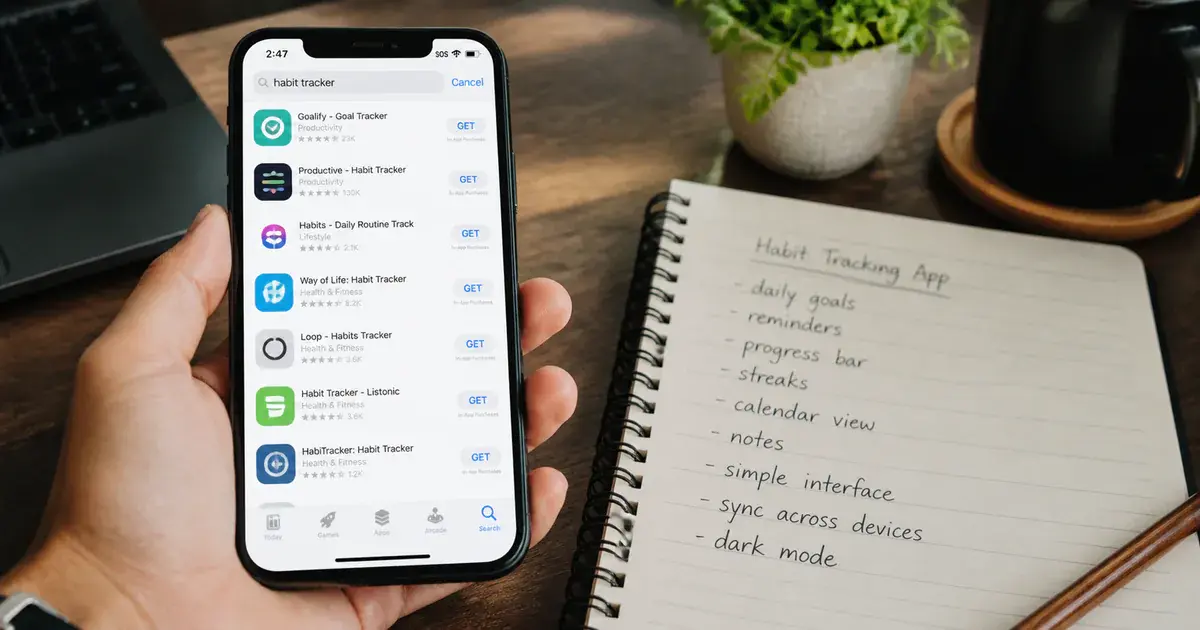
The practical test is blunt. Write down the ten phrases a stranger would type to find an app like yours, then check how many appear anywhere in your name, subtitle, keyword field or Play title and short description. If the answer is one or two, you have found your problem and it is not the algorithm. Our guide to ranking inside a store category works through how to choose those ten phrases.
Are you breaking a metadata rule without realising it?
Both stores publish rules that make certain metadata a liability rather than an asset, and the penalties run from rejection to reduced distribution — several of the "growth hacks" still circulating are explicitly prohibited. Check this branch before you write new metadata, not after.
Google's metadata policy is direct: it does not allow apps with misleading, improperly formatted, non-descriptive, irrelevant, excessive or inappropriate metadata. It also rules out emojis, emoticons and repeated special characters in elements such as the app title, icon and developer name, and prohibits text or images in those elements that indicate store performance ("App of the year"), price or promotion ("10% off"), or programme status such as "Editor's choice".
Apple's position on the keyword field is equally plain. It notes that improper use of keywords is a common reason for App Store rejections, and says not to include unauthorised use of trademarked terms, celebrity names or other protected words and phrases; terms that are not relevant to the app; competing app names; or inappropriate, offensive or objectionable terms.
This is still sold as a tactic. Apple lists competing app names among the things not to include, and names improper keyword use as a common rejection reason. The downside is a rejected submission and a delayed release; the documented upside is nothing. In our portfolio we treat it as an automatic removal during a listing audit.
Two softer failures belong here too. Keyword repetition across your title, subtitle and keyword field spends the budget twice on the same term — Apple explicitly tells you not to repeat words already in the name, subtitle or category. And a title padded with category words to the 30-character limit reads as spam to a human even where it passes policy, which trades ranking for conversion. The listing has to survive both the algorithm and the person who taps it.
Are you competing for terms you cannot win?
If your app is indexed, correctly named and honestly described, and still invisible, the most likely explanation is that you chose head terms owned by apps with vastly more of the behavioural signals both stores use. This is not a fixable defect. It is a targeting decision, and the fix is to change the target.
Apple names the two halves of the ranking input without weighting them: text relevance on one side, and user behaviour — downloads, ratings and reviews, and more — on the other. That second half is the part you cannot write your way past. A new app with a few hundred installs and a handful of ratings is not going to outrank an incumbent on a term like "photo editor", however well the keyword field is packed.
You will find blog posts assigning percentages to each ranking factor — title 30%, keywords 20%, and so on. Neither Apple nor Google publishes any such figure, and we will not print one. What is documented is which inputs exist and in which direction they push. That is enough to plan with; a fabricated weight is not.
The workable move is to compete where the behavioural gap matters less:
- Longer, more specific phrases. Fewer searchers, far fewer credible competitors, and an intent match that converts better when they arrive.
- Your actual differentiator, in words users would type. If you are the expense tracker that handles UPI autopay, that phrase has an audience the head term does not reach.
- Language and market. A term with brutal competition in English may be barely contested in a regional language, which is one of the strongest levers available in India specifically. Our piece on store localisation strategy covers how far that goes.
- Category choice. Apple lists primary category among the text-relevance factors, so the category is a ranking input and not merely a shelf label.
Set the expectation honestly with whoever asked the question. Head terms are won with sustained install volume and rating quality, not with metadata edits, and a plan that pretends otherwise fails on a schedule.
Is technical quality suppressing you?
On Google Play this branch is documented in unusually blunt terms: exceeding a bad-behaviour threshold makes your app less discoverable, and Play may steer users on affected device models away from your title entirely. If your crash or ANR rate is over the line, no metadata work will restore the visibility you have lost.
Google's Android vitals documentation publishes the overall bad-behaviour thresholds directly. A user-perceived ANR rate counts as overall bad behaviour when at least 0.47% of daily active users experience a user-perceived ANR across all device models; the user-perceived crash rate threshold is at least 1.09% of daily users experiencing a user-perceived crash across all device models. The consequence is stated plainly: if your app exceeds these thresholds, it is likely to be less discoverable on Google Play. Where the problem is device-specific, Google Play will steer users on those devices away from these titles and towards others that are more suitable for them, and in some cases a warning could be shown on your app's store listing.
The Android vitals overview repeats the mechanism from the developer side — your app's core vitals affect your app's visibility on Google Play, and if your app or game exceeds a bad behaviour threshold, Play may reduce the visibility of your title. It also notes that Play uses the last 28 days of data to assess your app's quality, and flags that apps exceeding the thresholds for memory usage, bitmap memory usage or code optimisation may see store visibility impact starting from February 2027.
A stability regression does not suppress you forever, but it does not clear the moment you ship a fix either — the assessment window has to roll past the bad period. Plan for the recovery to lag the fix, and do not read the first fortnight of flat rankings as evidence the fix failed.
Apple does not publish an equivalent threshold table, and we are not going to invent one. What it does publish is that ratings and reviews are among the user-behaviour inputs to search — and crashes reliably produce bad ratings, so the path from instability to lost visibility exists on both platforms even where only one of them documents the numbers. We cover the commercial cost of that in why bad vitals act as a tax on acquisition, and the thresholds themselves in the vitals thresholds that decide distribution.
Is your app simply too new?
Both stores use behavioural signals that a week-old app has not had the chance to generate, so a new app ranking nowhere is the expected state rather than a fault. The mistake is treating a normal cold start as a defect and rewriting metadata every few days in response to noise.
Look again at what Apple names as inputs: text relevance and user behaviour, with downloads, ratings and reviews given as examples of the latter. A new app has the first half and none of the second. It is not being penalised; it has simply not produced the evidence the second half is made of.
Neither Apple nor Google publishes how long that takes, or how the two halves trade off, and any specific number you read on the subject is someone's inference presented as fact. What we can say from the documentation is the direction, and from experience the shape:
- Get the text-relevance half completely right at launch, because it is the only half you fully control and it is cheap to fix before habits form.
- Generate the behavioural half deliberately. Installs from any channel, and ratings from satisfied users, are the inputs Apple names. Our guide to ASO for new apps covers the launch sequence.
- Change one thing at a time and give it a proper window. Play assesses quality on 28 days of data; ranking changes are not same-day feedback either.
- Track ranks for a fixed keyword set from day one, so you can tell a trend from a wobble later.
The related trap is a listing rewritten so often that no version ever accumulates enough data to be judged. If you change the title, subtitle and keywords together every fortnight, you will never learn which change did anything. A structured approach to that is worth setting up early — our ASO testing framework covers running one variable at a time properly.
Is ranking even the problem you have?
A meaningful share of "we are not ranking" cases are conversion problems: the app appears, people see it, and nobody taps — which then suppresses the behavioural signals that would have improved the ranking. The two failures look identical in an install chart and need opposite fixes.
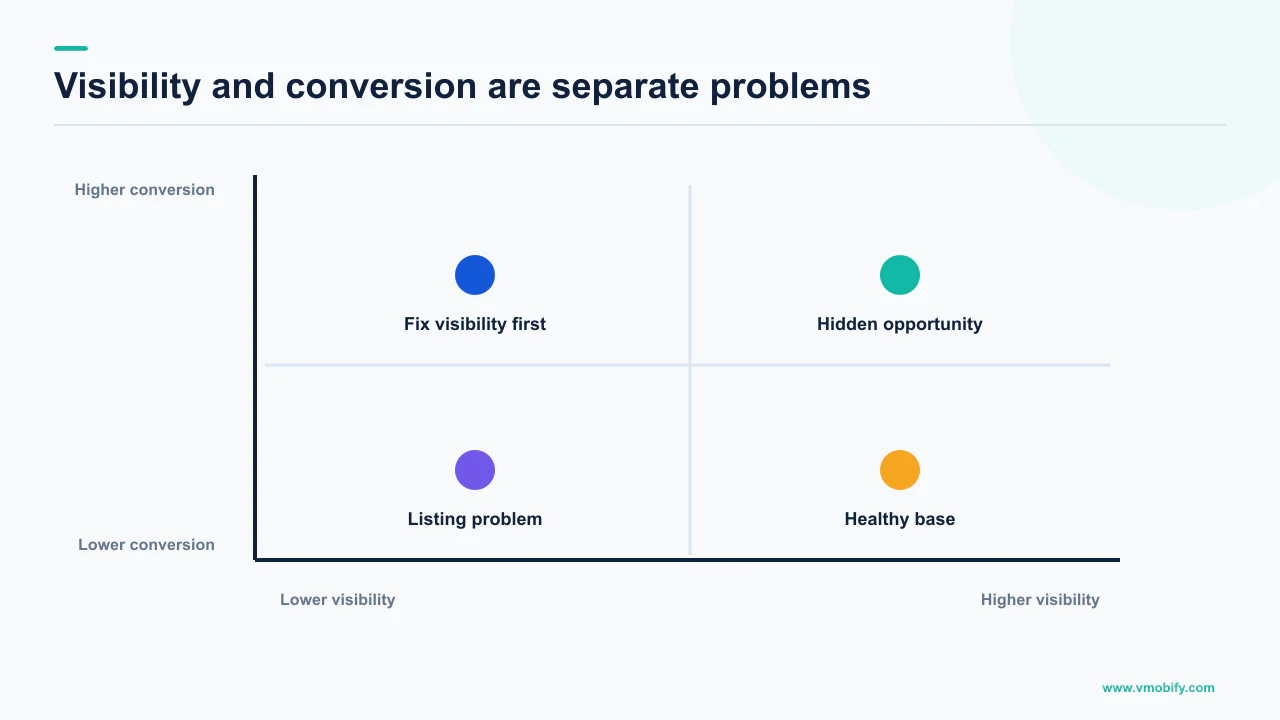
Check the store analytics before you accept the premise. If store listing visitors are healthy and installs are not, you have a conversion problem. If visitors are near zero, you have a visibility problem and the rest of this fault tree applies. Guessing between the two wastes whichever quarter you guess wrong in.
The two branches diverge completely from there:
Visibility problem
- Impressions and listing visitors near zero
- Fix in text relevance, category, availability and technical quality
- Feedback is slow and indirect
- Work this article's tree in order
Conversion problem
- Visitors arrive, installs do not follow
- Fix in icon, screenshots, first two lines, ratings
- Feedback is fast and testable
- Usually the cheaper of the two to move
There is a compounding effect worth naming. Apple lists downloads and ratings among the user-behaviour inputs to search. A listing that converts badly generates fewer of both, which weakens the half of the ranking equation you cannot write, which reduces impressions further. Conversion is therefore not a separate discipline from ranking — it is an input to it, and on a new app it is usually the faster lever. Our guide to store listing conversion covers the elements in order of impact.
What order should you work this in?
Strictly top-down, because each branch invalidates the ones below it — diagnosing keyword competition on an app that is still in review is wasted work, and it is the most common way teams spend a month. The order below is the whole method.
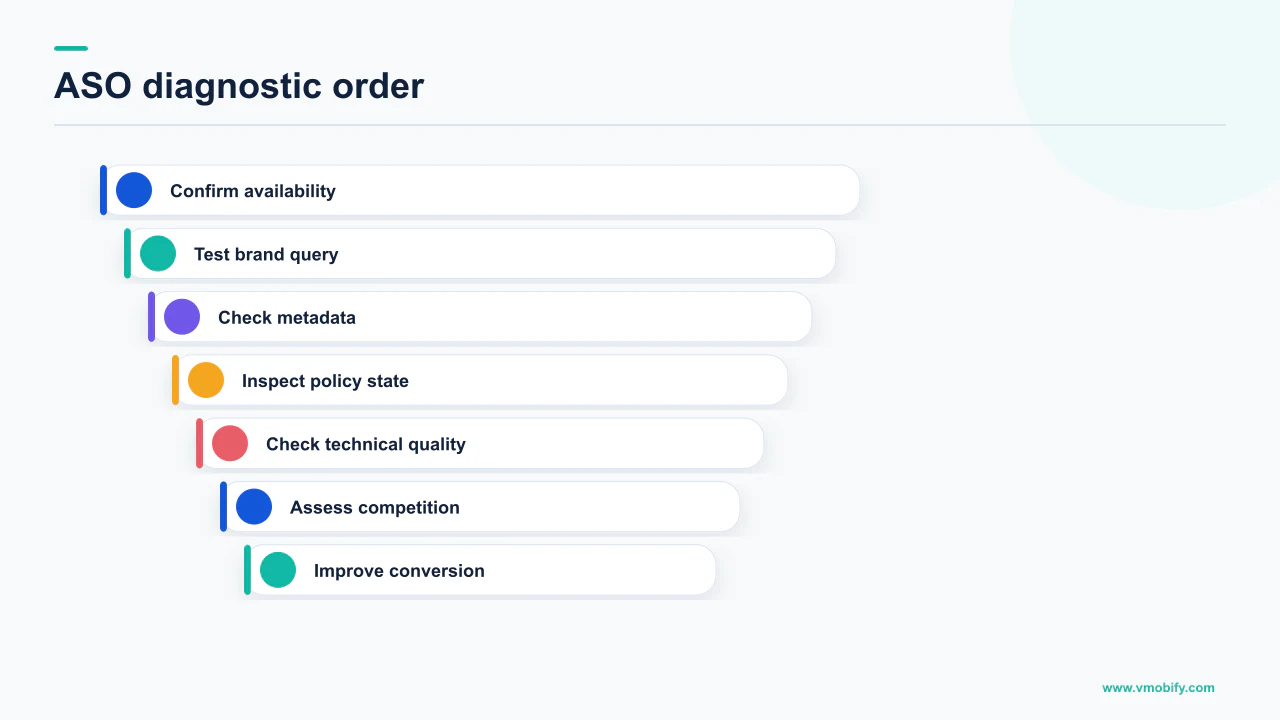
- Availability. Published, out of review, distributed to the country you are testing from, installable on the device you are testing with. Search from a clean account in the target Play country.
- Own name. If you do not retrieve for your exact title, fix indexing and naming before anything else. If you do, indexing works.
- Metadata coverage. Do the words people type appear anywhere in the documented fields? 30 characters of name, 30 of subtitle and 100 of keywords on iOS; a 30-character title and an 80-character short description on Play.
- Policy compliance. No competitor names, no emojis or repeated special characters in title, icon or developer name, no rankings or price claims, no irrelevant or excessive metadata.
- Competition realism. Are the terms winnable with the install and rating volume you actually have? If not, move to longer phrases, a differentiator, or another language.
- Technical quality. Crash and ANR rates against the published thresholds, checked per device model as well as in aggregate.
- Age. If everything above is clean and the app is weeks old, the honest answer is that it is too early, and the work is generating the behavioural signals rather than editing the listing again.
One discipline holds the whole thing together: never change two branches at once. If you rewrite the metadata and ship a stability fix in the same week, you will not know which one moved the numbers, and the next diagnosis starts from scratch.
The reason to be this literal about order is that the branches have wildly different costs. Availability is a checkbox. Metadata is an afternoon. Competition realism is a strategy conversation. Technical quality is engineering time. Age is patience. Teams that skip to the expensive branches usually do so because those feel like real work, and that instinct is what turns a ten-minute answer into a quarter.
If you have worked the tree and cannot place your app on it, that is usually a short diagnosis for someone who has seen the pattern before — tell us what the store analytics show, or see how we approach a listing end to end in our ASO work.
Frequently Asked Questions
Why can I not find my app when I search its exact name?+
Check availability before relevance. The release may still be in review — Google states extended reviews may take up to 7 days or longer in exceptional cases — or the country you are searching may not be selected for distribution. Google is specific that country targeting is based on the user’s Play country, where their account is registered, not their current location. Test from a clean account registered in the target country.
What actually determines App Store search ranking?+
Apple states that search results are based on a number of factors, including text relevance — matches for your app’s title, subtitle, keywords and primary category — as well as user behaviour such as downloads, ratings and reviews. Apple does not publish how those factors are weighted, so treat any percentage breakdown you see elsewhere as someone’s guess.
How many characters do I get for App Store metadata?+
App Store Connect sets the app name at a minimum of 2 and a maximum of 30 characters, and the subtitle at up to 30 characters. Apple states the keyword field is limited to 100 characters total, with terms separated by commas and no spaces, though spaces are allowed within a keyword phrase.
Can I put competitor app names in my keyword field?+
No. Apple explicitly lists competing app names among the things not to include, alongside unauthorised trademarked terms, irrelevant terms and offensive terms, and notes that improper use of keywords is a common reason for App Store rejections. The documented downside is a rejected submission; there is no documented upside.
Can crashes really stop my app ranking on Google Play?+
Yes, and Google says so directly. Its Android vitals documentation states that if your app exceeds the bad-behaviour thresholds it is likely to be less discoverable on Google Play, and that where behaviour is bad on specific device models, Play will steer users on those devices towards other titles. A warning may also be shown on your store listing.
How long should a new app take to start ranking?+
Neither store publishes a figure, so that number is not publishable. What is documented is that user behaviour — downloads, ratings and reviews — is part of the ranking input, and a new app has not generated any of it yet. Google separately notes that Play uses the last 28 days of data to assess app quality, which gives a sense of the timescales involved.
My app appears in search but gets no installs. Is that a ranking problem?+
No, that is a conversion problem, and it needs the opposite fix. Check store listing visitors against installs: if visitors are healthy and installs are not, work on the icon, screenshots, first lines of the description and your ratings. It compounds, because downloads and ratings are themselves inputs to search ranking.
Sources
- Apple — App Store search — Names text relevance (title, subtitle, keywords, primary category) and user behaviour as search factors, the 100-character keyword limit, and what not to include in keywords.
- Apple — App Store Connect: app information — App name minimum 2 and maximum 30 characters, subtitle up to 30, and when each field can be edited.
- Google Play — Metadata policy — App title 30 characters or less, no emojis or repeated special characters, and the ban on misleading, irrelevant or excessive metadata.
- Google Play — Add preview assets to showcase your app — States the 80-character limit on the Google Play short description.
- Google Play — Monitor technical quality with Android vitals — Overall bad-behaviour thresholds of 0.47% ANR and 1.09% crash rate, and the statement that exceeding them makes an app less discoverable.
- Android Developers — Android vitals overview — Core vitals affect visibility on Google Play, Play assesses quality on the last 28 days of data, and memory-related visibility impact from February 2027.
- Google Play — Publish your app — Extended reviews may result in review times of up to 7 days or longer in exceptional cases.
- Google Play — Distribute app releases to specific countries — Country targeting is based on the user’s Play country where their account is registered, not their current location.
About the author
Amol Pomane — Founder, Vmobify
Amol leads Vmobify, a mobile app growth agency that has driven 30M+ downloads and ranked 54K+ keywords across 300+ apps since 2013. He writes about ASO, paid user acquisition, retention, and the operational reality of scaling mobile apps in India and global markets.
Check your store metadata
Run your current App Store or Play metadata through the free checker.
Open free tool