ASO Before You Have Data: Ranking a Brand-New App From Zero
Every ASO framework assumes you already have rankings, conversion rates and A/B test results to optimise against. A brand-new app has none of them. This guide covers only the data-free stage: how to build a keyword set, model the right competitors, and make the listing decisions iOS gives you no way to test yet — plus what Play does let you experiment on before launch, and how long you will wait for the rest.
On this page
- Why does standard ASO advice break when you have no data?
- How do you build a keyword set with zero ranking history?
- Which competitors should you model, and which will mislead you?
- How do you make listing decisions you cannot test yet?
- What should you ship on day one versus hold back to test later?
- How long before you have enough data for real ASO?
- What are the first three things to change once data arrives?
- Which pre-launch ASO work has the longest payback?
- Frequently Asked Questions
Why does standard ASO advice break when you have no data?
Almost every ASO framework in circulation assumes you already have three things — keyword ranking history, a store-page conversion baseline, and enough traffic to run a test — and a brand-new app has none of them. That is the entire reason this guide exists, and it is worth stating the scope plainly before you read another word: this post is about the data-free stage only. It covers the window between "we have decided to build this" and "we have our first few thousand installs." Everything after that window is covered in our complete app store optimisation guide, and you should read that one second, not first.
The distinction matters because the two stages fail in opposite ways. Post-launch ASO fails when teams iterate too slowly. Pre-launch ASO fails when teams iterate at all — when they treat a set of untested guesses as a draft to be revised weekly, and end up with a listing that has been changed six times in eight weeks and therefore cannot be measured against anything.
Concretely, here is what is missing on day zero:
- No ranking history. You cannot see which terms you rank for, because you rank for nothing. Every keyword tool that reports your positions is reporting an empty set, and every tool that estimates your potential is extrapolating from apps that are not you.
- No conversion baseline. The impressions to product-page-views to installs funnel needs volume before the ratios mean anything. Apple's own documentation states that App Store metrics become available once you have at least five first-time downloads or pre-orders — which tells you the floor for seeing a number, not the floor for trusting one.
- Thin test infrastructure, and it is asymmetric. Apple limits custom product pages and product page optimisation on a pre-order product page to apps that already exist on the store, so a first iOS app has no testing surface at all until it ships. Play is more generous: store listing experiments accept unique user pre-registration clicks as a target metric, which means a Play listing can be tested before the app is downloadable. Apple Ads keyword tooling — the single most useful source of App Store search-demand data — needs a published product page, so for a brand-new app it unlocks when your pre-order goes live rather than on launch day.
- No user vocabulary. You do not yet know which words your actual users type. You know which words your team types, and those are almost never the same.
What this changes is the posture. Post-launch, you optimise: small changes, measured, kept or reverted. Pre-launch, you decide: you make a set of choices with incomplete information, you make the reversible ones cheaply, you make the irreversible ones carefully, and you instrument everything so that real data arrives as fast as possible. That is a different discipline with a different set of correct moves.
Across the 300+ apps we have managed since 2013, the launches that go badly at the ASO layer almost never fail because someone picked the wrong long-tail keyword. They fail because someone made an irreversible decision — the name, the category, a screenshot system that cannot be re-cut cheaply — casually, and then spent the next eighteen months paying for it. The rest of this guide is organised around that asymmetry.
How do you build a keyword set with zero ranking history?
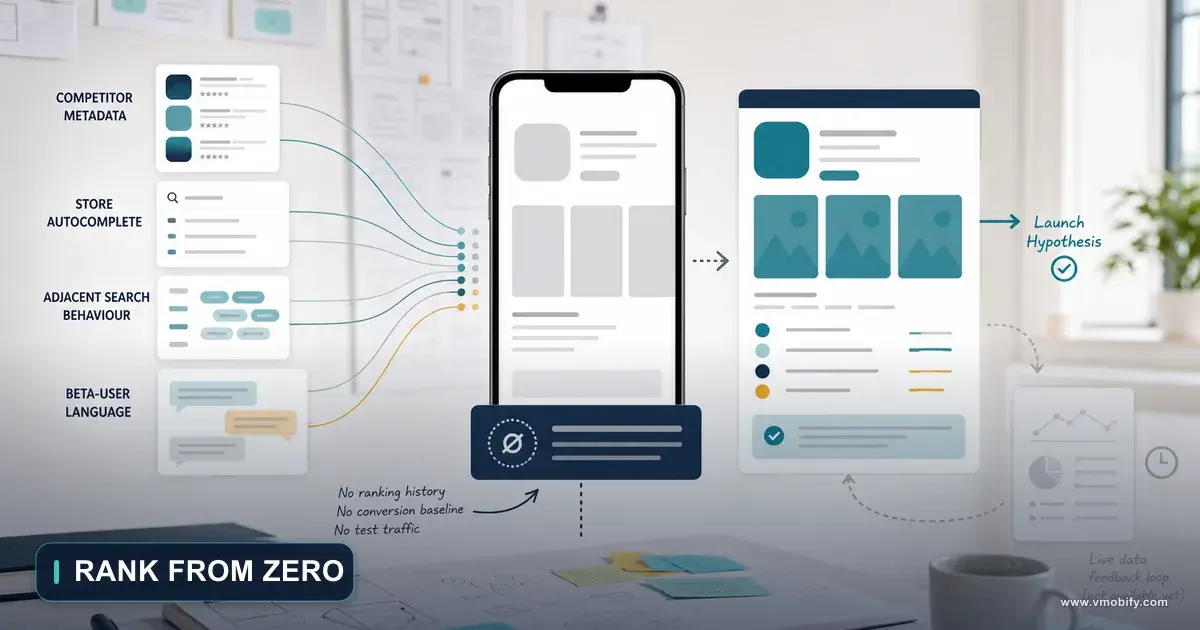
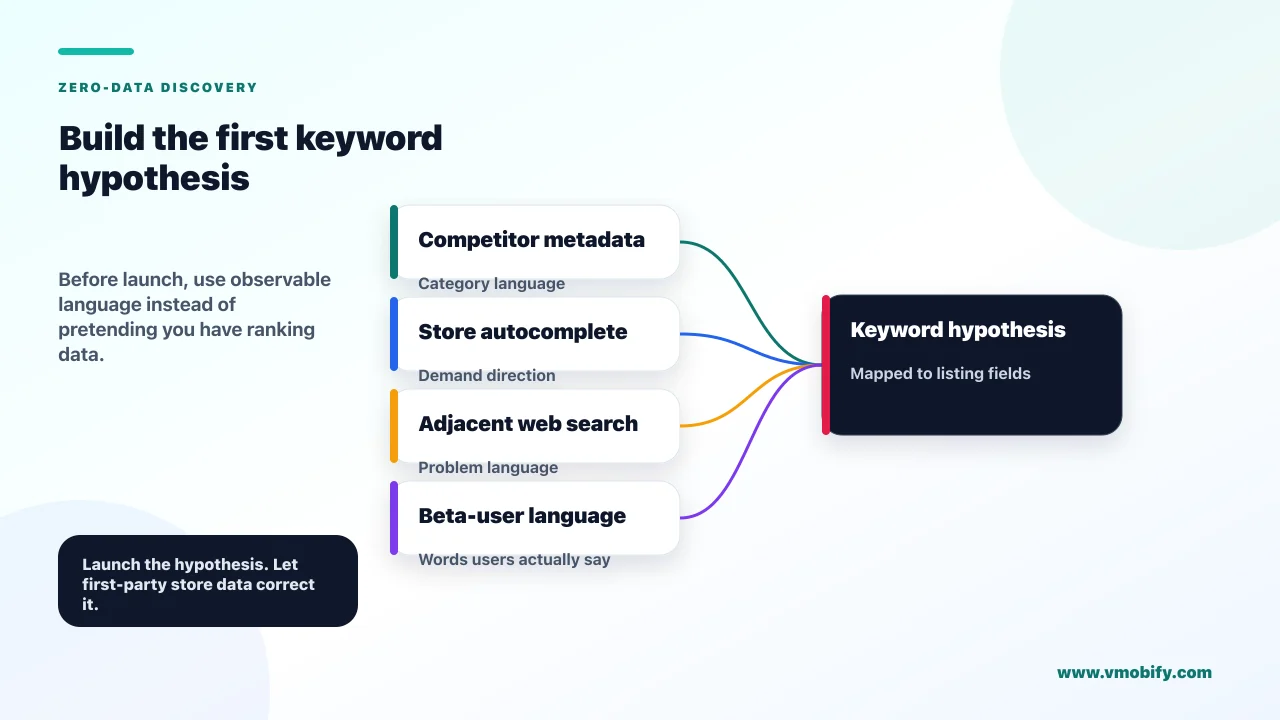
You build it from demand evidence that exists outside your app — competitor metadata, store autocomplete, adjacent web search behaviour and the words your own beta testers use — and you treat the result as a hypothesis you will overwrite within a quarter. Start by knowing exactly how much space you are filling, because the constraint shapes the research.
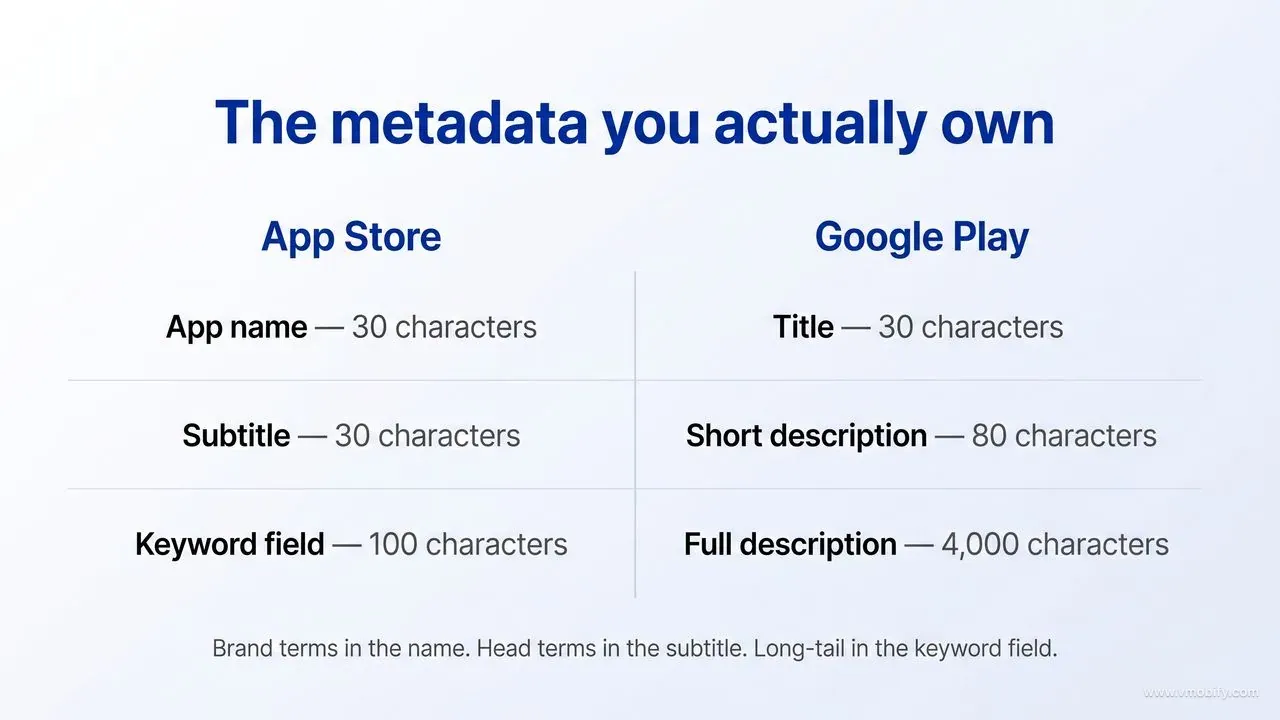
On iOS you have an app name of up to 30 characters, a subtitle of up to 30 characters, and a keyword field limited to 100 characters with terms separated by commas and no spaces. Apple's official description of App Store search states that results are based on text relevance — matches for your app's title, subtitle, keywords and primary category — as well as user behaviour including downloads, ratings and reviews. Apple does not list the long description among those text-relevance inputs. Apple also now generates app tags using large language models from the metadata you supply in App Store Connect, which is a further argument for metadata that describes the app precisely rather than metadata stuffed with terms.
On Google Play the fields are a 30-character title, an 80-character short description and a 4,000-character full description, per Google's own store listing documentation. Google does not publish which fields feed Play search ranking, and its published best-practice guidance explicitly tells you not to fill the description with lists of words and to write in everyday language. Treat that as the instruction it is: on Play, natural phrasing that repeats your core terms in real sentences is the correct approach, not a keyword dump.
With the container defined, here are the five sources of pre-launch demand signal that actually work, roughly in order of usefulness:
- Store autocomplete, typed by hand on a real device. Open the App Store and Play search fields, type the first three to six characters of every term in your category, and write down every suggestion. Autocomplete is ordered by real query behaviour on that storefront. It is free, it is first-party, and it is the closest thing to a keyword volume tool that a pre-launch app can access. Do it on a device set to your target country — suggestions differ by storefront.
- Competitor metadata inventory. Pull the name and subtitle of the top 20 apps ranked for each of your candidate terms. Terms that appear in multiple competitors' 30-character subtitles are terms those teams paid attention to. Terms that appear in nobody's are either worthless or unclaimed — and you find out which by checking whether autocomplete suggests them.
- Web search volume as a directional proxy. Keyword Planner and similar tools measure web intent, not store intent, and the two diverge badly for anything transactional. Use web volume to rank the relative size of concepts, never to predict store installs. If "budget tracker" has 10x the web volume of "expense diary", the ordering is probably right even though the absolute numbers are meaningless in store terms.
- Your beta testers' own words. If you are on Android with a personal Play Console account created after 13 November 2023, you are already running a closed test — Google requires a minimum of 12 testers opted in continuously for at least 14 days before you can apply for production access. That cohort is a free vocabulary study. Organisation accounts and personal accounts created before that date are not subject to the rule, so if it does not apply to you, recruit the same cohort deliberately through TestFlight or an open Play test; a dozen engaged people is enough for this purpose. Ask each tester to describe the app in one sentence and write down the nouns they use. In practice this exercise changes the subtitle more often than any tool does.
- Competitor review mining. One-star and three-star reviews on rival apps are written in the exact language of people who wanted your category and were disappointed. The recurring phrases are both keyword candidates and screenshot caption candidates.
Then structure the set into three tiers and allocate the fields accordingly. Brand terms — your own name — go in the app name, and nothing else does. Padding those 30 characters with misspellings or extra category words is a policy risk rather than a free win: Google's store listing documentation warns that repetitive or irrelevant use of keywords in the app name, description or promotional description can result in an app being suspended on Google Play, and Apple's review guidelines require the app name to be the name of the app rather than a run of additional descriptive or keyword terms. Put the brand variants and the misspellings you expect people to type into the iOS 100-character keyword field instead, where your own brand identity terms are entirely legitimate, and let both stores' fuzzy matching absorb the rest. Head terms — the two or three category words with the most demand — belong in the subtitle even though you will not rank on them for months, because they are the terms you are building toward. Long-tail terms — three-to-five-word specific phrases with obvious intent — are where a new app can genuinely rank inside weeks, and they are what the 100-character keyword field is for. Apple's instruction on that field is explicit and worth following literally: do not repeat any word already included in your app name, subtitle or category, and avoid plurals of words you have already used, because Apple treats them as duplicates. Whether the fields are literally combined into one index is not something Apple publishes — the no-repeat rule is, so treat it as an instruction rather than as a described mechanism, and spend the characters it frees on terms you do not own anywhere else. If you have not settled the name yet, read how to name your app before you write a single keyword, because the name eats the highest-value 30 characters you own. For the tooling side, our roundup of free ASO tools covers what is genuinely usable at zero budget.
Which competitors should you model, and which will mislead you?
Model the apps one tier above you in maturity, not the category leaders — a leader ranks partly on download volume, ratings and review counts you cannot replicate, so its metadata is not the reason it wins and copying that metadata teaches you nothing. This is the single most common analytical error we see in pre-launch ASO work, and it is expensive because it feels like rigour.
Apple is explicit that search results combine text relevance with user behaviour — downloads, ratings and reviews. So when the number-one app in your category ranks first for a head term with a vague two-word subtitle, the honest reading is that its behavioural signals are carrying the result and its metadata is coasting. Reproducing a vague subtitle without the behavioural signals underneath it produces a listing that ranks for nothing.
Split your competitive set into three groups and use each for a different purpose:
Category leaders (study, do not copy)
- Use them to understand what the category's users have been trained to expect — the visual conventions, the standard feature vocabulary, the pricing presentation.
- Never copy their metadata structure, and never copy a one-word name.
Near-peers (copy structurally)
- These are apps launched in roughly the last 12-18 months with rating counts in the hundreds rather than the hundreds of thousands, and which nonetheless appear for specific long-tail terms.
- They are ranking predominantly on text relevance, which means their metadata is a working example of what text relevance alone can achieve.
- This is your model set.
Adjacent-category apps (mine for vocabulary)
- Apps solving a neighbouring problem for the same person.
- They are where you find the phrasing your user already knows, and often where you find an uncontested long-tail cluster.
Identifying near-peers is mechanical: sort your candidate keyword results by rating count ascending, filter out anything with a rating count above a few thousand, and check the app's update history for a first release inside the last 18 months. What you extract from them is not their word list — it is their structure. Where did they put the head term, in the name or the subtitle? Does the short description on Play read as a sentence or as a list? How many of their first three screenshots carry a caption, and is the caption a benefit or a feature?
Four traps that will mislead you, all of which we have watched teams walk into:
- Assuming any competitor's metadata is optimised. Most listings in most categories have never been touched by anyone who knew what they were doing. A pattern that appears in three of twenty apps is noise, not a convention.
- Copying conversion design from a different buying decision. A hyper-casual game's first screenshot and a B2B invoicing app's first screenshot are answering different questions. Visual style transfers across categories; persuasion structure does not.
- Modelling an app that runs heavy paid acquisition. Its store page is tuned for ad traffic that arrived with context and intent already set by the creative. Search traffic arrives cold. The same page performs differently against the two, which is precisely why the separation tooling exists.
- Assuming the listing you see is the listing their users see. On Play a developer can create up to 50 custom store listings, targeted by country, user state, pre-registered users, ads traffic, or even the search keywords people used to find the app — with the constraint that a given country can be targeted by only one listing at a time. On iOS the equivalent mechanism is custom product pages, and Apple publishes a hard ceiling: up to 70 additional versions of your product page, each with its own screenshots, promotional text, app previews and assigned keywords. The default page you are studying may be the one almost nobody lands on.
Do the competitor pass once, properly, and then stop. The marginal value of the twentieth competitor teardown is close to zero, while the cost — anchoring your listing to the category average — is real. In our portfolio, a couple of focused hours across roughly eight near-peers is where the returns visibly flatten; past that you are mostly reading the category average back to yourself and calling it research.
How do you make listing decisions you cannot test yet?
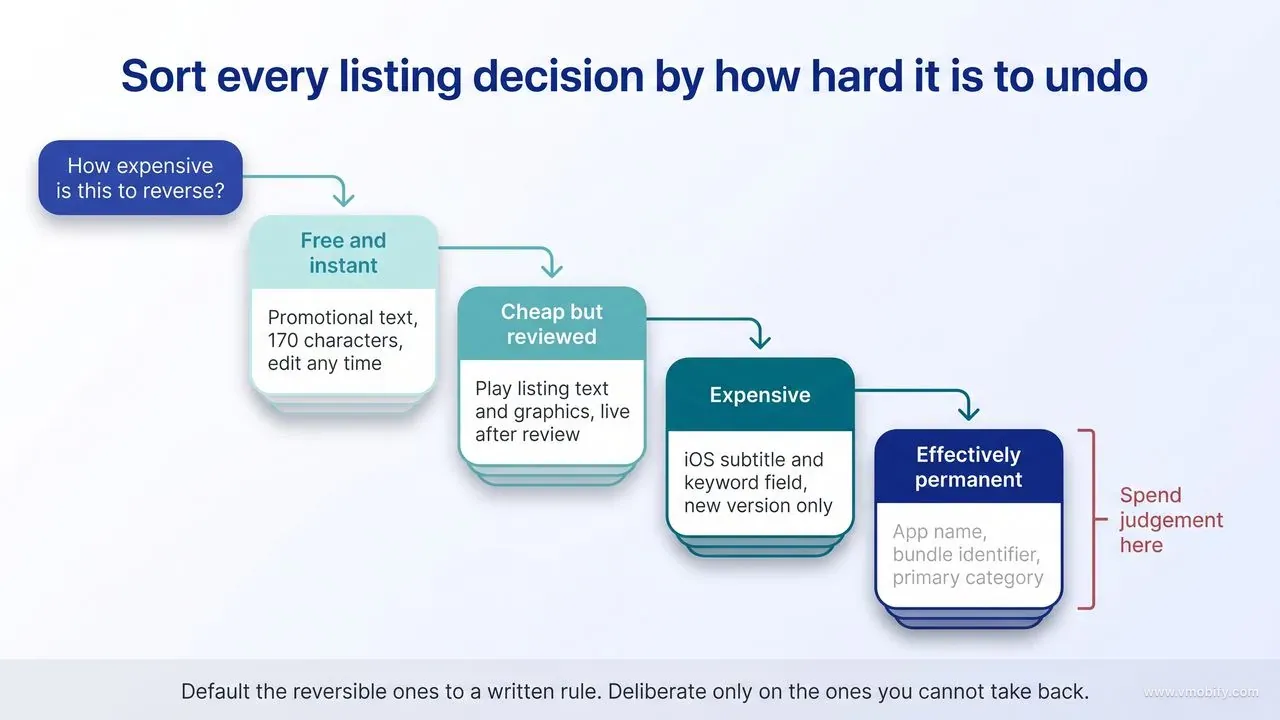
Rank every decision by how expensive it is to reverse, then spend your judgement on the irreversible ones and default the rest to a written rule. Untestable does not mean arbitrary. It means you substitute a decision procedure for an experiment, and the procedure has to be cheap enough that you actually follow it.
Start by sorting your listing into four reversibility bands:
Free and instant
- On iOS, promotional text is up to 170 characters and can be updated at any time without submitting a new version — though Apple notes it does not affect search ranking, so use it for timely messaging, not keywords.
Cheap but reviewed
- Play store listing text and graphics can be edited and submitted; changes go through review before they go live.
- Practically, this makes Play the store where you can afford to be wrong first.
Expensive
- The iOS subtitle and keyword field change only with a new version submission.
- That couples your metadata cadence to your release cadence, which for most teams means monthly at best.
Effectively permanent
- The app name as a brand, the bundle or package identifier, and your category choices.
- Apple states that your primary category and your optional secondary category are both indexed by its search algorithm, and category also determines which charts and browse surfaces you can appear in at all.
- The secondary category is the softer of the two and can be revisited without the same cost, which is a reason to fill it deliberately rather than leave it empty — and a reason to concentrate your deliberation on the primary, which is the one that behaves as permanent in practice.
For the permanent band, use structured judgement rather than taste. Write down, in one sentence each: who this asset is for, what single thing it must communicate, and what you would expect to see in the data if the choice were wrong. Then run a five-second test — show the icon and first screenshot to eight to ten people outside the team for five seconds and ask what the app does. A five-second test needs no install data, costs nothing, and catches the failure mode that matters most at launch, which is illegibility rather than sub-optimality.
For screenshots specifically, know the containers before you design. iOS product pages support up to 10 screenshots and up to 3 app previews of up to 30 seconds each. Google Play accepts up to 8 screenshots per supported device type with a minimum of two across device types, plus a mandatory 1024x500 feature graphic and a 512x512 icon. The temptation is to fill every slot. Resist it. Apple documents that, depending on the orientation of your screenshots, the first one to three images are what appear in App Store search results when no app preview is available — so those frames are carrying a surface a visitor may reach a verdict on before ever opening your product page. Ship three excellent frames and pad with competent ones rather than shipping ten mediocre frames.
Caption copy is now doing double duty on iOS. Appfigures' analysis of the June 2025 App Store algorithm change found that Apple began extracting text from screenshot captions and treating it as part of an app's keyword metadata. Apple has not published a field list confirming this, so do not build your whole keyword strategy on it — but writing captions that use your real target phrases costs nothing and is good conversion practice regardless.
The default rules we apply when there is nothing to test against:
- Caption one states a benefit in the user's words, not a feature in yours. If your first caption contains your feature's internal product name, it is wrong.
- One idea per frame. A screenshot that makes two points makes neither at thumbnail size.
- Legible at thumbnail scale. Zoom your export to 20% and read it. If you cannot, the type is too small — which is the most common defect we find in first-time listings.
- Sequence the frames as an argument: problem, mechanism, proof, differentiator. Random feature order is the default and it underperforms.
- Design in a template with slots, not as ten bespoke images. The reason is in the next section.
Our app store screenshots guide covers the frame-by-frame construction in detail; treat this section as the decision layer that sits above it.
What should you ship on day one versus hold back to test later?
Ship your single best version of everything on day one, and hold back only the variants you have deliberately built to serve as the second arm of a test you cannot run yet. Hedging your day-one listing is the wrong instinct: day one is when you create the control, and a deliberately compromised control makes every subsequent test harder to read.
The reason the day-one listing is a control rather than a draft is different on each store, and the difference is worth getting right, because most guidance flattens it into "you cannot test before launch." Google Play store listing experiments test variants against your current listing; you can run one default graphics experiment or up to five localised experiments at a time, with up to two variants against the control, and experiments stop automatically after six months. The part that matters before launch is the target metric: alongside unique user install clicks and open clicks, Play accepts unique user pre-registration clicks. A pre-registration listing is a live listing, so on Play the pre-launch window is a real testing runway and not only an indexing one.
On iOS the same window is genuinely closed. Apple's pre-orders documentation states that existing apps can use custom product pages and product page optimisation for their pre-order product page — which, read the other way, is Apple telling you that a first-time app cannot. Product page optimisation, which allows up to three treatments with alternate icons, screenshots and app previews running for up to 90 days or until you stop it, therefore begins the day your app is live.
Plan your iOS listing as a control you will not touch for a month, and plan your Play listing as something that can already be earning you an answer.
What that means for planning:
- Plan alternate icons into the binary. Apple notes that product page optimisation tests without alternate app icons can be submitted for review independently of a new app version — which is the tell that icon treatments are tied to the build. If you intend to test icons in month two, the alternates need to be in the app you ship in month one, or you wait for a release.
- Build a second screenshot set, do not ship it. Design your day-one set and one deliberately different alternative — different hook, not different colours. On iOS that alternative waits for launch, because there is no pre-order test to put it in. On Play it does not have to wait: if you open pre-registration, the alternative goes straight into a default graphics experiment measured on pre-registration clicks, and you can arrive at launch day with one result already banked.
- Write a second short description for Play. Eighty characters, framed on a different benefit. Localised experiments on Play can test descriptions, so this is a genuinely runnable test within weeks of launch.
- Hold localisation beyond your top two or three languages. Machine-translated metadata in nine markets on day one produces nine listings you cannot maintain and cannot read the data on. Add markets deliberately once the primary market has a baseline.
Equally, some things should never be held back. Ship full keyword coverage, with the stress on relevant. An unused character in the 100-character field is a wasted asset, but Apple names improper use of keywords as a common reason for App Store rejections and is specific about what triggers it: terms that are not relevant to the app, competing app names, and unauthorised trademarked terms, celebrity names or other protected phrases. There is no partial credit for volume. The target is a full field of terms you could defend to a reviewer, not merely a full field. Ship screenshot sets for every device type you support, because a missing tablet set is a hard conversion loss, not a test. Ship complete, human-written metadata in every language you actually publish. And ship your ratings prompt logic live from day one, because ratings and reviews feed the behavioural side of Apple's ranking inputs and there is no way to backfill the first three weeks.
There is one important exception to "nothing is live before launch," and it is underused. Both stores offer a pre-launch surface with a real, indexed store page. Google Play pre-registration can run for up to 90 days before you must launch to production, allows up to two apps in pre-registration at a time, and sends every pre-registered user a push notification at launch, with eligible devices auto-installing on launch day. One gate to plan around: if your Play Console account is a personal account created after 13 November 2023, pre-registration stays disabled alongside production until you have cleared the closed-test requirement of 12 testers opted in continuously for 14 days — so on that account type your keyword deadline is set by your testing timeline, not by your launch date. On iOS, App Store pre-orders publish a limited version of your product page with a release day 2 to 180 days out for a brand-new app, and Apple states those pre-order pages are discoverable in search results, as well as on the Today, Games and Apps tabs if your app is being actively featured. On release day the app downloads automatically to the devices of everyone who pre-ordered.
The ASO implication is the part teams miss: your metadata is live and indexed before your app is downloadable. That converts pre-launch from a dead period into a real indexing runway, and it means the keyword set has to be finished before pre-registration or pre-order opens — not before launch day. There is a second implication on iOS that justifies the pre-order paperwork on its own: Apple states you can use Apple Ads to promote your app while it is available for pre-order. Because Apple Ads is where keyword popularity scores and Search Match suggestions live, opening pre-orders early is the cheapest way to buy yourself genuine App Store search-demand data before a single organic install exists. Our pre-launch app marketing playbook covers how to feed traffic into that window so the page accumulates signal rather than sitting idle.
How long before you have enough data for real ASO?
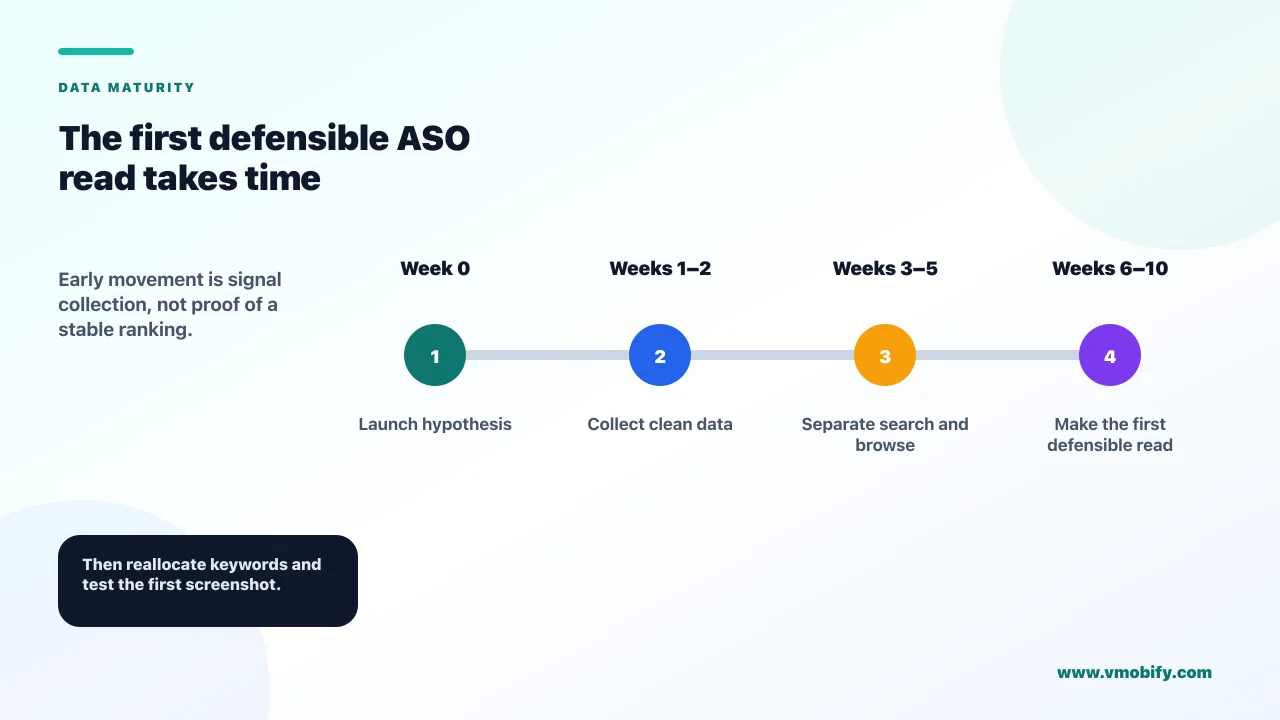
Plan on 6-10 weeks before you have a defensible read of your live listing, not 6-10 days — and understand that the gate is absolute event volume, not elapsed calendar time. The one exception is the Play pre-registration experiment described earlier, which runs on pre-registration clicks and can therefore return a graphics result before you have a single download. A low-traffic app can sit at week twelve with less usable data than a high-traffic app has at day four, and no amount of patience fixes a denominator problem.
The stores tell you where the floors are, if you read the documentation. Apple's App Store Connect Analytics metric definitions state that App Store metrics are available once you have at least five first-time downloads or pre-orders, and the same page carries the conversion-rate definition you will be reading all quarter. Apple applies a comparable floor further into Analytics — the minimum-threshold-of-five rule for campaign metrics is documented on the campaign links page rather than in the metric definitions — but for organic pre-launch work it is the five-download floor that binds. Those are visibility floors, not decision floors. Seeing a conversion rate is not the same as being able to act on it.
The definition itself explains why early numbers swing so violently. Apple computes conversion rate as total downloads and pre-orders divided by unique device impressions. With a few hundred impressions in the denominator, a handful of installs moves the headline rate by whole percentage points, and a single feature placement or a single Reddit thread can double it for a day. Reading a directional story into that noise is how teams convince themselves a good listing is broken.
Google gives you a better planning instrument. When you create a store listing experiment, the creation page estimates the time and the number of acquisitions, opens or pre-registrations the experiment will need to reach a statistically significant result, and it flags when a result is expected within the week. Use that estimator before you launch anything: create a dummy experiment configuration purely to read the estimate. If the console tells you the test needs 40 days, you now know not to interpret the chart on day six — and you know your real constraint is traffic, so the correct response is a traffic plan, not a creative plan.
A realistic staging that matches what we see across the portfolio:
- Weeks 1-2 — indexing. Your app starts appearing for brand terms and the least contested long-tail phrases. The useful question here is binary: are you indexed for the terms you targeted at all? Not: where do you rank?
- Weeks 3-4 — first directional conversion read. Enough impressions accumulate to see whether your store page converts catastrophically badly, acceptably, or well. Treat this as a smoke test with three outcomes, not as a number.
- Weeks 6-10 — first defensible test result on the live listing. If traffic supports it, your first post-launch store listing experiment or product page optimisation test resolves. A Play pre-registration experiment, if you ran one, will already have reported before any of this. This is the first moment ASO becomes an optimisation discipline rather than a decision discipline.
Two rules protect that timeline. First, do not change metadata weekly. On iOS every subtitle or keyword change ships with a version, which resets your read and confounds attribution between the metadata change and the release itself. One deliberate metadata change every three to four weeks is the fastest sustainable cadence in the first quarter, and slower is usually better. Second, do not fix the denominator with paid traffic and then apply the learning to organic. Paid traffic arrives pre-sold by the creative and converts differently from cold search traffic. If you do run paid into the store page — and there are good reasons to — separate it using Play custom store listings and iOS custom product pages so that your organic baseline stays clean.
What are the first three things to change once data arrives?
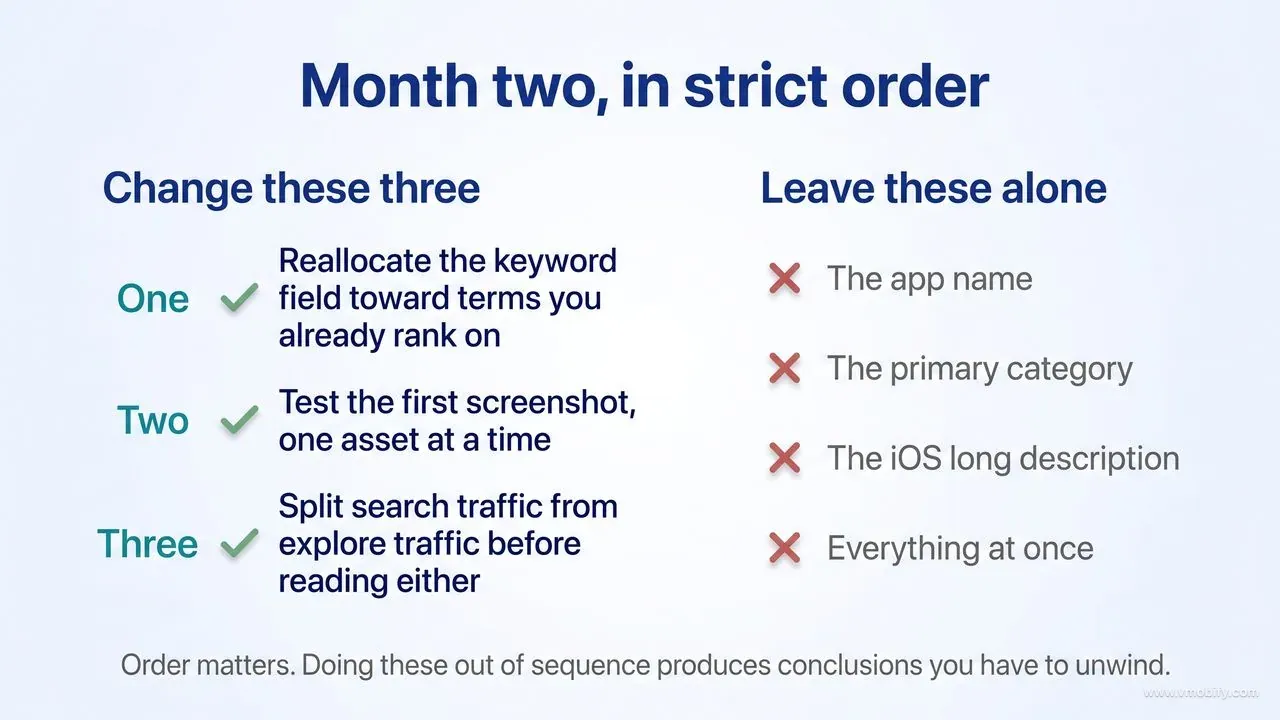
In strict order: reallocate the keyword field toward terms you already rank on, test the first screenshot, and separate organic search traffic from browse traffic before drawing any conclusion about either. Everything else waits, because doing these three in the wrong order produces conclusions you will have to unwind.
- Reallocate keywords toward proven ranking positions. The first real dataset always contains the same surprise — you rank for several terms you never targeted, and you rank nowhere for two or three terms you were confident about. The correct response is unsentimental. The rule that survives contact with data in our portfolio is that characters spent on terms you are not visible for are simply gone: climbing from deep in a result list to slightly less deep changes nothing any user ever sees, whereas moving a term you already rank on from the second screen onto the first changes traffic materially. So drop the head terms you are nowhere on, and reinvest those characters into the terms already sitting just outside comfortable visibility. Visibility on both stores is heavily concentrated at the very top of the result list, which is why promoting one term into that zone beats promoting five terms from invisible to slightly less invisible. On iOS this is a one-version change to a 100-character field, which makes it the cheapest high-value edit available to you.
- Test the first screenshot. Now that a conversion baseline exists, the first asset worth testing is the one seen by every visitor. Run it through a Play default graphics experiment or an Apple product page optimisation treatment. Google's guidance is to test changes to one asset at a time so you can attribute any change in performance, and that discipline matters more when your traffic is small — a multi-variable test on thin traffic resolves as a draw and costs you six weeks. Change the hook, not the palette: a test between two colour treatments of the same message rarely clears the minimum detectable effect you configured.
- Split your traffic sources before interpreting anything. Read the current definitions before you read the chart, because the obvious interpretation of the labels is the wrong one and it sends teams to the wrong fix. Play Console groups store listing acquisition into three traffic sources, and Google defines them narrowly. Google Play search means users who searched for your app's name or a closely associated brand — branded demand, in other words. Google Play explore means users who browsed Play, and it explicitly includes people who searched for a category of apps such as "racing game" and people who tapped a search autocomplete suggestion — so all of your non-brand query traffic lands here, not under search. Ads and referrals covers paid and third-party referrals, with UTM source and campaign available as dimensions underneath it rather than as separate top-level channels.
Once the definitions are straight, the diagnosis inverts from the version most ASO advice repeats. Weak conversion on search is a branded-traffic failure: those people came looking for you by name and the page did not close them, which points at the icon, the first screenshot, or an expectation set off-store by an ad or a press mention — not at your keyword set. Weak conversion on explore is where a keyword-relevance problem actually surfaces, because that bucket holds the category queries and the autocomplete taps; if it converts badly you are appearing for non-brand queries you do not satisfy, and the fix is metadata. Weak conversion on both is creative or positioning. And if you want the direct answer rather than the inference, the Conversion analysis page carries a search term dimension, which tells you which queries brought people in instead of making you deduce it from a channel label. Apple's App Analytics offers an equivalent source-type breakdown, separating App Store search from App Store browse, referrers and web.
What should explicitly not be in your first three changes:
- The app name. Changing it discards whatever brand recognition and ranking association you have accumulated, and it cannot be cleanly A/B tested on either store. If the name is wrong, that is a strategic decision made deliberately, not a month-two optimisation.
- The primary category. A category change resets your chart position history and your browse-surface presence, and Apple indexes both the primary and the optional secondary category, so it perturbs search as well. If a category rethink is genuinely tempting in month two, test it on the secondary category first, where the blast radius is far smaller.
- The iOS long description. Apple does not name it among the text-relevance matches behind search results, so rewriting it is a conversion exercise for the minority of visitors who expand it — worth doing eventually, worth doing third or fourth, not first.
- Everything at once. The most common failure we see at this stage is a team shipping a new icon, new screenshots, a rewritten subtitle and a new keyword set in a single release, then having no way to attribute the resulting swing.
Once these three are done and read, you have crossed out of the data-free stage entirely, and the standard ASO playbook in our complete app store optimisation guide becomes the right reference.
Which pre-launch ASO work has the longest payback?
The name, the primary category and a reusable screenshot system — in that order — because each one either compounds or constrains every ASO decision you make for the next two years. If you have limited time before launch, spend it here and default the rest.
The name. It occupies your highest-value 30 characters on both stores, Apple names the title as a text-relevance input alongside subtitle, keywords and category, and it is the one asset you can never cleanly test — changing it resets brand recognition and any ranking association it has built. A name that carries one genuine category term is worth a substantial and permanent head start over a pure invented word, at the cost of some brandability. That trade-off deserves a proper decision, which is why we wrote a separate guide on how to name your app.
The primary category. It determines which charts you can rank in, which browse surfaces show you, and which competitive set the store places you against — and Apple indexes it, along with the optional secondary category, in search. Choosing a large category means more traffic and a ceiling you will never touch; choosing a precise smaller one means less traffic and a realistic path to visible chart placement. For a new app with no behavioural signals, the smaller category is usually correct, because chart placement is itself a discovery surface that compounds.
A screenshot system, not screenshots. This is the recommendation teams underrate most consistently. Build your day-one frames as a template with defined slots — caption slot, device slot, background system, type scale — so that producing a new variant takes an hour rather than a week. The cost of testing is what determines how much testing you do, and a team that commissioned ten bespoke images will quietly stop testing after the first round. In our portfolio, the apps that iterate their store creative most often are almost always the ones that built a template first, not the ones with the biggest design budget.
Two further items with long payback and low pre-launch cost:
- Localisation architecture. Decide before you write anything which storefronts get genuinely native metadata rather than translated metadata, and which get nothing at all. Retrofitting is expensive because each market needs its own keyword research, and Play localised experiments cover up to five languages at a time, so an unfocused set of nine half-maintained markets is worse than three real ones.
- Audience-separation plumbing. Play supports up to 50 custom store listings with a rule that each country can be targeted by only one listing, and Apple supports up to 70 additional product page versions, each with its own screenshots, app previews, promotional text and assigned keywords. Setting up a naming convention and one or two listings on day one costs almost nothing and is what makes it possible, six months later, to tell paid-traffic conversion apart from search-traffic conversion.
The through-line across all five is the same asymmetry the first section opened with. Reversible decisions can be made quickly and badly with little consequence, because data will correct them within a quarter. Irreversible decisions made quickly and badly are paid for indefinitely, and no amount of post-launch optimisation recovers a name that does not fit the category or a category that does not fit the app. If you want a second pair of eyes on those decisions before you publish, that is exactly the stage where our ASO team does its most useful work — the review costs a week and the alternative costs a year.
Frequently Asked Questions
Can you do ASO before your app is published?+
Yes, and on Google Play you can do more than the decision half. On both stores you can research keywords from store autocomplete and competitor metadata, write and structure your listing, and design screenshots. On Play you can also run a store listing experiment during pre-registration, because unique user pre-registration clicks is an accepted target metric. On iOS you cannot test, because Apple limits custom product pages and product page optimisation on a pre-order page to existing apps — but Apple Ads runs during pre-order, so its keyword tooling opens up the moment your pre-order page goes live.
How do I find keywords when I have no ranking data at all?+
Use five sources in combination: store autocomplete typed by hand on a device set to your target country, the names and subtitles of the top 20 apps for each candidate term, web search volume as a directional proxy only, the words your beta testers use to describe the app, and recurring phrases in competitors negative reviews.
Should a new app target head keywords or long-tail keywords?+
Both, in different fields. Head terms belong in the subtitle as the position you are building toward, even though you will not rank on them for months. Long-tail three-to-five-word phrases belong in the keyword field, because those are the terms a new app with no download history can realistically rank for within weeks.
How long does it take before ASO data is usable for a new app?+
Apple surfaces App Store metrics once you have at least five first-time downloads or pre-orders, but that is a visibility floor rather than a decision floor. Plan on weeks 1-2 for indexing, weeks 3-4 for a directional conversion read, and weeks 6-10 for a first defensible experiment result on the live listing. A Play pre-registration experiment is the exception — it resolves on pre-registration clicks before launch.
Can I A/B test my store listing before launch?+
On Google Play, yes. Store listing experiments accept unique user pre-registration clicks as a target metric, so a pre-registration listing can be tested before the app is downloadable. On iOS, no: Apple restricts custom product pages and product page optimisation on a pre-order product page to apps that already exist on the store, so your first iOS test starts after launch. Build the second variant either way — on Play it can run immediately, on iOS it waits.
Does the pre-order or pre-registration page get indexed?+
Apple states that pre-order pages are discoverable in App Store search results, and on the Today, Games and Apps tabs if your app is being actively featured. Google Play pre-registration listings are live store pages as well, though pre-registration is disabled for personal accounts created after 13 November 2023 until the 12-testers-for-14-days closed test is cleared. Your metadata therefore needs to be finished before that page opens, not before launch day.
What is the single biggest pre-launch ASO mistake?+
Making an irreversible decision casually. The app name, the primary category and the bundle identifier cannot be cleanly changed or tested later, so they deserve far more deliberation than the keyword field, which you can and will rewrite within a quarter.
Sources
- Apple — App Store Search — Text-relevance inputs plus user behaviour and LLM-generated app tags; primary and optional secondary category are both indexed; improper keyword use is a common rejection reason
- Apple — Creating Your Product Page — Field limits: 30-char name, 30-char subtitle, 100-char keyword field, 170-char promotional text, 10 screenshots, 3 app previews; first one to three images appear in search results
- Google Play — Create and Set Up Your App — 30-character title, 80-character short description, 4,000-character full description
- Google Play — Understand and Grow Your User Base — Store listing traffic sources: Google Play search is app-name and brand queries; Google Play explore covers browse, category queries and autocomplete; ads and referrals
- Google Play — Run A/B Tests on Your Store Listing — Target metrics include unique user pre-registration clicks; one default graphics or five localised experiments at a time, up to two variants, auto-stop after six months, significance estimator
- Google Play — Pre-Registration — Up to 90 days, two apps at a time, launch push notification and auto-install; disabled until testing requirements are met for personal accounts created after 13 Nov 2023
- Apple — App Store Connect Analytics Metric Definitions — App Store metrics available after at least five first-time downloads or pre-orders; conversion rate definition
- Apple — App Store Pre-Orders — Release day 2-180 days out for a new app; discoverable in search results and on featured tabs when actively featured; custom product pages and product page optimisation limited to existing apps; Apple Ads usable during pre-order
About the author
Amol Pomane — Founder, Vmobify
Amol leads Vmobify, a mobile app growth agency that has driven 30M+ downloads and ranked 54K+ keywords across 300+ apps since 2013. He writes about ASO, paid user acquisition, retention, and the operational reality of scaling mobile apps in India and global markets.
Prepare app icon exports
Turn an approved source into selected Apple, Play, Android and PWA sizes.
Open free tool