How to Name Your App: Keywords, Trademarks and Store Limits
Your app name is the shortest, most permanent and most contested piece of metadata you will ever write. Thirty characters on each store, a trademark exposure you cannot undo cheaply, and no way to A/B test it once you are live. Here is how to choose one properly.
On this page
- Why does your app name matter more than any other metadata field?
- How many characters do you actually get on each store?
- How do you balance brand against keyword in the title?
- What belongs in the subtitle versus the title?
- How do you check a name for trademark conflict before you commit?
- What happens to your rankings when you rename a live app?
- Which naming patterns get rejected or penalised?
- How do you test a name before you commit to it?
- Frequently Asked Questions
Why does your app name matter more than any other metadata field?
Your app name is the only piece of metadata that is indexed for search, printed on every store surface a user sees, and effectively permanent in the minds of the people who already have you installed — no other field does all three jobs at once. That combination, not a published weighting number, is what makes it the field worth arguing about for a week.
Start with what the platforms actually document, because this is a topic where confident invented numbers are everywhere. Apple states that App Store search results are based on text relevance — described as matches for your app's title, subtitle, keywords and primary category — as well as user behaviour, including downloads, ratings and reviews. That list appears in Apple's own App Store search documentation. Four text fields, and the name is one of them.
Google documents less than Apple does, but it is not silent either, and the difference matters if you are planning a Play listing. Play Console Help's App discovery and ranking article states that once Google establishes a user's intent, metadata — the article names title, description and category as its examples — and other signals are used to determine which apps best address the query. Play's own guidance on getting discovered in search then works through the title, description and promo text field by field. So Play's ranking metadata is named; what is missing on both stores is the weighting.
That is the distinction to hold onto, because almost everything written about this subject blurs it. Apple lists four text fields and never says how they are weighted against each other. Google names title, description and category and never says how they are weighted against each other. So when you read that the title carries "three times the weight" of the keywords field, or that Play weights the short description at some specific percentage, you are reading a guess dressed as a fact. We have deliberately not repeated any of those figures here, and the argument below does not need them.
The case for the name being the most consequential field is structural rather than numerical, and it holds up on inspection:
- It is indexed. Apple names the title as a text-relevance input. Whatever the weighting, words that are not in any indexed field cannot rank at all.
- It is displayed everywhere. Apple's App Store Connect reference describes the name as the localised name of your app as it appears on product pages and when users install it. It shows up in search results, category lists, charts, and the update queue. Your description does not.
- It is the only field a user repeats. People tell friends the name. They search the name from memory. They type it, misspell it, and either find you or do not.
- It is the hardest to change. Subtitles and descriptions get rewritten quarterly across the 300+ apps we have managed since 2013. Names get changed roughly once, and it hurts.
There is a second permanence sitting underneath the name that first-time founders routinely miss. Apple's App Store Connect documentation states plainly that the bundle ID cannot be changed after you upload a build. Google Play's guidance is blunter still: package names for app files are unique and permanent, and they cannot be deleted or re-used. So the identifier you type into Xcode or your Gradle config on day one — usually derived from whatever you were calling the project that week — outlives every marketing decision that follows it. Pick the working name as carefully as the public one, or at least pick a neutral reverse-domain identifier that will not embarrass you later.
None of this means the name alone will rank you. It sits inside a much larger system of conversion rate, retention signals and category context that we break down in our complete ASO guide. But it is the input with the longest half-life, and the one where a bad decision compounds quietly for years.
How many characters do you actually get on each store?
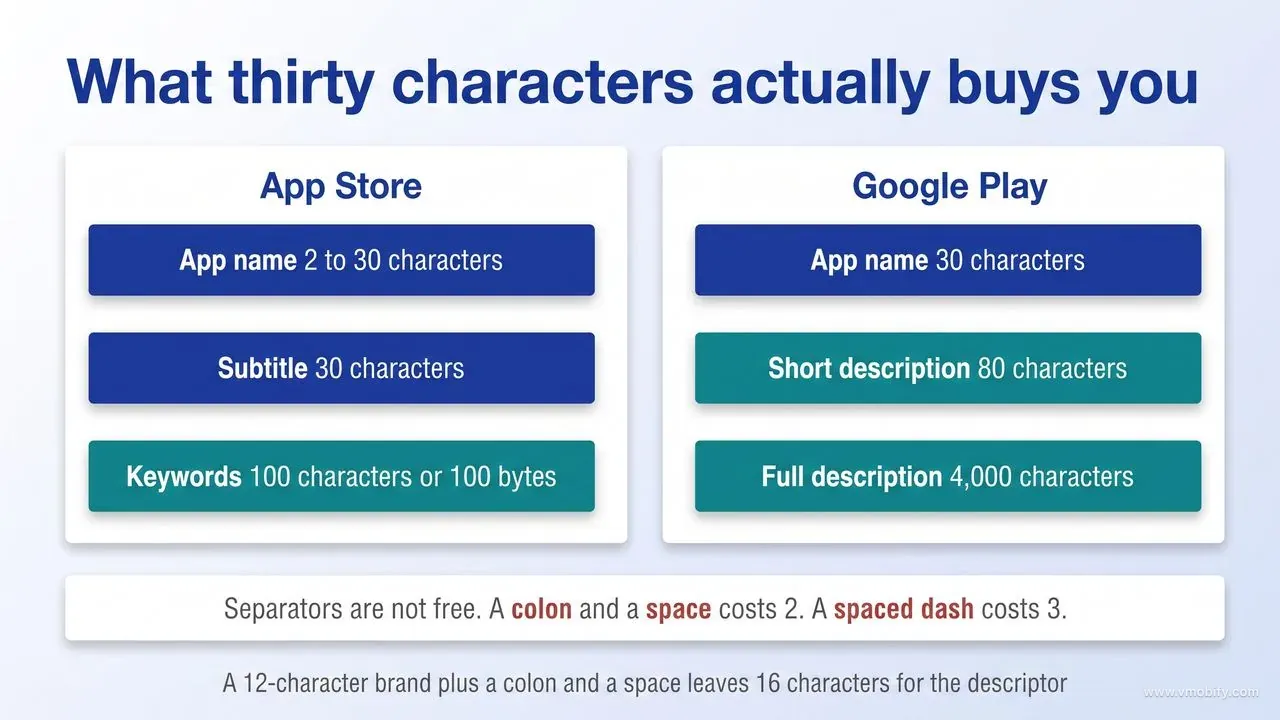
Thirty characters for the app name on both the App Store and Google Play — plus a 30-character subtitle and a keywords field Apple documents as 100 characters in one place and 100 bytes in another, and an 80-character short description with a 4,000-character full description on Android. Those are the current documented limits, and several widely-shared guides still quote older, larger numbers.
The App Store figures, taken from Apple's own documentation:
- App name: 2 to 30 characters. Apple's App Store Connect reference states the name must be at least two characters and no more than 30. The same 30-character cap is repeated inside App Review Guideline 2.3.7, which is unusual — Apple rarely restates a field limit inside the review guidelines, and it tells you how often this one is abused.
- Subtitle: 30 characters. Described by Apple as a summary that appears under your app's name on the product page, and updatable when you submit a new version.
- Keywords: 100 characters — or 100 bytes, depending on which Apple document you read. Apple's guidance on creating your product page says keywords are limited to 100 characters in total, while the App Store Connect field reference for the same box says you can provide up to 100 bytes of content. The formatting rule is consistent across both: terms are separated by commas with no spaces, and you may use spaces inside a multi-word phrase, so Property,House,Real Estate is a valid 26-character entry.
That characters-versus-bytes discrepancy is harmless in English and expensive everywhere else. A Latin character is one byte in UTF-8; a Japanese, Chinese, Korean, Hindi or Arabic character is typically two to four. If the field is genuinely byte-limited, a keyword set that measures 100 characters in your text editor can be rejected or silently truncated in a localisation that fits comfortably on paper. The only reliable way to settle it is to paste each localised keyword set into App Store Connect and let the field tell you where it stops, which takes a minute per locale and removes an entire category of launch-day confusion. Do not count non-Latin metadata in a spreadsheet and assume it will fit.
The Google Play figures, from Play Console Help:
- App name: 30 characters. Google reduced the title limit as part of a 2021 store-listing policy update, which also prohibited keywords implying store performance or promotion in the icon, title and developer name.
- Short description: 80 characters. This is the line users see above the fold before expanding your listing.
- Full description: 4,000 characters.
One detail in Play's documentation matters enormously if you plan to localise and almost nobody accounts for it: character limits apply to both full-width and half-width characters, and the numbers above are the maximum regardless of which you use. A 30-character Japanese or Chinese title is 30 glyphs, not 30 bytes — which in practice gives a CJK title considerably more meaning per character than an English one. Teams building for those markets should write the localised title natively rather than translating the English one and hoping it fits. Teams that treat the localised title as an original piece of copy consistently get more out of those 30 characters than teams that translate.
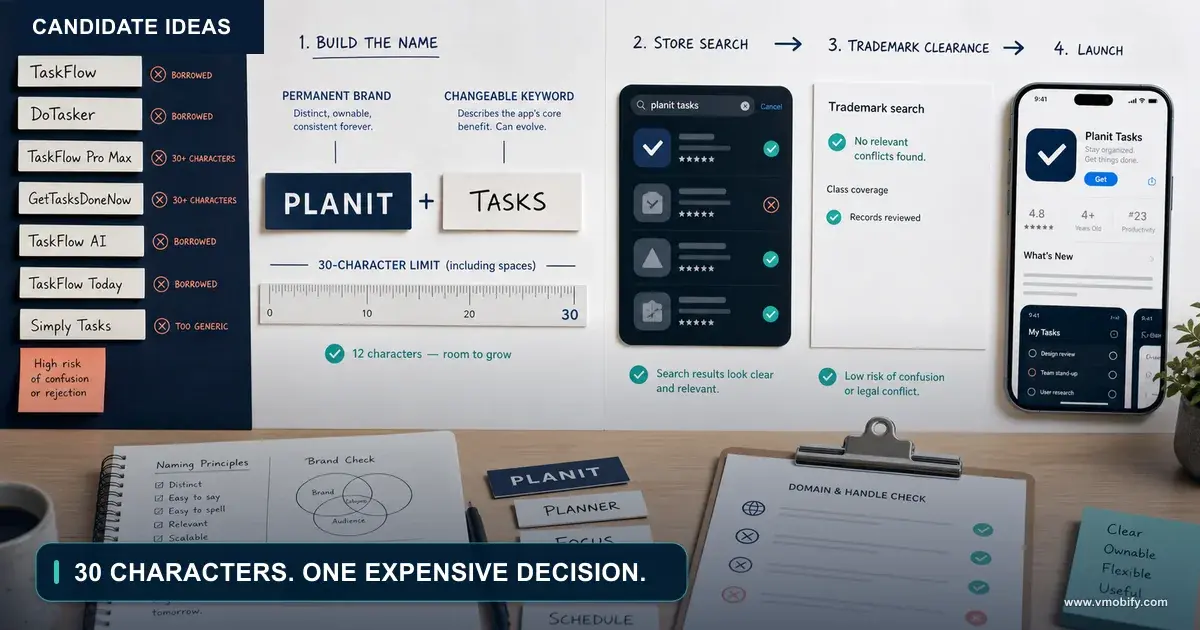
Now do the arithmetic on 30 characters, because it is tighter than it reads. Separators are not free. A brand of 12 characters plus a colon and a space costs 14, leaving 16 for whatever descriptor you were hoping to add — roughly two useful words. A dash surrounded by spaces costs three characters on its own. In our portfolio, the single most common naming mistake at launch is not a bad brand; it is a good brand followed by a descriptor that was truncated into meaninglessness because nobody counted.
Two further practical constraints that the character counts do not tell you. First, the name that appears on a user's home screen is set in the app binary, not in the store listing, so a long store name and a short home-screen name are separate decisions — plan both. Second, list views across both stores truncate long names with an ellipsis at widths that vary by device and surface, so the front of your title is doing far more work than the back of it. Whatever must be read, put it first.
If you are naming an app that has not launched yet, read this alongside our guide to ASO for brand-new apps — the naming decision and the first keyword set are the same decision made twice, and doing them in the wrong order wastes both.
How do you balance brand against keyword in the title?
Give characters to the keyword only while nobody is searching for your brand; the moment branded search volume exists in meaningful quantity, the brand takes the front of the title and the keyword moves to the subtitle. This is a sequencing decision, not a permanent style choice, and the mistake is treating it as the latter.
The three-stage progression we use when advising founders:
- Stage one — nobody knows you. Pre-launch and the first few months after. Nobody types your brand because nobody has heard it. Every character spent on brand-only text is a character that cannot be found. Structure: brand, separator, then the single highest-intent descriptor you can defend.
- Stage two — the brand is starting to earn queries. You can see branded searches appearing in App Store Connect or Play Console. Keep the descriptor, but shorten it to the tightest possible phrase so the brand reads cleanly in list views.
- Stage three — the brand is the demand. People search you by name. At this point the descriptor is costing you brand clarity and buying very little incremental discovery. Drop it. This is why the largest apps have one-word titles: they earned the right to, and they did not start there.
Choosing the descriptor is where most of the value sits. The rule we apply is simple: the descriptor must be the phrase a stranger would type, not the phrase your product team uses internally. "Expense Manager" is a query. "Spend Intelligence Platform" is a positioning statement that nobody has ever typed into a search box. Check real volume with one of the tools in our roundup of free ASO tools before you commit 16 characters to a phrase with no demand behind it.
A few mechanical points that decide whether the descriptor earns its characters:
- Do not repeat words across fields. Apple's App Store Connect reference states that your app is searchable by app name and company name, so you should not duplicate those values in the keyword list. Apple's product page guidance separately tells you to avoid duplicate words, plurals of words you have already included in singular form, and the names of categories or the word "app". Apple says nothing either way about overlap between the title and the subtitle — extending the same discipline there is our practice rather than Apple policy, and it has never cost us anything to apply.
- Prefer the head term you can realistically place over the head term you cannot. Ranking twelfth for a huge query delivers close to nothing; ranking third for a smaller, high-intent one delivers installs. Apple frames this explicitly as a trade-off between ranking well for less common terms and ranking lower for popular ones.
- Choose the separator deliberately. Colon, dash and hyphen all read differently and all cost characters. A colon plus a space is two characters; a spaced dash is three. Over a 30-character budget that is a whole extra word.
- Do not chain descriptors. "Brand: Budget, Expenses, Bills, Money" is the pattern Guideline 2.3.7 exists to stop, and Play's metadata policy independently prohibits repetitive or unrelated keywords in listing text.
One asymmetry worth planning around: Google tells you which metadata feeds Play search — title, description and category — but nothing about how much any of it counts, and it has no hidden keywords box at all, so every ranking term has to sit inside text a human will read. The safe assumption for Play is therefore that a natural, readable title and description serve you at least as well as a stuffed one and carry none of the policy risk. Play's own best-practice guidance says as much: make sure the title accurately describes the app's functionality, and write naturally rather than producing a block of keywords. On iOS, where a dedicated keywords field is indexed but never displayed, the calculus is more precise — which is one of several reasons the two stores deserve separate metadata rather than a copy-paste. We cover the ranking-system differences in more depth in our breakdown of the App Store algorithm in 2026.
What belongs in the subtitle versus the title?
The title carries your brand plus your single most valuable keyword; the subtitle carries the second and third, written as a sentence a human would read rather than a list a crawler would parse. And critically, no word should ever appear in both.
The clean way to think about the App Store is as one shared budget of roughly 160 characters — 30 for the name, 30 for the subtitle, 100 for keywords — rather than three independent fields. Two caveats before you start counting, because both are places where confident writing has outrun the documentation.
The first is the measurement. As set out above, Apple's product page guidance calls the keywords field 100 characters and App Store Connect's field reference calls it 100 bytes, so "160" is an English-language approximation rather than a universal constant. In a CJK or Devanagari localisation the real ceiling may be considerably lower, and the place to discover that is App Store Connect, not a spreadsheet.
The second is whose rule the no-duplication principle actually is. Apple's documented position is narrower than it is usually reported: do not duplicate your app name or company name in the keyword list, and within that list avoid duplicate words, plurals of words already included in singular form, category names and the word "app". Apple does not tell you to keep the subtitle clear of words used in the title. Treating all three fields as one budget is our own practice, and we apply it because a repeated word has never yet earned back the characters it costs. Across the listing audits we run, that single pass typically recovers 20 to 30 characters that had been spent saying the same thing twice — before anyone has written a word of new copy.
What the subtitle should do, in order of priority:
- Answer the question the title raised. If the title says what you are, the subtitle says what happens when someone uses it. Concrete outcome beats abstract category.
- Absorb the keywords the title could not fit. The second and third terms you want to rank for belong here, in a natural phrase rather than a comma-separated string.
- Differentiate against whatever ranks beside you. Your subtitle is read in a list next to four competitors. If it could sit under any of their icons without anyone noticing, rewrite it.
- Stay within policy. Guideline 2.3.7 states that subtitles must follow the standard metadata rules and should not include inappropriate content, reference other apps, or make unverifiable product claims. "Best budgeting app" is an unverifiable product claim.
Google Play has no subtitle field. The nearest equivalent is the 80-character short description, and it behaves differently enough that treating it as a translated subtitle is a mistake. It appears above the fold, it is what a user reads before deciding whether to expand the listing, and at 80 characters it has room for a complete sentence rather than a compressed phrase. Write it as the one line you would say if someone asked what the app does — then check it against Play's metadata policy, which prohibits unattributed or anonymous user testimonials, references to store rankings such as "#1" or "App of the Year", and promotional claims such as a discount or a limited-time offer.
A pattern we see work consistently across the ASO programmes we run: draft the subtitle and short description before the final title. Writing the supporting line first tells you which words genuinely have to be in the title and which ones you were only including out of anxiety. More than once that exercise has freed up eight or nine characters, which at this scale is the difference between a descriptor that reads and one that truncates.
One more field-level distinction worth holding onto. Apple's subtitle is updatable when you submit a new version, which makes it a legitimate, repeatable experiment surface — you change it, you ship, you read the result over the following release cycle. Play's short description can be edited as part of your store listing. Either way, the supporting line is the part of your naming system that is allowed to move. That is exactly why the durable, non-negotiable part of your identity belongs in the title and the testable part belongs underneath it. If you want a second pair of eyes on how that split should look for your category, our ASO team does this as a first-week exercise on every engagement.
How do you check a name for trademark conflict before you commit?
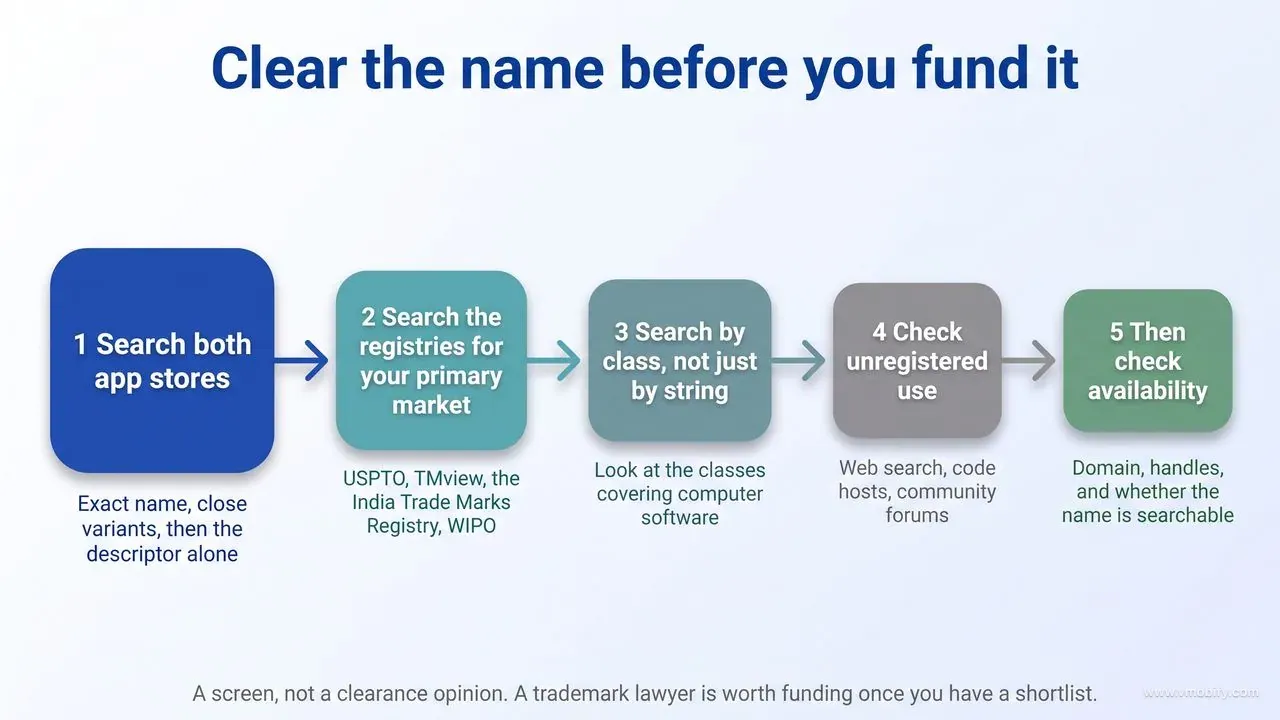
Search both app stores, then the trademark registries covering every market you intend to distribute in, before you buy a domain or commission a logo — because passing store review is not the same as clearing a rights holder, and the two stores will act on a valid complaint long after they approved your listing. The search is cheap. The rename is not.
The practical sequence, in the order that finds problems fastest:
- Search both stores first. Exact name, then close variants, then the descriptor phrase on its own. An identical or near-identical app already live is the cheapest conflict you will ever discover, and it takes four minutes.
- Search the registries for your primary market. In the United States that is the USPTO trademark search system. In Europe, the TMview database run by the EU Intellectual Property Office and its partner offices covers EU marks alongside a long list of national offices in one query. In India, the Trade Marks Registry runs a public search facility for registered and pending marks. WIPO's Global Brand Database is a reasonable multi-jurisdiction sweep when you are not sure where to start.
- Search by class, not just by string. Marks are registered against specific classes of goods and services. A registered mark in an unrelated class does not automatically block you, and a clean search in the wrong class tells you nothing. Look at the classes that cover computer software and software services.
- Check unregistered use. Plenty of enforceable rights exist without a registration certificate. A plain web search, a GitHub search and a check of the relevant app-adjacent communities catch names that are in active commercial use but never filed.
- Then check availability. Domain, the handles on the two or three platforms you will actually use, and whether the name is searchable at all. A name that is a common English word is a permanent, compounding tax on every piece of marketing you will ever run.
Be clear about what this process is and is not. It is a screen designed to eliminate obviously doomed candidates before you spend money on them. It is not legal advice, and it does not replace a clearance opinion from a trademark lawyer, which is a genuinely worthwhile spend once you have a shortlist you are prepared to fund.
The second half of the trademark question is the one that gets asked more often and answered badly: can you put a competitor's brand in your keyword field? Both stores say no, in writing. Apple's Guideline 2.3.7 instructs developers not to pack metadata with trademarked terms, popular app names, pricing information, or other irrelevant phrases just to game the system, and adds that Apple may modify inappropriate keywords at any time or take other steps to prevent abuse. Guideline 4.1 is more direct still: you cannot use another developer's icon, brand or product name in your app's icon or name without approval from that developer. On Play the same ground is covered by two policies rather than one, and it is worth knowing which is which. The impersonation policy prohibits app titles, icons and developer names that falsely suggest a relationship with another company, app or entity, and its intellectual property policy prohibits infringing someone else's trademark or copyright. Play's metadata policy — the one usually cited for this — actually says something narrower: do not use a celebrity's name or a brand's logo without permission. If you are checking a competitor-name keyword against Play policy, impersonation and intellectual property are the two documents to read.
We are asked about this often enough that it deserves a plain answer. Across the 300+ apps we have managed since 2013 we have never seen a competitor-brand keyword produce a return that survives the risk. Apple can strip the keywords silently, which means you may be paying the risk without receiving the traffic. The traffic that does arrive is people looking for a different product, so it converts and retains poorly. And the downside is not a rejection you resubmit around — it is a rights holder complaint against a live, revenue-generating listing.
One additional trap specific to India and other multi-script markets: run the name past native speakers in every language you will localise into before you commit. A name that is neutral in English and unfortunate in Hindi, Portuguese or Turkish is discovered by your users, publicly, at the worst possible moment.
What happens to your rankings when you rename a live app?
Renaming is mechanically straightforward and strategically expensive: the stores will accept the change, your installs, reviews and identifiers all survive it, but every ranking association built on the words you removed leaves with them. Nothing breaks. Something quietly stops working.
Start with the mechanics, because they are more constrained than people expect on iOS. Apple's App Store Connect documentation states that you can edit the name until you submit the app to App Review, and that afterwards you change it when you create a new version, or when the status of the app version permits editing the property. In practice that means an iOS rename ships attached to a binary release — you cannot quietly swap the title on a Tuesday afternoon. On Google Play the title is part of the store listing rather than the release, so the change is faster to make, but it is still a change that goes live to every user who visits your page.
What does not change when you rename:
- Your identifiers. Apple's documentation states the bundle ID cannot be changed after you upload a build, and Google's states that package names are unique and permanent. Your app is, at the system level, the same app.
- Existing installs. Users update in place. They do not reinstall, and they do not lose data.
- Ratings and reviews. They carry across. This has a side effect people forget: your review history is now full of users praising a product by a name that no longer exists.
- Your store links — though not in the same way on both stores. A Play listing URL is keyed to the package name, so it is literally unchanged by a rename. An App Store product URL carries a readable slug derived from your app name followed by the numeric app ID, and the slug does change when you rename; the numeric ID is permanent and old links redirect to the new address. The practical outcome is the same — ads, press coverage and backlinks keep working — but if you have hard-coded App Store URLs anywhere, update them to the numeric-ID form rather than assuming the slug is stable.
What does change is the part that matters. If your title contained "Invoice" and the new title does not, you have removed the strongest indexed signal you had for that term. Where the word goes matters: moving it from title to keyword field on iOS keeps it indexed but changes its context; dropping it entirely removes it. Any of the ranking you built on that term is now being defended by weaker fields, and you should expect the associated positions to soften over the following release cycles rather than instantly.
The renames we have run in our portfolio follow a consistent playbook:
- Change one thing. Do not rename and redesign the icon in the same release. If the numbers move you will not know which change moved them, and the icon is the variable you can actually test independently.
- Bridge the transition inside the title if the characters allow. A short "formerly X" carried for a release or two helps existing users recognise you in their update queue — but it has to fit inside 30 characters alongside the new name, which frequently it does not.
- Announce it everywhere the old name lives. In-app message, the release notes, your email list, your support docs and every ad account. The rename is not finished when the listing updates; it is finished when your paid creative stops showing a name that no longer matches the store.
- Baseline before you ship. Record your positions for the terms in the outgoing title, your branded impression volume and your listing conversion rate. Without a baseline the post-rename conversation becomes an argument about vibes.
- Give it a full release cycle before judging. Store indexing, user habit and word of mouth all move on different clocks, and a two-week read on a rename is not a read at all.
The honest summary: rename when the current name is actively costing you — it is unsearchable, it misrepresents a product that has moved, or it carries a legal problem. Do not rename because a new name would be slightly nicer. The cost is real, it is paid immediately, and the benefit accrues slowly if at all.
Which naming patterns get rejected or penalised?
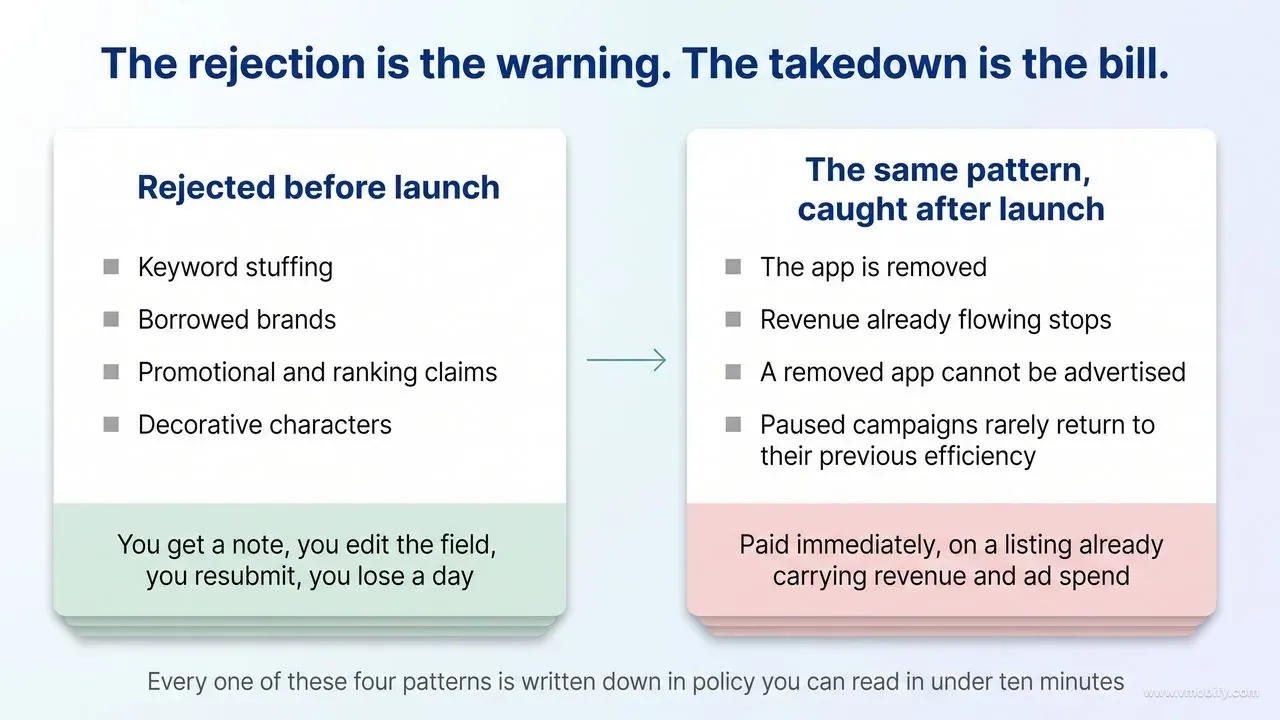
Four patterns account for nearly every naming rejection we see: keyword stuffing, borrowed brands, promotional or ranking claims, and decorative characters — and all four are written down explicitly in policies you can read in under ten minutes. Nobody is guessing at the rules here; they are simply not being read.
Keyword stuffing. Guideline 2.3.7 asks you to choose a unique app name, assign keywords that accurately describe your app, and not pack your metadata with trademarked terms, popular app names, pricing information or other irrelevant phrases to game the system. Google's Play metadata policy independently prohibits misleading, non-descriptive, irrelevant or excessive metadata, and specifically calls out repetitive or unrelated keywords. The failure mode is recognisable at a glance: a brand followed by four comma-separated nouns.
Borrowed brands. Covered above, and worth restating because it is the pattern with the worst downside. Apple's Guideline 4.1 prohibits using another developer's icon, brand or product name in your icon or name without approval, and Guideline 5.2.5 separately prohibits apps that appear confusingly similar to an existing Apple product, interface or app. Play's impersonation policy prohibits titles, icons and developer names that falsely suggest official status or an unauthorised relationship with an established company.
Promotional and ranking claims. Guideline 2.3.7 states that metadata such as app names, subtitles, screenshots and previews should not include prices, terms or descriptions that are not specific to the metadata type. Play's metadata policy prohibits store-ranking references such as "#1" or "App of the Year" and promotional claims such as a percentage discount or a limited-time free offer. Google's 2021 store-listing update also prohibited keywords implying store performance or promotion in the icon, title and developer name. "Free" and "Best" in a title are the two most common versions of this mistake.
Decorative and misleading characters. Play's metadata policy tells you not to use emojis, emoticons or repeated special characters in the app title, icon or developer name, and to avoid ALL CAPS unless it is part of your brand name. Misleading symbols in icons — a fake notification badge being the classic — are prohibited outright. Apple's keyword guidance similarly advises avoiding special characters such as # or @ unless they are part of your brand identity.
Two rules that catch people who were not being cynical at all:
- "For Kids" and "For Children" are reserved. Guideline 2.3.8 states that use of those terms in app metadata is reserved on the App Store for the Kids Category. An education app outside that category cannot use them, however accurate they are.
- Your name and icons should be consistent. The same guideline asks you to keep your metadata — including app name and the full set of icons — similar enough to avoid creating confusion. A rebrand that updates one and not the other trips this.
The consequence structure is what should actually drive your behaviour here, and it is asymmetric. A rejection before launch is the cheap outcome: you get a note, you edit the field, you resubmit, you lose a day. The expensive outcome is an enforcement action against a live listing that is already carrying revenue and paid acquisition spend — a removed app cannot be advertised, and the campaigns you paused rarely return to their previous efficiency. The rejection is the warning; the takedown is the bill. If you want a policy read on a listing before you submit it, our team does this as part of every launch review and you can get in touch for one.
How do you test a name before you commit to it?
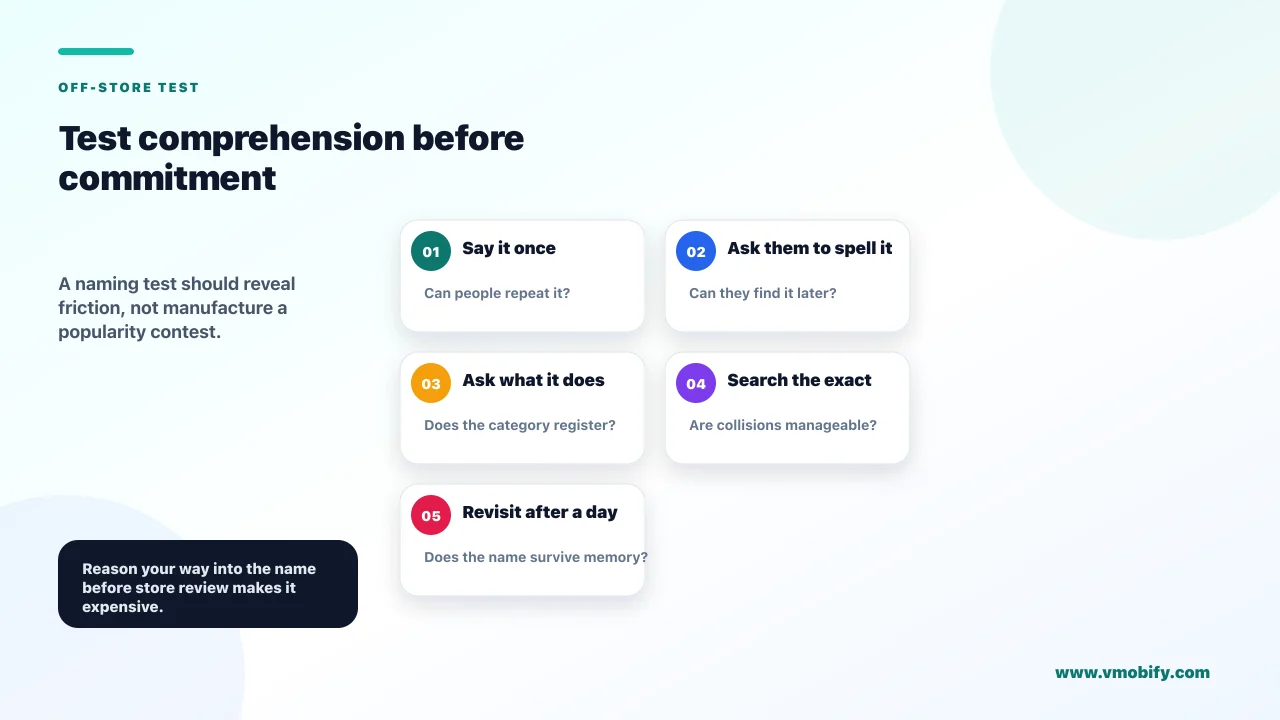
Neither store lets you A/B test the app name, so every test has to happen off-store — which makes naming one of the very few ASO decisions you have to reason your way into rather than measure your way into. Knowing that up front changes how much time you should spend before you commit.
The platform position is unambiguous. Apple's Product Page Optimization lets you test up to three treatments containing alternate app icons, screenshots and app preview videos, with a traffic percentage you choose. The name and subtitle are not on that list. Google Play's store listing experiments, documented in Play Console Help's guide to running A/B tests on your store listing, cover the icon, feature graphic and screenshots, with descriptions testable in localised experiments across a limited set of languages. You can run up to two variants against your current listing, visitors are split equally between them, and the experiment stops collecting data automatically after six months. The app title is not among the testable elements. Both stores will happily test how your listing looks. Neither will test what it is called.
So the testing you can do is off-store, and these are the methods that have actually changed our recommendation on a shortlist:
- Spellability testing. Say the name out loud to ten people who have not seen it written and ask them to type it into a search box. This is the highest-value test available and it costs nothing. A name that cannot be spelt from hearing it is a name that cannot be recommended by word of mouth, which is the acquisition channel you least want to disable.
- Delayed recall. Show the shortlist once, then ask the same people the next day which names they remember and what each one did. Names that survive 24 hours in someone's head behave very differently in a crowded search result to names that do not.
- Paid creative tests. Run the same creative with different name treatments and compare click-through. It is an imperfect proxy — ad context is not store context — but a name that consistently underperforms on cold traffic is telling you something real.
- Landing page tests. Put each candidate at the top of a simple page and measure waitlist signups. This is the closest pre-launch analogue to a store listing, and it doubles as the tester and early-user list you will want anyway.
- Search volume checks. Test the descriptor half rather than the brand half. Run the candidate phrases through a keyword volume tool and drop any descriptor with no demand behind it, however elegant it reads.
- Native-speaker review. One conversation per target locale, before launch. This is a check, not a test, and it is the one that prevents the most expensive category of naming mistake.
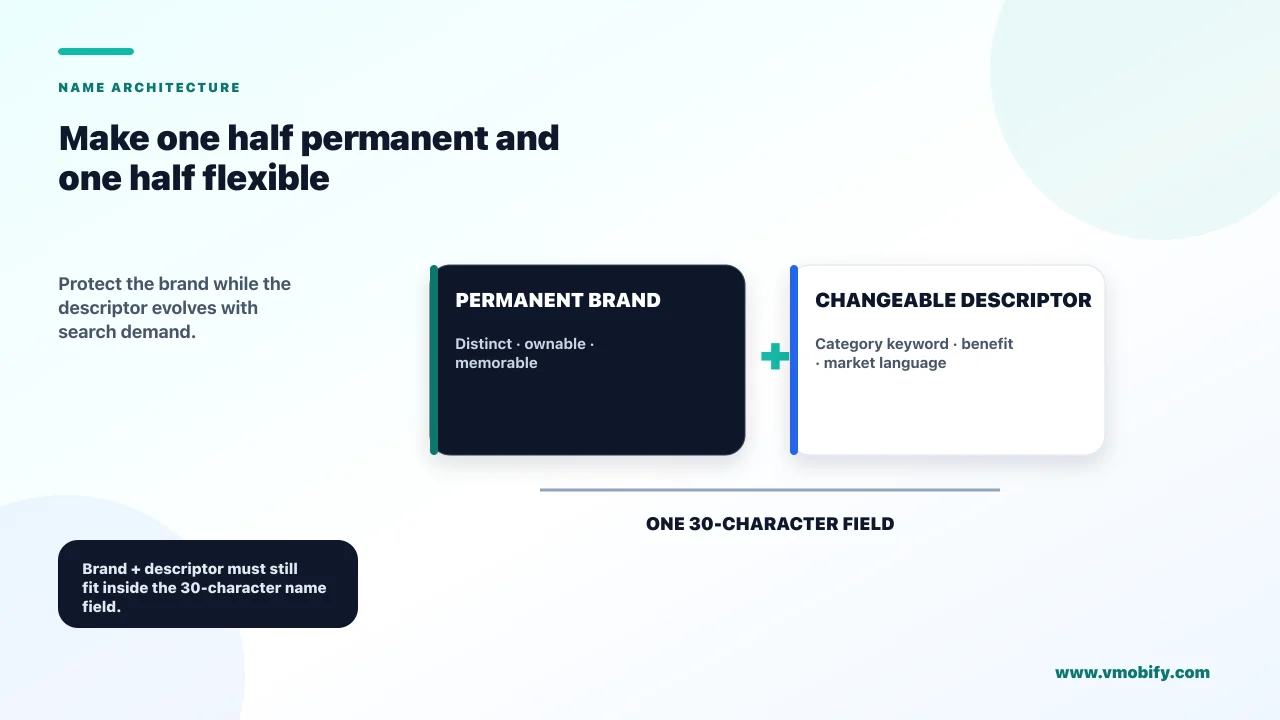
The structural answer to the no-testing problem is to build the name in two halves. The brand half is permanent — chosen carefully, cleared legally, never touched again. The descriptor half is the experiment — it can change with any release, and on iOS the subtitle beneath it can change with every version submission. Design the name so all of your uncertainty lives in the half you are allowed to move, and none of it lives in the half you are not.
Then set expectations for what a post-launch read will and will not tell you. Because you cannot run a controlled test, any change you observe after a title edit is confounded by everything else happening that week — a release, a feature, a seasonal shift, a competitor's campaign. Change one field at a time, baseline before you ship, and read across a full release cycle rather than a weekend. In our portfolio, the naming decisions that hold up are almost never the ones that won an argument about aesthetics; they are the ones that were spelt correctly by strangers, cleared a registry search, and left enough characters for a descriptor that people actually type.
Frequently Asked Questions
How many characters can an app name be?+
Thirty on both stores. Apple requires the App Store name to be at least two characters and no more than 30, and Google Play caps the app title at 30 characters. Older guides quoting a longer Play title limit predate Google's 2021 store-listing policy update.
Should my app name include a keyword?+
While nobody is searching for your brand, yes — a keyword in the title is one of the few discovery levers a new app has. Once branded search volume becomes meaningful, move the keyword into the subtitle or keywords field and let the brand own the title. It is a sequencing decision, not a permanent style.
Can I change my app name after I launch?+
Yes, but it costs you. On iOS the change ships with a new version, because Apple only permits editing the name when you create a new version or when the version status allows it. Your bundle ID, package name, installs and reviews all survive, and old store links keep working — a Play URL is keyed to the package name, while an App Store URL swaps its name-derived slug but keeps its permanent numeric app ID and redirects. What does not survive is the ranking association built on the words you removed.
Can I use a competitor's brand name in my keywords?+
No. Apple's Guideline 2.3.7 prohibits packing metadata with trademarked terms and popular app names, and states Apple may modify inappropriate keywords at any time. Apple's App Store Connect reference also states that names of other apps or companies are not allowed in the keyword list. On Play the relevant rules sit in the impersonation and intellectual property policies, which prohibit metadata that falsely suggests a relationship with another app or company or that infringes someone else's trademark. Beyond the policy risk, that traffic is looking for a different product and converts badly.
Does the App Store subtitle affect search ranking?+
Apple lists the subtitle as one of the text-relevance inputs to App Store search, alongside the title, keywords and primary category. Apple does not publish how those fields are weighted relative to each other, so treat any specific weighting figure you read elsewhere as a guess.
Can I A/B test my app name on the App Store or Google Play?+
No. Apple's Product Page Optimization tests icons, screenshots and app previews. Google Play's store listing experiments test the icon, feature graphic, screenshots and descriptions. Neither includes the app name, so name testing has to happen off-store through landing pages, ad creative and recall tests.
Do I need to register a trademark before launching my app?+
Registration is not a store requirement, but a clearance search is a practical necessity. Search both app stores and the registries covering your distribution markets — USPTO, TMview for Europe, the Indian Trade Marks Registry public search — before you commission a logo. Clearing store review does not protect you from a rights holder complaint later.
Sources
- Apple — App Store Review Guidelines — Guidelines 2.3.7 and 2.3.8 on metadata and naming, 4.1 on copycats, 5.2.1 on third-party intellectual property, and 5.2.5 on apps confusingly similar to Apple products
- Apple — App information reference (App Store Connect Help) — App name 2 to 30 characters, subtitle 30 characters, and the rule that bundle IDs cannot change after a build is uploaded
- Apple — Platform version information (App Store Connect Help) — The keywords field described as up to 100 bytes of content, and the rule against duplicating your app name or company name, or naming other apps or companies, in it
- Apple — Creating Your Product Page — Keywords described as limited to 100 characters in total, the comma formatting rule, and the guidance to avoid plurals, duplicate words, category names and special characters
- Apple — App Store search — Apple's statement that search relevance draws on title, subtitle, keywords and primary category, plus user behaviour
- Play Console Help — Create and set up your app — Title 30 characters, short description 80, full description 4,000, applied equally to full-width and half-width characters
- Play Console Help — App discovery and ranking — Google's statement that metadata — title, description and category are its examples — and other signals determine which apps best address a query; no weighting is published
- Play Console Help — Impersonation policy — Rules on titles, icons and developer names that falsely suggest a relationship with another company or app
About the author
Amol Pomane — Founder, Vmobify
Amol leads Vmobify, a mobile app growth agency that has driven 30M+ downloads and ranked 54K+ keywords across 300+ apps since 2013. He writes about ASO, paid user acquisition, retention, and the operational reality of scaling mobile apps in India and global markets.