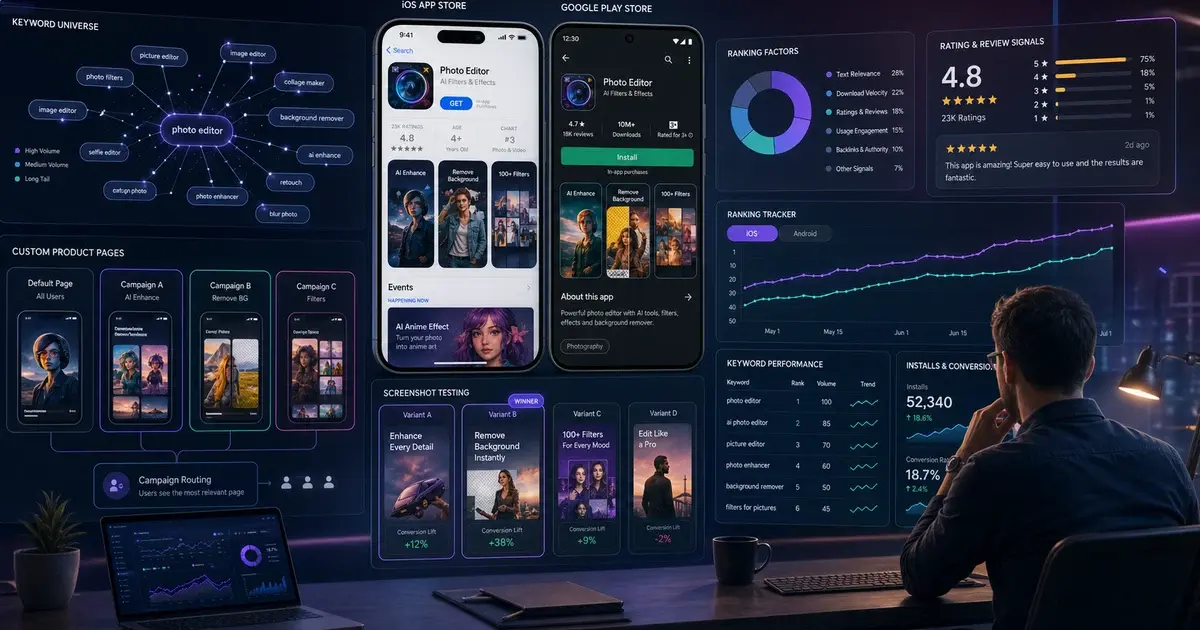
How to Rank #1 in App Store Category: A Category Ranking Playbook
Category ranking is a different game from keyword ranking. This is the playbook we use to push apps into the top 10 of their category and hold the position.
On this page
- What is App Store category ranking?
- Which signals actually move category rank?
- How do you pick the right category?
- How do you build the install velocity engine?
- Why is retention the most underrated ranking lever?
- How do reviews and ratings affect category rank?
- Why does store conversion beat raw traffic?
- How do you hold a top category position?
- What is a realistic timeline to top 10?
- Frequently Asked Questions
What is App Store category ranking?
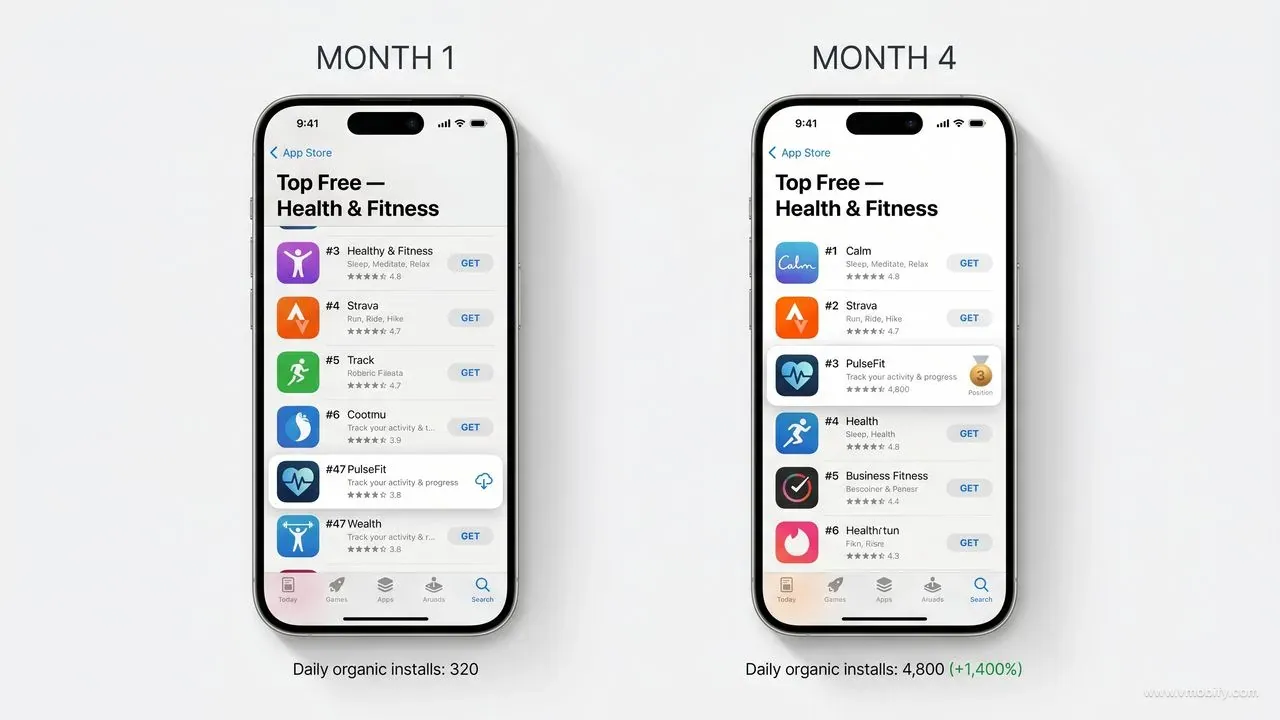
Category ranking is the ordered list of apps that App Store and Google Play surface inside every category — Finance, Games, Health & Fitness, Education — across Top Free, Top Paid, and Top Grossing charts. A top-10 placement in any meaningful category puts your app in front of millions of weekly browsers at zero per-install cost, which is why category rank remains one of the highest-leverage growth assets in mobile.
The key thing to understand is that category rank is calculated very differently from keyword rank. Keyword ranking is a relevance calculation — does your metadata match the query? Category ranking is a momentum calculation — are you one of the apps in this category currently winning right now? You do not rank #1 in Finance because the word "finance" appears in your title. You rank because the store's algorithm has decided you are gaining users, retaining them, monetising them, and being talked about more than your peers.
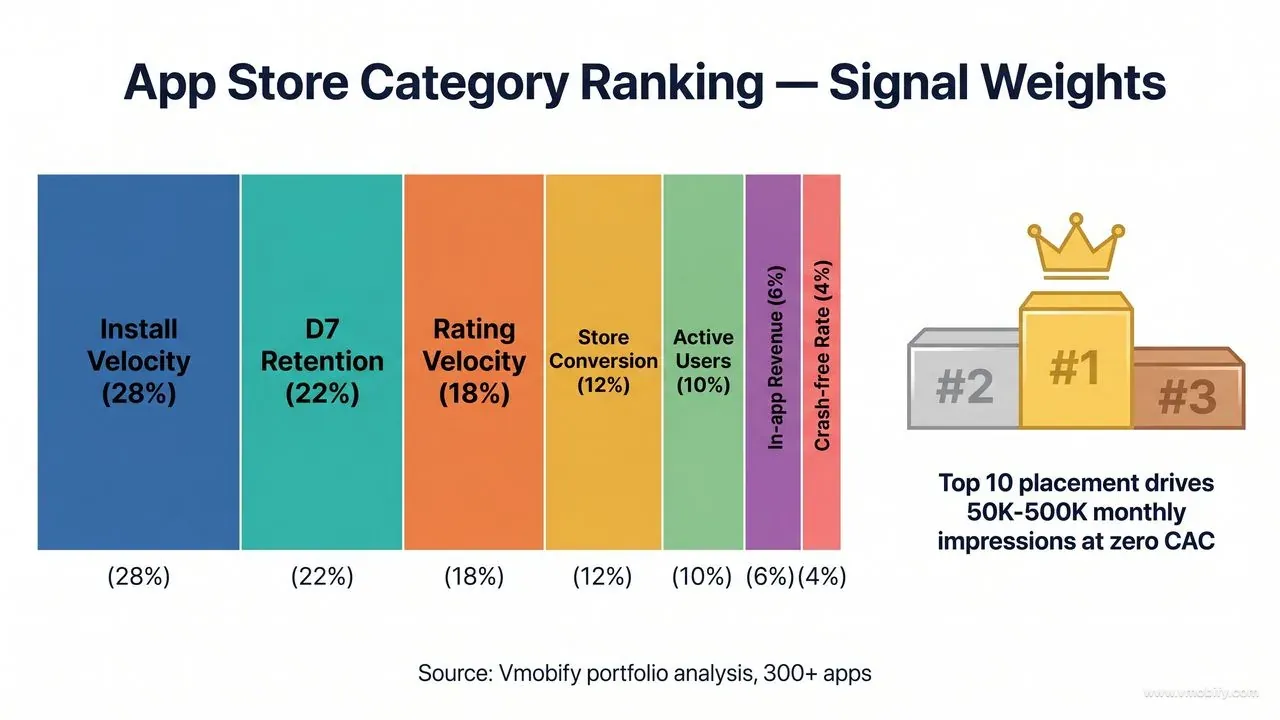
Both stores publish very little about how the chart algorithm works, but the broad mechanics have been confirmed through years of testing and from Google Play's own launch best practices documentation and Apple's editorial guidance. The signal stack is dominated by install velocity, retention, rating velocity, and store-listing conversion — in that rough order — with secondary inputs around revenue, engagement, and crash-free rate.
Across our portfolio of 300+ apps managed since 2013, the apps that crack top 10 in their category share three traits: a precisely chosen category, a coordinated velocity engine that ramps installs over 7-14 days rather than dumping them, and a retention curve that holds the rank once won. The rest of this playbook walks each one.
Which signals actually move category rank?
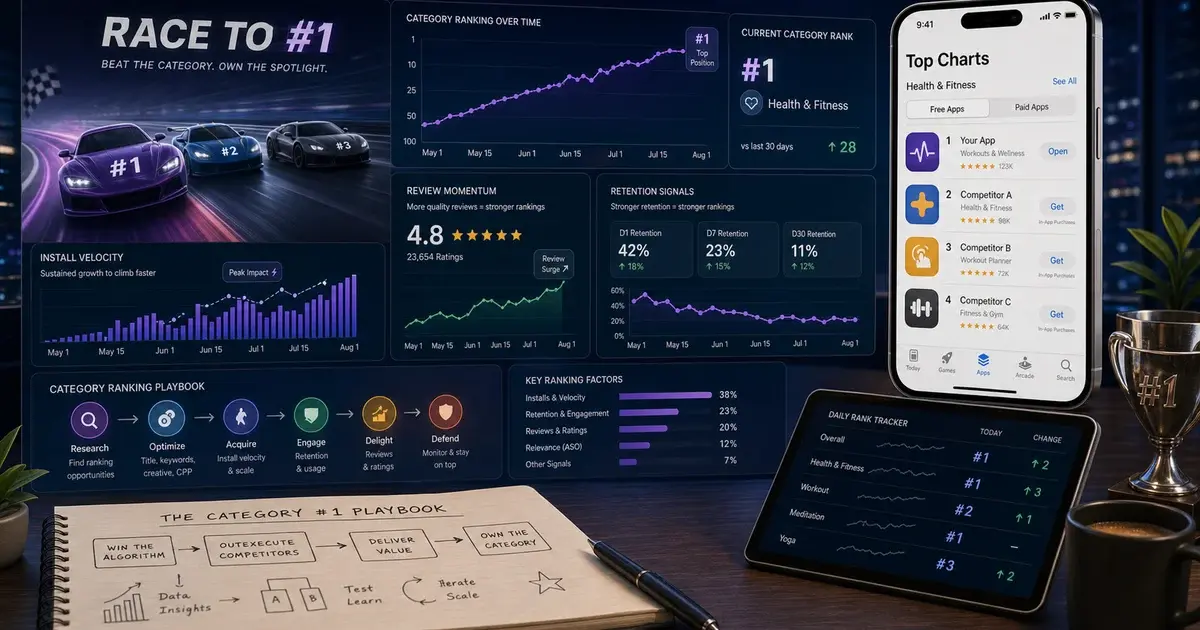
Both stores weight roughly the same set of signals for category rank, in this approximate order: install velocity, D1/D7/D30 retention, rating average and velocity, store-page conversion, in-app engagement, revenue (for Top Grossing), and crash-free rate. Everything else — metadata, backlinks, social mentions — is either a secondary input or has no measurable effect on category position.
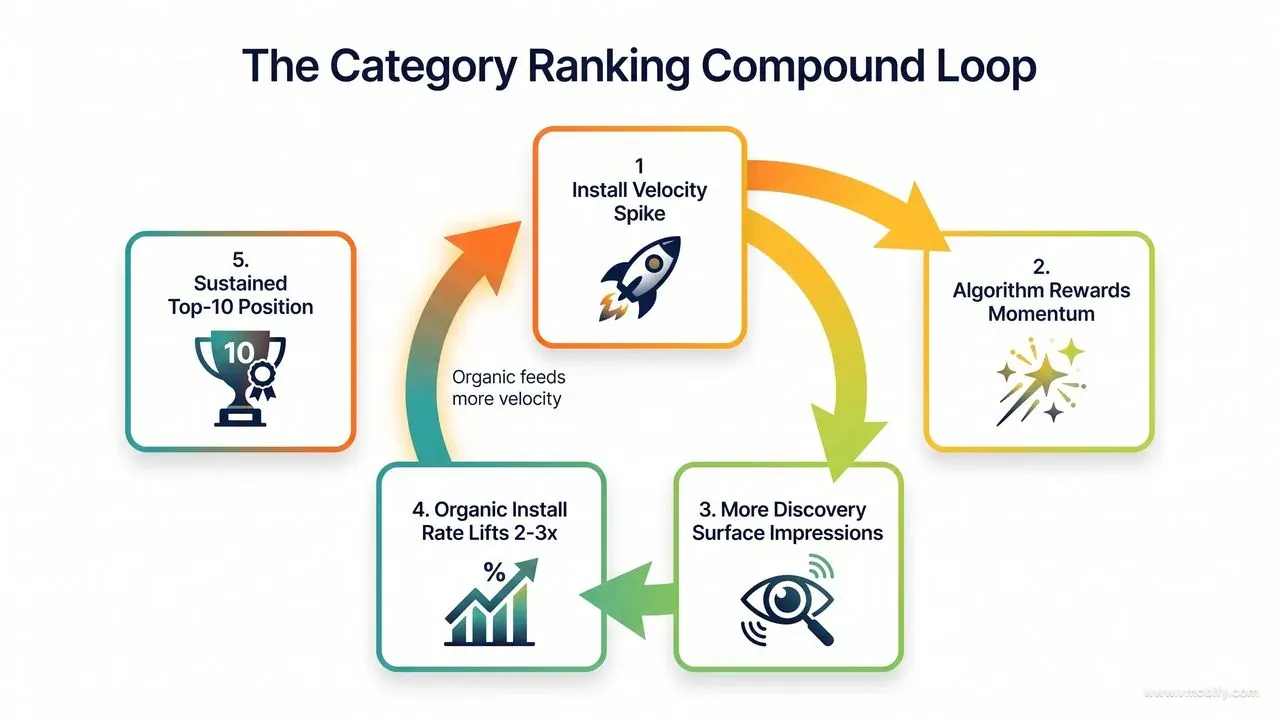
- Install velocity: Day-over-day install growth, normalised against your category baseline. A 2x daily growth curve over a week is worth more than a flat high-volume baseline. Both stores explicitly weight velocity because it correlates with "this app is interesting to users right now." AppsFlyer's Performance Index data consistently shows velocity-led apps get more discovery-surface impressions than higher-volume but flat-line peers.
- D1 / D7 / D30 retention: Both stores explicitly weight retention. An app with 40% D7 retention will rank above an app with 20% D7 retention given equal install volume, every time. This is the single biggest reason fraudulent install bursts collapse within a week — the retention signal gives the fraud away.
- Average rating + rating velocity: 4.3+ average is the practical floor for top-10 in most verticals. New rating velocity (reviews added per week) matters almost as much as the cumulative average — a 4.8 app with one rating per month signals less than a 4.5 app collecting 200 a week.
- Store-page conversion rate: If users who land on your listing install at a higher rate than category peers, stores send you more discovery traffic. This is a self-reinforcing loop and one of the most exploitable signals.
- Active user count + engagement: DAU / MAU ratio, sessions per user, time in app. Stores want to surface apps that get used, not just installed. Apple's editorial team explicitly references engagement when curating featuring.
- In-app revenue (Top Grossing only): Total IAP + subscription revenue, weighted toward recent. Top Grossing is its own chart with its own ranking logic; do not confuse it with Top Free.
- Crash-free rate + uninstall rate: Negative signals. An uninstall rate above the category median actively suppresses rank, regardless of how strong your install velocity is.
Both stores reserve the right to suppress apps that violate policy regardless of these signals — see Apple's App Store Review Guidelines and Google Play's Developer Policy. A top-10 category position can vanish overnight if a policy review flags your listing for keyword stuffing, incentivised reviews, or undisclosed data collection. Treat policy compliance as the gate before any ranking work.
How do you pick the right category?
Category choice is the single biggest category-ranking lever most teams ignore, and the one most likely to determine whether top 10 takes you 60 days or 6 years. Both App Store and Google Play let you pick a primary and secondary category, and the picks compound: primary determines which chart you compete in; secondary expands which browse surfaces you appear on.
The heuristic we apply across our portfolio is simple — pick the most specific category that genuinely fits your app. A fintech expense tracker should sit in "Finance" or its sub-category, not "Productivity" where it is invisible against Microsoft, Notion, and Google. A meditation app belongs in "Health & Fitness" not "Lifestyle" where the competitive set is 10x bigger and dominated by adjacent verticals it cannot beat.
Before committing, audit the top 100 in your candidate categories. Specifically, look at the install volume of the apps ranked #10, #25, and #50. Sensor Tower, AppTweak, and similar tools give rough volume estimates. If your nearest peer at #50 has 50x your weekly install volume, you will not crack top 10 there in any realistic timeframe — and a smaller well-fit category beats a giant adjacent one every time.
Across the 300+ apps we have managed, the most common ranking unlock comes not from a budget increase but from a category re-classification. We have moved apps from "Lifestyle" to "Health & Fitness" and watched them climb from rank 200+ to top 20 inside a quarter with identical paid spend. Stores allow category changes at any submission, and App Store Connect and Google Play Console both make the change live within 24-48 hours of review approval.
One caveat: category changes reset your position inside the new category from baseline. Total downloads, ratings, and keyword rankings are preserved, but the chart algorithm starts measuring your velocity fresh. Time category moves with a planned ASO refresh or paid push so the reset works in your favour.
How do you build the install velocity engine?
To trigger the velocity signal that moves category rank, you need installs to grow day-over-day for 7-14 consecutive days — not a single big spike, and not a flat plateau. A flat 2,000 installs per day for a month is materially worse for ranking than a ramp of 500 / 700 / 1,000 / 1,400 / 2,000 / 2,800 over six days, even when the averages look similar on paper.
Both store algorithms appear to look at the first derivative — the rate of change in your install curve — far more than the absolute install count. AppsFlyer's State of App Marketing data points to the same conclusion: apps that engineer a controlled ramp outperform flat-spend peers in category climb almost regardless of absolute budget.
How to engineer the ramp:
- Start paid spend small and scale 20-30% daily. Resist the temptation to front-load. A campaign that hits its peak budget on day 1 produces no velocity signal — it produces a single spike that decays.
- Stack launches: creative refresh on day 1, micro-influencer push on day 3, ASO metadata update on day 5, CPI burst on day 7. Each layer adds incremental velocity without exhausting any single channel.
- Time it with editorial featuring. If you are pitched for featuring on either store — see Apple's In-App Events and Google Play's collections — time the velocity engine to peak the week of placement. Featured traffic amplifies velocity if you have one running, and dissipates if you do not.
- Use Custom Product Pages or Store Listing Experiments to multiply paid traffic conversion. Apple's Custom Product Pages and Google Play's store listing experiments let you serve different listings to different traffic sources — converting more of the velocity traffic into actual installs.
Tactically, the full burst playbook is in our 72-hour install push guide. For category ranking specifically, the difference is that you want to stretch the burst over 10-14 days rather than concentrate it into 72 hours. The chart algorithm needs to see sustained growth — a single weekend spike rarely moves position more than 10-15 ranks before reverting.
Why is retention the most underrated ranking lever?
Install velocity gets you ranked; retention keeps you ranked. The single highest-leverage product investment for category position is moving D7 retention up by 5 percentage points. In our portfolio, we have seen apps add 30-50 positions in category rank purely from a D7 retention improvement with zero change in paid spend or ASO.
The mechanic is straightforward. Stores measure how many of your new installs are still active 1, 7, and 30 days later, normalised against the category median. An app retaining at 40% D7 in a category where median is 20% gets dramatically more discovery surface than the same app retaining at 25%. Doubling your retention is roughly equivalent to doubling your paid spend, except retention compounds and paid spend does not.
Levers that move D7 retention fastest in our experience:
- Onboarding compression. Cut your onboarding to 3 screens. Every additional screen drops completion by 10-15% per Adjust's mobile benchmarks. A user who never completes onboarding never makes it to your retention numerator.
- First-session "aha" inside 90 seconds. Engineer the moment users see your app's core value inside the first session. A user who experiences value once is 4-5x more likely to return on D2 than a user who never reaches the value moment.
- A single, well-timed Day 1 push notification. One D1 push at the user's local evening window typically lifts D7 retention by 15-25%. Do not over-do it — one well-timed push beats five poorly-timed ones, and aggressive push schedules trigger uninstall.
- Day 3 second-touch hook. A second reason to return on D3 — new content, social notification, progress reminder, streak alert — compounds D1 retention into D7. Apps without a D3 hook lose 60-70% of D1 users by D7.
- Crash-free rate above 99.5%. Crashes destroy retention more than any other technical factor. A 1% crash rate maps to roughly 10-15% retention loss because crashed users disproportionately uninstall.
The product team owns retention, but the growth team should own the metric for ranking purposes. We typically run weekly retention reviews alongside paid performance reviews because the two compound — a paid push into a leaky retention bucket is wasted velocity, while a paid push on top of strong retention triggers the multiplier that moves category rank.
How do reviews and ratings affect category rank?
Top 10 category apps almost universally hold 4.3+ average ratings. Below 4.0, you have an effective ceiling — the chart algorithm will not surface low-rated apps regardless of other signals, because doing so degrades store quality for browsers. Rating velocity (the rate of new ratings) matters nearly as much as the cumulative average.
The fastest legitimate way to lift ratings and accelerate rating velocity:
- Prompt at the moment of success. Use the native iOS SKStoreReviewController or the Google Play In-App Review API, triggered only after the user has completed a successful action — not on launch, not on close, not on a paywall dismiss. Successful-action prompts convert at 8-15%; cold prompts convert at under 2%.
- Filter dissatisfaction first. A 2-step prompt — "are you enjoying the app?" — sends yes-respondents to the store rating dialog and no-respondents to a feedback form. This routes detractors into your inbox rather than into your public 1-star pile. Both stores permit this pattern explicitly; it is one of the most under-used legitimate rating tactics.
- Respond to every 1- and 2-star review within 48 hours. Visible developer responses cause about 15% of reviewers to revise their rating upward within a week. Both store consoles surface revised ratings to the algorithm in near-real-time.
- Address the systematic complaints in your next release notes. Reviews tagged to a specific build version improve as that build ages out and a fixed version replaces it. Ship a release every 4-6 weeks that explicitly addresses the most common 1- and 2-star themes.
Avoid every shortcut here. Paid review schemes get accounts permanently suspended — enforcement coverage shows Apple removes hundreds of millions of fraudulent reviews per year and bans the developers. Incentivised reviews disguised as organic are explicitly prohibited in Apple's guidelines section 3.2.2 and Google Play's deceptive behaviour policy. For a broader Android-specific tactical breakdown see our ASO hacks for Android apps guide.
Why does store conversion beat raw traffic?
Stores reward apps that convert browsers into installs at a higher rate than category peers — and if you lift store-page conversion from 25% to 35%, you get the equivalent of a 40% paid spend increase for free, on top of more organic traffic from the algorithm. Conversion rate is one of the most exploitable signals in the category-ranking stack because it is fully under your control and testable on real store traffic.
The three highest-impact tests we run across portfolio apps:
- First screenshot: The first frame drives roughly 60% of the install decision per SplitMetrics' aggregated A/B test data across thousands of apps. Test benefit-led copy on a UI hero against pure UI hero against social-proof hero. Winning concepts typically lift conversion 10-25%.
- App icon: Test 2-3 distinct concepts, not minor colour tweaks. Winning icons routinely lift conversion 5-15%. Avoid running an icon test alongside a screenshot test — you cannot attribute the lift cleanly with two simultaneous changes.
- Preview video (iOS) / feature graphic (Android): Adding a preview video lifts iOS conversion 10-25% in most categories. Optimise the first 2 seconds — most users skip after 2 seconds, so the hook matters more than the demo.
Use App Store Connect's product page optimisation for iOS A/B testing and Google Play Console's store listing experiments for Android. Both run on real store traffic, both are free, and both give statistically valid results within 7-14 days for most apps. Apple's Custom Product Pages additionally let you serve up to 35 variant listings to different traffic sources — perfect for matching the listing to the paid creative the user just saw.
Across our 300+ apps, the apps that ran a continuous conversion test pipeline (one new test live every 2-3 weeks) gained 30-60% in store conversion over 12 months. Apps that set up a listing once and never iterated gained 0-5% over the same period. The algorithmic reward for that conversion delta is significant — see our ASO service breakdown for the full pipeline structure we use.
How do you hold a top category position?
Reaching top 10 is hard; holding it is harder, because the algorithm demands continued momentum. Apps that get there and slow down drop back within 2-4 weeks. The mechanic is the same as the mechanic that got you there — velocity, retention, rating velocity, conversion — but with no slack and no plateau allowed.
The defensive playbook we run for portfolio apps holding top 10 positions:
- Maintain a steady paid baseline. Typically 30-50% of the spend that got you there. Cutting paid to zero after reaching top 10 is the single most common reason apps lose position. The velocity signal disappears within days.
- Ship a meaningful update every 4-6 weeks. Updates trigger re-indexing and signal active maintenance to stores. Both stores measurably favour recently-updated apps in chart placement.
- Run an always-on creative testing pipeline. The creatives that ranked you will fatigue inside 30-60 days. Replacement winners must be in the pipeline before fatigue hits, not after.
- Watch the category leaderboard daily. Competitors copy what works. Respond within days, not weeks. Tools like Sensor Tower and AppTweak surface daily competitor changes; AppTweak's research on competitive ASO is a useful baseline.
- Defend ratings actively. A single bad release that drops your rating from 4.5 to 4.1 will collapse your category position within a week. Stage rollouts on Android, watch crash and rating telemetry hourly for the first 48 hours of any release, and roll back fast.
- Time competitive defence. When a rival is climbing fast, a defensive paid push or CPI layer can hold your position until their wave breaks. This is one of the legitimate uses of our vetted CPI network — defensive burst, not offensive farming.
Across our portfolio, apps that treat top-10 as "done" lose it inside a quarter. Apps that treat it as an operational state to maintain hold it for years. The cost of holding is meaningfully lower than the cost of regaining — typically 40-60% lower per equivalent rank position — because the velocity loop is already primed.
What is a realistic timeline to top 10?
Assuming you start outside the top 100 in a mid-competitive category with a properly working app, top 10 takes 90-180 days of disciplined execution. Faster outcomes are possible in smaller categories or geographies; longer timelines are realistic for Finance, Social Networking, and Games globally.
- Week 1-2: Category audit, ASO refresh, paid foundations laid, retention diagnostics complete. Visible movement: into top 100.
- Week 3-6: Velocity engine engaged. Paid spend scaling daily. Creative system producing winners. ASO test pipeline live. Visible movement: into top 50.
- Week 7-12: Retention lifts compound with paid lift. Store conversion optimised. Rating velocity steady. Visible movement: into top 20.
- Month 4-6: Top 10 in sub-categories. Top 20 in main category if competitive. Editorial featuring becomes a credible pitch. Apple's In-App Events become a useful surface to ride.
- Month 6+: Defensive operations to hold position. Always-on creative + conversion + retention work.
Some categories move faster — Education in India, Health & Fitness in tier-2 cities, regional language apps in their home market. Some move slower — Finance globally (high regulation, high competition), Social Networking (network-effect incumbents), Games (saturated paid auctions). Geography matters too: a top-10 in India costs roughly 30-40% of the equivalent paid investment in the US for most verticals, per Sensor Tower's State of Mobile benchmarks.
For category-specific timelines see our case studies for examples across Finance, Education, Health & Fitness, and Utility categories. If you want a category-ranking audit for your specific app, talk to our team — the audit takes 5-7 days and outputs a category-fit recommendation, a velocity-engine spec, and a 90-day ranking plan.
Frequently Asked Questions
Can I rank #1 in a major category without a huge budget?+
Realistically no for global top categories (Games, Finance, Photo & Video). But you can rank #1 in well-fit sub-categories with surprisingly small budgets if retention and rating are strong. Sub-category #1 is often more valuable for discovery than primary-category #50.
Does Apple Search Ads affect category ranking?+
Indirectly. ASA installs count toward velocity and contribute to retention metrics like organic installs do, so they help category rank — but they are not weighted differently from organic installs by the algorithm. Use ASA to feed velocity, not as a ranking shortcut.
How often does category ranking update?+
Multiple times per day on both stores. Visible position changes are usually published in 1-4 hour cycles. Significant signal changes (large velocity shifts, ratings collapses) can move ranks within hours.
Should I pick the most competitive category to maximise visibility?+
No. Pick the most specific category that genuinely fits. Top 10 in a smaller well-fit category surfaces you to more high-intent users than top 200 in a giant adjacent one. Category fit beats category size every time.
Will changing my category reset my ranking?+
It resets your position in the new category (starting from category-baseline) but does not affect your overall download count, ratings, or keyword rankings. Time category changes with an ASO refresh or paid push so the reset works in your favour.
How important is the secondary category?+
Less than primary, but still meaningful. Secondary expands which browse surfaces you appear on and which "Apps Like This" lists you join. Pick a secondary that genuinely fits and where you can plausibly compete — not a wishlist category where you will never appear.
Do paid installs count differently than organic for category rank?+
No. Both stores treat all real installs equally for velocity. What matters is whether the installs retain — paid installs from high-intent channels (UAC, Meta Advantage+, quality CPI) retain similarly to organic and contribute equally to rank. Paid installs from fraudulent or incentivised sources retain poorly and actively hurt rank.
Sources
- Apple App Store Review Guidelines — Official policy on incentivised installs, reviews, and metadata manipulation
- Google Play Developer Policy — Official rules governing chart eligibility and policy suppression
- Google Play Launch Best Practices — Google's documentation on install velocity and category placement
- Apple Custom Product Pages — Variant listings to lift paid-traffic conversion
- Apple In-App Events — Editorial surface used to amplify velocity around launches
- AppsFlyer Performance Index — Quarterly benchmarks for velocity vs retention by category and geography
- SplitMetrics ASO Research — Aggregated A/B test data on store-page conversion levers
- Sensor Tower State of Mobile — Category install volume and CPI benchmarks across geographies
About the author
Amol Pomane — Founder, Vmobify
Amol leads Vmobify, a mobile app growth agency that has driven 30M+ downloads and ranked 54K+ keywords across 300+ apps since 2013. He writes about ASO, paid user acquisition, retention, and the operational reality of scaling mobile apps in India and global markets.
Check your store metadata
Run your current App Store or Play metadata through the free checker.
Open free tool