App Store Localisation Strategy: Which Markets, Which Words
Localisation is the only ASO change that creates new demand instead of fighting harder for demand you already compete in. This is how to choose locales from your own install data, rebuild a keyword set in a language rather than translating one, and decide which assets are worth localising — including the Indian-language opportunity almost every Western ASO guide ignores.
On this page
- Why does localisation beat almost every other ASO lever on cost per install?
- Which locales should you prioritise, and in what order?
- Why is translation not localisation?
- How do you rebuild a keyword set for a new locale?
- Which assets need localising, and which can stay global?
- How do regional languages in India change the calculation?
- How do you measure whether a locale paid off?
- What breaks when you localise badly?
- Frequently Asked Questions
Why does localisation beat almost every other ASO lever on cost per install?
Localisation is the only ASO change that creates new demand rather than fighting harder for demand you already compete in, which is why its cost per incremental install is usually the lowest number on an acquisition plan. Everything else in ASO redistributes traffic. A new locale manufactures it.
Most ASO work is zero-sum inside a single storefront. You rewrite a title, retest a screenshot set, restructure a description, and the installs you gain came out of three competitors ranking for the same query set you were already ranking for. That work is worth doing and we do a great deal of it. It is also bounded: there is a finite quantity of English-language search demand for a budgeting app, and every team chasing it has read the same guides you have.
Adding a locale changes the shape of the problem. A Portuguese (Brazil) listing does not compete for a share of the queries you already appear in — it makes you eligible for a query set you were absent from entirely, usually one where the competitive field is a fraction as crowded because most of the category shipped in English and stopped there.
The cost structure is the second half of the argument. Paid acquisition is a tap: installs stop the day the budget stops. A localised listing is a fixed, one-time cost — copy, keyword research, a screenshot set, a native-speaker review pass — that keeps converting for as long as the app is live. Across the 300+ apps we have managed since 2013, the pattern we keep seeing — and this is our own observation across our accounts rather than a published benchmark you should take on trust — is that locales localised properly in year one are still producing organic installs in year three with no spend attached to them.
Then there is the effect on traffic you are already paying for. Every click you buy in a market lands on a store listing. If that listing is in a language the reader processes at half speed, you paid full price for the click and then took a discount on the conversion. Localisation is the cheapest available way to raise store conversion rate in precisely the markets where your media buying performs worst — which is why we treat it as a user acquisition project as much as an ASO one.
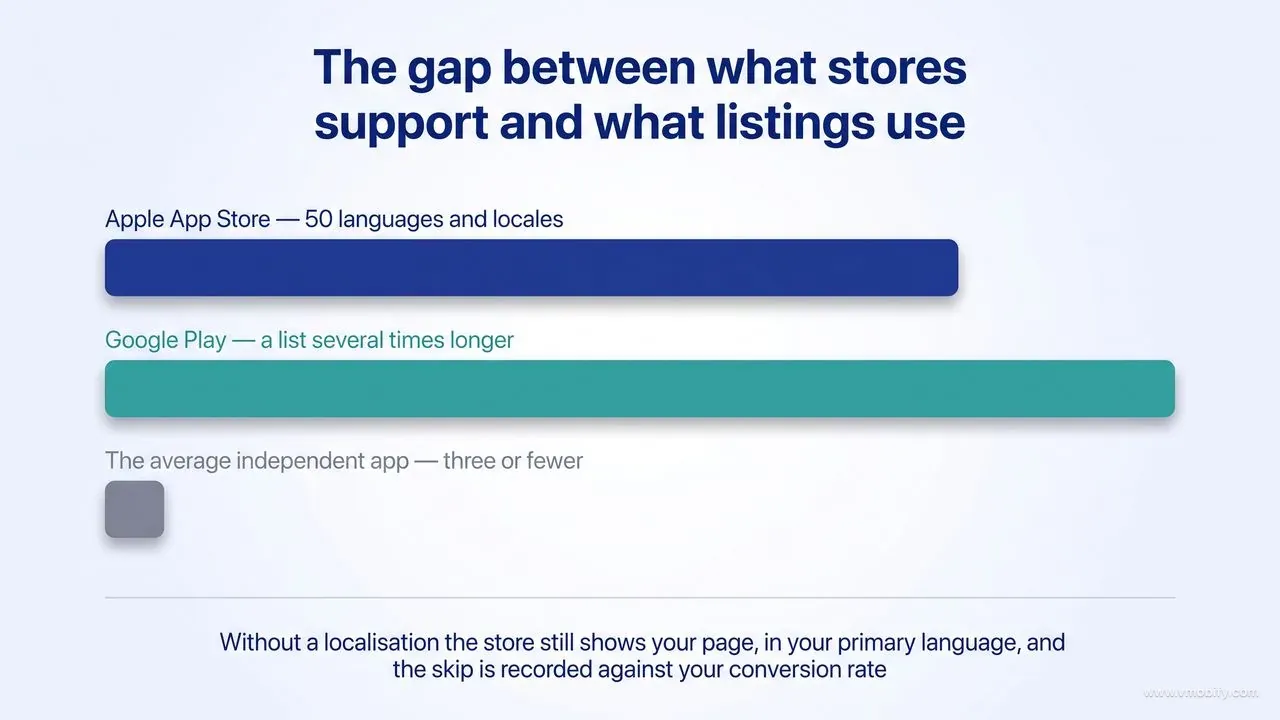
It matters, too, that the store does not simply hide an unlocalised app. Apple's guidance on localising app information states that if no localisation matches a user's language setting, the next most relevant localisation is used, and otherwise the metadata displays in your primary language. You are not invisible without localisation. You are worse off than invisible in a specific and expensive way: you are being served, read and skipped, and the skip is recorded against your conversion rate.
Finally, the ceiling is high because the floor is so low. Apple supports 50 App Store languages and locales. Google Play accepts developer-supplied translations across a list several times longer. Almost no independent app uses more than three. The distance between what the stores support and what the average listing actually does is the entire opportunity, and closing it costs the price of doing the work rather than the price of outbidding somebody.
The rest of this guide is about doing that work in the order that pays: choosing locales from your own data, rebuilding the keyword set instead of translating it, localising the assets that decide the install and ignoring the ones that do not, and measuring the outcome well enough to know when to stop.
Which locales should you prioritise, and in what order?
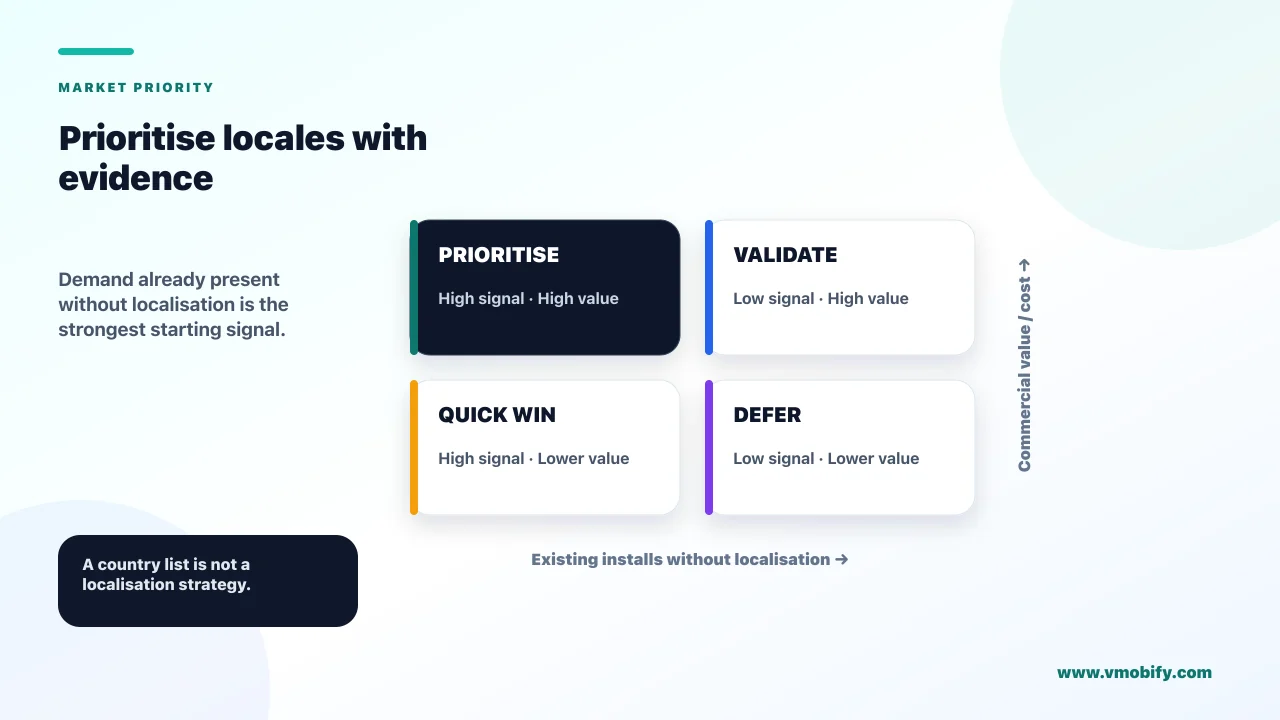
Prioritise locales where you already receive installs despite having no listing in that language — latent demand you can see in your own console beats any market-size league table. The countries that convert against an English page are telling you what they would do with a proper one.
The sequence we use on new engagements:
- Pull country-level data first. App Store Connect gives you impressions, product page views and installs by territory; Play Console gives you store listing acquisition by country and language. Look for territories with healthy impressions and a conversion rate below your global average. That gap is the localisation opportunity, already measured, at no cost.
- Then look at language reach, not country reach. One localisation can serve many storefronts. Apple's App Store localisations reference maps every storefront to a default language plus the additional languages it supports — Spanish (Mexico), for instance, is a supported language in the United States storefront, not only in Latin America. A single localisation can therefore work in a dozen markets at once, which changes the cost arithmetic completely.
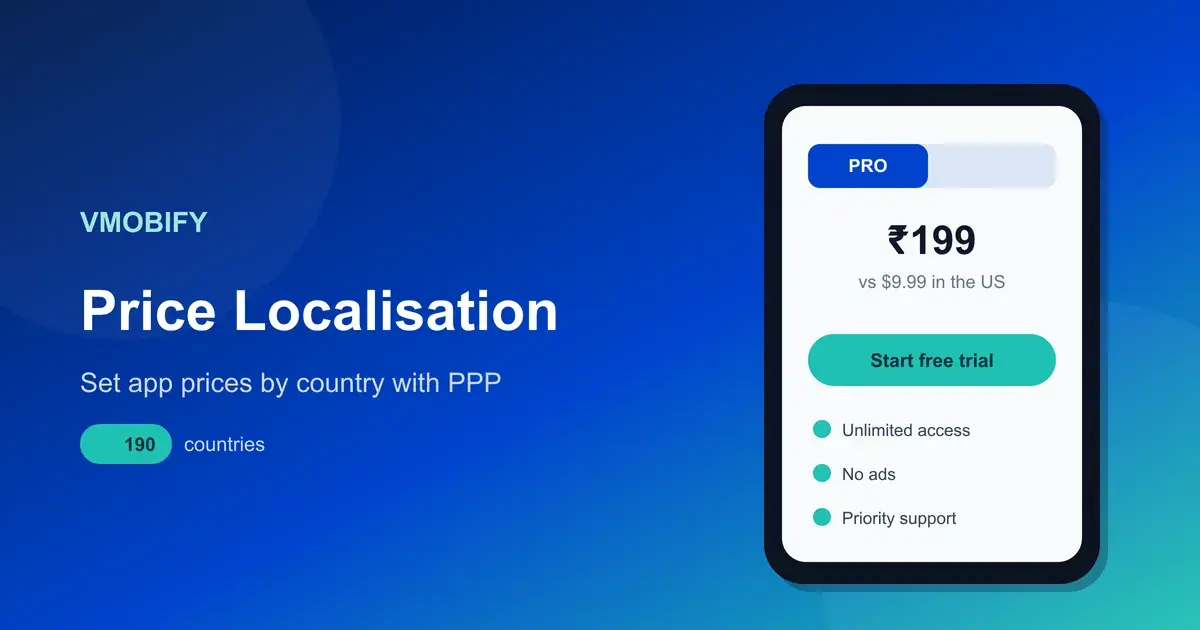
- Filter by whether the market can pay. Cheap installs in a market that cannot monetise are a vanity exercise. Store pricing is a separate discipline with its own rules, covered in our guide to purchasing power parity pricing — settle the pricing question before you commit engineering time to a locale, not after.
- Cost in the support tail. Publish in a language and you will receive reviews and support tickets in it. Reviews you cannot read are reviews you cannot answer, and unanswered reviews in a small storefront damage conversion faster than they would in a large one.
- Check the competitive floor. Open the top 20 results for your main category in the target storefront on a device set to that language. If the leaders have localised properly, you are entering a real fight. If half of them are showing English metadata, you are entering an empty room.
A useful way to group the results is by how many storefronts one localisation unlocks. Spanish, Portuguese (Brazil), French, German, Arabic and Russian each buy reach across many territories. Japanese, Korean, Simplified Chinese, Thai and Vietnamese buy one large market each but tend to buy it decisively, because those markets have low tolerance for English metadata. Indian languages behave differently again and get their own section below.
The discipline that matters most here is restraint. Start with three locales, not fifteen. The most common failure we are asked to clean up is a listing that was machine-translated into a dozen languages in one afternoon, produced no measurable movement anywhere, and left nobody able to say which locale worked because none of them were done well enough to generate a signal. Three locales done properly give you a clean read, a repeatable process and an internal case for funding the next five.
Sequence them, too. Ship the first locale, wait four to six weeks, read the conversion data, then apply what you learned to the next two. Localisation gets cheaper and better every round because the second locale inherits a working process — a keyword research method, a screenshot template that survives text expansion, a briefing document for the native reviewer.
Why is translation not localisation?
Translation converts your sentences into another language; transcreation rebuilds your argument for a reader with a different competitive set, different objections and a different search vocabulary — and only the second one moves conversion rate. The distinction is not academic. It shows up directly in the numbers.
Consider what a store listing actually does. In the few seconds before the reader scrolls back to the search results, it has to name the problem in the words the reader uses for it, establish that you are credible, handle the one objection that stops that market from installing, and make the next action obvious. Every one of those four jobs is market-specific. The problem has a local name. Credibility is signalled by different proof in different countries — a regulator, a bank partner, a user count, a local press mention. The blocking objection in one market is price, in another it is data privacy, in another it is whether the app works offline on a mid-range Android device.
A translator, working faithfully, will render your English answers to those questions into fluent target-language sentences. What they will not do — because it is not the job you gave them — is notice that your English listing spends its first line on a benefit the target market does not care about, or that your headline proof point means nothing in a country where that brand is unknown.
The tooling makes the distinction easy to blur. Play Console offers a free machine-translation service you can order per language, and Google is direct about its limits. The list Play Console Help enumerates runs to ten entries — Arabic, French (France), German, Indonesian, Italian, Japanese, Portuguese (Brazil), Spanish (Latin America), Spanish (Spain) and Thai — and Google states plainly that, being machine translations, they are not reviewed or approved by humans. One caveat on that number: Google's own marketing page for the service advertises 29 languages without naming them, which does not match the ten the Help Centre actually lists. We work from the enumerated list throughout this guide, because it is the only one you can check against a language you care about. Play also brokers paid human translation through third-party vendors, starting at around $0.07 per word. At that price, translating a full listing costs less than a handful of installs in most markets, which is exactly why so many teams stop at translation and call the locale done.
What transcreation adds, in the order it pays:
- Reordered value proposition. Lead with whichever benefit that market ranks first, which is often not the one your home market ranks first.
- Local proof. Swap in the trust signals that mean something locally — a payment method people recognise, a compliance body, a partner name.
- Register and formality. Languages carry formality decisions that English does not force you to make. Getting this wrong reads as careless, and in finance or health categories it reads as untrustworthy.
- Search vocabulary. The word the market types into the store is frequently a different word from the correct dictionary translation of your category. This is the single biggest gap between translation and localisation, and it is the subject of the next section.
- Length discipline. German, Russian and Finnish copy all run longer than the English they came from, and both stores cap the app name at 30 characters — Apple in App Store Connect, Google in the Play Console. An English title that already fills all 30 has no faithful German equivalent that fits inside them. The field simply will not accept the overflow, so somebody cuts it at the last minute, usually badly, usually by amputating the keyword rather than the brand. Transcreation avoids that by writing to the limit in-language in the first place, choosing a shorter native noun instead of trimming a long one.
One more thing that catches teams out: policy applies to every language you publish. Google's best practices for your store listing state it directly — the Metadata policy and Google's other policies apply to all translations of your Google Play store listing. A keyword-stuffed description in a language nobody on your team reads is still a policy violation, and it is a violation you will not spot before a reviewer does. Whoever signs off the English listing has to own the other nine, which in practice means budgeting a native reviewer per language rather than a translator per language.
How do you rebuild a keyword set for a new locale?
Build the keyword set from scratch in the target language — never translate the English one — because search vocabulary is a property of the market, not a property of your app. A translated keyword set is a list of words that are correct and unsearched.
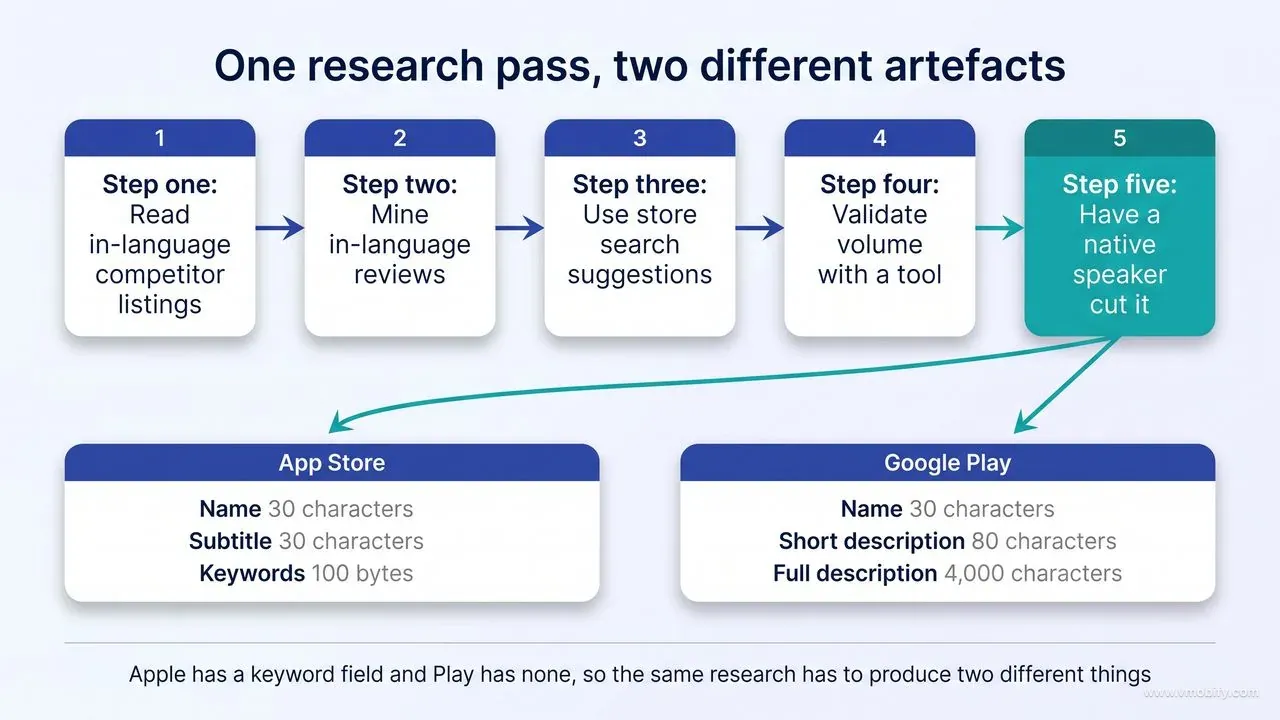
Start by understanding what you are filling in, because the two stores are structurally different and one research pass has to produce two different artefacts.
On the App Store, each localisation carries its own metadata. The name and subtitle are limited to 30 characters each, and the keywords field, per Apple's platform version information reference, allows up to 100 bytes of content, with the description limited to 4,000 characters and promotional text to 170. Note that Apple counts bytes, not characters, in the keyword field — non-Latin scripts consume considerably more of that budget per character, so a Japanese or Hindi keyword set has materially less room than an English one. Apple has never published a rule about the description and App Store search, and no public test we are aware of has found evidence that it is indexed for in-store search — the closest thing to an official statement in that same reference is that the description will be used for web engine search results once you release your app, which is a different index. Treat it as convention rather than policy, and concentrate your in-store keyword work into name, subtitle and that 100-byte field while still writing a description good enough to earn the web traffic.
On Google Play, there is no keyword field. The indexed text is the listing copy itself: a 30-character app name, an 80-character short description and a 4,000-character full description. Google's guidance on getting discovered on Google Play search says that using a professional translation service for your description can lead to better search results and discoverability for worldwide users — which is Google saying, in the politest possible terms, that machine-translated listings rank worse.
There is one cross-border mechanic on Apple worth building a strategy around: localised keywords are searchable in every country or region where the App Store supports that language, not only in the country the language is named after. A Spanish (Mexico) localisation is therefore a play for the United States storefront as much as for Mexico. This is the highest-return single localisation available to most English-first apps, and it is routinely missed because teams think in countries rather than in languages.
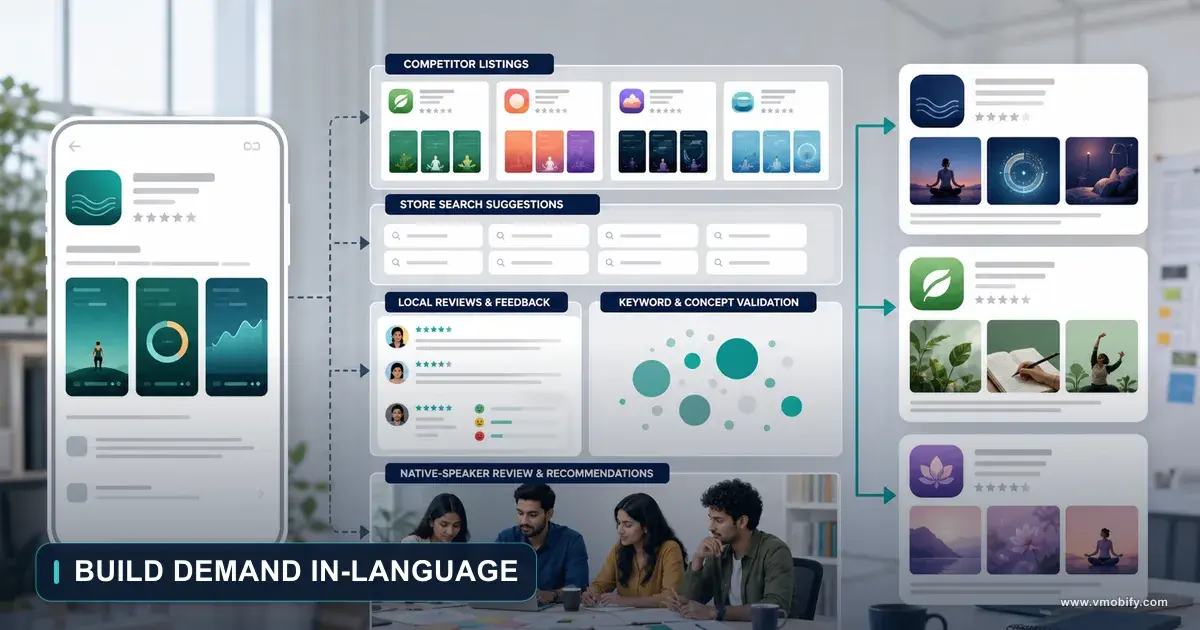
The research method itself, in the order we run it:
- Read in-language competitor listings. Set a device to the target locale and read the top 20 listings in your category. Collect every recurring noun and verb. These are words a native team already paid to research.
- Mine in-language reviews. Reviews contain the words users choose unprompted, which is closer to search behaviour than any marketing copy. This is the richest source and the one most teams skip.
- Use store search suggestions. Type your seed terms in-language on a device set to that storefront and record what autocomplete offers. Suggestions are demand-ranked by the store itself.
- Validate volume with a tool. Any credible ASO platform will give you per-locale volume and difficulty estimates. Use them to rank a list you generated from the market, not to generate the list.
- Have a native speaker cut it. The final pass removes terms that are technically correct and never typed. Nobody who does not speak the language can do this step, and no tool substitutes for it.
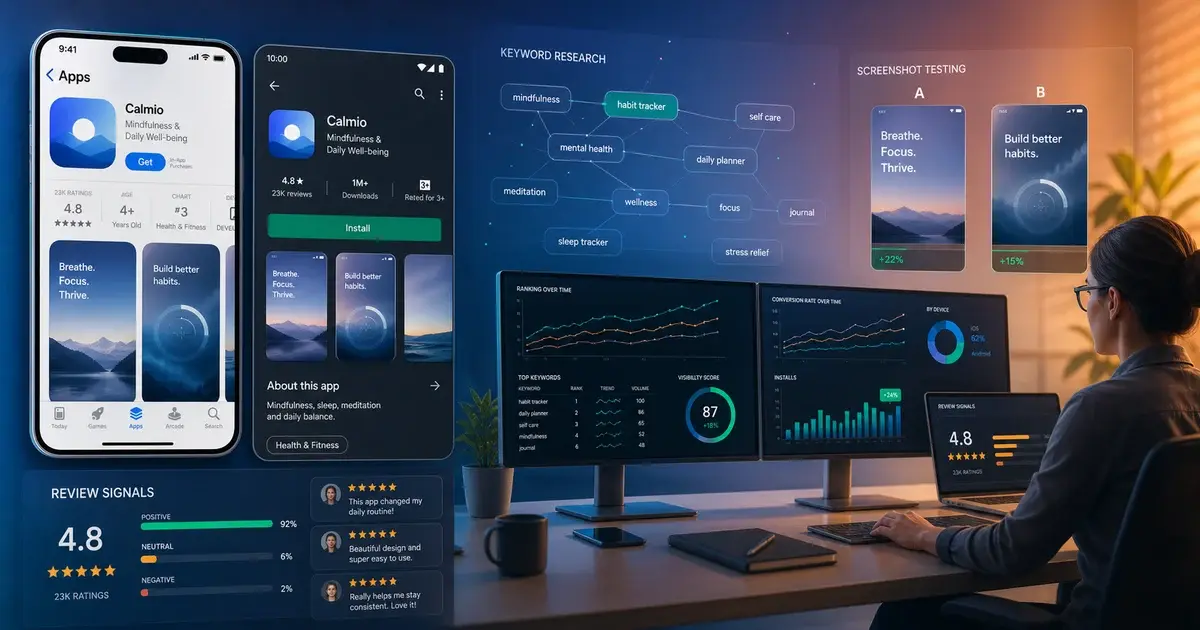
Two mechanical points on the Apple keyword field. Apple's own instruction is narrow: your app is searchable by app name and company name, so you should not duplicate either of those in the keyword list. The subtitle is not named in that rule, but every practitioner test points to it being indexed as well, so treat it the same way and spend the bytes elsewhere. Second, do not waste bytes on spaces after commas or on both singular and plural forms. On Play, work the target terms into the short description and the opening of the full description in language that still reads naturally to a human — our app store optimisation guide covers the field weighting in more depth, and it applies per locale exactly as it applies to your primary language.
Which assets need localising, and which can stay global?
Localise everything the user reads before the install decision, and defer everything after it until the locale has proved itself. That single rule settles most of the argument about scope, and it keeps the cost of testing a market roughly an order of magnitude below the cost of committing to one.
The priority order we work in, highest return first:
- App name, subtitle and short description. These are read in the search results, before anyone opens your page. They are also the smallest amount of text in the whole exercise. Highest return per word by a wide margin.
- Screenshot captions. Most users never scroll to the description. They read three screenshot captions and decide. Google's best practices for your store listing are explicit that for screenshots containing text you should provide separate screenshots and promotional videos for each language you support, and our store screenshots guide covers building a caption layer that can be swapped per language without rebuilding the artwork.
- Keywords. On Apple, the 100-byte field per localisation. On Play, the terms woven into the short and full description.
- Full description. Lower priority than the above because fewer people read it, but it is indexed on Play, so it earns its place there ahead of Apple.
- App preview video. The most expensive asset to localise and the last one worth doing. Subtitles are an acceptable interim step.
- In-app strings. A product decision, not an ASO one — and one to make only after the listing has demonstrated demand.
What can stay global, at least initially: your icon, unless it contains text or a culturally loaded symbol; the Play feature graphic if it carries no copy; and, for games, the in-game UI captured inside a screenshot — Google does not require that to be localised market by market, but any tagline or text overlay you place on top of it is a different matter and should be. Screenshot artwork itself can usually stay global if the caption layer is separate — which is a good argument for building it that way from the start.
Both stores also give you per-market listing variants beyond straightforward translation. Play supports custom store listings: up to 50 per app, each carrying its own name, icon, short and full descriptions and graphics. Google lets you target one at a country or region so long as each country is claimed by only one listing, and it also lets you target by search keyword, by a unique custom-listing URL, by ads traffic, by pre-registration, and by audience segments such as lapsed or churned users. Apple's equivalent, custom product pages, lets you publish a large number of alternative page versions — 70 per app at Apple's current limit, raised from 35, so check the figure in App Store Connect before you plan around it — each with its own screenshots, promotional text and previews for any of your page's localisations, and each reachable by its own URL or surfaced in App Store search through keywords you assign it.
The two features overlap far more than most comparisons allow: both give you alternative pages, both can be pointed at campaign traffic, and both can be surfaced by search terms. The single real difference is the one that matters for localisation. A Play custom store listing can be assigned to a country; an Apple custom product page cannot be assigned by country at all. So if you need the same Spanish or English copy to carry different proof points in Mexico and Colombia, or in the United Kingdom and Australia, Play will do it for you natively and Apple will not — on Apple, country-level differentiation still has to come from the localisation you attach to the storefront, not from a page variant.
The sequencing point is the one that saves the most money. Do not localise the app before the listing. A localised listing in front of an English app is a bad idea for reasons covered in the final section, but a localised listing plus a small paid test tells you whether the demand exists for a fraction of the cost of a full product localisation. The teams that get this right treat listing localisation as the cheap experiment and product localisation as the funded consequence of it, never the other way round.
How do regional languages in India change the calculation?
India is the largest under-served store localisation opportunity in the world: 870 million of the country's 886 million active internet users accessed the internet in Indic languages in 2024, and almost no app listing reflects it. Most Western ASO advice treats India as one English-speaking market, and that assumption is where the opportunity comes from.
The demand-side numbers are not marginal. The IAMAI and Kantar Internet in India 2024 report puts active internet users at 886 million, of whom 488 million are rural, and finds that 870 million — 98% — accessed the internet in Indic languages during the year. Even in urban India, where the English assumption is strongest, 57% of users say they prefer to consume internet content in Indic languages against 43% preferring English.
The supply side supports it. On Apple, the India storefront defaults to English (U.K.) and additionally supports Bangla, Gujarati, Hindi, Kannada, Malayalam, Marathi, Odia, Punjabi, Tamil, Telugu and Urdu — eleven Indian languages, each with its own metadata and its own keyword field. On Google Play, developer-supplied listing translations are available in Hindi, Bangla, Gujarati, Kannada, Malayalam, Marathi, Punjabi, Tamil, Telugu and Urdu, alongside a distinct English (India) locale that is worth using in its own right rather than letting English (US) copy serve the market by default.
Here is the detail that turns this from a nice idea into a competitive advantage, and it needs stating precisely, because it is usually stated wrongly. Play Console's free machine-translation service — the one you order per language from inside the Console — covers no Indian language at all. Its ten entries are Arabic, French (France), German, Indonesian, Italian, Japanese, Portuguese (Brazil), Spanish (Latin America), Spanish (Spain) and Thai. There is no self-serve button that hands you a Tamil or Marathi listing, which is why the shortcut that filled the European locales with mediocre ordered-in machine copy simply does not exist here.
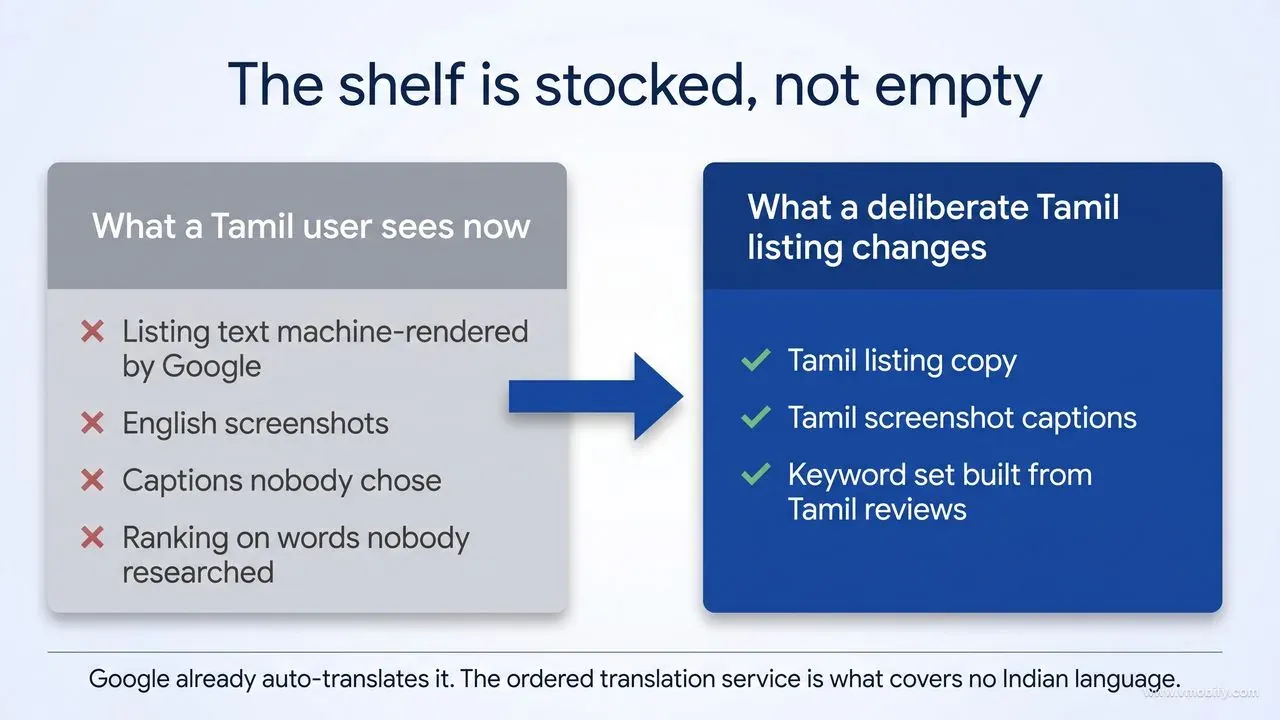
What that does not mean is that an Indian-language user sees nothing. Google supplies automated machine translations of store listings you have not explicitly defined — the same mechanic that shows Spanish-language users in the United States your default listing with automated translations into Spanish. So a Tamil-speaking user is already being served a machine rendering of your English copy. The shelf is not empty. It is stocked with output nobody at your company chose, ordered or read.
That is a better-shaped opportunity than an empty shelf, not a worse one, because of what auto-translation does not touch. It fills listing text. It does not redraw your screenshots, it does not rewrite the captions burned into them, and it does not do the keyword research that decides whether your listing appears for the Tamil noun a user actually types. So the incumbent you are competing against in an Indian-language search result is not a localised app. It is your own category, machine-rendered, sitting above English artwork, ranking on words nobody chose. A Tamil listing that was written deliberately, with Tamil screenshot captions and a keyword set built from Tamil reviews, does not read as a slightly better version of that. It reads as the only app in the results that turned up.
Which languages first is a real question, and the IAMAI data answers it in a way that surprises people — with one qualification that matters, because the relevant chart measures urban India only. Ranked by conversion ratio in urban India, which is IAMAI's measure of how strongly users who have used a language actually default to it, Tamil, Telugu and Malayalam show the highest predominance; Hindi and Kannada sit in the middle; Gujarati, Marathi and Bengali lower. Hindi buys the largest raw reach, but a Tamil or Telugu listing often converts harder per unit of effort because those users are more consistently operating in-language.
A sensible first pass for a consumer app is therefore Hindi for reach, plus one southern language chosen by where your existing installs already cluster. Treat that ranking as a starting hypothesis rather than a national finding, though: 488 million of India's 886 million active internet users are rural, the predominance chart does not cover them, and an app whose installs skew rural may find the order comes out differently. Your own country and language breakdown in Play Console settles it faster than any published table can.
Three practical cautions from working this market across the 300+ apps we have managed since 2013:
- Script versus transliteration. A significant share of Indian-language search happens in Latin script rather than Devanagari or Tamil script. Do not assume the native-script keyword set captures everything — test transliterated forms in your Play description, where the copy is the index.
- Text expansion breaks titles. Devanagari and southern scripts render taller and often wider than Latin text. Screenshot captions designed at English length will overflow. Build the caption layer with headroom.
- Distribution is not only Play. India has an active alternative-store ecosystem with its own Indian-language surfaces, which we cover in our Indus Appstore guide. The same localised copy usually ports across with minimal rework, which improves the return on the original translation investment.
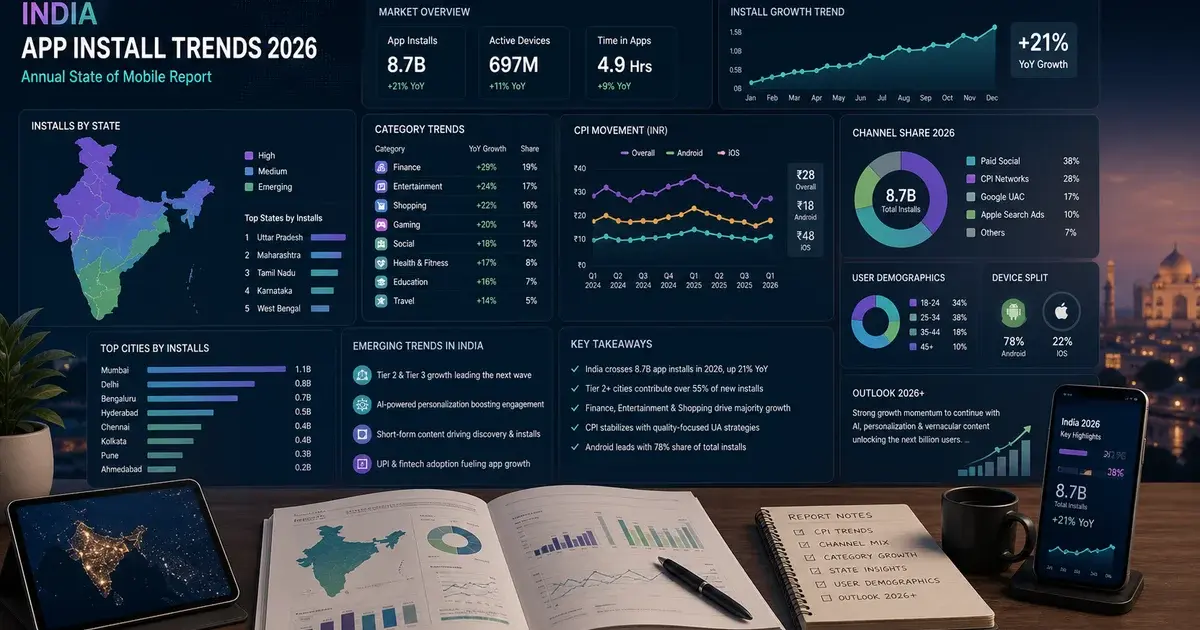
If you are building an India plan from scratch, the language work sits alongside the wider market picture in our analysis of India app install trends — the two decisions, which languages and which acquisition channels, should be made together rather than in sequence.
How do you measure whether a locale paid off?
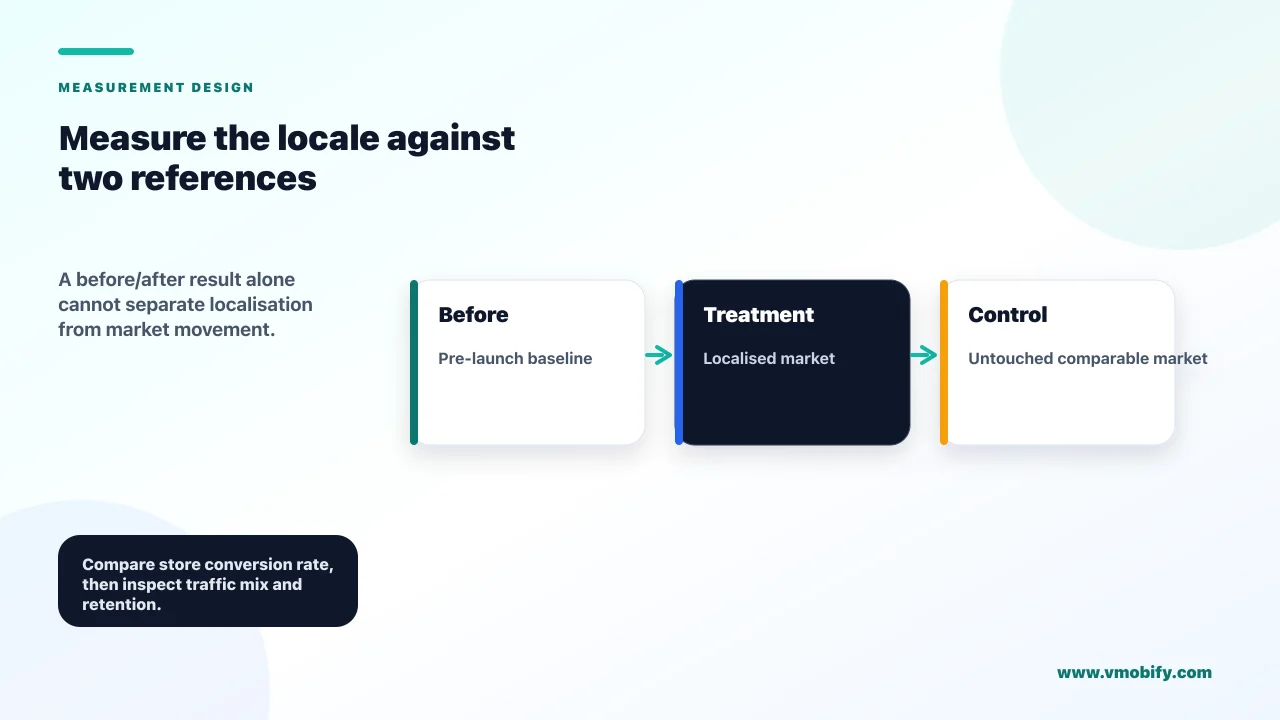
Measure a locale on its own store conversion rate against a pre-launch baseline and an untouched control market — never on total downloads, which will move for a dozen reasons that have nothing to do with your translation. Localisation is one of the easiest ASO changes to measure properly and one of the most commonly measured badly.
Set the measurement up before you ship, because half of it is unrecoverable afterwards:
- Record a 28-day baseline for the target territory. Impressions, product page views and installs on Apple; store listing acquisition by country and language on Play. The metric that matters is the ratio, not the volume.
- Nominate a control market. Pick a comparable territory you are deliberately not localising for the next six weeks. When your target market moves, the control tells you how much of the movement was the localisation and how much was seasonality, a feature release or a category-wide shift.
- Freeze everything else. Do not ship a new icon, a new screenshot set and a localisation in the same week. If you cannot resist changing several things at once, use Play's store listing experiments, which run per-language and isolate the variable for you.
- Give it six to eight weeks. Store search indexing takes time to settle after a metadata change, and a locale that looks flat at week two frequently looks different at week six.
The question you are answering is narrow: did the same volume of store traffic in that territory convert at a higher rate once it was reading its own language? If impressions also rose, the keyword work is doing its job as well as the copy — those are two separate wins and it is worth attributing them separately, because they tell you different things about where to spend the next round of effort.
Then convert the result into money, which is the only version of this argument a finance team will act on. Take the incremental installs over the first 12 months, divide by the total one-time cost of the locale — translation, keyword research, screenshot production, review time — and compare that number against your blended cost per install in the same market. Our editorial view, formed from our own accounts rather than from any benchmark we can hand you, is that a properly executed locale clears that comparison comfortably enough that the debate stops being about whether to localise and becomes about how many locales the team can maintain. Do not take that on trust. Run the arithmetic on your own first locale before you promise a finance team a multiple, because the number is yours, not ours.
Two adjustments keep the analysis honest. First, installs are not the outcome; a locale that installs well and retains badly is a signal that you have localised the listing ahead of the product, which is a real finding and worth acting on immediately. Track day-7 retention and revenue per user for the new locale separately for at least a quarter. Second, watch your ratings by country. A localisation that drives volume into a market where the experience is poor will show up in the local star average long before it shows up in your global one.
Finally, set the kill rule in advance. If a locale has not moved store conversion rate against its control after eight weeks, the honest options are to fix the specific weakness — usually screenshots or a keyword set that was translated rather than researched — or to withdraw the localisation and put the effort into the next market. Keeping an underperforming locale live because it was expensive to produce is the most common form of sunk-cost reasoning in ASO, and if you want a second opinion on where a market went wrong, our ASO team reviews localised listings against the local competitive set rather than against the English original.
What breaks when you localise badly?
Bad localisation costs more than no localisation, because the damage lands on the exact page where the install decision happens and then persists in reviews and ratings you cannot read. This is the section to read before you approve a bulk machine-translation project.
The failure modes, roughly in order of how often we are asked to repair them:
- Unreviewed machine copy. Fluent-but-wrong text reads as low effort at best and fraudulent at worst. In finance, health and any category where the user is handing over money or personal data, awkward phrasing is read as a trust signal, and it is read fast.
- Translated keyword sets. The words are correct and nobody types them. On Apple you have burned a 100-byte field that cannot be recovered until the next update; on Play you have filled the indexed copy with terms that generate no impressions.
- Mismatched assets. A translated description sitting above English screenshots is the most visible tell of a half-finished job, and it is the combination the user actually sees. If you can only do one, do the screenshots.
- A localised listing in front of an unlocalised app. The worst outcome available. The listing wins the install, the app opens in English, the user uninstalls and leaves a one-star review in their own language. You have converted acquisition budget into a permanent conversion penalty for that storefront.
- Unanswered reviews. Ratings and reviews are country-specific, so a handful of poor reviews in a small storefront moves the visible average in a way the same reviews would not in a large one. If nobody on the team reads the language, nobody replies, and the pattern compounds.
- Layout breakage. German and Russian expand against English; Arabic and Hebrew run right to left; Indian scripts render taller. A 30-character title that fitted in English gets truncated at exactly the point where your brand name ends and your keyword begins.
- Policy exposure. Metadata policy applies to every translation. Keyword stuffing added by a freelancer trying to be helpful is your violation, in a language you cannot audit.
Every one of these has the same root cause: treating localisation as a content production task rather than a market entry decision. The teams that get it right run each locale through the same gate they would use for any other market — is there demand, can we serve it, can we support it, can we measure it — and only then commission the words.
The good news is that localisation is reversible in a way most launch decisions are not. If a locale is doing damage, remove the localisation, let the storefront fall back to your primary language, fix the underlying gap and return to it. That is a cheap correction, and it is a great deal cheaper than leaving a bad listing live for a year because pulling it would look like an admission.
If we were starting a localisation programme tomorrow, the order would be exactly the one in this guide: read your own country data, pick three locales where reach per localisation is highest, rebuild the keyword sets in-language rather than translating them, localise the text a user reads before installing, hold everything else constant for six weeks, and then decide with numbers. It is slower than translating fifteen locales in an afternoon. It is also the only version that produces a market you can keep.
Frequently Asked Questions
How many languages can you localise an app store listing into?+
Apple supports 50 App Store languages and locales, and each storefront has a default language plus a defined set of additional supported languages. Google Play accepts developer-supplied translations across a considerably longer list, including Hindi, Tamil, Telugu, Marathi, Kannada, Gujarati, Malayalam, Punjabi, Bangla and Urdu, plus a separate English (India) locale.
Is the App Store keyword field separate for each language?+
Yes. Every App Store localisation carries its own metadata, including its own keywords field of up to 100 bytes. Apple also states that localised keywords are searchable in every country or region where the App Store supports that language, so a Spanish (Mexico) localisation is discoverable in the United States storefront too.
Does Google Play have a keywords field?+
No. Play indexes the listing copy itself — a 30-character app name, an 80-character short description and a 4,000-character full description. Your keyword research still matters, but on Play it has to be expressed in copy that reads naturally rather than dropped into a hidden field.
Is machine translation good enough for a store listing?+
It is a floor, not a strategy. The free machine-translation service you can order in Play Console covers ten enumerated locales, none of them Indian languages, and Google states plainly that those translations are not reviewed or approved by humans. Separately, Google auto-translates listings you have not defined at all, so machine copy is often already live in languages you never chose. Its own discovery guidance notes that a professionally translated description can produce better search results, so use machine output as a draft a native speaker edits, never as the published listing.
Which Indian languages should an app localise into first?+
Hindi buys the largest raw reach, but IAMAI and Kantar data for urban India shows Tamil, Telugu and Malayalam users defaulting to their own language most consistently, measured by conversion ratio. A sensible first pass is Hindi plus one southern language chosen by where your existing installs already cluster, then expand based on measured conversion rather than population size.
Should you localise the app before the store listing?+
No, do it the other way round. A localised listing plus a small paid test costs a fraction of a full product localisation and tells you whether the demand is real. The one combination to avoid is a localised listing in front of an English-only app, which buys installs, uninstalls and negative reviews in that language.
How long before you can tell whether a locale worked?+
Allow six to eight weeks. Store search indexing takes time to settle after a metadata change, and you need enough traffic in that territory to read a conversion-rate difference against an untouched control market. Judge on store conversion rate and per-locale install cost, not on total downloads.
Sources
- Apple — App Store localizations — The 50 supported languages and the storefront-by-storefront table of default and additional languages
- Apple — Localize your app information — Fallback behaviour when no localisation matches, and confirmation that localised keywords are searchable wherever the App Store supports that language
- Apple — Platform version information — Field limits: 100 bytes of keywords, 4,000-character description, 170-character promotional text
- Apple — App information reference — App name and subtitle limits of 30 characters each
- Google Play — Translate and localise your app — The developer-supplied translation languages including Urdu, the ten enumerated free machine-translation locales, the not-reviewed-by-humans disclaimer, and the $0.07-per-word paid option
- Google Play — Best practices for your store listing — The 30-character app title, 80-character short description and 4,000-character full description limits; that the Metadata policy applies to all translations; and the requirement to supply separate screenshots and promotional videos per language where screenshots contain text
- Google Play — Create custom store listings — Up to 50 custom listings per app, the full set of targeting types including country, search keywords and unique URL, and confirmation that Google auto-translates the default listing for languages you have not defined
- IAMAI and Kantar — Internet in India 2024 — 886M active internet users, 488M rural, 870M (98%) accessing the internet in Indic languages, 57% urban Indic preference
About the author
Amol Pomane — Founder, Vmobify
Amol leads Vmobify, a mobile app growth agency that has driven 30M+ downloads and ranked 54K+ keywords across 300+ apps since 2013. He writes about ASO, paid user acquisition, retention, and the operational reality of scaling mobile apps in India and global markets.
Check localized screenshots
Inspect localized screenshot dimensions before store upload.
Open free tool