How to Get More App Ratings and Reviews Without Breaking Policy
Every ASO guide tells you review velocity is a ranking factor. Almost none tells you how to earn reviews without doing something both stores prohibit — starting with the tactic most apps are quietly using right now.
On this page
- Why does review velocity matter more than review count?
- Why is review gating against policy on both stores?
- How do the iOS and Android review APIs actually work?
- When should you actually trigger the review prompt?
- How do you earn reviews rather than ask for them?
- What do you do about unhappy users if you cannot gate?
- Does responding to reviews change anything?
- How do you recover a rating that has already dropped?
- Which review tactics get your app removed?
- Frequently Asked Questions
Why does review velocity matter more than review count?
Both stores read the rate at which an app accumulates ratings, and how recent they are, as a signal of current quality — which is why an app with 500 ratings gathered this quarter outranks an app with 5,000 gathered three years ago. Count is a stock; velocity is a flow, and the algorithms care about the flow.
There are two separate mechanisms at work, and conflating them causes most of the confusion:
- Ranking. Rating average and rating volume both feed store ranking, weighted toward recency. A steady stream of current ratings tells the store the app is actively good, not historically good.
- Conversion. The star rating shown on your listing changes whether a browser installs at all. This effect is larger and more immediate than the ranking effect, and it compounds: better conversion means more installs from the same impressions, which means more velocity.
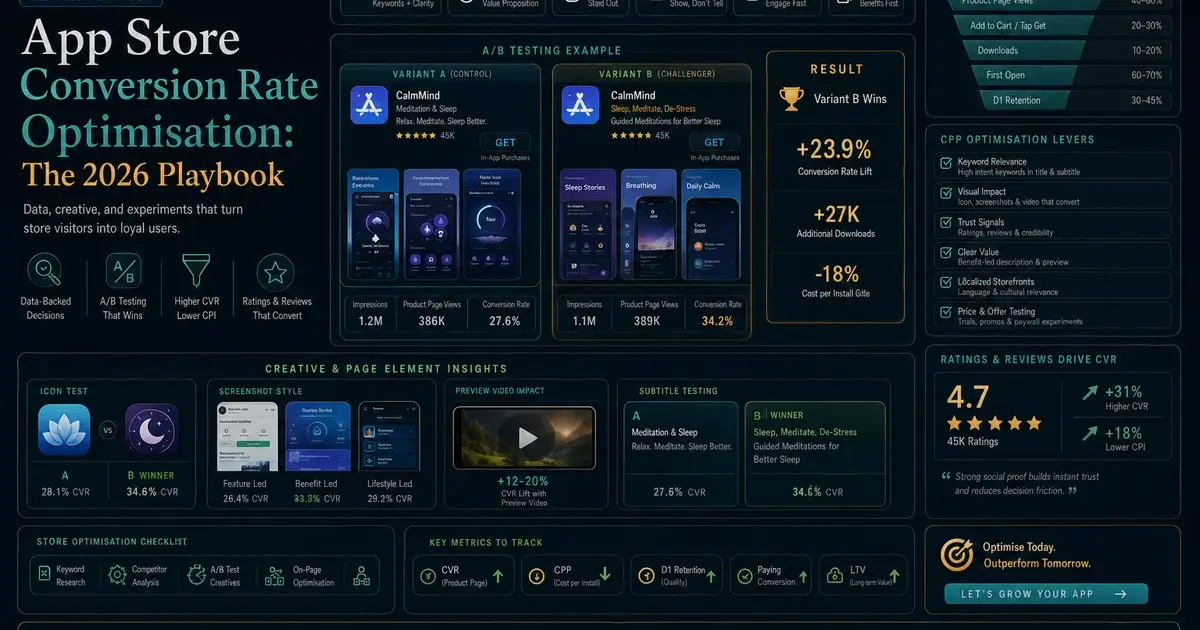
The conversion half is where the real money sits. A listing showing 4.6 stars converts materially better than one showing 3.9, and the gap between them is usually not product quality — it is whether the app ever asks, and when. Our store conversion guide covers where rating sits against the other listing elements.
Recency also cuts the other way, which teams forget. A rating collapse recovers faster than most people expect, because recent ratings are weighted more heavily — but a good rating decays too, and an app that stops asking will drift down as its recent ratings become sparse and self-selecting. The people who leave unprompted reviews skew negative, because irritation is a stronger motivator than satisfaction.
Two structural details are worth knowing because they change where the effort should go. First, ratings and reviews are separate things: a rating is a tap, a review is written text. Rating volume is far easier to move because the barrier is a hundred times lower, and rating is what feeds the star figure on your listing. Written reviews matter for a different reason — they are what a hesitant browser reads before installing, and the top few are disproportionately influential.
Second, ratings are counted per store per country. A user in India sees the rating and reviews from their storefront, not a global average. That matters enormously if you are expanding: an app with an excellent rating at home can present as almost unrated in a new market, which suppresses conversion exactly when you are spending to acquire there. If you are running a market entry, treat rating velocity in that storefront as part of the launch plan rather than something that follows automatically — the same logic our India market analysis applies to install costs applies here.
Across the 300+ apps we have managed since 2013, the single most common rating problem is not a bad product. It is an app that never asks, so its public rating is composed almost entirely of the small minority of users who were annoyed enough to go looking for the review box.
Why is review gating against policy on both stores?
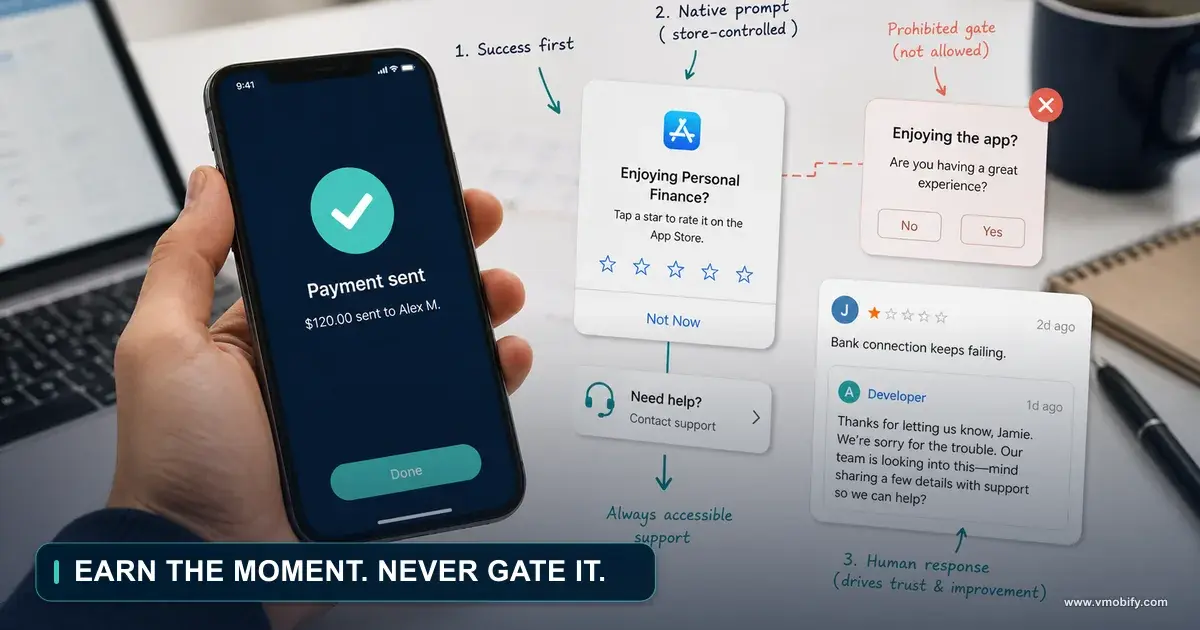
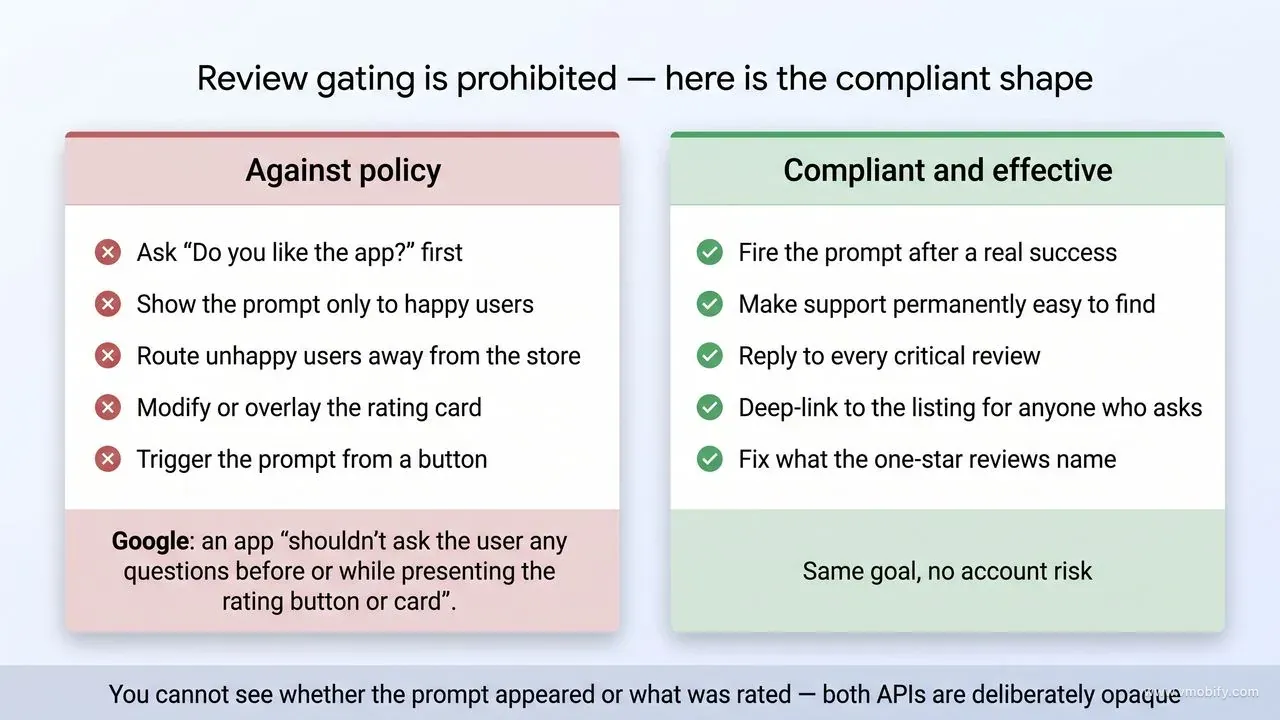
Review gating — asking users how they feel, then routing only the happy ones to the store prompt and the unhappy ones to a support form — is the most widely used review tactic in the industry, and Google prohibits it in explicit terms. If you take one thing from this post, take this one, because a great many apps are doing it right now.
Google's In-App Review API design guidelines say it directly: your app "shouldn't ask the user any questions before or while presenting the rating button or card, including questions about their opinion (such as 'Do you like the app?') or predictive questions (such as 'Would you rate this app 5 stars')."
That single sentence forbids the entire pattern. The "Enjoying our app? Yes / Not really" dialog that fronts a review prompt is the exact thing being described.
On iOS the constraint arrives differently but lands in the same place. Apple requires the SKStoreReviewController API, and that API gives you no signal at all — you cannot tell whether the prompt appeared, whether the user rated, or what they rated. So even setting policy aside, gating on iOS does not work mechanically: you can filter who you attempt to prompt, but you learn nothing and control nothing after that.
Both stores also prohibit modifying the card. Google requires you "surface the card as-is, without tampering or modifying the existing design in any way, including size, opacity, shape, or other properties," adds "don't add any overlay on top of the card or around the card," and states that once shown you must not programmatically remove it.
The uncomfortable part is that gating works, in the narrow sense that it raises average rating. It is also the tactic most likely to be quietly copied from a competitor's app without anyone checking the policy. Being right here is worth more than the half-star: enforcement on review manipulation is account-level, not listing-level.
How do the iOS and Android review APIs actually work?
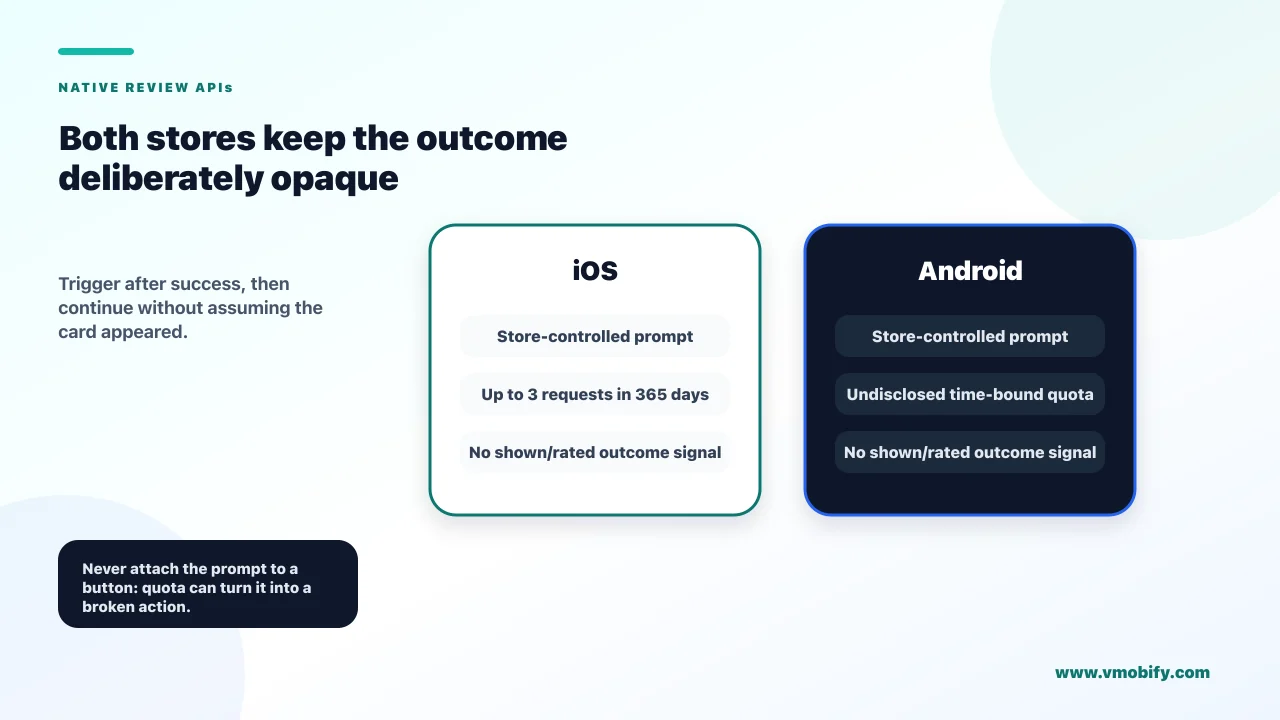
Both APIs present a store-controlled card inside your app, both ration how often it can appear, and both deliberately tell you nothing about the outcome. Understanding what they withhold is more useful than understanding what they do.
iOS — SKStoreReviewController
- Apple states you "can prompt for ratings up to three times in a 365-day period."
- You call the API at a moment of your choosing; the system decides whether to actually show anything.
- Your callback does not tell you whether it appeared or what happened.
- Three attempts per user per year is the whole budget.
Android — In-App Review API
- Google enforces "a time-bound quota on how often a user can be shown the review dialog," and is explicit that "the specific value of the quota is an implementation detail, and it can be changed by Google Play without any notice."
- So you cannot even design around a known number.
- Calling the flow repeatedly in a short window will simply do nothing.
Three practical consequences follow:
- Never wire the prompt to a button. Google says so plainly: "you should not have a call-to-action option (such as a button) to trigger the API, as a user might have already hit their quota and the flow won't be shown, presenting a broken experience." If you want a button, deep-link it to the store listing instead — that always works.
- Never block the UI waiting for it. The flow may not appear. Your app must behave identically either way.
- Never measure prompt-to-review conversion. You cannot. Any analytics event claiming to track it is measuring your call, not the outcome. Judge changes by public rating movement over weeks instead.
There is one more asymmetry worth planning around. On Android the in-app card lets the user both rate and write a review without leaving your app, so the flow is genuinely frictionless. On iOS the system prompt collects a star rating inline and offers to open a review form — meaning iOS ratings come easily and written iOS reviews come harder. If written reviews matter to you on iOS, they will mostly come from users motivated enough to go to the listing themselves, which loops back to earning rather than prompting.
Keep a deep link to your store listing's review section available as a separate, non-prompt route — in a support reply, in an email to an enthusiastic user, in a release note. That link always works, has no quota, and is the compliant answer to "how do I let people who want to review us actually do it?" Both stores support a URL that opens the listing with the review action ready.
Test on a real device with the store account signed in, and expect the prompt not to show on repeat attempts — that is the quota behaving correctly, not a bug. Both platforms provide testing paths that let you see the card without burning real quota.
When should you actually trigger the review prompt?
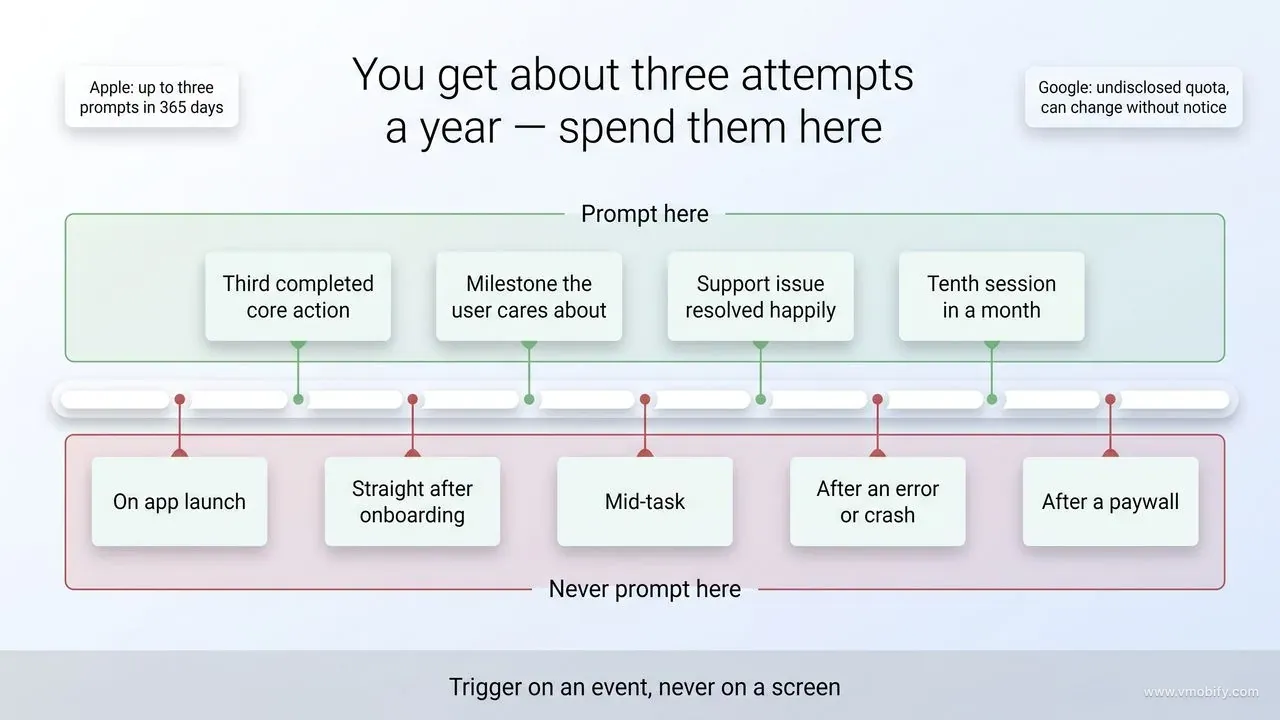
Because prompts are rationed, timing is the only real lever you have — and the rule is to fire after a moment of demonstrated success, never on app open and never during a task. Apple's own guidance is to ask "when users are most likely to feel satisfaction with your app, such as when they've completed an action, level, or task," and to "make sure not to interrupt their activity."
The triggers that work share one property: the user has just received value, and knows it.
- After a completed core action — a bill paid, a workout finished, an order delivered, a document exported. Not the first one; the third or fourth, once the behaviour is established.
- After a milestone the user cares about — a streak reached, a goal hit, a level cleared.
- After a problem was solved — a support ticket closed happily, a sync that finally worked.
- After sustained engagement — a user on their tenth session in a month is telling you something no survey would.
The triggers that waste your allocation:
- On app launch, before the user has done anything. The most common implementation and the worst.
- Immediately after install or onboarding. Nothing has happened yet.
- Mid-task, interrupting the thing they opened the app to do.
- Right after an error, a crash recovery or a failed payment. Obvious, and still shipped surprisingly often because the trigger was tied to a screen rather than to an outcome.
- After a paywall, whether they bought or not.
Implement the trigger against an event, not a screen. "Third successful export" is a trigger; "settings screen opened" is not. And add a floor — no prompt before the user has had a genuine success — plus your own cooldown on top of the store's, so that your three annual attempts are spread across the year rather than spent in one week.
The activation work in our aha-moment playbook is directly reusable here: the event you identified as the moment a user understands the product is almost always the right prompt trigger.
How do you earn reviews rather than ask for them?
Since you get roughly three prompts per user per year, the volume has to come from having more users reach a moment worth prompting at — which makes review velocity a retention problem wearing an ASO costume. This is the part most ASO advice skips.
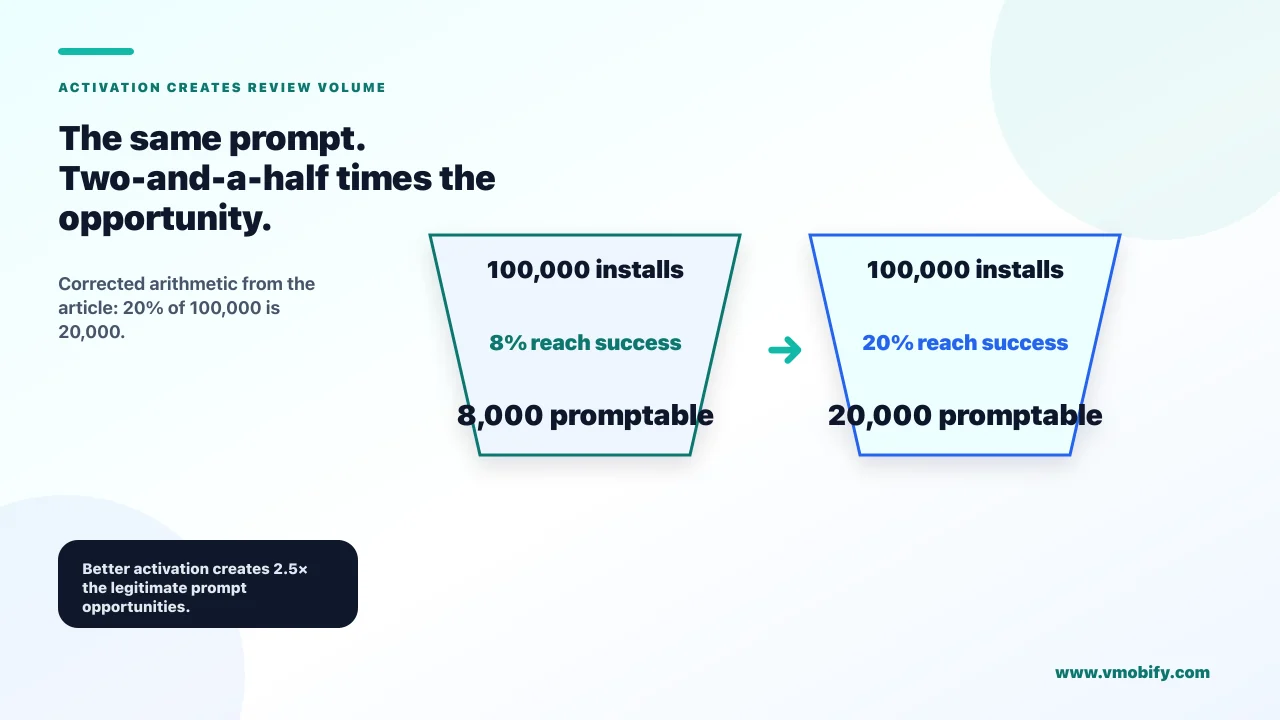
The arithmetic is unforgiving. If 100,000 people install and 8% reach a genuine success moment, you have 8,000 legitimate prompt opportunities. Improve activation to 20% and you have 20,000 — a two-and-a-half-fold increase in review volume with no change to your prompting logic and no policy risk at all.
What actually moves that number:
- Faster time-to-value. Every step between install and first success loses users who will never be promptable. Our onboarding guide covers cutting that path.
- Fixing the crash and bug tail. Users who hit a crash do not leave five stars; some of them leave one. Stability work is rating work.
- Bringing lapsed users back to a success. A returning user who completes the core action is an excellent prompt candidate.
- Making the success legible. If the app did something valuable and the user did not notice, they cannot feel satisfied about it. A visible confirmation of what was accomplished is both good product and good prompting.
It is worth checking your own numbers before assuming prompting is the problem. Both consoles report ratings over time against installs, and the ratio tells you which lever you are short of. A healthy prompted app converts a low single-digit percentage of active users into ratings over a year; if you are an order of magnitude below that, the gap is either that you never prompt, that you prompt at the wrong moment, or that too few users ever reach a moment worth prompting at. The free ASO tools round-up covers what you can measure without paying for anything.
There is a second, slower source worth building: people who review without being prompted because they were genuinely delighted or genuinely helped. Fast, human support generates these reliably. So does shipping a fix someone asked for and telling them you did — that specific act converts a critic into an advocate more often than anything else we have seen.
None of this is a growth hack, which is precisely why it is durable. It cannot be copied by a competitor overnight and it cannot get your account suspended.
What do you do about unhappy users if you cannot gate?
You make support permanently easy to find, independently of the review prompt — so an unhappy user has an obvious route that is not the store, without you ever asking a question that filters who sees the prompt. The distinction is subtle and it is the whole compliance line.
What is not allowed: a dialog asking how they feel, with the answer deciding whether they see the review card.
What is allowed and effective:
- A visible, always-available "Help" or "Contact us" entry point in your main navigation or settings, not buried three levels down. Available to everyone, all the time, unconnected to any review logic.
- Contextual help at the points where people get stuck — an error state that offers support rather than only an error code.
- Proactive outreach on failure signals you can already see: repeated failed transactions, a crash loop, a stalled sync. Reaching out because your telemetry shows a problem is support, not gating.
- Fast replies. The single biggest determinant of whether a frustrated user goes to support or to the store is which one they expect to produce a result.
The reframe that makes this easier to accept: gating does not fix anything. It hides dissatisfaction from your public rating while leaving it in your product, and it means the feedback you most need never reaches you. An unhappy user who writes a one-star review has told you something specific and public. The same user silently routed into a support form and forgotten has told you nothing and still churned.
In our portfolio, teams that removed a gating dialog usually saw the average rating dip briefly and then recover past its previous level within a couple of months — because the same work that stops one-star reviews also stops churn.
Does responding to reviews change anything?
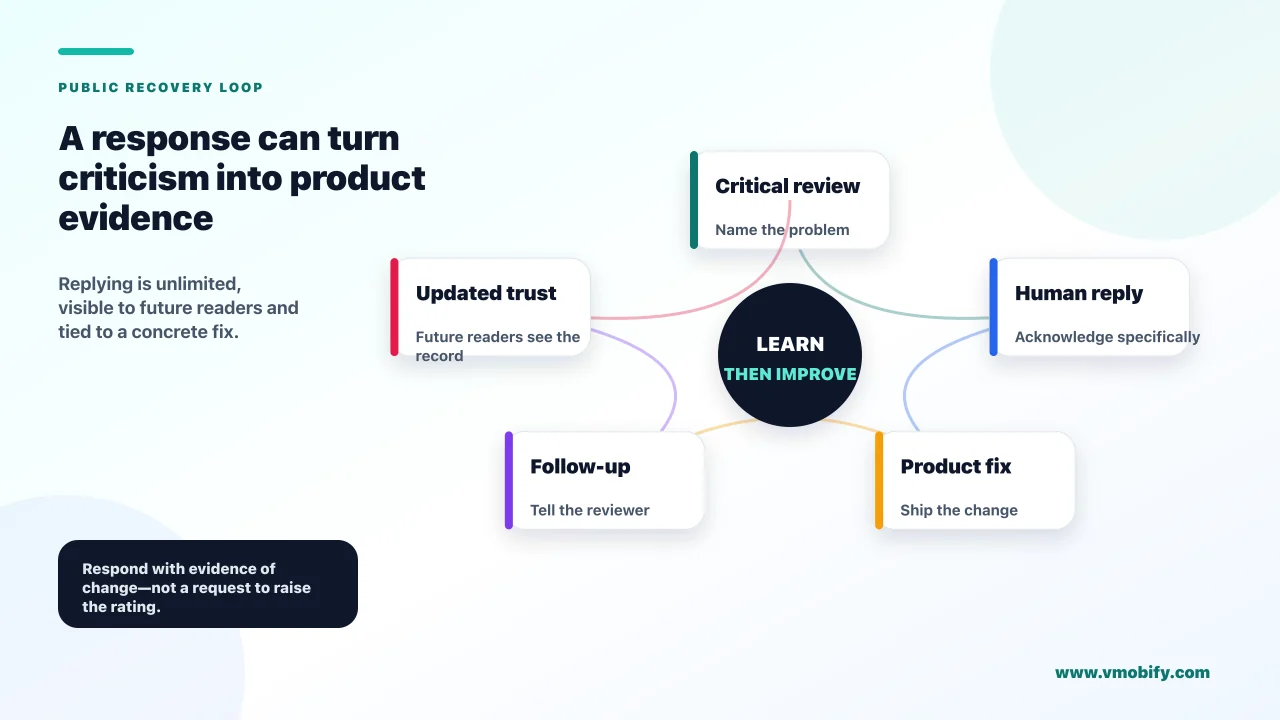
Yes, and it is the most underused legitimate lever available — because it is unlimited, it is public, and on Android it can prompt the reviewer to reconsider their rating. Unlike prompting, there is no quota on replying.
Three separate returns:
- The reviewer sometimes updates their rating. Google notifies users when a developer replies, and a one-star review caused by a bug you then fixed is one of the more reversible things in this business.
- Every future reader sees the reply. This is the larger effect. A prospective user reading a critical review with a specific, non-defensive developer response reads a team that is present. The same review with no reply reads as abandonment.
- You get structured product feedback for free, from the users motivated enough to write.
How to reply well: answer the specific complaint rather than posting a template; say what you did or will do, without committing to dates you might miss; offer a support route for anything needing account details; keep it short; and never argue. A defensive reply is read by everyone who visits the listing afterwards, and it does more damage than the review it answers.
Prioritise by impact rather than by star rating: recent reviews, reviews describing a reproducible bug, reviews that are wrong in a way future readers would find misleading, and detailed critical reviews that will sit near the top of your listing. A two-star review explaining exactly what broke is worth more of your time than a five-star review saying "good app".
At volume this needs a system rather than goodwill. Build a small set of starting points for the recurring cases — a bug that is fixed in a named version, a bug still open, a feature request, a misunderstanding of how something works, a billing issue needing account details — and then edit each one so it answers the specific review. The starting points save time; sending them unedited is transparent and counterproductive. Route anything requiring account access to support rather than resolving it in public.
Decide who owns it, too. Review replies land on whoever has console access by default, which usually means nobody. In our portfolio the teams that reply consistently have made it a named responsibility with a slot in the week, and the teams that do not have almost always meant to.
Set a rhythm — a fixed slot two or three times a week — rather than reacting whenever a notification arrives. Consistency matters more than speed here, and an unanswered backlog is itself visible.
How do you recover a rating that has already dropped?
Fix the cause first, then rebuild velocity — because recency weighting means new ratings genuinely can outweigh old ones, but only once the thing generating one-star reviews has stopped. Prompting harder into an unfixed problem accelerates the decline.
The sequence that works:
- Read the negative reviews as data. Cluster them. A rating drop almost always traces to one release, one broken flow, or one policy change — and the reviews will name it.
- Fix it and ship. Nothing else in this list matters until this is done.
- Reply to the affected reviews saying it is fixed and in which version. This is where reply-driven rating updates concentrate.
- Then resume prompting, at your best success moment, to users on the fixed version.
- Watch weekly, not daily. Averages move slowly at volume; daily readings are noise and invite panic changes.
One structural tool worth knowing, and it exists on only one store: Apple lets you reset your summary rating when you release a new version, and that rating is specific to each territory. Google Play has no equivalent — its documentation states plainly that app ratings do not start over when you publish a new version. What Play does instead is weight the rating users see toward more recent ratings, which is a softer, automatic version of the same thing and is why recovery on Android is faster than a lifetime average would allow. Treat an Apple reset as a last resort. You are trading your entire rating history, including the good part, for a clean slate, and a fresh listing with almost no ratings converts poorly too. It is the right call only after a genuine relaunch where the old ratings describe a product that no longer exists.
Our full diagnostic on why an app rating drops and how star averages are really calculated covers the mechanics in depth. Set a realistic horizon. For an app with meaningful install volume, a recovery from a bad quarter typically takes one to three months of clean releases and consistent prompting. Anyone promising faster is describing something that is not legitimate.
Which review tactics get your app removed?
Anything that buys, trades or coerces ratings, and anything that filters who sees the prompt — these are enforced at the account level, not the listing level. The downside is categorically worse than the upside.
The list, in rough order of how often we see it attempted:
- Buying reviews. Detection is mature — pattern analysis across accounts, devices and timing. Bought reviews also read as bought to any human who scrolls them.
- Incentivising reviews. Offering currency, features, discounts or entries in exchange for a review is prohibited on both stores, and it does not become allowed by saying "leave an honest review."
- Review-swap groups. Same detection surface as buying, with the added exposure of a written record of the arrangement.
- Review gating. Covered above, and the one most likely to be in your app already.
- Blocking app functionality behind a review. Coercion, and reliably reported by users.
- Nagging. Repeated prompts do not work — the quota stops them — but a custom nag screen outside the API is both irritating and a policy problem.
- Competitor review attacks. Obviously prohibited, and traceable back to whoever benefits.
It is worth being clear about why the incentivised version is not a grey area. Apple's App Store Review Guidelines and Play's policies both prohibit offering anything of value in exchange for a review, and adding the word "honest" to the offer changes nothing — the exchange is the violation, not the sentiment requested. The same applies to internal versions of the tactic, like asking staff or contractors to rate the app.
Both stores treat rating manipulation as a serious violation because it corrupts the signal the whole store runs on. Play's policy on ratings, reviews and installs and Apple's review guidelines both cover it, and enforcement can reach the developer account rather than only the app.
The legitimate version is genuinely slower: get more users to a real success, prompt once at the right moment, reply to everyone, and fix what the critical reviews tell you. It compounds, it survives audits, and it is the only version that still works next year. If you want a second opinion on where your rating is actually leaking, talk to our team — it is usually visible in the reviews themselves within an hour.
Frequently Asked Questions
Is it against policy to ask users if they like the app before showing the review prompt?+
Yes on Google Play, explicitly. Google states an app "shouldn't ask the user any questions before or while presenting the rating button or card, including questions about their opinion". On iOS the same pattern is pointless as well as inadvisable, because SKStoreReviewController tells you nothing about whether the prompt appeared or what was rated.
How many times can I show the review prompt?+
Apple allows prompting up to three times in a 365-day period. Google enforces a time-bound quota it does not publish, and states the value can change without notice. Neither tells you whether a given attempt actually displayed anything.
Can I put a "Rate us" button in my settings screen?+
Not wired to the review API — Google advises against it, because a user who has hit their quota would tap a button and see nothing. If you want a button, deep-link it to your store listing instead, which always works.
When is the best moment to ask for a review?+
Straight after a completed core action, a milestone the user cares about, or a problem you solved for them — and not on app open, during a task, after an error, or right after a paywall. Trigger on an event rather than a screen, and not on the user's first success.
Does replying to reviews actually help?+
Yes, in three ways: the reviewer is notified and sometimes updates their rating, every future visitor to your listing sees that you respond, and you get specific product feedback. Unlike prompting, replying has no quota.
Should I reset my app rating if it has dropped?+
Rarely. Resetting discards your good ratings along with the bad and leaves a listing with almost none, which converts poorly. Fix the cause, reply to the affected reviews, then rebuild velocity — recency weighting means new ratings do genuine work. Reset only after a true relaunch.
How long does it take to recover a damaged rating?+
For an app with meaningful install volume, typically one to three months of clean releases and consistent prompting at a real success moment. Anything promising a faster turnaround is describing a tactic that risks the account.
Sources
- Android Developers — In-App Review API — Design guidelines, the prohibition on opinion questions, quota behaviour and the no-button rule
- Apple — Ratings and Reviews — The three-prompts-per-365-days limit and guidance on timing
- Apple — SKStoreReviewController — The required iOS API and what it does and does not report back
- Apple — Human Interface Guidelines: Ratings and reviews — Design guidance on when and how to request a rating
- Play Console Help — Ratings, reviews and installs policy — Play policy on rating and review manipulation
- Android Developers — Integrating In-App Review (Kotlin/Java) — Implementation details and testing the review flow without burning quota
- Apple — App Store Review Guidelines — Rules covering incentivised and manipulated ratings
About the author
Amol Pomane — Founder, Vmobify
Amol leads Vmobify, a mobile app growth agency that has driven 30M+ downloads and ranked 54K+ keywords across 300+ apps since 2013. He writes about ASO, paid user acquisition, retention, and the operational reality of scaling mobile apps in India and global markets.
Check your store metadata
Run your current App Store or Play metadata through the free checker.
Open free tool