Do You Need a Backend, and Do You Need Accounts?
Two questions get merged into one decision and both get answered wrong. Apple will not let you gate a first launch behind a login unless your app genuinely has account-based features, and Google Play tells you outright that its purchase notifications do not carry complete information about the purchase. One of these questions is a policy constraint; the other is an architecture constraint, and they resolve separately.

On this page
- Which question are you actually asking?
- Will Apple let you put a login in front of your app?
- What does adding accounts oblige you to build?
- Does a social login drag in a second requirement?
- Can you sell subscriptions without a server?
- What breaks if you verify purchases on the device?
- What can you genuinely ship with no backend?
- When do accounts earn their place?
- How do you sequence this without a rewrite?
- Frequently Asked Questions
Which question are you actually asking?
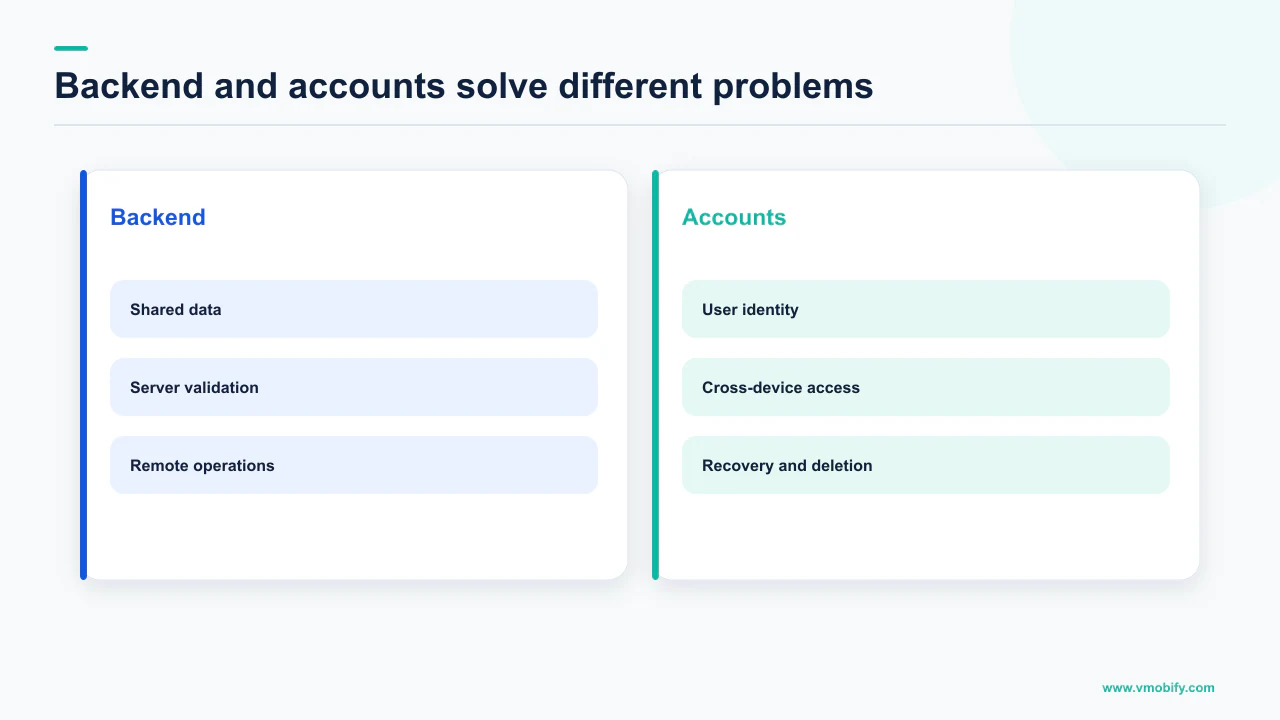
These are two separate questions with two separate answers, and merging them is how teams end up building a login screen they were never allowed to show and a purchase flow they cannot audit. Accounts are a policy question first. A backend is an architecture question that the stores answer for you the moment you take money.
The pattern is consistent. Somebody decides the app needs users, so it needs sign-up, so it needs a database, so it needs an API, and four weeks disappear before a screen does anything a user asked for. Then review rejects the login gate.
Split it properly:
Do you need accounts?
- Governed by Apple's review guidelines, not by preference
- Allowed only when the app has significant account-based features
- Creating them triggers deletion obligations on both stores
- A product decision with a policy ceiling
Do you need a backend?
- Governed by what you are trying to trust
- Google states outright that billing notifications are incomplete on their own
- Purchase verification is documented as backend work
- An architecture decision the store rules force
You can need a backend and not need accounts, and that combination is usually the right first release. Across the 300+ apps we have managed since 2013, the expensive mistake here is not choosing wrong — it is answering both questions with one shrug and building for the harder case before anyone has downloaded anything.
Will Apple let you put a login in front of your app?
Not unless the app has significant account-based features — Apple's wording is that if your app doesn't include significant account-based features, you must let people use it without a login. That is a requirement, not advice, and it is one of the more commonly hit walls in review.
Guideline 5.1.1(v) in the App Review Guidelines is short and unusually plain. Apps may not require users to enter personal information to function, except when directly relevant to the core functionality of the app or required by law. If your core functionality is not related to a specific social network, you must provide access without a login or via another mechanism.
Apple also closes the obvious loophole in the same paragraph: pulling basic profile information, sharing to the social network, or inviting friends to use the app are not considered core app functionality. A sign-in that exists so you can send push notifications and count users is exactly the case the guideline is written against.
Ask what the app cannot do for an anonymous user. If the honest answer is "nothing, we just want to know who they are", the login gate fails 5.1.1(v). If the answer is "restore their purchases on a new device, sync their data, show their colleagues' activity", you have account-based features and the gate is defensible.
There is a second cost that has nothing to do with review. A registration wall in front of the first useful moment is measured in installs that never become users. Our guide to onboarding that survives first launch covers where the account request belongs when you genuinely need one — later, after the app has proved something.
Note what the guideline does not say. It does not prohibit accounts. It prohibits requiring them before the app functions. Offering sign-in, and letting a user skip it, satisfies the rule and preserves the option.
What does adding accounts oblige you to build?
Deletion, on both stores, and Google Play requires two separate paths rather than one. This is the obligation teams discover after shipping, usually as a policy warning rather than a design decision.
Apple's rule sits in the same guideline as the login rule: if your app supports account creation, you must also offer account deletion within the app. The supporting documentation is specific about what counts. You must offer to delete the entire account record, along with associated personal data. You may include additional options, but only offering to temporarily deactivate or disable an account is insufficient. If people need to visit a website to finish deleting their account, include a link directly to the page on your website where they can complete the process. And Apple answers the workaround question directly — an app that links out to a web browser for account creation still needs to offer account deletion within the app.
Google Play's requirement is stricter in shape. Its page on app account deletion requirements states that developers whose apps enable account creation must provide users with an in-app path to delete their app accounts and associated data, and provide a web link resource where users can request app account deletion and associated data deletion. Both, not either. The web resource must be functional, relevant in scope with deletion prominently featured, and reference the app or developer name as it appears on the store listing, and users must be able to submit a deletion request without being required to reinstall the app.
That last clause catches teams who built deletion as a screen buried inside a signed-in settings menu. A user who has uninstalled has no in-app path, which is why the web resource is required alongside it.
There is a monetisation wrinkle attached. Apple's guidance is that if the user has auto-renewable subscriptions, you should notify them that their billing will continue through Apple and request that they cancel the subscription before continuing. Deleting the account does not cancel the subscription, and a user who discovers that on their next statement writes the review you spend a quarter recovering from.
Account creation is not one screen. It is sign-up, sign-in, password recovery, in-app deletion, a public web deletion request path, a subscription warning during deletion, and a privacy policy that explains your retention and deletion behaviour. Cost the whole set when you decide, because the store rules will not let you ship half of it.
Can you sell subscriptions without a server?
On Google Play, not properly — Google's own launch documentation says you should create a secure backend server to receive real-time developer notifications, and that those notifications do not give you complete information about the purchase. This is the clearest "you need a backend" statement either store publishes, and it is worth reading in full before you plan a client-only implementation.
Google's Play Billing getting-ready guide describes real-time developer notifications as a mechanism to receive notifications from Google whenever there is a change in a user's entitlement within your app, delivered through Cloud Pub/Sub. It states that to receive them you should create a secure backend server to consume the messages sent to your Cloud Pub/Sub topic. And then the note that decides the architecture:
"You must call the Google Play Developer API after receiving Real-time developer notifications to get the complete status and update your own backend state. These notifications tell you only that the purchase state changed. They do not give you complete information about the purchase."
Take that literally. The notification is a signal that something happened, not a record of what happened. A design that treats the payload as the source of truth for entitlement is building on a document that says it is not one. Google is explicit that the Play Developer API is a server-to-server API providing functionality not available in the Play Billing Library, such as securely verifying purchases and issuing refunds, and that you must configure access to it through Play Console as part of integrating billing.
There is a hard deadline in the same area that a client-only implementation handles badly. Google's billing documentation states that after granting entitlement your app must notify Google that the purchase was successfully processed, and that this must be done within three days so that the purchase isn't automatically refunded and entitlement revoked. Google recommends the server-side acknowledgement endpoints where you have a secure backend, and notes that while you can acknowledge or consume on the client, server-side APIs provide additional protection against issues like poor network connectivity and malicious activity.
A user who pays, then loses connectivity or force-quits before the client acknowledges, is a user who gets automatically refunded three days later while your app still believes they are subscribed. That failure mode is silent, it is entirely on the client path, and it is why acknowledgement belongs on a server. Teams migrating their billing stack should read this alongside our notes on the Play Billing Library 8 migration.
If subscriptions are your revenue, the thing that decides who has paid should not live on a device you do not control — which is also the case for a managed layer rather than a bespoke one, as we compare in StoreKit versus RevenueCat.
What breaks if you verify purchases on the device?
Replay and tampering, and Google documents the specific defence — record every purchase token, check the current one against every previous one, and confirm it with the Play Developer API. Google's guidance on this is prescriptive enough to implement directly.
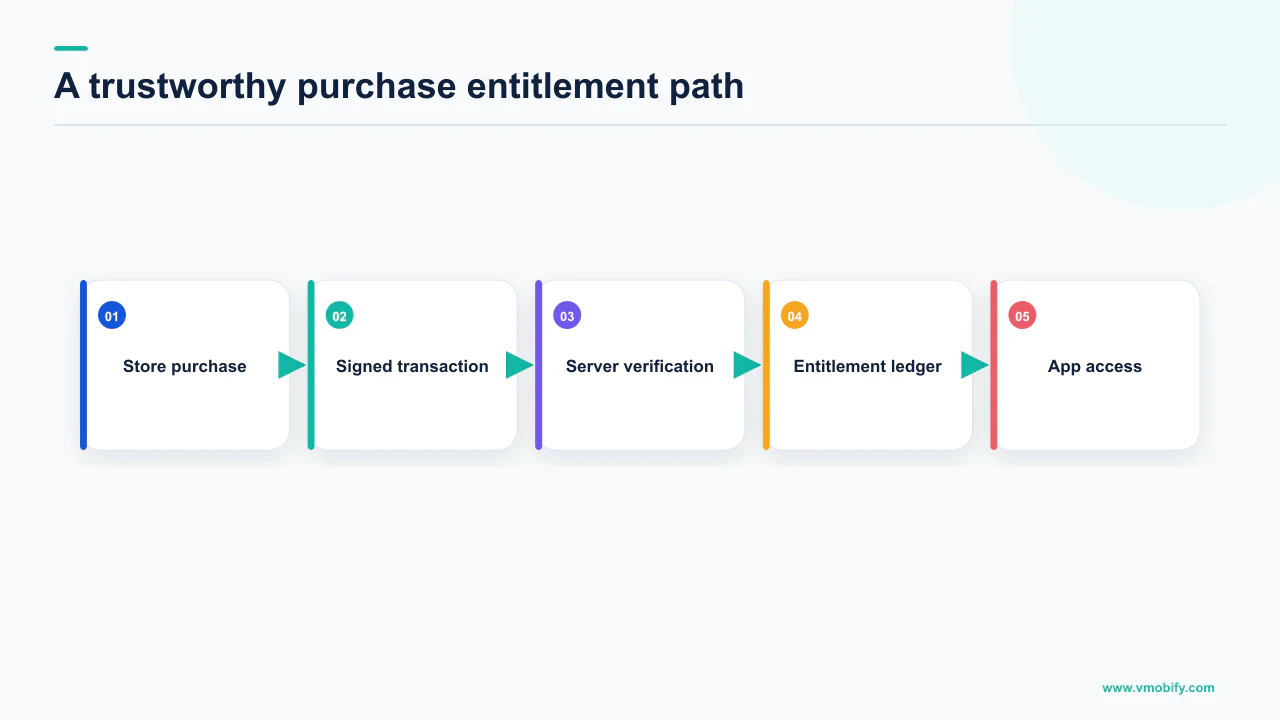
Its fraud and abuse guidance names purchase verification and acknowledgement as a special case of sensitive data and logic that should be handled in the backend. After a user makes a purchase, Google says you should send the corresponding purchase token to your backend, meaning you maintain a record of all purchase token values for all purchases; verify that the token for the current purchase does not match any previous token value, noting that the token is globally unique and can safely be used as a primary key in your database; and use the Play Developer API endpoints for products or subscriptions to verify with Google that the purchase is legitimate.
The general principle Google states around it: as much as your app design permits, move sensitive data and logic to a backend server that you control, because the more data and logic you have in a frontend device, the more vulnerable it is to being modified or tampered with.
Three consequences follow, and they are all architectural rather than cosmetic:
- You need durable storage for purchase tokens. The duplicate check Google describes is impossible without a store that outlives the app process and the device.
- You need a server identity for the user, even without a login. Entitlement has to attach to something. That can be an anonymous, app-issued identifier rather than an email address and a password.
- You need to handle the state change, not just the receipt. Refunds, revocations, grace periods and upgrades arrive as notifications after the sale, on a channel that only a server can hold open.
Point two settles this article's central question. Needing a backend for billing does not mean needing accounts: an anonymous identifier satisfies entitlement without a sign-up screen. That is the shape Firebase Authentication documents for anonymous accounts, which let users who have not signed up work with data protected by security rules, and can later be upgraded to a regular account so the user continues where they left off.
What can you genuinely ship with no backend?
More than most teams assume, provided the app is not selling anything and not sharing state between people. The honest boundary is not "simple apps versus complex apps" — it is whether anything in the product needs to be true for someone other than the person holding the phone.
A tool that computes, records, edits or organises on-device data needs no server at all. Neither does one whose only remote dependency is a public API it reads from. On Apple platforms, cross-device continuity is available without operating infrastructure: CloudKit stores your app's data in iCloud and keeps it up to date across devices and on the web, storing private data in users' own iCloud accounts, with encryption configurable on fields in private databases. That is device sync and a user identity without you running an authentication system or a login screen — and, notably, without triggering the account-creation obligations from the previous sections, because the user is not creating an account with you.
The line moves the moment one of these is true:
- You take money in-app. Covered above; the store documentation settles it.
- Two users need to see the same thing. Messaging, sharing, leaderboards, teams. Someone has to hold the shared state.
- You must change behaviour without shipping a build. Remote configuration, feature flags, content that is not tied to a release.
- Something must be authoritative against a determined user. Entitlements, quotas, credits, anything with a price attached.
- You need a cross-platform identity. A user on iOS today and Android next year is a server-side identity problem, not a client one.
What is not on that list is analytics. You do not need a backend to understand your funnel — an analytics SDK covers it, and confusing the two is how teams justify infrastructure they will not maintain. We set out the alternative in our guide to funnel analytics for apps.
The pattern we see repeatedly in our portfolio is a first release that needs exactly one server-side capability — usually billing — and a team that builds a full identity platform to get it.
When do accounts earn their place?
When losing them costs the user something they would miss — restoring purchases on a new device, keeping work that took effort to create, or being reachable by another person. Everything else is instrumentation dressed up as a feature.
Run the question from the user's side. What does an account give them? If the list is empty, 5.1.1(v) is not an obstacle to work around; it is a correct reading of your product. If the list is real, the account is something users will ask for, and the conversion cost of the sign-up screen drops because there is a reason attached to it.
The sequencing that works is anonymous-first with a documented upgrade path. Firebase Authentication describes exactly this: temporary anonymous accounts let people use features that require authentication without signing in first, and if the user later chooses to sign up you can upgrade the anonymous account to a regular account, so the user can continue where they left off. The app functions immediately, the entitlement has something to attach to, and the account appears at the moment it becomes useful rather than at first launch.
Two operational points. A purchase made anonymously still has to be restorable, so your entitlement record needs a route to the new account at upgrade — design that before you ship. And the moment you allow the upgrade you have enabled account creation, so every deletion obligation above applies from that release onward.
For subscription products specifically, the account question is entangled with the payment question in markets where the mandate lives outside the store — we cover one such case in our piece on UPI AutoPay and app subscriptions.
How do you sequence this without a rewrite?
Decide the two questions independently, ship the smallest server that the store rules actually require, and keep identity anonymous until a user benefit forces it. The rewrite risk sits almost entirely in identity, so that is the decision to defer and the one to design for.
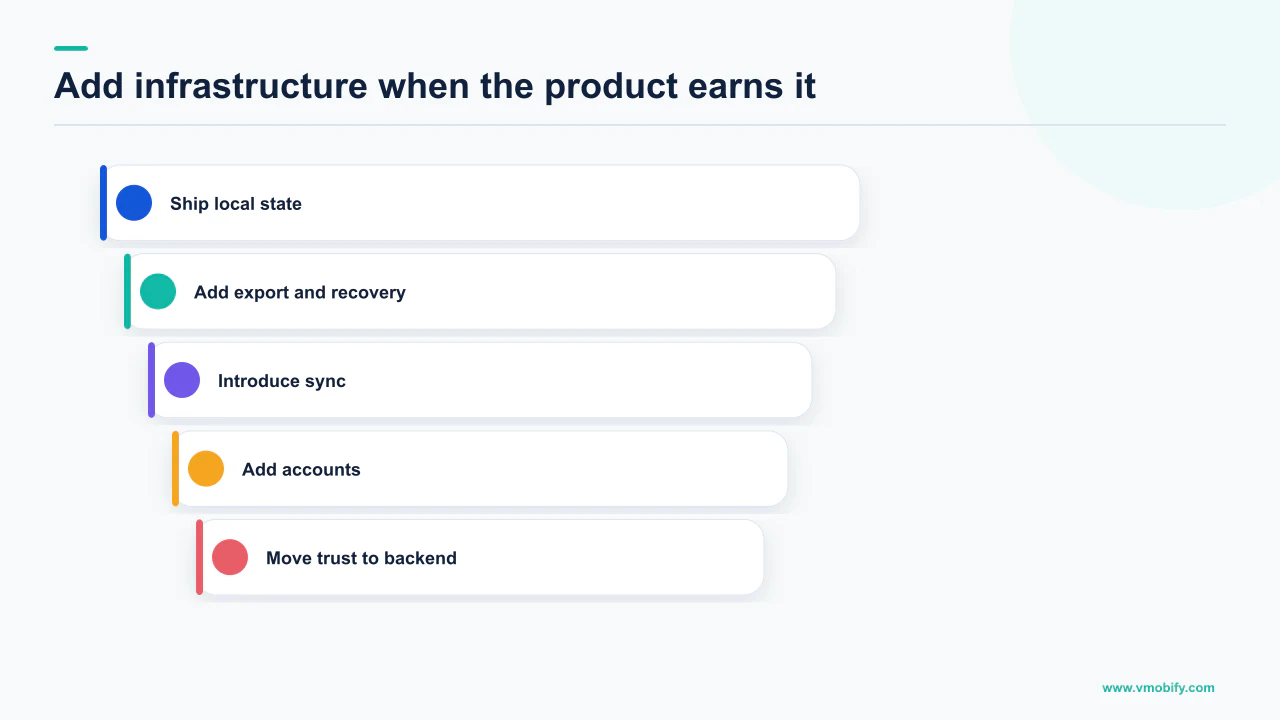
- Write down what breaks without a server. If the honest list is empty, ship without one. If it contains "in-app purchases", you have your answer and its scope.
- Build the billing backend first, not the identity platform. Purchase token storage, the duplicate check Google describes, Play Developer API verification, server-side acknowledgement inside the three-day window, and an endpoint for real-time developer notifications.
- Give every install an anonymous identifier on day one. It costs nothing, it gives entitlements somewhere to live, and it is the hook a real account attaches to later.
- Leave the login out of the first release unless the app cannot function without it. The guideline requires this and the funnel rewards it.
- When you do add accounts, ship the whole obligation set together — in-app deletion, the public web deletion request path, the subscription warning during deletion, and the privacy policy language about retention and deletion.
- Re-read the guidelines before submission, not after rejection. Both stores update the wording; the version you built against last year may not be the version you are reviewed against.
One thing we deliberately do not publish here is a cost or a timeline for any of this. We have no defensible figure for what a billing backend costs to build in a given stack, and inventing one to look authoritative would be worse than useless to anyone budgeting against it. What is defensible is the scope, and the scope above is drawn entirely from the stores' own documentation.
This decision deserves care because it front-loads the whole schedule. A team that answers "yes" to both by default spends its first month on infrastructure and its second on a rejection, before anyone has learned whether the product works. Our guide to publishing a first app covers what that month buys you spent on the listing instead, and the common rejection reasons covers what else review looks for.
If you are staring at a login screen you are not sure you are allowed to ship, or a subscription flow with no server behind it, that is usually a short conversation for someone who has seen both go wrong — tell us what the app does without an account, or see how we approach the paid side in our monetisation work.
Frequently Asked Questions
Can I require users to create an account before using my app?+
Only if the app has significant account-based features. Apple guideline 5.1.1(v) states that if your app does not include significant account-based features, you must let people use it without a login, and that apps may not require users to enter personal information to function except when directly relevant to core functionality or required by law. Pulling basic profile information, sharing to a social network, or inviting friends are explicitly not considered core functionality.
If I add sign-up, what else am I obliged to build?+
Deletion, on both stores. Apple requires account deletion within the app if your app supports account creation, and says that only offering to temporarily deactivate or disable an account is insufficient. Google Play requires an in-app path to delete the account and associated data plus a web link resource where users can request deletion, and users must be able to submit that request without reinstalling the app.
Do I need a backend server to sell subscriptions on Google Play?+
In practice yes. Google states that to receive real-time developer notifications you should create a secure backend server to consume the messages sent to your Cloud Pub/Sub topic, and that you must call the Google Play Developer API after receiving a notification to get the complete status, because the notifications tell you only that the purchase state changed and do not give you complete information about the purchase.
What happens if my app does not acknowledge a purchase in time?+
Google states that acknowledgement must be done within three days so that the purchase is not automatically refunded and entitlement revoked. Google recommends the server-side acknowledgement endpoints where you have a secure backend, noting that while you can acknowledge or consume on the client, server-side APIs provide additional protection against issues like poor network connectivity and malicious activity.
Does adding Google or Facebook sign-in create extra requirements?+
It can. Apple guideline 4.8 requires apps that use a third-party or social login service for the primary account to also offer an equivalent option that limits data collection to name and email address, lets users keep their email address private during setup, and does not collect in-app interactions for advertising without consent. Apps that exclusively use the company’s own account setup and sign-in systems are one of the listed exceptions.
Can I sync data across devices without building a server?+
On Apple platforms, yes. CloudKit stores your app’s data in iCloud and keeps it up to date across devices and on the web, with private data stored in users’ own iCloud accounts and encryption configurable on fields in private databases. Because the user is not creating an account with you, this does not trigger the account-creation obligations that a sign-up screen does.
How do I handle purchases if I have no login?+
Attach entitlement to an anonymous, app-issued identifier rather than an email address. Google’s guidance is to send the purchase token to your backend, keep a record of every token, check the current one against all previous values since the token is globally unique, and verify the purchase with the Google Play Developer API. None of that requires the user to identify themselves to you.
Sources
- App Review Guidelines - Apple Developer — Guideline 5.1.1(v) on login gating and in-app account deletion, and guideline 4.8 on login services and its listed exceptions.
- Offering Account Deletion in Your App - Support - Apple Developer — Full account record deletion, deactivation being insufficient, the web link to complete the process, and the subscription cancellation notice.
- Understanding Google Play’s app account deletion requirements — Requires both an in-app deletion path and a web link resource, with no reinstall required to submit a request.
- Getting ready | Play Billing | Android Developers — Real-time developer notifications need a secure backend server, and do not give complete information about the purchase.
- Fight fraud and abuse | Play Billing | Android Developers — Purchase token storage, the duplicate-token check, Play Developer API verification, and moving sensitive logic off the device.
- Integrate the Google Play Billing Library into your app | Android Developers — Acknowledgement within three days to avoid automatic refund and revoked entitlement, and the server-side acknowledgement recommendation.
- CloudKit - iCloud - Apple Developer — Storing app data in iCloud, syncing across devices and the web, private data in users’ own iCloud accounts, and field-level encryption.
- Firebase Authentication — Temporary anonymous accounts and upgrading an anonymous account to a regular one so the user continues where they left off.
About the author
Amol Pomane — Founder, Vmobify
Amol leads Vmobify, a mobile app growth agency that has driven 30M+ downloads and ranked 54K+ keywords across 300+ apps since 2013. He writes about ASO, paid user acquisition, retention, and the operational reality of scaling mobile apps in India and global markets.