App Store Rejected? The Guidelines That Actually Block Launches
A rejection is a paragraph of guideline text and no explanation of what to change. Six guidelines account for most first-submission rejections, and every one of them is avoidable before you submit — if you know what the reviewer is actually looking at.
On this page
- Why do most first submissions get rejected?
- What does Guideline 2.1 app completeness actually require?
- What does Guideline 4.3 spam and duplicates really mean?
- Which metadata mistakes trigger a rejection?
- Why do privacy and data declarations fail review?
- Why does account deletion block so many launches?
- What breaks in the in-app purchase review?
- How should you respond in Resolution Center?
- When is an appeal worth filing?
- How do you avoid the rejection loop on your next release?
- Frequently Asked Questions
Why do most first submissions get rejected?
Most first submissions are rejected for things the developer could have checked in ten minutes, because the guidelines are written as rules rather than as a checklist and almost nobody reads all of them before shipping. The rejection itself compounds the problem: you get a guideline number, a paragraph of quoted policy, and no statement of what to change.
The useful reframe is that App Review is a person with a device, a short window, and a list. They open your app, try the main flow, look at your metadata against what the app does, and check a handful of policy items. Nearly every rejection comes from that session going wrong in a predictable way — the app would not run, the reviewer could not get past the login, the screenshots described something the app does not do, or a policy requirement was simply never built.
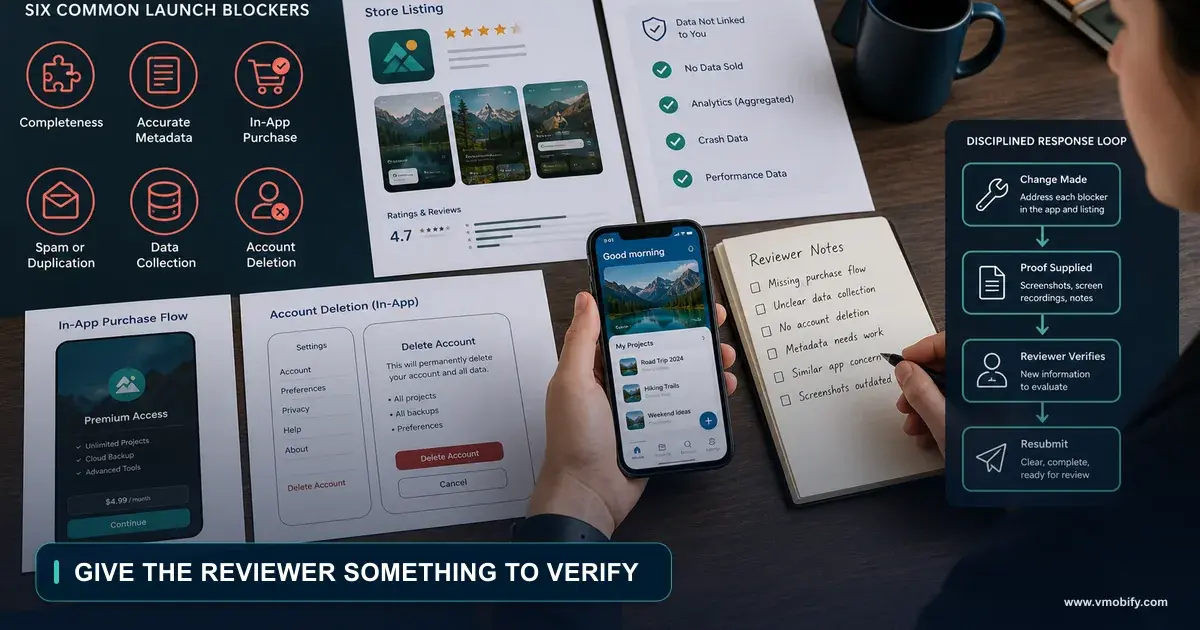
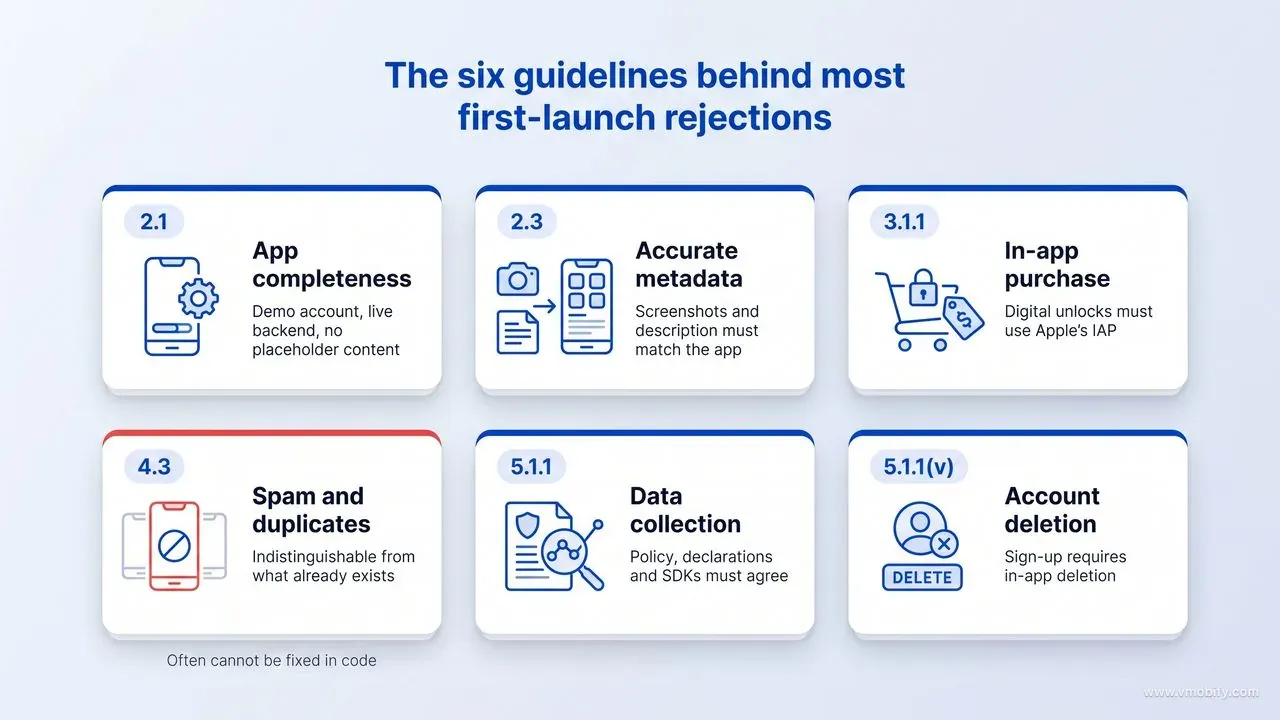
Six guidelines account for the overwhelming majority of what blocks a first launch: 2.1 app completeness, 2.3 accurate metadata, 3.1.1 in-app purchase, 4.3 spam and duplicates, 5.1.1 data collection and storage, and 5.1.1(v) account deletion. Apple maintains its own list of the most common reasons for rejection, and it has been broadly stable for years, which tells you these are not edge cases — they are the same mistakes repeating.
The good news is the timeline. Apple states that 90% of submissions are reviewed in less than 24 hours, so a rejection costs you a day rather than a fortnight, provided your resubmission actually changes something. In our portfolio across 300+ apps managed since 2013, the launches that slip by weeks are almost never slowed by a single hard rejection — they are slowed by three or four rounds of resubmitting a build that did not address the finding.
The rest of this guide works through the six, in the order they tend to bite, and then covers what to do once you have already been rejected.
What does Guideline 2.1 app completeness actually require?
Guideline 2.1 requires that what you submit is a finished app the reviewer can actually use — final metadata, working URLs, no placeholder content, no crashes, and a working demo account with your backend switched on if there is a login. It is the cheapest rejection to avoid and one of the most common to receive.
Apple's wording is direct: submissions "should be final versions with all necessary metadata and fully functional URLs included; placeholder text, empty websites, and other temporary content should be scrubbed before submission." It goes on to require that you test on-device for bugs and stability, and to "include demo account info (and turn on your back-end service!) if your app includes a login." That parenthetical exists because developers keep forgetting.
What this means in practice, as a pre-submission checklist:
- Demo account that works today. Not an account that worked last week, and not one behind a phone-number OTP the reviewer cannot receive. If your only sign-in is SMS OTP, provide a documented bypass code in Notes for Review or expect a rejection.
- Backend live in the review window. Staging environments that sleep, rate limits that block an unfamiliar IP, and geo-restrictions that exclude the reviewer's location all present as "the app does not work."
- No lorem ipsum, no empty states that look broken, no dead links. Support URL and privacy policy URL must resolve — check them from outside your network.
- No crashes in the main flow on a real device. Apple states plainly that it will reject "incomplete app bundles and binaries that crash or exhibit obvious technical problems."
- In-app purchases visible and functional to the reviewer, which is 2.1(b) and a frequent trip-up for apps where purchases are gated behind progress.
One habit removes most of this risk: before you submit, install the exact build you are submitting on a device that has never seen the app, sign in with the demo credentials you provided, and use it as a stranger would. Most 2.1 rejections die at that step, because they are not subtle — they are things that are obvious to anyone who has not already learned to route around them.
What does Guideline 4.3 spam and duplicates really mean?
Guideline 4.3 rejects apps that are indistinguishable from what is already widely available, and unlike the other guidelines it cannot always be fixed with a code change — which makes it the one that ends projects rather than delaying them. If you are going to lose a launch, this is usually how.
It has two halves. 4.3(a) targets multiple bundle IDs of the same app — Apple's own example is "submitting a separate map app for every city in the world instead of a single worldwide map." This catches template and white-label operations, and it catches legitimate developers who shipped one app per client without realising that is the pattern being described.
4.3(b) is the harder one. Apple states: "Don't submit apps that are indistinguishable from what's already widely available. Opportunistically creating variants of existing app categories or popular apps degrades App Store discovery." It then names categories explicitly — "dating, flashlight, sound effects, wallpaper, simple timers, and fortune telling" are "well established on the App Store and we will not accept new submissions unless they offer a meaningfully different or improved experience."
Read that list carefully if you are building in one of those categories, because it is not advisory. It also warns that repeated submissions of low-effort apps "may lead to removal from the Apple Developer Program" — the account-level consequence that makes 4.3 different in kind from the others.
What actually helps when you receive a 4.3:
- Identify the differentiated thing and make it the first thing the app does. If your differentiation is real but sits three screens deep behind a generic onboarding, the reviewer never saw it. This is the most common recoverable version of a 4.3.
- Rewrite the metadata to lead with the difference. A title and screenshot set identical to fifty other apps invites the comparison you are trying to avoid.
- Explain it in Notes for Review, specifically. Name the apps you are adjacent to and state what you do that they do not.
- Consolidate multiple bundles into one configurable app if you are on the 4.3(a) side.
The test underneath all of this is worth stating plainly, because it is the question to answer before writing code rather than after being rejected: what does this app do that the top five results for its main search term do not? A good answer names a capability, an audience or a constraint — it works offline, it handles Indian regional languages the incumbents ignore, it targets a profession with workflow the general-purpose tools cannot express. A weak answer names an attribute — it is faster, cleaner, simpler, better designed. Attributes are what every rejected 4.3 app claims, which is precisely why they carry no weight.
Two situations are worth separating here, because they get conflated. Being in a crowded category is not itself a 4.3 — the App Store is full of successful apps in crowded categories, and Apple is not rationing entrants. Being indistinguishable is the finding. An expense tracker competing against thirty expense trackers is fine if it does something specific those thirty do not; it is a 4.3 if the only honest description is "an expense tracker." The difference is not competitive intensity, it is whether the app has a reason to exist that a reviewer can see in the first thirty seconds.
And the honest part: if the app genuinely is a wrapper around a website, a template with a new colour scheme, or a fifth entrant into a category Apple has named as closed, no appeal wording fixes that. The teams we have seen recover from a 4.3 all did it by building something the app did not previously do — and the ones who avoided it entirely made sure, before writing any code, that they could answer "what does this do that the top five results already do not?" in one sentence.
Which metadata mistakes trigger a rejection?
Metadata rejections happen when your store listing describes an app that is different from the one the reviewer opened — and the fix is almost always to change the listing rather than the app. Guideline 2.3 governs this, and it has several sub-clauses that each catch a different mistake.
The ones that matter most for a first launch:
- 2.3.1 — hidden or undocumented features. Apple requires that "all new features, functionality, and product changes must be described with specificity in the Notes for Review section" and states that "generic descriptions will be rejected." Anything behind a feature flag, a promo code or a server toggle needs disclosing.
- 2.3.2 — purchases must be signposted. If featured items, levels or subscriptions require additional purchase, the description and screenshots must say so. Screenshots implying free content that is paywalled is a reliable rejection.
- 2.3.3 — screenshots must show the app in use, "not merely the title art, login page, or splash screen." A first screenshot that is a logo fails on both policy and conversion grounds, which is one of the rare cases where the guideline and good ASO agree exactly.
- 2.3.6 — answer the age-rating questions honestly. Under-rating an app to widen its audience is caught easily and reads as deliberate.
- 2.3.7 — keywords and app name. Do not "pack any of your metadata with trademarked terms, popular app names, pricing information, or other irrelevant phrases just to game the system."
That last one is where ASO ambition collides with review, and it is worth being precise about the line. Researching the terms real users search and writing a title that includes the strongest one is normal, expected optimisation — our app store optimisation guide covers how the fields are weighted. Putting a competitor's brand name in your keyword field is not optimisation; it is the specific behaviour 2.3.7 prohibits, and it risks the listing you are trying to rank.
Metadata rejections are the least costly kind, because they usually do not require a new binary — you can often fix the listing and be back in review the same day. Treat them as a warning rather than a setback, and use the moment to check the whole listing rather than only the clause you were cited for.
Why do privacy and data declarations fail review?
Privacy rejections come from a mismatch between what your app actually does and what you declared it does — the reviewer compares your privacy policy, your App Store privacy details and the app's real behaviour, and any gap between the three is a finding. Guideline 5.1.1 is the relevant section, and it is where first-time publishers most often discover an obligation they did not know existed.
The three failure modes, in order of frequency:
- The privacy policy does not say enough. Apple requires it to identify what data is collected and how, confirm that third parties receiving that data provide equal protection, and "explain its data retention/deletion policies and describe how a user can revoke consent and/or request deletion of the user's data." A three-line policy copied from a generator will not contain those elements.
- The declared privacy details do not match the SDKs you shipped. Your App Store privacy details must cover data collected by every third-party SDK in the binary, not only your own code. Analytics, attribution, crash reporting and ad SDKs all collect things, and developers routinely declare only what they wrote themselves.
- Permissions requested without a relevant purpose. 5.1.1(iii) requires that apps "only request access to data relevant to the core functionality." A note-taking app requesting contacts at launch is the archetype. Apple also requires consent for collection "even if such data is considered to be anonymous," and states that paid functionality "must not be dependent on or require a user to grant access to this data."
The practical fix is an inventory rather than a policy rewrite: list every SDK in the build, look up what each one collects, and reconcile that list against both your privacy policy and your declared privacy details. Apple's user privacy and data use documentation is the reference for what falls into which category.
Do this before you submit rather than after, because a privacy rejection often requires changes in three places at once — the app, the policy and the App Store Connect declarations — and getting two of the three right is still a rejection.
Why does account deletion block so many launches?
Because the requirement is one sentence long, it applies to almost every app with a sign-up, and it asks for a feature nobody builds by default: if your app supports account creation, you must also offer account deletion within the app. That is guideline 5.1.1(v), and it is the single most predictable rejection a first-time publisher receives.
The logic is straightforward from a user's point of view and easy to miss from a developer's. You built sign-up because you needed it on day one. You never built deletion because no user had yet asked, and because it is genuinely awkward — it touches your database, your backups, your billing, and any downstream service holding that user's data. So it gets deferred, and then it blocks the launch.
What Apple expects, per its account deletion guidance:
- The path must be inside the app. A support email address or a web form the user has to find does not satisfy it.
- It must be findable. Buried four levels into settings with no label a normal person would recognise reads as non-compliance.
- It must actually delete the account, not merely deactivate or sign out — including the data associated with it, subject to whatever you are legally required to retain.
- Related obligations should be handled honestly. If the user has an active subscription, tell them what happens to it and where to manage it; deleting the account does not cancel an App Store subscription on its own.
There is a second, easier route worth knowing: Apple states that "if your app doesn't include significant account-based features, let people use it without a login." A meaningful share of the apps that hit this rejection did not need mandatory sign-up at all — they added it to collect emails. Making sign-in optional removes the requirement, removes a large onboarding drop-off, and usually improves activation. We cover why that matters for retention in our app onboarding guide.
If you are shipping to both stores, note that Google Play has its own account-deletion policy with a web-facing component. Building this properly once, early, satisfies both — building it under rejection pressure tends to produce a version you rewrite later.
What breaks in the in-app purchase review?
In-app purchase rejections split into two kinds: using something other than Apple's in-app purchase to unlock digital content, and shipping purchases the reviewer could not see or complete. The first is a business-model problem; the second is a testing problem.
Guideline 3.1.1 is unambiguous on the first: "If you want to unlock features or functionality within your app... you must use in-app purchase." It then closes the obvious workarounds, stating that apps "may not use their own mechanisms to unlock content or functionality, such as license keys, augmented reality markers, QR codes, cryptocurrencies and cryptocurrency wallets." If your web product sells a licence key that activates the iOS app, that is the exact pattern being described.
The mechanical failures are more common and easier to fix:
- Products not submitted alongside the binary. A first in-app purchase must be submitted with the app version; developers configure them in App Store Connect and assume that is enough.
- Purchases the reviewer cannot reach. 2.1(b) requires them to be "complete, up-to-date, visible to the reviewer and functional." If a purchase unlocks at level 10, tell the reviewer how to get there or provide an account that already has.
- No restore mechanism. Apple requires a restore path for restorable purchases, and its absence is a routine finding.
- Consumables that expire. Credits or in-game currency bought via in-app purchase "may not expire."
- Loot boxes without disclosed odds. Randomised virtual items require the odds be disclosed before purchase.
Test the purchase flow in the sandbox on a real device with a fresh sandbox account before every submission that touches monetisation, and write the exact steps to reach each purchase into Notes for Review. Reviewers are not hunting for your paywall — if they cannot find it in a few minutes, that is the finding. Our paywall guide covers the conversion side of the same screen once you are through review.
How should you respond in Resolution Center?
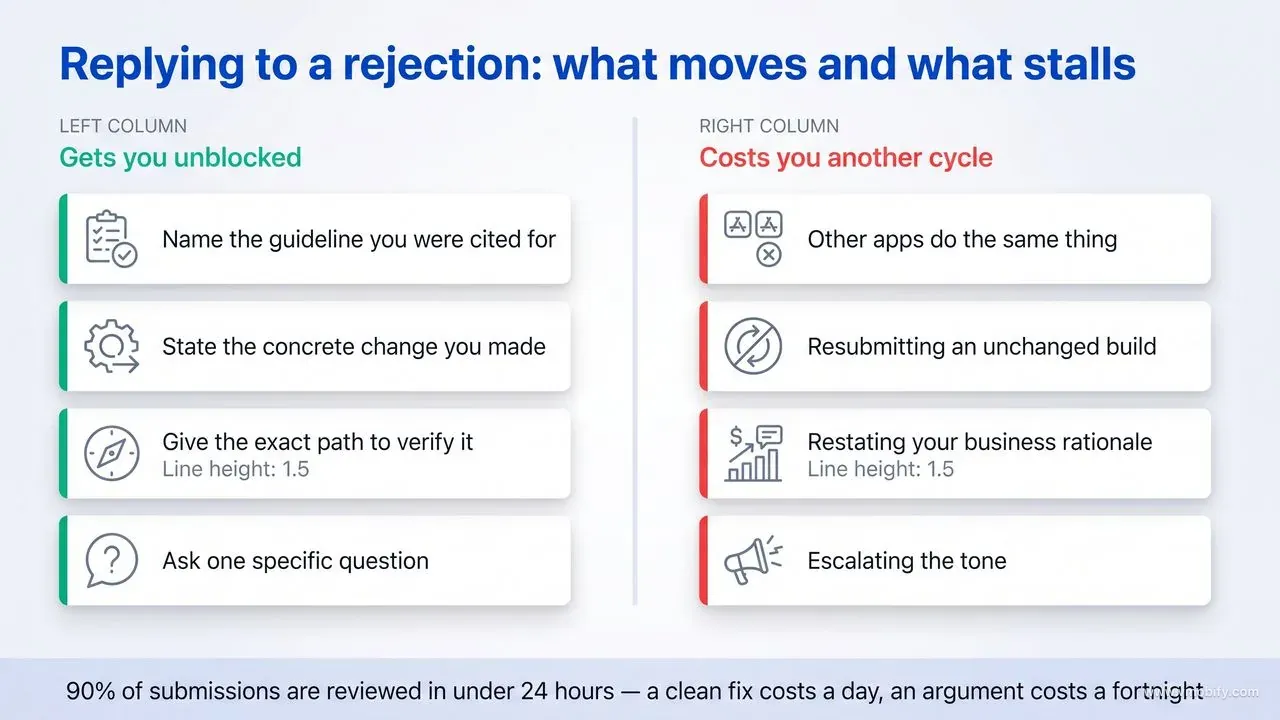
Respond with what you changed, not with why you disagree — and if you genuinely did not change anything, explain precisely what the reviewer should look at instead. Resolution Center is a working channel with a person on the other end, and it rewards being treated as one.
The structure that works:
- Acknowledge the specific guideline cited, so it is clear you read it.
- State what you changed, concretely. "Added Delete Account under Settings → Account, second item" beats "we have addressed the account deletion requirement."
- Tell them how to verify it — the exact navigation path, the demo credentials, the state the account is in.
- Ask one specific question if you genuinely do not understand the finding. Reviewers do answer direct questions; they do not respond well to open-ended requests to explain their reasoning.
What does not work, and reliably costs days: arguing that other apps do the same thing, resubmitting an unchanged build with a longer message, restating your business rationale, or escalating in tone. None of these change the outcome, and each one costs another review cycle.
Two practical notes. First, if the rejection is a misunderstanding — the reviewer could not reach a feature, or tested in a region where content differs — say that plainly, provide the path, and attach a screenshot or screen recording. Reviewers can and do reverse findings when shown the thing they missed. Second, if you need to ship a build to fix it, ship the build first and then reply; a reply pointing at a version that does not exist yet just consumes a round trip.
There is one escalation worth knowing about and using sparingly: the expedited review request. It exists for genuine urgency — a critical bug affecting live users, or a fixed deadline tied to an event outside your control. It is not a queue-jump for a launch you scheduled badly, and requesting it routinely is how you lose access to it when something actually breaks. Treat it as a resource with a budget of roughly one use per year, and spend it on a production incident rather than on impatience.
On timing: with 90% of submissions reviewed in under 24 hours, a clean fix-and-resubmit cycle typically costs one day. That number is why the disciplined approach wins — three tight cycles cost three days, while three rounds of argument can cost two weeks and end in the same place.
When is an appeal worth filing?
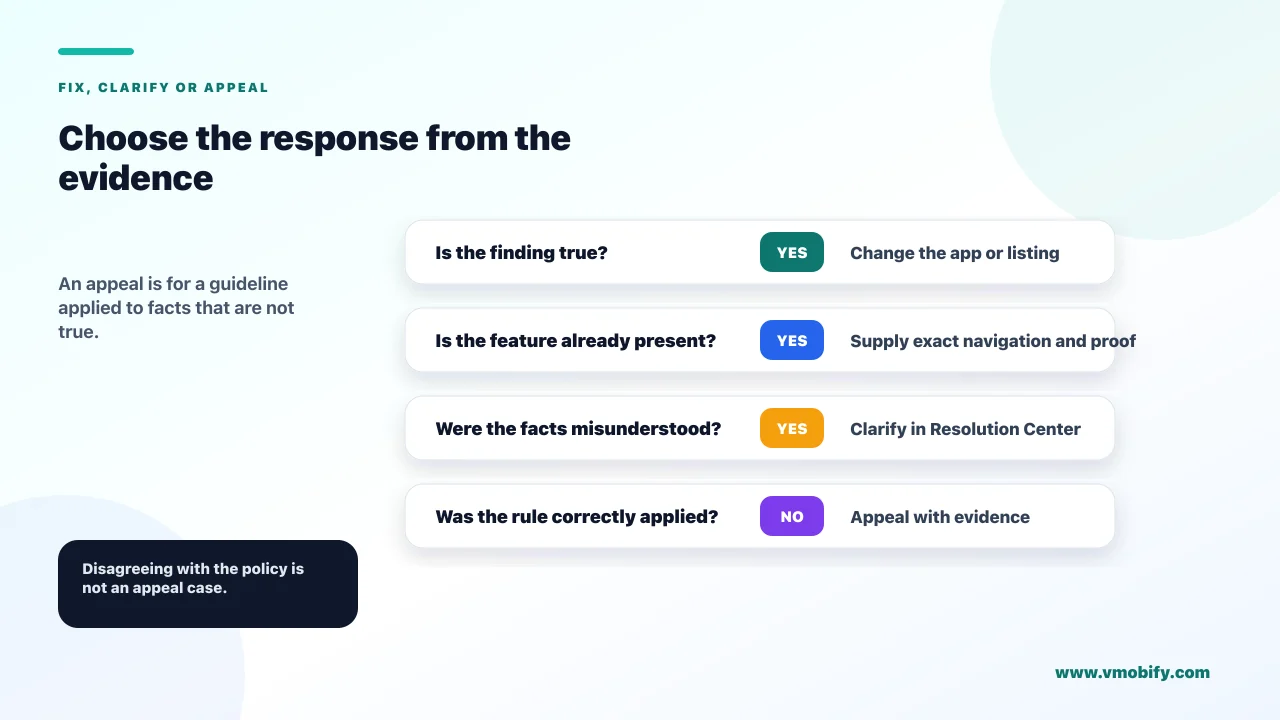
Appeal when you believe the guideline was applied to facts that are not true about your app — not when you disagree with the guideline itself. That distinction decides whether an appeal is worth the days it costs.
Cases where appealing is reasonable:
- Factual error. The reviewer concluded your app does something it does not, or missed a feature that exists. This is the strongest ground and the most common successful appeal.
- Inconsistency across reviews. The same functionality passed in previous versions and was rejected now with no relevant change. Cite the earlier version number.
- Category misclassification under 4.3. Your app was grouped with a saturated category it does not genuinely belong to, and you can articulate the difference in a sentence.
Cases where appealing wastes time: the rule is clear and your app does not meet it; you want an exception for business reasons; other apps appear to break the same rule. That last one feels unjust and is the most tempting argument to make — but enforcement inconsistency is not a defence, and raising it invites scrutiny of your own listing rather than theirs.
If you do appeal, write it like a brief. State what the rejection claims, state what is actually true, provide the evidence — navigation path, screen recording, prior version number — and stop. Keep it short and unemotional. The people reading appeals read a great many of them, and the ones that succeed are the ones that make the factual correction easy to verify.
Meanwhile, keep building. The most expensive appeal is the one where you halt all work for a week waiting on a decision that was unlikely to go your way. If there is a version of the app that clearly complies, building it in parallel means you have a route forward whichever way the appeal lands.
How do you avoid the rejection loop on your next release?
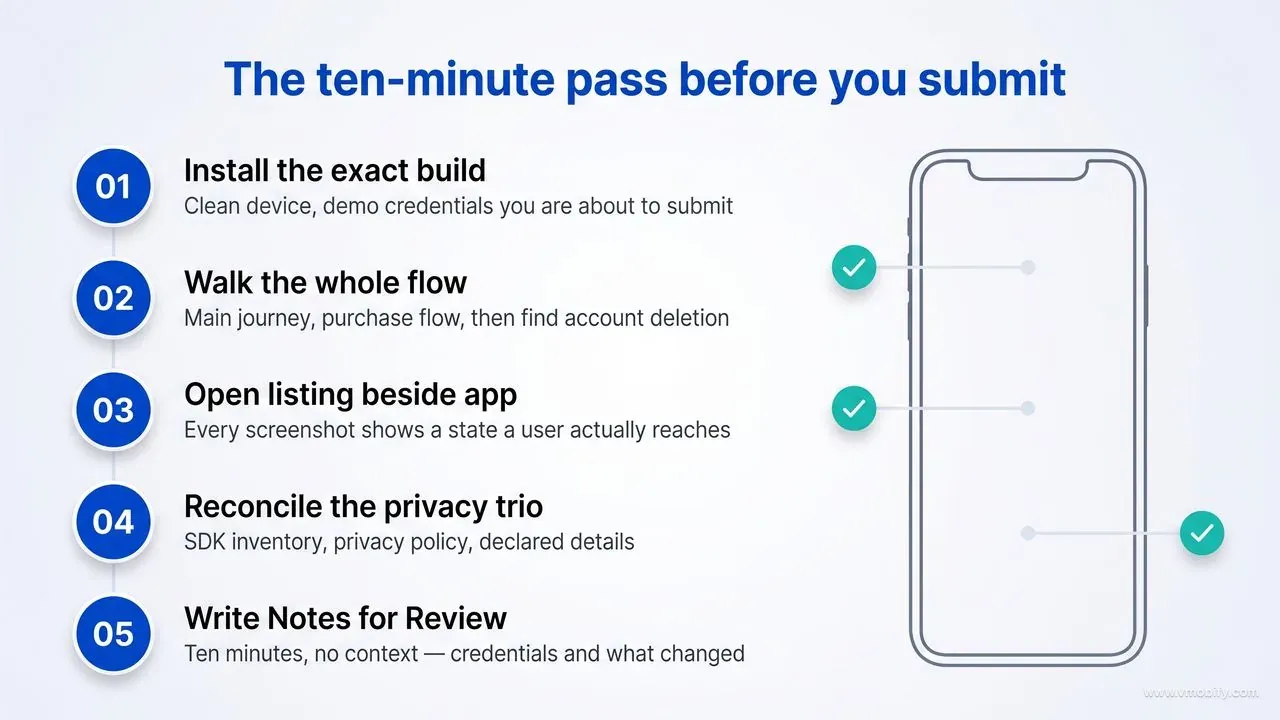
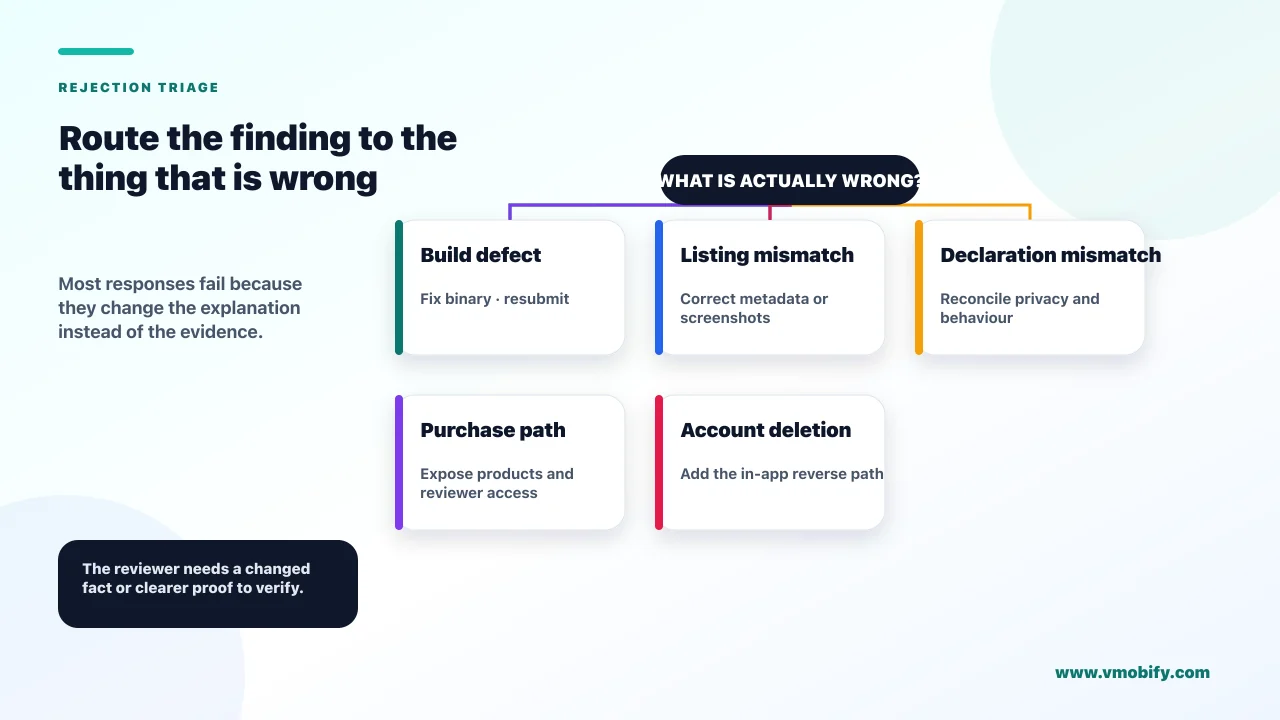
Run a pre-submission pass that mirrors what the reviewer does, and keep the Notes for Review field as a living document rather than something you write at 2am on submission day. Nearly every repeat rejection is a first rejection that was patched narrowly instead of understood.
The pass we would run before any submission:
- Install the exact submitted build on a clean device. Sign in with the demo credentials you are about to provide. Complete the main flow, then the purchase flow, then find account deletion.
- Open the listing next to the app. Does every screenshot show something the app actually does, in a state a user reaches? Does the description promise anything that requires a purchase without saying so?
- Reconcile the privacy trio. SDK inventory against privacy policy against declared privacy details.
- Check every URL from outside your network. Support, marketing, privacy policy.
- Write Notes for Review as though the reader has ten minutes and no context. Demo credentials, how to reach anything non-obvious, what changed since the last version, and an explicit note about anything that might look unusual.
There is a pattern behind repeat rejections that is worth naming, because recognising it saves cycles. A first rejection cites one guideline; the developer fixes exactly that clause and resubmits; the reviewer — often a different person — opens the app fresh and finds the next thing. Nothing went wrong procedurally, but three narrow fixes cost three cycles where one thorough pass would have cost one. When you are cited for anything, re-run the whole checklist rather than the line item, on the assumption that the reviewer stopped at the first problem rather than compiling an exhaustive list.
The Notes for Review field deserves more attention than it gets. It is the only place you get to speak to the reviewer before they form a view, and Apple has told you explicitly that generic descriptions will be rejected. A specific, well-organised note prevents the class of rejection where the reviewer simply could not find the thing.
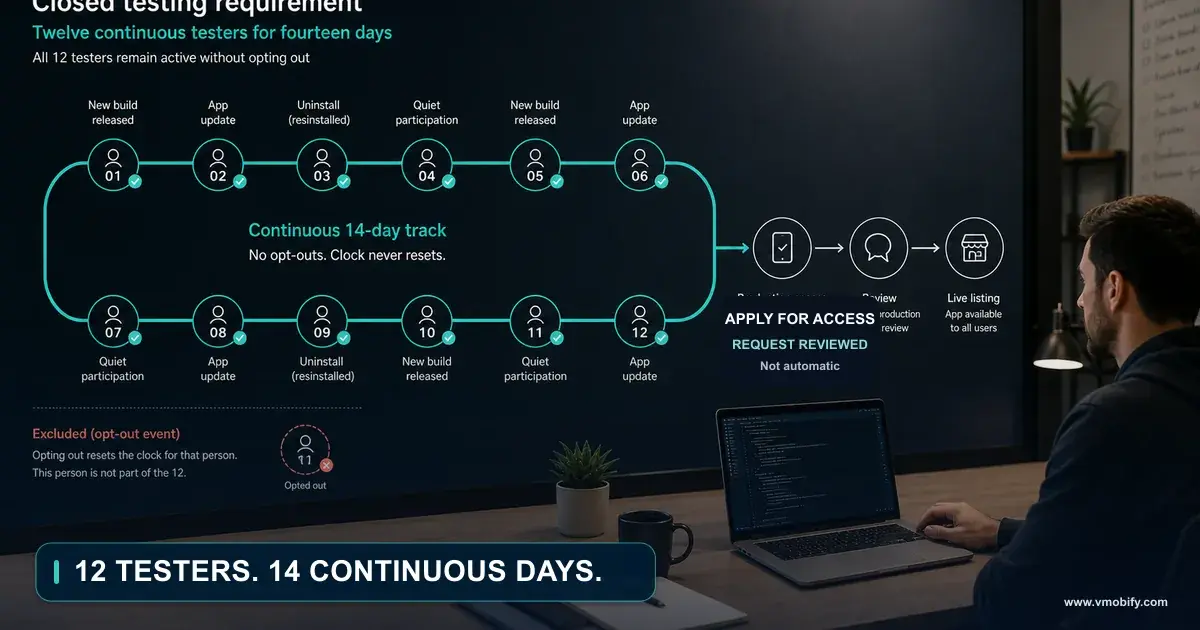
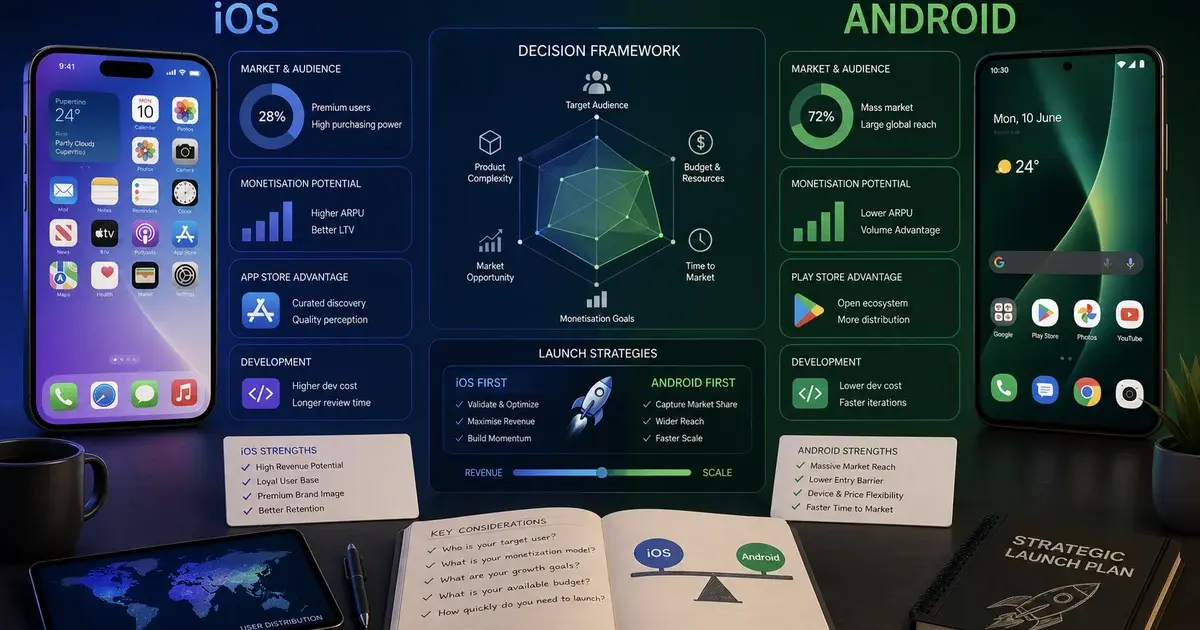
Sequencing matters too. Submit early enough that a rejection is survivable — never with a launch campaign already booked against the date. If you are shipping Android alongside, note that the platforms fail differently: iOS blocks on review, while a new personal Play account blocks on the closed testing requirement before it ever reaches review. Our iOS versus Android launch comparison covers how to sequence the two.
In our portfolio, the teams that stopped getting rejected did not learn the guidelines better — they built the ten-minute pre-submission pass into their release checklist and stopped treating submission as the moment the work ends. If you want a second pair of eyes on a listing before you submit, get in touch; the pass is quick and the alternative is measured in launch days.
Two removal paths operate after your app is live, and neither involves a new submission. The first is neglect: Apple states that "If your app no longer functions as intended or you're no longer actively supporting it, it will be removed from the App Store." An app left unmaintained through OS releases is a candidate for removal without any policy violation at all. The second is severity, and it reaches past the app to the account — the guidelines state that if you attempt to cheat the system, "for example, by trying to trick the review process, steal user data, copy another developer's work, manipulate ratings or App Store discovery", your apps will be removed from the store and you will be expelled from the Apple Developer Program. Several individual guidelines repeat the pattern in their own terms, noting that egregious or repeated behaviour is grounds for removal from the Developer Program. The practical reading: a rejection costs you a release cycle, but the post-approval failures cost you the account, and they are the ones nobody plans for.
Frequently Asked Questions
How long does App Store review take?+
Apple states that on average 90% of submissions are reviewed in less than 24 hours. A rejection therefore usually costs about a day, provided your resubmission actually addresses the finding rather than restating your case.
What is Guideline 4.3 and why is it so serious?+
Guideline 4.3 covers spam and duplicates — multiple bundle IDs of the same app, and apps indistinguishable from what is already widely available. It is serious because it often cannot be fixed with a code change, and Apple warns that repeated low-effort submissions may lead to removal from the Apple Developer Program.
Do I really need account deletion inside the app?+
Yes, if your app supports account creation. Guideline 5.1.1(v) requires the deletion path to be inside the app — a support email or web form does not satisfy it. If your app does not have significant account-based features, the alternative is to let people use it without a login at all.
Can I argue with a rejection in Resolution Center?+
You can respond, and reviewers do reverse findings when shown a factual error. But argument without a change rarely works. Reply with what you changed and how to verify it, or with the specific path to the feature the reviewer missed.
Why was my app rejected for metadata when the app itself is fine?+
Guideline 2.3 rejections come from a mismatch between your listing and your app — screenshots showing a splash screen rather than the app in use, undisclosed paywalled content, keyword fields packed with competitor names, or new features not described specifically in Notes for Review. These usually need no new binary, only a corrected listing.
Will a rejection hurt my App Store ranking?+
A rejection itself does not carry a ranking penalty — the app was never live. The real cost is time and momentum: a launch delayed past a booked campaign or a seasonal window. Repeated low-effort submissions under 4.3 are the exception, since those carry account-level consequences.
What is the single most common reason first-time apps are rejected?+
Guideline 2.1 completeness — most often a demo account that does not work, a backend that was not live during review, or placeholder content left in the build. It is also the cheapest to prevent: install the exact build you are submitting on a clean device and use it as a stranger would.
Sources
- Apple — App Store Review Guidelines — The primary source for guidelines 2.1, 2.3, 3.1.1, 4.3 and 5.1.1 quoted throughout
- Apple — Common App Rejections — Apple's own list of the most frequent reasons submissions are rejected
- Apple — App Review — Review process overview and the stated 90% within 24 hours figure
- App Store Connect Help — Submitting for review — Submission mechanics, Notes for Review and demo account fields
- Apple — Offering account deletion in your app — What guideline 5.1.1(v) requires in practice and how to implement it
- Apple — App privacy details on the App Store — Declaring data collection, including data collected by third-party SDKs
- Apple — User privacy and data use — Reference for tracking definitions and permitted data use
- Apple — StoreKit documentation — In-app purchase implementation, restore mechanisms and sandbox testing
About the author
Amol Pomane — Founder, Vmobify
Amol leads Vmobify, a mobile app growth agency that has driven 30M+ downloads and ranked 54K+ keywords across 300+ apps since 2013. He writes about ASO, paid user acquisition, retention, and the operational reality of scaling mobile apps in India and global markets.