Google Play Closed Testing: How New Developers Reach Production
If you opened a personal Play Console account after November 2023, you cannot publish to production until 12 testers have stayed opted in for 14 straight days. Most developers lose weeks to this rule because nobody explains how the clock actually works — or why buying testers is the fastest way to lose the account.
On this page
- Why does Google Play require closed testing before production?
- Which developer accounts does the requirement actually apply to?
- What is the difference between internal, closed and open testing?
- How many testers do you need, and for how long?
- Where do you find real testers who will not drop out?
- Why are paid tester farms a risk to your account?
- What disqualifies a tester and resets your clock?
- How do you use the 14 days instead of just waiting?
- What does the production access application actually ask for?
- What happens if you are rejected, and how do you reapply?
- What does the realistic timeline from signup to production look like?
- Frequently Asked Questions
Why does Google Play require closed testing before production?
Google introduced the closed testing requirement to raise the cost of publishing low-quality and fraudulent apps, by forcing every new personal developer account to prove that real people have used the app before it can reach the open store. It is a quality gate, not a technical one — and understanding that changes how you should approach it.
For most of Play's history, a developer could register an account, pay the one-time fee, upload an APK and be live in production within a day. That openness is exactly what made Android's ecosystem enormous, and also what made it a target. Cloned apps, thin wrappers around a website, subscription traps and outright malware all exploited the same property: publishing was cheap and instant.
The requirement, documented in Play Console Help's app testing requirements, changes that calculation. A bad actor who needs 12 genuine testers using the app for two straight weeks, followed by a written application describing what was learned, is running a much more expensive operation than one who needs an upload button. The friction is the point.
It is worth being clear-eyed about the trade-off, because it is the thing that frustrates legitimate developers most: the same gate that raises the cost for a fraudster raises it for a first-time solo developer with a genuinely good app. Google has acknowledged this by softening the rule once already — the tester count dropped from 20 to 12 on 11 December 2024 — but the structure remains.
Across the 300+ apps we have managed since 2013, the teams that handle this badly all make the same mistake: they treat the fortnight as a bureaucratic delay to be minimised, then arrive at launch day with an untested store listing and no keyword strategy. The teams that handle it well treat it as a free, mandatory soft launch. The second half of this guide is about doing that.
Which developer accounts does the requirement actually apply to?
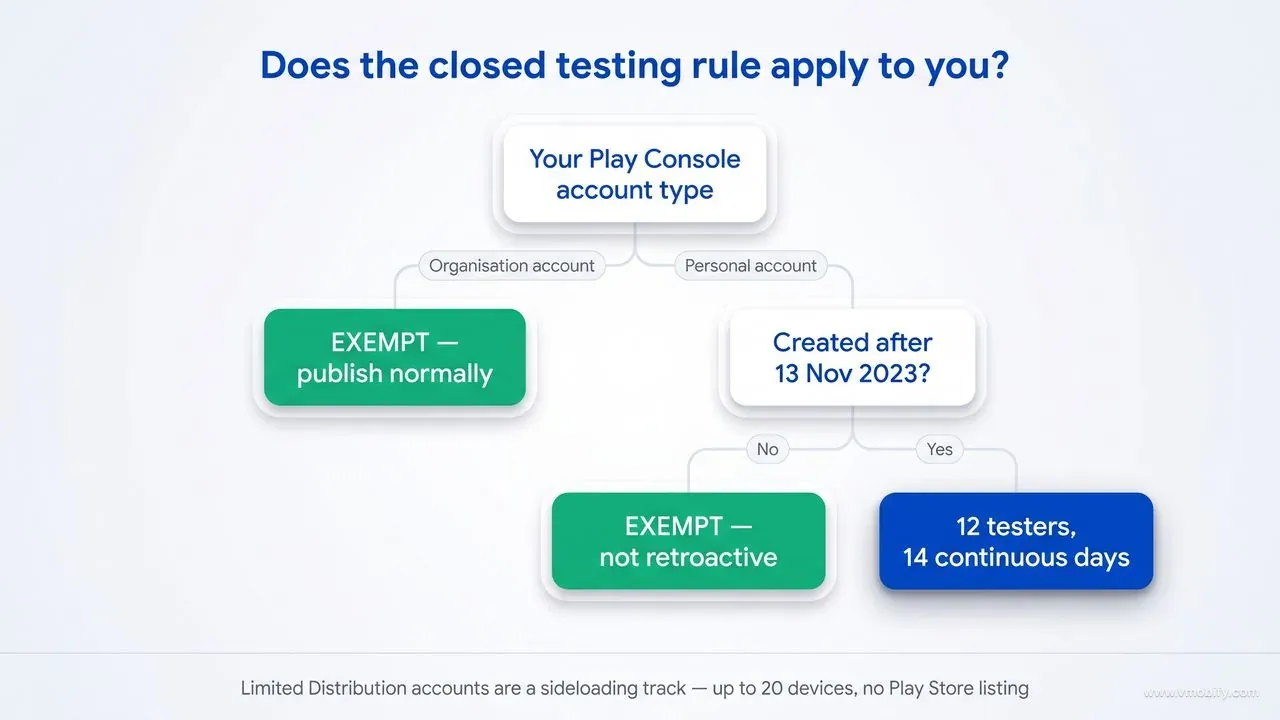
The requirement applies only to personal Play Console accounts created after 13 November 2023 — organisation accounts registered to a legal business entity are exempt, and so is any personal account created before that date. This single distinction decides whether the next three weeks of your launch plan exist at all.
The three cases in practice:
- Personal account created after 13 November 2023: the rule applies. You cannot publish your first app to production until you complete closed testing and are granted production access.
- Personal account created on or before 13 November 2023: exempt. The policy was not applied retroactively.
- Organisation account: exempt. These require a legal business entity and a D-U-N-S number, which is itself the accountability Google is looking for.
If you are a founder registering a company anyway, the organisation account is usually the better route on its own merits — it puts the company name on the listing rather than your personal name, it survives a change of who runs the account, and it avoids this requirement entirely.
But do the arithmetic before you treat it as a shortcut, because it often is not one. An organisation account requires a D-U-N-S number, the nine-digit business identifier issued by Dun & Bradstreet, and Google warns that applying for one can take up to 30 days. If you do not already have a D-U-N-S number, switching to an organisation account to dodge a 14-day test can cost you more time than the test would have. The organisation route is the right call when you are building a company that will publish more than one app; it is rarely the right call when you are trying to launch faster.
One misconception worth correcting, because it started circulating as soon as the feature launched: the new Limited Distribution account type does not bypass this rule. Introduced globally in August 2026 as part of Android's developer verification programme, a Limited Distribution account lets students and hobbyists share apps directly to up to 20 devices without a government ID or a fee. It is a sideloading track for learning and small-scale sharing, not a Play Store publishing track. If your goal is a public listing on Google Play, closed testing still stands between you and production.
Also confirm the account you are testing on is the account that will publish. We have seen developers complete a full 14-day cycle on a personal account and then decide to move the app to a newly created organisation account — which resets everything, because production access is granted to an account, not to an app.
What is the difference between internal, closed and open testing?
Three tracks with different tester ceilings, different review treatment and different visibility — and only closed testing satisfies the production access requirement. Teams lose weeks to this by running the wrong track and discovering it does not count.
Google's guidance on setting up an open, closed or internal test sets out what each one is for.
Internal testing
- Ceiling: up to 100 testers
- Added by: a list of email addresses
- Review: internal tests might not be subject to standard Play policy or security reviews
- Use for: your own team, fastest possible loop
Closed testing
- Ceiling: up to 200 lists of up to 2,000 users, and up to 50 lists per track
- Added by: email address or Google Groups
- Review: subject to standard review
- Use for: the 12-tester requirement — this is the track that counts
Open testing is the third. Anyone can join, users can find your test app on Google Play through search or by opting in from the store listing, and it is either unlimited or has a minimum of 1,000 testers if you choose to cap it. It needs review before launch, because your app and store listing become visible on Google Play.
Two consequences follow that catch people out. First, the ceilings are not the constraint anyone imagines — closed testing scales to hundreds of thousands of people, so if you are struggling to reach twelve, the problem is recruitment rather than the track. Second, open testing puts your unfinished app in front of strangers who can rate it. A rough build discovered through Play search collects real one-star reviews on the listing you are about to launch, which is a durable cost for a temporary state.
There is one more detail worth knowing about internal testing: on a first upload, Google notes that a temporary name and store listing information may display for up to 48 hours. A tester who reports that the app "has the wrong name" during the first two days is describing expected behaviour, not a packaging mistake.
Internal app sharing sits outside all three. Uploaded artifacts can be signed with any key and are automatically re-signed with an Internal App Sharing key that Google creates for your app, links are limited to 100 users and expire 60 days after upload, version codes do not need to be unique, and the artifacts never appear in your testing or production track releases. It is excellent for passing a build to a colleague and useless as evidence for production access — none of it counts toward your 12 testers or your 14 days.
That re-signing has a second consequence that costs teams a launch day. Because an internally shared build carries a different certificate from your production build, anything authenticated by your app's signing fingerprint — Google Sign-In, Maps and other restricted API keys, App Links verification — can work in internal sharing and fail in production, or the reverse. We cover that failure in detail in the SHA-1 that breaks Google Sign-In. Validate anything certificate-dependent on a closed testing track, which goes through Play App Signing and therefore carries the certificate production will use.
How many testers do you need, and for how long?
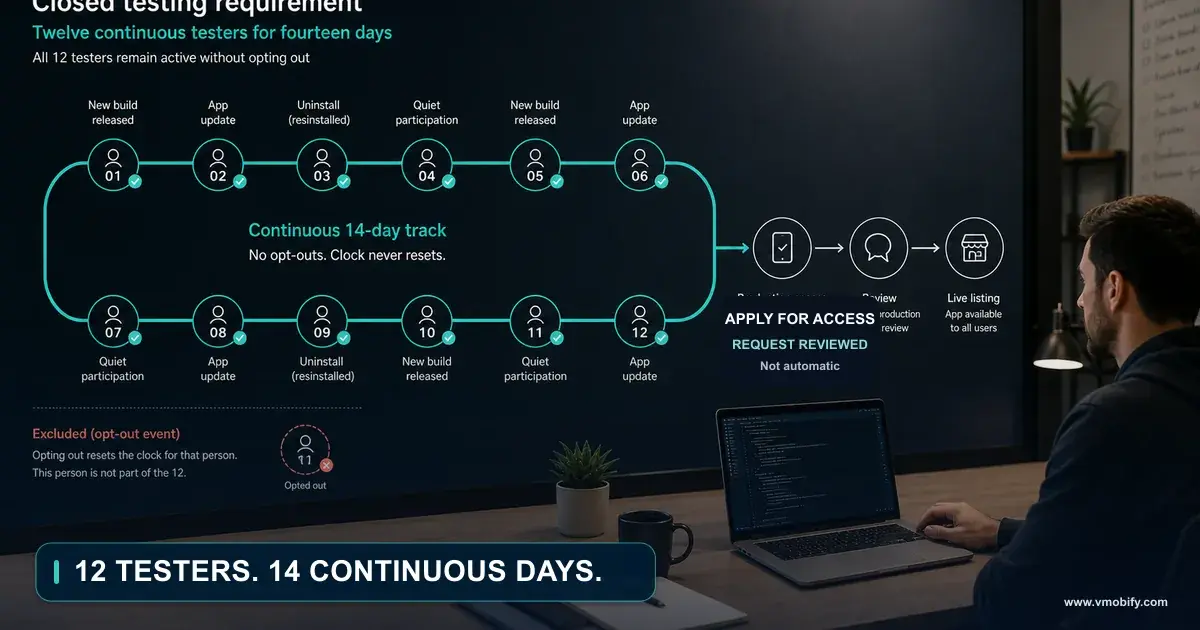
You need at least 12 testers opted in to your closed test, and they must have been continuously opted in for the 14 days immediately preceding your application for production access. Both halves of that sentence carry weight, and the second half is where most applications fail.
The number changed. Until 11 December 2024, the requirement was 20 testers. Google reduced it to 12 after sustained developer feedback that recruiting 20 committed testers was disproportionate for a solo developer shipping a first app. This matters for a practical reason beyond trivia: a large share of the guides, forum answers and AI-generated summaries you will find still quote 20. Some of them are three years old and still ranking. Check the publication date on anything you read about this rule, including this post — we date and update ours for exactly this reason.
What "continuously opted in" means in practice:
- A tester counts from the moment they accept the invitation link and opt in — not from when you sent the invite, and not from when they install.
- The 14 days are consecutive calendar days. There is no partial credit and no accumulation across gaps.
- If a tester opts out and later opts back in, their clock restarts. Play Console Help is explicit that the 14 days must be consecutive to count.
- You need 12 simultaneously, at the moment you apply — not 12 who each managed 14 days at some point during a longer window.
The practical consequence is that 12 is a floor you should never sit exactly on. Recruit 16 to 20. Attrition over a fortnight is normal and entirely outside your control: people change phones, clear accounts, uninstall to free storage, or simply lose interest. If you start at exactly 12 and one person drops out on day nine, you do not have 11 days banked — you have a stalled application and a decision about whether to wait for a replacement to serve their own 14 days.
The testers must also be real Google accounts on real devices, which is what makes the recruiting problem genuine rather than administrative. That constraint is the subject of the next two sections.
Where do you find real testers who will not drop out?
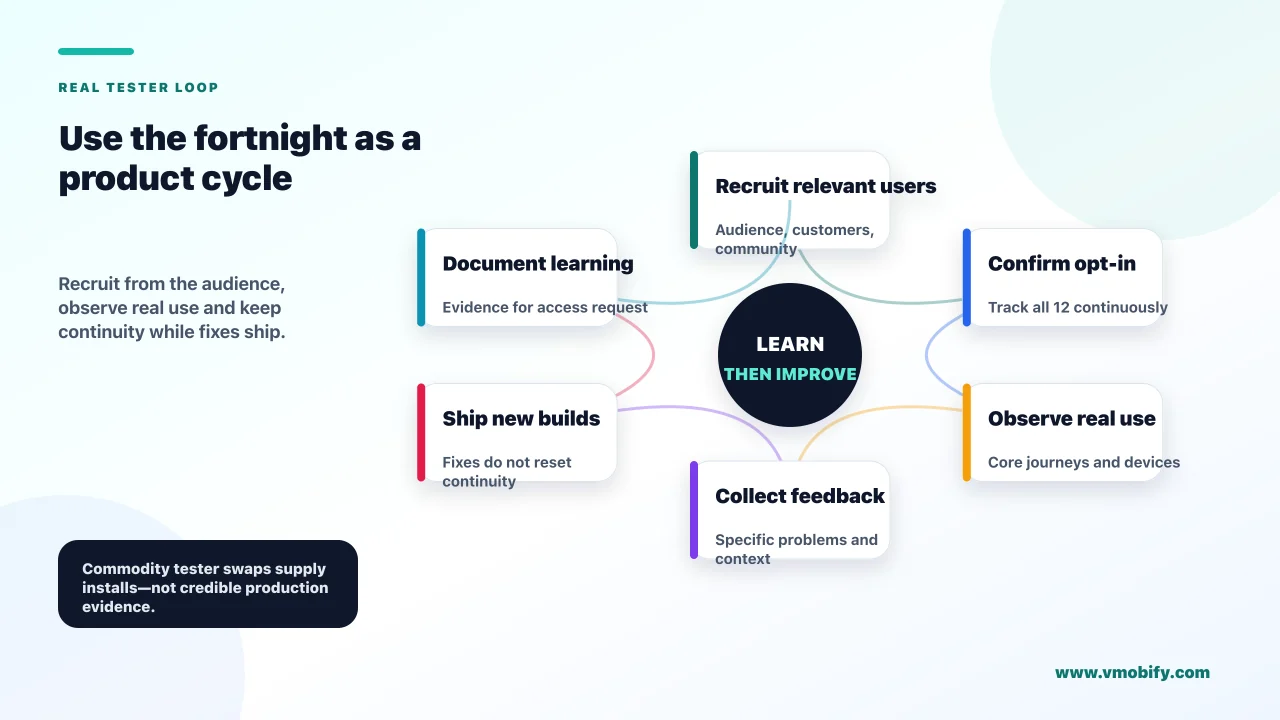
The most reliable testers are people with an actual reason to want the app to exist — which means recruiting from the audience you built the app for, not from anywhere that supplies testers as a commodity. Retention over 14 days correlates almost entirely with genuine interest.
Sources that work, roughly in order of reliability:
- People you already know who match the target user. Not everyone you know — the subset who would plausibly use the app. A parenting app tested by twelve colleagues without children produces useless feedback and fragile commitment.
- Communities built around the problem you solve. Subreddits, Discord servers, WhatsApp and Telegram groups, local meetups. Ask for testers by describing the problem, not by pitching the app.
- A waitlist you started before development finished. This is the strongest source and the one most developers skip, which is why we argue for building it during the pre-launch window rather than after.
- Existing users on another platform. If you shipped iOS first, your iOS users are the highest-intent Android testers available to you.
- Other developers building for the same audience. A genuine peer who will actually use the app is very different from a reciprocal install swap — the distinction is intent, and it is the distinction Google is examining.
Make participation as frictionless as you can. Use an email list or a Google Group as the tester list so you are managing one entry rather than twelve. Send the opt-in link with a one-line instruction and a screenshot of what the opt-in screen looks like, because the Play testing opt-in flow is genuinely confusing for people who have never seen it. Tell them plainly that they need to stay opted in for two weeks and that uninstalling is fine but opting out is not.
Then keep them engaged. A short message at day three and day ten, asking one specific question rather than "any feedback?", does two things at once: it produces the qualitative material your production-access application will need, and it reminds people the test is still running before they tidy up their phone and opt out.
The ask itself matters more than most developers expect. The version that fails is a link with "please test my app" — it gives someone no reason to care and no idea what they are committing to. The version that works states the problem the app solves, names the commitment honestly, and makes the first action trivial: what the app does in one sentence, that you need them opted in for two weeks rather than testing daily, that opting out is the one thing that breaks it, and a single link. Being upfront that this is a Google requirement rather than a favour tends to help — people are markedly more willing to help clear a bureaucratic hurdle than to be recruited as free QA.
Where you ask matters too. In communities, a post that describes the problem and asks whether anyone has it will out-recruit a post announcing an app, because the first invites a conversation and the second asks for a favour from strangers. Follow the room's self-promotion rules exactly — a moderator removing your post on day one costs you more than the testers it might have found.
Why are paid tester farms a risk to your account?
An entire industry now sells "12 testers for 14 days" as a packaged service, and using one puts the account you are trying to unlock at risk — because the production-access application asks you to describe exactly the thing these services cannot honestly provide. This is the part of the topic that almost nobody writes about, for a straightforward reason: most of the pages ranking for this rule are published by the companies selling the service.
The offer is seductive when you are on day nine with eight testers. It usually takes one of three shapes: a paid pool of accounts that will opt in on demand, a reciprocal swap community where developers install each other's apps, or a "managed" service that promises to handle the whole requirement for a fee.
Here is the problem. The production-access application does not just ask whether you ran a test. It asks how you recruited your testers, how they used the app, whether their behaviour matched what you would expect in production, and what you learned from their feedback. Every one of those questions is designed to distinguish a real test from a compliance exercise. A pool of accounts that opened the app once to satisfy an obligation generates no meaningful feedback, no realistic usage pattern, and nothing you can truthfully write in that form.
The risks stack up:
- You have nothing to write. The application is free-text and reviewed. "Testers were recruited from a testing community and used the app as expected" is a visibly empty answer.
- Usage patterns do not look like production. Twelve accounts opening an app once each on the same afternoon is a recognisable signature.
- Policy exposure. Play's Play Console requirements and the wider developer policies cover misrepresentation and manipulation of Play systems. You are staking the account you are trying to open.
- You lose the only free signal you will get. Twelve real users for two weeks before launch is genuinely valuable. Trading it for a rubber stamp means launching blind.
The honest version is slower and boring: recruit more people than you need, from the audience you built for, and use the fortnight properly. In our portfolio, the apps that clear this gate on the first attempt are consistently the ones that treated it as a real test — because the application answers write themselves when the test was real.
What disqualifies a tester and resets your clock?
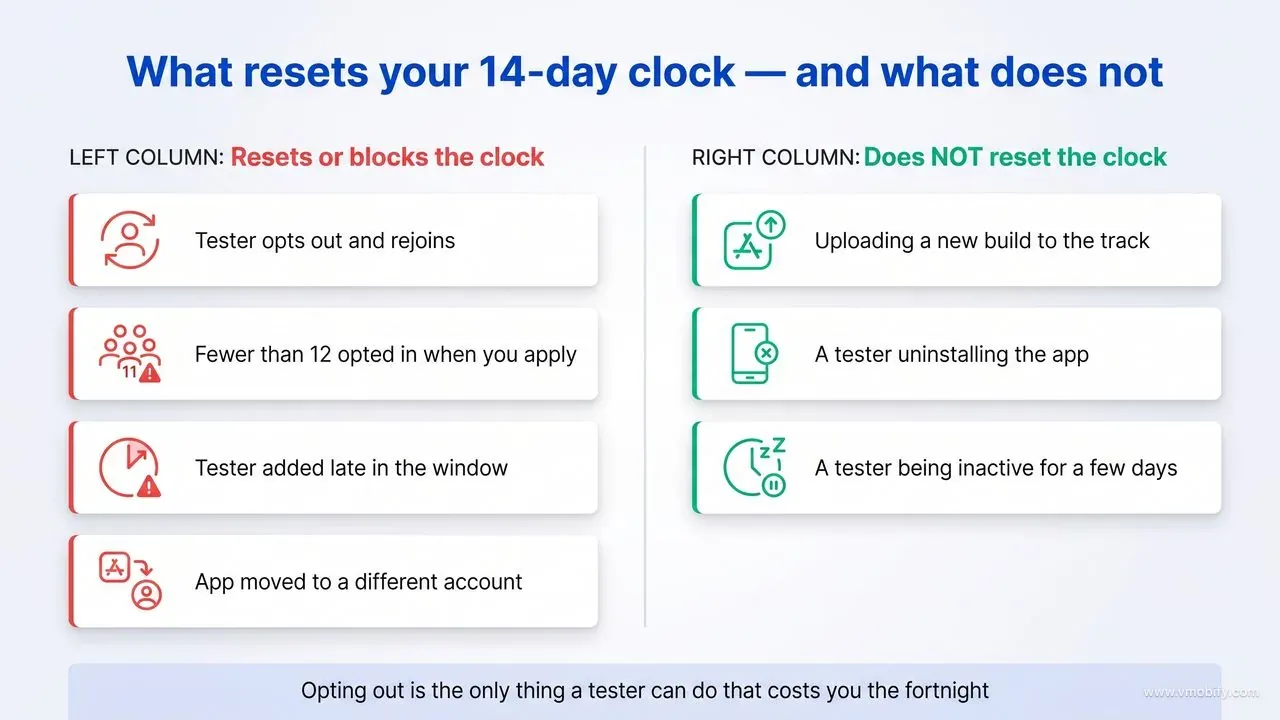
The single event that resets a tester's 14-day clock is opting out of the test — and because you need 12 opted in simultaneously, one person leaving on day twelve can cost you the full cycle. Knowing precisely what does and does not break the clock saves the most common wasted fortnight.
What resets or blocks the clock
- Opting out and rejoining. The 14 days must be consecutive; a rejoining tester starts again from zero.
- Dropping below 12 opted-in testers at the moment you apply. The count is evaluated against your application, so a shortfall on the day is a shortfall.
- Testers added late. Someone who joins on day ten has served four days when you reach day fourteen. They do not inherit the group's progress.
- Moving the app to a different account. Run the test on the account you actually intend to publish from — a different account has its own status, and if it is a new personal account it faces the requirement in its own right.
What does not reset the clock, and causes needless panic
- Shipping new builds. You are expected to iterate. Uploading updated releases to the closed track during the test is normal and does not affect opt-in status.
- A tester uninstalling the app. Uninstalling is not opting out. The opt-in is tied to the Google account, not the installed binary — though a tester who uninstalls has stopped generating the usage you actually need.
- A tester being inactive for a few days. There is no daily-activity requirement in the rule. That said, an entirely inactive test gives you nothing to write in the application, so treat activity as necessary for the outcome even though it is not a mechanical trigger.
Two habits prevent nearly all of this. First, keep a simple record of who opted in and on which date, so you always know your true earliest application date rather than guessing. Second, over-recruit and communicate — most opt-outs are not deliberate abandonment but someone tidying up a phone without realising what it costs you. A short message explaining that opting out restarts a two-week clock is usually enough to prevent it.
How do you use the 14 days instead of just waiting?
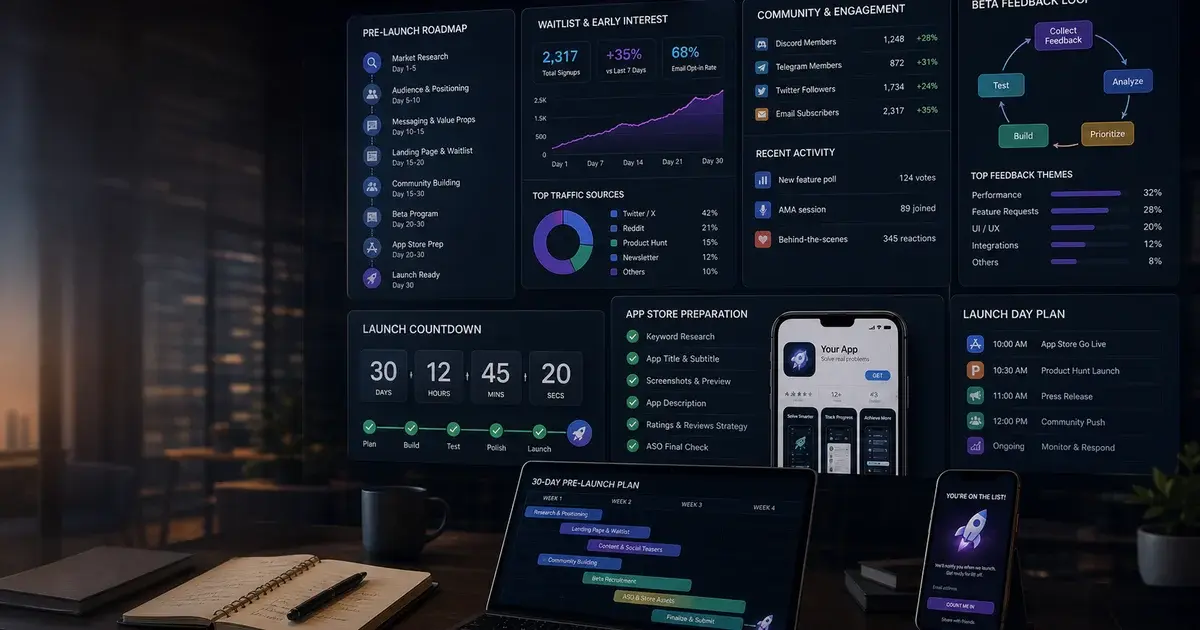
The fortnight is a mandatory soft launch, and treating it as one is the difference between a launch day that starts cold and one that starts with a tested listing, a working keyword set and a queue of testers ready to be asked for a review the moment you go live. The clock runs whether or not you use it.
What we would have a team do across those two weeks:
- Days 1–3 — instrument and listen. Confirm analytics and crash reporting actually fire on real devices. Twelve real users on twelve real device models will surface crashes no emulator found. This is the cheapest crash data you will ever get.
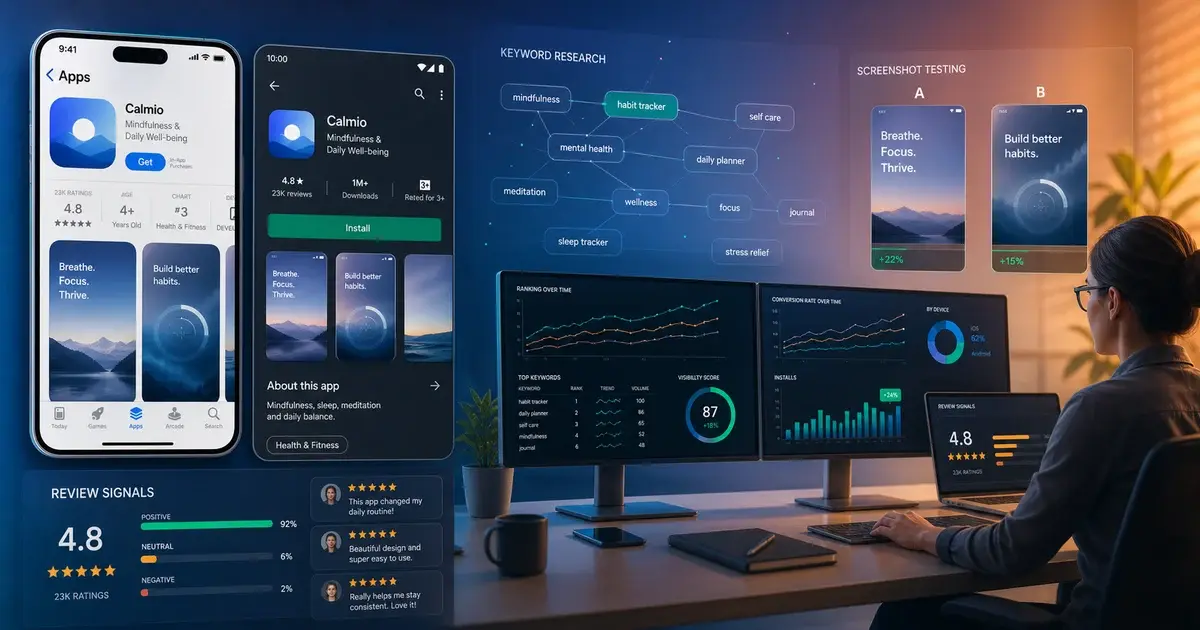
- Days 3–7 — build the store listing properly. Title, short description, full description and the keyword set behind them. Our app store optimisation guide covers the field weights; the free ASO tools round-up covers doing the keyword research without a budget.
- Days 5–10 — fix what the testers actually hit. Not everything they mention — the things that block them. Onboarding drop-off is the usual culprit and the cheapest thing to fix before you spend on acquisition.
- Days 7–12 — get the graphics tested. Show your icon and screenshot set to people who are not your testers and have not seen the app. Screenshot quality decides store conversion more than almost anything else you control.
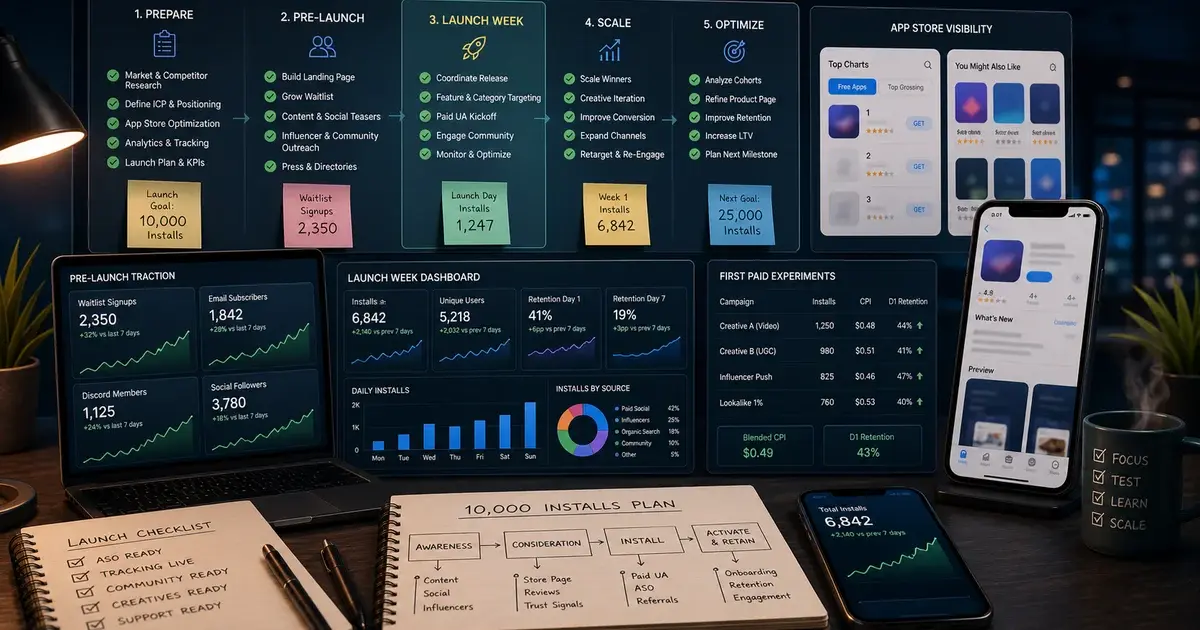
- Days 10–14 — prepare launch mechanics. Ask satisfied testers to review the app once it is live (they cannot review a closed test). Line up the first-week acquisition plan from our first 10,000 installs playbook, and draft the production-access answers while the test is fresh.
One thing to be deliberate about: write the application answers during the test, not after it. The specific, credible detail Google is looking for — what a tester struggled with, what you changed as a result — is vivid on day six and vague by day fifteen. Keep a running note.
The compounding benefit is that everything in that list is work you would otherwise be doing under time pressure after launch, when mistakes cost real acquisition budget rather than nothing. For a first-time publisher this is the most valuable forced delay in the process, and the developers who resent it hardest are usually the ones who have not yet had a launch go badly.
What does the production access application actually ask for?
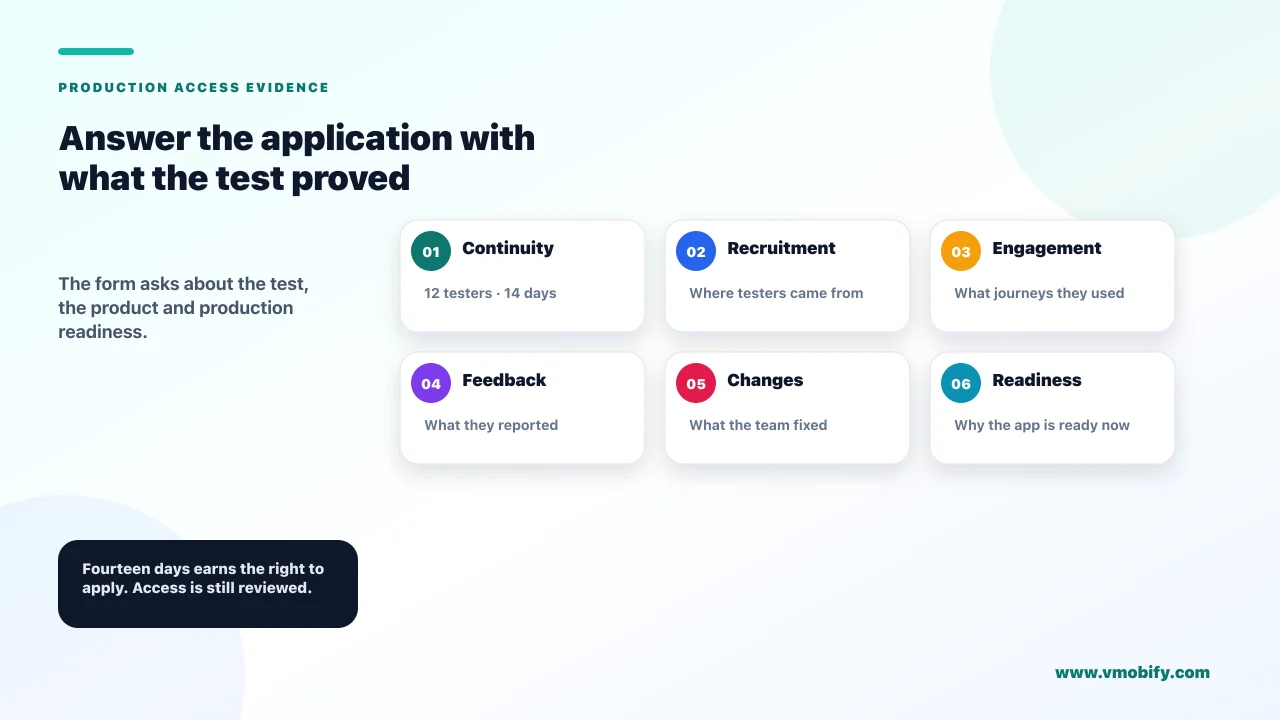
The application is a written form in three parts — about your closed test, about your app, and about your production readiness — and it is read, so the answers determine the outcome. It is not a checkbox confirming that 14 days elapsed.
The three sections, and what each is really probing:
- About your closed test. How you recruited testers and how hard it was, how they used the app's features, whether their behaviour matched what you expect in production, and a summary of the feedback you collected. This section is where a fabricated test becomes visible — it asks for texture no packaged service can supply.
- About your app or game. Who it is for, what value it delivers, and how many installs you expect in the first year. Answer the install estimate realistically. An unremarkable, grounded number reads as someone who understands their market; a wild one invites scrutiny.
- About your production readiness. What you changed as a result of the closed test, and how you concluded you were ready. The implicit question is whether the test changed anything at all. "We found and fixed X" is the answer that works — and it is only available to you if the test was real.
How to write it well: be specific and be brief. Name the actual bug you fixed, the actual onboarding step people got stuck on, the actual feature nobody discovered. Concrete detail is both more persuasive and easier to write than generalities, and it demonstrates the thing being assessed. Avoid marketing language entirely — this is not a pitch, and reviewers read a great many of these.
The difference is easiest to see side by side. A weak answer to the feedback question reads like "testers found the app useful and reported no major issues" — which describes no test at all, and is what a reviewer sees when a requirement was satisfied rather than met. A strong answer to the same question names what happened: that several testers never found a core feature because it sat behind an icon nobody recognised, that you moved it into the main flow on day eight, and that the testers who joined afterwards reached it without prompting. That answer is unfalsifiable in the useful sense — it is so specific to your app that no template produces it.
The same principle applies to the recruiting question. "Recruited from a testing community" invites exactly the scrutiny you do not want. "Recruited from a parenting group I am part of, plus eight people from the waitlist we collected before launch; roughly a third of those invited actually opted in" describes a real, slightly difficult process — and difficulty is what makes it credible, which is precisely why the form asks how hard recruiting was.
Google states that review usually takes seven days or less, though it can occasionally take longer. In practice most decisions arrive faster than that, but plan against the stated figure rather than the optimistic case, particularly if you have a launch date tied to a campaign or a seasonal window.
One more thing to check before you apply, because it is a separate gate that catches people at exactly this moment: your app must meet Play's current target API level requirements. These tighten annually and the deadline sits in late August, so a first-time publisher launching in the second half of the year should confirm the current target before building the release they intend to ship.
What happens if you are rejected, and how do you reapply?
A rejection is not a ban — it is a request for a better test, and the reapplication path is open — but each cycle costs you real weeks, which is why the first attempt deserves the effort. Understanding the common failure modes is the cheapest form of preparation.
What typically causes a rejection:
- The tester requirement was not genuinely met. Fewer than 12 opted in at application time, or the continuity broken and not noticed.
- The answers show no real test happened. Generic responses with no specific feedback, no described changes, and no evidence the app was used the way real users would use it.
- The app itself has policy problems. Production access review is also a look at the app. Missing or inaccurate data-safety declarations, unclear account-deletion handling for apps with sign-in, and permissions that are not justified are all common.
- The app is visibly incomplete. Placeholder content, broken core flows, or a listing that does not match what the app does.
If you are rejected, resist the instinct to resubmit the same application with the wording changed. Read what the decision actually says, fix the underlying thing, and if the gap was the test itself, run more of it — with more testers, and with the engagement that produces something to report. A second application that describes a materially better test is a genuinely different application. A second application that describes the same test in new words is not.
Two practical notes. Keep the closed test running while you wait and while you fix — tearing it down means rebuilding tester continuity from zero if you need another cycle. And handle the app-level policy items proactively rather than reactively: the store rejection patterns that block iOS launches have close Android equivalents, and data safety and account deletion are the two that catch first-time publishers most often.
The developers we see stuck in repeat cycles are almost always the ones who treated the first attempt as a formality. The ones who clear it first time treated the fortnight as a real test — which, once again, is the same advice as everywhere else in this guide, because it is the only thing the process is actually measuring.
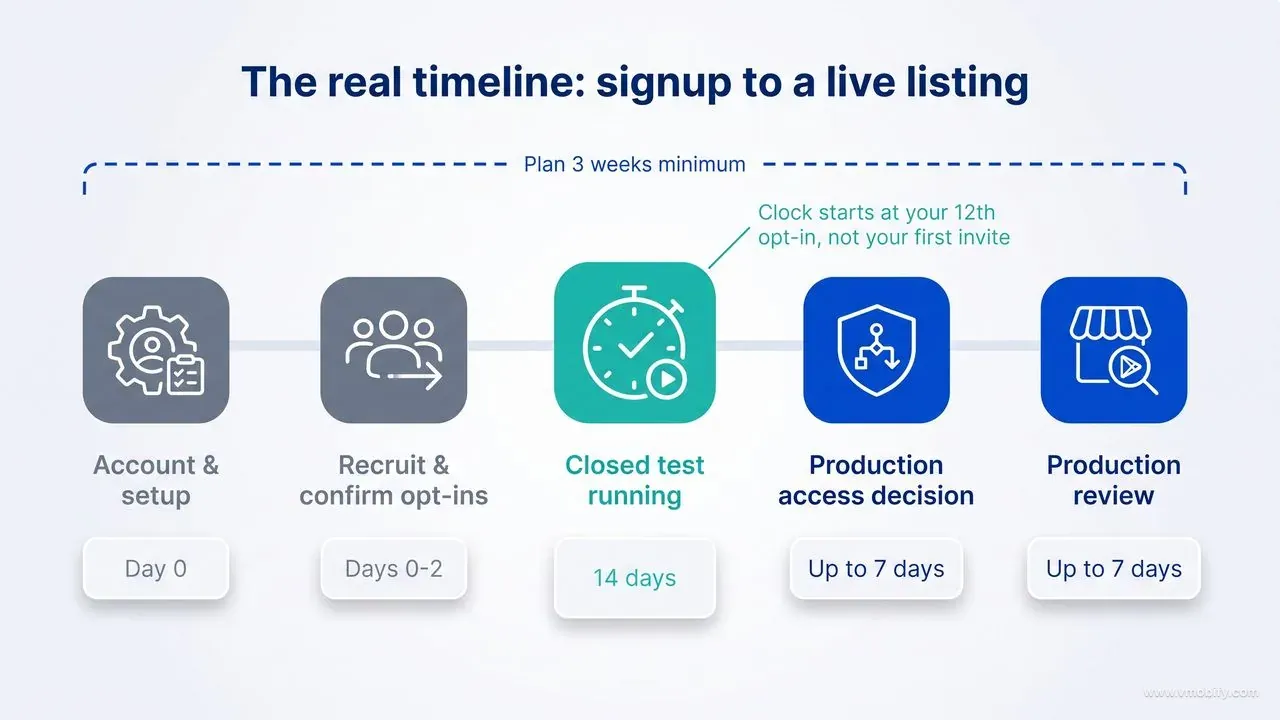
What does the realistic timeline from signup to production look like?
Budget about three weeks from a working build to a live production listing, and add a buffer if anything about your app is unusual. The 14 days are the visible part; they are not the whole cost.
A realistic sequence:
- Day 0 — account and setup. Create the account and complete verification. Prepare the closed track, the tester list and the opt-in link.
- Days 0–2 — recruit and confirm opt-ins. The gap between "someone agreed to test" and "someone has actually opted in" is where days quietly disappear. Confirm each opt-in individually rather than assuming.
- Days 2–16 — the 14-day window. Runs from when your twelfth tester is opted in, not from when you first invited anyone.
- Days 16–18 — production access decision. Often around 48 hours, though Google states up to seven days.
- Days 18–25 — production review of the app itself. A separate review from the access decision, and first submissions take longer than updates.
That is roughly three weeks in the good case and closer to four if a tester drops out or a review takes its full window. The planning implication is simple: if your launch is tied to a date — a funding milestone, a seasonal peak, a campaign — start this at least six weeks out. The most expensive version of this mistake is booking acquisition spend against a launch date that the closed-testing clock will not permit.
It also argues for sequencing your platforms deliberately. If you are shipping both, the iOS build has no equivalent requirement, so an iOS-first launch can be generating users and feedback while the Android clock runs in parallel. Our iOS versus Android launch comparison covers when that ordering makes sense and when it does not.
One thing worth confirming rather than assuming when you plan a second app: Google's documentation describes applying for production access to distribute your app, and does not spell out whether that grant extends to everything you publish afterwards. Do not schedule a second launch on the assumption that the fortnight is behind you for good — check the dashboard for that app before you commit to a date. The requirement is badly explained, and the developers who get the most out of it are the ones who stop treating it as a queue and start treating it as the soft launch they would not otherwise have run. If you want help turning that fortnight into a launch plan, talk to our team — it is the window where the cheapest wins in a launch are still available.
Frequently Asked Questions
How many testers does Google Play require for closed testing?+
Twelve. They must be opted in to your closed test and must have remained continuously opted in for the 14 days before you apply for production access. The requirement was 20 testers until 11 December 2024, so older guides quoting 20 are out of date.
Does the 12-tester rule apply to every developer account?+
No. It applies only to personal Play Console accounts created after 13 November 2023. Organisation accounts registered to a legal business entity are exempt, and personal accounts created before that date were not affected retroactively.
Can I use a paid tester service to meet the requirement?+
We strongly advise against it. The production-access application asks how you recruited testers, how they used the app and what you learned — questions a packaged tester pool cannot answer credibly. It also risks the account under Play policies covering misrepresentation, and it wastes the only free pre-launch signal you get.
Does uploading a new build restart the 14-day clock?+
No. Shipping updated releases to the closed track during the test is expected and does not affect tester opt-in status. Only a tester opting out and rejoining restarts that tester's 14-day count.
What happens if a tester drops out on day 12?+
If it takes you below 12 opted-in testers, you cannot apply until you are back above the threshold — and a replacement has to serve their own 14 consecutive days. This is why we recommend recruiting 16 to 20 rather than exactly 12.
Does a Limited Distribution account avoid the closed testing requirement?+
No. Limited Distribution accounts, which launched globally in August 2026, let you share an app directly to up to 20 devices without a fee or government ID. That is a sideloading track for hobbyists and students, not Play Store publishing. A public Play listing still requires production access.
How long does the whole process take from start to a live app?+
Budget about three weeks: a day or two of setup and recruiting, 14 days of testing, roughly 48 hours for the production-access decision, and up to seven days for the production review of the app itself. Allow four weeks if a tester drops out or a review runs long.
Sources
- Play Console Help — App testing requirements for new personal developer accounts — The primary source: 12 testers, 14 continuous days, and the three-section production access application
- Play Console Help — Play Console Requirements — Account-level requirements and policies governing Play Console use
- Play Console Help — Policy announcements — Running log of policy changes, including the December 2024 reduction from 20 to 12 testers
- Android Developers Blog — Developer verification — Context for the 2026 verification programme and the Limited Distribution account type
- Android Developers — Register for limited distribution — What Limited Distribution accounts do and do not permit — up to 20 devices, no Play Store publishing
- Android Developers — Target API level requirements — The annually tightening target API deadline that gates production releases
- Android Developers — Launch best practices — Google's own guidance on preparing a launch, including testing tracks
- Android Developers — In-app review API — How to request reviews from real users once the app reaches production
About the author
Amol Pomane — Founder, Vmobify
Amol leads Vmobify, a mobile app growth agency that has driven 30M+ downloads and ranked 54K+ keywords across 300+ apps since 2013. He writes about ASO, paid user acquisition, retention, and the operational reality of scaling mobile apps in India and global markets.