StoreKit vs RevenueCat: Build or Buy Your IAP Layer?
StoreKit 2 and Google Play Billing handle the purchase on-device for free — but server-side validation, cross-platform entitlements, subscription state and paywall testing are still yours to build. Here is an honest build-versus-buy breakdown of native IAP versus RevenueCat (and peers like Adapty), with the trade-offs that actually decide it.
On this page
- What is the build-versus-buy decision really about?
- What does StoreKit 2 give you natively?
- What does Google Play Billing give you natively?
- What do you still have to build yourself?
- How does server-side receipt and transaction validation actually work?
- How does the cost and fee trade-off work?
- What does RevenueCat actually abstract away?
- How do cross-platform entitlements work?
- How do refunds, grace periods, and plan changes actually behave?
- When is building natively the right call?
- Which IAP pitfalls cost teams the most?
- When does buying RevenueCat or Adapty win?
- How do you migrate later if you change your mind?
- Frequently Asked Questions
What is the build-versus-buy decision really about?
The build-versus-buy decision for your in-app purchase layer is not about who processes the payment — Apple and Google always do that — it is about who owns the infrastructure that sits between the buy button and your app deciding whether a user is a paying customer. That gap is wider than most teams expect, and underestimating it is the single most common mistake we see in monetisation builds.
When a user taps "subscribe", the store's native billing SDK runs the purchase, takes the money, and hands your app a signed receipt or transaction. That part is genuinely solved and free. The hard part starts a moment later: verifying that receipt on a server you trust, recording that this user now has an active entitlement, keeping that entitlement in sync if they reinstall or switch from iPhone to Android, reacting when a subscription renews or lapses, and giving your growth team a way to test pricing without shipping a new binary. None of that is handled by the store SDK alone.
So the honest framing is: build means you write and maintain that middle layer yourself on top of StoreKit and Play Billing. Buy means you adopt a service like RevenueCat (or a peer such as Adapty) that provides it as an SDK plus backend, in exchange for a revenue share above a free tier. This guide walks both paths concretely so the choice is informed rather than defaulted.
Across our 300+ apps managed since 2013, the teams that regret their choice almost always made it implicitly — they either built billing plumbing because "it is just an SDK", then drowned in edge cases, or they paid a revenue share on a single one-off purchase that never needed it. The decision deserves a deliberate hour, not a default. For where IAP fits in the wider revenue picture, our mobile app monetisation playbook sets the context this post drills into.
What does StoreKit 2 give you natively?
StoreKit 2 gives you a modern, Swift-native API for fetching products, running purchases, reading current entitlements on-device, and — crucially — receiving transactions that are already cryptographically verified by Apple, so you no longer have to parse a base64 receipt blob yourself. It is a substantial improvement over the original StoreKit, and for some apps it is genuinely enough.
The headline pieces, per Apple's StoreKit documentation, are: Product for loading store metadata and pricing in the user's local currency; Product.purchase() for the buy flow; Transaction.currentEntitlements to read what the user owns right now on this device; and Transaction.updates, an async stream that surfaces renewals, refunds and revocations while the app runs. Each transaction arrives as a VerificationResult that Apple has signed with JWS, so on-device verification is built in.
- Product loading and display: localised price, currency and subscription metadata, fetched directly from the store.
- Purchase and restore: a single async call drives the purchase sheet and a clean way to restore non-consumables and subscriptions.
- On-device entitlement check:
currentEntitlementsanswers "is this user a subscriber?" without your own backend for simple cases. - Server-side counterpart: the App Store Server API and Apple's App Store Server Notifications let your backend query transaction history and receive renewal and refund events.
What StoreKit 2 deliberately does not do is run your business logic. It will tell you a transaction is verified; it will not store that the user is entitled, sync that across their devices, reconcile it with your own user account system, or tell you why your conversion dropped last week. Those remain your job — which is exactly the gap the rest of this post is about.
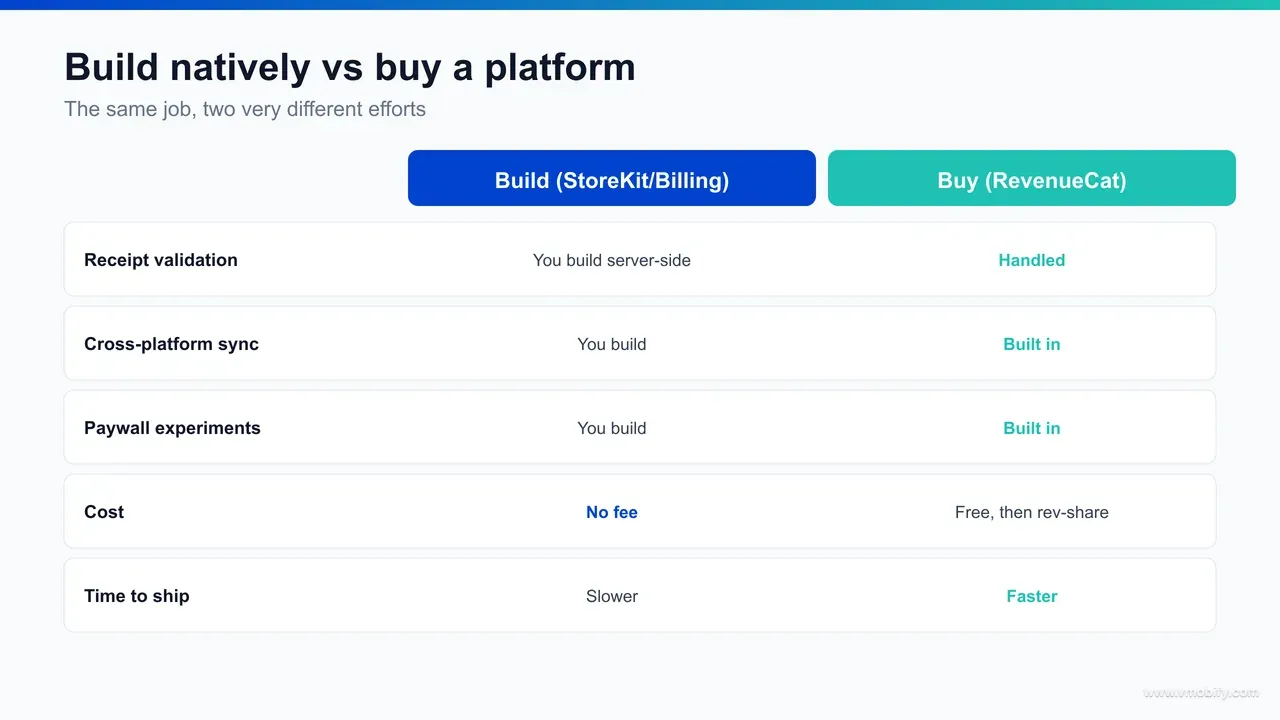
What does Google Play Billing give you natively?
Google Play Billing gives you the Android equivalent — a client library to query products, launch the purchase flow, and acknowledge purchases — but it leans harder on your backend, because the authoritative source of truth for a Play purchase lives in Google's server APIs rather than fully on-device. The practical implication is that a robust Play integration almost always needs a server, even for cases where StoreKit 2 might not.
The Play Billing Library handles product details, the billing flow, and purchase acknowledgement. But three things make Android distinct. First, you must acknowledge or consume every purchase within three days or Google automatically refunds it — a foot-gun that has cost real revenue for teams who missed it. Second, the trustworthy way to validate a purchase and read subscription state is the Google Play Developer API on your server, not the client token alone. Third, you should subscribe to Google's Real-time Developer Notifications over Pub/Sub to learn about renewals, cancellations, grace periods and account holds as they happen.
- Client library: product queries, the purchase flow, and purchase acknowledgement on the device.
- Server validation: the Developer API verifies the purchase token and returns the canonical subscription state.
- Event stream: Real-time Developer Notifications push renewal, cancellation and account-hold events to your backend.
- Subscription lifecycle: Play models grace periods, account holds, pauses and resubscribes that you must handle to avoid wrongly locking out paying users.
The takeaway: Play Billing is solid, but it pushes more of the entitlement burden onto your infrastructure than Apple does. If you are cross-platform, you are now maintaining two validation paths, two event streams, and two subscription state machines that drift apart over time — which is precisely where a unifying layer starts to pay for itself.
What do you still have to build yourself?
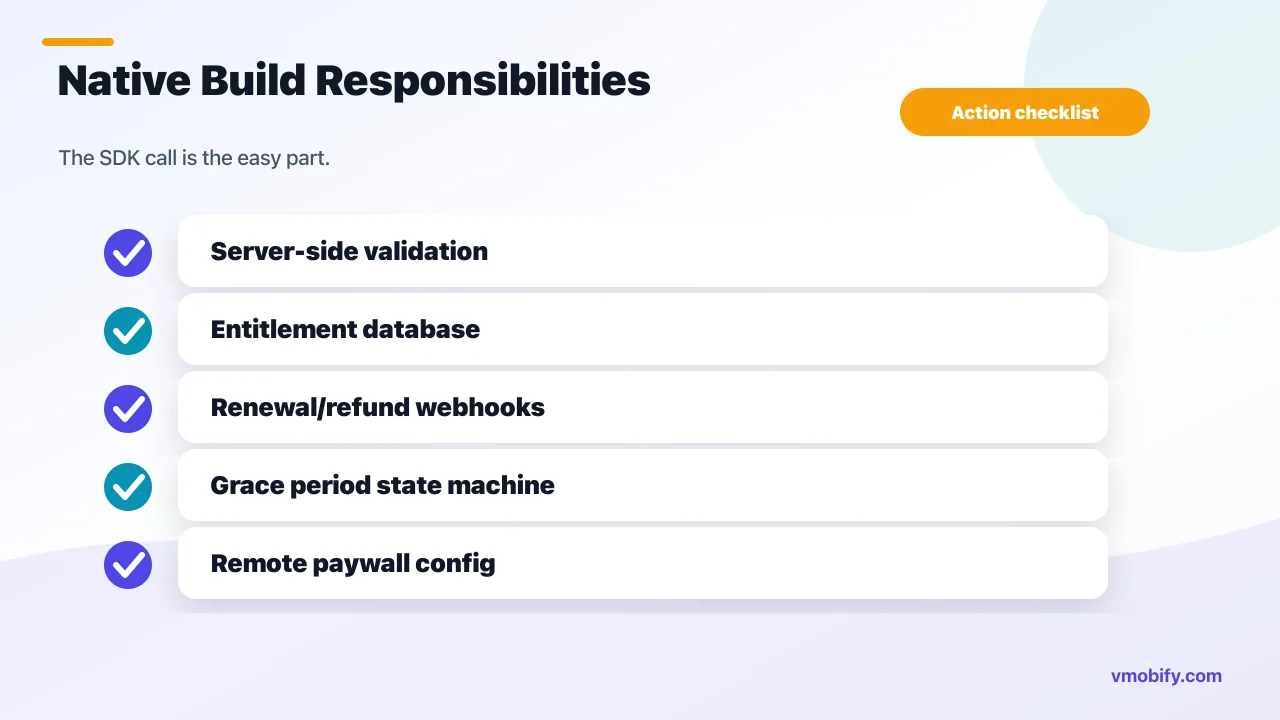
Even with StoreKit 2 and Play Billing doing the purchase, you still own server-side validation, an entitlement store, cross-platform identity, the full subscription lifecycle, renewal and refund handling, and any paywall experimentation — and that list, not the SDK call, is where the engineering months actually go. This is the part teams consistently underestimate.
Walk through what a production-grade native build still requires:
- Server-side validation: never trust the client. You validate Apple transactions against the App Store Server API and Play tokens against the Developer API, then store the result. Skipping this is the classic route to trivial subscription piracy.
- An entitlement store: a durable record of who owns what, when it expires, and which platform granted it — joined to your own user accounts, not the anonymous store identifier.
- Webhook ingestion: a reliable, idempotent pipeline consuming App Store Server Notifications and Play Real-time Developer Notifications, including retries and out-of-order delivery.
- Subscription state machine: active, in trial, in intro price, grace period, billing retry, on hold, cancelled-but-active, expired, refunded, upgraded, downgraded, crossgraded. Each transition gates access differently.
- Edge cases: family sharing, ask-to-buy, refunds and chargebacks, price changes the user must consent to, region changes, restore on a fresh device, and clock-tampering.
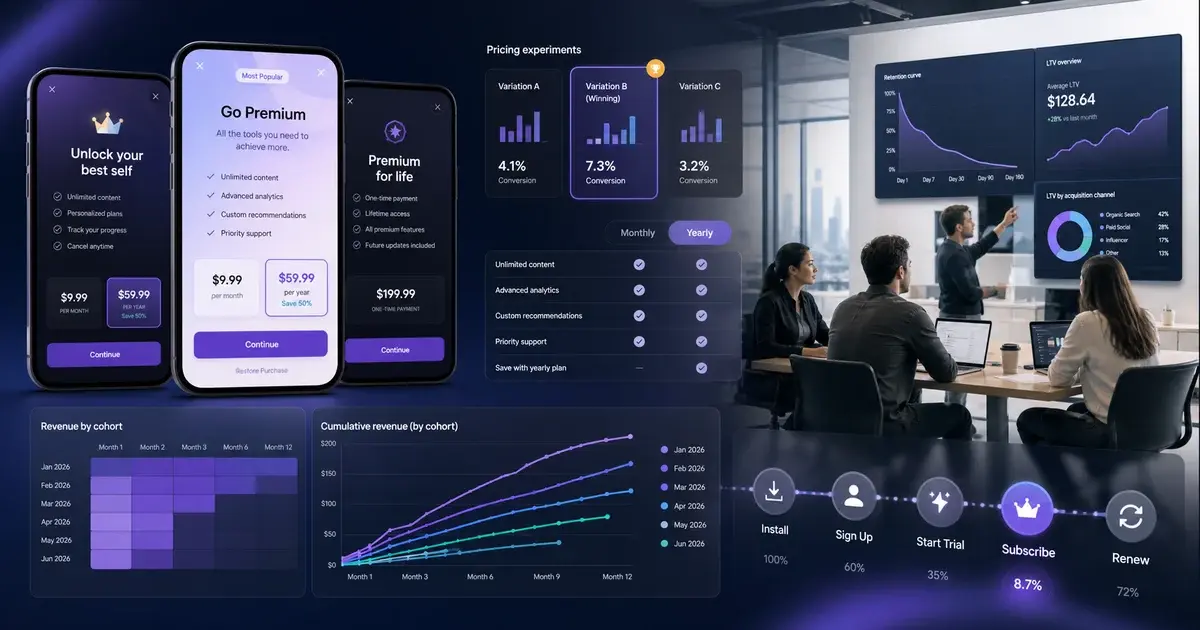
- Paywall experimentation: if pricing or paywall copy is hardcoded in the binary, every test needs an app update and a review cycle — so you also build remote config plus an experiment framework to test anything.
In our portfolio, the apps that built all of this well did so because billing was their core competency and scale justified it. The ones that struggled treated it as a two-week task and then spent quarters firefighting renewal bugs and support tickets from users wrongly denied access. The native SDKs are the easy 20%; this list is the hard 80%.
How does server-side receipt and transaction validation actually work?
Server-side validation means your backend independently confirms that a purchase is real and current — for Apple by verifying the JWS-signed transaction or calling the App Store Server API with its transaction ID, and for Google by sending the purchase token to the Play Developer API — and then storing the verified result as the only entitlement your app will trust. The client is a messenger, never the source of truth.
On iOS, StoreKit 2 hands you each transaction as a JWS (JSON Web Signature) payload that Apple has already signed. Your server can verify that signature against Apple's published root certificates entirely offline, which is fast and cheap. When you need the canonical history — for example to confirm a subscription is still active after a renewal, or to look up the original transaction ID that ties a whole family of renewals together — you call the App Store Server API with the transaction ID and read the authoritative record back. The two approaches complement each other: verify the signature for speed, query the server for truth.
On Android the model is simpler to describe and stricter in practice. The purchase token your app receives is essentially opaque; the real state lives behind the Play Developer API. Your backend sends that token to the subscriptions endpoint, gets back the current status, expiry, auto-renew flag and any grace-period or hold state, and only then grants access. Skipping this and trusting the local cache is the single most common way Android apps quietly leak free subscriptions.
It is worth being concrete about the native code you actually write versus what a managed layer removes. Building it yourself, you own: the signature-verification routine and certificate handling, an idempotent webhook endpoint that survives duplicate and out-of-order delivery, retry-with-backoff against both store APIs when they rate-limit or time out, and the database writes that move an entitlement between states. Restore purchases is a worked example of why this matters — when a user reinstalls and taps restore, StoreKit replays their transactions and Play returns their owned products, but it is your validation-and-storage path that has to recognise each one, match it to the right account, and re-grant access without minting a duplicate entitlement. A layer like RevenueCat does all of this server-side and exposes a single verified entitlement, which is most of what teams are really paying for. Across our 300+ apps managed since 2013, the validation path is where the subtlest, longest-lived bugs live — they pass QA and only surface later in production renewal data.
How does the cost and fee trade-off work?
The cost trade-off is a straight swap: build natively and you pay zero per-transaction fee but carry the full engineering and maintenance cost; buy a layer and you pay nothing until you cross a free-tier threshold, then a small revenue share on tracked revenue above it — so the question is whether that share costs more or less than the engineers it replaces. Treat the specific numbers as something to verify, because vendor pricing changes.
The native path has no marginal fee, but it is not free. You are paying salaried engineering time to build the validation, entitlement and webhook infrastructure above, plus ongoing maintenance every time Apple or Google changes their billing model — which is most years. That cost is fixed-ish and does not scale with revenue, which is exactly why it gets cheaper, per rupee earned, as you grow.
Managed layers typically use a freemium model: free up to a monthly tracked-revenue threshold, then a percentage of tracked revenue above it (often with an enterprise tier that caps or renegotiates the rate at high volume). That cost scales with revenue, which makes it cheap when you are small and increasingly material as you grow. Always check the current pricing on the vendor's own pricing page before you model anything — the threshold and the percentage both move, and an out-of-date assumption here can swing the decision.
The mental model we use with clients: a per-revenue fee is rational when it buys back engineering time you would otherwise spend, and questionable once your scale means the same money would fund a dedicated billing engineer who removes the fee entirely. For an early-stage subscription app, paying a small share to ship faster is usually the right trade. For a high-volume app where IAP is the business, the maths eventually flips. If you want help running that calculation against your actual revenue and roadmap, that is core to our monetisation work.
What does RevenueCat actually abstract away?
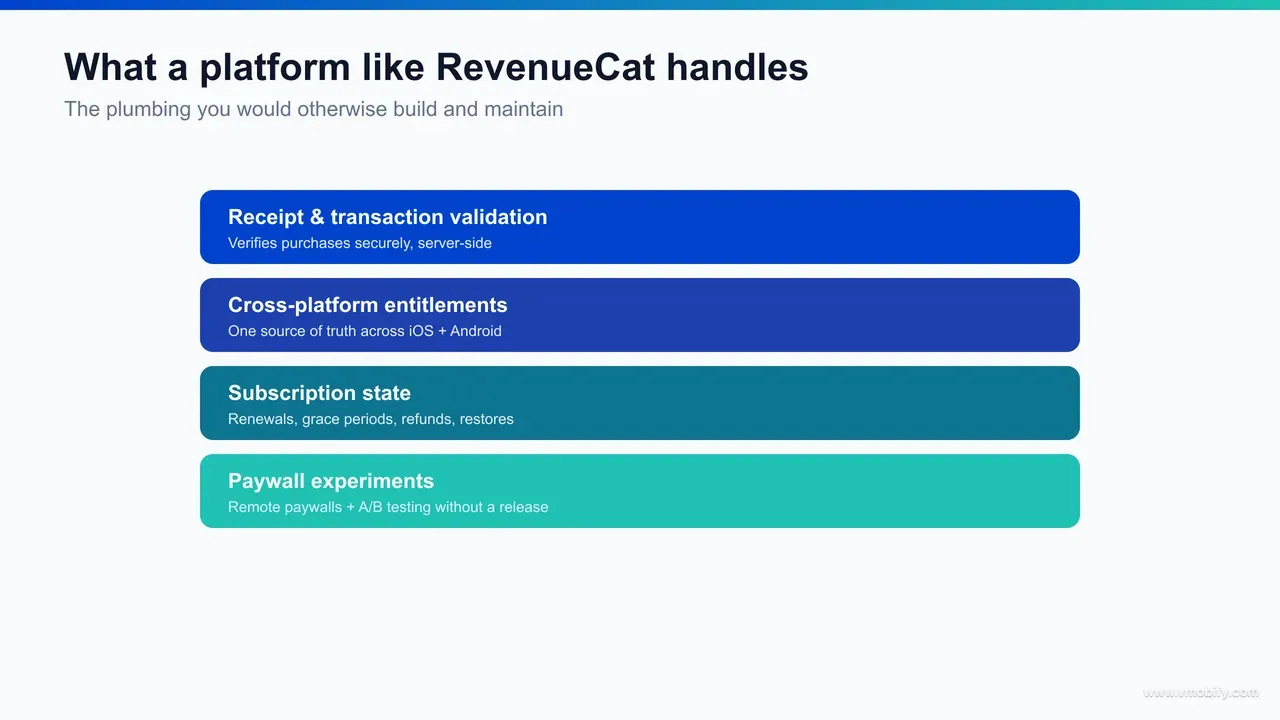
RevenueCat (and peers like Adapty) abstract away the entire middle layer — server-side receipt validation for both stores, a single cross-platform entitlement API, webhook normalisation, subscription state tracking, and a remote-config paywall you can change without shipping an app update — so your app asks one question, "does this user have this entitlement?", and gets one answer. That is the whole pitch, and it is a real one.
Concretely, per RevenueCat's documentation, you wrap StoreKit and Play Billing with its SDK and get:
- Validation as a service: it verifies every Apple and Google transaction server-side, so you do not run the App Store Server API or Play Developer API yourself.
- One entitlement model: you define entitlements (e.g. "pro") and offerings centrally; the SDK exposes whether the current user has them, identically on iOS and Android.
- Normalised webhooks: Apple and Google's different event streams arrive as one consistent set of events you can forward to your analytics, CRM or backend.
- Subscription state handled: trials, intro offers, grace periods, billing retries and refunds are tracked for you and reflected in the entitlement.
- Remote paywalls and experiments: change price points, paywall layout and copy from a dashboard, and A/B test them without an app release.
The deliberate boundary: it is not a payment processor and does not touch the money — Apple and Google still process payment, take their commission, and pay you. The layer sits beside that flow, reading the signed transactions and turning them into clean entitlement state. We have seen this collapse what was a multi-month billing project into a multi-day integration, which is why it is the default recommendation for small teams shipping cross-platform subscriptions. For the paywall side specifically, our paywall optimisation benchmarks show why being able to test without a release matters so much.
How do cross-platform entitlements work?
A cross-platform entitlement is a single record of what a user is allowed to access, tied to your own account identity rather than to a store — so a customer who subscribes on iPhone keeps their access on their Android tablet and on web, because entitlement is decoupled from the platform that happened to take the payment. This is the problem that most justifies buying rather than building, because it is genuinely hard to get right by hand.
The difficulty is identity. Apple gives you an app-account token and an original transaction ID; Google gives you a purchase token and an obfuscated account ID. Neither knows about your user accounts, and neither knows about the other. To unify them you must map both store identities to your own user, dedupe when the same human subscribes on two platforms, and decide what happens when a user logs into a second account on a shared device — all without ever locking out a legitimate paying customer or leaking access to one who is not.
- Identity mapping: link each store's purchase identity to your canonical user ID at purchase and at login.
- Single source of truth: one entitlement record your backend and every client read, regardless of which store granted it.
- Conflict handling: sensible rules for duplicate subscriptions, restores, and account switches.
- Web and other surfaces: if you also sell on web (Stripe, or India-specific rails), those entitlements must merge into the same record.
A managed layer does this mapping for you through a single "app user ID" you control. Building it yourself is doable, but it is its own service with its own edge cases — and getting it subtly wrong produces the worst possible support category: paying users denied what they bought. For India-focused apps where renewals depend on UPI AutoPay mandates, cross-platform entitlement state also has to reconcile with mandate status, which adds a layer the stores do not model at all.
How do refunds, grace periods, and plan changes actually behave?
The subscription edge cases that decide whether users trust your app — refunds, billing-retry grace periods, and upgrades or downgrades — each behave differently on Apple and Google, and a native build has to model every one of them by hand while a managed layer reflects most of them in the entitlement automatically. These are not rare corners; at any real scale you hit all of them every day.
- Refunds and chargebacks: when Apple grants a refund it sends a REFUND notification; Google reports it through voided-purchases and a notification. In both cases your job is to revoke the entitlement promptly — a customer who has been refunded but still has access is direct lost revenue, and at volume it gets exploited deliberately. The worked failure here is an app that grants on purchase but never listens for the refund event, quietly bleeding access to people who have already had their money back.
- Grace periods and billing retry: when a renewal payment fails, neither store expires the user immediately. Apple offers a billing grace period and Google a grace period followed by an account hold, during which the platform retries the card. The correct behaviour is to keep access on through the grace window and only revoke once the subscription truly moves to on-hold or expired. Treating a billing-retry user as expired locks out someone who is still, as far as they know, a paying customer — and generates the angriest support tickets you will see.
- Upgrades, downgrades and crossgrades: Apple prorates an upgrade immediately and defers a downgrade to the next renewal; Google uses explicit replacement modes that you choose at purchase time, with similar immediate-versus-deferred semantics. Your entitlement logic has to know that a downgrade scheduled for next period must not change access today, while an upgrade takes effect now. Getting this wrong either gives away the higher tier early or strips it too soon.
- Family sharing: Apple's Family Sharing can grant your subscription to family members, and StoreKit flags those transactions as family-shared. There is no extra revenue, but there is an extra entitled user your logic must recognise and grant — and must stop granting if sharing is turned off. Google models the equivalent differently, so a cross-platform build cannot assume symmetry here.
None of this is exotic, but it is a lot of state, and Apple and Google evolve the details most years. In our portfolio the grace-period and refund handlers are the two we most often find missing or wrong on a native build that shipped in a hurry — and both stay invisible until the renewal data weeks later shows churn or leakage. A managed layer earns much of its fee precisely by tracking these transitions for you, so your app only ever asks the one entitlement question.
When is building natively the right call?
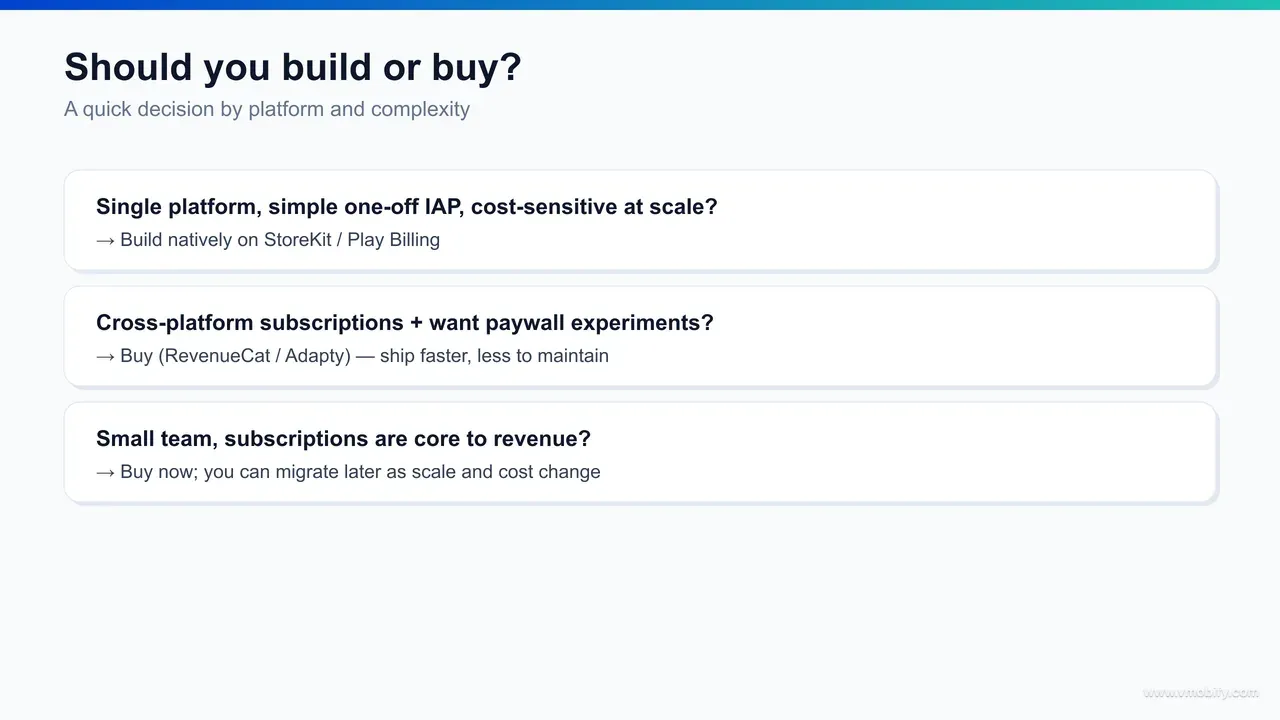
Building natively on StoreKit and Play Billing is the right call when your IAP needs are genuinely simple — a single platform, a one-off non-consumable or consumable, no cross-platform sync, no paywall experimentation — or when you are large enough that a revenue share costs meaningfully more than the engineer who would replace it. In those cases the layer adds cost and a dependency without buying back much work.
The clearest "build" profiles we see:
- Single-platform, single-product apps: an iOS-only app selling one lifetime unlock or a pack of consumables. StoreKit 2's on-device entitlement check may be almost all you need; a layer is overkill.
- One-off IAP with no renewal complexity: consumables (coins, credits) and non-consumables (remove ads, unlock a feature) avoid the entire subscription-lifecycle problem that makes building expensive.
- Cost-sensitive apps at real scale: once monthly IAP revenue is high, a percentage fee can exceed the fully-loaded cost of a billing engineer. At that point owning the stack removes the fee and gives you full control of data and logic.
- Strict data or compliance constraints: teams that cannot route transaction data through a third party for regulatory or contractual reasons.
Even in these cases, do not skip server-side validation — "simple" does not mean "trust the client". The point is that the incremental work over the native SDK is small when there is no cross-platform sync, no subscription state machine, and no experimentation to maintain. We have seen capable teams ship a clean native one-off-purchase flow in days. The trouble only starts when "simple" quietly grows into "cross-platform subscriptions with trials and a tested paywall" — at which point the build cost balloons and the buy case reopens.
Which IAP pitfalls cost teams the most?
The pitfalls that cost the most are weak or absent server-side validation, lost or unhandled transactions, missed acknowledgement on Android, and a subscription state machine that wrongly locks out paying users — each of which shows up as either lost revenue or a flood of support tickets, and each is avoidable. These are the recurring failure modes regardless of build-or-buy.
- Trusting the client: validating purchases only on-device invites tampering and refunds-abuse. Always verify against the store's server API and store the verified result. This is the most expensive shortcut in the category.
- Lost transactions: a purchase that succeeds while your app is backgrounded, crashes, or the network drops must still be reconciled. StoreKit's
Transaction.updatesand Play's pending-purchase handling exist precisely for this — ignore them and users pay without getting what they bought. - Missed Android acknowledgement: fail to acknowledge a Play purchase within three days and Google auto-refunds it. Teams have shipped this bug and watched real revenue silently reverse.
- Grace-period mishandling: treating a billing-retry or grace-period user as "expired" locks out a customer who is still paying, generating angry tickets and churn. The state machine must keep access on during these windows.
- Hardcoded paywalls: baking price and copy into the binary means every test is an app release — so most teams simply never test, leaving conversion money on the table.
In our portfolio, weak validation and grace-period bugs are the two we see most often, and they are insidious because the app looks fine in QA — the damage only appears in production renewal data weeks later. A managed layer removes most of these by construction; a native build must consciously engineer each one. The deeper subscription-design discipline behind avoiding these is covered in our app subscription monetisation strategy.
Buying a billing layer does not exempt you from Google's version deadlines — it moves the question to which library version your provider bundles. From 31 August 2026, new apps and updates to existing apps must use Play Billing Library 8 or later, with a documented extension route to 1 November 2026 requested through the warning in Play Console under Policy status. Existing published apps keep working; what you lose is the ability to ship anything, including an urgent fix. The deadline also recurs annually — version 8 must itself be replaced by 31 August 2027 — so if you are doing the migration anyway, moving to the current version rather than the minimum viable one buys a year for the same effort. We work through what version 8 removed, and why restore purchases is the hard part, in the Billing Library 8 migration.
When does buying RevenueCat or Adapty win?
Buying a layer wins when you run cross-platform subscriptions, want to experiment on pricing and paywalls without shipping app updates, or have a small team whose time is better spent on the product than on billing plumbing — which describes the large majority of subscription apps below serious scale. The fee buys speed, fewer bugs, and engineering focus, and for most teams that is a good trade.
The clearest "buy" profiles:
- Cross-platform subscriptions: the moment you sell the same subscription on iOS and Android, the doubled validation, webhook and state-machine work — plus cross-platform entitlement sync — makes a unifying layer the rational default.
- Experimentation-led growth: if pricing, trials and paywall design are levers you actively pull, remote paywalls and built-in A/B testing pay for themselves in conversion gains that a hardcoded paywall can never capture.
- Small or early-stage teams: when every engineer-week matters, not building billing infrastructure is the highest-leverage decision available. Ship the product; rent the plumbing.
- Analytics and integrations: normalised subscription events flowing into your analytics, attribution and CRM stack out of the box, instead of a bespoke pipeline.
RevenueCat and Adapty occupy roughly the same space; the right one depends on pricing at your volume, paywall-tooling depth, and which integrations you need — evaluate both against your numbers rather than defaulting to the better-known name. We have seen first-time subscription apps reach a tested, cross-platform, properly-validated paywall in a fraction of the time a native build would take, which for a team racing to product-market fit is usually decisive. When monetisation strategy and billing infrastructure need to be designed together, that is exactly what our team does — talk to us if that is where you are.
How do you migrate later if you change your mind?
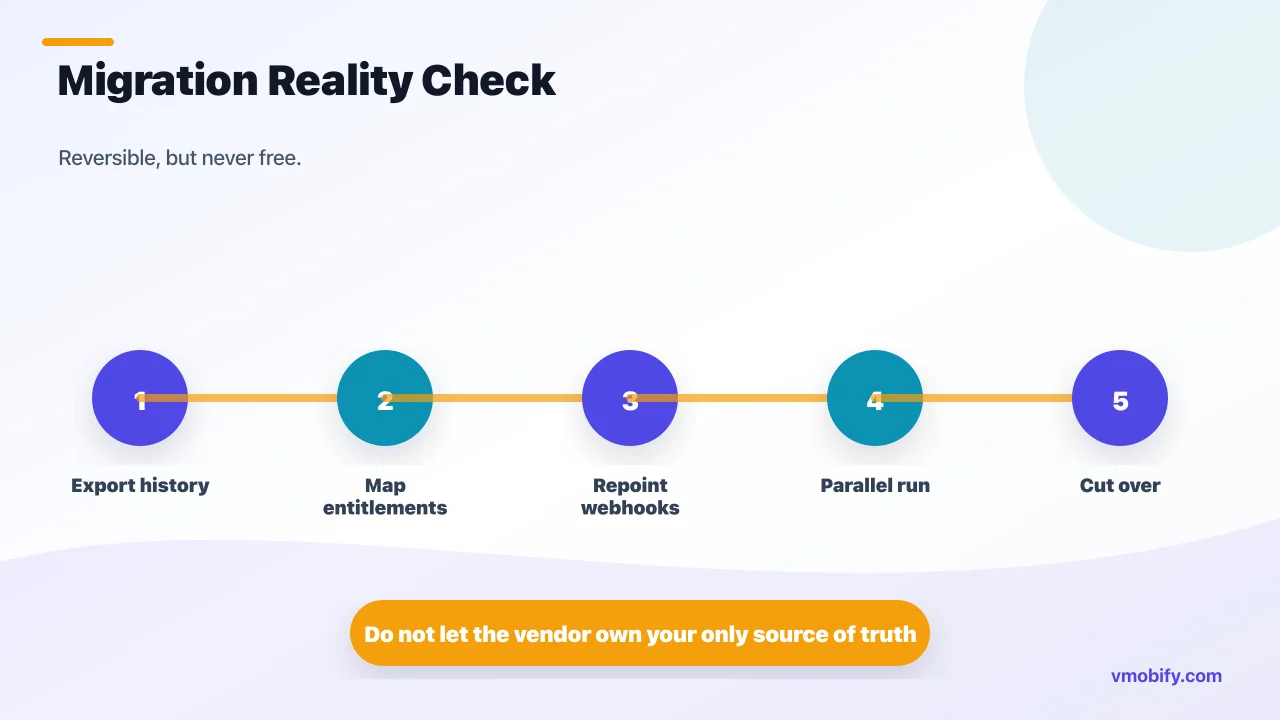
Migrating between a native build and a managed layer in either direction is realistic but never free — the SDK swap is the easy part, while reconciling existing entitlements, historical transactions and live webhooks without disrupting paying users is the work — so choose deliberately rather than assuming you can cheaply reverse the decision. It is reversible, but treat it as a project, not a config change.
Moving onto a layer from a native build means: importing or rebuilding your existing subscribers' entitlements so no current customer loses access on cut-over; pointing the store server notifications at the new provider; and running both paths in parallel for a window while you confirm parity. Providers offer transfer and import tooling for exactly this, but you still own the reconciliation and the testing.
Moving off a layer to native is the harder direction: you must reconstruct the entitlement and validation infrastructure you previously rented, export your subscriber and transaction history, re-point store notifications at your own endpoints, and verify every subscription state maps correctly before you cut over. It is doable — teams do it at scale when the fee eventually outweighs the build — but plan for careful migration and a parallel-run period.
- Entitlement reconciliation: every active subscriber must keep uninterrupted access across the switch.
- Historical data: export and re-home transaction history for analytics, support and compliance.
- Webhook re-pointing: App Store Server Notifications and Play Real-time Developer Notifications must target the new owner without dropping events.
- Parallel run: validate the new path against the old one before fully cutting over.
The practical guidance we give: start where your current scale and team point — usually buy if you are small and cross-platform, build if you are single-platform-simple or very large — and revisit only when the economics clearly flip. The decision is not permanent, but it is sticky enough that getting it roughly right the first time saves a migration. If you want a second opinion mapped to your revenue, roadmap and platform mix, our monetisation team runs exactly this evaluation.
Frequently Asked Questions
Is RevenueCat a payment processor?+
No. Apple and Google still process the payment and take their commission. RevenueCat sits beside that flow, validating the signed transactions and turning them into clean cross-platform entitlement state. It never touches the money itself.
Do I still need a server if I use StoreKit 2?+
For simple single-platform, one-off purchases, StoreKit 2 on-device entitlement checks may suffice. For subscriptions or anything cross-platform you should validate server-side via the App Store Server API and listen to server notifications, so a backend is effectively required.
Does Google Play Billing need server-side validation?+
In practice yes. The authoritative subscription state lives in the Google Play Developer API, and you must also acknowledge purchases within three days or Google auto-refunds them. Real-time Developer Notifications should feed your backend for renewals and cancellations.
How much does RevenueCat cost?+
It uses a freemium model: free up to a monthly tracked-revenue threshold, then a revenue share above it, with enterprise terms at high volume. The exact threshold and percentage change, so always check the current pricing page before modelling your numbers.
RevenueCat or Adapty — which should I pick?+
They occupy the same space, so decide on pricing at your volume, paywall-experimentation depth, and the integrations you need rather than brand familiarity. Evaluate both against your actual revenue and roadmap before committing.
When should I build my IAP layer natively instead of buying?+
Build when you ship one platform with a single one-off purchase and no cross-platform sync or paywall testing, or when you are large enough that a revenue share costs more than a dedicated billing engineer. In those cases the native SDKs plus server validation are enough.
Can I migrate off RevenueCat later?+
Yes, but it is a project, not a toggle. You must reconstruct validation and entitlement infrastructure, export transaction history, re-point store notifications to your own endpoints, and run both paths in parallel before cut-over so no paying user loses access.
Sources
- Apple — StoreKit documentation — StoreKit 2 products, purchases, entitlements and Transaction.updates
- Apple — App Store Server API — Server-side transaction history and subscription status verification
- Apple — App Store Server Notifications — Server events for renewals, refunds and revocations
- Google — Play Billing Library — Android client billing flow, acknowledgement and subscription lifecycle
- Google — Play Developer API (Android Publisher) — Authoritative server-side purchase and subscription validation
- Google — Real-time Developer Notifications — Pub/Sub event stream for Play subscription state changes
- RevenueCat — Documentation — Cross-platform entitlements, validation, webhooks and remote paywalls
- Apple — In-App Purchase overview — Apple commission, product types and StoreKit 2 overview
About the author
Amol Pomane — Founder, Vmobify
Amol leads Vmobify, a mobile app growth agency that has driven 30M+ downloads and ranked 54K+ keywords across 300+ apps since 2013. He writes about ASO, paid user acquisition, retention, and the operational reality of scaling mobile apps in India and global markets.