When to Shut Down Your App — and How to Do It Properly
Most teams shut an app down by simply stopping work on it, which is the one option neither store lets you take quietly. Apple states plainly that an app you no longer actively support will be removed, and Google Play will not let you delete a monetised app at all once it has installs. This is the sequence that ends an app without stranding the people still paying you.
On this page
- Is shutting down actually the right call?
- What is the difference between unpublishing and deleting?
- What happens to users who already installed it?
- Will the store shut it down for you if you do nothing?
- What do you owe users who are still subscribed?
- What are your obligations on user data?
- Can any of this be undone?
- What does a clean wind-down sequence look like?
- What should you keep once the app is gone?
- Frequently Asked Questions
Is shutting down actually the right call?
The decision is rarely about the app being unpopular — it is about whether you can still afford to keep it compliant, and that cost is fixed regardless of how few users you have. A dormant app is not a free asset sitting quietly in a corner. It carries a maintenance floor.
That floor is set by the platforms, not by you. Target API level deadlines arrive every year. Store policies change. Privacy declarations need updating. A payment SDK reaches end of life. None of that scales down when your daily actives do, which is why an app with a hundred users can cost the same to keep legal as one with a hundred thousand.
The honest test is simple. If the next twelve months of mandatory platform work would not be justified by the app's contribution, you are not deciding whether to shut it down — you are deciding whether to do it deliberately or let it happen to you.
Quietly abandoning an app is not a third path. Apple's App Review Guidelines state that if your app no longer functions as intended or you are no longer actively supporting it, it will be removed from the App Store. Neglect ends the same way as a shutdown, except you have no control over the timing and no chance to tell your users first.
There is a second reason to be deliberate, and it is commercial. Across the 300+ apps we have managed since 2013, the ones shut down badly leave behind one-star reviews, chargebacks and an enforcement history on the developer account. The ones shut down well leave behind an email list.
Before you commit, be sure the app is genuinely finished rather than mismanaged. A flat install curve is often an acquisition problem, not a product verdict — our breakdown of why apps fail in the first 90 days covers the failure modes that look terminal and are not.
What is the difference between unpublishing and deleting?
Unpublishing removes the app from discovery while leaving your existing users intact; deleting destroys the listing, your data access and — on Google Play — your right to that package name forever. They are not two intensities of the same action. They are different decisions with different reversibility.
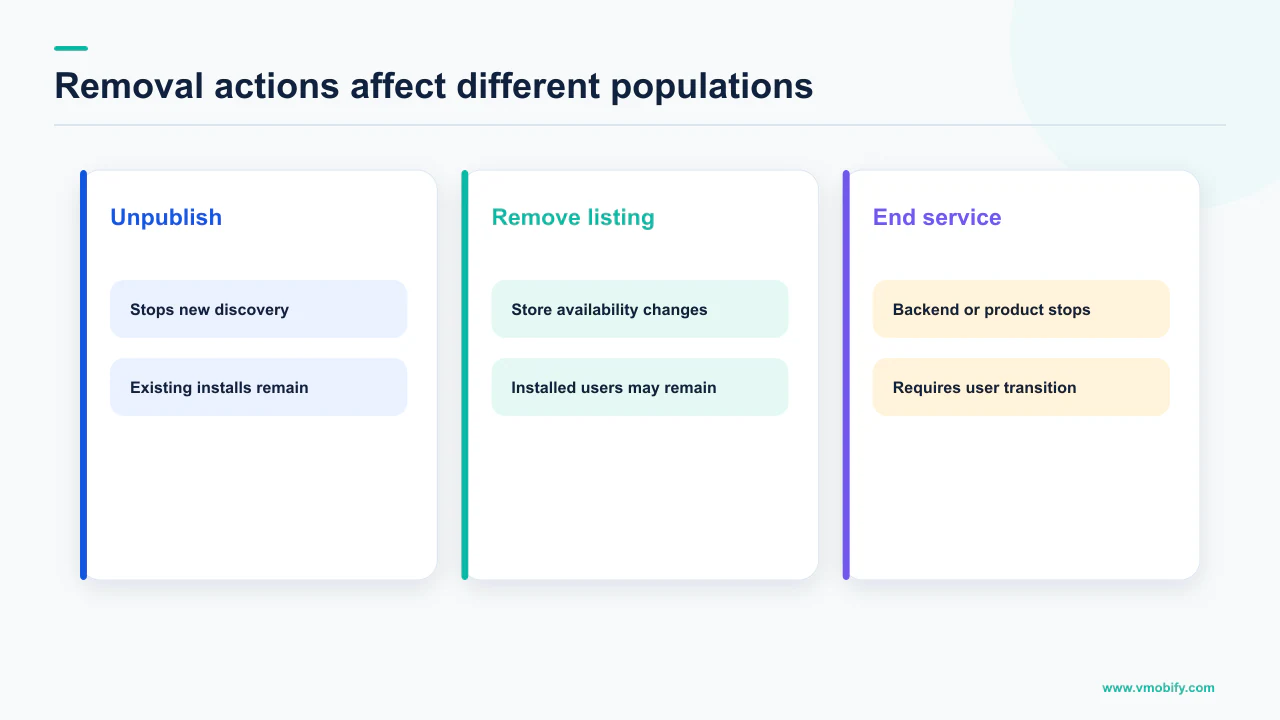
Google Play's publishing documentation defines the unpublished state precisely: you have chosen to unpublish your app from Google Play, it is discoverable on Google Play for existing users only, and updates are only available for existing users. Nothing is destroyed. New acquisition stops, and your current base carries on being served.
Deletion is a different order of finality. Google's page on deleting an app sets out more prerequisites than teams expect: the app must be unpublished, must not have changes in review, must not be rejected, blocked or suspended, and must be installed on fewer than 1,000 active devices. Monetised apps are excluded from self-service deletion altogether unless they have zero lifetime installs. Only after all of that can you delete it, that your app will be removed from Google Play and you lose access to all user data and metrics, and that a deleted app cannot be transferred. Package names belonging to apps with any lifetime installs cannot be reused by anyone.
Unpublish
- Hidden from new users; discoverable for existing users only
- Updates still reach the people who have it
- Console data and metrics stay accessible
- Reversible
Delete
- Requires unpublishing first
- You lose access to all user data and metrics
- Package name is gone permanently if the app ever had installs
- Recoverable for seven days, then final
There is one more restriction that catches monetised apps out. Google states that the self-service deletion feature does not include monetised apps — for example paid apps, apps with in-app purchases, or subscriptions — unless the apps have zero lifetime installs. If you have ever taken money through the app, self-service deletion is simply not available to you. Unpublishing is the end of the road, and for almost every commercial app that is the correct destination anyway.
What happens to users who already installed it?
On both stores, removing an app from sale does not remove it from anyone's phone — and on the App Store it does not even stop updates or redownloads. This surprises most teams, and it changes the shape of the wind-down considerably.
Apple's App Store Connect guidance on managing availability is explicit. Your app will be removed from the App Store in all countries or regions within 24 hours. Users who previously downloaded your app from the App Store in that country or region will continue to receive app updates. And the app can be redownloaded from a customer's purchase history as long as the necessary contract remains active.
That final clause carries more weight than its length suggests. Redownload is conditional on your agreements with Apple staying in force. A team that unpublishes the app and then lets the developer programme lapse has quietly removed the ability of paying customers to reinstall something they already own — on a new device, after a restore, or after clearing space.
Google Play is comparable on the user side: unpublished apps remain discoverable for existing users, and updates are still available to them.
Removing the listing stops acquisition. It does not stop your servers being called, your APIs being hit, or a user opening the app in eighteen months and expecting it to work. The listing and the service are two separate switches, and the order in which you throw them is most of what distinguishes a clean shutdown from a messy one.
The practical consequence is that you can — and usually should — stage this. Unpublish first, keep the backend running, ship one final update carrying the shutdown notice, and only then plan the date the service actually stops. Users who never see an in-app notice will find out when the app breaks, and that is when the reviews arrive. Our guide to re-engagement messaging covers reaching lapsed users who will not open the app on their own.
Will the store shut it down for you if you do nothing?
Apple will, on a documented timetable, and it publishes exactly what triggers it. This is the clearest evidence available that neglect is a decision rather than a delay.
Apple's App Store Improvements process states that apps are evaluated and removed if they no longer function as intended, do not follow current review guidelines, or are outdated. The specific trigger is spelled out: developers of apps that have not been updated within the last three years and fail to meet a minimal download threshold — meaning the app has not been downloaded at all or extremely few times during a rolling 12 month period — receive an email notifying them that their app has been identified for possible removal from the App Store.
Apple's wording on the notice is that you will be asked to submit an update within 90 days to keep your app on the App Store, and separately that apps that crash on launch will be removed immediately. The three-year clock is generous; the crash-on-launch rule has no clock at all.
The part worth reading twice is what Apple says about your existing users when this happens: your app will remain fully functional for current users, they will not experience interruption to services, and they will still be able to buy in-app purchases. So an abandoned app can be delisted while continuing to charge people — which is precisely the scenario that produces refund demands and complaints against your developer account.
Google Play does not publish an equivalent inactivity timetable, and we are not going to invent one. What Play does enforce is its target API level policy, and apps that fall behind it stop being available to new users on newer devices. The mechanism differs; the outcome for a neglected app is the same. If enforcement rather than choice is what brought you here, our piece on suspension and termination on Google Play covers what that path looks like.
What do you owe users who are still subscribed?
At minimum, you owe them the end of billing before the end of service — and neither store cancels subscriptions for you when you unpublish. This is the single most expensive thing to get wrong in a shutdown.
The default behaviour on Google Play, per its subscriptions policy, is that on cancellation the user will not receive a refund for the current billing period but will continue to receive their subscription content for the remainder of the current billing period. The policy also puts the notification duty on you: it is your responsibility to notify your users of any changes to your subscription, cancellation and refund policies.
Left alone, an unpublished subscription app keeps renewing. The listing is gone, the roadmap is gone, and the charges continue. That is how a shutdown turns into chargebacks.
- Stop new sign-ups first. Remove the subscription from availability so nobody buys into a service you have already decided to end.
- Notify before the next renewal date, not after. A user who is charged and then told the app is closing will ask for money back, and will be right to.
- Cancel or revoke server-side rather than hoping users act. Google's Play Developer API offers a revoke endpoint that terminates the purchase and refunds it — the documented revocation contexts include refunding the full amount of the latest charge on each item, or a prorated amount based on the time remaining.
- Keep service running until the last paid period expires. Ending access mid-period converts a graceful wind-down into a refund dispute.
- Say what happens next in plain language, including the final date and whether any data is exportable.
On iOS, Apple's account deletion guidance makes the same point from the user's side: if the user has auto-renewable subscriptions, notify them that their billing will continue through Apple and request that they cancel their subscription before continuing. Apple points developers at the manage-subscriptions sheet or the subscriptions page for that. Billing does not stop because your app stopped.
If you are unwinding a paid product, the sequencing and the messaging matter as much as the accounting — our subscription strategy guide covers the lifecycle this is the final stage of.
What are your obligations on user data?
If your app supports account creation, both stores require a deletion path that survives the app itself — which means a web route, not just a screen inside a binary you are about to stop shipping. This is the obligation most shutdown plans miss entirely.
Google Play's account deletion requirement states that if your app enables account creation you must provide users with an in-app path to delete their app accounts and associated data, and provide a web link resource where users can request app account deletion. Google adds that the web link must be functional — for example, loads without error — and relevant in scope, with the pathway to request account deletion prominently featured and easily discoverable on the page.
Apple's rule is the in-app half of the same idea. Guideline 5.1.1(v) states that if your app supports account creation, you must also offer account deletion within the app, and Apple's supporting guidance asks you to offer to delete the entire account record along with associated personal data — including user-generated content shared with others, such as photos, video, text posts and reviews. Where a website is needed to finish the process, Apple asks for a link directly to the page where they can complete it.
An in-app deletion screen stops being reachable the day someone uninstalls, and stops working entirely the day you switch off the backend. The hosted deletion page is the only one of the two obligations that can still be honoured after the app is gone — which makes it the piece to keep online longest, not the piece to decommission first.
On what you may keep, Google is specific: when you delete an app account based on a user's request, you must also delete the user data associated with that app account, though data may be retained for legitimate reasons such as security, fraud prevention or regulatory compliance provided you clearly inform users about your retention practices, for example within your privacy policy.
Practically, that means the shutdown plan has three data decisions in it — what is deleted at closure, what is retained and under which stated justification, and what remains exportable for users who want their content. Decide those before the announcement, because the announcement is when people will ask. If your instrumentation is spread across tools you are also about to cancel, our overview of the analytics stack is a useful place to start the inventory.
Can any of this be undone?
Unpublishing is fully reversible, App Store removal is reversible while your contracts hold, and deletion on Google Play has a seven-day window before it is permanent. Knowing which door closes behind you decides how much of this needs to be a single decision.
Google states that you can recover a deleted app within seven days of deleting it, and after the deadline your app is permanently deleted. It also states that a deleted app cannot be transferred, and that package names from apps with any lifetime installs cannot be reused by anyone. That last clause is the one with the longest tail: if you ever want to relaunch under the same identifier, deletion forecloses it permanently.
Set against that, unpublishing costs almost nothing to hold. There is no expiry on the state, your console data stays accessible, and existing users continue to be served. For a team that is not certain the shutdown is final, unpublished is a stable resting place rather than a step towards deletion.
The only real benefits of deleting are tidiness in your console and freeing a package name — and the package name is not freed if the app ever had installs. Everything you actually want from a shutdown, you get from unpublishing. In our portfolio we have yet to see a case where deleting a monetised app was the right end state rather than an irreversible mistake waiting to be regretted.
On the App Store side, the reversibility hinge is the contract clause quoted earlier: redownload from purchase history works as long as the necessary contract remains active. If you intend customers to retain access to something they paid for, the developer programme membership and the relevant agreements are part of the shutdown plan, not an expense to cut on day one.
Neither Apple nor Google publishes figures on how many apps are removed, restored or deleted each year, so any number you see quoted for that is someone's estimate. We do not print it, because there is no primary source to anchor it to.
What does a clean wind-down sequence look like?
Money stops first, service stops last, and the store listing comes out somewhere in the middle — never at the start. Most botched shutdowns are the same sequence run backwards.
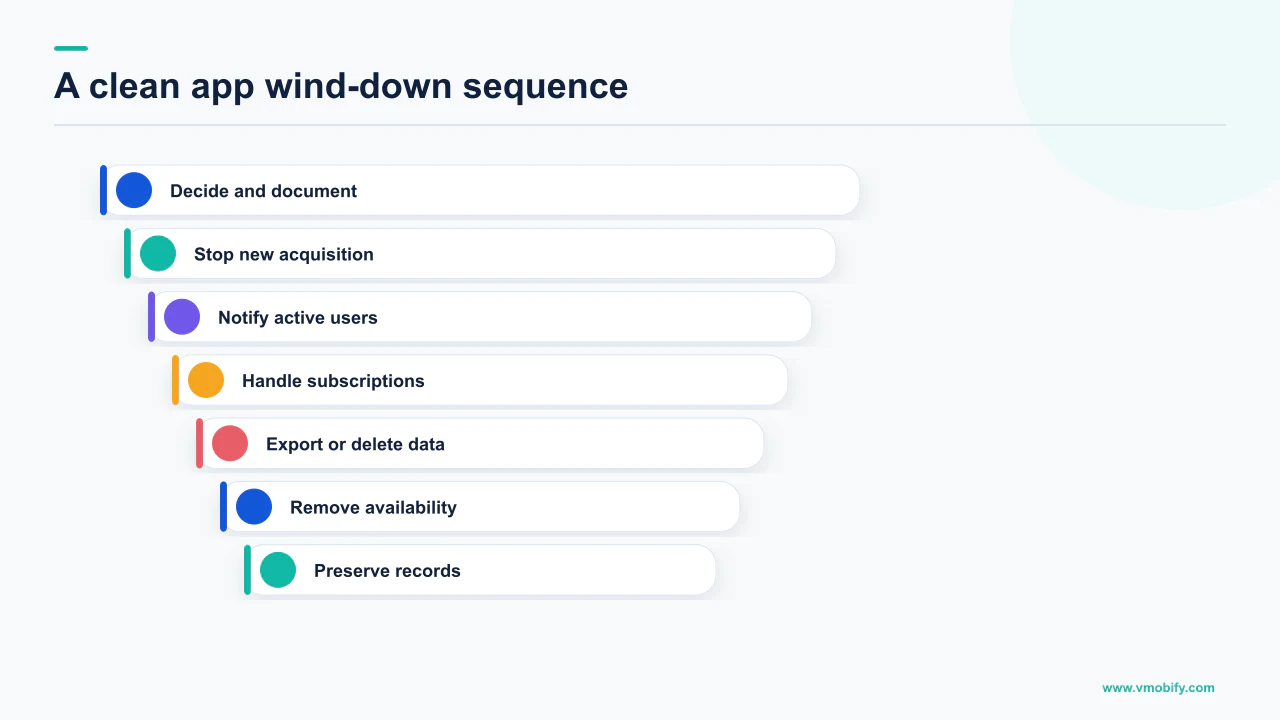
- Freeze new revenue. Make subscriptions and in-app purchases unavailable for new buyers before anything else changes. Every sale after the decision is a refund you have volunteered for.
- Ship one final update. While the listing is still live, release a build that carries the shutdown notice, the final service date and a link to the account deletion and data export pages. This is the only channel that reaches users who have push disabled and never open your emails.
- Announce, then wait a full billing cycle. Email, in-app notice and store description, saying the same thing. Anyone on an annual plan needs a longer runway than your calendar wants to give them.
- Cancel or revoke remaining subscriptions with the refund treatment you have decided on, rather than leaving users to discover the charge.
- Unpublish the listing. New acquisition stops; existing users remain served and can still update. This step is safe to take early, but pointless to take before the notice has shipped.
- Keep the backend and the deletion page running past the final date. The deletion route is an obligation that does not expire when the app does.
- Decide about deletion months later, if at all. There is no deadline, and for a monetised app with installs the option is not available anyway.
Two details are worth building into the plan explicitly. The first is that store removal takes effect within 24 hours on Apple's side, so the listing coming down is not instantaneous and should not be scheduled as if it were. The second is that your support inbox becomes the primary interface the moment the app stops working, so it needs to be staffed past the shutdown date rather than closed with it.
If the app is being retired because a replacement is coming, the shutdown is also a migration and deserves the same care as a launch — including the store-side work covered in our guide to review rejections for whatever you are shipping in its place.
What should you keep once the app is gone?
Keep the developer account, the audience and the evidence of what worked — those three assets outlive the product and cost almost nothing to hold. Teams routinely discard all three in a fit of tidying up.
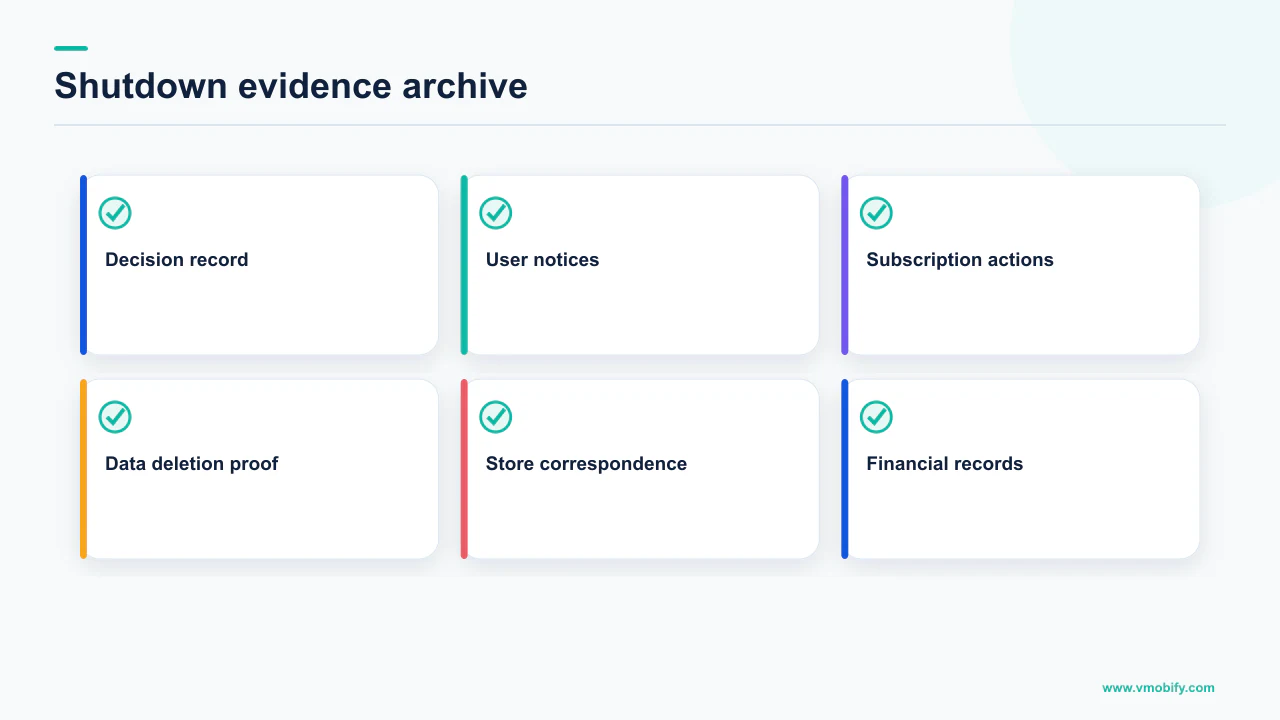
The developer account is first because of the contract clause: on the App Store, customers can redownload from purchase history as long as the necessary contract remains active. It is also your publishing identity for anything you build next, complete with its enforcement history — a clean account is materially easier to work with than a new one.
The audience is second. People who paid for a niche product are the best first cohort for your next one, and the shutdown announcement is the last moment you can legitimately ask them where to reach them.
The evidence is third and the most commonly lost. Once you lose console access — which deletion explicitly costs you — you lose the retention curves, the conversion rates by market, the creative performance and the pricing tests. That record is the input to the next product's plan, and it is not recoverable afterwards. Export it while you still can.
Store listing conversion by traffic source, retention curves by cohort and market, subscription conversion and churn by plan, review text grouped by theme, and the final creative set with its performance. It is an afternoon of work while the console is open and an impossible reconstruction afterwards.
The last thing to keep is the reasoning. Write down why the app is closing — the maintenance floor, the addressable market, the acquisition economics — and keep it with the exports. It is the document that stops the same idea being rebuilt in three years by someone who only remembers that it seemed promising.
If you are weighing a shutdown against one more serious attempt at growth, that is a diagnosis worth doing before the irreversible steps rather than after — tell us what the retention and payback numbers look like, or see how we approach the acquisition side in our user acquisition work.
Frequently Asked Questions
What is the difference between unpublishing and deleting an app on Google Play?+
Unpublishing makes the app discoverable for existing users only, with updates still available to them, and it is reversible. Deleting requires the app to be unpublished first, removes it from Google Play, and Google states you lose access to all user data and metrics. Deleted apps can be recovered within seven days, after which deletion is permanent.
Can I delete an app that has paying users?+
Generally no. Google states that the self-service deletion feature does not include monetised apps — for example paid apps, apps with in-app purchases, or subscriptions — unless the apps have zero lifetime installs. For any commercial app with an install history, unpublishing is the end state available to you.
Do users lose the app when I remove it from the App Store?+
No. Apple states the app is removed from the App Store within 24 hours, but users who previously downloaded it continue to receive app updates, and the app can be redownloaded from a customer purchase history as long as the necessary contract remains active. Letting your agreements lapse is what actually removes that access.
Will Apple remove my app if I stop updating it?+
Yes, on a published timetable. Apple states that developers of apps not updated within the last three years that also fail to meet a minimal download threshold receive an email identifying the app for possible removal, and are asked to submit an update within 90 days to keep it on the App Store. Apps that crash on launch are removed immediately.
What happens to subscriptions when I shut the app down?+
Nothing automatic. Unpublishing does not cancel them, so renewals continue. Google places the duty on you to notify users of changes to your subscription, cancellation and refund policies, and its default is that a cancelling user is not refunded for the current billing period but keeps access for the remainder of it. Cancel or revoke server-side before the next renewal date.
Do I still have to offer account deletion after the app is gone?+
The web route yes, and that is the point of it. Google requires both an in-app deletion path and a web link resource where users can request account deletion, and states the link must be functional and easily discoverable. Apple requires that users can initiate deletion within the app, and its wording on the website step is conditional: "If people need to visit a website to finish deleting their account, include a link directly to the page on your website where they can complete the process." A web step is permitted, not required.
Should I keep paying for my developer account after shutting down?+
Usually yes, at least through the wind-down. Apple ties redownload from purchase history to the necessary contract remaining active, so cancelling early removes reinstall access for people who already paid you. The account is also your publishing identity and enforcement history for whatever you build next.
Sources
- Apple — App Store Review Guidelines — States that apps no longer functioning as intended or no longer actively supported will be removed, and sets the 5.1.1(v) in-app account deletion requirement.
- Apple — App Store Improvements — The three-year and minimal-download evaluation trigger, the 90-day notice, immediate removal for crash-on-launch, and continued function for current users.
- Apple — Manage availability for your app on the App Store — Removal within 24 hours, continued updates for existing users, and redownload from purchase history while the necessary contract remains active.
- Apple — Offering account deletion in your app — What must be deleted, the direct link to a website page where deletion is completed, and notifying users that subscription billing continues through Apple.
- Google Play — Publish your app — Defines the unpublished status: discoverable for existing users only, with updates available to existing users only.
- Google Play — Delete an app — Unpublishing prerequisite, loss of all user data and metrics, seven-day recovery window, the monetised-app exclusion and permanent package name retirement.
- Google Play — Subscriptions policy — Cancellation disclosure requirements, the default no-refund-for-the-current-period behaviour, and the developer duty to notify users of policy changes.
- Google Play Developer API — purchases.subscriptionsv2.revoke — Server-side revocation of a subscription purchase with full, prorated or item-level refund contexts.
About the author
Amol Pomane — Founder, Vmobify
Amol leads Vmobify, a mobile app growth agency that has driven 30M+ downloads and ranked 54K+ keywords across 300+ apps since 2013. He writes about ASO, paid user acquisition, retention, and the operational reality of scaling mobile apps in India and global markets.