How to Validate an App Idea Before You Build It
Most idea validation tests whether people want the thing and whether you can build it. It rarely tests the third condition, which is whether the stores will distribute it at all. Apple and Google both publish the rules that decide that, and reading them before you write code is the cheapest validation step available.
On this page
- What does validating an app idea actually have to prove?
- Can this idea exist on the store at all?
- Is your idea too thin to be an app?
- Is it indistinguishable from something already there?
- Does your idea force a login it has not earned?
- How long before you are allowed to launch?
- How do you mine store reviews for evidence?
- What goes in a pre-build validation dossier?
- When should you kill the idea?
- Frequently Asked Questions
What does validating an app idea actually have to prove?
Three separate things: that somebody wants it, that you can build it, and that the two stores will distribute it — and almost every validation exercise we are shown has tested only the first two. The third condition is the cheapest of the three to test and the most expensive to discover late.
The usual sequence is familiar. Someone has an idea, talks to prospective users, sketches screens, estimates the build, and starts. Distributability is not probed at all, because it does not feel like a question until the app is finished and sitting in review.
It is a question, and it is answerable in an afternoon. Apple publishes the App Review Guidelines and Google publishes its Developer Program Policies. Both are written in plain language, both are public, and both describe categories of app that will not be accepted regardless of how good the execution is. An idea that falls into one of those categories does not become viable because you built it well.
A demand assumption that turns out wrong costs you a pivot. A policy assumption that turns out wrong costs you the build. The first is recoverable inside the same codebase; the second can invalidate the reason the codebase exists. Test the constraint that has no workaround before you test the ones that do.
Across the 300+ apps we have managed since 2013, the idea-stage conversations that go badly are rarely about a market that did not exist. They are about a product whose central mechanic was never going to be allowed, or whose category was closed without a kind of differentiation the team had not planned to build. Both were readable in advance. Treat store policy as a design input, in the same slot as your platform choice and your budget — our guide to why apps fail in their first 90 days covers what happens when it is treated as a launch formality instead.
Can this idea exist on the store at all?
Read the two policy documents against your one-paragraph description of the app, and note every rule your description touches — that list is your real specification constraint. This is a reading exercise, not a research project, and it should happen before the wireframes.
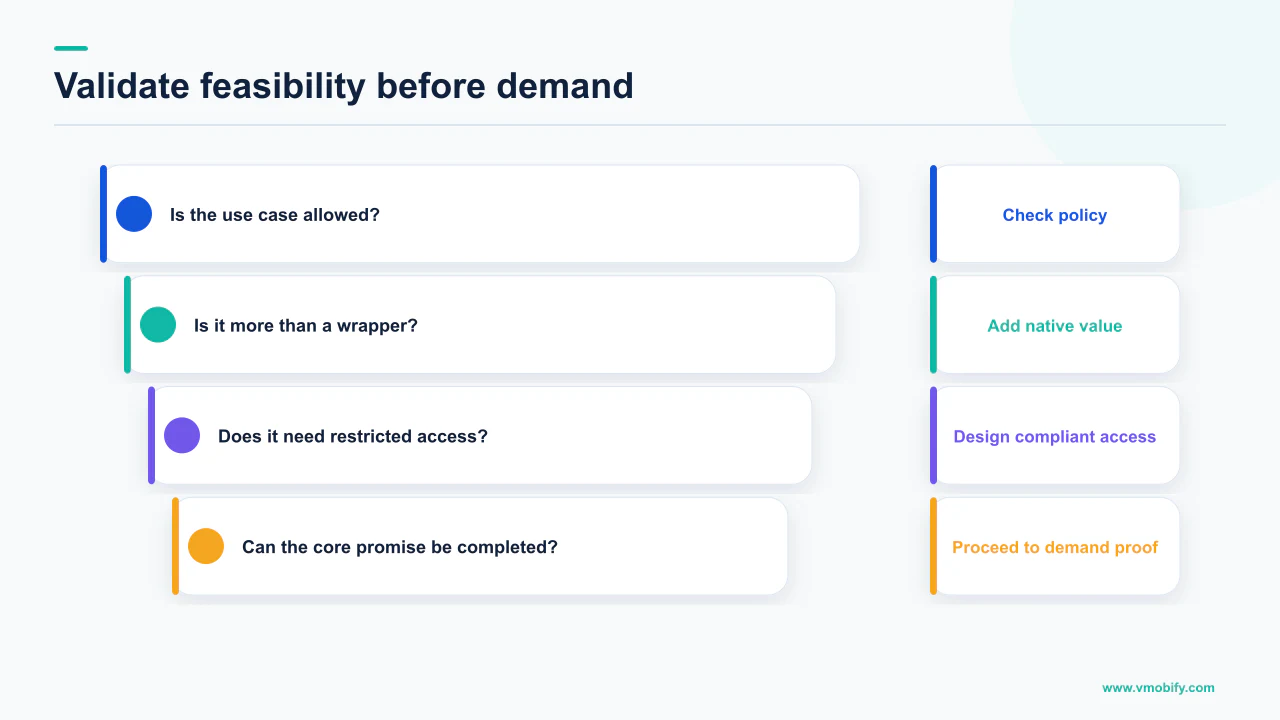
Start with Apple's App Review Guidelines, which list common missteps that "can slow down the review process or trigger a rejection" and note that checking every item is a good start rather than a guarantee of approval. Carry that framing into idea stage: policy compliance is a floor, not a feature.
Then read Google's policies on functionality, content and user experience. Google's baseline requirement is stated simply: apps should provide a stable, responsive and engaging user experience, and Google does not allow apps that crash, force close, freeze or otherwise function abnormally. Its listed examples include apps that fail to install, apps that install but do not load, and apps that load but do not respond to user interaction.
What you are looking for at this stage is not a compliance audit — you have nothing to audit. You are looking for the sentences that describe your idea. If your one-paragraph description contains the words "wrapper", "aggregator", "directory", "clone of" or "like X but for Y", you have work to do before the build starts.
Write the app in a single paragraph, as you would describe it to a stranger. Then read both policy documents with that paragraph beside you and mark every rule it touches. If it touches none, your description is probably too vague to be a product. If it touches five, you are not validating an idea, you are negotiating one.
Is your idea too thin to be an app?
Both stores publish a minimum functionality bar, and both aim it squarely at the two cheapest app ideas there are: the wrapped website and the single-purpose utility. If your plan is either, the policy text is the thing to read before you commit the budget.
Apple's guideline 4.2 is unambiguous: "Your app should include features, content, and UI that elevate it beyond a repackaged website. If your app is not particularly useful, unique, or 'app-like,' it doesn't belong on the App Store." Apple adds that an app that does not provide lasting entertainment value or adequate utility may not be accepted, and directs apps that are simply a song, movie, book or game guide to the relevant Apple store instead.
Google points the same way in different words. Its functionality policy restricts apps that only have limited functionality and content, giving as examples static apps without interactive features such as text-only or PDF viewers, apps with minimal content such as a single wallpaper app, and apps designed without any functional purpose. The stated requirement is that apps demonstrate the basic degree of adequate utility as mobile apps.
Read together, these rules make a specific and useful demand of an idea at validation stage:
- Name the thing the app does that a mobile web page cannot. Offline state, notifications, camera, background processing, biometrics, home-screen persistence. If nothing on that list is central, you may be validating a website.
- Name the reason to open it a second time. Apple's phrase is lasting value. A tool used once is a feature, not a product, and it has a marketing problem as well as a policy one.
- Name the content or service you create. Google asks for value delivered through unique content or services. Aggregating someone else's content is not that.
None of this is a judgement about small apps, only about thin ones. A narrow app with one well-built job clears both bars; a menu of links does not. Our piece on publishing your first app covers the mechanics once the idea has cleared this test.
Is it indistinguishable from something already there?
Apple names the categories it has closed to undifferentiated new entrants, and it names them in the guidelines — which turns "is this market too crowded?" from an opinion into a documented question. This is the single most useful paragraph in either policy document for anyone at idea stage.
Guideline 4.3(b) covers spam, and it is worth quoting at length because the specificity is the point. Apple states: "Don't submit apps that are indistinguishable from what's already widely available." It continues that "certain kinds of apps, such as dating, flashlight, sound effects, wallpaper, simple timers, and fortune telling, are well established on the App Store and we will not accept new submissions unless they offer a meaningfully different or improved experience." Apple adds that it may remove such apps going forward if they are not updated, improved, or do not attract customers.
Guideline 4.1 says the same about a specific case: do not simply copy the latest popular app, or make minor changes to another app's name or user interface and pass it off as your own. Google's spam policy covers the same ground in its own words: it does not allow apps that merely provide the same experience as other apps already on Google Play, and states that apps should provide value to users through the creation of unique content or services. Google's impersonation policy separately prohibits apps and developer accounts that impersonate or misrepresent their identity, ownership, or primary purpose — worth reading at the point you choose a name, not after you have printed it on everything.
Differentiation that is arguable
- A specific job the incumbents do badly, evidenced from their own reviews
- A market or language nobody has built for properly
- A different data source or integration that changes what the app can know
- A pricing or access model the category does not offer
Differentiation that is not
- A cleaner interface
- Fewer ads than the leader
- The same app, localised only in the store listing
- "Ours will be faster"
If your category appears in Apple's list, the burden is explicit: a meaningfully different or improved experience. Write yours down in one sentence before the build. If you cannot, that is the validation result. Naming is part of the same exercise — see how to name your app.
Does your idea force a login it has not earned?
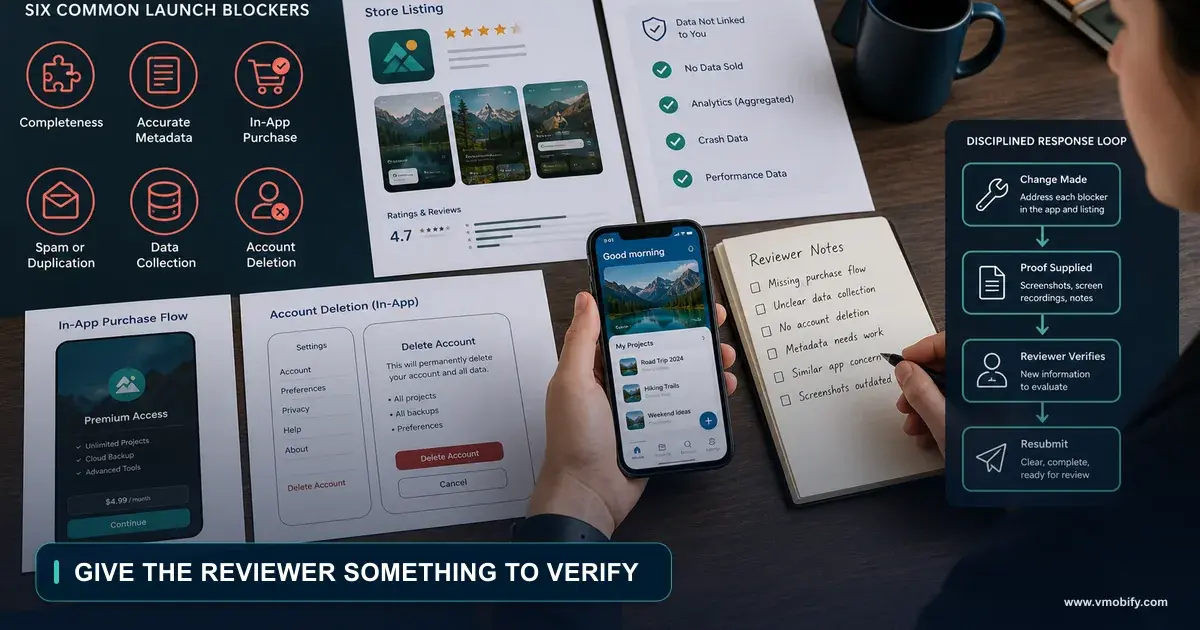
Apple's rule is that if your app does not include significant account-based features, you must let people use it without a login — and if it supports account creation, you must offer account deletion within the app. Both halves are architecture decisions, and both are cheap at idea stage and expensive after the data model is written.
The exact wording of guideline 5.1.1(v) is worth having in front of you: "If your app doesn't include significant account-based features, let people use it without a login. If your app supports account creation, you must also offer account deletion within the app." Apple continues that apps may not require users to enter personal information to function, except when directly relevant to core functionality or required by law.
Google's requirement on the same subject is stricter in one specific way. Its app account deletion requirements state that if your app allows users to create accounts, you must provide an in-app path to delete their app accounts and associated data, and also a web link resource where users can request app account deletion and associated data deletion. The web link exists so that someone who has uninstalled the app can still make the request. Google notes that data may be retained for legitimate reasons such as security, fraud prevention or regulatory compliance, provided users are clearly informed.
Two consequences travel into your pre-build plan:
- Design the guest path first, not last. If the app has to work without an account, the account cannot be the front door. Retrofitting a guest mode into a login-first product is a painful refactor, because identity leaks into every model.
- Budget the deletion endpoint as a feature. An in-app deletion flow plus a public web request page, both wired to your backend, is engineering work. It is not a checkbox you tick during submission week.
Policy is not only a filter on which ideas survive. It is a source of requirements, and those requirements have a cost that belongs in your estimate — a validation exercise that omits them has produced the wrong number. Our guide to the reasons apps get rejected goes through the rest of the list.
How long before you are allowed to launch?
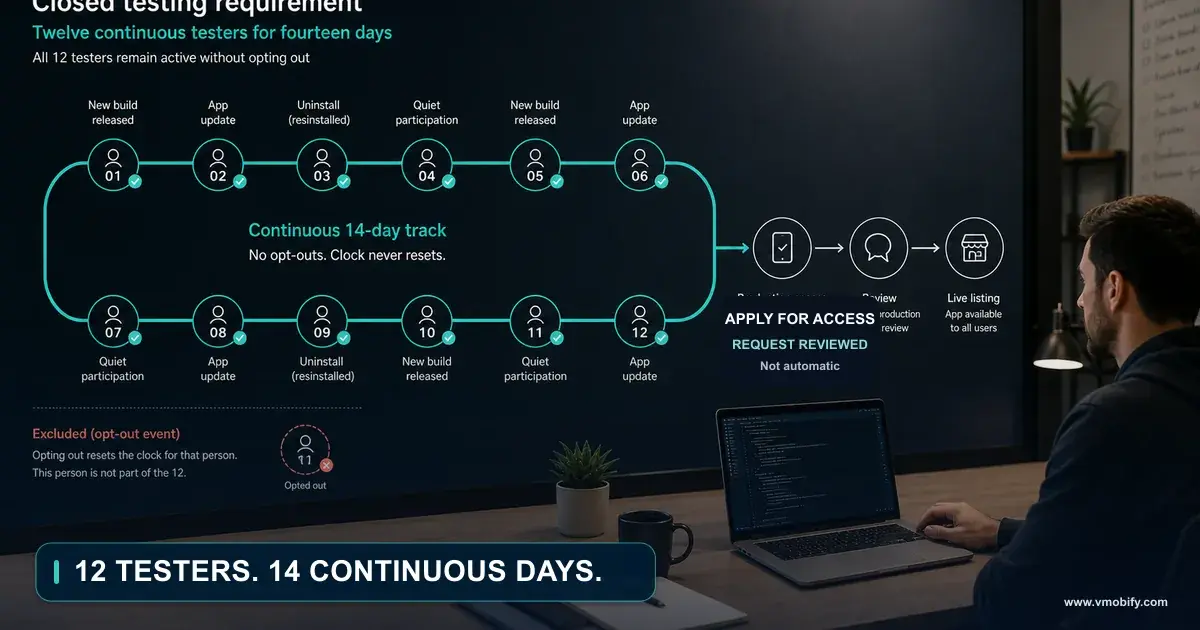
On Google Play, if you are launching from a personal developer account created after 13 November 2023, there is a documented testing requirement that stands between a finished build and a public listing — and it is measured in weeks, not days. If your plan has a launch date, this constraint sets the earliest one available to you.
Google's page on app testing requirements for new personal developer accounts states the rule directly. Developers with personal Play Console accounts created after 13 November 2023 must run a closed test for their app with a minimum of 12 testers who have been opted in continuously for at least 14 days. Google is explicit about what does not count: testers who opt in, test for fewer than 14 days, and then opt out do not count toward the requirement.
Once the criteria are met, you apply for production access on the dashboard in Play Console, answering questions about the closed test, the app and production readiness. Google states that review usually takes seven days or less, but can occasionally take longer.
This requirement is documented for personal developer accounts created after 13 November 2023. Do not quote the 12-tester, 14-day figures as a universal Play rule — the condition travels with them. Establish which kind of account you are launching from as part of validation, because it changes your timeline before it changes anything else.
Recruiting a dozen people who will keep a test build installed for a fortnight is easy to arrange at idea stage and awkward the week your build is ready. It is also a validation instrument in its own right: if you cannot find twelve people willing to keep your app on their phone for two weeks, you have learned something no landing page would have told you. We cover the mechanics in the closed testing requirement and the audience side in pre-launch app marketing.
Apple's constraint at the same moment is different in kind. Guideline 2.1(a) requires that submissions be final versions with all necessary metadata and fully functional URLs, that placeholder text and empty websites be scrubbed, that the app be tested on-device for bugs and stability, and that you include demo account information — and turn on your back-end service — if your app includes a login. Apple does not publish a guaranteed review turnaround, so we do not print one.
How do you mine store reviews for evidence?
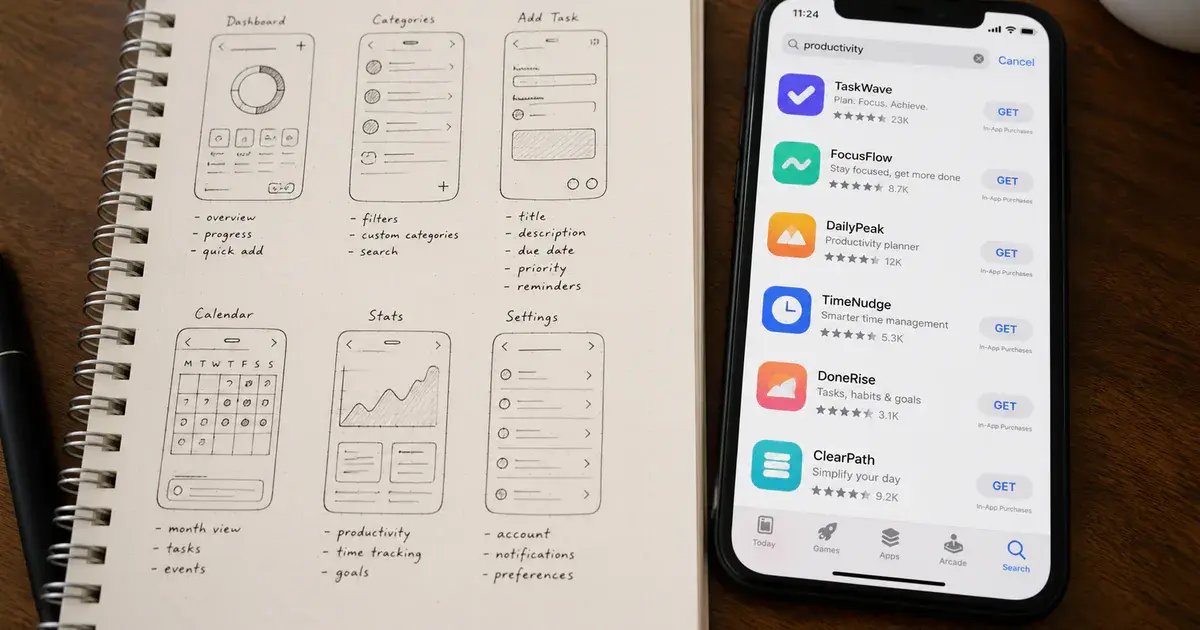
Treat the review sections of the apps already serving your users as the cheapest research panel available, and read them along the same axes the stores themselves segment by. Reviews are unprompted, dated, versioned and free, which is more than most of your alternatives can claim.
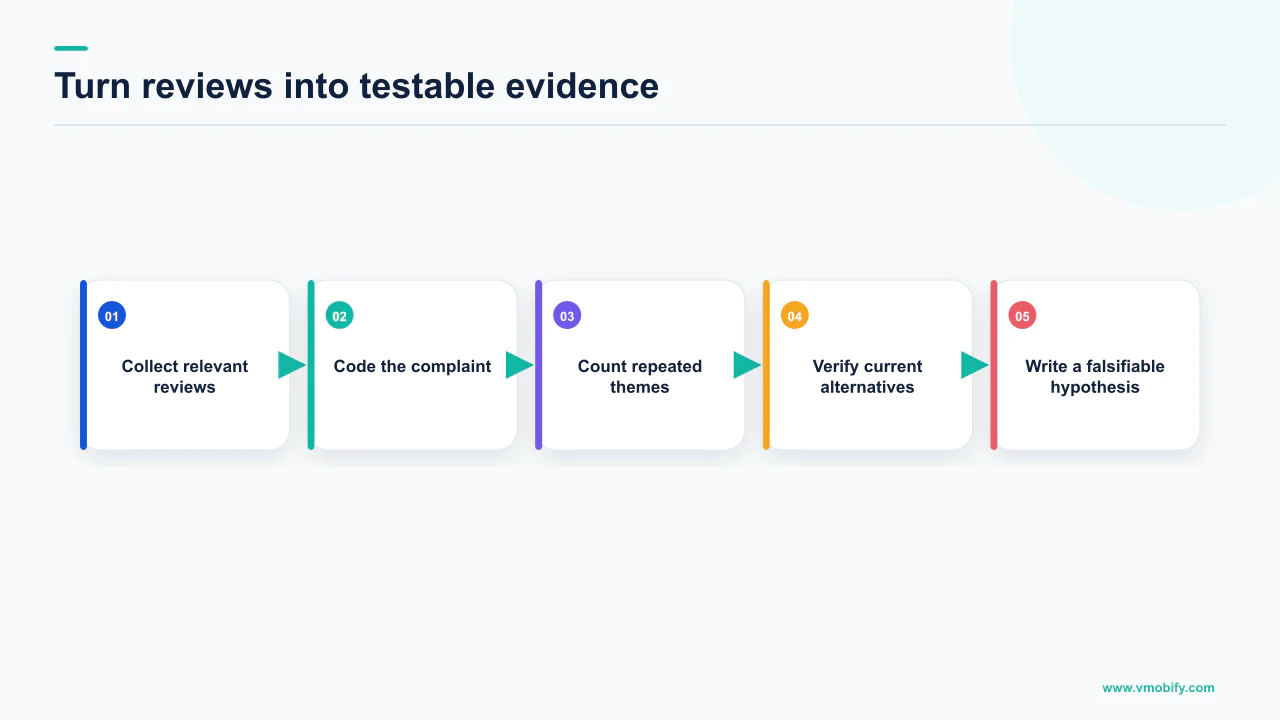
Borrow the axes from tooling rather than inventing them. Google's page on viewing and analysing your app's ratings and reviews describes the Play Console filters: date, language, reply state, star rating, app version and device, among others, with sorting by rating, date or helpfulness and a search box for specific words. Those filters exist because those are the dimensions on which complaints cluster.
You have no Console access to a competitor's app, so before you build you read their public listings by hand. The value is in reading structurally rather than impressionistically:
- Read the three-star reviews first. One-star reviews are frequently about billing, crashes or a support failure. Five-star reviews say little. Three-star reviews are written by people who want the app to work and are telling you precisely where it does not.
- Separate defect complaints from design complaints. A defect gets fixed in the next release and is not an opportunity. A design complaint — the thing the app has decided not to do — persists across versions, and that is where a new entrant has room.
- Watch for repetition across the category. A complaint that appears about every incumbent is a category-level failure, and the strongest idea-stage evidence that the meaningfully different experience Apple asks for is available to you.
- Check the language and market split. Complaints concentrated in one language often mean the category has been localised badly rather than built badly, which is a different and usually cheaper opportunity.
One honest limitation. We cannot tell you how many reviews constitute a sufficient sample, and we will not print a number for it, because neither store publishes one and any figure we invented would be decoration. The exercise is finished when new reviews stop telling you anything new, and in our portfolio that point arrives sooner than teams expect.
It also produces something you need later: the vocabulary real users employ for the problem, which is the raw material for your store listing. That connects to our ASO work and to finding your first 100 users.
What goes in a pre-build validation dossier?
One document, written before the first sprint, that answers demand, feasibility and distributability with a source attached to each answer. If a claim in it has no source, it is an assumption, and it should be labelled as one.
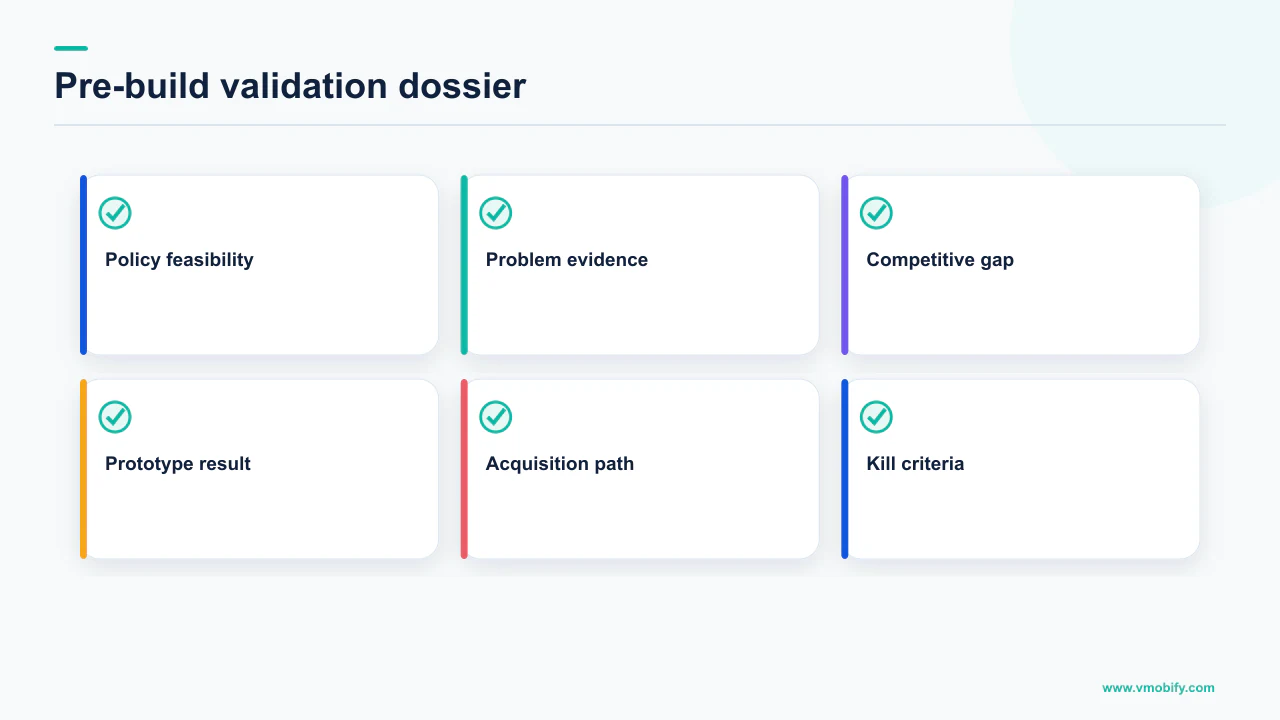
- The one-paragraph description. What the app does, for whom, and what it does that a mobile web page cannot. This is the input to every other step.
- The policy pass. Every rule in Apple's guidelines and Google's policies that your paragraph touches, quoted, with the section number. Not summarised — quoted, because summaries drift.
- The differentiation sentence. If your category is one Apple names, the meaningfully different or improved experience you offer, in one sentence, in language a reviewer who has never met you would accept.
- The identity decision. Whether the app has significant account-based features. If it does not, the guest path is now a requirement. If it does, in-app account deletion is a requirement on both stores and a web deletion request page is additionally required on Play.
- The timeline constraint. Which Play developer account you are launching from, and therefore whether the closed testing requirement for personal accounts created after 13 November 2023 applies to you.
- The review-mining notes. The recurring design complaints across the category's leading apps, separated from defect complaints, with the reviewer's own words kept verbatim.
- The kill criteria. Written now, while you are still capable of being objective about them.
Write it down rather than holding it in a conversation, because the estimate depends on it. A build plan that has not accounted for a guest path, an account deletion flow, a web deletion endpoint and a fortnight of closed testing is not an estimate of this app. It is an estimate of a different, easier app nobody is going to be allowed to ship.
It is also the document that survives your first setback. When a founder is three months in and deciding whether to persevere, the useful artefact is the one written before anyone was emotionally invested in the answer.
When should you kill the idea?
When the differentiation sentence cannot be written, when the app's central mechanic is what a policy prohibits, or when the only reason to open it twice is one you invented on the reader's behalf. Each of those is knowable before the build, which is the entire argument for doing this work first.
The honest framing is that most ideas do not fail validation outright. They come back with conditions attached, and the conditions change the project:
- The category is closed without differentiation. The idea survives only if the differentiation sentence is real and you are willing to build the thing it names. Otherwise it is the same app, and Apple has told you in advance what happens to those.
- The app is thinner than the minimum functionality bar. It survives as a feature of something larger, or as a web page. Both are legitimate outcomes and both are cheaper than the app you were about to build.
- The mechanic is prohibited. This is the clean kill, and it is the one worth being grateful for, because the alternative was finding out with a finished codebase.
- The timeline does not fit the plan. If a launch date depends on shipping in a fortnight and you are on a personal Play account created after 13 November 2023, the closed testing requirement has already answered that. Change the date, not the policy.
What should not kill an idea is a crowded category on its own. Crowding is where demand is proven, and both stores' rules assume new entrants — they only require that one bring something. The test is not whether competitors exist, but whether you can say in one sentence a stranger would accept what you do that they do not.
In our portfolio the teams that ship well are rarely the ones with the most original ideas. They are the ones who arrived with the constraints priced in: a guest path in the architecture, a deletion endpoint in the backlog, a differentiation sentence they could defend, and a launch date that accounted for the account they were actually launching from.
If you are at that stage and want the policy pass done properly before you commit a build budget, send us the one-paragraph description — or see how we handle the launch itself in our store optimisation and acquisition work.
Frequently Asked Questions
Why should store policy be part of idea validation rather than launch prep?+
Because it is the only one of the three validation questions with no workaround. A wrong demand assumption costs you a pivot inside the same codebase. A wrong policy assumption can invalidate the reason the codebase exists. Both Apple and Google publish the relevant rules openly, so the check costs an afternoon of reading.
Is my idea too small to be an app?+
Small is fine, thin is not. Apple guideline 4.2 asks for features, content and UI that elevate the app beyond a repackaged website, and says an app that does not provide lasting entertainment value or adequate utility may not be accepted. Google restricts apps with only limited functionality and content, giving text-only or PDF viewers and single wallpaper apps as examples. A narrow app that does one job properly clears both bars.
My category is crowded. Does that mean the idea is dead?+
No, but it raises the bar and Apple states the bar. Guideline 4.3(b) names categories including dating, flashlight, sound effects, wallpaper, simple timers and fortune telling as well established, and says new submissions will not be accepted unless they offer a meaningfully different or improved experience. Write that sentence before you build. If you cannot write it, that is the validation result.
Do I have to let people use my app without signing in?+
Apple guideline 5.1.1(v) states that if your app does not include significant account-based features, you should let people use it without a login. It also says apps may not require personal information to function except when directly relevant to core functionality or required by law. Decide this before the data model is written, because retrofitting a guest path is an expensive refactor.
What are the account deletion requirements?+
Apple guideline 5.1.1(v) requires that an app supporting account creation must offer account deletion within the app. Google requires both an in-app path to delete the account and associated data and a web link where users can request that deletion, so someone who has uninstalled can still ask. Google allows retention for legitimate reasons such as security, fraud prevention or regulatory compliance, provided users are clearly informed.
How long does Google Play closed testing take before I can go live?+
For personal developer accounts created after 13 November 2023, Google requires a closed test with a minimum of 12 testers opted in continuously for at least 14 days, and states that testers who test for fewer than 14 days and then opt out do not count. After that you apply for production access, and Google says review usually takes seven days or less but can occasionally take longer. The condition about account type is part of the rule.
How many competitor reviews should I read before I trust the findings?+
There is no sourced number and we will not invent one. Neither store publishes a threshold. Read structurally instead: start with three-star reviews, separate design complaints from defect complaints, and stop when new reviews stop telling you anything new. Complaints that repeat across every leading app in a category are the strongest idea-stage evidence you can gather for free.
Sources
- App Review Guidelines - Apple Developer — Guideline 4.2 minimum functionality, 4.1 copycats, 4.3(b) spam, 5.1.1(v) account sign-in and deletion, and 2.1(a) app completeness.
- Functionality, Content, and User Experience - Play Console Help — The broken functionality rule and the restriction on apps with only limited functionality and content.
- Spam - Play Console Help — Repetitive content: apps that merely provide the same experience as others already on Google Play are not allowed.
- Impersonation - Play Console Help — Apps and developer accounts may not impersonate or misrepresent identity, ownership or primary purpose. Relevant when choosing a name.
- Understanding Google Play's app account deletion requirements — In-app deletion path plus a web link for deletion requests, and the permitted retention exceptions.
- App testing requirements for new personal developer accounts — Personal accounts created after 13 November 2023: 12 testers opted in continuously for at least 14 days before applying for production access.
- View and analyze your app's ratings and reviews — The review filter dimensions in Play Console: date, language, reply state, star rating, app version and device.
About the author
Amol Pomane — Founder, Vmobify
Amol leads Vmobify, a mobile app growth agency that has driven 30M+ downloads and ranked 54K+ keywords across 300+ apps since 2013. He writes about ASO, paid user acquisition, retention, and the operational reality of scaling mobile apps in India and global markets.