Why Your Google App Campaign Stopped Spending
The budget is set, the campaign is enabled, and Google is spending nothing — or it was spending fine until Tuesday. These are not the same problem, and neither is the campaign that spends happily while your CPI climbs every week you scale it. Four distinct failures, each with its own diagnosis, and a triage order that stops you from changing settings that were never wrong.

On this page
- Is it not serving, not spending, or not converting?
- Why does a brand-new campaign show zero impressions?
- What is the budget-to-bid ratio that quietly kills campaigns?
- Why did spend collapse on a campaign that used to work?
- What actually resets the learning period?
- Why does your CPI rise the moment you scale?
- Why does one creative eat all your spend?
- What is different about iOS App campaigns?
- When is the problem not the campaign at all?
- What weekly checks catch this before it costs you a month?
- Frequently Asked Questions
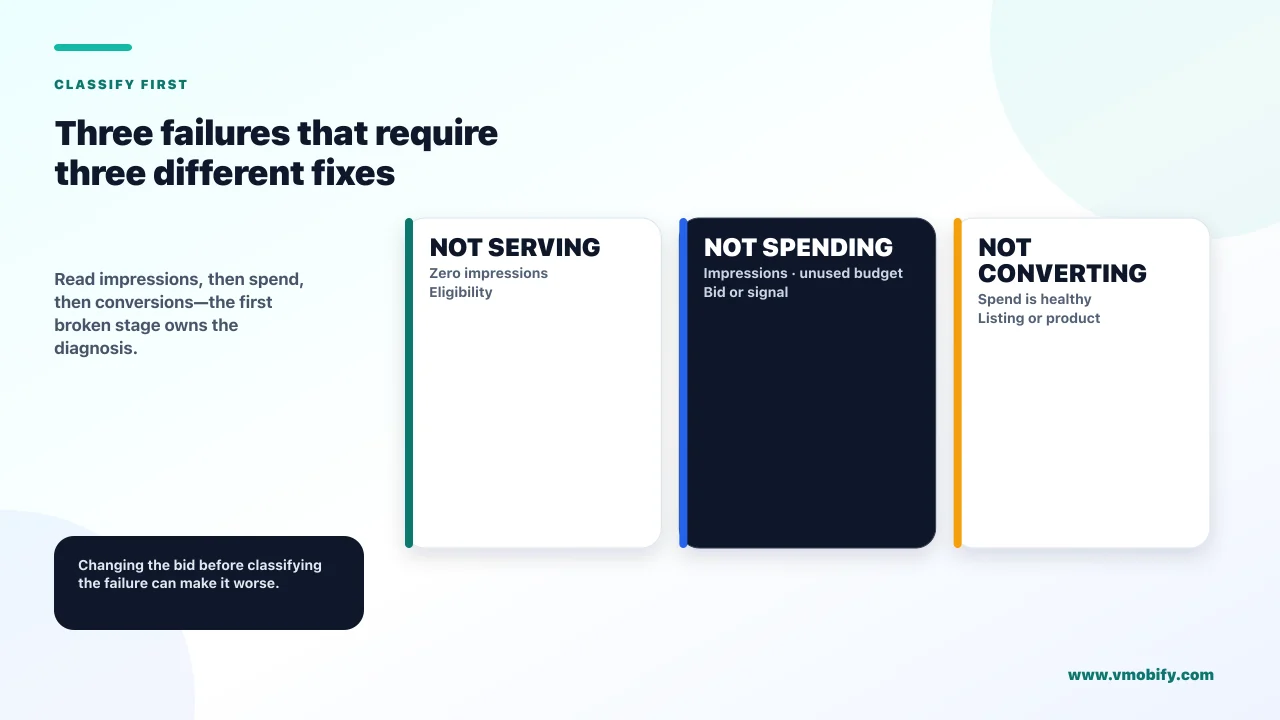
Is it not serving, not spending, or not converting?
Answer that question before you change a single setting, because the three failures look identical on a dashboard and have almost nothing in common underneath. Most of the wasted weeks we see in Google App campaigns come from applying the fix for one to a case of another.
- Not serving. Impressions are zero or near zero. The campaign is not entering auctions at all. This is usually eligibility: policy, app status, billing, targeting or dates.
- Not spending. Impressions exist but the budget goes unused. The campaign is entering auctions and losing them, or the bidding system has concluded it cannot deliver at your target. This is usually bids, budget ratios or conversion data.
- Not converting. Spend is fine and installs or in-app actions are not. This is a creative, listing or product problem wearing a campaign costume.
There is a fourth case that belongs with these because founders describe it in the same breath: the campaign that spends perfectly well while the cost per install climbs every week you increase the budget. That is not a failure at all. It is the system working as designed, and it needs a different response from all three above.
Across the 300+ apps we have managed since 2013, the single most expensive habit in paid acquisition is changing the bid because the dashboard looked bad. Read which of the four you have first. Two of them are made worse by touching the bid.
Look at impressions, then spend, then conversions, in that order. The first of the three that is wrong is the one to diagnose. If all three are healthy and only your CPI is rising, skip to the scaling section — nothing is broken.
Why does a brand-new campaign show zero impressions?
Almost always eligibility rather than competitiveness, and Google publishes the checklist. A new campaign with no impressions is not losing auctions; it is not in them.
Google's page on fixing an App campaign that is not running or has low traffic names eleven causes. Work them in this order, because they are ordered by how often they are the answer and how fast they are to check:
- Account issues. A suspended account or a billing problem stops everything. Check this first — it takes ten seconds and it explains a surprising share of cases.
- Dates and the date range you are looking at. Both the campaign's start and end dates, and the reporting range on screen. A campaign that starts tomorrow looks exactly like a campaign that is broken.
- Ad policy review status. Most ads are reviewed within 24 to 48 hours, though some reviews take longer. A campaign launched yesterday evening is frequently just in review.
- App status. If the app has been removed or has issues in the store, campaigns will not serve. This catches teams who launched ads while a store review was still pending.
- Targeting that is too narrow, or that overlaps with your other campaigns and ad groups. Overlap causes campaigns to cannibalise each other's delivery.
- Bid targets and optimisation goals that are too low to enter the auction, and conversion tracking that is misconfigured or has too little data for automated bidding.
Two further causes on Google's list are worth knowing but are rarely the answer on day one: auction dynamics, meaning competitors, and certain campaign features combined with poor policy compliance. Low creative asset coverage and diversity is on the list too, and it matters more than most teams expect — we come back to it below.
The discipline here is to resist the temptation to raise the bid. A campaign with zero impressions because its ads are in review does not become eligible by being more expensive. You will simply have raised your cost for the day the ads are approved.
What is the budget-to-bid ratio that quietly kills campaigns?
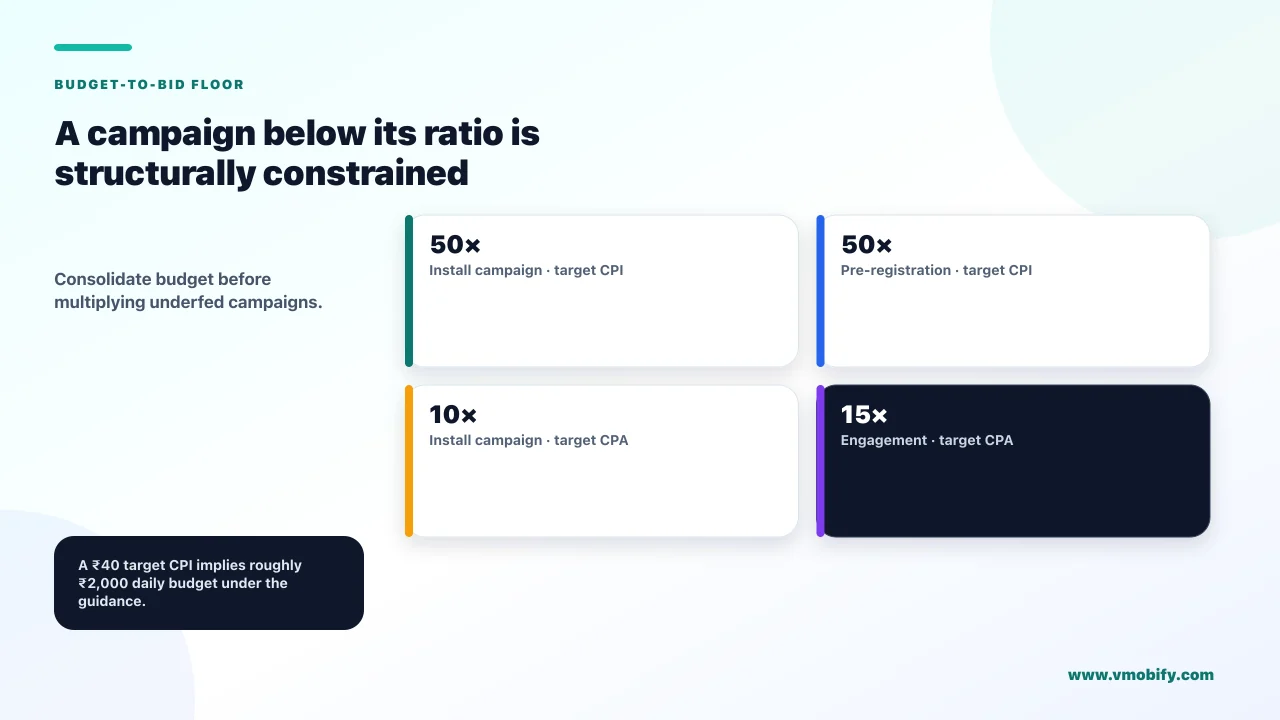
Google publishes explicit minimum ratios of budget to bid, and a campaign below them will underspend no matter what else you fix. This is the most useful number in App campaign troubleshooting and the one least often known.
From Google's App campaign best practices, the guidance is specific by campaign type and bid strategy:
Run the arithmetic on your own campaign before anything else. A target CPI campaign with a bid of ₹40 wants a daily budget of ₹2,000 to operate as designed. Set it at ₹500 and the campaign is structurally constrained — it will underdeliver, the data will be thin, and every other diagnosis you attempt will be reading noise.
The related trap is the small-budget Maximize Conversions campaign. Google's guidance on App campaign bidding warns directly that for Maximize conversions campaigns with small budgets the optimal bid per conversion may be higher than the budget, and that such campaigns may not be able to get any conversions at all. Not "fewer conversions" — potentially none.
If your total spend cannot support the ratio across four campaigns, it can often support it across one. Founders instinctively split budget to "test more", which in App campaigns produces four structurally starved campaigns instead of one that works. Consolidate first, then test once the surviving campaign has data.
Why did spend collapse on a campaign that used to work?
Something changed — and in the overwhelming majority of cases it was either you, the conversion signal, or the app's store status. A campaign that ran for months and stopped is a different investigation from one that never started, because eligibility was already proven.
Work backwards from the date spend fell, and check these in order:
- Did anyone change the campaign? Including changes that feel harmless. Google's tips page is explicit: try not to make drastic changes, for example changing the budget by more than 20% or changing your CPI by more than 20%. A well-meant 40% budget increase is a drastic change.
- Did conversion tracking break? This is the quiet one. If the signal your bidding depends on stops arriving — an SDK change, a Firebase misconfiguration, a renamed event — the bidding system loses the thing it optimises toward. Spend collapse is a symptom of measurement failure far more often than founders expect, which is why we check the analytics layer before the campaign layer.
- Did the app's store status change? App status is on Google's own list of causes. A suspension, a removal or a listing problem stops campaigns that were previously running perfectly.
- Did the ads go back into review? New assets are reviewed. Adding creative to a working campaign can put part of it into a review state.
- Did the auction change? Auction dynamics — competitors bidding more aggressively in your geography — is a real cause and the one you have least control over. It is also the one to conclude last, after the four above are ruled out.
In our portfolio, when a stable campaign dies overnight and nobody on the team changed anything in Google Ads, the cause is a release. Someone shipped a build. That build changed an event name, moved the SDK initialisation, or altered the flow that fires the conversion. The campaign is reacting correctly to a signal that stopped.
What actually resets the learning period?
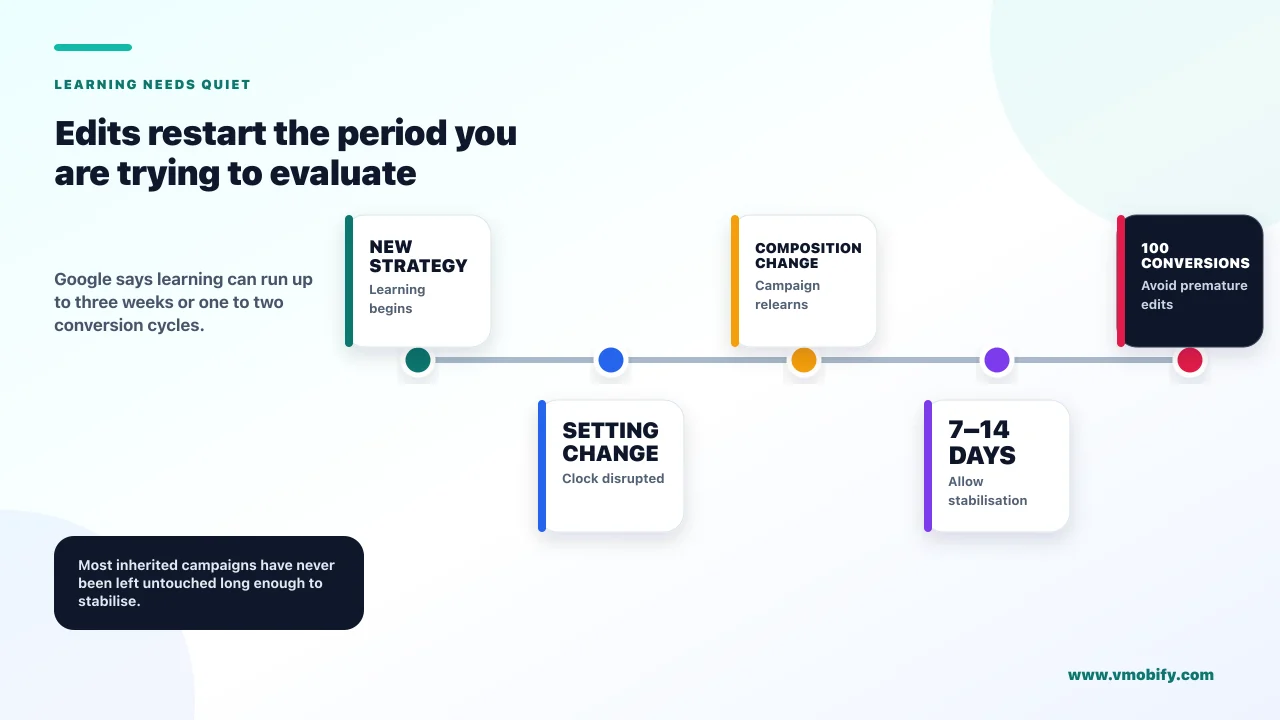
Changes to the bid strategy, its settings, or the campaign's composition — and the period can run up to three weeks or one to two conversion cycles. Understanding which edits restart the clock is what separates a campaign that stabilises from one held in permanent adolescence by a nervous operator.
Google's page on the duration of the learning period names four triggers for a Learning status: a new or recently reactivated strategy, a change to the bid strategy settings, a composition change such as campaigns or ad groups being added or removed, and ad group target changes. Its stated duration is up to three weeks or one to two conversion cycles, and the length depends on how many conversions you are getting, how long your conversion cycle is, and which bid strategy you use.
Two things follow that most operators get wrong.
- Stop editing. Google's best practices say that making changes to an in-flight campaign before the first 100 conversions have registered may disrupt learning and result in poorer performance. If your campaign generates ten conversions a day, that is ten days of leaving it alone. Most campaigns we inherit have never had ten consecutive untouched days.
- Give it the time the documentation asks for. Google's setup guidance says to allow at least 7 to 14 days for the system to stabilise before evaluating performance. Judging a campaign on day four is not diligence; it is guaranteeing you never see a stabilised result.
There is also a useful nuance in that page worth internalising: Google states its algorithms continue to learn even when the bidding status no longer shows Learning. The label leaving the screen is not the same event as the system being finished.
Google's setup guidance asks for at least 10 different users completing the most valuable in-app action every day. Note the wording carefully — it is ten users completing the action daily, which is not the same as the "10 conversions per day" third-party posts paraphrase it into. If your chosen action does not reach that, pick a more frequent action further up the funnel and optimise toward that instead.
Why does your CPI rise the moment you scale?
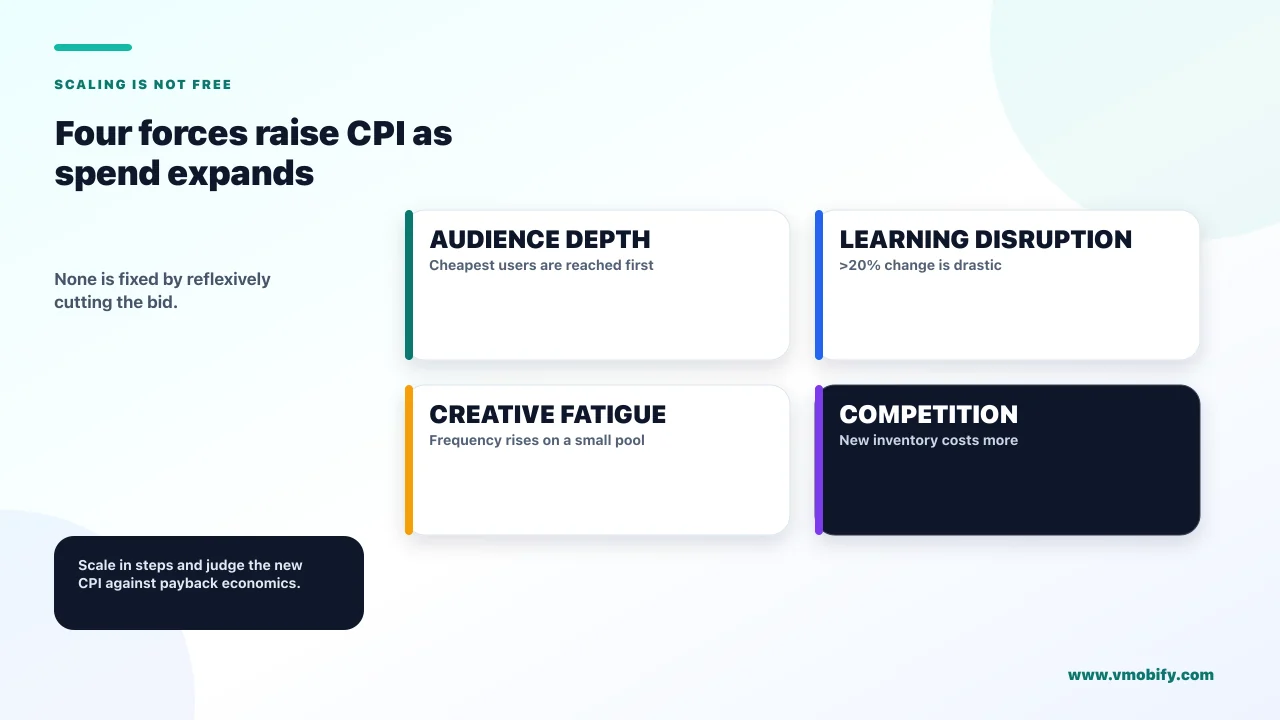
Because four things degrade in parallel as you spend more, and none of them is a mistake you made. This is the single most common misdiagnosis in App campaigns: a founder increases budget, the cost per install rises, and they conclude the campaign has broken. It has not. It has run out of the cheapest inventory.
The four causes, all operating at once:
Audience depth
- The cheapest users are found first. Additional budget reaches progressively less responsive people.
- This is arithmetic, not a fault. Every channel does it.
- Tell by: CPI rising smoothly with spend, conversion rate falling gradually
Learning disruption
- A large budget change is itself a change. Google names >20% as drastic.
- The campaign re-enters learning at the moment you needed it stable.
- Tell by: a sharp jump right after the edit, then partial recovery
The third is creative fatigue. More spend means more frequency against the same assets, and the assets that carried a small budget rarely carry a large one. The fourth is competition — auction dynamics is on Google's own list of causes, and scaling in a geography where a better-funded competitor is also scaling produces exactly this curve.
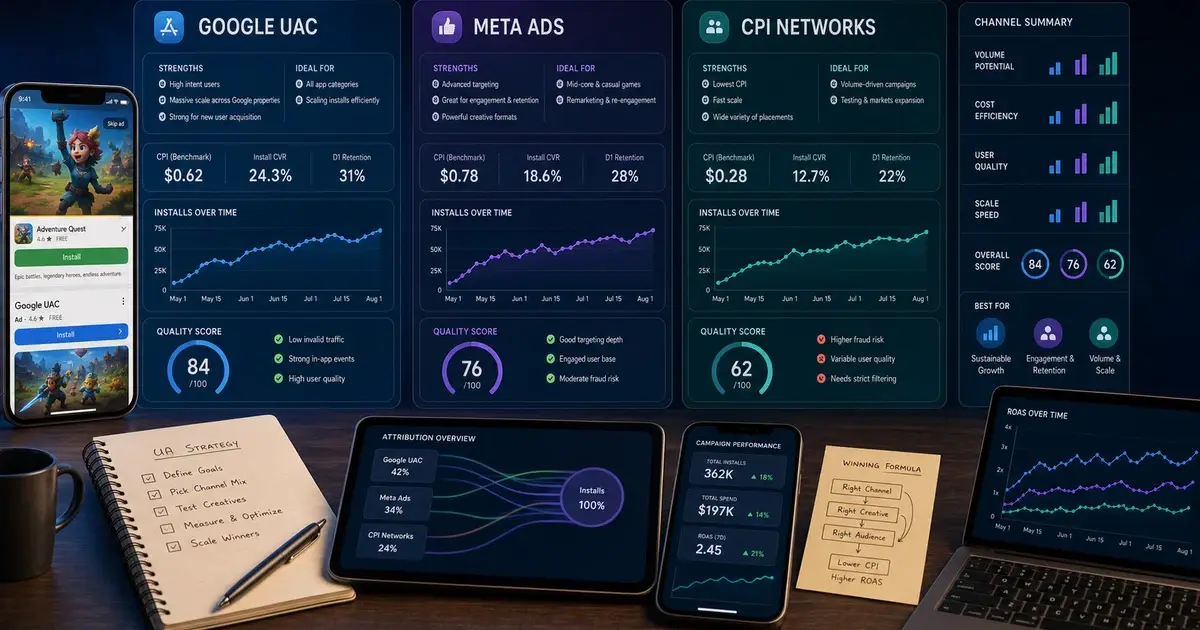
The right response is not to cut the bid. It is to decide whether the new CPI is still inside your payback maths, and if it is not, to fix the economics rather than the campaign. Our guide to what an install actually costs in India covers the benchmarking side, and Google UAC versus Meta versus CPI networks covers when the answer is a different channel rather than a different bid.
Scale in steps the system can absorb. Increases inside Google's 20% guidance, spaced far enough apart to let the campaign restabilise, cost far less in aggregate than one aggressive jump followed by a fortnight of disrupted learning and a panicked bid cut.
Why does one creative eat all your spend?
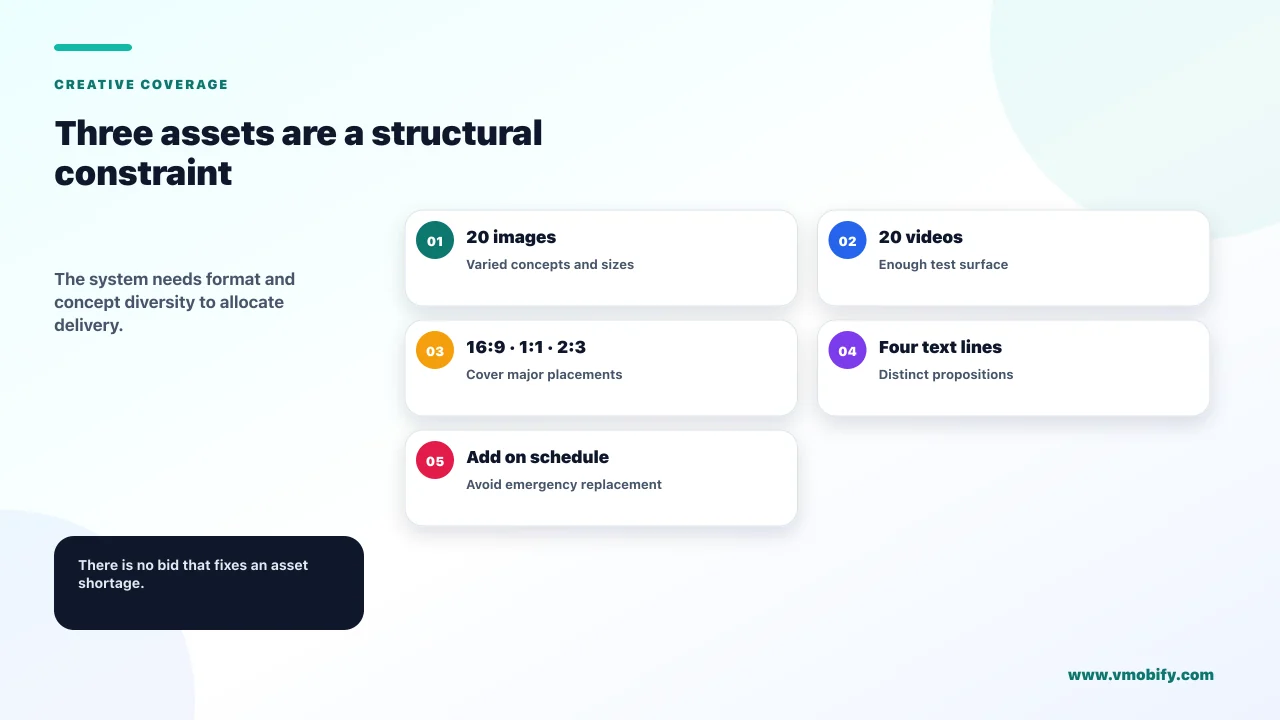
Because App campaigns allocate delivery across the assets you supply, and if you supply few assets there is nothing to allocate across. Low creative asset coverage and diversity appears on Google's own list of reasons a campaign underdelivers, which makes it an eligibility issue rather than merely a performance one.
Google's tips for maximising an App campaign set the target plainly: upload 20 images and 20 videos with a variety of aspect ratios and image sizes, along with four separate lines of text. Videos should be provided in 16:9, 1:1 and 2:3 so the system can serve into different surfaces.
The same page carries a claim worth citing precisely and attributing carefully: Google states that portrait videos have a 60% higher conversion rate than landscape videos. That is Google's own figure, published without a methodology, sample or date. It is a strong reason to produce portrait assets. It is not an independent finding, and we do not present it as one.
The practical failure mode we see repeatedly is a campaign running on three assets, one of which is a landscape video repurposed from a website. The system concentrates delivery on whichever performs least badly, frequency climbs against a tiny pool, and the campaign fatigues within a fortnight. There is no bid that fixes an asset shortage. Our creative strategy guide covers what to produce and how to test it without resetting learning every week.
Swapping assets changes campaign composition, which is one of the four triggers that restarts learning. Adding assets to an existing campaign is generally the cheaper move than rebuilding it. Plan creative refreshes as additions on a schedule, not as emergency replacements when performance dips.
What is different about iOS App campaigns?
The measurement is modelled rather than deterministic, which means week-to-week swings are expected and short evaluation windows are actively misleading. An iOS campaign judged on a week of data is being judged on a number that has not finished arriving.
Google's guidance on resolving performance fluctuations in iOS campaigns gives three operational facts:
- iOS conversion modelling can take between 7 and 10 days to adjust to fluctuations in deterministic signals. A change in your ATT opt-in rate or SKAdNetwork configuration produces a week or more of unstable reporting before the numbers mean anything again.
- iOS modelling and campaign optimisation are intended for the top eight campaigns per iOS app ID. Read the wording carefully: this is stated as what the modelling is intended for, not as a prohibition. Treat it as a measurement-quality ceiling — running many more iOS campaigns against one app ID degrades the modelling rather than being blocked.
- For new campaigns, Google recommends running your iOS campaign for at least two conversion windows or 30 days, whichever is longer. That is the evaluation window. Anything shorter is a guess.
The consequence for planning is that iOS and Android App campaigns cannot be managed on the same cadence. The Android campaign can be read weekly. The iOS campaign cannot, and treating a bad iOS week as a signal produces exactly the over-editing that keeps a campaign in permanent learning. Our comparison of AdAttributionKit and SKAdNetwork covers the underlying measurement mechanics.
When is the problem not the campaign at all?
When spend is healthy and the installs are not converting into anything — at which point you are looking at a store listing, an app quality or a traffic quality problem that no bid change will touch. Google Ads is honest about this: app status sits on its list of causes precisely because the campaign depends on things outside it.
Three external causes account for most of these cases.
- The store listing. The campaign delivers people to a listing that does not convert them. Ad-to-listing mismatch is the usual mechanism — the creative promises one thing, the screenshots show another. This shows up as reasonable click volume and poor install rate.
- App quality. Crashes, ANRs and install size all suppress conversion and retention, which in turn starves the bidding system of the downstream signal it optimises against. A campaign optimising toward an in-app action cannot succeed if the app fails before users reach it.
- Traffic quality. If installs arrive and behave nothing like users, the conversion signal degrades and costs rise. This is the mechanism our guide to mobile ad fraud prevention deals with, and it is worth ruling in or out before concluding the channel does not work for you.
The reason this section exists is that all three are invisible from inside Google Ads. The dashboard shows a campaign performing badly and offers you levers on the campaign. In our experience roughly a third of "the campaign is not working" conversations end with a change to the app or the listing rather than the campaign — which is also why we treat acquisition, store presence and product quality as one problem in our user acquisition work rather than three separate ones.
What weekly checks catch this before it costs you a month?
Four checks, ten minutes, once a week — designed so that the expensive failures announce themselves early rather than at the end of a bad month. Every failure on this page is cheap to catch and expensive to discover late.
- Is the conversion signal still arriving? Not "is the campaign converting" — is the event still firing at the volume it fired last week. This catches the release that broke tracking, which is the highest-cost failure on the list because it looks like a performance problem for weeks.
- Does the budget still clear the ratio? Bid changes and budget changes happen independently, and a campaign can drift below the 50×, 15× or 10× guidance without anyone deciding to do that.
- How many days since the last edit? If the answer is fewer than seven, and the campaign is not yet at 100 conversions, the correct action this week is no action.
- Is anything in review, and is the app healthy in the store? Both are outside the campaign and both stop it dead.
Set the evaluation windows to match the platform rather than the calendar. Android weekly is reasonable. iOS on anything shorter than 30 days or two conversion windows is not a decision, it is a coin toss with a spreadsheet attached.
If you are running App campaigns alongside other channels and want a second opinion on whether the numbers you are reading mean what you think they mean, tell us what the dashboard says — that conversation is usually short, and about half the time the answer is that nothing is wrong. You can also see the outcomes we have published for how this plays out over a full scaling cycle.
Frequently Asked Questions
My new App campaign has zero impressions. What do I check first?+
Account and billing status, then campaign start dates and your reporting date range, then ad review status — most ads are reviewed within 24 to 48 hours, though some take longer — then app status in the store. These four explain the majority of day-one cases and all take seconds to check. Raising the bid fixes none of them.
What budget do I need for a Google App campaign?+
Google states the budget should be at least 50 times the bid for App campaigns for installs on target CPI and for pre-registration campaigns, 10 times for installs on target CPA, and 15 times for engagement on target CPA. Below that ratio the campaign is structurally constrained regardless of what else you fix.
How long is the learning period, and what restarts it?+
It can take up to three weeks or one to two conversion cycles. It restarts on a new or reactivated bid strategy, a change to bid strategy settings, a composition change such as adding or removing ad groups, and ad group target changes. Google also notes its algorithms keep learning after the Learning label disappears.
Why does my CPI go up every time I increase the budget?+
Four causes operate together: the cheapest audience is reached first, a large budget change is itself a change that disrupts learning, the same creative fatigues faster at higher frequency, and competitors may be scaling in the same auction. Scale in increments inside Google’s 20% guidance and judge the result against your payback maths, not against the old CPI.
Can I run more than eight iOS App campaigns for one app?+
Google’s wording is that iOS modelling and campaign optimisation are intended for the top eight campaigns per iOS app ID. That reads as a measurement-quality guideline rather than a hard prohibition, so treat exceeding it as degrading your reporting quality rather than as a blocked action.
My campaign was fine for months and stopped overnight. Where do I look?+
Start with whether anyone edited it, including budget or CPI changes over 20%, which Google calls drastic. Then check whether conversion tracking broke — a release that renames an event or moves SDK initialisation is the most common hidden cause. Then app store status, then whether new assets put ads back into review.
Should I use target CPA with more than one conversion action?+
Google advises against it. Its guidance states that selecting more than one action effectively makes your target CPA a blended target for two or more actions with potentially different values. Pick the single action you actually want to optimise toward, and make sure it clears the volume floor.
Sources
- Google — Fix app campaign not running or low traffic — The eleven documented causes and the 24-48 hour ad review window.
- Google — Best practices for App campaigns — Budget-to-bid ratios and the 100-conversion guidance before editing.
- Google — Duration of the learning period — Up to three weeks, the four triggers, and what affects duration.
- Google — Resolve performance fluctuations in iOS campaigns — The 7-10 day modelling window and the top-eight-campaigns wording.
- Google — Tips for maximizing your App campaign — Asset counts, aspect ratios, the 20% change guidance and the portrait video claim.
- Google — About bidding in App campaigns — Bid strategies and the small-budget Maximize Conversions warning.
- Google — Set up App campaigns by goal — The ten-users-daily action threshold and the 7-14 day stabilisation window.
- Google — Choose a bid strategy for your App campaign — The blended-target warning against multiple actions on one target CPA.
About the author
Amol Pomane — Founder, Vmobify
Amol leads Vmobify, a mobile app growth agency that has driven 30M+ downloads and ranked 54K+ keywords across 300+ apps since 2013. He writes about ASO, paid user acquisition, retention, and the operational reality of scaling mobile apps in India and global markets.
Model an install budget
Turn CPI and activation assumptions into acquisition scenarios.
Open free tool