Why Your Android Push Notifications Never Arrive
Your CRM reports 94% delivered. Your session data says almost nobody opened the app. Both are correct, because "delivered" in a push dashboard does not mean what founders think it means. This is the whole Android delivery chain, the point at which each link breaks, and how to prove where yours is failing.
On this page
- Why does "delivered" in your dashboard not mean the user saw it?
- What is the Android push delivery chain, step by step?
- What did Android 13's notification permission actually change?
- Why do notification channels silently kill Android notifications?
- When does FCM legitimately delay or drop your message?
- Where do Indian device brands break the chain?
- Why do data messages fail when the app is in the background?
- How do stale tokens flatter your delivery reports?
- How do you prove where your notifications are dying?
- What should you build so users can fix this themselves?
- What does this mean for an India-first channel mix?
- Frequently Asked Questions
Why does "delivered" in your dashboard not mean the user saw it?
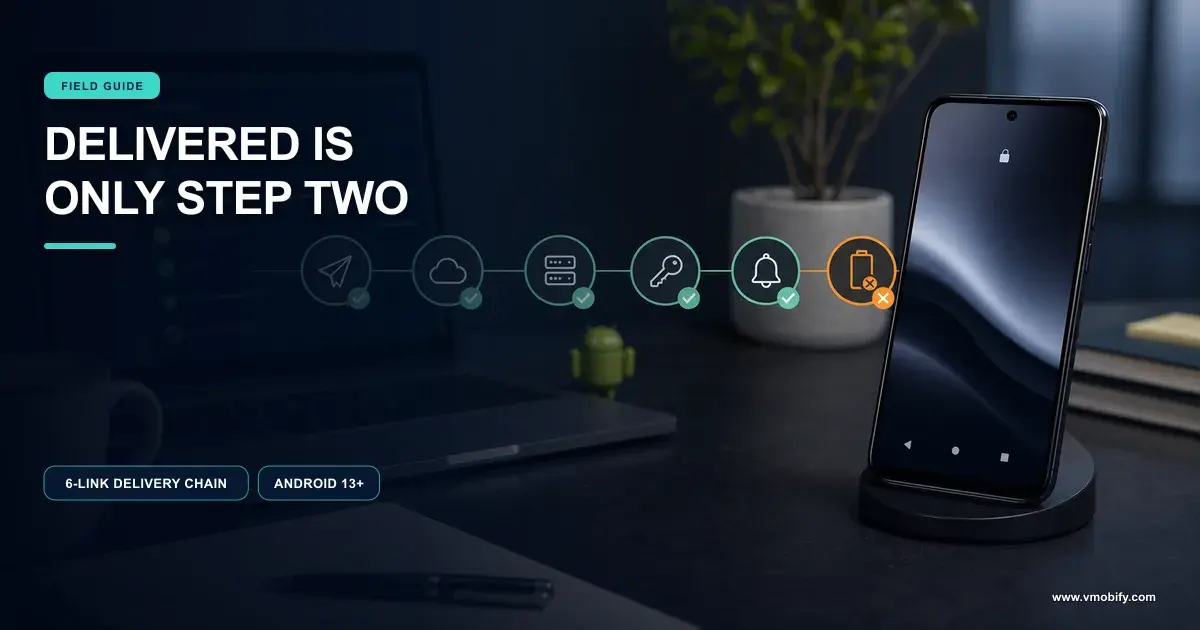
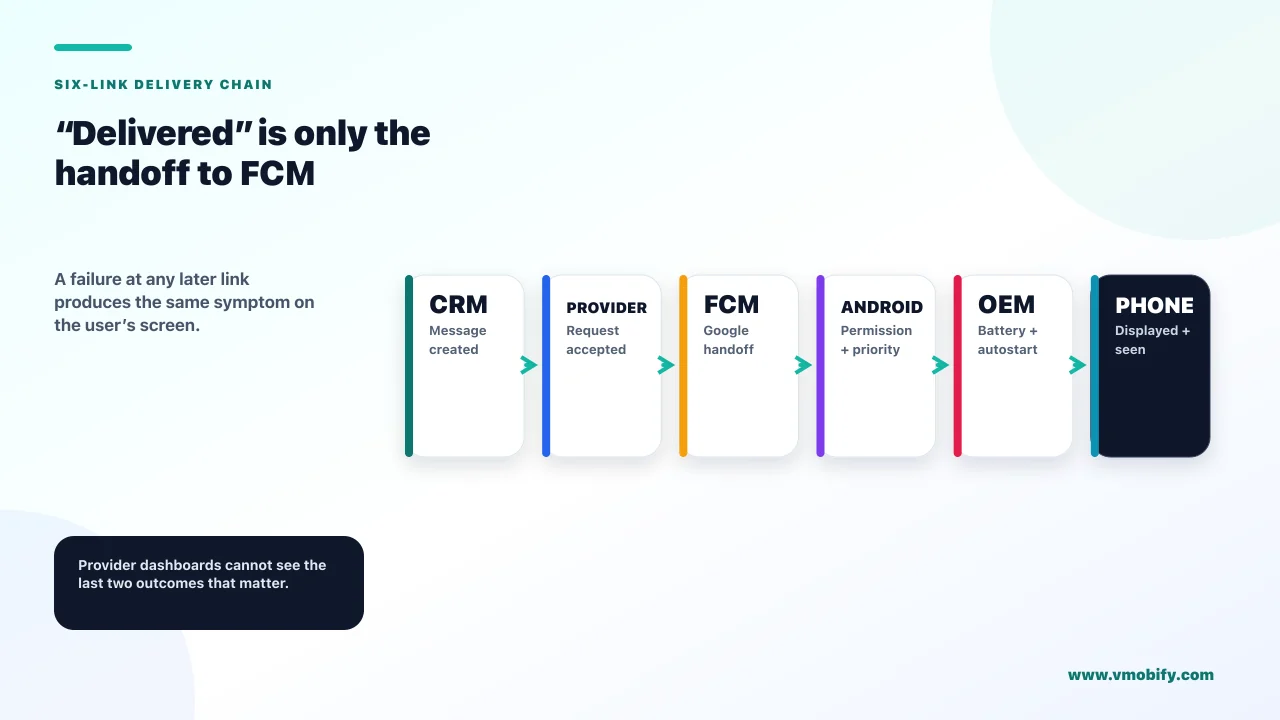
Because almost every push dashboard reports how many messages your provider successfully handed to Google's servers, and that is the second step of a six-step chain. Everything that happens after the handoff — whether the device was reachable, whether the OS allowed the notification, whether the device's manufacturer let your app run, whether the user ever looked — is invisible to the tool telling you 94%.
The chain a push message actually travels looks like this:
Two more steps follow that grid — seen, meaning the user looked at the notification shade, and tapped, which is the only one most analytics setups measure. The gap between step two and step four is where Android engagement programmes quietly die, and it is a gap almost nobody instruments.
Compare your provider's delivery number against sessions attributed to push within your own analytics, split by platform. If iOS behaves roughly as the dashboard predicts and Android does not, the problem is not your copy, your timing or your segmentation. It is somewhere in the chain below.
In our portfolio this is one of the most consistently misdiagnosed problems in mobile growth, because every instinct points the wrong way. A push campaign that underperforms looks like a messaging problem, so teams rewrite the copy. When that fails they change the send time. When that fails they cut frequency. All three are reasonable responses to a message nobody read, and none of them helps when the message was never rendered on the device.
What is the Android push delivery chain, step by step?
Six links, each owned by a different party, and a failure at any one of them produces the same symptom — nothing on the user's screen. Diagnosing Android push means knowing which link you are looking at, because the fix is completely different at each.
- Your backend or CRM issues the send. Owned by you. Failures here are visible: API errors, bad payloads, empty segments.
- FCM accepts the message. Owned by Google. This is where most dashboards stop counting, and where "delivered" usually means "accepted".
- FCM reaches the device. Owned by Google and the device's network state. Doze, standby buckets and connectivity all bite here.
- The OEM's push service passes it on. Owned by the device manufacturer. On several major Android brands this is an independent decision layer, and it is the least documented link in the chain.
- Android permits and renders the notification. Owned by the OS, gated by the runtime notification permission and by the notification channel's state.
- The user notices it. Owned by your copy, timing and everything else the industry writes about.
Note where the well-covered advice sits. Almost every article about push notifications addresses link six. Links three, four and five are where Android messages actually disappear, and they are engineering and platform questions rather than marketing ones.
The practical consequence is that a growth lead cannot fix this alone, and neither can an engineer working from a bug report that says "notifications aren't working". The diagnosis has to name the link. The rest of this article is about how to do that.
What did Android 13's notification permission actually change?
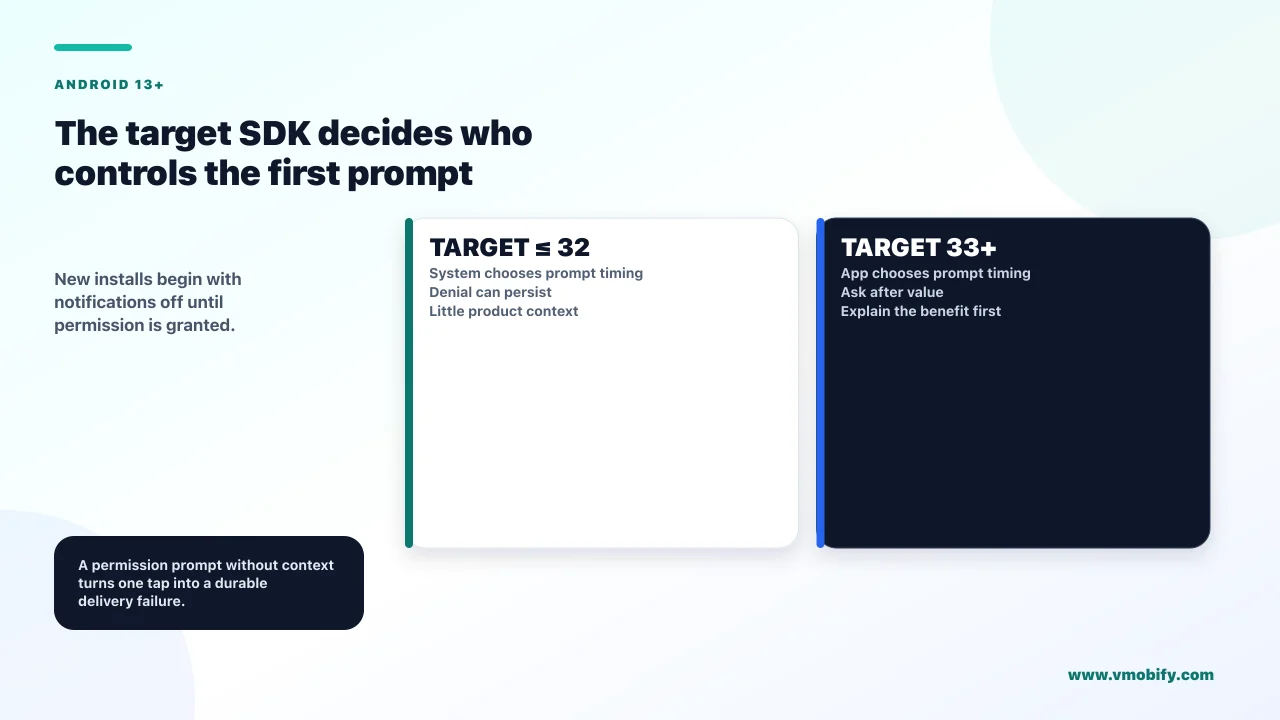
It turned notifications off by default for every new install, and it made a single tap on "Don't allow" permanent in a way most teams have never accounted for. Android 13 introduced POST_NOTIFICATIONS as a runtime permission, and the details in Android's notification permission documentation matter more than the headline.
The behaviour splits on what your app targets:
Targeting Android 13 (API 33) or higher
- Dialog timing: entirely yours to choose
- You can: show it in context, after the user has seen the value
- Risk: asking too early, and burning the one good prompt you get
Targeting Android 12L (API 32) or lower
- Dialog timing: the system decides
- Fires on: the first activity start after you create a notification channel
- Risk: one "Don't allow" and the user is not prompted again until they reinstall, or until you ship a build targeting API 33+
That last line is the expensive one. An app still targeting API 32 shows the permission dialog at a moment it did not choose — typically the first cold start, before the user knows what the app does — and a single dismissal is effectively permanent for that install. Raising your target SDK is not merely a compliance chore in that situation; it is the only way to ask again.
Three further behaviours are worth knowing precisely:
- Swiping the dialog away changes nothing. The permission state is untouched, so you may ask again. Only an explicit choice is recorded.
- Upgrades from Android 12L are pre-granted conditionally. The system pre-grants the permission when a user upgrades to Android 13 or higher, but only for apps that already have a notification channel and whose notifications the user had not explicitly disabled. A disable on 12L persists through the upgrade.
- Some notifications are exempt. Media session notifications, and
CallStylenotifications from apps that manage their own calls, do not require the permission. Foreground services do not need it to launch — but if the permission is denied, their notices appear only in the Task Manager and not in the notification drawer.
If you target API 33+, the prompt is a growth decision, not a technical one. Ask after the user has completed something that makes a future notification obviously useful — a first order, a first tracked item, a first saved search — never on the first screen. Our guide to onboarding and permission sequencing covers where this belongs in the first session.
Why do notification channels silently kill Android notifications?
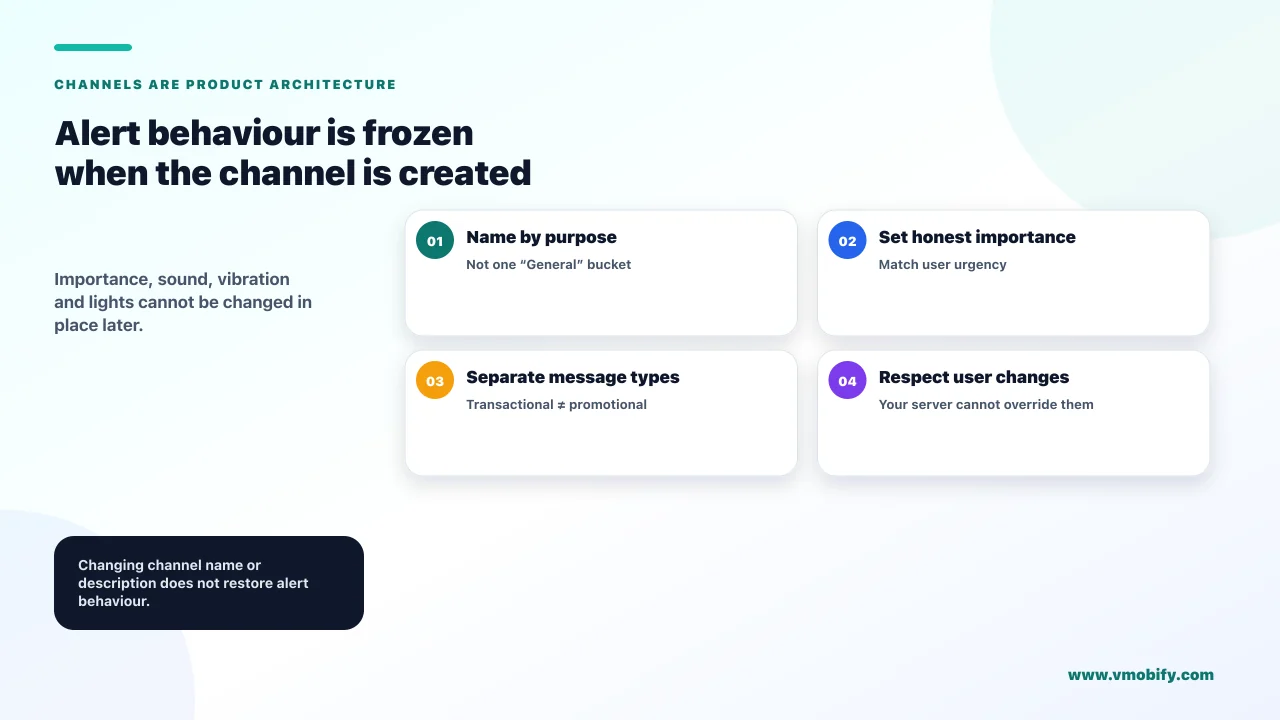
Because a channel's alerting behaviour is frozen the moment you first create it, and a channel a user has quietened is invisible in every server-side metric you have. Channels have been mandatory since Android 8.0, and Android's channel documentation is explicit about the consequences.
Start with the hardest failure. If you target Android 8.0 or higher and post a notification without specifying a channel, the notification does not appear and the system logs an error. Nothing is thrown, nothing reaches your crash reporter, and your CRM records a successful send.
The five importance levels, and what each actually does:
- Urgent (
IMPORTANCE_HIGH) — makes a sound and appears as a heads-up notification - High (
IMPORTANCE_DEFAULT) — makes a sound - Medium (
IMPORTANCE_LOW) — no sound - Low (
IMPORTANCE_MIN) — no sound, and does not appear in the status bar - None (
IMPORTANCE_NONE) — no sound, and appears in neither the status bar nor the shade
Now the part that catches teams out. Once you submit a channel to the notification manager, you cannot change its importance level. Sound, vibration pattern and lights are equally fixed. You can change only the channel's name and description. The association between a channel and its group is also permanent.
Shipping a single channel called "General" at default importance for every message type is the most common Android notification error we see. You cannot later raise its importance for transactional alerts, and you cannot split it retroactively. A user who mutes it because of marketing messages has also muted your delivery updates. The only remedy is to create new channels and migrate — which means the old one lingers in the user's settings.
Design the channel taxonomy before the first release, and make it match the reasons a user would want to opt out selectively rather than your internal campaign types. Transactional, account and security messages belong in channels a user is unlikely to mute; promotional and recommendation messages belong in channels they can mute without losing anything they need.
When does FCM legitimately delay or drop your message?
More often than most teams realise, and in at least one case as a direct penalty for how you have used push in the preceding week. These are documented behaviours rather than faults, which is why they never appear as errors.
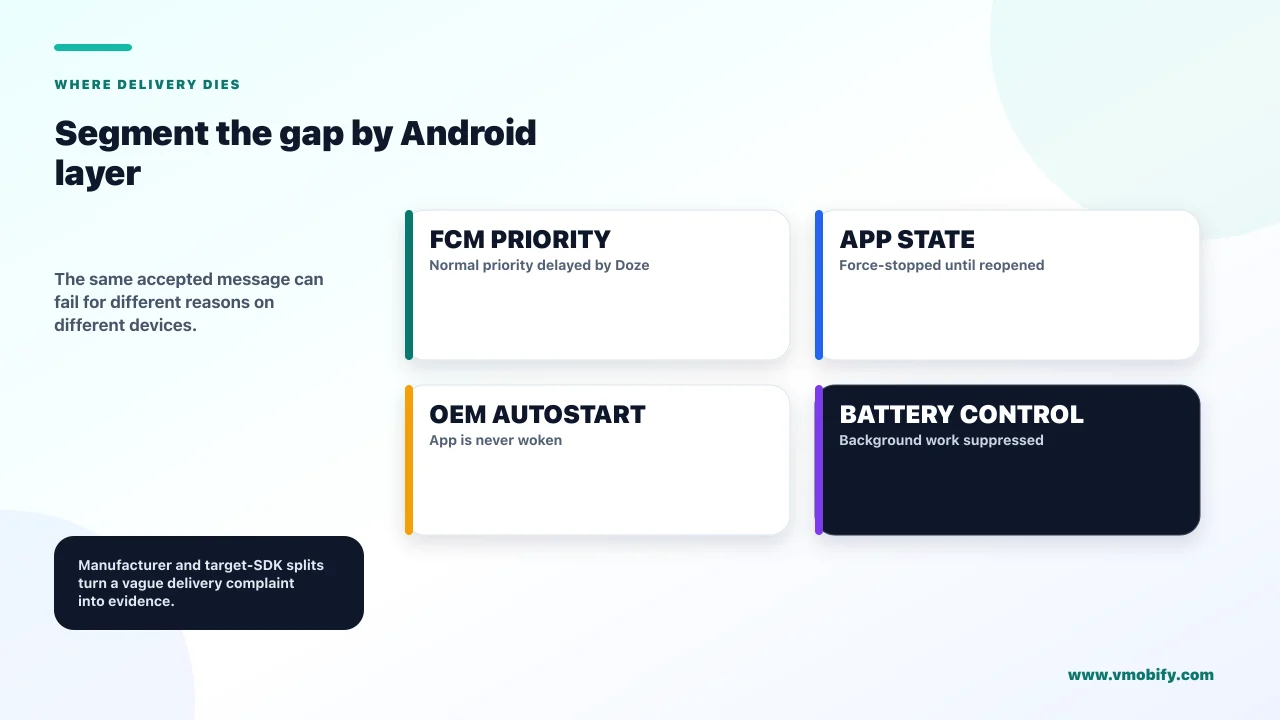
Message priority is the first lever. Per Firebase's documentation on message priority, a normal priority message is delivered immediately when the device is not sleeping, but when the device is in Doze delivery may be delayed to conserve battery until the device exits Doze. A high priority message is different: FCM attempts to deliver it immediately and can wake a sleeping device.
The temptation is to mark everything high priority. Firebase anticipated that, and the penalty is the most under-discussed mechanic in Android push:
If FCM detects a pattern in which your messages do not result in user-facing notifications, your messages may be deprioritised to normal priority. That assessment runs on seven days of message behaviour and is made independently for each app instance. An app that sends silent high-priority messages for background sync can therefore find its genuinely urgent notifications arriving late — on a per-user basis, invisibly.
Two further documented behaviours matter for reconciliation. When more than 100 messages are pending for your app on a device at the time it reconnects, or when a device has not connected to FCM for more than a month, FCM discards them and signals the app that messages were deleted rather than delivering the backlog. A user who leaves a phone in a drawer for five weeks does not receive five weeks of catch-up notifications.
Both priority levels give your handler only a few seconds to process the payload, with slightly more allowance for high priority. Anything longer belongs in WorkManager — expedited work for high priority messages, an ordinary work request for normal priority. Trying to do real work inside the message handler is a common cause of notifications that appear inconsistently on slower devices.
Time-to-live and collapse keys are the other two controls worth understanding: TTL governs how long FCM will keep trying before abandoning a message, and a collapse key lets a newer message replace an older undelivered one so a user who reconnects sees one current notification rather than a stack of stale ones. Check the current defaults and limits in Firebase's own documentation before you rely on specific values — they are the kind of platform detail that changes without much announcement.
Where do Indian device brands break the chain?
Several of the Android skins most common in India add a battery-management layer that can stop your app being woken at all, and it sits between FCM and the operating system where neither your code nor your dashboard can see it. This is link four, and for an India-first app it is not an edge case — it is the median device.
The mechanism differs by manufacturer but the shape is consistent. The skin maintains its own list of apps permitted to start in the background or hold a wake lock, defaulting to restrictive for apps the user has not explicitly protected. An app not on that list may simply not be woken to handle an incoming message, particularly after the device has been idle or the app has been swiped away from the recents screen.
What the user has to do
- Autostart: enable it for your app in the skin's own settings, not Android's
- Battery: set your app to unrestricted rather than optimised
- Recents: lock the app so swiping away does not force-stop it
- Notifications: allow them in both Android settings and, on some skins, a separate manufacturer screen
Why you cannot fix it in code
- No public API for most of these settings
- Different paths per manufacturer and per skin version
- Invisible to you: a suppressed message looks identical to a delivered one in your dashboard
- Force-stop is absolute: a force-stopped Android app receives nothing until the user opens it again
Force-stop deserves emphasis because it is frequently misunderstood. An Android app that has been force-stopped — by the user through settings, or by an aggressive task manager — does not receive FCM messages at all until it is launched again manually. Not delayed: not received. Any re-engagement strategy that depends on reaching lapsed users has to reckon with the possibility that the most lapsed users are also the least reachable ones.
The honest conclusion is uncomfortable for a push-led growth plan. Across the apps we have managed, the Android delivery gap is largest exactly where the install base is most concentrated in mid-range devices from manufacturers with aggressive power management, which describes a great deal of the Indian market. Planning a retention programme that assumes push arrives reliably is planning around a device population you do not have.
Why do data messages fail when the app is in the background?
Because a notification message and a data message are handled by different parts of the system, and the choice you make in the payload decides whether Android or your code is responsible for putting something on screen. Teams that pick the wrong one get notifications that work perfectly in testing and vanish in production.
The distinction, per Firebase's guidance on receiving messages on Android, is straightforward once stated. A message containing a notification payload, arriving while your app is in the background, is handled by the system and placed directly in the tray — your code does not run. A message containing only data is always delivered to your handler, which means your code must construct and post the notification.
That second path is the fragile one. It depends on your process being alive or startable, on the OEM permitting the wake, on the handler completing within its few seconds, and on your code correctly targeting a channel that exists and is not muted. Every one of those is a failure point that a plain notification payload avoids entirely.
A message containing both is split: the notification goes to the tray and the data arrives in the launching intent's extras.
If the message must be seen, send a notification payload and let Android render it. Use data-only messages for genuine background work — a silent sync, a cache invalidation, a badge update — and accept that they are best-effort. Building your user-facing notifications on a data-only pipeline gives you more control and considerably less reliability, and on aggressive OEM skins the trade is a bad one.
There is a legitimate case for data-only messages driving user-facing notifications: heavy personalisation that cannot be assembled server-side, or content that must be decrypted on-device. If that is genuinely your situation, treat delivery as unreliable by design and build a reconciliation path — an in-app inbox that shows what should have arrived, which we cover in our comparison of in-app messaging against push.
How do stale tokens flatter your delivery reports?
Because a registration token can remain in your database long after the install it belonged to has gone, and every send to a dead token is counted somewhere in your funnel as an attempt. The result is a denominator that grows faster than your real addressable base, and open rates that decline for reasons that have nothing to do with your content.
Tokens go stale for ordinary reasons: the user uninstalled, restored the app to a new device, cleared app data, or the token was simply refreshed. FCM reports unregistered tokens back to you, and the discipline is to act on that signal rather than let the row sit in your database because deleting records feels irreversible.
The reporting distortion works like this. Suppose a quarter of your token base is dead. Your provider may still show a high acceptance rate, because acceptance is measured before the token is resolved on the device. Your open rate, however, is computed against a denominator that includes those quarter of sends that could never open. The campaign looks progressively worse over time while its actual performance among reachable users is flat.
Track opens against reachable users — tokens that are valid, permission granted, channel not muted — rather than against total sends. It is a smaller number and a much less flattering one, and it is the only version that tells you whether your messaging is working. We set out the wider measurement approach in our guide to push notification strategy.
Uninstall tracking has a related trap on Android. A token stops working when an app is uninstalled, and this is often used as an uninstall signal — but the same silence is produced by a force-stopped app, a device that has been offline for a long period, or an OEM skin that has stopped waking your app. Treating token failure as proof of uninstall will overstate churn on precisely the devices where delivery is weakest.
How do you prove where your notifications are dying?
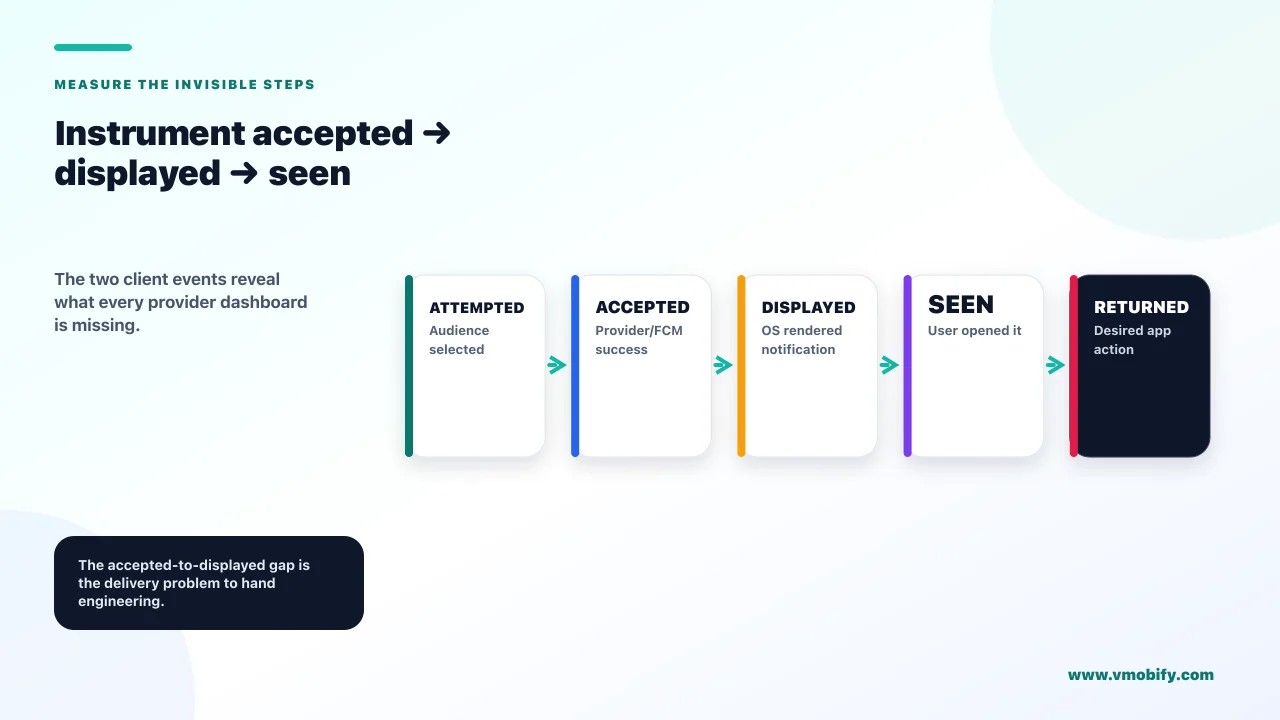
By instrumenting the two steps your provider cannot see — displayed and seen — and then splitting every number by Android version, target SDK and device manufacturer until one segment separates from the rest. Without that split you are looking at an average that hides the failure.
The diagnostic sequence, in the order that finds problems fastest:
- Split delivery against push-attributed sessions by platform. If iOS tracks the dashboard and Android does not, you have an Android chain problem rather than a content problem. This single comparison redirects most investigations.
- Log a client-side event when your app actually posts a notification. This is the "displayed" step nobody measures. The gap between your provider's accepted count and your own displayed count is the size of the problem, and it is the number to take to an engineer.
- Split displayed-versus-accepted by device manufacturer. If one or two brands account for most of the gap, you are looking at OEM power management, not at your code.
- Split by Android version and by your target SDK at the time of install. A cohort installed while you targeted API 32 may be permanently unpermissioned. That is a build problem with a known fix.
- Check permission state and channel state on app open, and store both as user properties. Now you can segment campaigns by who can actually receive them, and see how many of your "subscribers" are unreachable.
- Test on a real device from the manufacturer that dominates your install base, with the app swiped away from recents and the screen off for an hour. Emulators do not reproduce OEM battery management, and a device on a desk with the screen on reproduces nothing at all.
Step six is where most teams discover the problem is real. A notification that arrives instantly during development, with the app in the foreground on a flagship handset, tells you almost nothing about the same message reaching an idle mid-range device eight hours later.
Keep the instrumentation permanently rather than adding it during an investigation. Displayed-versus-accepted is a health metric, and like the technical quality metrics we cover in the Android vitals thresholds guide, its value is in the trend rather than any single reading.
What should you build so users can fix this themselves?
A short, honest in-app screen that detects what is blocking notifications and deep-links the user to the exact setting, because for OEM restrictions there is no programmatic fix — only a well-guided manual one.
What such a screen should check and offer:
- Is the runtime permission granted? If not, and you target API 33+, request it here in a context where the value is obvious.
- Are notifications enabled at the app level? Check before sending rather than assuming; the OS exposes this directly.
- Is the specific channel muted? A user who muted your promotional channel should not be told notifications are off, and a user who muted your transactional channel should be told exactly that.
- Is battery optimisation restricting the app? Where you can detect it, explain the consequence in plain terms and link to the relevant settings screen.
- Is this a device with a known autostart requirement? If so, show manufacturer-specific instructions rather than generic Android ones. The paths differ by skin, and generic advice sends users to a screen that does not exist on their phone.
Not in a settings screen nobody opens. Surface it at the moment the user asks for something that depends on a notification — enabling an alert, tracking an order, setting a reminder. That is when the request is obviously in their interest, and it is the only time a user will willingly walk through three levels of manufacturer settings.
Write the copy for a person who does not know what a wake lock is. "Turn on Autostart so we can tell you when your order ships" works. "Enable background execution permissions" does not. The instruction has to survive being read by someone holding a phone in one hand.
Set expectations internally too. Even a well-built version of this screen recovers a minority of affected users, because most people never see it and some will decline. It is worth building because the users who do complete it are disproportionately your engaged ones — but it is a mitigation, not a fix, and it does not change the strategic conclusion in the next section.
What does this mean for an India-first channel mix?
That push should be treated as a best-effort channel on Android rather than a guaranteed one, and that any message whose non-delivery has a real cost needs a second path. This is the strategic consequence of everything above, and it is the part most retention plans skip.
The test to apply to every message type you send: if this never arrives, what breaks?
Push alone is fine
- Content recommendations — a missed one costs an impression
- Re-engagement nudges — best-effort by nature
- Streak and habit reminders — valuable but not load-bearing
- Feature announcements — the in-app surface can carry them
Needs a second path
- Order and delivery updates — non-arrival generates support tickets
- Payment failures and expiries — non-arrival costs revenue directly
- Security and account alerts — non-arrival is a trust and compliance problem
- Time-bound actions — an expiring reservation the user never heard about
For the right-hand column, the practical alternatives in India are WhatsApp and SMS for anything genuinely transactional, email where an address exists and the message can wait, and an in-app inbox as the reconciliation layer that shows what should have arrived. Our guide to lifecycle marketing for Indian apps covers how those channels sequence together, and the push service comparison covers which tools handle the multi-channel fallback well.
An in-app inbox is the most underrated item on that list. It costs comparatively little to build, it is entirely under your control, and it converts an unreliable interruption into a reliable destination. A user who opens your app and finds three messages waiting has received them, regardless of what any push service reported.
The idea worth carrying out of this article is that Android push delivery is not a marketing variable you can optimise your way out of. It is a chain of six links owned by four different parties, and no amount of copy testing fixes a message the operating system never rendered. Measure the two steps your dashboard hides, split the result by manufacturer, and decide which of your messages are too important to send only one way. If you would rather have this diagnosed against your own install base than work through it yourself, tell us which devices dominate it and we will start with the displayed-versus-accepted gap.
Frequently Asked Questions
Why do my push notifications work on iOS but not on Android?+
Almost always because the Android chain has links iOS does not. Android 13 requires a runtime notification permission that is off by default for new installs, notifications must target a channel the user has not muted, and several Android manufacturers add their own battery and autostart layer that can prevent your app being woken at all. Split your delivery data by platform first, then by manufacturer, and the gap usually concentrates in one or two device brands.
What does "delivered" mean in my push dashboard?+
In most tools it means the message was accepted by Firebase Cloud Messaging, not that it reached the device or was rendered on screen. That is the second of six steps. To know whether the notification was actually displayed you have to log an event from your own app at the moment it posts one, and compare that count against your provider's.
Can I change a notification channel's importance after I have shipped it?+
No. Once a channel is submitted to the notification manager, its importance level, sound, vibration pattern and lights are fixed. Only the name and description can be changed, and the channel's group association is also permanent. The only way to change alerting behaviour is to create a new channel, which leaves the old one visible in the user's settings.
Should I send all my messages as high priority?+
No, and doing so can backfire. Firebase documents that if it detects a pattern in which your messages do not result in user-facing notifications, it may deprioritise them to normal priority — assessed on seven days of behaviour and applied independently for each app instance. Reserve high priority for messages that genuinely should produce something the user sees, and use normal priority for background work.
Why does a user who force-stopped my app stop receiving notifications entirely?+
Because a force-stopped Android app does not receive FCM messages at all until the user launches it again manually. This is not a delay — nothing is queued and delivered later. It matters most for re-engagement programmes, because the users you most want to reach are also the most likely to have force-stopped or heavily restricted the app.
Should I use data messages or notification messages?+
If the message must be seen, send a notification payload and let Android render it. A notification message arriving while your app is in the background is handled by the system and placed in the tray without your code running. A data-only message is always passed to your handler, which means your process must be alive or startable, must survive OEM power management, and must finish within a few seconds. That path gives you more control and considerably less reliability.
How do I know if my token base is full of dead tokens?+
FCM reports unregistered tokens back to you when a send fails against one; the discipline is to remove them rather than leave the rows in place. The symptom of not doing so is an open rate that declines steadily while performance among reachable users is flat, because the denominator includes sends that could never open. Measure opens against reachable users — valid token, permission granted, channel not muted — rather than against total sends.
Sources
- Android Developers — Notification runtime permission — POST_NOTIFICATIONS behaviour by target SDK, the permanence of a single denial, upgrade pre-granting, and the exempt notification types
- Android Developers — Create and manage notification channels — Channels mandatory since Android 8.0, the five importance levels, and which channel settings are immutable after creation
- Firebase — Message priority on Android — Normal versus high priority behaviour in Doze, and the seven-day deprioritisation assessment
- Firebase — Receive messages in an Android app — Notification versus data message handling in the background, and the conditions under which pending messages are discarded
- Android Developers — Notifications overview — Anatomy, behaviour and the notification drawer surfaces referenced throughout
- Android Developers — Optimize for Doze and App Standby — The platform power-management behaviour that delays normal priority delivery
- Android Developers — WorkManager — Where processing belongs when a message handler cannot finish within its few seconds
About the author
Amol Pomane — Founder, Vmobify
Amol leads Vmobify, a mobile app growth agency that has driven 30M+ downloads and ranked 54K+ keywords across 300+ apps since 2013. He writes about ASO, paid user acquisition, retention, and the operational reality of scaling mobile apps in India and global markets.