In-App Messaging vs Push: When Each Wins (With Benchmarks)
In-app messages reach users who are already engaged and see view rates near 75%; push reaches users who left and converts at much lower open rates. This guide settles when each channel wins, the benchmarks to plan against, how they combine across a lifecycle, and the India-specific WhatsApp and SMS reality most global playbooks ignore.
On this page
- What is the real difference between in-app messaging and push?
- What do the open and view-rate benchmarks actually say?
- When does in-app messaging win?
- When does push notification win?
- How do in-app and push work together across a lifecycle?
- How much do opt-in and frequency discipline matter?
- How do personalisation and triggers change the outcome?
- What is the India channel reality with WhatsApp and SMS?
- How do you measure each channel correctly?
- Which pitfalls cost teams the most?
- Frequently Asked Questions
What is the real difference between in-app messaging and push?
The difference is not the format of the message — it is where the user is standing when they receive it. In-app messages reach users who are already inside your app and engaged; push notifications reach users who have left and need pulling back. That single distinction decides everything else: the benchmarks, the jobs each channel does well, and the mistakes teams make when they treat the two as interchangeable.
An in-app message is a card, modal, banner, or tooltip that appears while the user is actively in a session. By definition the audience is already paying attention — they opened the app, they are looking at the screen, and the message is part of the experience rather than an interruption to it. A push notification is the opposite: it fires to the device while the app is closed or backgrounded, competing for attention against every other notification on the lock screen, and it has to earn the tap before any of your content is even seen.
Because the audiences are structurally different, comparing their raw numbers head-to-head is misleading. MoEngage's work on in-app messaging frames it well: in-app is a high-engagement surface precisely because it is shown to people who are already present, not because the creative is inherently better. Push has to manufacture the moment of attention; in-app inherits it. So the right question is never "which channel has the higher open rate?" — in-app will always win that — but "which channel is right for the job in front of me?"
Across our 300+ apps managed since 2013, the most expensive lifecycle mistakes we see come from this confusion. Teams blast a paywall as a push (low conversion, high annoyance) when it belonged in-app, or they bury a time-sensitive alert in an in-app card a lapsed user will never see because they never reopen the app. The channels are complements, not substitutes, and the rest of this guide is about matching the channel to the moment.
One more framing that prevents a lot of wasted spend: in-app messaging shapes the session a user is already having, while push decides whether a session happens at all. Email then carries the long-form story that neither short-form channel can hold, and in India, WhatsApp and SMS reach the users who opted out of everything else. A serious retention programme runs all of them, each pointed at the job it does best.
It also helps to retire the idea that one channel is "better" than another in the abstract. In-app cannot reach a lapsed user and push cannot deliver a paywall at the moment of intent — neither limitation is a flaw, it is the channel being used outside its design. The teams that struggle are usually the ones holding a single channel and trying to make it do every job; the teams that retain well hold a small portfolio of channels and route each message to the one built for it. The skill is routing, not picking a favourite, and the sections below are essentially a routing guide: a benchmark for each channel, the jobs each one owns, how they hand off, and how to prove the lift is real rather than assumed.
What do the open and view-rate benchmarks actually say?
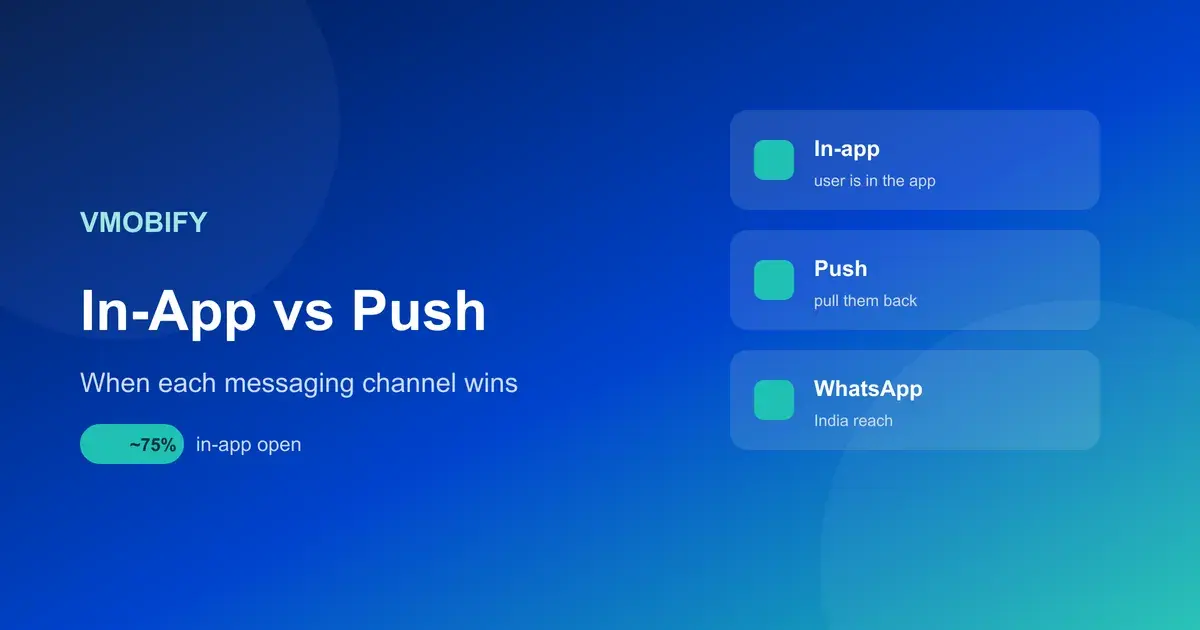
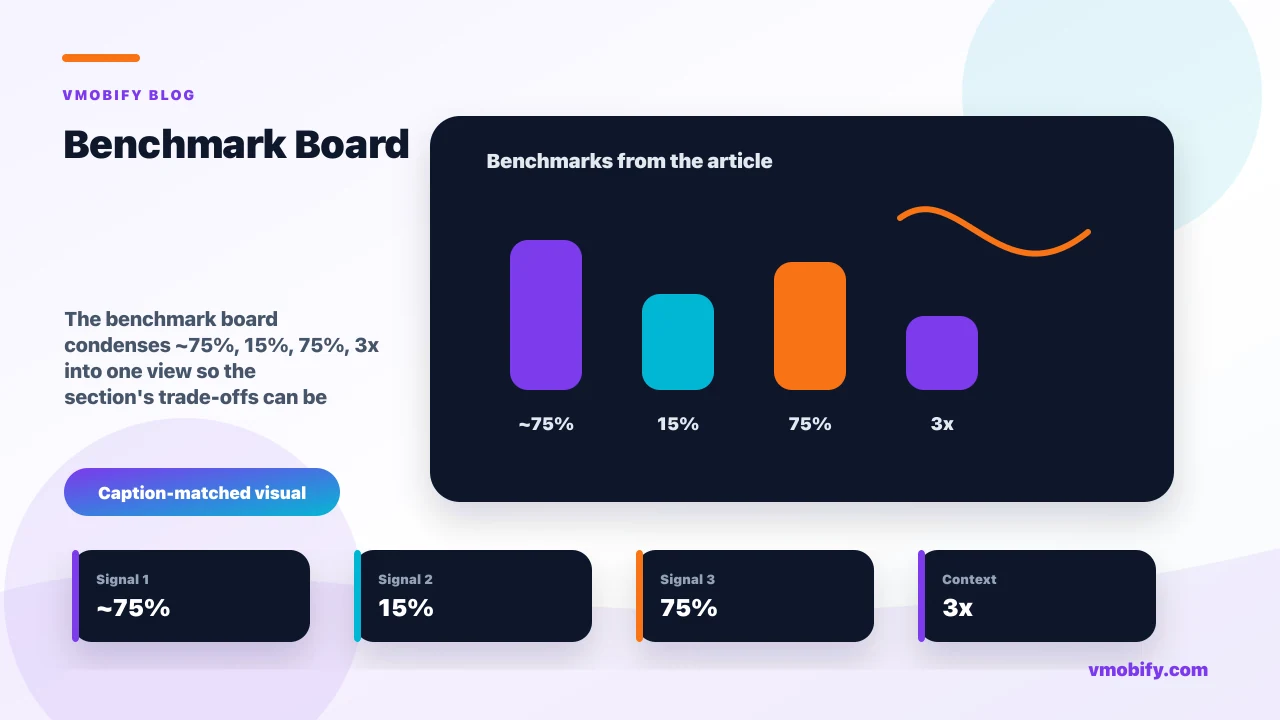
In-app messages see view rates around 75% — roughly three times the engagement of a push notification — because the audience is already in the app; push open rates typically sit at a much lower 5–15%, yet a well-timed push can still lift engagement materially, by as much as ~190% versus sending no message at all. Both numbers are correct, and the apparent contradiction is the whole point: they measure different things for different audiences.
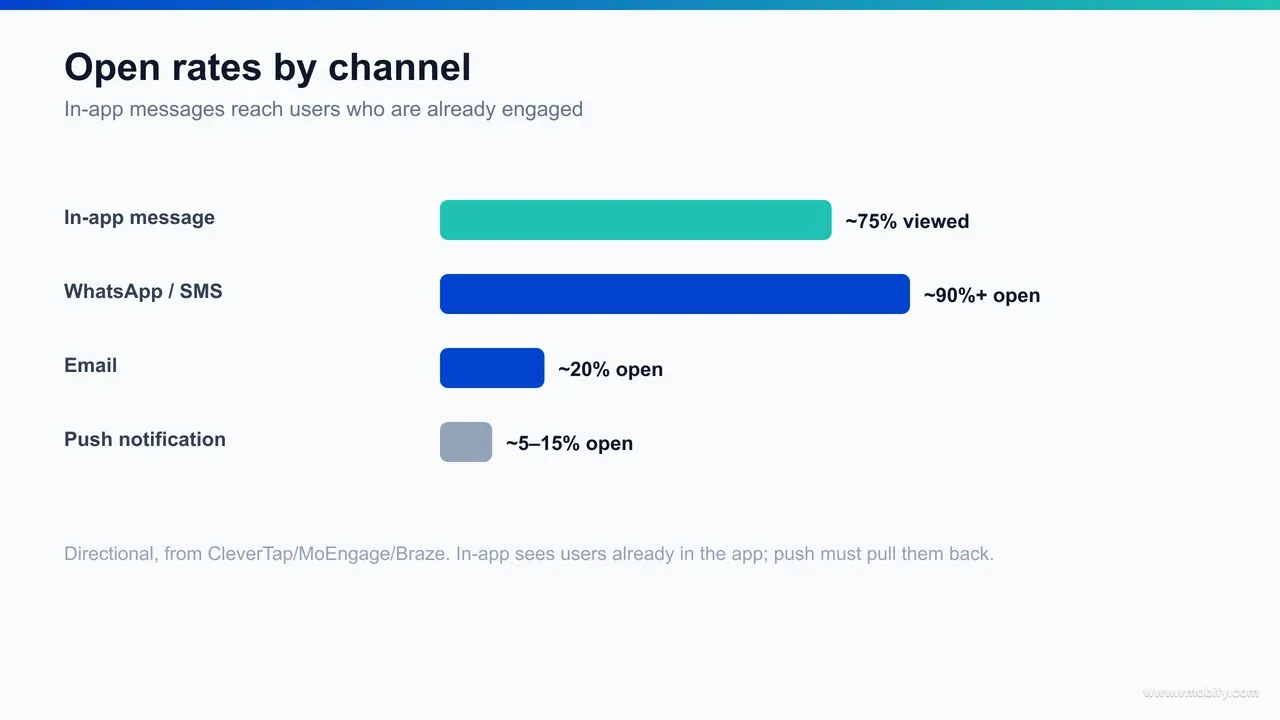
Read the in-app number carefully. A ~75% view rate sounds extraordinary next to push, but it is measured against users who are mid-session — the denominator is already-engaged people, so a high view rate is almost guaranteed. The value of in-app is not that the number is big; it is that the message lands at the exact moment the user can act on it. CleverTap's engagement research repeatedly shows in-app outperforming on per-impression action because context and intent are aligned.
Push benchmarks look weaker on open rate and they are — a 5–15% open rate is the realistic planning band for most categories, with finance and utility apps at the higher end because the stakes of the alert are higher. But open rate undersells push, because the channel’s real job is re-engagement, not impressions. Braze’s push best-practice guidance documents how a relevant, well-timed push can lift downstream engagement dramatically versus sending nothing — the lift shows up in sessions and retention, not in the open-rate line item.
The planning takeaway is to stop benchmarking channels against each other and start benchmarking each against its own job. Hold in-app to action-per-impression, hold push to incremental sessions and retained users, and hold email to read-through on long-form. Mixed-up scorecards are how teams kill a channel that was actually working.
When does in-app messaging win?
In-app messaging wins whenever the user is already in the app and the message should change what they do next in this session — onboarding, feature discovery, contextual nudges, and paywalls or upgrade prompts. If the goal is to shape an active session rather than start one, in-app is almost always the right channel.
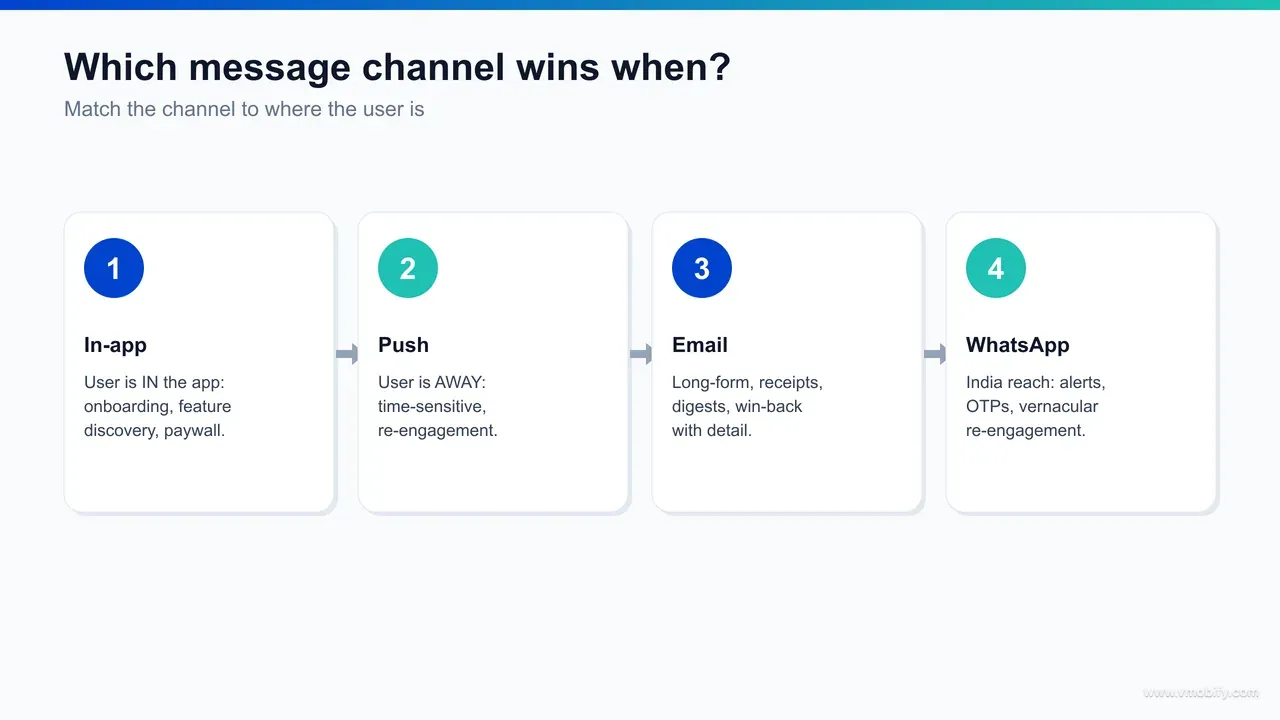
Onboarding is the clearest case. A first-time user is in the app, oriented towards learning, and an in-app tooltip or coachmark that points to the one action that creates value lands at the perfect moment. Pushing that guidance to the lock screen would be absurd — the user is right there. The same logic governs feature discovery: when you ship something new, an in-app announcement reaches engaged users at the moment they can try it, with a view rate that no push will match.
Paywalls and upgrade prompts are the highest-stakes in-app surface. The decision to subscribe is made mid-session, in the flow of using the product, when the user has just hit the value or the limit. An in-app paywall triggered by reaching a feature gate converts because it arrives exactly when intent peaks. The same offer delivered as a push — to a closed app — is both lower-converting and more irritating, because it asks for money out of context. Contextual upgrade prompts belong in-app, full stop.
- Onboarding guidance: coachmarks and progress nudges that get the user to first value faster.
- Feature discovery: announce new capability to users who are already engaged enough to try it.
- Paywalls and upgrade prompts: monetisation moments triggered by reaching a value or a limit.
- Contextual help: surface guidance when a user lingers or hesitates on a screen, not generically.
- Surveys and feedback: ask while the experience is fresh and the user is present.
There is a quieter advantage to in-app that teams under-use: because the user is present, the message can be richer and more interactive than a push ever can. A push has a title, a line of body, and maybe an image; an in-app message can be a full-screen carousel, a multi-step checklist, an embedded video, or an interactive form, and the user can act on it without leaving the surface. That bandwidth is why onboarding and feature education belong in-app — you can actually teach, not just nudge. Spending that bandwidth on a generic "welcome" modal nobody reads is the waste; spending it on the one action that creates value is where activation curves bend.
In our portfolio, the apps with the cleanest activation curves treat in-app messaging as a product surface, not a marketing channel — designed into the flow, triggered by behaviour, and removed the moment the user has done the thing. That discipline is the core of any serious app retention strategy: meet the user where intent already exists, and spend the rarer, more fragile push budget on the users who have left.
When does push notification win?
Push wins whenever the user is outside the app and the entire goal is to bring them back — time-sensitive alerts, lapsed-user win-back, and habit-forming reminders. If the value depends on re-entry rather than on shaping a session already underway, push is the only channel that can interrupt the user where they are.
Time-sensitive information is push’s home turf. A price drop, an order out for delivery, a payment received, a match starting, a limited-window offer — these only matter if they reach the user immediately, and the user is not in the app to see an in-app card. Push delivers to the lock screen in real time, which is a structural advantage no in-app surface can replicate. This is also why finance and logistics apps post the highest push open rates: the alerts carry genuine, time-bound stakes.
Lapsed-user win-back is the second clear win. A user who has not opened the app in days or weeks cannot be reached in-app by definition — there is no session to message into. Push is the bridge back. A re-engagement sequence at day 3, day 7, and day 14 of inactivity recovers a measurable cohort that would otherwise churn for good, and the data point worth internalising is that sending even one push in a user’s first 90 days makes them meaningfully stickier than users who get none. The full mechanics of these sequences sit in our app re-engagement and win-back guide and the broader push notification strategy.
- Time-sensitive alerts: deliveries, payments, price changes, live events — value decays in minutes.
- Lapsed-user win-back: the only channel that reaches a user who is no longer opening the app.
- Habit reminders: streaks, daily goals, and routine prompts that rebuild the habit loop.
- Re-stock and back-in-stock: high-intent triggers that pull a user back at the moment of relevance.
The thing to hold onto is that push is measured on the session it triggers, not the open it earns. A 9% open rate that brings back 9% of a lapsed cohort, repeatedly, is one of the highest-return mechanisms in mobile — which is exactly why it has to be protected with the opt-in and frequency discipline covered below. Burn the channel with noise and you lose the one tool that reaches users who have already drifted.
How do in-app and push work together across a lifecycle?
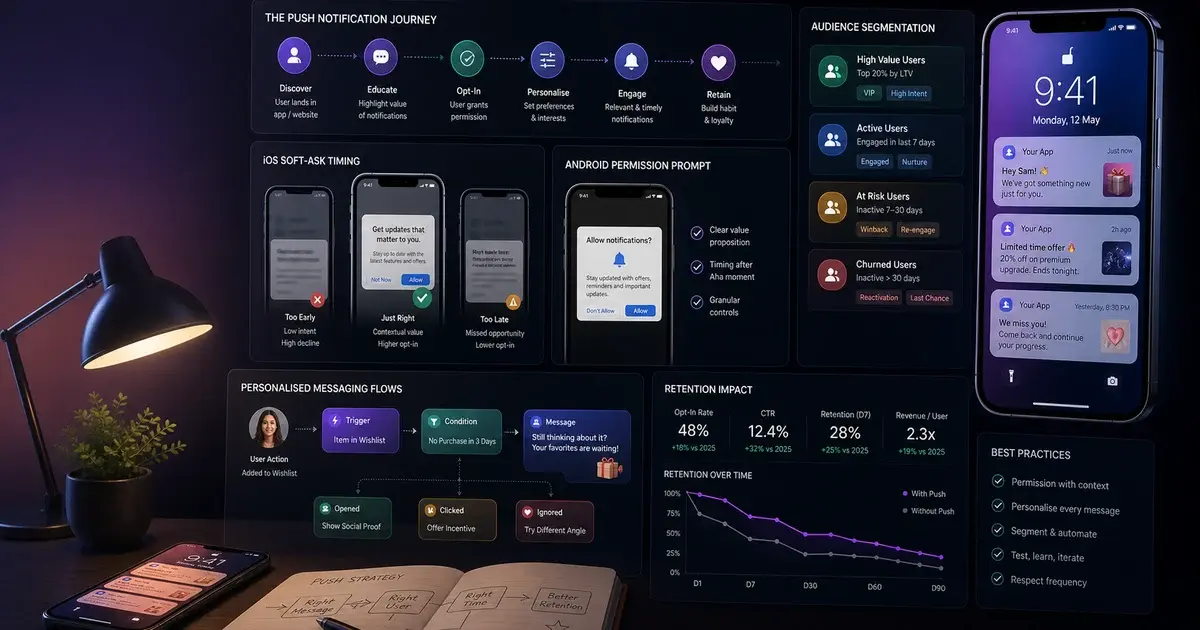
In-app and push are not competing options to pick between — they are two stages of the same lifecycle. Push gets the user back to the door; in-app shapes what happens once they are inside. The strongest retention programmes choreograph the two so each handoff feels like one continuous experience rather than two disconnected channels.
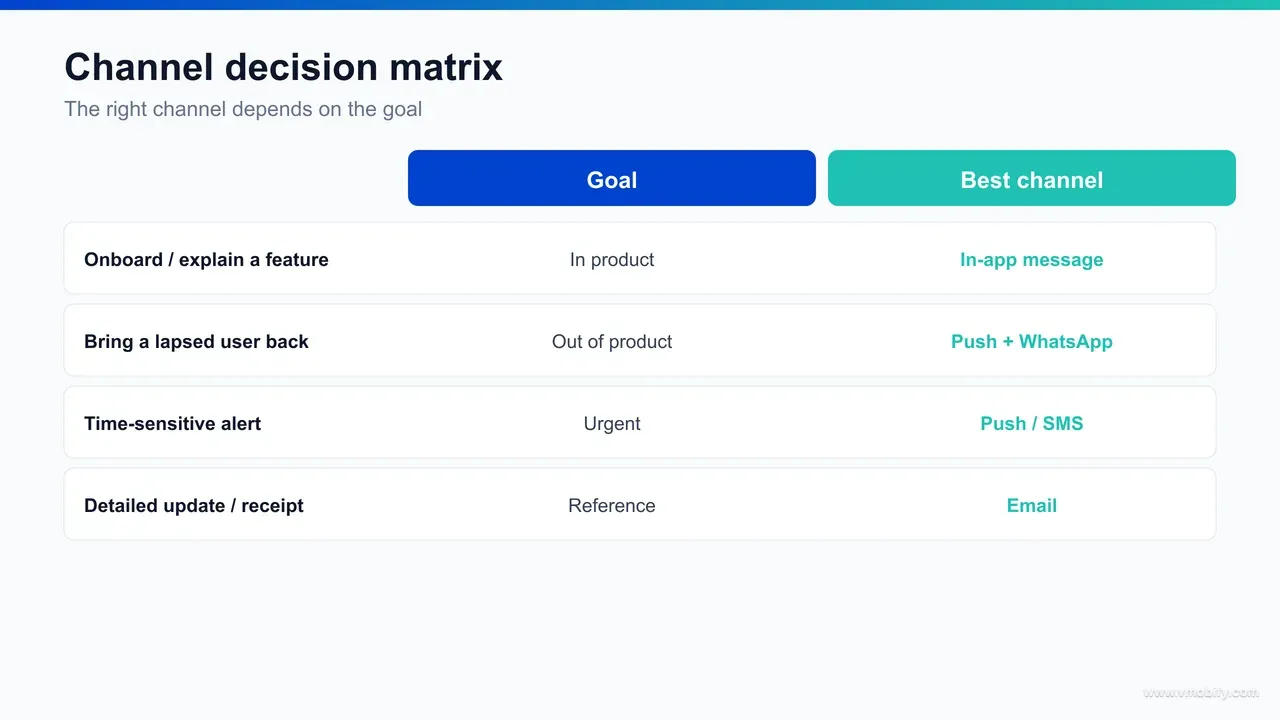
Map it to the user journey and the division of labour becomes obvious. At install and onboarding, in-app does the heavy lifting — guidance, activation, first value — while push earns its permission for later by being requested at the right moment, not on first launch. During active use, in-app handles feature discovery, contextual nudges, and monetisation, because the user is present. When the user goes quiet, push takes over, because there is no session left to message into. And when push succeeds in bringing them back, in-app catches them at the door with exactly the screen or offer the push promised.
The handoff is where most programmes leak value. A push that says "your cart is waiting" must deep-link to the cart, where an in-app message can confirm the items and nudge checkout — the two messages are one story told across the boundary of the app being closed and then open. Break that chain (a push that dumps the user on the home screen, an in-app message that ignores why they came back) and you spend the scarce push budget without capturing the session it bought you.
- Onboarding: in-app leads; push asks for permission at first value.
- Active use: in-app for discovery, nudges, paywalls; push for time-sensitive alerts only.
- Dormancy: push leads with win-back; in-app is silent because there is no session.
- Reactivation: push deep-links in; in-app catches the user with the promised screen.
This is the heart of lifecycle marketing, and getting the orchestration right is what separates a tool stack from a retention programme. Email then carries the long-form layer — feature roundups, case studies, education — that neither short-form channel can hold, and the India-specific layer of WhatsApp and SMS, covered below, reaches the users who opted out of push entirely.
How much do opt-in and frequency discipline matter?
They matter more than the creative. Push only works if the user opted in, and it keeps working only if you respect their attention with frequency caps and suppression rules. The two disciplines — earning permission well and spending it carefully — protect the channel that reaches users who have already drifted away, and they are the difference between push as an asset and push as an uninstall trigger.
Opt-in is the gate. On iOS you get exactly one system prompt, and apps that ask at the moment of first value rather than on first launch convert dramatically better — a soft-ask modal at the right moment routinely lifts opt-in from the 30–40% range to 55–70%. Android 13 introduced the same explicit opt-in requirement, so the deliberate permission strategy is now a cross-platform necessity rather than an iOS quirk. The point here is that opt-in is the single most valuable conversion event in onboarding, because every later push depends on it.
Frequency is how you keep the permission you earned. The data on push stickiness — one push in the first 90 days lifts retention — is real, but it inverts fast when notifications become noise. A user who receives three promotional pushes a day does not just ignore them; they revoke permission or uninstall, and once permission is gone there is no second prompt. The fix is structural: tier notifications into transactional (always send), behavioural-trigger (action or inaction based), and promotional (explicit opt-in, hard frequency cap), and enforce a global per-user cap across all tiers.
- Soft-ask first: never fire the system prompt cold — earn the opt-in at a moment of value.
- Tier your sends: transactional, behavioural, promotional — different rules, different caps.
- Global frequency cap: one ceiling across all tiers so no single user is over-messaged.
- Quiet hours and suppression: respect time zones and suppress users who just engaged.
In-app messaging needs the same discipline for a different reason: it is unmissable by design, so an over-eager in-app programme that interrupts every session with a modal trains users to dismiss reflexively and degrades the experience. Cap in-app frequency, gate messages behind real behavioural triggers, and let any given user see only the one message that matters most in a session. Restraint is the strategy on both channels.
How do personalisation and triggers change the outcome?
Behavioural triggers and personalisation are what turn both channels from broadcast into relevance — and relevance is the entire reason engagement lifts. A message sent because the user did something, carrying content specific to them, outperforms a scheduled blast by a wide margin on every metric that matters: open, action, and retention.
Triggers are the foundation. The highest-performing notifications are not sent on a calendar — they are sent in response to behaviour or its absence: a user abandoned a cart, completed a level, hit a usage limit, or went quiet for three days. Each of those is a moment where a specific message is genuinely useful. The same applies in-app: a paywall triggered by reaching a feature gate, a tip triggered by hesitation on a screen, a survey triggered by completing an action. Trigger-based messaging works because the timing carries the relevance — the user just did the thing the message is about.
Personalisation layers content onto that timing. Name, recent activity, location, lifecycle stage, and predicted intent all let the same trigger carry a message tailored to the individual. CleverTap and MoEngage both document large engagement gains from segment- and individual-level personalisation over generic sends — and the gains compound, because a relevant message also protects the channel by not training users to ignore you. Personalisation is retention insurance as much as it is a performance lever.
- Behavioural triggers: cart abandonment, milestone reached, limit hit, inactivity — send because of what the user did.
- Lifecycle segmentation: new, active, at-risk, and lapsed users need different messages, never the same blast.
- Dynamic content: recommendations and balances specific to the individual, not the cohort.
- Send-time optimisation: deliver when each user is historically most active, not on a global schedule.
The infrastructure to do this well — event tracking, segmentation, and the measurement to prove which triggers actually lift retention — is where most teams under-invest. Without clean event data, personalisation is guesswork and trigger logic has nothing to fire on, so the data layer is the real prerequisite. The creative matters far less than the data underneath it.
What is the India channel reality with WhatsApp and SMS?
In India, push and in-app are only part of the picture — WhatsApp and SMS reach users who never opted into push and never open email, which makes the real strategy a channel stack rather than a single channel. Any India playbook that stops at push is leaving a large share of its audience unreachable.
The reasons are structural. Push opt-in rates are lower on the budget Android devices that dominate India’s next 200 million internet users, notification permissions get cleared by aggressive battery-management software on many OEM skins, and email is simply not a daily habit for a large vernacular, Tier-2/3 audience. What that audience does check, constantly, is WhatsApp — and almost every Indian phone receives SMS reliably regardless of device, opt-in state, or data connection. Those two channels reach users that push and email structurally miss.
The job-to-channel mapping carries over cleanly. WhatsApp is a rich, conversational channel that suits order updates, payment confirmations, re-engagement, and even support — with read rates that dwarf email, when sent within policy as utility or authenticated messages rather than spam. SMS is the universal-reach fallback for the truly time-critical and trust-critical: OTPs, payment alerts, delivery windows — short, plain, and certain to arrive. Neither replaces in-app or push; they extend the same lifecycle to users the app-native channels cannot touch.
- WhatsApp: rich re-engagement and transactional updates with very high read rates — use for win-back and order/payment flows within policy.
- SMS: universal reach for OTPs, payment and delivery alerts — the channel that always arrives.
- Push: still primary for opted-in, app-native re-engagement — but not assumed to reach everyone.
- In-app: unchanged — the surface for users already in a session, on any device.
For an India-first app, the practical discipline is to treat WhatsApp and SMS as first-class lifecycle channels with the same trigger and frequency rules as push, not as afterthoughts bolted on for OTPs. Sequencing them properly across acquisition and retention is core to how we run user acquisition and retention for Indian apps — and it is the layer most global lifecycle templates simply do not have. The market reality decides the channel mix; copying a US push-and-email playbook leaves real reach on the table.
How do you measure each channel correctly?
You measure each channel against its own job, with a holdout group, on a downstream outcome — not on the vanity metric the channel happens to be good at. In-app is measured on action-per-impression, push on incremental sessions and retained users, and both on their contribution to retention and revenue against a control that received nothing.
The holdout is non-negotiable. The only honest way to know whether a notification programme works is to withhold it from a randomised slice of users and compare retention and revenue against the messaged group. Without a control, you cannot separate the lift the channel caused from the behaviour that would have happened anyway — and "would have happened anyway" is large, because messaged users are often your more engaged users to begin with. Every credible claim of "push lifts retention X%" rests on a holdout; treat any number without one as a hypothesis.
Match the metric to the channel’s purpose. In-app should be judged on whether users who saw the message took the action — completed onboarding, discovered the feature, started the trial — not on the near-guaranteed view rate. Push should be judged on incremental sessions and retained users, not on open rate, because a 9% open that brings back a lapsed cohort is a win even though the open rate looks small. Measuring push on opens is the single most common reason teams under-rate a channel that is actually carrying their retention curve.
- Hold out a control: randomised no-message group is the baseline for every lift claim.
- In-app metric: action and conversion per impression, plus activation and feature-adoption lift.
- Push metric: incremental sessions, D7/D30 retention lift, and revenue per recovered user — not opens.
- Watch the cost: uninstall rate and opt-out rate per send, so you catch channel fatigue early.
This is where clean event tracking pays off twice — it powers the triggers and it powers the measurement. Setting up holdouts, attributing downstream retention to specific message types, and watching opt-out and uninstall as guardrail metrics is exactly the analytics foundation we build for clients; you can see how that connects to outcomes across our analytics work. Without measurement, you are optimising open rates while the retention curve quietly does whatever it was going to do anyway.
Which pitfalls cost teams the most?
The costliest pitfalls all come from using the wrong channel for the job or measuring it on the wrong metric — pushing what belonged in-app, in-apping what needed a push, blasting on a calendar instead of a trigger, and judging push on opens instead of sessions. Each one quietly drains a channel that was capable of carrying real retention.
- Pushing a paywall: monetisation decisions are made mid-session; a push paywall to a closed app converts poorly and annoys. Cost: lost conversions plus opt-outs. Fix: keep paywalls in-app, triggered by a value or limit.
- In-apping a time-sensitive alert: a card a lapsed user will never see because they never reopen. Cost: the whole point of the alert is missed. Fix: time-critical and re-engagement messages go to push, WhatsApp, or SMS.
- Calendar blasts over triggers: scheduled sends to everyone ignore relevance and train users to dismiss. Cost: rising opt-out and uninstall. Fix: send on behaviour, not on the clock.
- Measuring push on opens: under-rates the channel and leads teams to cut sends that were actually retaining users. Cost: killing a working channel. Fix: measure incremental sessions and retention against a holdout.
- Over-messaging: no global frequency cap means power users get buried and revoke permission. Cost: permanent loss of the channel — there is no second prompt. Fix: a per-user ceiling across all tiers.
- Ignoring India’s channel reality: a push-and-email-only stack misses the WhatsApp and SMS audience entirely. Cost: large unreachable cohort. Fix: treat WhatsApp and SMS as first-class lifecycle channels.
In our portfolio, the pattern repeats: the apps that win at retention are rarely the ones with the cleverest copy — they are the ones disciplined about channel selection, trigger logic, frequency, and honest measurement. Those four fundamentals beat creative polish every time, because they are what keep each channel alive and pointed at the job it does best.
If you want this set up properly — the trigger logic, the channel stack including WhatsApp and SMS for India, and the holdout-based measurement that proves what is actually working — that is the retention work we run end to end. You can see the approach across our analytics and user acquisition services, or talk to us directly about your specific lifecycle. The channels are not the hard part; orchestrating and measuring them is, and that is exactly where most programmes leave their retention on the table.
Frequently Asked Questions
What is the main difference between in-app messaging and push notifications?+
In-app messages reach users while they are already inside the app and engaged; push notifications reach users who have left the app and need bringing back. That difference in user location decides which channel is right for any given message.
Why do in-app messages have much higher engagement than push?+
In-app messages are shown to users who are already in a session, so the audience is engaged by definition — view rates sit around 75%. Push has to win attention on the lock screen of a closed app, so open rates are lower, typically 5–15%.
Are push notifications still worth it if open rates are only 5–15%?+
Yes. Push is measured on the sessions and retention it drives, not on opens. A well-timed push can lift engagement materially versus sending nothing, and sending even one push in a user’s first 90 days makes them meaningfully stickier.
When should I use in-app messaging instead of push?+
Use in-app for anything that should change the current session: onboarding guidance, feature discovery, contextual nudges, and paywalls or upgrade prompts. If the user needs to be in the app for the message to make sense, it belongs in-app.
How important is push opt-in and frequency control?+
Critical. iOS gives one system prompt and Android 13 now requires explicit opt-in, so a soft-ask at the moment of value is essential. After that, a global frequency cap and tiered sends keep the channel from turning into uninstalls.
How do WhatsApp and SMS fit into an India engagement strategy?+
They reach users who never opted into push and never check email — a large share of India’s Tier-2/3 audience. WhatsApp suits rich re-engagement and transactional updates; SMS is the universal-reach fallback for OTPs and time-critical alerts.
How should I measure in-app messaging versus push performance?+
Hold out a randomised control group, then measure in-app on action-per-impression and activation lift, and push on incremental sessions and retention — not opens. Watch opt-out and uninstall rates as guardrails against channel fatigue.
Sources
- MoEngage — In-app messaging guide — In-app engagement framing and ~75% view-rate context for already-engaged users
- CleverTap — Engagement blog — In-app versus push engagement and personalisation lift data
- Braze — Push notification best practices — Push open-rate benchmarks and engagement lift versus no message
- AppsFlyer — State of App Marketing in India — App abandonment and retention benchmarks underlying re-engagement
- Adjust — Mobile app trends and resources — Engagement and retention benchmark context across categories
- Apple — User Notifications (Human Interface Guidelines) — iOS notification permission model and the single-prompt constraint
- Android Developers — Notification runtime permission — Android 13 explicit opt-in requirement for notifications
About the author
Amol Pomane — Founder, Vmobify
Amol leads Vmobify, a mobile app growth agency that has driven 30M+ downloads and ranked 54K+ keywords across 300+ apps since 2013. He writes about ASO, paid user acquisition, retention, and the operational reality of scaling mobile apps in India and global markets.