Push Notification Strategy: Opt-In, Personalisation, Retention
Push notifications are the highest-return retention channel in mobile — and the fastest route to an uninstall if you get the strategy wrong. This guide covers iOS soft-ask timing, Android 13 permission changes, segmentation tiers, personalisation at scale, and the 30-day onboarding sequence that consistently delivers 2–3× D30 retention across our portfolio of 300+ apps.
On this page
- Why do 77% of users abandon an app within 3 days — and what role do push notifications play?
- How do you maximise iOS push notification opt-in rates with a soft-ask strategy?
- What did Android 13 change about push notification permissions and why does it matter now?
- How do you segment push notifications so they feel personal rather than intrusive?
- What notification types and formats drive the highest click-through and retention?
- How does personalisation at scale — timing, copy, and deep links — change notification performance?
- What frequency caps and suppression rules should you apply to protect your notification channel?
- How do you build a lapsed-user re-engagement sequence that actually recovers churned installs?
- What are the India-specific push notification patterns that outperform global benchmarks?
- How do you A/B test push notifications to compound open rate gains over time?
- Frequently Asked Questions
Why Do 77% of Users Abandon an App Within 3 Days — and What Role Do Push Notifications Play?
Push notifications are the only asynchronous channel that can interrupt the forgetting curve before it permanently removes your app from a user's mental model — and the data on push-enabled users is unambiguous: they retain at rates 2–3× higher than opted-out users across every vertical we track in our portfolio.
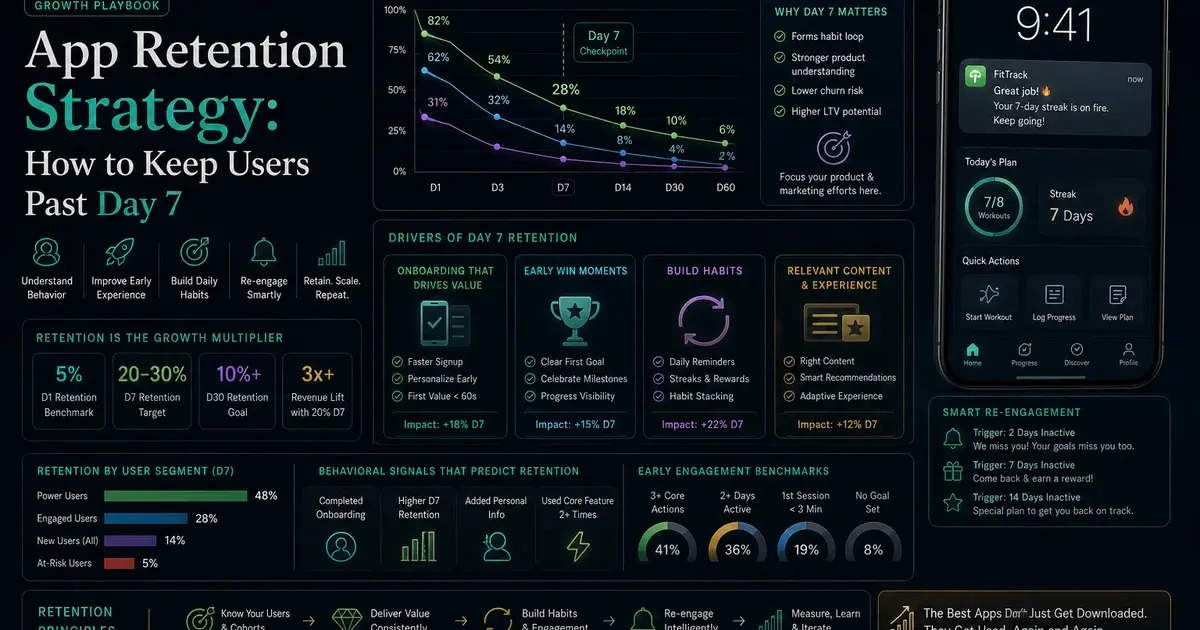
The abandonment curve is brutal and well-documented. AppsFlyer's State of App Marketing consistently shows that 77% of users abandon an app within the first three days of installation, and 90% are gone within the first month. This is not primarily a product quality problem — most of these apps offer genuine value. It is a habit-formation problem. Users download with intent, lose the habit loop before it forms, and the app graduates from "installed" to "forgotten" within a week.
Push notifications are the mechanism that interrupts this cycle. A user who has not opened your app in 36 hours receives a contextual, personalised prompt — a progress update, a personalised recommendation, a social signal from their network — and is pulled back into the habit loop before the forgetting becomes permanent.
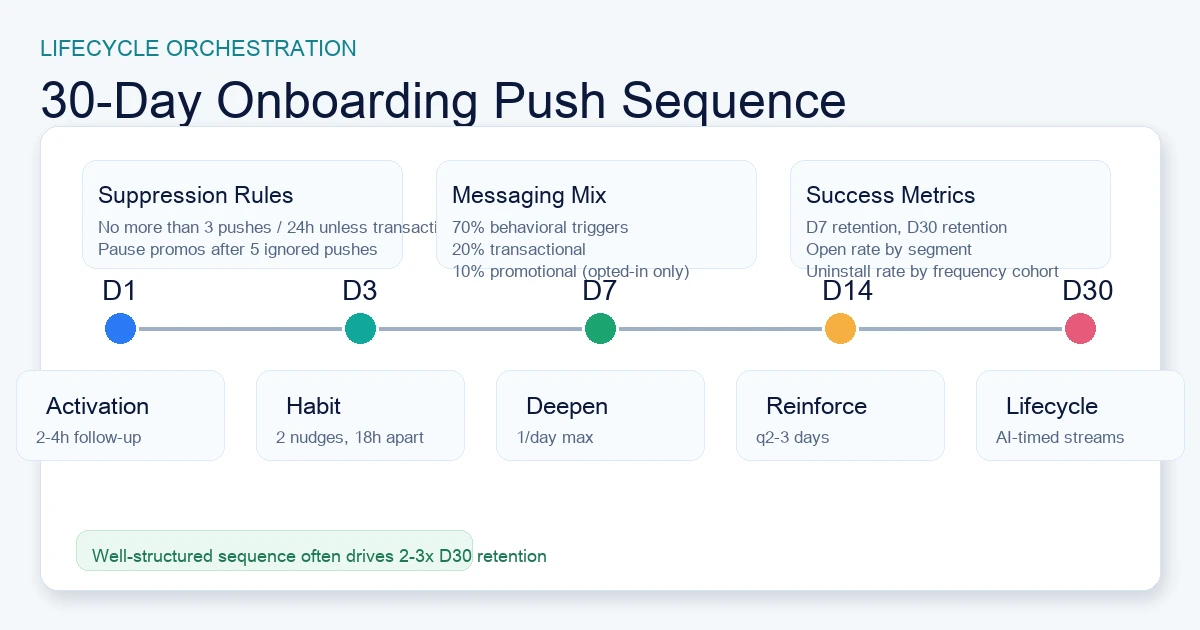
In our work across 300+ apps managed since 2013, the D30 retention differential between apps with a structured notification strategy and apps with ad hoc or no notifications consistently runs at 2–3×. That is not a marginal improvement; it is the difference between a sustainable app and a leaky bucket.
The channel advantage over email is structural. Where email open rates hover at 20–25% for well-optimised lifecycle programmes, mobile push open rates for well-timed, relevant notifications reach 40–60% for finance and utility apps in India — a category where the stakes of the notification (payment confirmation, reward credited, account alert) are inherently high. The immediacy of push delivery and the lock-screen presence that email never has are permanent structural advantages that fundamentally change the economics of user retention.
But the same immediacy that makes push powerful makes it dangerous. A notification that feels irrelevant or poorly timed does not get ignored — it triggers an uninstall. The difference between a push strategy that retains users and one that accelerates churn comes down to four disciplines:
- Permission strategy: maximise opt-in before the system prompt fires, especially on iOS where you have exactly one chance.
- Segmentation: map message type to user stage and behaviour, not to broadcast convenience.
- Timing intelligence: deliver at the moment each specific user is most likely to engage, not at a fixed schedule that fits the CRM team's calendar.
- Frequency discipline: establish suppression rules that protect the channel's credibility before any campaign is planned.
The sections below cover each discipline in detail. For the broader lifecycle picture, see our app retention strategy guide — push is a central pillar, but not the only one.
How Do You Maximise iOS Push Notification Opt-In Rates With a Soft-Ask Strategy?
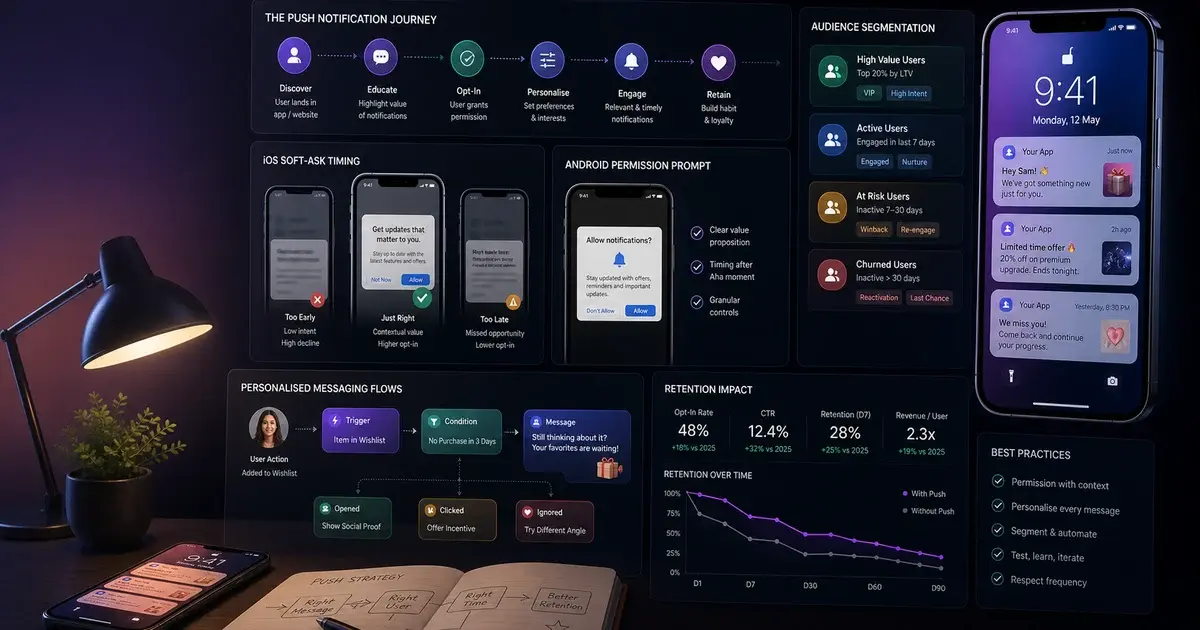
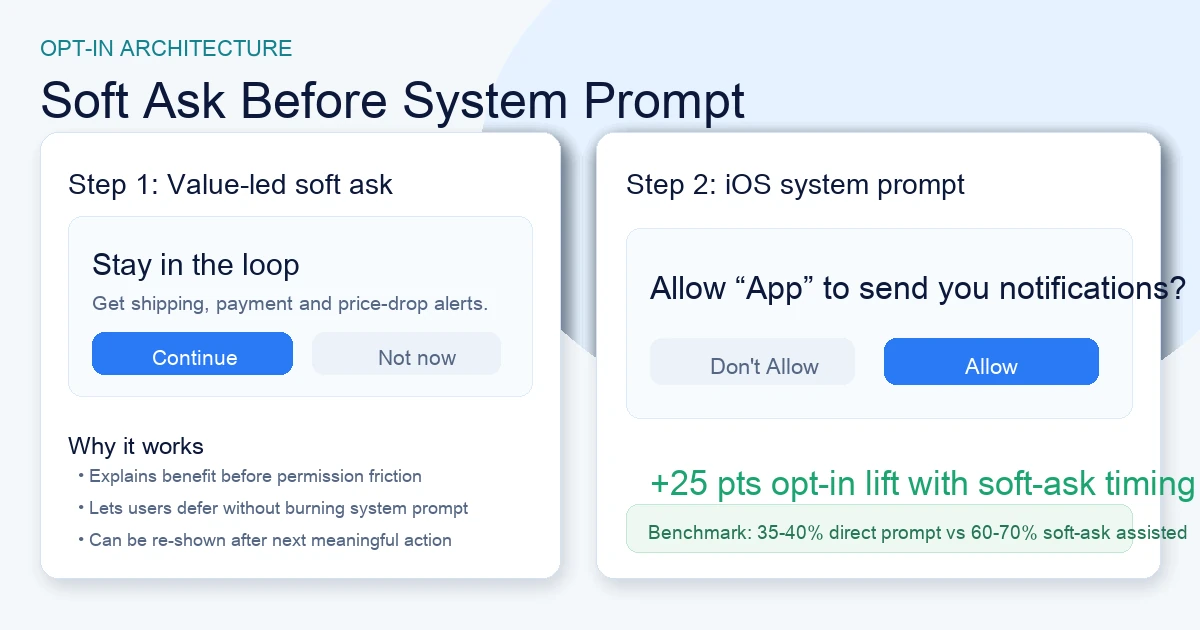
The single most consequential decision in your iOS push strategy is when you present the system permission prompt — because iOS gives you exactly one chance to ask, and timing it correctly is the difference between a 30–40% opt-in rate and a 55–70% opt-in rate on the same user cohort.
Apple's permission model has been restrictive since iOS 10, and iOS 16 tightened it further: there is no mechanism to re-trigger the system prompt if a user declines. A declined permission is permanent unless the user manually navigates to Settings and enables it — an action almost nobody takes. This means your single permission prompt is one of the highest-stakes UI decisions in your entire app, with a direct and permanent impact on the size of your reachable lifecycle audience.
The pre-permission soft ask is the technique that changes outcomes. The pattern works as follows:
- Present your own in-app modal before triggering the iOS system prompt. The soft ask explains the specific value the user will receive in plain language — "Get notified when your order ships," "Never miss a limited-time deal," "See when friends reply to your posts." Users who understand the value proposition before the system prompt accept at materially higher rates than users who see the system prompt cold.
- Time the soft ask to the moment of first demonstrated value. The optimal trigger is immediately after a user completes their first meaningful in-app action: completes a workout, places their first order, sends their first message. At that moment, the user's emotional connection to the app is at its highest, and the relevance of notifications is most apparent. Asking on first launch — before the user has experienced any value — is the single most common mistake in iOS onboarding flows, and it consistently produces the lowest opt-in rates.
- Give users a graceful "not now" option on the soft ask. Users who can decline your soft ask without triggering the system prompt preserve the system prompt for a subsequent session, when their connection to the app is deeper. Pushwoosh's opt-in rate research shows that apps using a soft-ask with a "remind me later" option achieve 30–50% higher ultimate system-prompt acceptance rates than apps that trigger the system prompt directly.
- A/B test the soft ask copy rigorously. Benefit-led copy ("Be first to know about deals just for you") consistently outperforms generic copy ("Enable notifications for a better experience") by 15–25 percentage points in ultimate acceptance rate. The copy framing on your soft ask is a direct revenue lever.
The operational implication is large. A 25 percentage-point improvement in permission acceptance on a 100,000-install cohort means 25,000 additional users reachable through lifecycle messaging. At even a modest 10% D30 retention difference for push-enabled versus opted-out users, that is 2,500 users who would otherwise have permanently churned. The opt-in flow is not a UX detail — it is a growth lever with compounding returns across every cohort you onboard.
What Did Android 13 Change About Push Notification Permissions and Why Does It Matter Now?
Android 13 (API 33, released October 2022) introduced the POST_NOTIFICATIONS permission requirement — meaning Android apps must now explicitly request notification permission, just like iOS, ending a decade in which Android notifications were enabled by default for all installed apps.
Before Android 13, an app installed on Android automatically had permission to send notifications unless the user manually disabled them in system settings. Opt-in rates on Android were effectively near 100% for the legacy installed base, and the entire retention strategy for Android push was about message quality rather than permission acquisition. That era is over for new installs.
According to MobiLoud's 2026 platform comparison data, the current iOS opt-in rate sits at approximately 43.9% globally and the current Android opt-in rate sits at approximately 91.1% — but this Android figure is heavily inflated by legacy installs on devices running Android 12 and below where permissions were granted automatically. For apps targeting new Android installs on Android 13+ devices, the opt-in conversion challenge is functionally identical to iOS. The same soft-ask strategy applies: present your own modal first, explain the value, then trigger the system prompt.
Industry-specific opt-in data from MobiLoud's vertical benchmarks shows how much room for improvement exists across categories:
Finance apps
- iOS: 50.8%
- Android: 93.8%
- The highest iOS opt-in of any vertical, reflecting users' genuine need for payment and account alerts.
eCommerce apps
- iOS: 44%
- Android: 91.9%
- Significant iOS headroom, particularly for apps that ask before the first purchase rather than after.
Gaming apps
- iOS: 37.2%
- Android: 89.7%
- The lowest iOS opt-in of any vertical, partly because in-app mechanics already deliver engagement signals without requiring push.
Entertainment apps
- iOS: 41.5%
- Android: 93.5%
- Strong content-alert value proposition if communicated in the soft ask.
The strategic implication for teams managing Android audiences: do not assume your Android users are opted in just because your legacy CRM data shows high opt-in rates. Segment your Android audience by device OS version. Users on Android 13+ who have not explicitly opted in are unreachable, and the proportion of your Android audience in this cohort grows with every new install. Treat Android permission strategy with the same deliberateness as iOS. Our analytics practice can audit your current notification audience coverage and identify the gap between your installed base and your reachable push audience.
Android gives teams more control over when to request permission when the app targets API 33 or higher. The official notification permission guidance recommends waiting until the user understands the value and requesting in context. Explain that value in your own pre-permission UI, then trigger the standard system dialogue; do not claim that custom campaign copy appears inside the system permission prompt.
How Do You Segment Push Notifications So They Feel Personal Rather Than Intrusive?
Notification fatigue and uninstall-triggering push campaigns almost always share a root cause: sending the wrong message type to the wrong user at the wrong lifecycle stage, because the segmentation model treats the entire opted-in audience as a single homogeneous group. The fix is a three-tier message taxonomy combined with lifecycle stage mapping.
Tier 1 — Transactional (always send, regardless of frequency caps): Notifications triggered directly by a user's own actions. Order confirmations, delivery updates, payment receipts, account security alerts, password resets, booking confirmations. These notifications carry open rates of 70–90% because they are unambiguously relevant and expected. Users who do not receive expected transactional notifications develop trust deficits that damage the app relationship more severely than any other single failure. Transactional messages must always be sent, and must be excluded from promotional suppression logic.
Tier 2 — Behavioural trigger (send when the trigger fires, subject to frequency caps): Notifications triggered by specific user behaviour or its absence. "You left something in your cart," "Your streak is at risk," "Your friend just joined," "You have not logged a session in 3 days." These feel personal because they respond to what the specific user did or did not do — not what the CRM team scheduled. In our portfolio, behavioural trigger notifications consistently produce 2–4× higher open rates than Tier 3 promotional broadcasts for the same user cohort, across every vertical we manage.
Tier 3 — Promotional (send only to users who have demonstrated receptiveness): Sale announcements, feature releases, content newsletters, promotional offers. These should only reach users who have engaged with promotional content in the past, explicitly opted in to marketing communications, or whose in-app behaviour signals receptiveness. Sending Tier 3 messages to users who exhibit only Tier 1 or Tier 2 behaviour is the primary driver of notification-triggered uninstalls across our entire client portfolio.
Lifecycle stage adds a second dimension to the taxonomy:
- New user (Day 0–7): Only Tier 1 + light Tier 2. No promotional content. Focus on completing onboarding and establishing the first habit loop.
- Active user (Day 8–60, stable or growing session frequency): Full Tier 1 + Tier 2 + selective Tier 3 for demonstrated-interest users. The most valuable segment — prioritise deepening over acquisition.
- At-risk user (Day 30–60, declining session frequency): Shift Tier 2 messages toward re-engagement framing. Suppress Tier 3 entirely. Introduce re-engagement sequence before the user crosses the lapsed threshold.
- Lapsed user (Day 60+, no recent opens): Dedicated win-back sequence only — see the re-engagement section below. Sending standard lifecycle messages to lapsed users produces near-zero open rates and elevated uninstall risk.
The tooling for this segmentation exists natively in every major mobile CRM: Braze, CleverTap, MoEngage, and Leanplum all support event-triggered segmentation at scale. The bottleneck is never the platform — it is the event taxonomy and lifecycle logic that your product and CRM teams need to design together. Our analytics and lifecycle practice specialises in this architecture, and we have run this build across dozens of apps in our portfolio with consistently measurable retention lift.
What Notification Types and Formats Drive the Highest Click-Through and Retention?
The difference in open rate between the highest- and lowest-performing notification formats can exceed 3× for the same user cohort on the same app — and the gap has widened in 2026 as users in high-notification-volume markets have become increasingly selective about which alerts they act on.
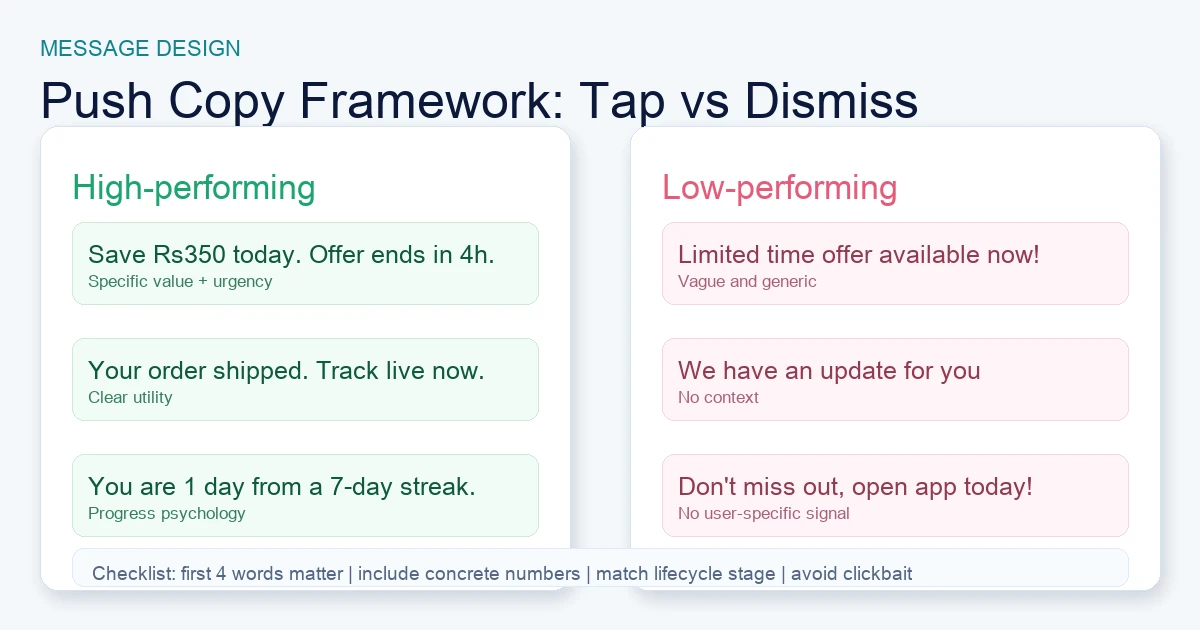
Rich notifications (image + action buttons): The highest-performing format by a consistent margin. Rich notifications — combining a thumbnail image, expanded message body, and two to three action buttons ("View Deal", "Remind Me Later", "Add to Wishlist") — deliver up to 56% higher open rates than plain-text pushes. The image creates visual stopping power in the notification tray; the action buttons eliminate the friction of opening the app by allowing users to take meaningful action directly from the lock screen or notification shade. On iOS, rich notifications require a Notification Service Extension; on Android they are natively supported via FCM. Every notification that can carry media should — the incremental production cost is trivial relative to the performance lift.
Personalised trigger notifications: Notifications that include a reference to the user's specific in-app behaviour — their name, their last action, their progress, their saved items — consistently outperform generic messages by 20–35% in open rate. "Based on your last workout, you are on track for your monthly goal" converts materially better than "Check out what's new in your fitness app." Personalisation tokens in modern mobile CRM platforms are trivial to implement; the discipline is in the data model, not the platform.
Urgency and scarcity triggers: Time-bounded messages ("Your cart expires in 2 hours," "Only 3 seats remain at this price") tap into loss aversion and drive strong open rates for ecommerce, travel, ticketing, and fintech. The critical discipline is authenticity: false countdown timers that reset train users to ignore urgency signals and permanently suppress the channel's performance on that user. Real scarcity converts; manufactured scarcity corrodes trust.
Social proof and community signals: "15 people in your city just booked this," "Your friend Priya hit a new personal best" — social signals drive FOMO-motivated re-entry and are particularly effective for fitness, gaming, marketplace, and social apps where community activity is a core value driver. These work best as Tier 2 behavioural triggers (sent when the social event actually occurs) rather than manufactured social-proof broadcasts.
Progress and milestone notifications: "You are 3 days into a 7-day streak — keep going" and "Your profile is 80% complete" activate the near-completion effect. Users who are close to a milestone are psychologically motivated to reach it. Apps that instrument milestone architecture into their push trigger logic see measurably higher D14 and D30 retention in our portfolio. The effort required is modest; the retention impact is disproportionate.
What to avoid: generic broadcast messages with no personalisation, notifications that surface information the user can see with one tap (no additive value), and any notification formatted like a marketing email pushed to users who have not opted in to promotional content. These patterns train users to swipe-dismiss every notification from your app — and once that dismissal reflex forms, re-engagement becomes structurally difficult. See our guide on increasing app downloads for how notification opt-in rates affect top-of-funnel conversion as well as retention.
How Does Personalisation at Scale — Timing, Copy, and Deep Links — Change Notification Performance?
Personalisation at scale is the compound of three independent variables — who receives the message (segment), when it arrives (timing), and where in the app it lands (deep link) — and optimising all three simultaneously produces the largest performance gains, typically 30–50% higher open-to-session rates than single-variable optimisation alone.
Timing personalisation (AI send-time optimisation): The shift from fixed-schedule broadcasting to individual-level send-time optimisation — where each notification is delivered at the moment that specific user is most likely to engage based on their engagement history — typically lifts open rates 20–35% with no change to message content. Traditional scheduling applies a population-level assumption ("most India users are active at 8pm, send at 8pm") that works for homogeneous audiences and breaks down as demographic diversity increases. AI send-time tools in Braze, CleverTap, MoEngage, and Pushwoosh analyse each user's individual session history and schedule notifications to land at their personal peak window. The data requirement is 7–14 days of per-user engagement history; new users should default to vertical-level timing benchmarks until individual data accumulates.
Copy personalisation: Push notification copy operates under extreme constraints — typically 50 characters for the title and 150 characters for the body on most platforms — which makes every personalisation token disproportionately valuable. The first four words determine whether a notification is tapped or dismissed in under two seconds. Front-load the personalisation signal and the value. "Your streak ends in 4 hours" beats "Don't break your streak." "You're ₹200 away from free shipping on your saved items" beats "Free shipping available." Concrete specificity always outperforms vague appeals in this format.
Deep link precision: A notification that opens the app to the home screen is a broken notification from the user's perspective — they tapped on a specific call-to-action and landed in the wrong place. Every push notification should deep-link directly to the in-app state that makes the message actionable: the specific cart, the specific product, the specific challenge, the specific workout log. Adjust's deep linking resources show that notifications with precise deep links convert to completed in-app actions at 2–3× the rate of notifications that land on the home screen. Setting up deep link routing is a one-time engineering investment with permanent impact on every notification campaign you run afterwards.
The personalisation stack in practice looks like this: segment the user (lifecycle stage + behaviour cluster), personalise the copy (name, recent action, specific metric), schedule via AI send-time optimisation, and deep-link to the specific in-app state. Teams that have all four components working simultaneously see the largest open-to-retention gains — and in our experience across our portfolio, the jump from one to four personalisation dimensions is often larger than the jump from zero to one.
Reach out to our team if you want a structured audit of your current personalisation coverage.
What Frequency Caps and Suppression Rules Should You Apply to Protect Your Notification Channel?
Frequency without relevance is the single most reliable predictor of notification-triggered uninstalls — and sending more than 3 notifications in any 24-hour period at low relevance is the most commonly cited cause of push opt-out across every vertical in our portfolio. Setting hard suppression rules before planning any campaign is non-negotiable.
The frequency architecture that works across verticals:
- Transactional cap: unlimited, but only when the trigger fires. Order updates, payment confirmations, and security alerts must always be sent. No transactional event should be suppressed by promotional frequency caps.
- Behavioural trigger cap: maximum 2 per day, minimum 4-hour gap between sends. Behavioural triggers are higher-value than promotions but still subject to daily volume discipline. A user who abandons a cart, simultaneously has a streak at risk, and a friend who just started a challenge should not receive all three notifications in the same hour.
- Promotional cap: maximum 1 per day, maximum 5 per week. For most consumer apps, 1 promotional notification per day is the practical ceiling before unsubscribe rate starts rising. News and sports apps can sustain higher frequency because users explicitly opt in expecting real-time content; productivity and fintech apps should stay at 1 every 2–3 days for promotional messages.
- Global daily cap: 3 notifications total across all tiers (excluding Tier 1 transactional). This is the hard ceiling. Build this logic into your CRM suppression rules, not into each individual campaign.
Suppression rules that must operate independently of frequency caps:
- Silent opt-out suppression: Users who have received 5 consecutive notifications without opening any are in silent opt-out mode. Suppress all Tier 2 and Tier 3 messages to this cohort immediately. Additional pushes to silent opt-out users accelerate uninstall probability rather than driving re-engagement. Move this cohort to a dedicated re-engagement sequence instead.
- Category-level opt-out: Implement per-category notification preferences (promotional vs. transactional vs. social) so users can reduce notification volume without opting out entirely. Apps with a granular notification preferences page consistently show lower total opt-out rates than apps with a single on/off toggle.
- Quiet hours enforcement: Never send promotional or behavioural notifications between 10pm and 8am local time. Transactional notifications (fraud alerts, time-sensitive order updates) are exempt, but all discretionary notifications must respect sleep hours.
Frequency without personalisation gives users a reason to disable notifications permanently. Treat this as an operating hypothesis and validate it against your own opt-out, uninstall and re-engagement cohorts rather than applying a generic benchmark. The channel's long-term value is worth more than any single campaign's reach. Protect it. For guidance on how notification strategy connects to the broader monetisation picture, see our app subscription monetisation strategy guide.
How Do You Build a Lapsed-User Re-Engagement Sequence That Actually Recovers Churned Installs?
A structured re-engagement sequence targeting lapsed users at day 3, day 7, and day 14 of inactivity — with copy that shifts from reminder to value-restatement to win-back across the three intervals — consistently recovers 10–25% of users who would otherwise churn permanently, in every vertical we have tested this across in our portfolio.
The timing logic matters as much as the copy. Most teams build re-engagement campaigns too late — waiting until a user has been inactive for 30 days before sending a win-back message. At 30 days of inactivity, the app has almost certainly been mentally filed under "apps I no longer use" and the re-engagement threshold is far higher. The window of highest recovery probability is days 3 to 14 of inactivity, when the user's context and memory of why they downloaded the app is still accessible.
The three-interval sequence that works:
- Day 3 of inactivity — Reminder framing: "You left off at [specific point in their journey] — pick up where you stopped." The message assumes the user simply got busy, references a specific in-app state, and makes re-entry frictionless with a deep link directly to that state. No urgency, no guilt. This is the highest-recovery interval — typically 15–25% of the cohort returns after a Day 3 reminder if the deep link is precise and the copy is personalised.
- Day 7 of inactivity — Value-restatement framing: The copy shifts from "you paused" to "here is what you have been missing." Introduce new content, a feature they have not yet used, a social signal from their network, or a progress update that makes re-engagement feel worthwhile rather than remedial. Recovery rate at Day 7 is lower than Day 3 (8–15%) but still meaningful, particularly for high-LTV verticals where recovering a churning premium user is commercially significant.
- Day 14 of inactivity — Win-back framing: The final interval before the user crosses into "permanently lapsed" territory. The message should acknowledge the gap directly: "It has been a while — here is what has changed." Offer a concrete incentive where appropriate (a free premium trial extension, a personalised discount, a milestone reset that makes re-entry feel fresh). Recovery rates are lower (3–8%) but the cost of one additional notification is near zero, and for subscription apps recovering a Day 14 lapsed user is worth multiple months of retained revenue.
After Day 14 without a response, move the user to a low-frequency monthly touchpoint and suppress all standard lifecycle messaging. Continuing to send standard notifications to a user who has ignored three re-engagement messages with increasing urgency is the fastest path to permanent uninstall.
WhatsApp as a re-engagement channel for India: For users who explicitly consent to WhatsApp messages, it can complement push for important, high-relevance re-engagement. Test it as a separate cohort at day 7 and day 14, cap frequency, and compare incremental return and opt-out rates against push alone. Use your own delivery and conversion data to decide whether the channel earns a place in the lifecycle stack.
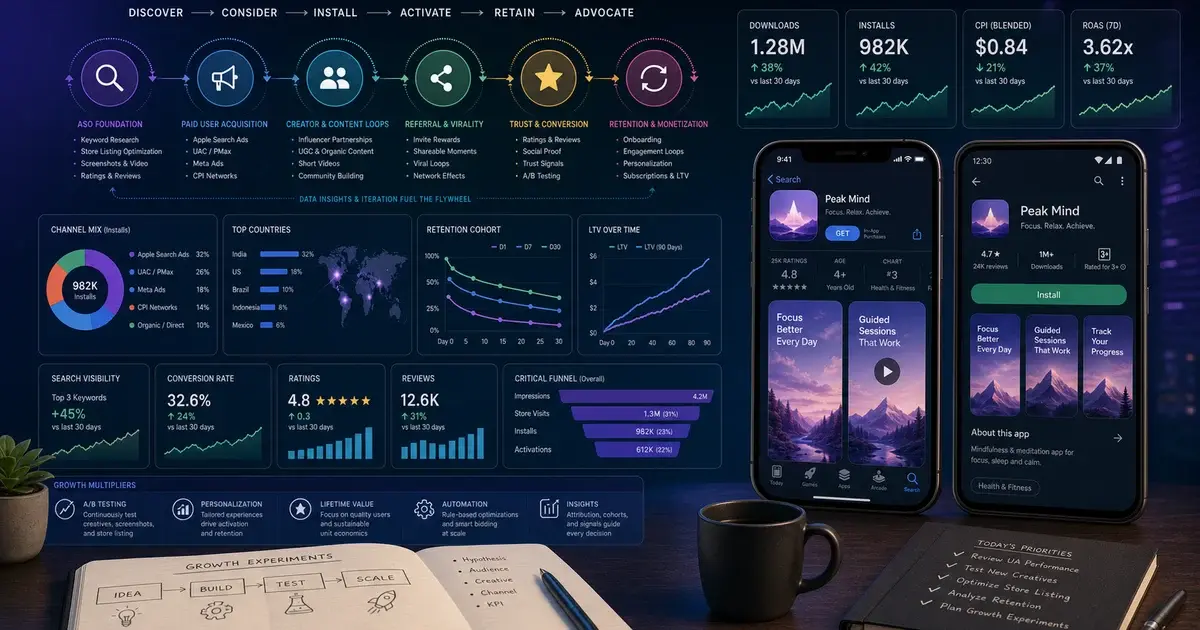
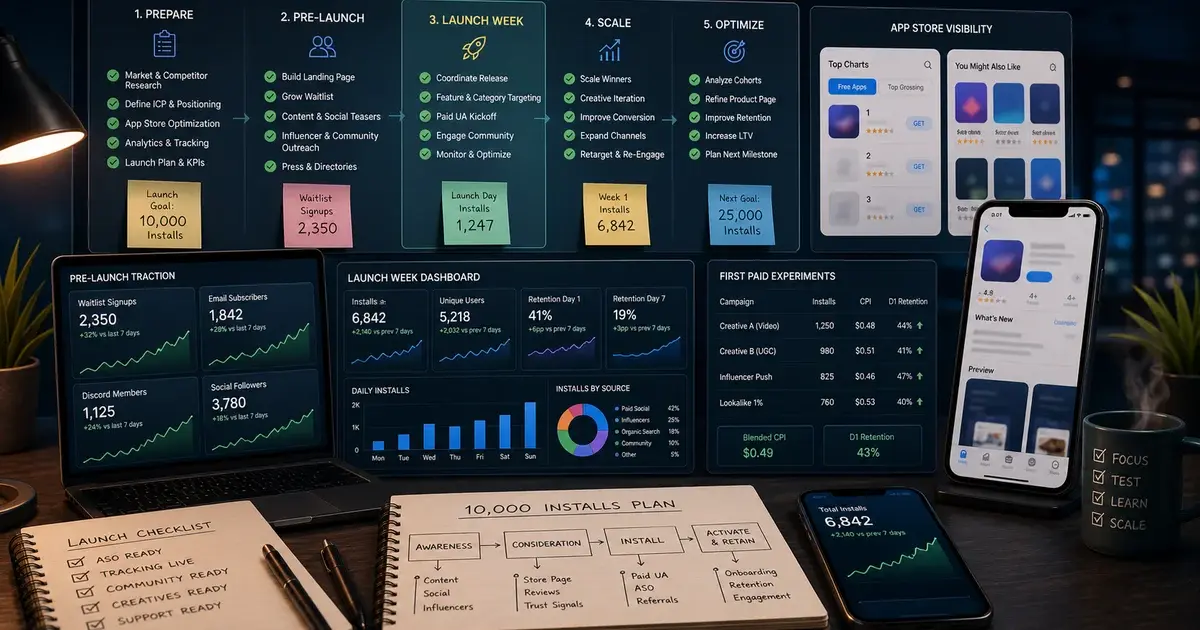
For the full onboarding context that precedes re-engagement decisions, see our guide on your first 10k installs — the onboarding quality at acquisition time determines how deep the habit loop goes and therefore how recoverable lapsed users are.
What Are the India-Specific Push Notification Patterns That Outperform Global Benchmarks?
India is the world's largest mobile-first consumer market, and push notification behaviour in India diverges from Western benchmarks in ways that require a specifically calibrated strategy — not a time-zone-adjusted copy of a global playbook. In our work across our portfolio of apps with significant India user bases, three patterns consistently distinguish high-performing from average India notification strategies.
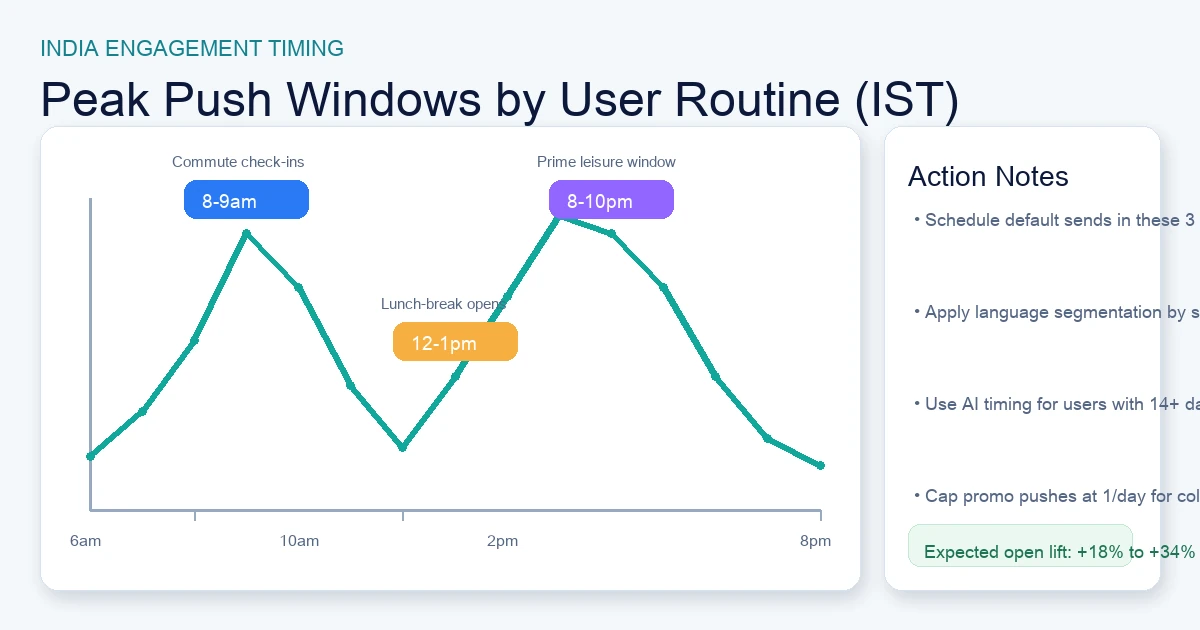
Peak engagement windows: Three windows consistently outperform all other send times across utility, fintech, social, and ecommerce apps in India:
- 8–9am IST — the commute window: Metro users in Mumbai, Delhi, Bengaluru, and Hyderabad are on trains or in autos with extended phone engagement time. Notification open rates in this window run 40–60% above the daily average for utility, news, and social apps.
- 12–1pm IST — the lunch break window: A natural daily pause where users actively seek entertainment and social updates. Strong for gaming, short-video, and social apps where the content consumption intent is already present.
- 8–10pm IST — the evening relaxation window: The longest and most commercially valuable engagement window for most consumer verticals. Users are at home, screen time is extended, and the consideration cycle for ecommerce, fintech, and subscription decisions is longer. The optimal window for promotional and conversion-focused notifications.
Language and regional personalisation: India has 22 officially recognised languages. Push notifications in Hindi, Tamil, Telugu, Kannada, Bengali, or Marathi consistently outperform English-only notifications for users in those language cohorts — open rate lifts of 30–50% versus English equivalents are routine in our Tier-2/3 India campaigns. Most modern mobile CRM platforms support Unicode push content natively. The bottleneck is having localised copy templates for each segment — this is a one-time build with permanent per-cohort performance lift.
Festival and payment-adjacent notifications: India's festival calendar — Diwali, Holi, Eid, Dussehra, Raksha Bandhan, Onam, Pongal — represents the highest consumer spending and emotional engagement periods of the year. Apps that align notification campaigns with the cultural context of major festivals see dramatically elevated engagement relative to the same promotional message sent outside festival windows. Equally important: UPI has normalised payment-triggered notifications across the entire India mobile user base. Payment confirmation, cashback credited, reward points updated, and split-payment notifications carry the highest open rates of any message type in India — routinely exceeding 80% — and build the trust infrastructure that makes promotional notifications more likely to be acted on later.
AppsFlyer's State of App Marketing data for the India market confirms that localisation and payment-event notifications are the two highest-ROI investments for apps seeking to improve lifecycle metrics in the India market specifically. For the broader user acquisition strategy that feeds these lifecycle programmes, our UA practice covers both the acquisition channels and the onboarding cohort quality that determines notification strategy effectiveness.
How Do You A/B Test Push Notifications to Compound Open Rate Gains Over Time?
A disciplined notification A/B testing programme — testing one variable at a time, running tests to statistical significance before declaring a winner, and compounding the improvements quarter-on-quarter — is the mechanism by which mature apps achieve notification open rates of 30–50% while newer apps in the same category sit at 8–15%. The gap is almost entirely explained by accumulated optimisation, not audience quality.
The four variables that produce the largest gains when tested systematically, in order of typical impact:
- Title copy (first 40–50 characters): The highest-leverage test variable. The title is the first thing a user sees in the notification tray and determines the majority of the open/dismiss decision. Test: benefit-led vs. curiosity-gap, specific vs. vague, urgency vs. social proof, personalised (user's name/recent action) vs. general. Run 1,000+ impressions per variant before drawing conclusions — notification open rates have high variance and small samples produce misleading results.
- Notification timing: Even without AI send-time optimisation, testing population-level send times (8am vs. 12pm vs. 8pm) in your specific vertical and user cohort provides actionable data. Run for a minimum of 2 weeks to control for day-of-week variation.
- Rich media vs. plain text: If you have not already tested this: do it immediately. The open-rate uplift from adding a relevant image is consistently 30–56% in controlled tests across our portfolio. For apps not yet using rich notifications, this is the single fastest available improvement.
- Notification frequency (within compliance): Test whether your current frequency cap is optimised for your specific audience. Some verticals and user cohorts — news apps, sports apps, gaming apps with active event calendars — sustain higher frequency without opt-out rate increases. The data from a 30-day frequency test often reveals that the conservative default cap you set at launch is leaving engagement (and retention) on the table.
Testing protocol that works:
- One variable per test. Multi-variable tests produce uninterpretable results in notification experiments due to the low volume of opens per variant.
- Minimum 1,000 impressions per variant, ideally 2,000+ for definitive conclusions on copy tests.
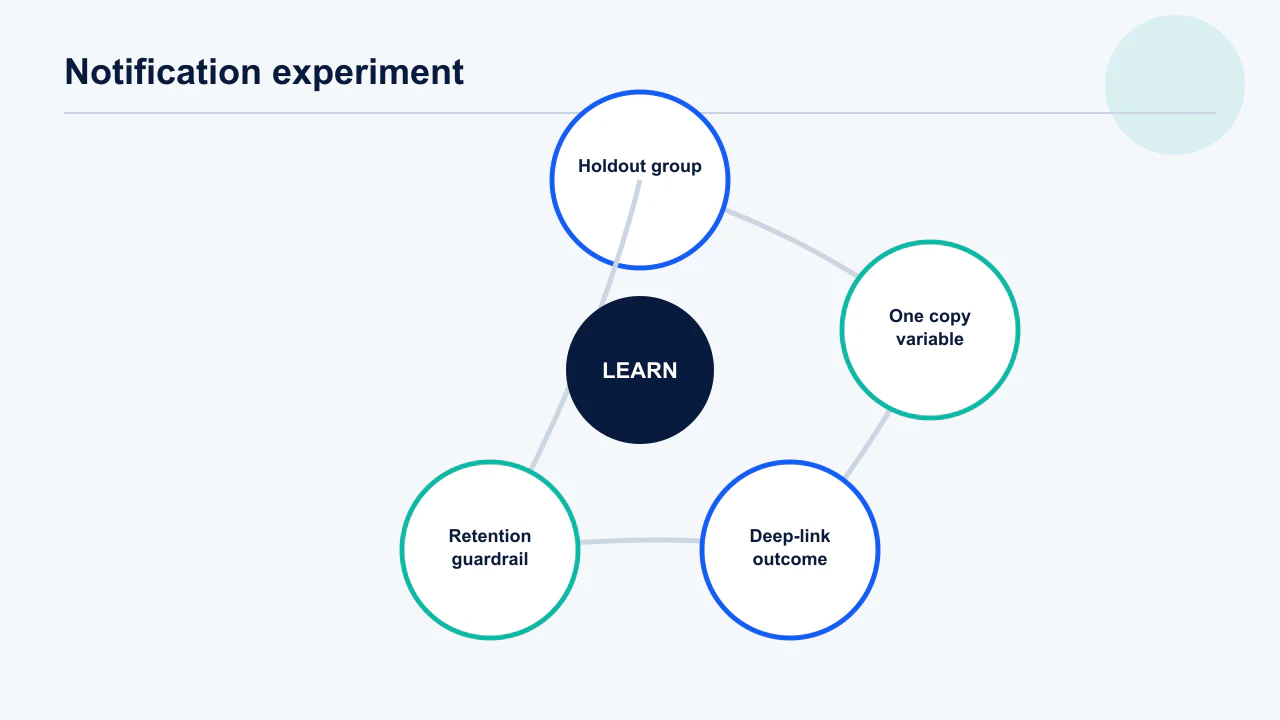
- Hold out a control group across all tests to measure the cumulative effect of optimisations over time — the compounding curve is one of the most compelling arguments for sustained CRM investment.
- Document winners and losers in a shared playbook. The institutional knowledge from 12 months of systematic testing is one of the most valuable assets a mobile CRM team can build. Teams in our portfolio that maintain this discipline consistently outperform peers who run ad hoc tests without a structured record.
The Adjust measurement resources cover the statistical methodology for mobile A/B test validity in detail — particularly important for notification tests where the open rate denominator (notifications delivered) differs from the impression denominator in display advertising. For how these lifecycle optimisations connect to your overall growth metrics, see our portfolio results.
Comparing two notification variants tells you which message won among people you notified. It cannot tell you whether notifying at all beat not notifying, because everyone in the test received something. The users who open your app after a push frequently include people who would have opened it anyway — and the more engaged the segment, the larger that overlap. The instrument for the causal question is a holdout: withhold the notification from a randomly selected slice of the eligible audience and compare outcomes across the whole group, not just among openers. Two disciplines make it trustworthy: hold the group out for a full behavioural cycle rather than a day, and measure the business outcome you actually care about rather than opens. Teams that run holdouts for the first time are routinely surprised by how much of their attributed push revenue was already going to happen — which is a better thing to learn from a test than from a board meeting.
Frequently Asked Questions
What is the ideal push notification frequency to avoid triggering uninstalls?+
The practical ceiling for most consumer apps is 1 promotional or behavioural notification per day and a global cap of 3 notifications per 24 hours across all non-transactional types. Transactional notifications (order updates, payment confirmations, security alerts) are exempt — they are expected and trusted. News and sports apps can sustain higher frequency; fintech and productivity apps should stay at 1 every 1–2 days for non-transactional messages. The most reliable signal that you have exceeded your audience's tolerance threshold is a rising 7-day opt-out rate — monitor this weekly.
How do you improve iOS push notification opt-in rates on iOS 16+?+
Present a pre-permission soft-ask modal before triggering the iOS system prompt. The soft ask should explain the specific value the user will receive — not generic "allow notifications" copy. Time it to immediately after the user's first meaningful in-app action, when emotional engagement is highest. Give users a graceful "not now" option so they can decline the soft ask without triggering the system prompt. Apps using this technique achieve opt-in rates of 55–70% versus 30–40% for apps that trigger the system prompt directly on first launch. The difference of 25 percentage points compounds across every cohort you onboard.
What changed with Android 13 push notification permissions?+
Android 13 (API 33) introduced the POST_NOTIFICATIONS permission requirement, meaning Android apps must now explicitly request notification permission — just like iOS. Before Android 13, notifications were enabled by default for all installed apps. Legacy Android installs still show high opt-in rates in aggregate data, but new installs on Android 13+ devices require the same deliberate soft-ask permission strategy as iOS. Finance apps currently achieve the highest iOS opt-in at around 50.8%, while gaming apps sit at the low end at around 37.2%, according to MobiLoud's 2026 platform data.
What is the best time to send push notifications in India?+
Three windows consistently outperform for India audiences across most consumer verticals: 8–9am IST (commute window, highest for utility and news), 12–1pm IST (lunch break, strongest for gaming and social), and 8–10pm IST (evening relaxation, best for ecommerce, fintech, and subscription conversion). Within these windows, AI send-time optimisation further personalises delivery to each user's individual engagement history. For Tier-2/3 India specifically, the evening window (8–10pm) often shows the highest uplift relative to the daily average because screen time is more concentrated in the evening for users without metro commutes.
What push notification platform is best for Indian apps?+
MoEngage and CleverTap are the dominant platforms for India-focused apps, offering strong regional language support, India data residency options, and local teams who understand the market. Braze is the global enterprise standard with excellent segmentation and A/B testing infrastructure. Firebase Cloud Messaging (FCM) is free and sufficient for basic notification delivery but lacks the CRM features needed for sophisticated lifecycle programmes. For apps with 100K+ MAU targeting India, a dedicated mobile CRM platform is strongly recommended over FCM alone. The platform choice matters less than the event taxonomy and lifecycle logic built on top of it.
How do you structure a re-engagement sequence for lapsed users?+
The highest-recovery window is days 3 to 14 of inactivity. Day 3 uses reminder framing ("pick up where you left off" with a precise deep link to their last in-app state) and typically recovers 15–25% of the cohort. Day 7 shifts to value-restatement framing ("here is what you have been missing") and recovers 8–15%. Day 14 uses win-back framing with a concrete incentive where appropriate and recovers 3–8%. After Day 14 without a response, move the user to monthly low-frequency touchpoints and suppress standard lifecycle messaging to avoid accelerating uninstall. In India, WhatsApp Business messages are a strong complement at Day 7 and Day 14 for cohorts with low push opt-in rates.
What is AI send-time optimisation and when should you enable it?+
AI send-time optimisation analyses each individual user's engagement history — what time of day they open notifications, what days they are most active, how long their sessions last — and schedules each notification to arrive at that user's personal peak engagement window rather than a population-level broadcast time. It typically lifts open rates 20–35% with no change to message content. Enable it once users have 7–14 days of individual engagement history. For apps below 50K MAU or users with insufficient history, use vertical-level timing benchmarks (8–9am, 12–1pm, 8–10pm IST for India) as a fallback — these still outperform arbitrary fixed schedules by 10–20%.
Sources
- AppsFlyer — State of App Marketing in India — Industry-standard retention benchmarks, D1/D7/D30 abandonment rates, and India market data by vertical
- Adjust — Mobile Measurement Resources — Deep linking best practices, A/B test methodology, and send-time optimisation performance data
- Sensor Tower — Blog and mobile insights — India engagement patterns, frequency vs. opt-out correlation, and WhatsApp as retention channel
- Apple — App Store Review Guidelines — Official iOS notification permission requirements, Notification Service Extension documentation
- Google Play — Developer Content Policy — Android 13 POST_NOTIFICATIONS permission requirements and notification policy guidelines
- MobiLoud — Push Notification Opt-In Rates 2026 — Vertical-level opt-in benchmarks: iOS 43.9% global average, Finance apps leading at 50.8%
- Pushwoosh — Increase Push Notification Opt-In — Soft-ask strategy data: 30–50% higher acceptance rates versus direct system-prompt triggering
- MobiLoud — iOS vs Android Push Notifications 2026 — Platform comparison: Android 13 permission model change and current opt-in rate breakdown
About the author
Amol Pomane — Founder, Vmobify
Amol leads Vmobify, a mobile app growth agency that has driven 30M+ downloads and ranked 54K+ keywords across 300+ apps since 2013. He writes about ASO, paid user acquisition, retention, and the operational reality of scaling mobile apps in India and global markets.
Model an install budget
Turn CPI and activation assumptions into acquisition scenarios.
Open free tool