How to Actually Ship a Mobile App With Claude Code
Building a mobile app got very cheap in the last eighteen months. Shipping one did not. This is the ordered path from idea to store listing with Claude Code, including the five cliffs that stop most projects and the compliance work that decides whether you ship at all.
On this page
- What actually changed about shipping a mobile app?
- Which build path should you choose?
- What setup pays for itself before you write a prompt?
- What agent workflow actually works for mobile?
- Which five cliffs stop a vibecoded mobile app?
- Why does agent-generated mobile design fail?
- What must you check before you submit?
- Which security work does this cohort skip?
- Why should a second agent review the first?
- How do you launch and reach the first 100 users?
- What does shipping this way actually cost?
- Where should you go deeper?
- What matters if you remember only one thing?
- Frequently Asked Questions
What actually changed about shipping a mobile app?
Building a mobile app got very cheap in the last eighteen months; shipping one did not, and every number that matters sits on the shipping side of that line.
App Store submissions hit 235,800 in Q1 2026, up 84% year over year, with Apple processing more than 200,000 submissions a week at peak. That figure comes from Sensor Tower data reported via The Information and picked up by 9to5Mac.
The second number in that same reporting is the one nobody quotes: the count of apps with meaningful usage stayed flat versus 2024.
Supply roughly doubled. Demand did not move. That is the market condition you are shipping into, and it changes what "hard" means. Two years ago the hard part was writing the code. Now the code is the cheap part, and the hard parts are getting through App Review, getting anyone to install the thing, and getting them to still be there in a month.
The retention data backs this up uncomfortably. RevenueCat's State of Subscription Apps reports that 27.1% of apps are now AI-powered — roughly one in four — and that those apps show:
- Annual retention of 21.1%, against 30.7% for non-AI apps. Monthly, 6.1% versus 9.5%.
- Trial conversion of 8.5%, against 5.6%.
- Lifetime value of $18.92 monthly and $30.16 annual, against $13.59 and $21.37.
- Refund rate of 4.2%, against a 3.5% median.
Read those together and the picture is specific: AI apps are better at getting the first payment and worse at keeping it. Higher conversion, higher LTV, higher refunds, much worse retention. People try them and leave. That is your baseline expectation, and it is a product problem rather than a marketing one.
On review: Apple's own 2024 App Store Transparency Report — the most recent official numbers — records 1,931,400 rejections out of 7,771,599 submissions, about 24.9%. The category split:
- Performance: 1,235,471
- Legal: 445,696
- Design: 378,300
- Business: 209,845
- Safety: 116,105
And 295,109 apps were approved after an initial rejection. So a quarter of submissions bounce, and a meaningful slice of those come back and get in.
The stat everyone repeats that is not real
You will see "spam accounts for 28% of App Store rejections" in a lot of posts about AI-built apps. Do the arithmetic against Apple's own table: Design is 378,300 of 1,931,400 rejections, which is 19.6% of rejections in total — and spam, Guideline 4.3, is only a subset of Design. There is no published breakdown at guideline level. The 28% figure does not appear in Apple's report and I could not find a primary source for it anywhere.
The same goes for every "X% of AI-built apps get rejected" number you have seen. No such figure has been published by anyone. Apple does not tag submissions by how they were authored. If you see a percentage, someone made it up or inferred it from a survey of their own customers.
You will also see "review times have blown out to 45 days." What is documented is narrower: individual multi-week stalls in Apple's own developer forums, such as threads 821221 and 818253, while Apple continues to state that around 90% of submissions are reviewed within 48 hours. Both are true. Plan for 48 hours, budget for a stall, and do not build a launch date around a headline number.
More on all of this in why your AI-built app got rejected. We took the tooling side of this apart separately in the Claude Code design plugins and skills guide.
Which build path should you choose?
Pick the path by what you already know and what you are willing to learn mid-project, because switching stacks after week three costs more than choosing slowly at the start.
There are two realistic ways to build a mobile app with AI in 2026, and they diverge early.
Path one: prompt-to-app builders
You describe the app, the tool generates it, and some of them will submit it to the stores for you. Here is the honest state of the category, tool by tool.
| Tool | Stack | What it is good at | What it runs into |
|---|---|---|---|
| Rork | React Native / Expo; native Swift on the Max tier | Polished, native-feeling UI; plugins for Sign in with Apple, push, App Store deploy | Logic and state. Reports converge on "streak calculations, state management, anything beyond surface-level CRUD needs significant manual rework" |
| a0.dev | React Native / Expo, real .tsx files | Fastest idea to published; one-click App Store Connect / Play Console; tester app with no Xcode; source export on Pro | Mobile only; thin backend beyond Convex or Supabase; context loss on larger projects |
| Vibecode | React Native / Expo — iOS, Android, web | Full Expo source export; Vibecode Cloud gives DB, auth and storage from one prompt; guided submission wizard | Very new; Android native builds listed as coming soon; was blocked by Apple in March 2026 |
| Replit (mobile) | React Native + Expo Router, Replit Postgres, EAS, Stripe | "Text to App Store" — agent plus one-button submit, Expo Go QR preview | Also blocked by Apple in March 2026 |
| Anything | Expo + Postgres | Native output, GitHub export, managed builds | Removed from the App Store twice — 26 March, reinstated 3 April, removed again |
| Draftbit | React Native, exportable | Drag-and-drop plus AI, MCP/REST/GraphQL, theming, git history | Not a "describe it and ship it" tool; you have to work visually |
| Bolt.new | Expo | Genuinely works for mobile, with RevenueCat IAP integration | Per Bolt's own docs: "projects created for web do not easily switch to mobile," and you must say "mobile app" in the first prompt. The slug is immutable after the first build. Still needs Node, Git, EAS CLI and paid store accounts |
| Lovable | Web only | — | Cannot build native mobile apps. No React Native or Expo support; it is an open feature request. Wrapping the web output in Capacitor or a WebView walks you into Apple's 4.2 minimum functionality rejection |
Pricing, with the uncertainty attached — these come from vendor pages and secondary reporting, not a contract you signed: Rork runs roughly $20–25 for about 100 messages up to $200 for Max; a0.dev is $20/month for 100 messages a day up to $800/month; Anything is around $240–600 a year.
On sentiment — and this is aggregate opinion, not verified fact — Rork's Trustpilot rating sits at 1.8 out of 5 with 83% one-star reviews across 23 reviews, clustering around billing shock, credits forfeited on cancellation, and projects locked afterwards. Twenty-three reviews is a small sample and unhappy people review more, but the pattern is consistent enough to know about before you put a project inside a platform.
The platform risk is the part that gets underweighted. Three tools in that table were blocked or removed by Apple inside a single year. If your project lives inside the builder rather than in a git repo you control, that is your project's risk too.
I go through all of this properly, with the numbers, in the vibecoding apps nobody uses.
Path two: Expo plus Claude Code
This is where people who ship converge, and it is what the rest of this guide assumes.
The reason is not ideology. In 2026 Expo shipped first-party agent support, and that changed the calculus. expo is the only mobile plugin in Anthropic's official Claude Code marketplace — I verified this by reading .claude-plugin/marketplace.json in anthropics/claude-plugins-official; the only other mobile-adjacent entry is a kotlin-lsp language server.
So: a first-party plugin, a first-party MCP server, about 25 maintained skills, and your source in your own repo where you can read it, diff it and move it somewhere else. The comparison in one line — a prompt builder gets you to a demo faster and to a shipped app slower, and you rent the ground you are standing on.
If you are weighing frameworks rather than tools — Flutter versus SwiftUI versus React Native, specifically from the angle of what agents are demonstrably good at — that is its own post. Before any of this, be sure the idea survives validation.
What setup pays for itself before you write a prompt?
Fifteen minutes writing a project context file beats an hour of prompting, because the agent inherits the rules on every future session rather than the one you are in.
Fifteen minutes here removes weeks of debugging later. Do it in this order.
Scaffold the project
npx create-expo-app@latestThat is the whole first step, and it now does something specific and useful: it scaffolds a CLAUDE.md whose entire contents are @AGENTS.md, plus a .claude/settings.json with the Expo plugin enabled.
That indirection is deliberate. Expo's own agent docs state the convention plainly: "Add project-level instructions to AGENTS.md, not CLAUDE.md, so they stay in one place." CLAUDE.md becomes a one-line pointer and AGENTS.md becomes the file every agent — Claude Code, Cursor, Codex, whatever you use next year — actually reads. Do not fight this by writing your instructions into CLAUDE.md; you will end up with two files that disagree.
A correction worth making loudly
If you have read a "best Expo starter for AI" post in the last year, there is a good chance it recommended Ignite (infinitered/ignite) as agent-ready.
It is not. I went looking for the files that would make it so: AGENTS.md, CLAUDE.md, .claude/settings.json. All three 404 in that repository. Ignite is a genuinely excellent React Native boilerplate with years of good decisions in it — but it ships zero agent instruction files, and dropping an agent into it gives the agent no more context than dropping it into any other repo.
The agent-ready Expo starter, today, is plain npx create-expo-app@latest. That is a boring answer and it is the right one.
Install the Expo plugin
claude plugin install expo@claude-plugins-officialOr, if you prefer to pull the skills directly rather than through the marketplace:
npx skills@latest add expo/skills --skill '*'expo/skills is the strongest single artifact in this ecosystem: roughly 25 skills, and the split matters. The free, open-source ones cover the framework — expo-overview, expo-router, expo-ui, expo-native-ui, expo-design-system, expo-animation, expo-project-structure, expo-data-fetching, expo-dev-client, expo-upgrade and more. A second group covers EAS, which is a paid service: eas-app-stores, eas-hosting, eas-observe, eas-simulator, eas-update-insights, eas-workflows. The plugin bundles the Expo MCP too.
Add the React Native rules
npx skills add vercel-labs/agent-skillsThe piece you want is skills/react-native-skills in vercel-labs/agent-skills. Here is a small thing that tells you something about the state of documentation in this space: it contains 33 rules across 8 sections, not 16 as the most-shared writeup claims — and the repo's own sub-README says 34, contradicting itself. Thirty-three is the counted number. The sections are List Performance (8 rules, marked CRITICAL), Animation (3), Navigation (1), UI Patterns (9), State (5), Rendering (2), Monorepo (2), Config (3). Each rule lives in its own rules/<id>.md with a why, a wrong example and a right example, which is exactly the shape an agent uses well.
Also worth having, from the people who maintain Reanimated, Gesture Handler and Screens:
/plugin marketplace add software-mansion-labs/skills
/plugin install skills@swmansion
react-native-best-practices is the substantive skill there; the rest are vendor-adjacent.
Add MCP servers — three, not thirty
Every MCP server you connect costs context before you have written a word. Be selective. For an Expo project the three that earn their place:
claude mcp add --transport http expo https://mcp.expo.dev/mcpThen run /mcp to complete the OAuth flow. The Expo MCP exposes 30-plus tools — read_documentation, add_library (which wraps npx expo install so versions stay compatible), build_run, build_submit, testflight_crashes, store review read and reply, local screenshot / tap / find-by-testID, and Router sitemap inspection — and is now on the free plan. Three limits: documentation search requires a paid EAS plan, it holds one dev-server connection at a time, and iOS local automation works on macOS simulators only, no physical devices. SDK 54 or later.
claude mcp add mobile-mcp -- npx -y @mobilenext/mobile-mcp@latestmobile-mcp is platform-agnostic — iOS and Android, simulator, emulator or real device — and gives the agent accessibility snapshots with screenshot fallback, screen recording and crash reports. Node 20 or later. It is the most reliable Android path for Claude Code by a wide margin. Real iOS devices need go-ios plus WebDriverAgent plus a tunnel, which is a heavy setup; simulators are free.
On macOS, add:
claude mcp add XcodeBuildMCP -- npx -y xcodebuildmcp@latest mcpTwo things about XcodeBuildMCP. First, ownership moved from cameroncooke to getsentry — the old URL redirects, but any tutorial you find that names the old org is at least that stale, which is a useful freshness test. Second, and this is the single most common setup failure in the entire mobile MCP space: omitting the trailing mcp subcommand. npx -y xcodebuildmcp@latest without it does not start an MCP server and the failure mode is confusing. It needs macOS 14.5+, Xcode 16.x+ and Node 18+, it skips Swift macro validation by default, physical devices need signing preconfigured, and it sends Sentry telemetry unless you set XCODEBUILDMCP_SENTRY_DISABLED.
If you are on Supabase:
claude mcp add --scope project --transport http supabase "https://mcp.supabase.com/mcp?features=docs,account,database,debugging,development,functions,branching"Supabase's own documentation warns that connecting production carries security risk. Use ?read_only=true and pin ?project_ref=<id>. The old npx-based path is superseded by this remote server.
That is enough. The full annotated inventory — every skill, plugin and MCP server for mobile, with what breaks in each — is post 2, and the fifteen-minute setup with the full AGENTS.md template is post 3.
Write AGENTS.md before you write a feature
This is the highest-leverage file in the project. An agent with no project context makes reasonable-looking decisions that are wrong for your app and then repeats them across forty files. Here is a starting template. Fill in the bracketed parts; delete what does not apply.
# Project: [name]

## Stack
- Expo SDK [version] — do not upgrade the SDK without asking
- Expo Router (file-based). Routes live in app/
- State: [Zustand / TanStack Query / useState only] — do not add a
  second state library
- Styling: [NativeWind v4 / StyleSheet] — no inline style objects for
  anything reused
- Backend: [Supabase / Convex / none]

## Non-negotiable mobile rules
- Safe areas: use react-native-safe-area-context (useSafeAreaInsets,
  SafeAreaProvider). Never hardcode top/bottom padding. Do NOT use
  React Native's built-in SafeAreaView — it is iOS-only and ignores
  Android navigation bars.
- Keyboard: use react-native-keyboard-controller, not
  KeyboardAvoidingView.
- Lists: FlashList v2 for any list that can exceed one screen. Never
  .map() over an array of unknown length.
- Scroll views: contentInset / contentContainerStyle, not
  Modifier.padding-style bottom padding on content.
- Every screen that loads data implements five states: loading
  (skeleton, not spinner), empty, error-with-retry, offline, and
  stale-but-cached.
- Touch targets: minimum 44x44 pt on iOS, 48x48 dp on Android.
- Text containers: never a fixed height. iOS Body type scales from
  17 pt to 53 pt at the largest accessibility size.
- Animations: check AccessibilityInfo.isReduceMotionEnabled() and
  provide a non-animated branch.
- Permissions: never request at launch. Show a priming screen that
  explains the value, then the OS dialog only after a soft yes.

## Security rules
- No secrets in the bundle, ever. EXPO_PUBLIC_* variables and
  app.json "extra" are extractable from the .ipa/.apk.
- Third-party API calls go through a server or edge function.
- Auth tokens go in expo-secure-store, never AsyncStorage.
- Entitlement checks are validated server-side. Never `if (isPro)`
  in client JS as the only gate.

## Environment
- Read config via expo-constants. .env.local is gitignored.

## What to ask me about instead of deciding
- Adding any new native dependency (it may force a dev build)
- Changing the slug or bundle identifier (immutable after first build)
- Adding a new permission to Info.plist or AndroidManifest.xml
- Anything that touches billing or receipt validation
Two notes on that template. The safe-area rule and the KeyboardAvoidingView rule are there because they are the two most common failures in agent-written React Native, and both are the kind of mistake that looks fine in a simulator screenshot and breaks on a real device with a notch and a gesture bar. The "ask me instead of deciding" section is there because agents are agreeable, and an agreeable agent will happily add a native module at 2am and hand you a project that no longer runs in Expo Go.
What agent workflow actually works for mobile?
The workflow that survives contact with a real app is plan, small diff, run it on a device, review with a second agent — not one long prompt and a hopeful build.
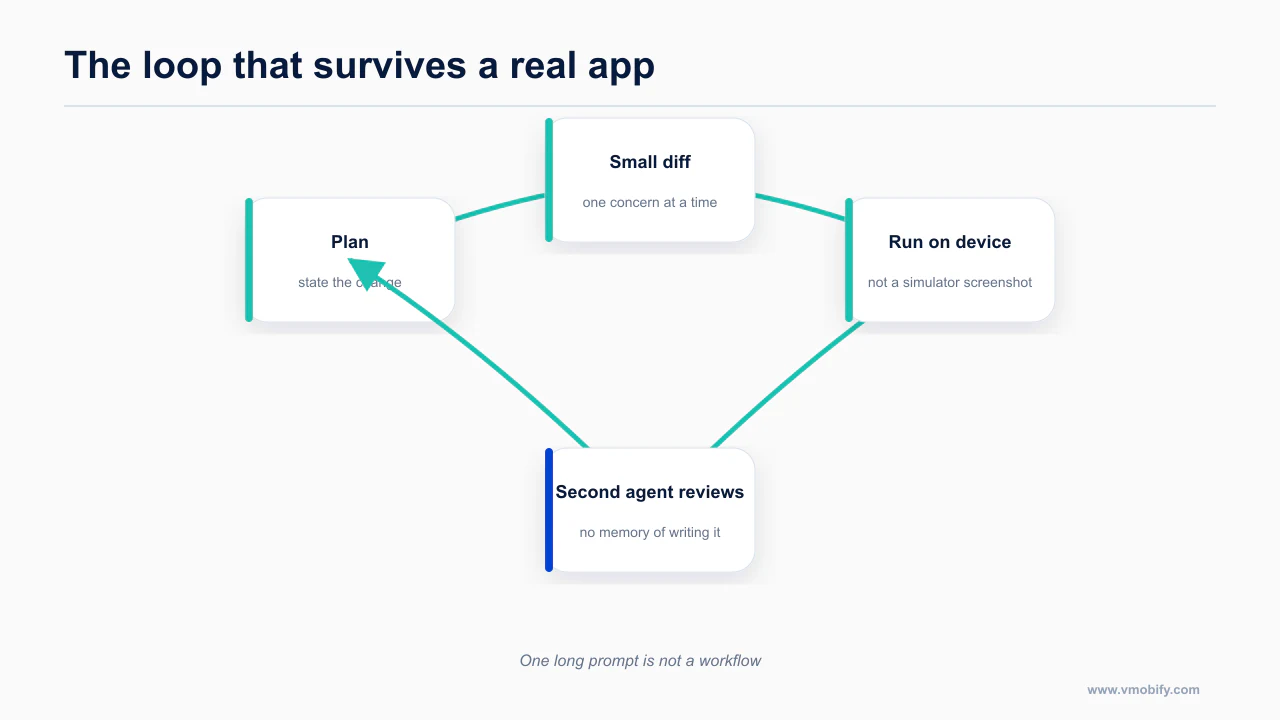
Here is the loop, in order. It is not exotic. What makes it work is that every step closes a feedback loop the agent can act on, instead of leaving the agent guessing.
1. Write the brief before you open the agent. One page: what the app does, who for, the three screens that matter, and — most importantly — what it explicitly does not do in v1. Agents expand scope silently. A written boundary is the only thing that holds.
2. Check the category before you write code. This is out of order compared to every other guide and it is deliberate. Apple's Guideline 4.3 rejects apps for category saturation, independent of quality. Habit trackers, AI chat wrappers, calorie counters, journaling apps and dating apps are all saturated, and all of them are what an agent proposes when you ask it for app ideas. If your idea is in one of those categories, you need a differentiator that a reviewer can see in thirty seconds, and you need to know that now rather than after the build.
3. Build screen by screen, not app by app. Ask for one screen with all five states. Run it. Then the next. An agent asked for "the whole app" produces something that compiles and has no error handling anywhere.
4. Give the agent eyes. This is what separates output that looks fine in a screenshot from output that works. With mobile-mcp or XcodeBuildMCP connected, the agent launches the app in a simulator, taps through it, takes a screenshot and reads it back — Claude Code views images directly, so "screenshot this and tell me what breaks at 320 points wide" is a real instruction with a real answer. Open-loop generation plateaus; closed-loop generation keeps improving. Post 5 is entirely about this.
5. Add test automation early. Maestro is the best fit for an agent because it is YAML and the agent can inspect a live screen to write it:
curl -fsSL "https://get.maestro.mobile.dev" | bashclaude mcp add maestro -- maestro mcpThe MCP is bundled with the CLI — there is no separate package to install. Its tools include list_devices, inspect_screen (view hierarchy as JSON), take_screenshot, run (inline YAML or a file), and the Maestro Cloud equivalents. The loop the agent runs: inspect the live simulator, generate YAML, run it, read the failure, correct itself.
One caution. Maestro's assertWithAI and extractTextWithAI take a screenshot and let an LLM judge it against a natural-language assertion — genuinely useful where pixel baselines are brittle. They need a MAESTRO_CLI_AI_KEY, they are experimental, and they default to optional: true, meaning a failure does not break your CI run. That default is a false-confidence generator. Set it explicitly.
6. Get it onto a real device. Simulators lie about performance, about gesture areas, about the keyboard, and about anything involving the camera or haptics.
7. Run the compliance pass before you build the release binary. Section below. Doing this after submission costs you a review cycle each time.
8. Submit, then treat rejection as information rather than failure. Feeding the rejection text back to the agent works well for mechanical issues and does not work at all for 4.3.
9. Instrument before you market. If you cannot see where users drop off, you cannot fix retention, and retention is your documented weak spot.
10. Mine your reviews from week one. An agent turns a few hundred reviews into a ranked backlog in one pass. See review mining with Claude Code.
Which five cliffs stop a vibecoded mobile app?
Five predictable cliffs stop vibecoded mobile apps, and every one of them is cheaper to hit deliberately in week one than accidentally in week six.
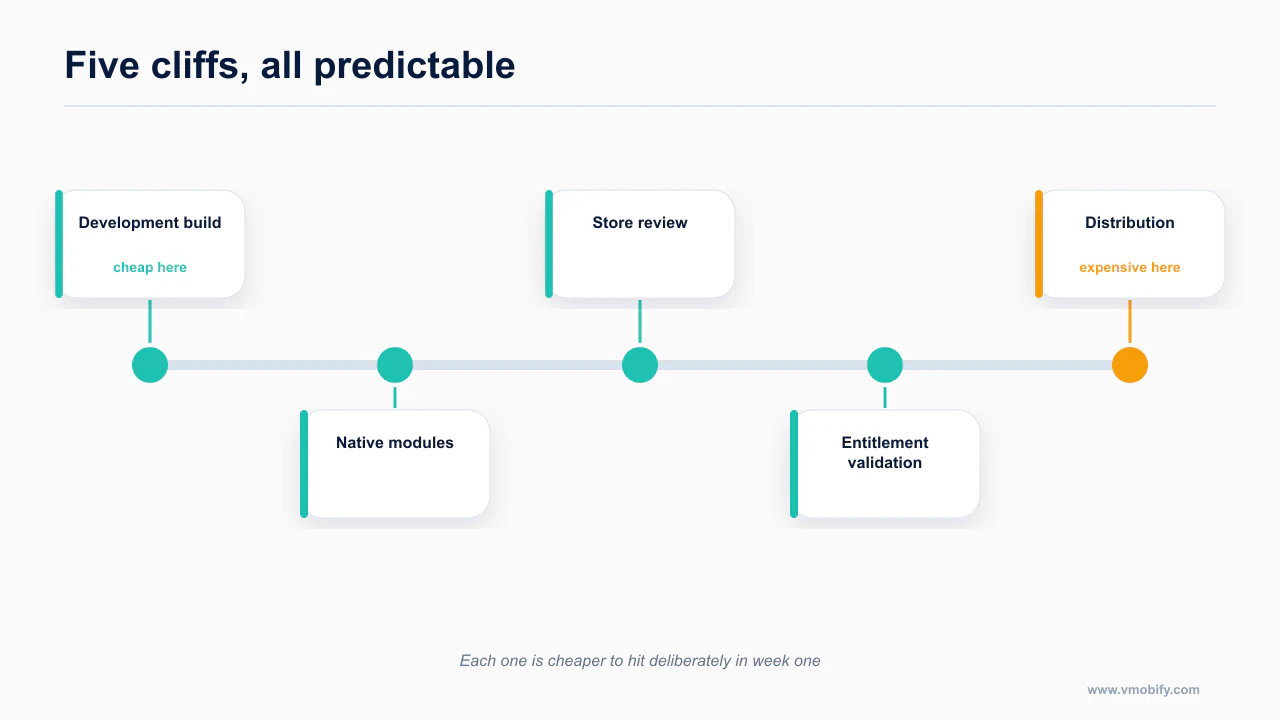
These are the five places mobile projects die. In roughly the order you will hit them.
Cliff one: Expo Go is not your app
This is the biggest one, and most prompt-builders hide the boundary until it breaks.
Expo Go is a pre-built container app with a fixed set of native modules compiled into it. Your JavaScript runs inside it. That is great until you need a native module that is not in that fixed set — a payments SDK, a specific camera library, background location, a widget, anything with a custom native dependency. At that moment you need a development build, which means prebuild, a config plugin, and an actual native compilation.
The symptom list is recognisable once you know it: a module that "works" in the docs but throws at runtime; a library whose install instructions mention Podfile or AndroidManifest.xml; anything that says "not supported in Expo Go."
The advice that saves the most time: hit this cliff deliberately on day two. Add one native dependency you know you will need, run the dev build, and get through the whole prebuild-and-sign process while the project is small and you have nothing to lose. Discovering it in week six with a finished app is how projects get abandoned. Full treatment in the development build cliff.
Cliff two: EAS builds fail, and the free tier is smaller than you think
npm i -g eas-cliThe EAS free tier gives you 15 iOS and 15 Android builds per month, one concurrency, a 45-minute timeout, low queue priority, and 1,000 EAS Update MAUs. That is genuinely enough for a solo first launch. It is also a hard constraint that vibecoders burn through fast, because a failed build costs the same as a successful one.
The documented common causes of failure are boring and repetitive: missing Info.plist keys, wrong bundle identifiers, a Podfile deployment-target mismatch, and peer-dependency conflicts.
The single most useful habit here: paste the full build log into the agent, not the last error line. EAS failures routinely surface as a generic final error whose actual cause is 400 lines earlier. An agent reading the whole log finds it; an agent reading the last line guesses.
For CI, the agent-friendly invocation is:
npx eas-cli build --platform all --non-interactive --no-waitwith EXPO_TOKEN set in the environment. Add --json for machine-readable output — that combination is what makes EAS scriptable by an agent rather than something you babysit.
One prerequisite that almost nobody mentions: you must have completed one successful local eas build first. That first run is what creates the projectId and provisions credentials. Skipping straight to CI fails in a way that is hard to diagnose.
Cliff three: signing, provisioning and keystores are still manual
No agent gets you past Apple Developer Program enrollment, a D-U-N-S number if you are enrolling as an organisation, certificate generation, or creating and safely storing an Android keystore. These require a human, a credit card, and in the organisation case, days of waiting.
Budget for this. It is the least interesting part of shipping and it is the part with the longest lead time.
Cliff four: the slug and bundle identifier are immutable
Once you have run the first build, the slug is fixed. Bolt's documentation says this explicitly and it is true of the underlying platform generally. Choose them deliberately at the start, from your actual product name, not from whatever the agent generated in the scaffold.
Cliff five: in-app purchases are a state machine, not a feature
Agents write the happy path. Purchase succeeds, isPro becomes true, done. The states they miss: cancellation, network failure mid-purchase, receipt validation error, restore-purchases on a new device, subscription lapse, refund, and family sharing.
And the security half of it: server-side receipt validation is still your job. A client-side if (isPro) check in JavaScript is trivially patched — this is exactly what happened to Enrichlead, whose paywall was enforced client-side only and got bypassed along with API abuse and rogue database writes. This is the main reason RevenueCat is near-universal in this cohort: their server does the validation.
claude plugins marketplace add RevenueCat/ai-toolkitThen install the plugin. It ships 13 SDK integration skills covering iOS, Android, KMP, Flutter and React Native, plus paywall, entitlement and troubleshooting skills, and an MCP server at https://mcp.revenuecat.ai/mcp for project, app, product and offering CRUD. Two limits worth knowing: paywall create and update route through their "Rico" assistant, not through general MCP tools, and charts and analytics are not covered by the official server. Pricing is free up to $2,500 monthly tracked revenue, then 1% of tracked revenue, with no plan tiers.
Why does agent-generated mobile design fail?
Agent-generated mobile design fails on the parts that are invisible in a screenshot: safe-area insets, Dynamic Type, touch target size and the states nobody screenshots.
Agents are worse at mobile design than at mobile code, and the reason is structural. There is no viewport to inspect, no hover state to reason about, no DOM to read back — just insets, gestures, screen readers and a thumb that reaches part of the screen.
Here is the highest-value subset. The full version, with the skill file, is post 7.
The numbers to put in your rules file
On iOS, per Apple's Human Interface Guidelines: minimum control size is 44×44 pt. Contrast is 4.5:1 for body text, 3:1 for large text and UI components; for custom colours in Dark Mode, at least 4.5:1 with a stated goal of 7:1 on small text. Minimum recommended custom type size is 17 pt.
Dynamic Type is the table agents ignore hardest — 7 standard steps plus 5 accessibility steps (AX1–AX5), with Body running from 17 pt to 53 pt, a 3.1× range:
| Style | Large (default) | AX5 |
|---|---|---|
| Large Title | 34/41 | 60/70 |
| Title 1 | 28/34 | 58/68 |
| Title 2 | 22/28 | 56/66 |
| Title 3 | 20/25 | 55/65 |
| Headline | 17/22 Semibold | 53/62 |
| Body | 17/22 | 53/62 |
| Callout | 16/21 | 51/60 |
| Subhead | 15/20 | 49/58 |
| Footnote | 13/18 | 44/52 |
| Caption 1 | 12/16 | 43/51 |
| Caption 2 | 11/13 | 40/48 |
Any container with a fixed height breaks at AX1 and is unusable at AX5. The HIG rule agents miss entirely: "aim to display as much useful text at the largest accessibility font size as at the largest standard size" — in practice, switch inline rows to stacked layouts and drop columns as the size grows.
On Android, the minimum touch target is 48×48 dp. The M3 type scale is worth pulling from TypeScaleTokens.kt in the androidx source rather than from a blog post — the full table is in post 7, and the reason to take it from source is that the design site is unfetchable, which is its own post.
Window size classes are now five width buckets, not three: Compact under 600dp, Medium 600–840, Expanded 840–1200, Large 1200–1600, X-Large 1600 and above. Height buckets are Compact under 480, Medium 480–900, Expanded 900 and above. The API is currentWindowAdaptiveInfo().windowSizeClass. Most content still describes three buckets.
The Android 16 changes that are not optional
Targeting API 36 — which you now have to, since the Play deadline of 31 August 2026 has passed and apps below API 36 can no longer ship updates — brings four enforced behaviour changes. Edge-to-edge is enforced (windowOptOutEdgeToEdgeEnforcement is deprecated and ignored; consume insets via WindowInsets or Compose insets — the number one thing agents get wrong on Android). Predictive back is on by default, so onBackPressed() is no longer called and KEYCODE_BACK is not dispatched; migrate to OnBackInvokedCallback or Compose's BackHandler. Orientation and resizability locks are ignored on sw600dp and above, with the opt-out disappearing entirely at API 37+. And android:elegantTextHeight is deprecated and ignored, which changes text metrics for Arabic, Thai, Lao, Myanmar, Tamil and most Indic scripts — if you ship to India, layouts tuned to the old metrics will clip.
Liquid Glass, and the rule that breaks every agent's default
iOS 26's Liquid Glass is the biggest recent design change, and agents handle it badly because most of their training predates it. Two failure modes: iOS 17-era chrome, or a hallucinated API like .liquidGlass() that does not exist.
The rules that matter:
- Liquid Glass is a functional layer for controls and navigation only — tab bars, toolbars, sidebars — floating above content. Apple: "Don't use Liquid Glass in the content layer." The exception is transient interactive elements like sliders and toggles while active.
- Two variants.
.regularis the default — it blurs and adjusts luminosity, and suits alerts, sidebars, popovers and text-heavy surfaces..clearis highly translucent, is only for media-rich backgrounds, and requires a dimming layer. - "Use Liquid Glass effects sparingly." Never stack glass on glass. Standard materials — ultra-thin, thin, regular, thick — remain the content-layer answer.
- "Avoid full-width buttons." iOS 26 wants buttons inset from the screen edges so they harmonise with the hardware corner curvature. The full-width call-to-action button, which is the default output of every React Native and Tailwind habit an agent has, is now off-pattern on iOS.
The fix is to paste the actual iOS 26 API surface — .glassEffect(_:in:isEnabled:), GlassEffectContainer, .buttonStyle(.glass), .tabBarMinimizeBehavior, .tabViewBottomAccessory and the rest — into your rules file, so the agent has something to write against instead of something to invent. The full list is in post 7. conorluddy/LiquidGlassReference is a fuller reference with DO/DON'T guidance, written by its author as "a document I can point Claude at" — last updated November 2025, so it may lag iOS 26 point releases.
The five states
This one rule catches more real bugs than anything else in this post. Agents build two states, loading and success. Mobile needs five.
- Loading — a skeleton, not a spinner. A spinner tells the user nothing about what is coming.
- Empty — the first-run state, which every new user sees and agents never build.
- Error with retry — an error with no retry affordance is a dead end on a device with no keyboard shortcuts.
- Offline — mobile is the platform where the network goes away mid-tap. Not an edge case.
- Stale but cached — last known data with an indicator, rather than a blank screen, while refreshing.
Optimistic UI with a write queue is the mobile default, not an optimisation.
The other things agents get wrong
Each of these is a real bug you will otherwise ship. The long version of every one, with the fix, is post 7.
- Hardcoded top and bottom padding instead of insets. On React Native use
react-native-safe-area-context(useSafeAreaInsets,SafeAreaProvider) and not the built-inSafeAreaView, which is iOS-only and ignores Android navigation bars. - Copy-pasted
KeyboardAvoidingView, which needs a differentbehaviorper platform and breaks with native headers. The 2026 consensus isreact-native-keyboard-controller. - Bottom padding on scroll content instead of
contentInsetplusscrollIndicatorInsets, which clips scroll indicators and breaks over-scroll. .map()over arrays for lists. Use FlashList v2 —estimatedItemSizehas been removed andmaintainVisibleContentPositionis on by default. In Compose,LazyColumnwith a stablekey = {}; agents omit the key and cause full recomposition.- Permissions requested at launch. Android's own guidance is "as late into the flow as possible." Prime first, then trigger the OS dialog only on a soft yes — it is one-shot and a hard deny is close to permanent.
- Multi-screen onboarding carousels. Honest caveat: "three screens maximum" is folklore. I found no rigorous 2026 research on onboarding length — every source is a vendor blog citing another vendor blog. Cut onboarding because it delays the first useful moment, not because a study says three.
- Deep links declared but never verified. iOS needs
apple-app-site-associationathttps://yourdomain/.well-known/,Content-Type: application/json, no redirects and no query string, plus theapplinks:entitlement. Android needs/.well-known/assetlinks.json,android:autoVerify="true", and the SHA-256 fingerprint of the Play App Signing certificate — not just your upload certificate, which is the more common mistake. Both fail silently to the browser.
The 48dp trap that Google's own pattern creates
Compose's Checkbox, RadioButton, Switch, Slider and Surface enforce the 48dp minimum touch target internally — but only when they are interactive. The recommended pattern for a toggleable list row passes onCheckedChange = null to the checkbox and puts click handling on the row's Modifier.toggleable. Passing null makes the checkbox non-interactive, which removes the internal 48dp padding.
That is correct as written, because the outer row provides the target. But an agent copying the inner snippet without the outer modifier — exactly what happens when it is quoted in isolation — ships a sub-48dp target that no automated check flags.
Thumb zones, honestly
Primary actions and navigation in the bottom third. Destructive and rare actions in the top corners. A bottom sheet for any mid-flow decision. Never a tap target in the home-indicator strip, which cannot be opted out of on either platform.
Those are good rules. Here is the part most content leaves out: the famous thumb-zone heat maps predate 6.7-inch displays. Hoober's work is from 2013, Wroblewski's from 2016, and I could find no primary reachability study conducted in 2026. Everything ranking for "thumb zone 2026" restates decade-old research about phones nobody carries. The rules are sound judgement; the percentages attached to them are not measurements of current devices.
The one accessibility thing to do today
npm i -D eslint-plugin-react-native-a11yeslint-plugin-react-native-a11y ships basic, ios and android presets, and it matters more than a testing library for a mechanical reason: it is lint, so the agent sees the error inside its own loop and fixes it before you ever see the code. A CI test catches problems after the fact; a lint rule catches them during generation.
What must you check before you submit?
Run the compliance pass before you submit, because the review queue is the most expensive place to discover a missing privacy declaration.
Every item here costs you a full review cycle if you find it after submission instead of before. Run this as a checklist against the build you are about to upload.
Things that were true before 2026 and still catch people
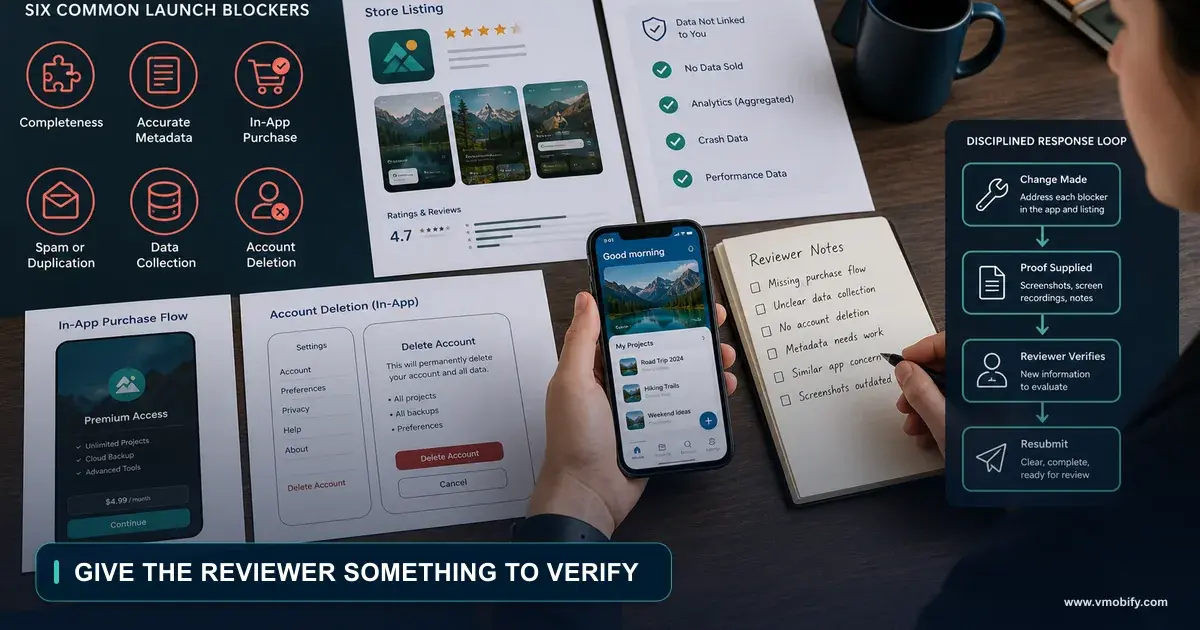
Account deletion — Guideline 5.1.1(v). In force since 30 June 2022: if your app supports account creation, it must support in-app account deletion. The 2026 twist is that reviewers now check that the button actually erases backend data, not just signs the user out. This is a very common failure in agent-built apps specifically, because an agent will happily wire up a "Delete account" button with a confirmation dialog and no server-side cascade at all.
Guideline 4.3 — spam and category saturation. The single biggest trap. A documented case in Apple's own developer forums: a solo student's dating app, two years of work, reviewers acknowledged it was useful, rejected under 4.3 purely for being in a saturated category. The App Review Board appeal was denied on the same grounds. It was approved on Android without issue.
That is the shape of the problem. It is not about your code and no prompt fixes it. In a saturated category, your differentiator has to be visible in the screenshots.
Guideline 4.2 — minimum functionality. Where WebView wrappers of web-builder output land.
Guideline 2.3 and the paperwork rejections. Screenshots that do not match the build, dead support or marketing URLs, missing test-account credentials, and default permission strings that still say "This app needs access to your camera." Each of these resets your clock for nothing.
The four 2026 rules that catch agent-built apps specifically
Age rating overhaul — deadline was 31 January 2026. New bands of 13+, 16+ and 18+ on top of 4+ and 9+, with four new mandatory questions covering in-app controls, capabilities, medical and wellness content, and violence. Not answering them blocks you from submitting updates. Apps with AI assistants or chatbots must account for sensitive-content frequency, which is most agent-built apps.
Social media declaration — required from September 2026, which is now. The trigger is the "ability to redistribute, amplify, or interact with UGC through a social feed or similar discovery method." That means a minimum 13+ rating, a Social Media content descriptor, and placement in the Social Media Time Allowance bucket regardless of your category. Any app with a feed and likes gets caught, and a feed with likes is a default agent output.
Privacy manifests (PrivacyInfo.xcprivacy). Expo does not fully automate this. You configure expo.ios.privacyManifests yourself, and Expo's own docs note that "Apple does not correctly parse all the PrivacyInfo files included by static CocoaPods dependencies" — so third-party SDK reasons have to be consolidated into your own manifest by hand. The required-reason API categories are UserDefaults, file timestamp, system boot time, disk space and active keyboard.
Play target API 36. The deadline was 31 August 2026 and it has passed — an enforced floor, not a to-do.
Two more on the Play side. The July 2026 policy pack pulls third-party AI calls under the User Data policy: disclose external model endpoints in Data Safety and get explicit consent before data transfer. And Data Safety mismatch is a top Play rejection cause — your declaration has to match what the binary does, including SDKs the agent added without telling you.
If you have a personal Play account created after 13 November 2023, you also need 12 testers for 14 continuous days before Production. Opting out breaks the streak and the days must be consecutive. Start that clock early — it is the longest pole in an Android launch.
The dated version of all of this, formatted to paste into a project tracker, is the 2026 mobile compliance calendar.
What happened in March 2026
Apple silently blocked updates for Replit and Vibecode citing Guideline 2.5.2 — "no downloading, installing or executing code that introduces or changes functionality" — and Anything was removed, reinstated, and removed again. The detail that usually gets dropped: Apple explicitly told MacRumors there is no rule targeting vibe coding. This is existing-guideline enforcement, not new policy, which is also why Swift Playgrounds and Pythonista run user code and remain on the store. The full account is in post 18.
The takeaway for you is narrower than the drama: if your app downloads or executes code at runtime, you are inside a guideline that is being actively enforced. The store-side detail lives in the guidelines that actually block launch.
Which security work does this cohort skip?
The security work this cohort skips is the work that decides whether a breach is embarrassing or terminal: server-side entitlement checks, real secret storage and row-level access rules.
An .ipa is a zip file. So is an .apk. Anything in your JavaScript bundle is extractable with tools that take about a minute to run, and React Native's own documentation says so.
So EXPO_PUBLIC_* variables, the extra block in app.json, and any hardcoded string are recoverable by anyone who downloads your app. There is no client-side place to hide a secret. Prompt builders wire an OpenAI or Gemini key into the app because that is what makes the demo work; the consequence class is someone else's key, your bill.
The other four that show up constantly in agent-built code:
AsyncStorageis unencrypted plaintext, and it is the default an agent reaches for when storing an auth token. Useexpo-secure-store, which uses the iOS Keychain and Android Keystore. This is OWASP Mobile M1.- Client-side entitlement checks, covered above; the fix is server-side validation.
- Row-level security never enabled. A vendor-run scan of 20,052 URLs across five indie product directories over a month reported 11.04% of vibe-coded apps leaking Supabase keys — 2,217 exposed domains, 2,325 critical exposures. That is a self-interested scan by a security vendor, so weigh it accordingly; the methodology was stated and the Hacker News thread vetted it, which makes it worth more than an anecdote.
The nuance most coverage of that stat misses: the Supabase anon key is designed to be public and respects row-level security. The real disasters are leaking the service_role key, which bypasses RLS entirely and is server-only, or shipping the anon key with RLS never enabled — and tables in the public schema are live API endpoints by default. Moltbook leaked 1.5 million API keys, 35,000 emails and private messages for exactly that reason.
- Unprotected RPC functions and public storage buckets — the two RLS-adjacent holes agents miss even when they remember RLS on tables.
Minimum hardening, in order: no secrets in the bundle ever; all third-party API calls proxied through a server or edge function; RLS on every table, tested with the anon key; service_role server-only; RPC functions and storage buckets policy-gated; tokens in SecureStore rather than AsyncStorage; entitlements validated server-side; and run Supabase's Security Advisors before launch.
And note that Play's July 2026 rule turns most of this from a security problem into a compliance problem. Full treatment, including an audit prompt you can run against your own repo, in your vibecoded app is leaking.
Why should a second agent review the first?
A second agent reviewing the first catches what the author structurally cannot, for the same reason a human reviewer does.
The agent that wrote the code is primed to believe it. A reviewer with a clean context window, mobile-specific criteria and access to the device catches what the author cannot.
Fastest setup:
claude /install-github-appThat configures claude-code-action@v1 and requires repo admin. Two specifics: mcp_config is deprecated — use claude_args: --mcp-config '{...}' or the settings JSON — and structured output comes from --json-schema in claude_args.
The cost trap is easy to avoid once you know it: **GitHub-hosted macos-* runners bill at a 10× minute multiplier.** Reviewing a diff needs no Xcode, so run review on ubuntu-latest and reserve macOS runners for build and test.
A mobile review prompt should look for things no generic reviewer checks: main-thread blocking, retain cycles and missing [weak self], Compose recomposition problems, drift in Podfile.lock / Package.resolved / gradle.lockfile, new permissions appearing in Info.plist or AndroidManifest.xml, app-size deltas, secrets committed into google-services.json or GoogleService-Info.plist, and minSdk or deployment-target bumps.
CodeRabbit pairs well with this and runs SwiftLint, detekt, ESLint and Oxlint, with coderabbit review --agent emitting structured JSON for an agent to consume. One gap if you are on Flutter: CodeRabbit lists no Dart or Flutter tooling at all.
The workflow YAML and the full prompt are in post 14 — with the caveat, there and here, that any YAML built from the action's input list is a construction, not an official Anthropic sample.
How do you launch and reach the first 100 users?
Getting the first hundred users is a distribution problem you solve by hand, not a growth problem you solve with a budget.
You have shipped. Now the actual hard part, and the part where the "AI made building free" thesis bites hardest: you are one of 235,800 apps submitted in a quarter, competing for a pool of engaged users that did not grow.
Store metadata is the highest-leverage thing you control
Apple indexes name, subtitle, keywords, primary category and secondary category — and, new in 2026, App Tags generated by an LLM from your App Store Connect metadata. That last one deserves more attention than it gets: your en-US metadata now feeds a tag generator that is itself a ranking surface. Tags are US-only so far, and Apple warns that deselecting all of them hurts discoverability.
The field limits, from Apple's product page reference and App Store Connect help:
| Field | Limit | Indexed for search |
|---|---|---|
| App Name | 2–30 characters | Yes |
| Subtitle | 30 characters | Yes |
| Keywords | 100 characters total, comma-separated, no spaces | Yes |
| Promotional Text | 170 characters | No |
| Description | see below | No |
| Screenshots / previews | 10 / 3 (each ≤30s) | — |
Here is a case where everyone repeats a number that the primary source does not contain. Nearly every ASO guide states that Apple's description limit is 4,000 characters. Apple's own product-page reference specifies no character limit for the description. What is true is that App Store Connect enforces 4,000 in practice. The distinction matters because people design their content strategy around a documented rule that is not documented — check what your own App Store Connect instance accepts rather than trusting the number in a blog post, including this one.
Apple's search documentation is also explicit about what to leave out of keywords: no plurals of words already present, no generic terms like "app" or "game," no filler, no special characters, and no trademarks or competitor names.
Google Play works differently in a way that surprises people coming from iOS: there is no keywords field. Play indexes free text — title, description, promotional text. Limits are 30 characters for the app name, 80 for the short description and 4,000 for the full description. Feature graphic is 1024×500; the icon is a 512×512 32-bit PNG under 1024 KB; screenshots run 320–3840 px with the maximum dimension no more than twice the minimum, and you need at least two.
What an agent can and cannot automate here
An agent can own the entire write path on both stores for text and creative. Apple's App Store Connect API covers name, subtitle, keywords, description, promotional text, what's-new and all localizations, plus screenshots and previews — automatable through fastlane deliver or raw REST with a JWT-signed key. On the Play side, edits.listings inside an edit transaction covers language, title, shortDescription, fullDescription and video, with images via edits.images; fastlane supply wraps it.
It cannot run Play store-listing A/B tests (Console UI only, no API, a long-standing unanswered request), cannot edit Play custom store listings (also no API), and cannot set Apple App Tags outside App Store Connect.
It can run Product Page Optimization on iOS, because AppStoreVersionExperiment is a real App Store Connect API resource — fastlane does not expose it, so you call REST directly. The PPO rules constrain test design more than people expect: up to 3 treatments against the original, creative only (icon, screenshots, previews — not text), maximum 90 days, one test per app at a time, cannot be modified once started, treatments go through App Review, and alternate icons must already be in the binary.
One number to verify yourself rather than take from me: Apple's help page states you can have up to 70 Custom Product Pages per app, while long-circulating ASO content says 35. I could not resolve which reflects current behaviour — check your own App Store Connect.
The last practical note, and it affects your release cadence: Apple metadata changes to name, subtitle or keywords require a new version submission and App Review. Only promotional text updates without a binary. Plan keyword iteration around your release schedule, not independently of it.
There is a lot more here, including the full agent workflow from review mining to validated metadata: ASO with Claude Code, and the broader vendor landscape in the growth stack an agent can drive.
Reviews and ratings
Your reviews are the cheapest product research available, and the best agent fit for reading them is a real CLI:
npm i -g @appfigures/cliThen appfigures auth login, and npx -y @appfigures/cli mcp if you want it as an MCP server. It handles reviews list, breakdown and reply, plus keywords, rankings and top charts. The free tier is 1,000 requests a day; competitor data is a paid add-on.
Two constraints shape what you can actually build:
Google Play's Reply to Reviews API only covers reviews created or modified in the last 7 days, production track only, with replies capped at 350 characters of plain text, and quotas of 200 GET/hour and 2,000 POST/day. For historical mining you export CSV from Play Console instead. Apple gives you full history via GET /v1/apps/{id}/customerReviews, plus customerReviewSummarizations — Apple's own AI summaries.
Apple's guidance on replies is "personalize, don't template" — precisely the failure mode of a naive LLM reply bot. Agent drafts, human sends.
On asking for ratings: SKStoreReviewController's requestReview shows the prompt a maximum of three times per 365 days, and Apple says explicitly "don't call it in response to a button tap." It always shows in development builds and has no effect in TestFlight, which is how people convince themselves it works when it does not. The compliant always-works path is a link to <your product page URL>?action=write-review.
The consequence is worth internalising: you get three system-chosen shots a year, and no Apple API lets you A/B test the prompt. Timing is the only lever. The full version of this stage is the first 1,000 users plan.
What does shipping this way actually cost?
The honest cost is small in tokens and large in the hours nobody puts in the demo video.
| Item | Cost |
|---|---|
| Apple Developer Program | $99/year, recurring |
| Google Play Console | $25, one-time |
| EAS Free | $0 — 15 iOS + 15 Android builds/month, 1 concurrency, 45-min timeout, low priority, 1,000 EAS Update MAUs |
| EAS Starter | $19/month + $45 build credit, 1 concurrency (+$50 per extra, max 5), 2h timeout, high priority, 3,000 MAUs |
| EAS Production | $199/month + $225 credit, 2 concurrency, 50,000 MAUs |
| EAS overages | roughly $0.05–0.10/GiB bandwidth, $0.05/GiB storage |
| RevenueCat | Free up to $2,500 monthly tracked revenue, then 1% of tracked revenue. No plan tiers |
A realistic year-one floor is around $364–724 — a platform subscription plus $99 plus $25. Add a database, error monitoring and a domain and $800–1,200 is the honest number for a solo first app.
The line worth pinning to your wall: EAS Free is genuinely enough for a solo first launch, and 15 builds a month is the real constraint. A failed build costs exactly as much quota as a successful one, and agent-driven native changes fail a lot early on. That budget goes fast in week one and then you are waiting for the calendar to roll over. Get your first successful build done deliberately and carefully rather than by iterating blindly. If the app carries an AI feature, the variable side is covered in AI app unit economics.
Where should you go deeper?
Each guide below goes deep on one part of the path above.
This is the hub. Each of these goes deep on one part of the path above.
Build:
- Every Claude Code skill, plugin and MCP for mobile development — the verified directory, with the corrections.
- The Expo + Claude Code setup that prevents 80% of problems — the full
AGENTS.mdtemplate andeas.jsonprofiles. - Expo Go is not your app: the development build cliff
- Give your agent eyes: driving simulators and real devices
- Flutter, SwiftUI or React Native? What AI agents are actually good at
Design:
- The mobile UI/UX rules AI agents get wrong — the ten failures in full, plus the skill file that fixes them.
- Stop feeding your agent empty pages: fetchable HIG and Material docs — the HIG returns nothing to fetchers; here is the mirror that works.
- Figma to mobile code: what actually works in 2026
- Which mobile design system gets the best AI output?
Ship:
- Why your AI-built app got rejected (and what Apple actually said) — the real numbers, and Guideline 4.3.
- The 2026 mobile compliance calendar — dated, and three of the four have already landed.
- Your vibecoded app is leaking — mobile security for people who do not do security.
- Automated code review for mobile repos
Grow:
- ASO with Claude Code — the exact boundary of what an agent can automate.
- Review mining with Claude Code — turning reviews into a ranked backlog.
- The growth stack an agent can drive — which vendor MCPs actually write.
Opinion:
- The vibecoding apps nobody uses — an honest look at the prompt-to-app category.
What matters if you remember only one thing?
Submissions are up sharply while engaged usage is flat, roughly a quarter of submissions get rejected, and none of that is about your code.
Submissions are up 84% and engaged usage is flat. A quarter of submissions get rejected. AI-powered apps convert better and retain much worse than everything else on the store. None of those facts are about your code, and all of them are about whether your app ships and survives.
So spend your effort accordingly. Fifteen minutes on AGENTS.md beats an hour of prompting. Hitting the development-build cliff on day two beats hitting it in week six. Running the compliance checklist before you submit beats three review cycles. Server-side entitlement validation beats a client-side boolean. And checking whether your category is saturated beats finding out after two years, which is a thing that actually happened to someone in Apple's own forums.
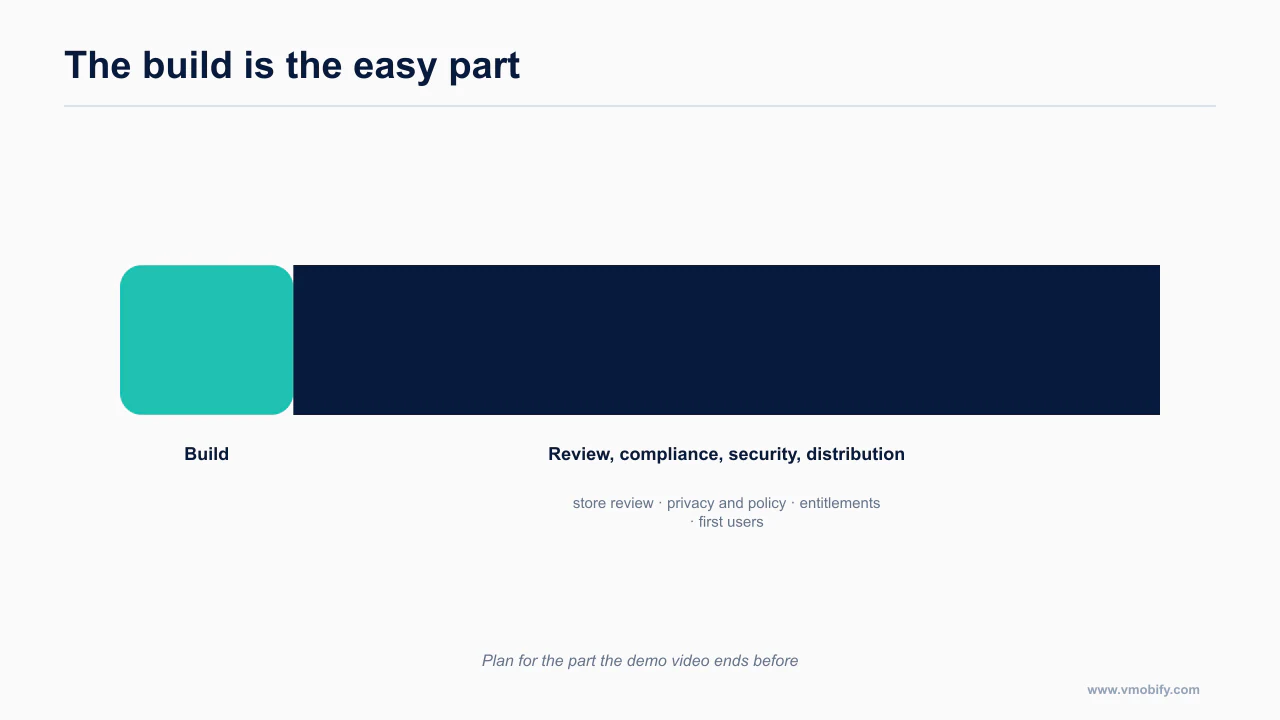
The build really is the easy 20% now. Plan for the other 80%.
Frequently Asked Questions
Can Claude Code actually build a whole mobile app?+
It can build the app. The evidence gap is everything after that: passing review, validating entitlements server-side, meeting accessibility requirements and getting installs. Treat the build as the cheap 20% and plan the rest deliberately.
Should I use Expo or bare React Native with an agent?+
Expo, unless you already know you need something it cannot do. The managed workflow removes most of the native build surface an agent gets wrong, and the development-build cliff is easier to cross deliberately than to discover in week six.
What is the single highest-return setup step?+
A project context file. Fifteen minutes writing AGENTS.md or CLAUDE.md with your stack, non-negotiable rules and environment beats any amount of prompting, because it loads on every session automatically.
Why do AI-built apps get rejected more often?+
They are not rejected for being AI-built — no published figure supports that claim. They are rejected for the same reasons other apps are, and this cohort is simply less likely to have run a compliance pass, declared data collection accurately, or handled account deletion.
Do I need a second agent to review the code?+
It is the highest-return single addition after the context file. A reviewer with no memory of writing the code catches what the author structurally cannot, which is the same reason human code review works.
How much does this cost to run?+
Token cost is small relative to the hours. The real cost is the work that does not appear in demo videos: compliance, security, store assets and distribution. Budget for those rather than for prompts.
Is any of this specific to Claude Code?+
The cliffs and the compliance work apply to any agent. The specific files, commands and MCP servers here are Claude Code's, but the sequence is the same whichever agent you use.
Sources
- Apple — 2024 App Store Transparency Report — Primary source for submission and rejection volumes
- RevenueCat — State of Subscription Apps — Conversion and retention benchmarks, including AI-powered apps
- Expo — Using Claude Code with Expo — Official agent setup guidance
- Expo — MCP server — Official Expo MCP documentation
- 9to5Mac — App Store sees 84% surge in new apps — Reporting on submission volume growth
- getsentry/XcodeBuildMCP — Build and simulator control for agents
- anthropics/claude-code-action — Official GitHub Action for agent review in CI
- Apple — App Store Connect API — Programmatic store metadata and submission
About the author
Amol Pomane — Founder, Vmobify
Amol leads Vmobify, a mobile app growth agency that has driven 30M+ downloads and ranked 54K+ keywords across 300+ apps since 2013. He writes about ASO, paid user acquisition, retention, and the operational reality of scaling mobile apps in India and global markets.