Your Vibecoded App Is Leaking: Mobile Security Basics
An .ipa is a zip file, and anything you bundled into it ships to every device that installs your app. This is what actually leaks in vibecoded mobile apps, why the widely-blamed anon key is not the problem, and the eight things to fix.

On this page
- Why should you unzip your own app first?
- How much weight does the widely quoted number hold?
- Why is the anon key not the problem?
- What does the incident record actually show?
- What does mobile add on top of the web pitfalls?
- Why is this now a compliance problem too?
- What is the eight-item hardening checklist?
- How do you audit your repo for all eight?
- What should you do this week?
- Frequently Asked Questions
Why should you unzip your own app first?
An .ipa or .apk is an archive, so the fastest security review available to you is opening your own build and reading what shipped inside it.
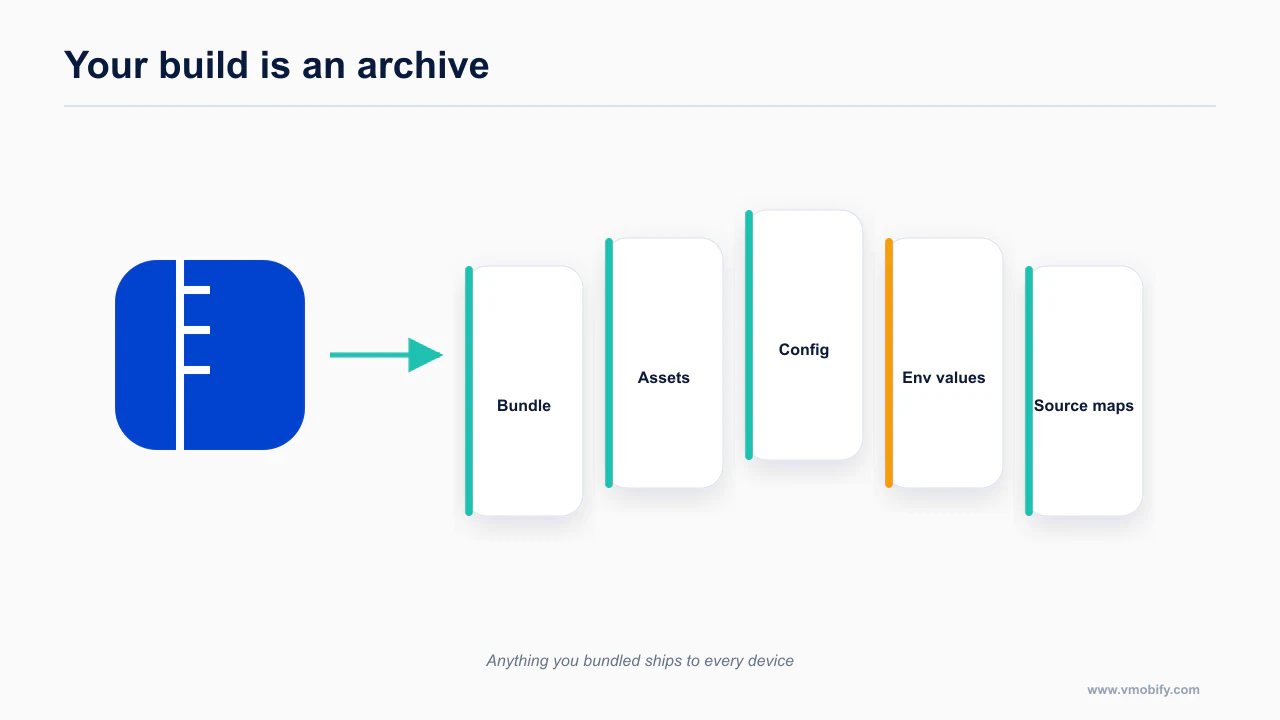
You do not need tooling for this. If you have a build artifact, you have everything.
# iOS — a .ipa is a zip
unzip -q MyApp.ipa -d extracted-ipa
grep -ra "SUPABASE\|API_KEY\|SECRET\|Bearer \|sk-" extracted-ipa | head -40

# Android — an .apk is a zip
unzip -q app-release.apk -d extracted-apk
grep -ra "SUPABASE\|API_KEY\|SECRET\|Bearer \|sk-" extracted-apk | head -40
For a React Native or Expo app the interesting file is the JavaScript bundle. Inlined environment variables live there as literal strings, because that is what inlining means. For a native app, look in the compiled resources and the string tables. Either way, the exercise takes ten minutes and the result is not ambiguous: either your keys are in there or they are not.
Do this before you read the rest of this post. It changes how the rest of the post reads.
Two things people reach for at this point, and why neither is an answer:
- Obfuscation. Minifying or mangling a bundle raises the cost of finding a string from seconds to minutes. It does not change the fact that the string must exist in plaintext at the moment your code uses it, because the network request has to carry it. Obfuscation is a speed bump on a road that still leads to the same place.
- "Nobody will bother with my app." Nobody has to bother with your app specifically. Automated scanners walk app directories and bundles at scale, and the whole point of an exposed credential is that it is worth something regardless of which app it came from. The interesting asset is your API key, not your idea.
The consequence class for a leaked model-provider key is simple and expensive: someone else's usage, your bill. There is no rate limit on your account that distinguishes your users from a stranger's script.
How much weight does the widely quoted number hold?
The figure everyone repeats is real but narrower than its usage implies, and it is worth knowing what it actually measured.
The stat doing the rounds is that 11.04% of vibe-coded apps leak Supabase keys. It is worth being precise about where it comes from, because the precision is what makes it usable.
It comes from a scan run by SupaExplorer, a vendor whose product is Supabase security scanning. The stated methodology: 20,052 URLs scanned across five indie product directories over roughly a month, producing 2,217 exposed domains, 2,325 critical exposures and 2,960 flagged files.
Three honest observations about that:
- It is vendor-run and self-interested. A company selling Supabase security scanning published a number showing that Supabase security scanning is needed. Treat it the way you would treat any vendor-published prevalence figure.
- The methodology is stated, which is more than most circulating security stats manage. You know the population (indie product directories, not the App Store), the sample size, the window and the counts. You can argue with the sampling frame — apps listed on indie directories skew heavily towards recent no-code and agent-built projects, which is exactly the cohort most likely to leak — but you can see what was measured.
- The Hacker News thread vetted it. The discussion went through the methodology rather than just amplifying the headline, which is the difference between a number that survives scrutiny and one that gets quietly retracted.
So: use it as an order-of-magnitude signal about a specific and unrepresentative population, not as a universal rate. "Roughly one in nine apps in a scan of indie directories exposed Supabase credentials" is defensible. "11% of all apps leak keys" is not, and you will be corrected in public.
The more useful takeaway is not the percentage at all. It is what "exposed key" actually means, because most coverage of this gets it backwards.
Why is the anon key not the problem?
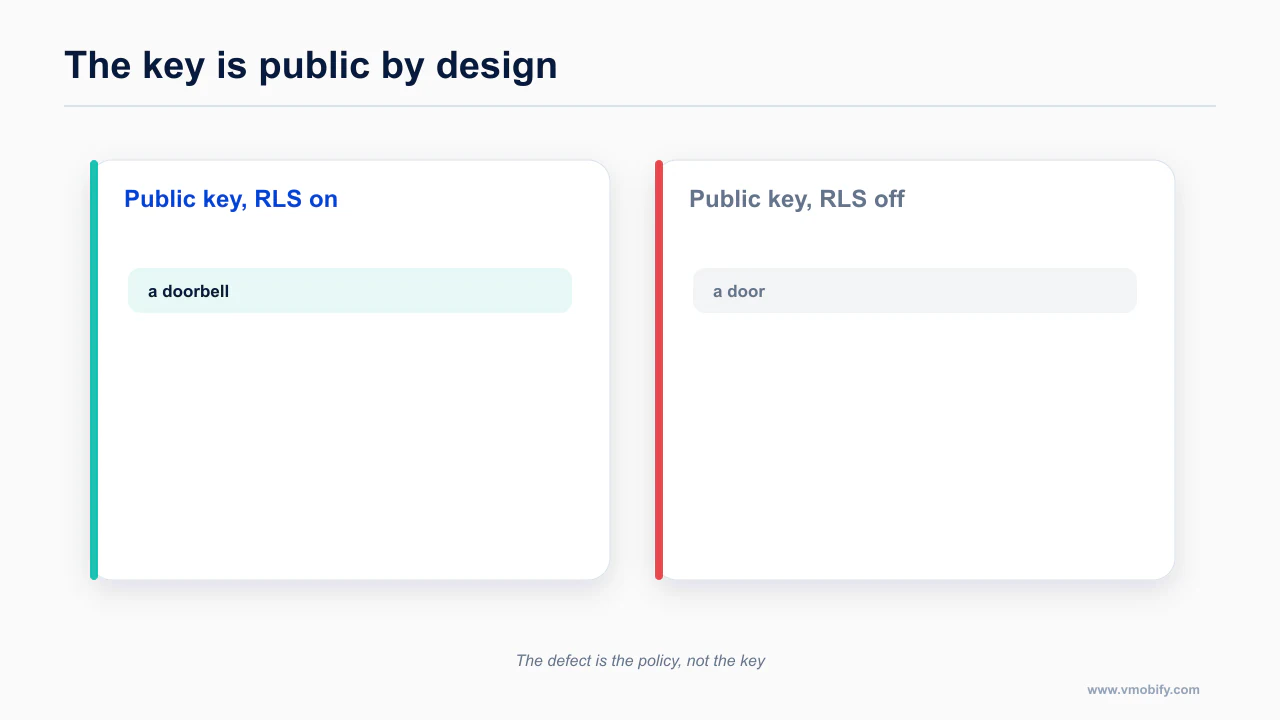
The Supabase anon key is designed to be public; the defect is almost never the key being visible, it is that row-level security was never switched on behind it.
Here is the nuance that separates a credible post from a scare piece.
The Supabase anon key is designed to be public. It ships in your client. It is in every web app and every mobile bundle that talks to Supabase directly, by design, and it is not a secret in any meaningful sense. Its entire security model is that it carries no privilege of its own — it identifies the project, and every request it makes is evaluated against row level security policies on your tables.
If RLS is on and your policies are correct, a stranger holding your anon key can do exactly what an anonymous user of your app can do. Which is the point.
So finding an anon key in a bundle is not, by itself, a finding. What makes it a finding is one of two things.
Catastrophe one: the service_role key is in the client. This key is explicitly designed to bypass RLS entirely. It exists so that your server or edge function can do administrative work. If it reaches a client bundle, every policy you wrote is decorative. Whoever has it can read, write and delete every row in every table, regardless of what your policies say. This is the one that turns an inconvenience into a data breach.
Agents leak this one for a mundane reason: when a query returns nothing because RLS is blocking it, the fastest way to make the app work is a key that ignores RLS. If you have ever asked an agent "why is this returning an empty array" and it fixed the problem in one turn, go and check which key it used.
Catastrophe two: the anon key ships with RLS never enabled. This is the more common one, and it does not require anyone to make a mistake with keys at all. It requires only that nobody turned RLS on.
The critical detail, and the one nobody tells first-time builders: tables in the public schema are live API endpoints by default. Creating a table creates a REST surface for it. If RLS is off, the anon key — the one that is supposed to be public, the one that is in your bundle by design — can read and write that table. The key was never the vulnerability. The absent policy was.
Supabase's own CEO has acknowledged the pattern, and the company now contractually requires vibe-coding platforms to surface Supabase Security Advisors to their users. That is a vendor responding to a real and repeated failure mode, not a hypothetical.
Practically, that gives you three checks rather than one:
- Is the
service_rolekey anywhere outside your server environment? Grep the bundle and your repo history. - Is RLS enabled on every table in the
publicschema, including the ones an agent created three weeks ago and you forgot about? - Have you actually tested your policies using the anon key, rather than reading them and deciding they look right?
That third one is where most audits stop short. A policy you have read is not a policy you have tested.
Supabase documents this directly: the API keys guide explains which keys are safe to ship, and the row level security guide covers the control that is actually protecting your data.
What does the incident record actually show?
The documented incidents share a shape: a public key over an unprotected table, not a stolen secret.
The individual failures are boring, which is what makes them instructive. None of these required an exotic attack.
| Incident | Cause | Scale |
|---|---|---|
| Moltbook | RLS never enabled | 1.5M API keys, 35k emails, private messages (Wiz) |
| Lovable / CVE-2025-48757 | Auth logic inverted — blocked real users, admitted unauthenticated ones | 18k+ users across 170 apps |
| Base44 | Registration and OTP endpoints required no auth at all | Platform-wide bypass (Wiz, July 2025) |
| Orchids | Generated code not isolated or validated | Zero-click RCE on user machines (BBC, December 2025) |
| Enrichlead | Paywall enforced client-side only | Subscription bypass, API abuse, rogue database writes |
| Escape.tech scan | Broad survey of live AI-built apps | 2,000+ vulnerabilities across 5,600 apps; 400+ exposed secrets |
Read down the cause column and the pattern is one thing: the check that was supposed to happen on the server did not happen on the server.
Moltbook is the pure form of it — the policy layer was never switched on, so the client could ask for anything and the database answered. 1.5 million API keys is not a subtle failure.
The Lovable CVE is the most darkly funny: the authorisation logic was inverted, so it blocked legitimate authenticated users and admitted unauthenticated ones. That is exactly the kind of bug that passes a demo. You test as a logged-out visitor, it works, you ship. The failure mode of a correct-looking condition with the sense reversed is that everything appears fine from one direction.
Base44 needed no clever bypass either — the registration and OTP endpoints required no authentication at all, which is a design gap rather than a coding bug.
Enrichlead is the one to sit with if you are building a paid app, because it is the exact shape of what an agent produces when you ask for a paywall. The paywall was client-side only. Client-side only means the check is advice, not enforcement.
What does mobile add on top of the web pitfalls?
Mobile adds a layer the web does not have, because the client is a file on someone else’s device rather than code you serve on each request.
Everything above applies to any app with a client and a database. Mobile adds four failures of its own.
Every environment variable in an Expo bundle is a public string
Expo's convention is that variables prefixed EXPO_PUBLIC_ are inlined into your JavaScript bundle at build time. The prefix is doing exactly what it says. Anything named EXPO_PUBLIC_* is public — it is in the bundle you just unzipped.
The same is true of app.json's extra field, and of any constant an agent wrote directly into a source file.
The mistake is not the prefix. The mistake is what people put behind it. EXPO_PUBLIC_API_URL is fine, because your API URL is not a secret and your users' phones need it. EXPO_PUBLIC_OPENAI_API_KEY is a billing incident with a delay fuse. The prefix does not make a secret safe; it announces that the value is not a secret, and the announcement is load-bearing.
The correct architecture for any third-party model, payment or email provider is that the client never holds the key. Your app calls your own endpoint — an edge function, a serverless route, a small server — and that endpoint holds the provider key and makes the outbound call. This gives you three things the bundle approach never can: the key stays server-side, you can rate limit per user, and you can see and cut off abuse.
That is more work than the demo path, and it is why the demo path wins by default. Ask for it explicitly and you get it. There is more on structuring these boundaries up front in the Expo setup post.
AsyncStorage is unencrypted plaintext, and agents default to it
Ask an agent to persist a session and you will very often get AsyncStorage. It is the most common storage API in the React Native ecosystem, it appears in an enormous amount of training data, and it works on the first try.
It is also unencrypted plaintext. That is not a bug or an oversight in the library — it is a key-value store, not a secrets store, and it never claimed otherwise. On a compromised or rooted device, and in a range of backup and forensic scenarios, its contents are readable.
Auth tokens, refresh tokens, API keys and anything else that grants access do not belong there. The correct answer in an Expo app is expo-secure-store, which stores values in the iOS Keychain and the Android Keystore — platform-provided, OS-backed secure storage designed for exactly this.
This maps directly to OWASP Mobile M1, improper credential usage, which is the top item on the mobile risk list for a reason.
The audit is one grep:
grep -rn "AsyncStorage" src/ app/ lib/ 2>/dev/nullThen look at what each call site stores. Theme preference, last-selected tab, a cached list — leave them. Anything that looks like a token, a session, a key or a credential moves to SecureStore. Note the practical constraint while you are at it: SecureStore is meant for small values, so it holds a token, not a cached payload.
if (isPro) is not a paywall
This is the mobile version of the Enrichlead failure, and it is close to universal in agent-generated subscription code.
The generated pattern looks like this: fetch a purchase state, set a boolean, gate the premium screens on the boolean. It renders correctly, it demos perfectly, and it is enforcement in name only. A JavaScript bundle can be modified. A boolean in a client can be flipped. A network response can be intercepted and rewritten. Every one of those is a well-worn technique, and none requires anything more than patience.
Entitlements must be validated server-side against a receipt. The store — Apple or Google — issues a signed record of the purchase. Something you control verifies that record with the store, and then your backend decides what this user is entitled to. The client asks; the server answers; the client renders the answer.
This is precisely what RevenueCat's server does, and it is the main reason RevenueCat is close to universal in this cohort. It is not that people cannot write receipt validation. It is that receipt validation is a genuinely fiddly state machine — cancellation, network failure, validation errors, restores, grace periods, refunds, cross-platform purchases — and getting it wrong quietly is easy. On pricing, it is free up to $2,500 monthly tracked revenue and then 1% of tracked revenue, which for a first launch means you are paying nothing to not build it. The monetisation side of that decision is in the growth stack post.
Whatever you choose, the rule does not move: the device is not allowed to be the authority on what the user paid for.
RPC functions and storage buckets: the holes left after you remember RLS
You turned RLS on for every table. Good. Two things are still open, and these are the ones agents miss even when they got the table policies right.
Postgres functions exposed over RPC. A function callable through the API runs with whatever privileges it was defined with, and a SECURITY DEFINER function can bypass the very policies you just wrote. An agent writing "a function to fetch a user's dashboard data" has no reason to reason about the privilege model. Enumerate every RPC function, decide who is allowed to call it, and enforce that inside the function rather than assuming table policies will cover it.
Storage buckets. A public bucket is a public URL. If your agent created a bucket for profile photos and left it public because that made the images load, then every file in it is readable by anyone with the URL — and object URLs are frequently guessable or enumerable. Anything user-generated and remotely private belongs in a private bucket with storage policies and signed URLs.
Both of these are visible in Supabase Security Advisors, which is the single highest-value fifteen minutes in this entire post. Run it before launch, and again after any week where an agent touched your schema.
The platform primitives for this are Keychain Services on iOS and the Android Keystore, with Expo SecureStore wrapping both. React Native's security documentation is the shortest useful overview if you are starting from nothing.
Why is this now a compliance problem too?
Play’s July 2026 rules turn several of these from a code-quality issue into a distribution one.
Up to here, everything is security: your bill, your data, your users. There is now a second consequence.
Under Google Play's July 2026 policy pack, which took effect around mid-August 2026, third-party AI calls fall under the User Data policy. In practice that means you must disclose external model endpoints in your Data Safety declaration and obtain explicit user consent before transferring data to them.
Sit that next to the architecture problem above. If your app calls a model provider directly from the client with a bundled key, you have simultaneously:
- exposed a credential that bills you
- created an undeclared data transfer to a third party
- almost certainly failed to obtain the consent that transfer now requires
That is one architectural shortcut producing a security incident and a policy violation at once. And Play's most common rejection cause is already a Data Safety declaration that does not match what the binary actually does — including SDKs an agent added without telling you.
The fix is the same fix. Proxy the call through your own backend, disclose the transfer honestly, and gate it behind consent. Dates and details for the rest of the 2026 rules are in the compliance calendar.
Treat the July 2026 policy specifics as a prompt to check the primary source rather than a substitute for checking it — this is a recent policy pack and the sourcing is secondary. The dated version of this sits in the 2026 compliance calendar.
What is the eight-item hardening checklist?
Eight items cover the realistic attack surface for an app in this category, in the order they are worth doing.
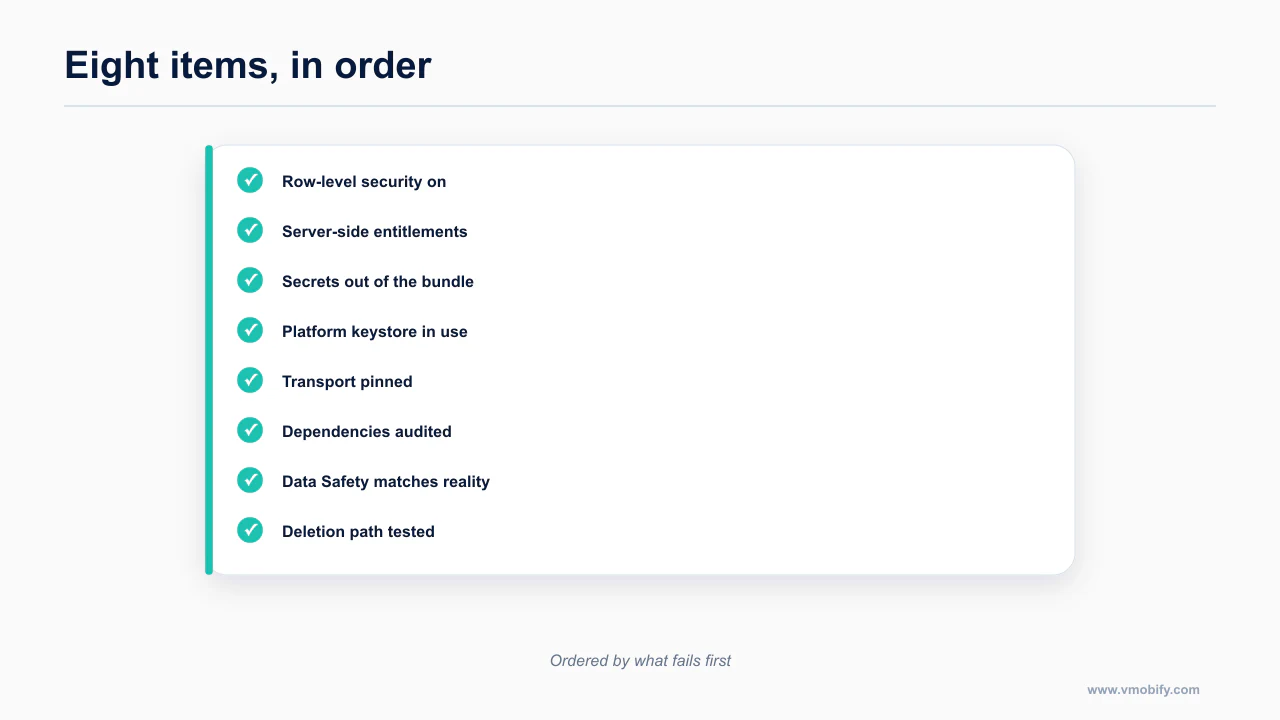
This is the whole post compressed. Work top to bottom; the order is roughly by blast radius.
- No secrets in the bundle, ever. Unzip your build and grep it. If a provider key is in there, rotate it today, then fix the architecture.
- All third-party API calls go through a server or edge function. The client calls you; you call the provider. Rate limit per user while you are there.
- RLS on every table, tested with the anon key. Not read — tested. Tables in the
publicschema are live endpoints by default. service_roleis server-only. Never in a client, never inapp.json, never in a repo. Check git history, not just the working tree.- RPC functions and storage buckets are policy-gated. Enumerate every RPC function and every bucket, and decide access explicitly for each.
- Tokens live in SecureStore, not AsyncStorage. Keychain on iOS, Keystore on Android. OWASP Mobile M1.
- Entitlements are validated server-side against a receipt.
if (isPro)in client code is a rendering hint, not enforcement. - Run Supabase Security Advisors before launch. And again after every week where an agent touched your schema.
The list maps onto the OWASP Mobile Top 10 if you want a standard reference to check it against.
How do you audit your repo for all eight?
A single prompt can check all eight against your repository, which is faster and more consistent than working the list by hand.
Paste this into Claude Code at the root of your project. It is deliberately read-only — it reports, it does not fix, because you want to see the full picture before anything starts changing.
Audit this mobile repository for the security failures common in AI-generated apps.
Report findings only. Do not modify any files.

Work through these checks in order and give me a table of findings with
file path, line number, severity (critical / high / medium), and the fix.

1. SECRETS IN THE CLIENT
   - Find every environment variable read in client code, including all
     EXPO_PUBLIC_* variables and everything under "extra" in app.json /
     app.config.js/ts.
   - Find hardcoded credential-shaped strings: anything matching sk-,
     Bearer, service_role, private_key, client_secret, or a JWT literal.
   - For each, tell me whether it is genuinely public (a URL, a project
     ref, a Supabase anon key) or a real secret that must move server-side.
   - Check .gitignore covers .env files, and check whether any .env file
     is tracked in git.

2. SUPABASE / BACKEND ACCESS
   - Locate every Supabase client initialisation and report which key it uses.
   - Flag any use of a service_role key outside a server or edge function
     directory as CRITICAL.
   - List every table referenced by client code, and tell me which ones you
     cannot find a corresponding RLS policy or migration for.
   - List every .rpc() call and every storage bucket referenced, and whether
     access control for each is visible anywhere in this repo.

3. LOCAL STORAGE
   - Find every AsyncStorage read and write.
   - Classify each stored value: credential (token, session, refresh token,
     API key, PII) or preference.
   - Flag every credential in AsyncStorage as HIGH and give me the
     expo-secure-store replacement for that specific call site.

4. ENTITLEMENTS AND PAYWALLS
   - Find every premium / pro / subscription gate in the code.
   - For each, determine whether the decision comes from a server response
     or from client-side state.
   - Flag any client-only entitlement check and describe what a user would
     have to do to bypass it.

5. NETWORK AND TRANSPORT
   - Find any plain http:// endpoint.
   - Find any disabled TLS or certificate validation, and any ATS exception
     in Info.plist or cleartext traffic permission in AndroidManifest.xml.

6. PERMISSIONS AND DISCLOSURE
   - List every permission declared in Info.plist and AndroidManifest.xml,
     and identify which code path actually uses each one.
   - Flag any permission with no corresponding usage as a review risk.
   - List every outbound call to a third-party AI or analytics provider that
     would require a Google Play Data Safety disclosure and prior consent.

7. LOGGING
   - Find any console.log, print or logging statement that could emit a
     token, key, email address or other personal data in a release build.

Finish with:
 - the three findings you would fix first, and why
 - anything you could not determine from this repo alone and would need
   me to check in the Supabase or Firebase dashboard
Two notes on using it. First, run it on a repo, not a directory of build output — it needs to see your config files and your git state. Second, whatever it reports about RLS is necessarily incomplete, because policies live in your database and not in your repo. The prompt tells you where to look; Supabase Security Advisors tells you what is actually true. Use both.
The checklist and reusable prompt are included above so you can copy them into your own repository and adapt the dashboard checks to your stack.
What should you do this week?
Start by reading your own bundle, then switch on row-level security, then work down the list.
If your app is live, in this order: unzip your build and grep it, rotate anything you find, then check RLS on every table. If your app is not live yet, do the same three things before it is, because rotating a key that has never shipped costs nothing and rotating one that has costs you a support thread and a forced update.
Then set up a second pair of eyes that runs on every change rather than once, which is the automated code review post.
The uncomfortable truth underneath all of this is that none of these failures are hard to understand. They are failures of default. The agent picked the option that made the feature work, and nobody told it that the code was going to be installed by strangers who can read it. Now you have. The wider release path is the Claude Code mobile pillar, and the store-side declarations are in the compliance checklist.
Two adjacent pieces are worth reading alongside this: account deletion with an active subscription, because deletion touches the same data paths, and the technical reasons users uninstall, because several of these defects surface as crashes long before they surface as breaches.
Frequently Asked Questions
Is it a problem that my Supabase anon key is in the app?+
No, that key is designed to be public. The problem is what sits behind it: if row-level security is off, the public key is a door rather than a doorbell.
How do I see what actually shipped in my app?+
Rename the .ipa or .apk to .zip and open it. Everything bundled at build time is there, which is the same view an attacker has.
Can I hide an API key in a mobile app?+
Not from a determined reader. Anything shipped in the binary can be extracted, so the answer is to make the key safe to expose rather than to hide it.
What is the single highest-return fix?+
Turning on row-level security and writing real policies. It closes the defect behind almost every documented incident in this category.
Does this apply if I only use Firebase?+
Yes, with different names. Firebase security rules play the role row-level security does in Supabase, and an unprotected collection fails the same way.
Is client-side entitlement checking ever acceptable?+
For user experience, yes. For access control or revenue, no. Validate entitlements server-side, because the client is a file the user controls.
How often should I re-run the audit?+
Whenever you add a dependency or a data path, and once before every submission. New SDKs change both the attack surface and your Data Safety declaration.
Sources
About the author
Amol Pomane — Founder, Vmobify
Amol leads Vmobify, a mobile app growth agency that has driven 30M+ downloads and ranked 54K+ keywords across 300+ apps since 2013. He writes about ASO, paid user acquisition, retention, and the operational reality of scaling mobile apps in India and global markets.