The Expo and Claude Code Setup That Prevents Most Problems
Most problems in agent-driven Expo work are setup problems. This is the scaffold to start from, the AGENTS.md template that carries your rules into every session, the eas.json profiles you need, and which MCP servers are worth their context cost.
On this page
- Which scaffold should you start from?
- Why does CLAUDE.md contain one line and AGENTS.md everything?
- What goes in the MOBILE-AGENTS.md template?
- How should eas.json be configured?
- Which two prerequisites does nobody mention?
- Which MCP servers should you install, and which should you skip?
- What does a correctly set-up session look like?
- What does this setup not solve?
- Frequently Asked Questions
Which scaffold should you start from?
Starting from the right scaffold removes a class of problems you would otherwise spend the first week describing to an agent.
The primary reference for this is Expo agents documentation, Claude — worth reading in full rather than taking a summary of it, because the details change more often than the shape of the advice does.
Run this:
npx create-expo-app@latestThat is the agent-ready starter. Not because it has more in it, but because of what it puts in the repository: a CLAUDE.md containing just @AGENTS.md, and a .claude/settings.json with the Expo plugin enabled.
A correction worth making here, because it circulates widely: Infinite Red's Ignite ships no agent files at all. AGENTS.md, CLAUDE.md and .claude/settings.json all 404 in that repository. It is an excellent React Native boilerplate and it is not agent-ready. If you start there, you write all of this yourself.
Then install the Expo plugin, which is the only mobile plugin in Anthropic's official marketplace: If you have not decided the stack yet, what agents are actually good at covers that decision first.
claude plugin install expo@claude-plugins-officialWhy does CLAUDE.md contain one line and AGENTS.md everything?
Splitting them keeps one canonical rules file and avoids two documents drifting apart, which is the failure mode when both carry content.
The first time you see it, the indirection looks pointless. CLAUDE.md holds a single import:
@AGENTS.mdAnd AGENTS.md holds all the actual instructions. Why not just put the instructions in CLAUDE.md?
Because AGENTS.md is the cross-tool convention and CLAUDE.md is not. Expo's own guidance is explicit: add project-level instructions to AGENTS.md, not CLAUDE.md, so they stay in one place. Cursor, Copilot, Gemini CLI, Codex and Claude Code do not agree on a filename, but they increasingly agree on AGENTS.md. Putting your rules there and pointing every tool-specific file at it means one source of truth instead of four drifting copies.
The practical test: when a teammate opens the repository in a different agent next month, do your safe-area rules apply? With the import pattern, yes. With rules living in CLAUDE.md, no.
Keep CLAUDE.md at one line. Put everything in AGENTS.md. If you later need something genuinely Claude-specific — a hook, a permission setting — that goes in .claude/settings.json, not in CLAUDE.md.
What goes in the MOBILE-AGENTS.md template?
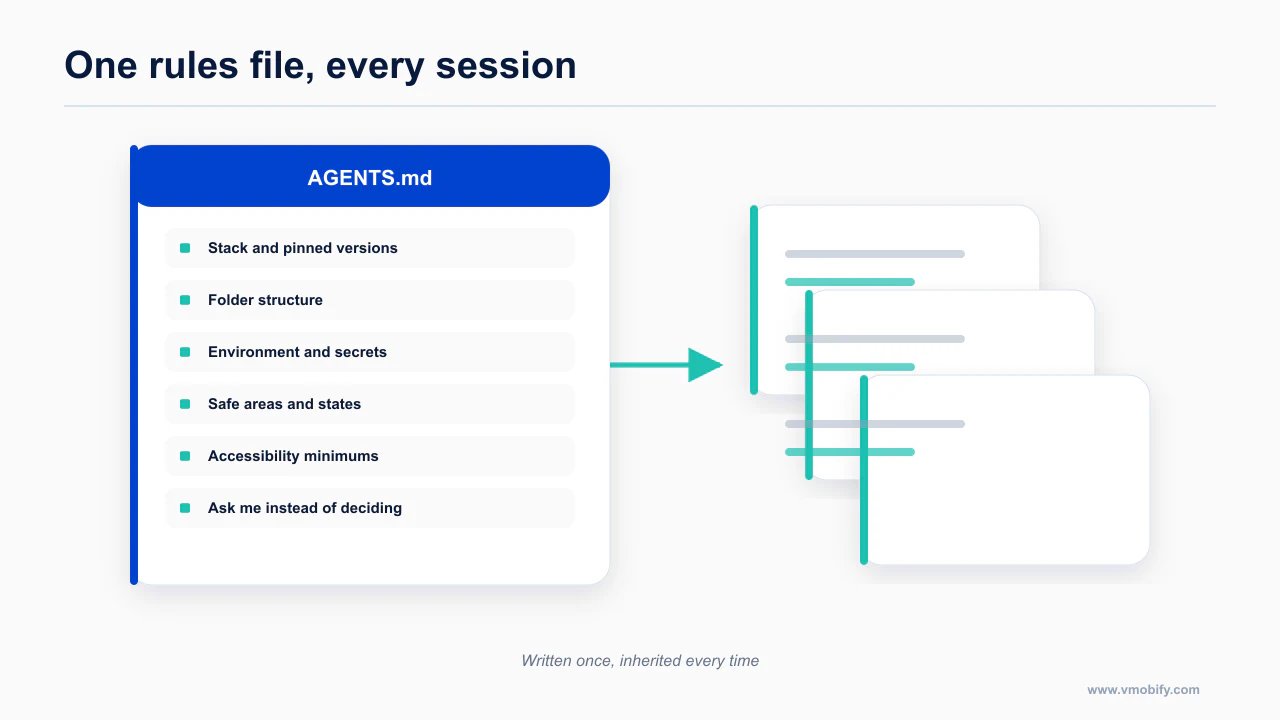
The template is the whole point of the setup: stack, structure, secrets, layout rules, states, accessibility floors and the things the agent must ask about.
The documentation worth reading before you act on this is Expo MCP server — worth reading in full rather than taking a summary of it, because the details change more often than the shape of the advice does.
This is the asset. Paste it into AGENTS.md, replace the bracketed values with your project's real ones, and delete the sections that do not apply.
It is opinionated on purpose. A file that says "use a state library" teaches the agent nothing; a file that says "Zustand, stores live in stores/, no Redux" ends the argument. The rules below are drawn from the failures that actually recur in agent-written React Native, and each one exists because agents get it wrong by default.
# AGENTS.md

Project instructions for AI coding agents. Read this before writing any code.
If a rule here conflicts with a general React Native pattern you know, this file wins.

## Stack (pinned — do not upgrade without being asked)

- **Expo SDK:** 56. Do not use APIs from a newer SDK. Do not run `expo upgrade`.
- **Router:** Expo Router (file-based). All routes live in `app/`.
  Do not add React Navigation directly; Expo Router already wraps it.
- **State:** Zustand. Stores live in `stores/`. Server state is TanStack Query.
  Do not add Redux, MobX, Jotai or Recoil. Do not put server data in Zustand.
- **Styling:** NativeWind v4 (Tailwind class strings), components from
  React Native Reusables. Do not write raw `StyleSheet.create` for new components
  unless a class string genuinely cannot express it.
- **Native UI:** `@expo/ui` for sheets, pickers, switches and any surface that
  should pick up platform chrome automatically. Its props are easy to hallucinate —
  check the Expo docs before writing them.
- **Lists:** FlashList. See the list rules below.
- **Keyboard:** `react-native-keyboard-controller`. Do not use `KeyboardAvoidingView`.
- **Secure storage:** `expo-secure-store`. Never `AsyncStorage` for tokens.

Always install with `npx expo install <package>`, never plain `npm install`,
so the version matches the SDK.

## Folder structure

```
app/          Expo Router routes only. One file = one screen or layout.
components/   Reusable presentational components. No data fetching in here.
hooks/        Custom hooks. One hook per file, named use*.
stores/       Zustand stores. One domain per store.
services/     API clients, SDK wrappers, anything that talks to the network.
constants/    Colors, spacing, typography, config values, route names.
```

Rules:

- Screens compose; they do not implement. If a screen file passes 200 lines,
  extract to `components/`.
- Nothing in `components/` imports from `app/`.
- Nothing outside `services/` calls `fetch` directly.

## Environment variables and secrets

- Read config through `expo-constants`: values go in `app.config.ts` under
  `extra`, and are read as `Constants.expoConfig?.extra?.<key>`.
- Local values live in `.env.local`, which is **gitignored**. Never commit it.
- **Anything in the JS bundle is extractable.** An `.ipa` and an `.apk` are zip
  files. `EXPO_PUBLIC_*` variables and `app.json` `extra` values can be read out
  of a shipped build by anyone.
- Therefore: **no private API key ever goes in the app.** No OpenAI key, no
  Stripe secret key, no `service_role` key, no admin token. If a feature needs
  one, it goes behind a server route or edge function and the app calls that.
- Publishable and anon keys are fine in the bundle *only* when the server
  enforces access on its own (row-level security enabled and tested).

## Safe areas — the rule agents break most

- Use **`react-native-safe-area-context`**: wrap the app in `SafeAreaProvider`
  and read insets with `useSafeAreaInsets()`.
- **Do not use React Native's built-in `SafeAreaView`.** It is iOS-only and
  ignores Android navigation bars. Importing it from `react-native` is a bug.
- Never hardcode top or bottom padding to clear a notch, status bar, home
  indicator or gesture bar. Always use the inset value.
- On scroll views, apply bottom spacing with `contentContainerStyle` padding or
  content insets — not `padding` on the scroll view itself, which clips the
  scroll indicators.
- Assume edge-to-edge on Android. It is enforced from API 36 and cannot be
  opted out of; the app must consume insets itself.

## Orientation

- Portrait only unless told otherwise; set it in `app.config.ts`.
- Do not rely on an orientation lock on large screens. Android ignores
  `screenOrientation`, `resizableActivity` and aspect-ratio locks on `sw600dp`
  and above from API 36. Layouts must survive being rotated anyway.
- Never assume a fixed screen width. No magic numbers derived from a 390pt
  iPhone.

## Animation and reduce-motion

- Reanimated for anything that animates. Gesture Handler for gestures.
- **Every animation needs a reduce-motion branch.** Read
  `AccessibilityInfo.isReduceMotionEnabled()` (and subscribe to changes) and
  degrade to an instant state change or a cross-fade.
- No parallax, no auto-playing motion, no looping animation without that branch.
- Do not animate layout properties on the JS thread. Worklets or nothing.

## Lists

- Use **FlashList**, not `ScrollView` with `.map()`, for any list that can
  exceed one screen.
- FlashList v2 removed `estimatedItemSize` — do not pass it.
  `maintainVisibleContentPosition` is on by default; do not re-enable it.
- Every item needs a **stable `keyExtractor`**. Never use the array index.
- Row components are memoized and take primitive props where possible.
- Paginate. Never fetch an unbounded collection into a list.

## The five UI states — every screen, every time

A screen is not done with `loading` and `success`. Implement all five:

1. **Loading** — a skeleton that matches the final layout, not a centered spinner.
2. **Empty** — explains what would be here and gives the action that creates it.
3. **Error** — states what failed and has a retry control that actually retries.
4. **Offline** — distinct from error. Say it is offline, keep the UI usable.
5. **Stale but cached** — show the cached data with a quiet freshness indicator
   rather than blanking the screen.

Writes are optimistic with a queue, and roll back visibly on failure.

## Accessibility minimums (non-negotiable)

- Touch targets: **44×44 pt minimum on iOS**, **48×48 dp minimum on Android**.
  If the visual element is smaller, expand the hit area — do not ship the
  smaller target.
- Every interactive element has an `accessibilityLabel` and an
  `accessibilityRole`. State goes in `accessibilityState`, not in the label.
- Decorative images are hidden from assistive technology.
- Text containers have no fixed `height`. iOS Body type scales from 17pt to
  53pt across Dynamic Type, so fixed heights clip at accessibility sizes. Use
  intrinsic sizing and let rows stack instead of truncate.
- Contrast: 4.5:1 for body text, 3:1 for large text and UI components.
- Run `eslint-plugin-react-native-a11y` (preset `basic`, plus `ios` and
  `android`) and fix what it reports before saying a screen is done.

## Never do this

- Never use `SafeAreaView` from `react-native`.
- Never use `KeyboardAvoidingView`.
- Never hardcode inset, notch or status-bar padding.
- Never render a long list with `.map()`.
- Never use an array index as a list key.
- Never put a private API key, secret or `service_role` key in the app.
- Never store auth tokens in `AsyncStorage`.
- Never gate a paid feature with a client-side `if (isPro)` check. Entitlements
  are validated server-side against a receipt.
- Never add a dependency without `npx expo install`.
- Never change the app slug or bundle identifier — they are immutable after the
  first build.
- Never add a full-width, edge-to-edge button on iOS; inset it from the screen
  edges.
- Never ship an in-app light/dark toggle. Follow the system appearance.
- Never write an animation without a reduce-motion branch.
- Never claim a screen is finished with only loading and success states.

## Before you tell me something is done

- It builds.
- All five states are implemented and reachable.
- Insets are respected on a device with a notch and on Android with gesture
  navigation.
- The accessibility lint passes.
- No new secret entered the repository.
Two notes on using it. First, delete what does not apply — a file full of rules for libraries you do not use is noise the agent has to read past. Second, treat it as living: every time the agent does something you have to correct twice, that correction becomes a line in this file.
How should eas.json be configured?
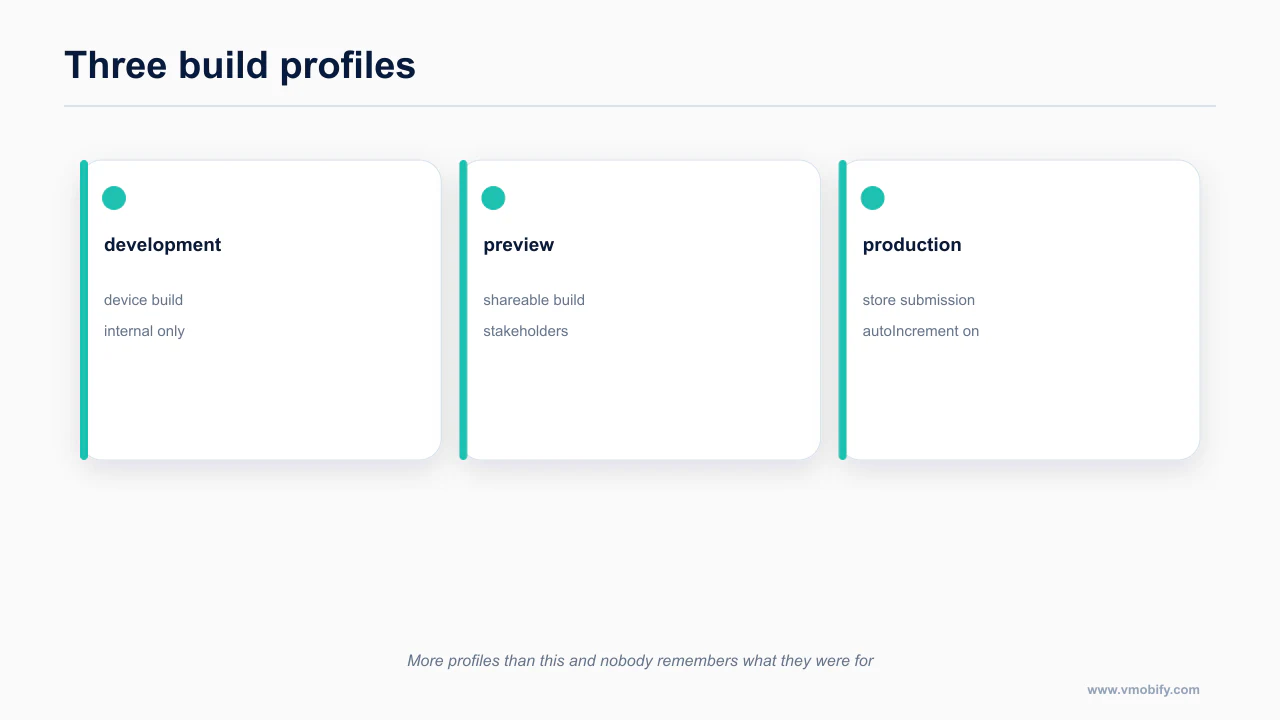
Three profiles and an autoIncrement setting cover the realistic build cases without inviting an accidental production submission.
This is documented directly in expo/skills — worth reading in full rather than taking a summary of it, because the details change more often than the shape of the advice does.
The build config is the other file worth getting right on day one, because the free tier is 15 iOS and 15 Android builds per month, one concurrency, with a 45-minute timeout. That is genuinely enough for a solo first launch, and vibecoders burn through it fast on failed builds.
Three profiles cover almost everything. The following is my construction from the documented EAS CLI behaviour, not an Expo-published sample — check the current schema in Expo's docs before you rely on it.
{
  "cli": { "version": ">= 5.0.0" },
  "build": {
    "development": {
      "developmentClient": true,
      "distribution": "internal"
    },
    "preview": {
      "distribution": "internal",
      "autoIncrement": true
    },
    "production": {
      "autoIncrement": true
    }
  },
  "submit": {
    "production": {}
  }
}
development gives you a development build with the dev client — the thing you install once and then reload JavaScript into for weeks without rebuilding. preview is the internal-distribution build you send to testers. production is what goes to the stores.
autoIncrement on the two non-development profiles is the setting that stops the most tedious failure in mobile release work: a rejected upload because the build number already exists.
Tell the agent it may run eas build, eas build:list, eas build:download, eas submit and eas update, and that it should use --non-interactive --no-wait with --json when it needs machine-readable output. That combination is what makes EAS agent-drivable at all.
Which two prerequisites does nobody mention?
You must complete one successful eas build yourself before the agent can do anything useful with EAS. That first run is what creates the projectId and provisions credentials. Until it exists, every agent-initiated build fails in a way that looks like a configuration bug and is actually a missing setup step.
npm i -g eas-cliRun one build by hand. Then hand the keys over.
The slug and bundle identifier are immutable after the first build. Not "hard to change" — immutable. Decide the app slug, the iOS bundle identifier and the Android package name before you build anything, write them into app.config.ts, and put them in AGENTS.md under "never do this" so the agent does not helpfully rename them during a refactor.
While you are at it: signing, provisioning profiles, keystores, Apple Developer enrollment and D-U-N-S registration are all still manual. No agent gets past them. Budget for that separately from build time.
Which MCP servers should you install, and which should you skip?
Install the ones that close a loop you actually run, and skip the ones whose tool definitions cost more than the capability is worth.
The source that settles this is mobile-next/mobile-mcp — worth reading in full rather than taking a summary of it, because the details change more often than the shape of the advice does.
For the authoritative version, see vercel-labs/agent-skills — worth reading in full rather than taking a summary of it, because the details change more often than the shape of the advice does.
Every MCP server injects its tool definitions into context on every turn. Skills load on demand; MCP tools do not. So the question is not "is this useful" but "is this useful enough to pay rent."
Install these three:
claude mcp add --transport http expo https://mcp.expo.dev/mcpRun /mcp afterwards to complete OAuth. Thirty-plus tools including add_library (which wraps npx expo install, so versions come out right), build_run, build_submit, testflight_crashes, and local screenshot, tap and find-by-testID. Three limits to know: documentation search needs a paid EAS plan, it holds one dev-server connection at a time, and iOS local automation is macOS simulators only, no physical devices, SDK 54 and up.
claude mcp add mobile-mcp -- npx -y @mobilenext/mobile-mcp@latestCommunity-built, platform-agnostic, and the most reliable Android path from Claude Code. Node 20 or newer. Real iOS devices need go-ios plus WebDriverAgent plus a tunnel, which is a heavier setup than it sounds.
claude mcp add --scope project --transport http supabase "https://mcp.supabase.com/mcp?read_only=true&features=docs,database,debugging,development,functions"If you use Supabase. Note read_only=true and --scope project. Supabase's own documentation warns that production connections carry security risk, and an agent with write access to your production database has no undo.
Skip these at setup time: anything you are not using this week. Firebase without --only crashlytics exposes an enormous tool list. Appium and Maestro are worth adding when you start writing device tests, not before. Analytics and ads servers belong in a growth session, not a build session — and one of them, the flat TikTok Ads server, exposes roughly 400 tools and will consume your context window before the agent reads a single file.
Skills are the cheap alternative. For React Native rules, install the vercel-labs set — 33 rules across 8 sections, and yes, 33, not the 16 that circulates: The full directory is every skill, plugin and MCP for mobile.
npx skills add vercel-labs/agent-skillsWhat does a correctly set-up session look like?
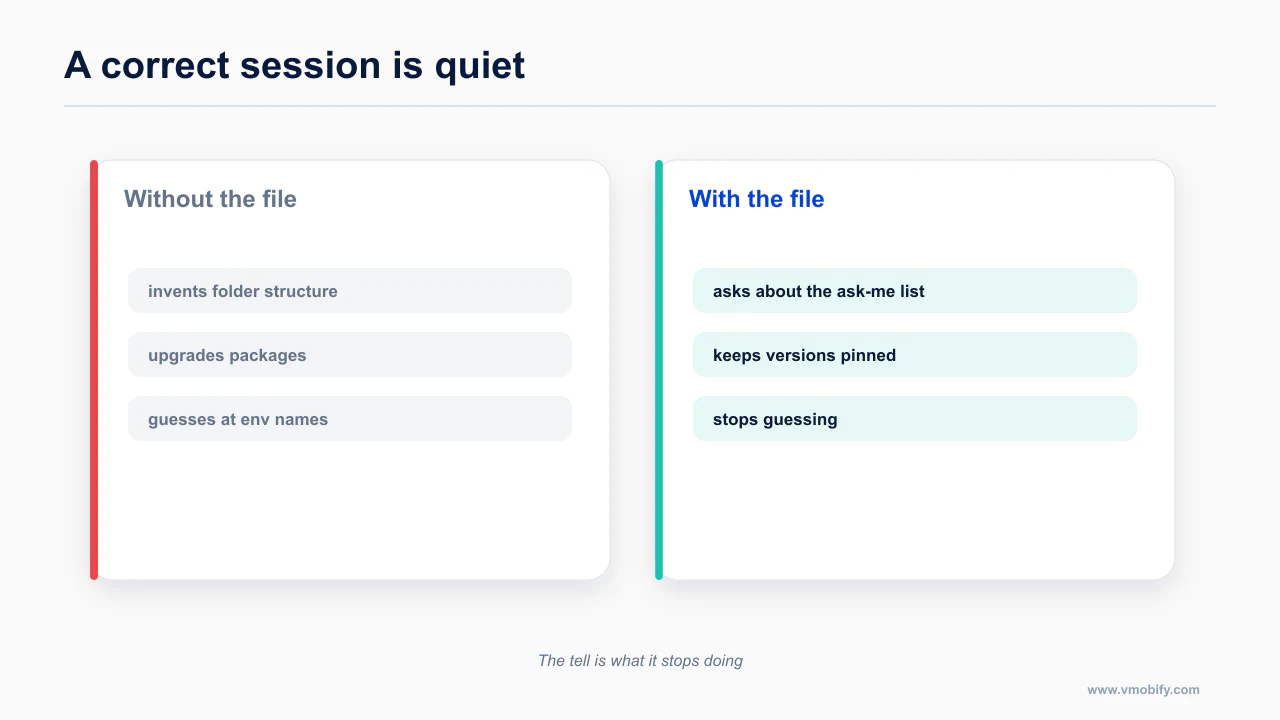
A correct session is quiet: the agent asks about the things you told it to ask about and stops guessing at the rest.
You can check the setup in about a minute.
Ask the agent to add a package. It should reach for npx expo install, not npm install. If it uses npm, the Expo plugin is not loaded or AGENTS.md is not being read.
Ask it to build a screen with a list and a header. It should import useSafeAreaInsets from react-native-safe-area-context, use FlashList with a real keyExtractor, and give you all five states without being asked. If you get a ScrollView with .map() and a hardcoded paddingTop: 44, your AGENTS.md is not in context — check that CLAUDE.md contains the @AGENTS.md import and that you are running from the project root.
Ask it what SDK the project is on. It should answer from the file, not guess.
Run /mcp. You should see three servers, not eleven.
Then open the app on a device with gesture navigation and rotate it. That is the test the file is really for.
The tell that setup is working is negative rather than positive: the agent stops doing things. It stops inventing folder structure, stops upgrading packages, stops guessing at your environment variable names. If it is still doing any of those, the rules file is not being read, and the usual cause is that it lives somewhere the agent does not look.
What does this setup not solve?
Setup removes friction, not judgement, and it does none of the store work.
Setup removes the recurring mistakes. It does not remove the cliffs. The first native module still forces you off Expo Go and into a development build, which is the moment most vibecoded projects stall: Expo Go is not your app.
And the highest-leverage next step after AGENTS.md is giving the agent a way to see what it built, rather than trusting the screenshot in its head: driving simulators and real devices from Claude Code.
The design rules in the template above are the compressed version. The reasoning behind each one, with the numbers, is in the mobile UI/UX rules AI agents get wrong. The build boundary you will meet next is the development build cliff, and the whole path is the mobile shipping pillar.
It also does not decide what to build. A well-configured project makes the agent reliable at executing decisions; it has no opinion about whether the decisions are good ones, and a fast implementation of the wrong screen is still the wrong screen.
Frequently Asked Questions
Why not put the rules directly in CLAUDE.md?+
You can, but keeping one canonical file avoids two documents drifting apart. A one-line CLAUDE.md pointing at AGENTS.md means there is only ever one place to update.
Should I pin my dependency versions?+
Yes, and say so in the rules file. Silent upgrades are one of the most common causes of a build that worked yesterday and does not today.
How many eas.json profiles do I need?+
Three covers it: development, preview and production. More than that tends to produce profiles nobody remembers the purpose of.
Which MCP servers are worth it for Expo?+
The ones that close a loop you actually run — build, run and observe. Anything you would not use weekly costs context on every session for no return.
What is autoIncrement for?+
It raises the build number automatically, which prevents the collisions that cause a submission to be rejected before review even starts.
Does this setup work for bare React Native?+
Mostly. The rules file and the review discipline transfer; the Expo-specific parts, including eas.json and the Expo MCP server, do not.
How do I know the setup is working?+
The agent asks about the things you listed as ask-me items and stops guessing at them. If it is still inventing folder structure or upgrading packages, the file is not being read.
Sources
About the author
Amol Pomane — Founder, Vmobify
Amol leads Vmobify, a mobile app growth agency that has driven 30M+ downloads and ranked 54K+ keywords across 300+ apps since 2013. He writes about ASO, paid user acquisition, retention, and the operational reality of scaling mobile apps in India and global markets.