Paywall A/B Testing: What to Test, in What Order
Most paywall tests never produce a decision — the sample was too small, the metric was the wrong one, or the winner shifted users onto a cheaper plan and quietly cost money. This is the test catalogue and the method: what to test in what order, how much traffic each test class actually needs, and which mistakes void the result before you read it.
On this page
- Why do most paywall tests produce no usable answer?
- What should you test first, and why is it almost never the price?
- How many users do you actually need for a paywall test?
- Which paywall elements move conversion most?
- How do you test price without damaging trust or breaching policy?
- Why does trial-to-paid matter more than the conversion you are testing?
- How do you stop a winning test from losing money?
- Which testing mistakes invalidate the result entirely?
- Frequently Asked Questions
Why do most paywall tests produce no usable answer?
Most paywall tests fail for one of three structural reasons — the sample was never large enough to detect the effect being sought, the users were assigned at the wrong moment, or the metric that was measured is not the metric that determines revenue. None of those are failures of the paywall. They are failures of test design, and they are all decided before a single user sees a variant.
The first failure is arithmetic. A test that compares two versions of a paywall is a comparison of two proportions, and the number of observations you need per variant rises roughly with the inverse square of the difference you want to detect. Halving the effect you are chasing quadruples the traffic bill. A team that wants to know whether a new headline lifted conversion from 3.0% to 3.2% is asking a question that needs tens of thousands of paywall views per arm. They usually run it for two weeks on a few thousand, see a difference, and ship it. The difference was noise.
The second failure is the assignment point. If you bucket users at install, everyone who never reaches the paywall lands in your denominator and contributes nothing but variance. Depending on your funnel, that can be the majority of the cohort. Assignment belongs at the moment the paywall is about to render, and it has to be sticky, so that a user who reopens the app, reinstalls, or switches devices does not slide into the other arm and become uncountable.
The third failure is the one this whole post keeps returning to. Paywall conversion is a leading indicator of revenue, not a measure of it. A variant can raise the proportion of people who start a subscription while lowering the amount of money the average paywall view eventually produces — by moving purchases onto a cheaper plan, by attracting people who cancel inside the trial, or by generating refunds that land weeks later.
We have seen teams ship three consecutive conversion wins across a quarter and finish the quarter with lower subscription revenue than they started with.
Across the 300+ apps we have managed since 2013, the pattern is consistent: teams with modest traffic and disciplined test design out-earn teams with large traffic and undisciplined test design, because the disciplined team spends its limited number of experiments on questions that are answerable. This post is about deciding which questions those are. For the design decisions themselves — placement, hard versus soft, what a strong paywall actually looks like — our paywall optimisation benchmarks cover that ground, and for choosing the platform you run tests on, see our comparison of A/B testing tools for apps. What follows is the catalogue and the method.
What should you test first, and why is it almost never the price?
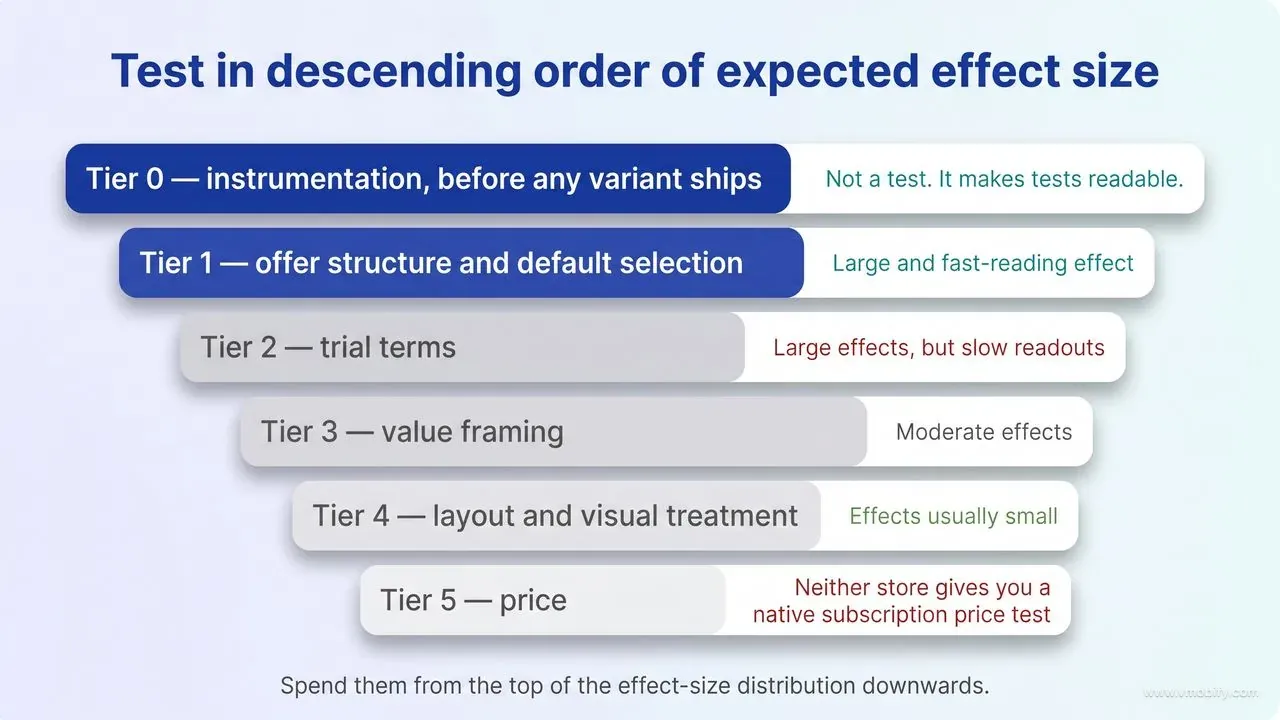
Test in descending order of expected effect size, because effect size determines how much traffic each question costs — which puts offer structure and default plan selection first, trial terms second, value framing third, and price close to last. Price feels like the biggest lever, and in revenue terms it often is, but it is the most constrained and the slowest to read.
The ordering principle is not aesthetic. Every test consumes a fixed budget of traffic and calendar time, and you only get so many per year. Spend them from the top of the effect-size distribution downwards, because a test you cannot power is not a cheap test — it is a test that costs the same traffic and returns nothing.
A workable order for a subscription app:
- Tier 0 — instrumentation, before any variant ships. Assignment at paywall view, sticky across sessions and reinstalls, one agreed definition of the conversion event, and a revenue metric that can be read at a fixed number of days after exposure. This is not a test. It is the thing that makes tests readable, and skipping it is why so many teams have a year of experiment logs and no conclusions.
- Tier 1 — offer structure and default selection. How many plans you present, which one is preselected, and whether the annual plan is expressed as a total or a per-month equivalent. These routinely move conversion and plan mix by amounts large enough for a mid-sized app to detect in a fortnight.
- Tier 2 — trial terms. Whether there is a trial, how long it is, and whether it is opt-in or opt-out. Large effects, but slow readouts, because the money arrives after the trial ends.
- Tier 3 — value framing. The headline, the benefit list, and what is shown above the fold. Moderate effects, and the class of test where copy discipline matters more than volume of ideas.
- Tier 4 — layout and visual treatment. Imagery, spacing, badge placement, button styling. Real effects exist here but they are usually small, which makes them expensive to measure. Most apps should not be running these.
- Tier 5 — price. Last, for the reasons in the pricing section below: neither store gives you a native subscription price test, the change is constrained by policy and by notification rules, and a price move alters the denominator of every other metric you are tracking.
Two exceptions are worth naming. If your paywall has an outright defect — a plan that does not render its localised price, a purchase button below the fold on small devices, a trial whose terms are not stated — fix it rather than testing it. Broken is not a variant. And if you are pre-product-market-fit with a few hundred paywall views a week, do not run tests at all. Watch session recordings, read cancellation reasons, and ship the obvious fixes. Experimentation is a scale tool, and pretending otherwise burns the only asset a small app has: time.
In our portfolio the single highest-yield first test, for apps that have never run one, is almost always default plan selection. It is one line of configuration, it produces a large and fast-reading effect on plan mix, and it immediately teaches the team the lesson that the rest of this post is about — that the variant which converts more people frequently makes less money.
How many users do you actually need for a paywall test?
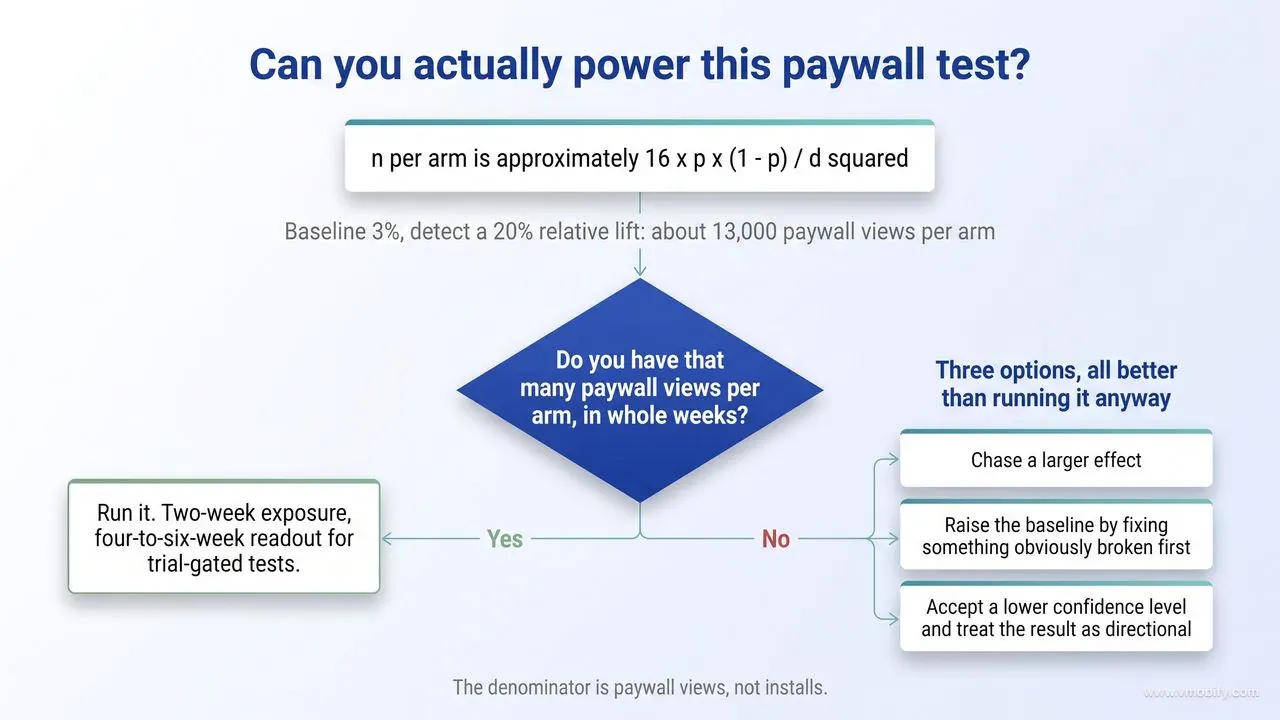
Work backwards from the smallest effect worth acting on: for a two-arm test at conventional settings, you need roughly sixteen times the baseline variance divided by the square of the absolute difference you want to detect, per arm — which for a 3% baseline chasing a 20% relative lift is about 13,000 paywall views per variant. Doing that arithmetic before the test is the difference between an experiment and a coin toss.
The rule of thumb is n per arm is approximately 16 × p × (1 − p) ÷ d², where p is your baseline conversion rate and d is the absolute improvement you want to be able to detect. It is an approximation for the standard two-proportion comparison at 80% power and 95% two-sided confidence, and it is close enough for planning. Worked through:
- Baseline 3%, detect a 20% relative lift (3.0% to 3.6%, so d = 0.006): about 13,000 paywall views per arm, roughly 26,000 in total.
- Baseline 3%, detect a 50% relative lift (3.0% to 4.5%): about 2,100 per arm. Big effects are cheap to detect.
- Baseline 3%, detect a 10% relative lift (3.0% to 3.3%): about 52,000 per arm. Halving the target effect quadrupled the cost.
- Baseline 10%, detect a 20% relative lift (10% to 12%): about 3,600 per arm. Higher baselines are cheaper to test on, which is one under-appreciated advantage of a hard paywall.
Note the denominator: paywall views, not installs. If a third of your new users ever reach the paywall, triple every figure above to get the install requirement. Measure your own view rate rather than assuming one, and instrument that step before you plan anything, because it varies enormously with where the paywall sits.
The other input is the minimum detectable effect, and the honest way to set it is to ask what difference would change your decision. Google Play's own tooling makes this explicit: in Play Console price experiments, the default confidence level is 90% and adjustable between 70% and 99% at setup, and the default minimum detectable effect is 30%, configurable in 5% increments from 5% to 50% (parameters as of August 2026). A 30% default is not timidity on Google's part — it is a recognition that most apps do not have the traffic to resolve anything smaller, and that the alternative to a coarse answer is no answer.
Two practical constraints on duration. Run in whole weeks, because app usage is strongly weekly and a test that starts on a Tuesday and ends on a Sunday has weighted its arms differently. And separate the exposure window from the readout window: if you are selling an annual plan behind a seven-day trial, the last user exposed needs at least a week before their outcome exists, plus a refund window on top. In practice we plan a two-week exposure and a four-to-six-week readout for trial-gated tests, and we tell teams up front that the number they see on day fourteen is not the number they will act on.
If your maths says you cannot power the test, you have three options and all of them are better than running it anyway: chase a larger effect, raise the baseline by fixing something obviously broken first, or accept a lower confidence level with eyes open and treat the result as directional rather than decisive.
Which paywall elements move conversion most?
The elements that reliably move conversion are the ones that change what is being offered or what is pre-chosen — plan count, default selection, price framing, trial terms and the specificity of the value statement — while the elements that feel most testable, such as colour, imagery and micro-copy, produce effects too small for most apps to measure. The catalogue below is organised by what the variant actually is and what can go wrong in the reading, not by which one we think should win.
Plan count and arrangement. The variant is the number of options presented and their order. Effect class: large. Watch the secondary metric closely — reducing options often raises conversion while concentrating purchases on whichever plan survives, so plan mix must be a reported outcome, not a footnote.
Default selection. The variant is which plan is preselected when the paywall renders. Effect class: large on mix, moderate on overall conversion. This is the cheapest large-effect test in the catalogue and the one most likely to demonstrate the conversion-versus-revenue divergence in your own data.
Price framing without a price change. The variant is how the same price is expressed — annual shown as a total against annual shown as its monthly equivalent, or with the saving stated as a percentage against as an absolute amount. Effect class: moderate to large. This is the closest you can get to a pricing test without touching product configuration, and it is where teams with limited traffic should look before they consider real price changes.
Trial presence and length. The variant is no trial against a trial, or one trial duration against another. Effect class: large on paywall conversion and large on trial-to-paid, frequently in opposite directions. RevenueCat's 2026 State of Subscription Apps analysis, drawn from more than 115,000 apps on their platform, reports trials of 17 to 32 days converting to paid at a median 42.5% against 25.5% for trials shorter than four days (figures as published and checked in August 2026) — their platform data, not a universal law, but a strong argument for treating trial length as a revenue test rather than a conversion test.
Value statement specificity. The variant is a generic benefit list against one that names the concrete thing the user gets. Effect class: moderate. It is also the only test class in the catalogue with a policy dimension, because guideline 3.1.2(c) says that before asking a customer to subscribe you should clearly describe what the user will get for the price. That is a should, not a must, and the removal-level obligation lives in the separate clause on tricking users into a subscription under false pretenses or bait-and-switch practices. A vaguer variant is therefore not automatically a rejection — but the vaguer it gets, the closer it drifts to the clause that is enforced by removal rather than by feedback.
Layout, imagery and styling. Effect class: small. Genuine effects exist, and at very large scale they are worth harvesting, but for an app doing a few thousand paywall views a week these tests consume the same traffic as a Tier 1 test and return a result you cannot distinguish from zero. Say no to them, and spend the traffic upstream.
One structural note that changes what is testable on iOS, with a caveat that disqualifies a large share of the audience for this post. Apple introduced monthly subscriptions with a twelve-month commitment at WWDC26, alongside forthcoming bundles and suites, and its StoreKit documentation for the feature sets out three conditions that, as of August 2026, all have to hold at once. You must build against the Xcode 26.5 SDK or later. The customer must be on a device running iOS, iPadOS, macOS, tvOS or visionOS 26.4 or later. And the plan can be deployed worldwide except in the United States and Singapore. The last condition is the one that decides whether this test is on your roadmap at all: a subscription app whose revenue is concentrated in the US cannot run it today, however attractive the mechanic looks, and the device-version line on its own is only half the requirement.
Where it is available, treat it as a new offer-architecture lever rather than a new price point, and put it in Tier 1 of the catalogue: the variant is the billing plan presented, the commitment is disclosed by the system rather than by your paywall copy, and the metric that matters is revenue per paywall view over a full year rather than the purchase rate on the day. Because the customer is committing to twelve payments, the trial-to-paid and refund terms in the revenue equation behave differently from a standard monthly plan, so read it against annual, not against monthly.
How do you test price without damaging trust or breaching policy?
Neither store gives you a native subscription price A/B test, so price testing means configuring several products at different prices and assigning users yourself — which is permitted, but sits inside real constraints on disclosure, on changing prices for existing subscribers, and on how quickly a price change can be reversed. Understanding those constraints before you design the test is what separates a price experiment from a support incident.
Start with what the platforms actually provide. Google Play does have a first-party price experiment tool, but its scope is narrow: Play Console price experiments apply to active one-time products only. Subscriptions are not eligible. Experiments run at app level, split the selected audience equally across control and variants, cap at six months, and revert prices to the original after fourteen days of reaching statistical significance unless you apply the winner (scope and limits as of August 2026). App Store Connect has no equivalent price-testing feature at all — Apple's pricing tooling is for setting and scheduling prices, not for splitting them.
So subscription price testing is a client-side exercise: create the products, fetch them from StoreKit or Play Billing, assign the user to one, and render the localised price the store returns rather than any figure hardcoded in your app. That last point is not pedantry. Prices differ by storefront, taxes and foreign exchange move them, and a paywall showing a stale number is a disclosure problem rather than a formatting one.
The policy boundaries are clear enough to design around. Apple's App Review Guidelines state that before asking a customer to subscribe you should clearly describe what the user will get for the price, warn that apps which trick users into purchasing a subscription under false pretenses or engage in bait-and-switch practices will be removed, and note that while pricing is up to the developer, Apple will reject in-app purchase items that are clear rip-offs. Google Play's Payments policy carries the same obligation in fewer words, requiring developers to clearly and accurately inform users about the terms and pricing of their app or any in-app features or subscriptions offered for purchase, and adding the line that matters most for a price test: in-app pricing must match the pricing displayed in the user-facing Play billing interface. That is the policy basis for rendering the price the store hands back rather than one you formatted yourself. Neither store's policy forbids showing different prices to different cohorts; what both forbid is a paywall whose stated terms do not match what is charged.
Store policy is not the only law that applies, though, and this is where a lot of otherwise careful test plans stop reading. Consumer-protection regimes outside the stores impose their own disclosure duties on differentiated and personalised pricing, and they vary by jurisdiction — which is directly relevant if your test spans the EU, or India and other price-sensitive markets where you are most tempted to vary price. Treat "is this allowed?" as two separate questions with two separate owners: App Review and Play policy answer the store question, and your legal advisers answer the consumer-law one. Nothing in this post is an answer to the second.
The trust question is separate from the policy question and is mostly about visibility. Two users in the same WhatsApp group comparing screenshots is a worse outcome than any statistical error, so we run price variation across new-user cohorts and, where relevant, across storefronts — never across a tightly connected community, and never on a user who has already seen the other price. Sticky assignment matters more here than anywhere else in the catalogue.
Then there is reversibility, which is asymmetric on both stores and catches teams out. Existing subscribers are shielded from a price increase, but by different mechanisms and with a different default. Google Play keeps them on legacy price cohorts until you deliberately migrate them, so the protection is automatic. App Store Connect instead offers preservation as an option you choose at the time of the change, with expired subscribers able to resubscribe at the preserved price within 60 days (as of August 2026). That is the good news. The bad news, and the place where the two stores genuinely diverge, is what happens to a price decrease. On Apple, a decrease cannot be walled off at all: App Store Connect states that if you decrease the price of an auto-renewable subscription, existing subscriptions will automatically renew at the lower price, and you do not have the option to preserve the higher price for existing subscribers. On Google Play the default is the opposite — existing subscribers stay in their legacy price cohort and keep paying their original base plan price regardless of the direction of the change, and they only move to the lower price if you deliberately end that cohort, at which point Play emails them and they begin paying the lower price at their next payment.
So a lower price you regret is a one-way door on iOS and a reversible decision on Android, which is a real argument for running the downward half of a price test on Android first.
Raising prices later has its own timetable, and Apple's consent rule is routinely misread — usually by splitting one compound condition into two independent ones. As of August 2026, App Store Connect requires the subscriber's explicit consent before the increase can take effect if any of three things is true: the subscriber is in a region that mandates consent for any price change at all (Apple names Austria, Germany, Poland and Korea among them); the subscriber has already had an increase on that subscription within the previous 12 months; or the increase is more than 50% of the current price and the difference exceeds the currency threshold for their storefront. Those two halves of the third condition are joined by an and, not an or, which is why doubling a US$0.99 plan needs no consent while a 60% increase on an expensive one may. The threshold is approximately US$5 per period for non-annual subscriptions or US$50 per year for annual ones in USD storefronts, and it is set per storefront rather than converted — Apple publishes a per-country table with values such as AUD 8 and 80, CAD 7 and 70, INR 500 and 5,000, and BRL 40 and 400. Check the table for the storefronts you actually sell in rather than assuming the dollar figures.
On Google Play, an opt-in increase runs on a 37-day notification timetable and cancels the subscription at next renewal if the user declines, while opt-out increases are available only in certain regions with limits on size and frequency. The scheduling rules differ too, and only one of them is a hard limit. Apple enforces one: you can schedule one future price change at a time, per country or region, per billing plan type, and scheduling a second overwrites the first. Google Play has no equivalent scheduling model — its documentation advises that you only do one price change at a time, and if you run several, impacted users need to agree only to the latest one, which supersedes the earlier migration. Either way you cannot queue a sequence of price moves and let them play out, but on Apple the store stops you and on Play it simply resolves in favour of whatever you did last. For the design of the pricing experiments themselves — which price points to test, how to handle India and other price-sensitive markets — see our guide to in-app purchase pricing experiments.
Why does trial-to-paid matter more than the conversion you are testing?
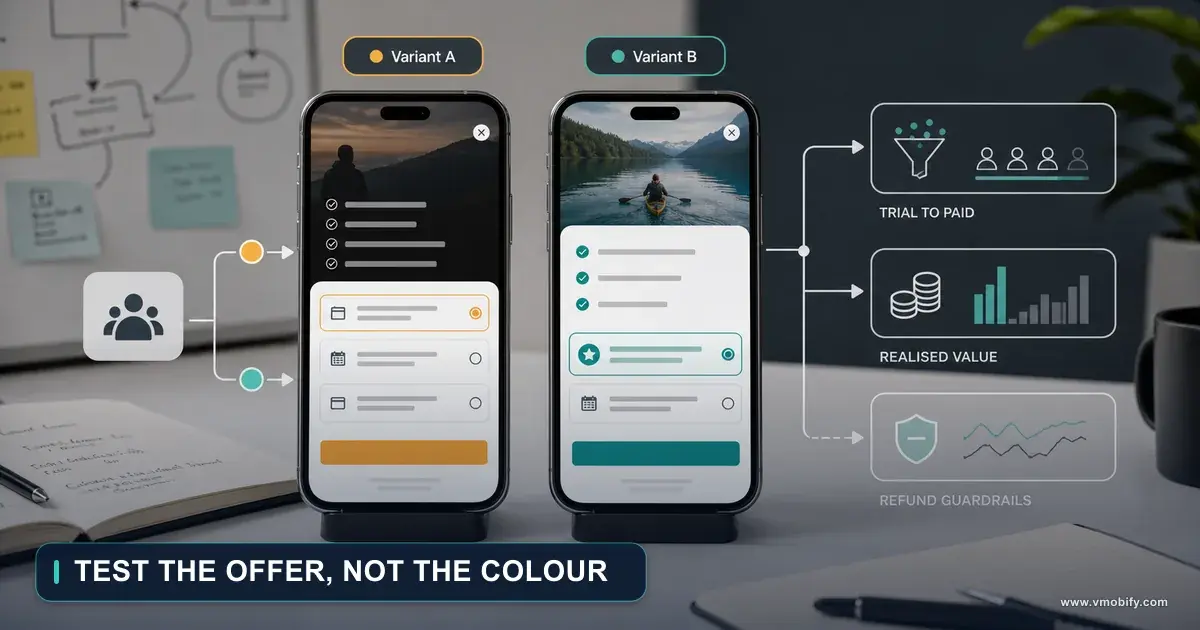
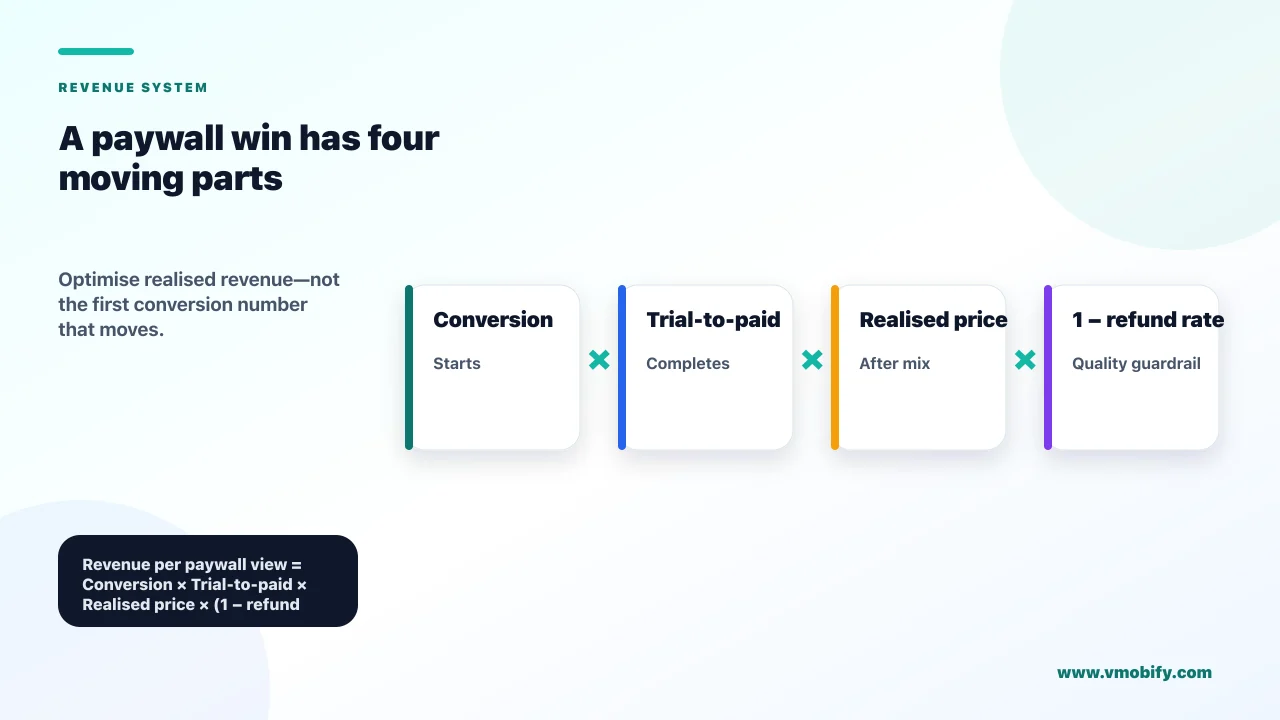
Because paywall conversion is the first term in a product, and every term after it can move in the opposite direction — revenue per paywall view equals paywall conversion multiplied by trial-to-paid, multiplied by realised price, multiplied by one minus the refund rate. A variant that lifts the first term by 15% while cutting the second by 20% is a loss, and it will read as a win for weeks before that becomes visible.
The mechanism is selection. Anything that lowers the bar for starting a trial — a softer commitment, a longer free period, a less prominent statement of what happens at the end — brings in people with weaker intent alongside the people you wanted. Those additional trialists convert to paid at a lower rate than your existing ones, so the average falls even when the absolute number of paying subscribers rises. Sometimes the absolute number rises enough to justify it. Frequently it does not, and you cannot tell which without measuring both terms in the same cohort.
The evidence for how fast this decays is stark. In RevenueCat's 2026 dataset, 55.4% of all three-day-trial cancellations happen on day zero, and 84% happen between day zero and day one. A trialist who cancels within hours of starting was never a customer; they were a conversion event. If your test metric counts trial starts, that user is indistinguishable from a subscriber who will renew for two years.
Trial length is the clearest illustration, and it is why we treat it as a Tier 2 test with a long readout rather than a quick win. The same dataset puts trials of 17 to 32 days at a median 42.5% trial-to-paid against 25.5% for trials under four days — a large gap in the direction most teams do not expect, since the instinct is that a shorter trial forces a faster decision. Whether it holds in your app is exactly the sort of question worth spending an experiment on, and our post on free trial conversion rates works through the benchmarks and the reminder sequence in detail.
Two more terms deserve instrumentation before you run anything. Realised price captures plan mix: if the winning variant sells more monthly plans and fewer annual ones, your average initial revenue per subscriber falls, and on most apps the annual cohort also retains better, so the loss compounds. And payment success is not uniform across platforms — RevenueCat reports that 31% of subscription cancellations on Google Play stem from billing errors, against 14% on the App Store. A variant that shifts volume between platforms, or towards a payment method with a higher failure rate, is silently changing that term too.
The practical consequence for test design is a discipline we apply on every monetisation engagement in our portfolio: the primary metric is declared as revenue per paywall view at a fixed day after exposure, net of refunds, and paywall conversion is reported as a diagnostic alongside plan mix, trial-to-paid and refund rate. That single change in what gets written on the test plan eliminates most of the false wins before they are shipped. If you want that instrumented properly against your existing stack, our monetisation team does exactly this work.
How do you stop a winning test from losing money?
Decide the metric, the horizon and the stop conditions before launch, hold a slice of traffic back after you ship the winner, and keep watching refunds and chargebacks for at least a month — because the losses from a bad paywall win arrive after the test dashboard has already declared victory. Everything in this section is cheap to set up and impossible to retrofit.
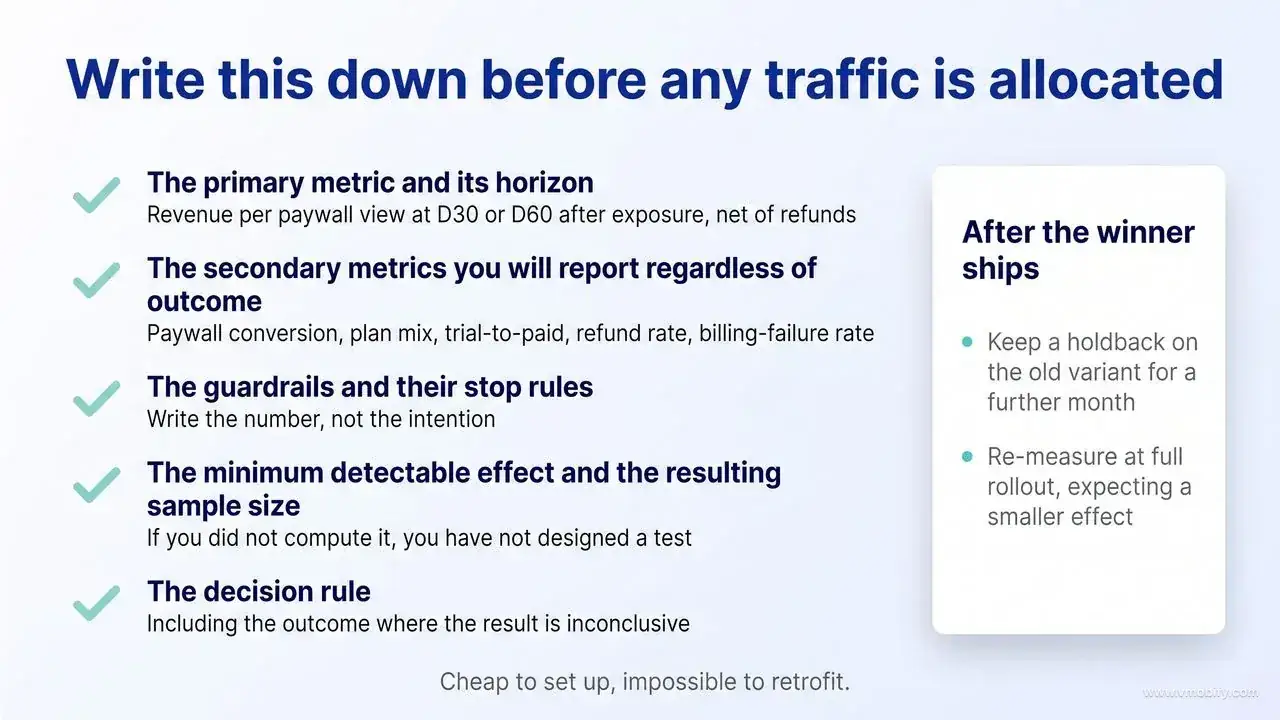
The pre-registration takes ten minutes and should be written down before any traffic is allocated:
- The primary metric and its horizon. Revenue per paywall view at D30 or D60 after exposure, net of refunds. One metric, fixed in advance, with the day count named.
- The secondary metrics you will report regardless of outcome. Paywall conversion, plan mix, trial-to-paid, refund rate, billing-failure rate.
- The guardrails and their stop rules. For example: halt if refund rate in the variant exceeds control by more than a stated margin, or if support contacts about billing rise beyond a threshold. Write the number, not the intention.
- The minimum detectable effect and the resulting sample size. From the arithmetic in the sample-size section. If you did not compute it, you have not designed a test.
- The decision rule. What you will do at each outcome, including the outcome where the result is inconclusive — which is the most likely one and the one teams are least prepared for.
Instrument refunds specifically, because neither platform pushes the full picture to you by default. On iOS, when a customer requests a refund the App Store may send a consumption request to your server, and Apple's Send Consumption Information endpoint asks you to respond within 12 hours for your data to be considered in the refund decision (window as documented in August 2026). Two things about that endpoint are easy to get wrong. You may only respond if the customer has given you valid consent to share their data with Apple — Apple is explicit that if consent was given you respond, and if it was not, you do not, and that obtaining that consent is your responsibility, separate from and unrelated to App Tracking Transparency. And not implementing it does not make you blind to refunds: the REFUND notification in App Store Server Notifications V2 reports them regardless. What you forfeit by skipping the endpoint is input into Apple's decision, not visibility of the outcome. On Android, the Voided Purchases API reports refunds, cancellations and chargebacks but carries a 30-day lookback window as of August 2026: older voided purchases are not returned regardless of the start time you request. If you are not polling it continuously, that data is simply gone, and a variant that raised refunds will never show up in your analysis.
After the winner ships, do two things that most teams skip. Keep a holdback — five or ten percent of traffic on the old variant for a further month — so you have a live control to compare against rather than a memory of last quarter's numbers. And re-measure the effect at full rollout, expecting it to be smaller than the test suggested. Winning variants are selected partly on favourable noise, so the measured lift is biased upwards — the winner's curse, and it bites hardest on the underpowered tests most apps are running. Expect the rolled-out effect to be materially smaller than the tested one, with the shrinkage growing as the test's power falls; we deliberately do not publish a single multiplier for it, because the honest number depends on your own power and effect size rather than on a rule of thumb. Knowing the direction in advance is what stops a team concluding that the implementation is broken when the rollout underdelivers.
Finally, roll the outcome up into unit economics rather than reporting it as a percentage. A 12% lift in revenue per paywall view means something only when it is expressed as a change in payback period against your acquisition cost, because that is the number which decides whether you can afford to buy more users. The teams in our portfolio that hold this discipline run fewer experiments per year than their peers and ship a much higher proportion of them.
Which testing mistakes invalidate the result entirely?
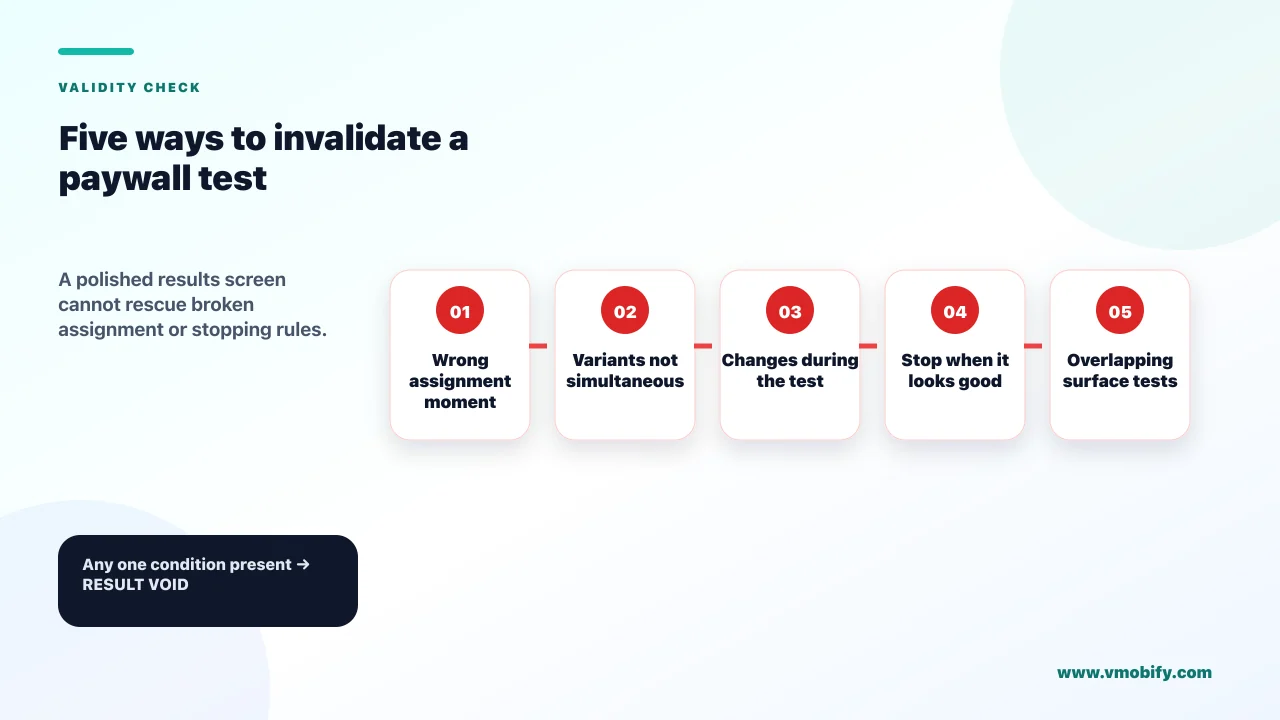
The mistakes that void a result outright are the ones that break the comparison itself — assignment at the wrong moment, variants that are not simultaneous, changes made mid-flight, stopping when the number looks good, and running a second test over the same surface. These are not degradations in precision. They mean the number on the dashboard is measuring something other than the paywall.
The list, in rough order of how often we encounter it:
- Assigning at install rather than at paywall view. Discussed above, and worth repeating because it is the most common single defect. It inflates the denominator with users who never saw the surface, which pushes the observed difference towards zero and makes a real effect unreadable.
- Non-sticky assignment. A user who reinstalls, reopens after an update, or uses a second device must land in the same arm. If assignment is recomputed per session, users cross between arms and the two groups stop being distinct populations.
- Shipping the variant as an app update. If variant B only exists in version 4.2, you are comparing users who updated against users who did not, and updaters are systematically more engaged. Paywalls under test must be remote-configured so both arms exist in the same binary.
- Sequential rather than parallel comparison. Running variant A for two weeks and variant B for the next two is not an A/B test. Seasonality, campaign mix and store featuring all shift between those windows. The same applies to using a store price change as a before-and-after test: a store-level price change applies to every new purchaser in that storefront at once, so the two periods differ in far more than the price and the comparison is not controlled. Note that this is a limit of the before-and-after design, not of cohort pricing in general — Play's legacy price cohorts and its price experiments both split users within a storefront.
- Peeking and stopping on the first significant reading. Checking daily and halting the moment the p-value drops below a threshold inflates the false-positive rate substantially. Either fix the sample size in advance and read it once, or use a tool with a sequential testing method built for repeated looks. Google Play's price experiment tool is the second kind: it documents using jackknife resampling to build its confidence intervals and then mixture sequential probability testing to control the inflated false-positive rate that continuous monitoring causes, which is what makes repeated looks safe there rather than any restraint on your part. Separately, and for a different reason, the confidence level and the minimum detectable effect are both fixed at setup and cannot be changed after launch.
- Editing the variant mid-test. A copy fix on day four resets the experiment. If you must change something, restart with a fresh cohort rather than merging the periods.
- Overlapping experiments on the same surface. Two concurrent tests touching the paywall interact, and unless you deliberately designed a factorial with the traffic to support it, neither result is interpretable. Queue them.
- Reading a partial-week result. Weekend and weekday purchase behaviour differ enough to swing a short test. Run whole weeks, and do not stop mid-cycle because the numbers look decisive.
- Segmenting after the fact until something is significant. Slicing a null result by country, device, OS version and acquisition source until one cell shows a lift produces a finding roughly as often as chance predicts. Pre-register any segment you intend to analyse.
- Measuring blended revenue rather than cohort revenue. Comparing total monthly revenue during the test to the month before folds in every other change your business made. The comparison must be between the two arms of the same cohort over the same clock.
One further trap is specific to subscriptions and is worth flagging on its own: calling the result before the money exists. With a trial in the flow, the paying outcome for the last-exposed user does not resolve until the trial ends, and the refund outcome does not resolve for weeks after that. A test that reads significant on paywall conversion at day ten is answering a question you did not ask. Hold the decision until the horizon you pre-registered has actually elapsed, however uncomfortable that is with a launch date approaching.
If most of this list describes tests you have already run, the useful move is not to run them again — it is to fix the instrumentation once and then re-run only the two or three questions whose answers would change what you build next. If you would like a second pair of eyes on a paywall test plan before you spend the traffic on it, talk to our team. The cheapest experiment is the one you decided not to run.
Frequently Asked Questions
How long should a paywall A/B test run?+
Long enough to hit the sample size your minimum detectable effect requires, rounded up to whole weeks, plus a separate readout window for the money to resolve. For a paywall without a trial, two to four weeks of exposure is typical. With a trial in the flow, plan a two-week exposure and a four-to-six-week readout, because the last user exposed needs the trial period plus a refund window before their outcome exists.
Can you A/B test subscription prices on the App Store and Google Play?+
Not natively. Google Play Console price experiments support active one-time products only, not subscriptions, and App Store Connect has no price-testing feature at all. Testing subscription prices means configuring multiple products at different price points, assigning users to one client-side, and rendering the localised price the store returns. Neither store's policy forbids that, provided the terms shown match what is charged and the price rendered is the one the store returns. Store policy is not the whole question, though: consumer-protection law in some jurisdictions imposes its own disclosure duties on differentiated pricing, which is a legal question rather than an App Review one.
What is the single most common paywall testing mistake?+
Assigning users to variants at install rather than at the paywall view. Everyone who never reaches the paywall then sits in the denominator adding variance and no signal, which pushes a genuine difference towards zero. Assignment should happen immediately before the paywall renders and must persist across sessions, reinstalls and devices.
How can a paywall test win on conversion but lose money?+
Three ways, and they often occur together. The variant shifts purchases onto a cheaper plan, so realised revenue per subscriber falls. It attracts lower-intent trialists who cancel before converting, so trial-to-paid drops. Or it raises refunds and chargebacks, which land weeks after the test reads significant. Measuring revenue per paywall view at a fixed horizon net of refunds catches all three; measuring conversion catches none.
What sample size do you need for a paywall test?+
Approximately 16 x p x (1 - p) divided by the square of the absolute lift you want to detect, per variant, where p is your baseline conversion rate. At a 3% baseline chasing a 20% relative lift that is around 13,000 paywall views per arm; chasing a 50% lift it falls to about 2,100. Note the denominator is paywall views, not installs, so multiply by your paywall view rate to get the install requirement.
Do existing subscribers get moved onto the new price when you test one?+
Not by default. Google Play keeps existing subscribers on legacy price cohorts until you explicitly migrate them, and App Store Connect offers an option to preserve prices for subscribers who joined before a change, with expired subscribers able to resubscribe at the preserved price within 60 days (as of August 2026). Decreases are where the two stores diverge, so do not generalise from one to the other. On Apple a decrease cannot be walled off — existing subscriptions automatically renew at the lower price with no option to preserve the higher one. On Google Play a decrease behaves like any other change: subscribers stay in their legacy cohort at the original price until you deliberately end that cohort, and only then start paying the lower price at their next payment.
Should a small app run paywall A/B tests at all?+
If you have a few hundred paywall views a week, no. You cannot power anything smaller than a very large effect, and the traffic is better spent on qualitative signal such as session recordings and cancellation reasons. Fix what is visibly broken, ship the default plan selection you believe in, and start testing once volume can resolve a 30% relative difference in a fortnight.
Sources
- Play Console Help — Run price experiments to optimise one-time product prices — Checked August 2026. Scope limited to active one-time products; default 90% confidence (70-99%), default 30% minimum detectable effect (5-50%), six-month cap, reversion 14 days after significance; jackknife plus mixture sequential probability testing to control false positives under continuous monitoring
- Android Developers — Change subscription prices — Checked August 2026. Existing subscribers are unaffected by default via legacy price cohorts, including on decreases; opt-in versus opt-out increases, the 37-day notification timetable, and the price migration API
- App Store Connect Help — Manage pricing for auto-renewable subscriptions — Checked August 2026. Preserving prices for existing subscribers and the 60-day resubscribe window; decreases always flow through with no preserve option; consent required if the region mandates it, or there was an increase within 12 months, or the rise is both over 50% and above the per-storefront threshold; one scheduled change at a time per region per billing plan type
- Apple — App Store Review Guidelines — Checked August 2026. Guideline 3.1.2(c) says you should clearly describe what the user will get for the price; the removal-level obligation is the separate false-pretenses and bait-and-switch clause
- Apple Developer — Send Consumption Information (App Store Server API) — Checked August 2026. The 12-hour window for responding to a consumption request, and the requirement to obtain valid customer consent before sharing consumption data with Apple
- Google Play — Voided Purchases API — Checked August 2026. Refunds, cancellations and chargebacks, with a 30-day lookback limit on voided purchase data
- Google Play — Payments policy — Checked August 2026. Developers must clearly and accurately inform users about terms and pricing, and in-app pricing must match the pricing displayed in the user-facing Play billing interface
- RevenueCat — State of Subscription Apps 2026 — Checked August 2026. Platform benchmarks across 115,000+ apps: trial length and trial-to-paid, day-zero cancellations, and billing-failure churn by store
About the author
Amol Pomane — Founder, Vmobify
Amol leads Vmobify, a mobile app growth agency that has driven 30M+ downloads and ranked 54K+ keywords across 300+ apps since 2013. He writes about ASO, paid user acquisition, retention, and the operational reality of scaling mobile apps in India and global markets.