Don't Start With a Prompt: Understand the Product First
The first instruction you give an AI agent on an existing product should be an instruction to investigate, not to improve. This is the discovery method we run before any AI-assisted audit, redesign or implementation: eight artefacts, nine steps, and an evidence label on every claim.

On this page
- Why should discovery come before the first prompt?
- Why does "build me a better product" fail?
- How do you separate discovery from recommendation?
- Step 1 — what is the product actually promising?
- Step 2 — how do you map the repository before reading files?
- Step 3 — what makes a capability inventory better than a feature list?
- Step 4 — how do you inventory states rather than screens?
- Step 5 — which three data objects deserve the deepest trace?
- Step 6 — how do you reconstruct a design system that already exists?
- Step 7 — which truths live outside the repository?
- Step 8 — how do you compare documentation, code and runtime?
- Step 9 — what should the agent check on the running product?
- What does the finished discovery package contain?
- Which screenshots prove discovery rather than decorate it?
- What does the ready-to-use discovery prompt look like?
- Which mistakes cost the most here?
- Frequently Asked Questions
Why should discovery come before the first prompt?
Because an AI agent's recommendation is only ever as good as the product model it built before it started recommending — and if nobody asked for that model, it was assembled from whichever file the agent happened to open first. The opening instruction on an AI-assisted product project should not be "redesign this", "make this premium" or "add this feature". It should be an instruction to investigate.
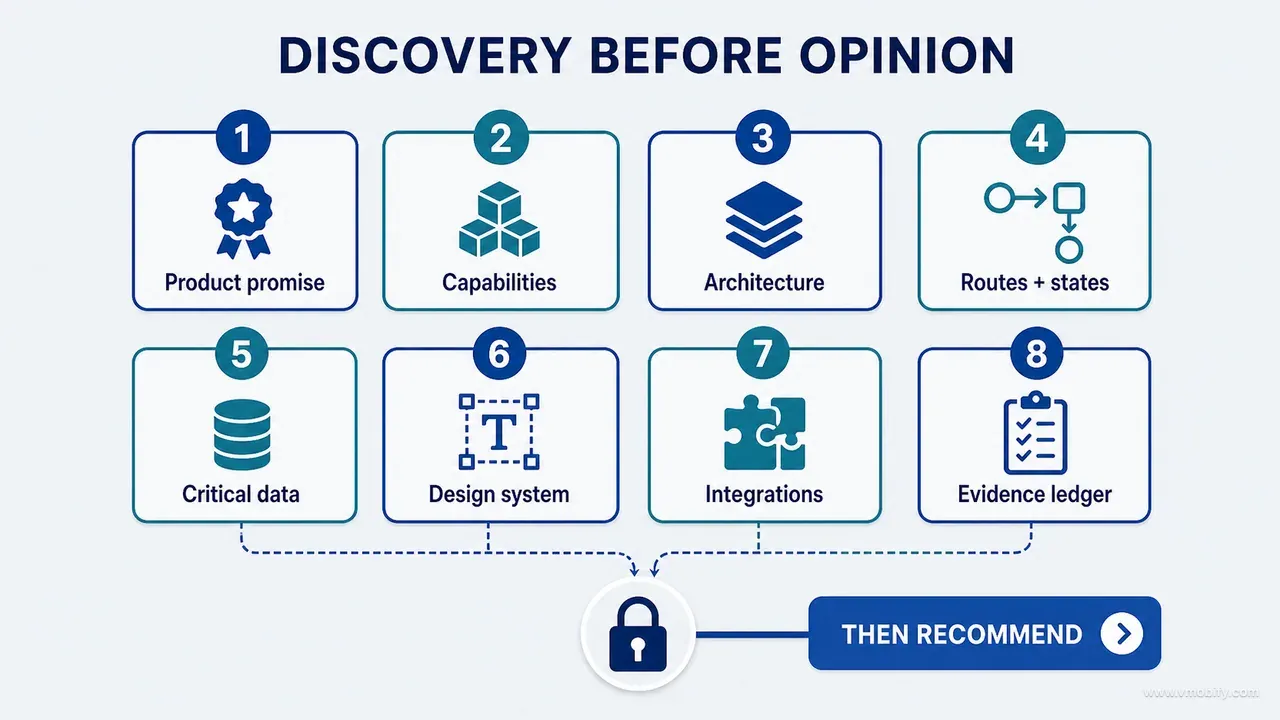
Before an agent is allowed to change an existing product, it should reconstruct what the product is, what it does, what data it protects, which behaviours already exist, and which claims remain unverified. In practice that means eight artefacts, produced and read before any opinion is accepted:
- Product promise and business-context summary — who it is for, what it claims, what it must never imply.
- Capability inventory — every meaningful capability with an entry point, an owner and a runtime status.
- Architecture and dependency map — where each kind of truth is allowed to live, and where that rule is broken.
- Screen, route and state inventory — including sheets, dialogs, conditional surfaces and every empty or failed state.
- Critical-data-object map — the three objects whose corruption would hurt most, and every path that writes them.
- Design-system inventory — what is defined, what is actually used, and what is hardcoded around it.
- External-integration and configuration inventory — every claim the repository cannot prove on its own.
- Evidence ledger — each finding marked verified, inferred or unknown, with the evidence type named.
Then require the agent to inspect the running product, compare runtime against source and documentation, and state plainly what it could not verify. Only once those artefacts have been read by a human should the agent receive a redesign or implementation objective.
This is part 02 of our AI product development methodology series. Part 01 sets out why the whole method has to be evidence-first; this part is the discovery pass that produces the evidence everything else stands on.
We arrived at it while auditing and redesigning a child-growth product implemented separately on iOS and Android. Both repositories looked mature: structured architecture, design tokens, dozens of screens, growth calculations, AI features, subscription logic, privacy controls, exports and extensive documentation. That richness made discovery more important, not less. The larger the product, the easier it is for an agent to find one plausible file, infer the rest, and produce a confident, fluent, incomplete answer.
Why does "build me a better product" fail?
Because it asks for design judgement before anyone has established product truth, and the agent will supply the judgement anyway — filling the gaps with plausible assumptions that nobody can see it made. Consider an instruction that sounds perfectly reasonable:
Act as an expert product designer. Review the dashboard and redesign it to feel
more premium, clear and modern.
The agent will probably find the dashboard file. It will read the current components and generate a cleaner layout. It may reduce card density, correct the spacing scale, improve the typographic hierarchy and add some motion. All of that can be genuinely good work.
But it does not know, and has not been asked to find out:
- Whether the dashboard goes stale after a record is saved on another screen.
- Whether a status badge uses the same calculation as the chart screen, or a second, older one.
- Whether multiple profiles or accounts can see different data through the same view.
- Whether every card links to a destination that exists and is reachable.
- Which modules are premium-gated, and what the gated state is supposed to look like.
- What the screen should show with zero records — the state most new users see.
- Whether the layout survives the largest accessibility text size.
- Whether the concept board it was handed shows features that were never built.
- Which design tokens are canonical and which are legacy leftovers.
- Whether the same component is used in four other places that will now look inconsistent.
The output can therefore be visually improved and functionally worse — a redesign that renders beautifully with twelve data points and falls apart with one, or that quietly promotes a card into a primary action when the underlying capability is half-wired.
This failure is not unique to AI. Human agencies make it whenever mood boards arrive before discovery is finished. What AI changes is the interval: it compresses the time between incomplete understanding and large-scale implementation from weeks to an afternoon. The mistake is the same one; it just ships faster and in more files.
How do you separate discovery from recommendation?
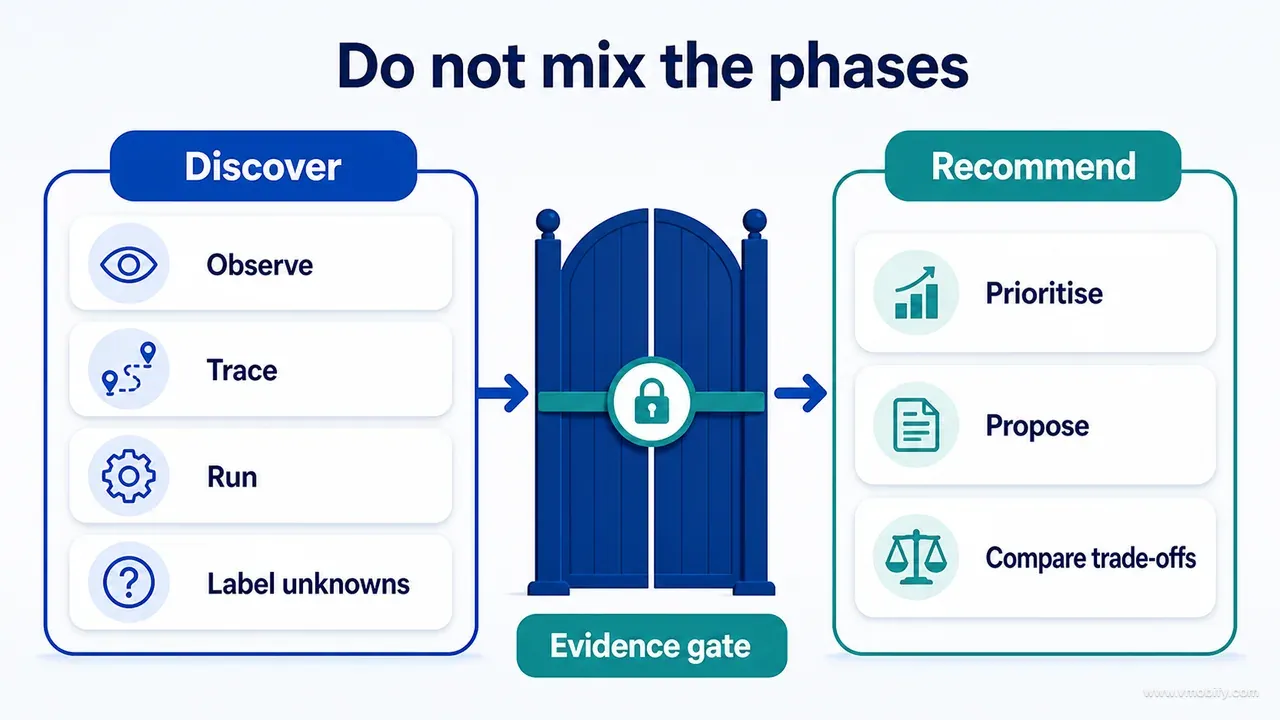
By making it a contract: the agent is not permitted to recommend, redesign or implement anything until it has proved that it understands the product. Sequencing is the entire mechanism — there is no clever prompt that substitutes for it.
Our early review instructions sounded thorough. Inspect UI, UX, navigation, colours, components, animations, forms, charts and functionality. Those categories were useful, but they left the reviewer free to begin wherever it found convenient. One pass would start at the dashboard. Another would search for TODO comments. A third would find the design tokens, observe that they existed, and infer consistency from their existence. Three passes, three different products described.
The change that fixed it was two sentences at the top of the task:
Do not recommend, redesign or implement yet.

First prove that you understand the product.
The agent then had to identify every meaningful route, state, data object and dependency before it was allowed to make any broad claim about product quality. That single rule exposed inconsistencies a visual-first review could not reach.
The clearest example is a capability that exists as a well-written service with no active call site. Documentation describes it. A code search finds the class. An agent reports "implemented" and moves on, and now that assertion is in a document that every later agent will treat as ground truth. A proper discovery pass asks three further questions: does the product actually invoke it, can a user reach it, and does an executed test prove the path? Discovery is not a file list. It is a reconstruction of active behaviour.
The pattern holds well beyond AI workflows. Reviews produce more durable recommendations when somebody has to write down what the product actually does before being allowed to say what it should do.
Step 1 — what is the product actually promising?
Start outside the code, because the promise is the only thing that lets you judge whether the product behaves coherently rather than whether each component is individually tidy. A component-level review can approve every part of a product that fails as a whole.
The questions worth answering before anything is opened:
- Who is the product for, specifically enough to exclude someone?
- What problem is the user trying to solve when they open it?
- What is the first meaningful result, and how many actions away is it?
- What does the product promise explicitly, in store copy, onboarding and marketing?
- What does the interface imply without saying — through iconography, tone, authority signals?
- Which actions create value, and which merely create engagement?
- Which failure would most seriously damage trust?
- What does the business need the user to do, and where does that conflict with the above?
In the child-growth case, "track measurements" was only the functional description. The real experience promise was closer to: help a parent record and understand growth information in a calm, responsible way, without presenting the product as a diagnostic authority.
That formulation changed the brief for everything downstream. Charts had to be accurate before they were beautiful. AI explanations had to stay optional and explicitly non-diagnostic. Privacy controls needed plain-language clarity rather than legal completeness. Calculation sources and reference data had to be visible. Reassuring illustration was allowed; anything that read as a health verdict was not. Without the promise written down, an agent optimises individual components and can make a product less trustworthy while improving every screen in it.
Capture it as a short brief the agent must fill in and a human must approve:
Primary user:
Primary problem:
First meaningful outcome:
Core recurring value:
Highest-value action:
Highest-trust-risk action:
Explicit promises:
Implied promises:
Non-goals:
Business constraints:
Regulatory or domain constraints:
The non-goals line does more work than any other. It is what lets a reviewer reject an attractive suggestion on grounds other than taste.
Step 2 — how do you map the repository before reading files?
Treat it as structural reconnaissance: the aim is not to explain every file, but to establish where each kind of truth is allowed to live. Once you know that, a single file tells you far more, because you know what it is permitted to do.
Have the agent identify applications and packages, feature modules, shared modules, the persistence layer, services, the network layer, the design system, tests, documentation, build configuration, CI workflows, scripts, generated assets, and anything archived or duplicated. Duplicated material matters disproportionately — an abandoned copy of a calculation module is one of the most reliable sources of a wrong number later.
In our two repositories the architectures differed considerably. One platform used view models, services and repositories with a separate growth-calculation package. The other used stateless UI components, state-flow view models, domain use cases, repositories and a pure calculation module — close to the layering in Android's own guide to app architecture. Different shapes, identical discovery questions:
Where does presentation live?
Where does state live?
Where is business logic allowed?
Who is allowed to write persistent data?
Which module owns calculations?
How do features communicate?
What is shared, and what is duplicated?
Then the part most agents skip. Architecture documentation is an orientation tool, not proof that the code follows the rules it describes. If the document says the flow is View → ViewModel → Service → Repository → Persistence, the agent's next job is to search for violations of exactly that sentence:
- Views writing directly to persistence.
- Feature modules importing each other instead of a shared contract.
- The same business rule implemented in two places, with one copy already drifting.
- A second repository that bypasses the service layer.
- Direct network calls in presentation code.
- Calculation logic inlined into a view because it was faster that day.
"The architecture is clean" is a conclusion that requires evidence. It is not a sentence to be copied out of a project guide into an audit report, which is precisely what an unsupervised agent will do with it.
Step 3 — what makes a capability inventory better than a feature list?
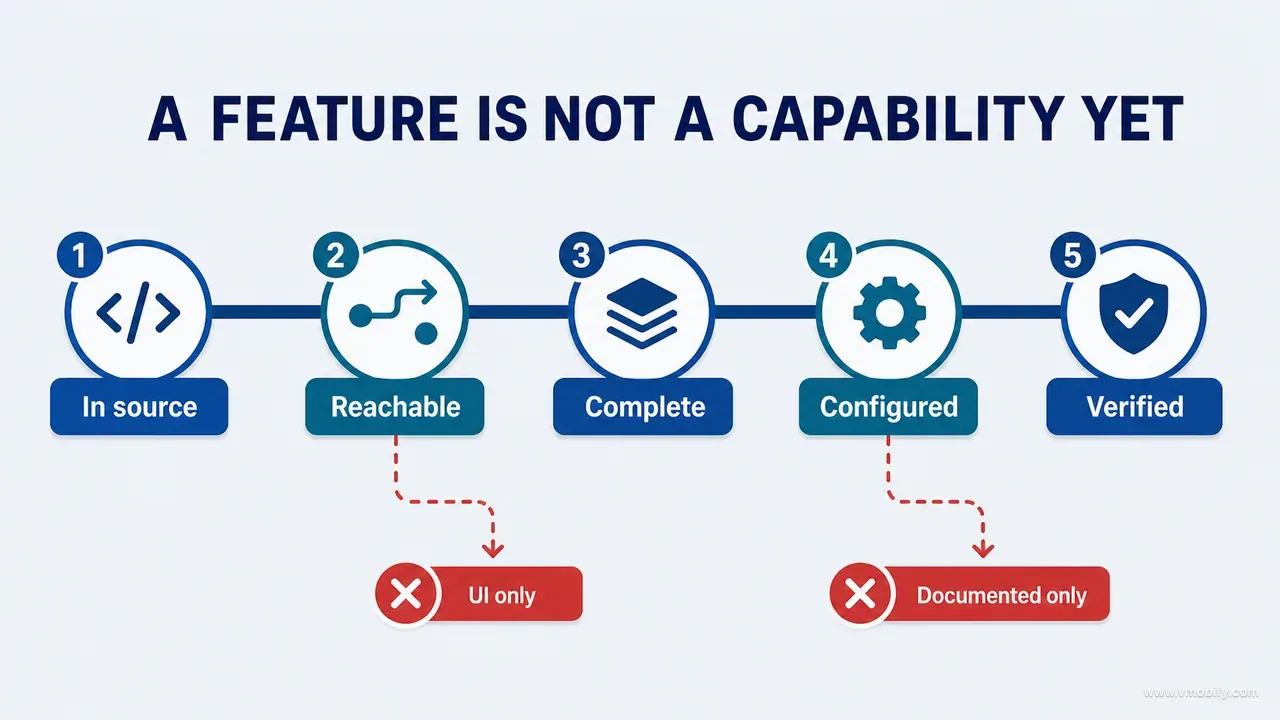
A feature list records intent; a capability inventory records reachability, completeness and evidence — which is the difference between a document that helps and a document that misleads the next agent.
Record every meaningful capability with the same seven fields: user entry point, main implementation, data dependency, runtime status, evidence type, known gap, and owner of the next verification. Written as a list rather than a table so it survives in any document:
Capability:        Restore account
Entry point:       Settings → Account → Restore
Implementation:    SyncService.restore()
Data dependency:   Auth session + remote store
Runtime status:    PARTIAL
Evidence:          CODE-CONFIRMED only
Gap:               Download path never exercised; no executed test
Next verification: Engineering, with a seeded remote account
That format exists to stop four specific errors, each of which we have watched an agent make:
- Existing in source is not reachable. A view or service can be fully implemented with no route, menu item or call site pointing at it.
- Reachable is not complete. A settings row can open a screen whose primary action is a placeholder.
- Complete locally is not configured externally. Purchases, notifications, authentication and AI services depend on production configuration the repository cannot prove.
- Documented is not implemented. Roadmaps and concept boards routinely blend current and intended capability, and nothing in the file marks which is which.
So every capability carries one of eight statuses, never a tick: live and verified, implemented but not runtime-verified, partially implemented, UI-only, hidden or unreachable, documented only, external configuration required, or deprecated and archived.
The two statuses that earn their keep are UI-only and documented only. They are where an agent's confident summary and the shipped product diverge most often, and they are invisible to any review that starts by looking at screens. An inventory with no entries in those two categories on a mature product is usually a sign the pass was not thorough, not a sign the product is unusually clean.
Step 4 — how do you inventory states rather than screens?
By generating the surface list from navigation declarations rather than filenames, and then recording nine states for every surface instead of one. A file list simultaneously misses screens implemented as component modes and includes dead screens no user can reach.
Build the surface list from every source that can produce a destination: navigation declarations, route enums or sealed types, deep-link handlers, tab configuration, modal and sheet presentations, direct destination calls, notification actions, widget links, authentication gates and subscription gates. Deep links deserve their own pass — both Android App Links and their iOS equivalent can land a user inside a surface that the in-app navigation never exposes, which means an unreachable screen in your inventory may be very reachable from a marketing email.
For every surface, record the full set:
Surface name
Route or presentation mechanism
Entry points
Exit points
Authentication requirement
Entitlement requirement
Data read
Data written
Primary action
Destructive actions
Nine states: loading, empty, error, offline, permission,
             authentication, entitlement, accessibility, recovery
Deep-link behaviour
Runtime evidence
The state list is the part that changes design decisions. Suppose a concept board presents an elegant chart with twelve data points. The shipped product must also handle zero points, one point, two points, missing values, extreme values, very long date ranges and an unavailable data source. A redesign approved only against the ideal state can fail in a common early-user state: almost no data. The same logic applies to SaaS tables, analytics dashboards, calendars, editors and marketplaces: empty and interrupted experiences are product experiences, and part 03 of this series is entirely about building that complete inventory before a single screen is redrawn.
Two states deserve extra weight for anything shipping in India or comparable markets. The first is offline and slow-network: on constrained Android hardware and intermittent connections, a loading state that assumes a fast response reads as a broken screen. The second is large text. Apple recommends supporting at least 200% enlargement, Android 14 and later supports font scaling up to 200%, and WCAG2ICT explains how WCAG principles can be applied to non-web software. Test the maximum platform setting on the smallest supported viewport instead of applying the web criterion to a native app without qualification.
Step 5 — which three data objects deserve the deepest trace?
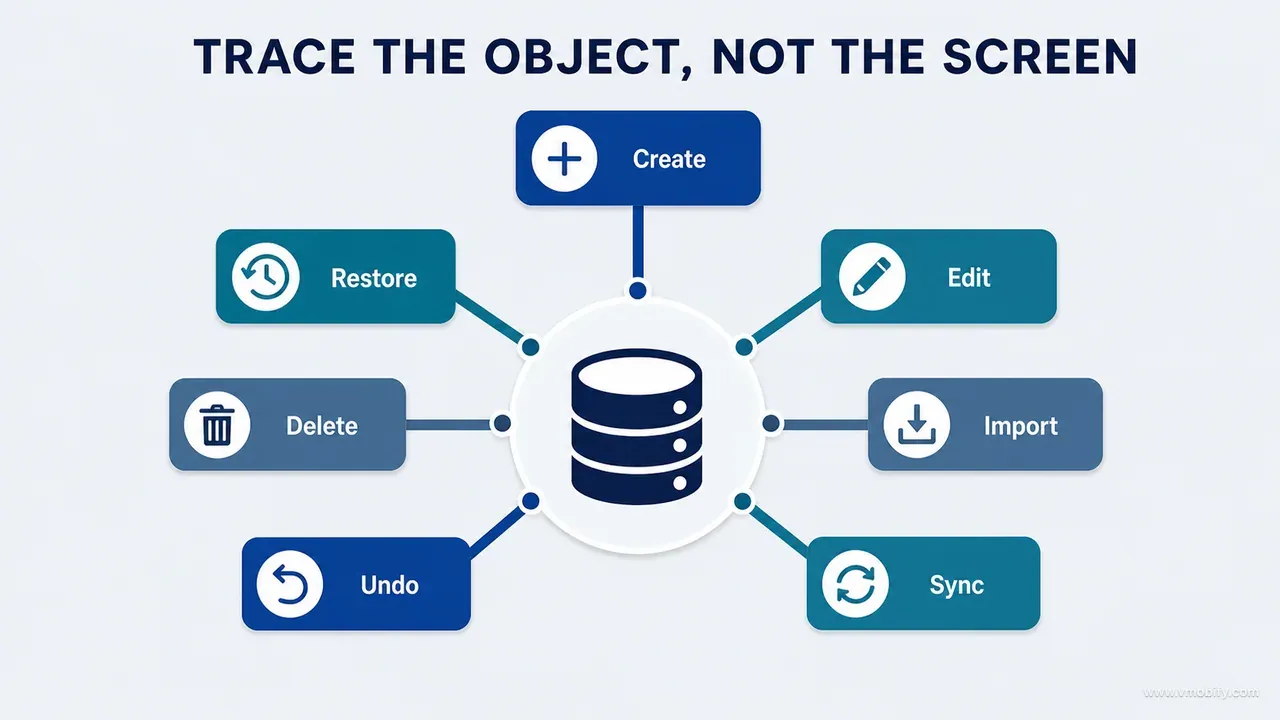
The three whose corruption, loss or inconsistency would damage the product most — and once the interface is mapped, they are where you stop thinking screen by screen. Three is a deliberate limit: it forces a decision about what actually matters instead of an even spread of shallow attention.
In most products the candidates are obvious once named: order, payment, customer record, document, booking, measurement, subscription entitlement, scheduled post. Pick the three, then map every path that can create, edit, delete, import, synchronise, restore, duplicate, undo, cancel midway, or recalculate a derived value from that object. Then map the failure branch of each path, which is where the real defects live — a create that succeeds locally and fails remotely, a delete that removes the record but leaves a derived summary, an import that half-completes.
The discovery question to answer for each object is a single sentence:
Where is the invariant validated on every path,
and what happens to dependent state after the object changes?
In our case study a single measurement affected the dashboard, the chart, the history list, the exported report, the home-screen widget, the AI explanation and the confidence framing shown alongside it. Reviewing the measurement form on its own could not possibly prove that those seven dependent surfaces refreshed consistently — and a stale widget showing last week's figure next to a corrected chart is a trust failure, not a caching detail, in a product about a child's health.
This is the point in discovery where product work starts uncovering engineering risks that present as UX problems. A user reporting "the number on the home screen is wrong" is describing a data-flow defect, but it arrives as a design complaint and gets triaged as one. Tracing the object rather than the screen is what puts it in the right queue.
Three practical rules we now apply. Write the invariant as a sentence before you look for its enforcement, or you will accept whatever validation you find as sufficient. Enumerate the dependent surfaces explicitly, because "the UI updates" is not a claim anyone can test. And check the failure branch first — the success path is the one everybody has already looked at.
Step 6 — how do you reconstruct a design system that already exists?
By inventorying what is defined and what is actually used as two separate columns, because the gap between them is the design system's real state. An AI redesign should never begin by inventing a palette; it should begin by proving what the current one is and how consistently it is honoured.
Locate the definitions first: colour tokens, typography styles, spacing scale, radius system, elevation and shadow rules, surface hierarchy, icons, illustration families, status semantics, motion durations and easing, haptic rules, shared components, state components and accessibility helpers. Most mature products have all of these somewhere. Their existence proves nothing.
Then compare definitions against usage. We found repeatedly that having tokens did not produce consistency. Legacy colours coexisted with a newer brand direction. Several card styles expressed the same hierarchy level. Fixed text sizes sat inside an otherwise scalable typography system, which is exactly what breaks the resize requirement from the previous step. A semantic success colour was reused decoratively, so the one thing it was supposed to communicate no longer communicated it — the failure mode that role-based systems such as Material 3's colour roles are designed to prevent.
So record availability and compliance together, one block per system area:
System area:            Colour
Canonical source:       Theme tokens
Usage coverage:         High
Duplicate definitions:  2 legacy sets
Hardcoded exceptions:   14
Enforcement mechanism:  Static check in CI

System area:            Typography
Canonical source:       Shared scale
Usage coverage:         Medium
Duplicate definitions:  1 mirrored scale
Hardcoded exceptions:   8
Enforcement mechanism:  Consistency test

System area:            Components
Canonical source:       Shared library
Usage coverage:         Medium
Duplicate definitions:  Several card variants
Hardcoded exceptions:   Unknown
Enforcement mechanism:  Manual audit only
That block tells the redesign what kind of work it is before anyone opens a design tool. High coverage with a working enforcement mechanism means reuse. Medium coverage with duplicates means consolidate. An "unknown" in the exceptions column and no enforcement means the first deliverable is a count, not a concept. The enforcement column is the one that predicts whether a redesign survives six months: a rule with no check regresses, and an agent will reintroduce the exact exception you just removed unless something mechanical stops it.
Step 7 — which truths live outside the repository?
Every claim that depends on production configuration, store setup, legal review or a third party — and an audit that reports those as facts is an audit that will be wrong in public. The repository is authoritative about implementation and silent about almost everything commercial.
Build a list of external evidence covering production environment variables, app-store and marketplace configuration, billing products and price tiers, authentication providers, notification certificates, server-side rules, analytics dashboards, AI model configuration, legal copy, remote data-retention behaviour, reference datasets and third-party service terms. Mark each item verified, owner-confirmed or unverified, and name the person who can close it.
A concrete example of why this is not pedantry. Source code can contain a subscription product identifier and a complete, well-tested purchase service. It cannot prove that the product is active, priced as intended, approved, or available in every market you plan to sell in. For a product with India in scope, that gap is wide: local price tiers, tax treatment and payment methods are all configured outside the repository, and a purchase flow that is flawless in code can still present a price nobody in the target market would pay.
Privacy claims carry the same risk in a more dangerous form. What an app declares in App Store privacy details — and its Play equivalent — is a public commitment about data collection that must match what the binary and its SDKs actually do. An agent that reads a privacy service in source and reports "data is encrypted and never shared" has produced a sentence that a store reviewer, a regulator or a journalist can test. Our post on why apps get rejected covers what happens when the declaration and the behaviour disagree; discovery is where you catch it first.
The rule we apply is simple and unpopular: no claim about money, privacy, availability or legal position leaves discovery with an INFERRED label. It is either externally verified, confirmed by a named owner, or explicitly listed as an open question. Unverified is a perfectly respectable output. A confident sentence with nothing behind it is not.
Step 8 — how do you compare documentation, code and runtime?
By building a discrepancy list that keeps all three competing claims visible instead of quietly picking the most convenient one. The most valuable discovery findings almost never sit inside a single source — they sit in the gaps between sources, which is why a reviewer looking at one source at a time cannot see them.
Record each disagreement as a block, with the decision left open until an owner closes it:
Claim:          Backup and restore is supported
Documentation:  Stated as available
Source:         Upload path implemented; restore path absent
Runtime:        No entry point reachable
Decision:       Rename the promise, or schedule restore. Owner: product
Four patterns account for most of what this surfaces. A feature described as available exists only partially and cannot be reached. A specific technical claim — data is encrypted in a particular way — maps to a service that exists but is unwired. A two-way capability such as backup and restore turns out to be one-way. An open-ended AI capability turns out to be a restricted flow with a fixed set of prompts behind it.
None of this is about proving documentation authors wrong. Documentation drifts because products change faster than their descriptions, and every team's does. The point is to stop a stale assertion being inherited and amplified: an agent that reads "restore is supported" in a project document will repeat it in an audit, a second agent will build a plan on the audit, and by the time anyone tests it the claim has been laundered through three artefacts that all appear to agree.
The discipline that makes this survive contact with a real project is giving every discrepancy a stable identifier and a status that is never blank. We learned that the expensive way on our own build — an audit produced roughly 150 findings, a plan claimed to contain them all, and about 70 were silently skipped through four rounds of review, because reviewers check what was done rather than what was left out. The full account of that failure, and the register that now prevents it, is in our write-up of shipping an AI-built iOS app. For discovery purposes, take only the rule: a finding without a terminal status is an open finding, and "not mentioned" is not a status.
Step 9 — what should the agent check on the running product?
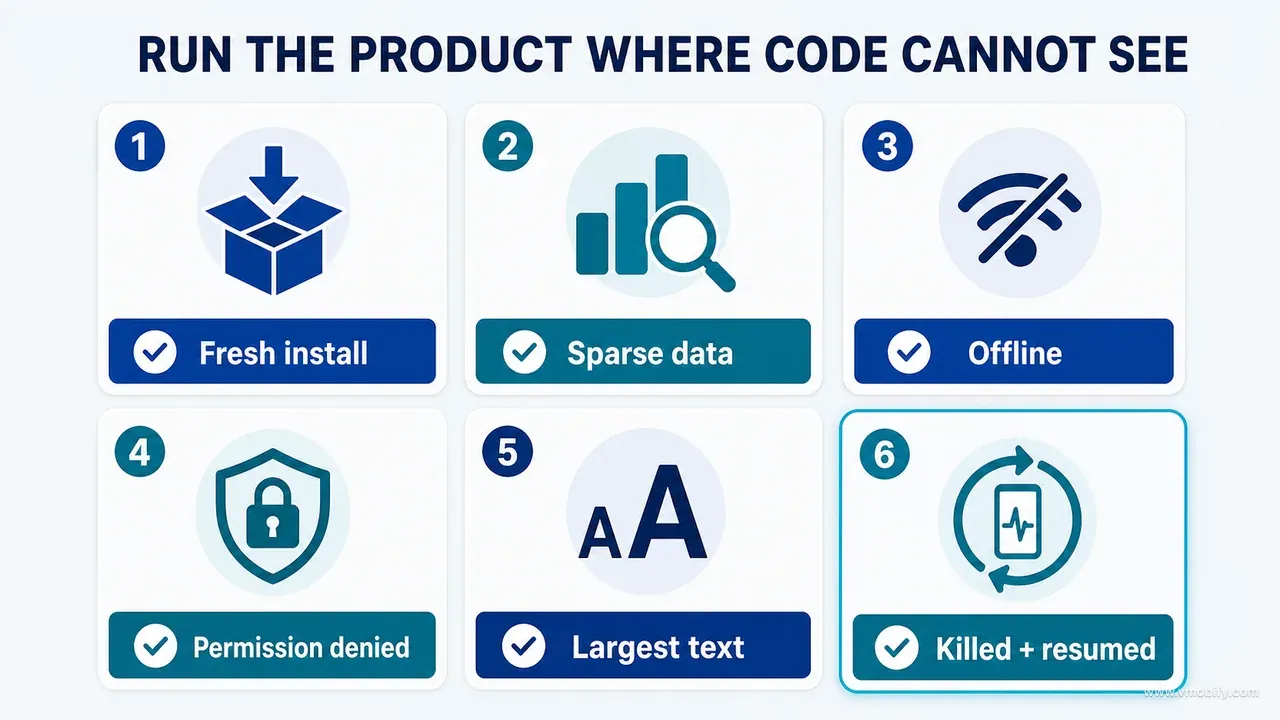
The states that source inspection cannot reach — first use, sparse data, interruption, denial and recovery — because source evidence and runtime evidence expose entirely different classes of defect. Source discovery should end by producing a runtime inspection plan, not by producing a conclusion.
The minimum runtime pass:
- Clean first use, on a genuinely fresh install with no seeded data.
- Returning use with realistic accumulated data, including a long history.
- The smallest supported viewport, and the largest supported text size.
- Light and dark themes, where both are supported.
- Offline mode, and a deliberately slow connection.
- Permission denied, then permission granted later from settings.
- Authentication transitions: sign in, sign out, session expiry, account switch.
- Subscription transitions: purchase, restore, expiry, downgrade.
- Empty data, sparse data and large data on every surface that renders a collection.
- Edit and delete, including the undo path and the derived values that must update.
- A failed request and its retry.
- Background and resume, including resume after the process was killed.
Capture screenshots and short recordings, and compare them against the inventory from Step 4 rather than against an impression. This is where the two evidence types combine into something credible: a source-first reviewer will correctly identify a screen and miss that the keyboard covers its primary action; a visual reviewer will see a working save button and miss that a derived total on another surface stayed stale. Neither is wrong. Each is half-blind.
Pay particular attention to the first-run path, because it is easy for established teams and seeded test accounts to under-test, and it directly shapes activation. The gap between install and first meaningful outcome is the subject of our work on reaching the activation moment. If discovery finds that the empty state of the main surface offers no obvious next action, that finding will often outrank aesthetic observations in the report.
One caution on evidence. A test file proves that somebody wrote a test; only an executed result proves what happened in the environment you reviewed. Treat unexecuted tests as documentation, and label them accordingly, and follow one of Nielsen's usability heuristics literally while you do it: visibility of system status is checkable at runtime and unprovable from source.
What does the finished discovery package contain?
Eleven numbered documents that later tasks can reference instead of re-explaining the product every time — which is why the package pays for itself even on projects where nothing is wrong.
00 Executive product truth
01 Capability inventory
02 Architecture map
03 Screen and state inventory
04 User journeys
05 Critical data objects and invariants
06 Design-system inventory
07 Integrations and external evidence
08 Documentation discrepancies
09 Runtime inspection report
10 Unverified questions and owners
Two properties make this useful rather than ceremonial. It is shared context: designers, engineers, reviewers and future agents all read the same reconstruction, so a disagreement becomes a disagreement about the product rather than about which document someone happened to read. And it reduces prompt size permanently — instead of re-describing the whole product in every task, later prompts reference reviewed source-of-truth documents by number, which is both cheaper and more reliable than hoping the agent rebuilds the same model twice.
Document 10 is the one most teams want to delete and the one that matters most. A list of what discovery could not establish, with a named owner against each item, is what converts an audit from a verdict into a work queue. It also protects the next pass: an agent handed a package with an explicit unknowns list will investigate those items, while an agent handed a package that implies completeness will assume the gaps were already checked.
Keep the package versioned alongside the code rather than in a document tool nobody opens. It goes stale the same way any documentation does, and the only defence is that it lives where changes are reviewed. In our portfolio the teams that get value from discovery a second time are always the ones who committed it into the repository.
Which screenshots prove discovery rather than decorate it?
The ones that show incomplete understanding becoming structured evidence — not a gallery of the most polished screens in the product. A discovery report illustrated with hero shots is arguing for the product; a discovery report illustrated with evidence is arguing for the method.
Six captures do the work:
- A repository overview with the major sources of truth labelled, so a reader can see where presentation, state, logic and persistence live.
- A contact sheet of verified product surfaces — every surface that was actually reached at runtime, in one frame.
- A route map showing hidden and conditional entry points alongside the obvious ones, including deep links and gated destinations.
- A state matrix for one important surface, showing the inventoried states side by side — loading, empty, error, offline and permission at minimum.
- One documentation-versus-runtime discrepancy, with the claim and the runtime evidence in the same image.
- The finished discovery package, so the reader can see the output is a set of documents rather than an opinion.
Three rules on the captures themselves. Redact user data and private implementation details before anything leaves the room. Use identical naming across captions, diagrams and the inventory, so a surface called one thing in the route map is not called something else in the state matrix. And never use AI-generated interface imagery as evidence of the real product — it is an illustration of an idea, and the moment it sits next to genuine captures it starts being read as proof of something that does not exist.
What does the ready-to-use discovery prompt look like?
Like a scope of work with a prohibition at the top — the prohibition is what makes the rest of it hold. This is the prompt we run, essentially unchanged, before any AI-assisted audit or redesign of an existing product.
You have access to an existing digital product and its repository.

Your current task is discovery only.

Do not redesign, refactor, implement or recommend features yet.
Do not assume documentation, mockups or concept boards describe the current product.

1. PRODUCT TRUTH
Identify the primary user, problem, first meaningful outcome, recurring value,
explicit promises, implied promises, business constraints and highest trust risks.

2. REPOSITORY MAP
Map applications, packages, features, shared modules, persistence, services,
networking, design system, tests, documentation, scripts and build configuration.

3. CAPABILITY INVENTORY
For every meaningful capability, record its entry point, implementation owner,
data dependency, runtime status, evidence, known gap and the owner of the next
verification.

Classify each capability as:
LIVE AND VERIFIED / IMPLEMENTED BUT UNVERIFIED / PARTIAL / UI-ONLY /
UNREACHABLE / DOCUMENTED ONLY / EXTERNAL CONFIGURATION REQUIRED / DEPRECATED

4. SCREEN AND STATE INVENTORY
Discover routes from navigation declarations, deep links, tabs, sheets, dialogs,
notifications, widgets, authentication and entitlement gates.

For every surface record purpose, entry points, exits, data read and written,
actions, destructive behaviour, loading, empty, error, offline, permission,
authentication, entitlement, accessibility and recovery states.

5. CRITICAL DATA
Identify the three most important data objects. For each, map every create,
edit, delete, import, sync, restore, undo, cancel and failure path. Show where
the invariant is validated and which dependent surfaces must refresh.

6. DESIGN SYSTEM
Inventory semantic tokens, typography, spacing, radius, surfaces, status colours,
motion, icons, illustrations, shared components and state components. Compare
defined rules with actual usage and identify duplication or hardcoded exceptions.

7. EXTERNAL EVIDENCE
List every claim that requires configuration, production, store, legal, domain,
reference-data or third-party evidence not available in the repository.

8. DISCREPANCIES
Compare documentation, source, tests, boards and runtime. Do not silently resolve
conflicts. Record the competing claims and recommend an owner or evidence source.

9. EVIDENCE LABELS
Label findings CODE-CONFIRMED, TEST-CONFIRMED, RUNTIME-CONFIRMED,
EXTERNALLY VERIFIED, INFERRED or UNVERIFIED.

10. FINAL OUTPUT
Produce the eleven-part discovery package (documents 00-10), a prioritised list
of unresolved questions and a statement of what this discovery method could not
detect.Section 10's last clause is the one people cut, and it is the one that keeps the method honest. An agent asked to state what its own method could not detect will name the things it never looked at — server behaviour, real user comprehension, data it had no access to — and that list is the brief for whatever evidence-gathering happens next.
Which mistakes cost the most here?
The ones that produce a confident document, because a confident wrong document is inherited by every agent and every human who comes after it. These are the seven we now check for explicitly before accepting a discovery pass.
- Reading only the README. It explains intended orientation, and it was usually written when the product was a third of its current size.
- Searching only for screen files. This misses sheets, dialogs, component modes, notification actions, deep links and every conditional surface — and it invents screens that no longer have a route.
- Treating tests as executed evidence. A test file proves somebody wrote a test. Only a run proves what happened.
- Assuming a service is active. Trace construction, injection and call sites. An unused implementation is not a shipped control, however well written it is.
- Confusing parity with quality. Two platforms can faithfully reproduce the same weak flow. Define product intent first, then evaluate each platform's execution against it.
- Letting discovery become an unprioritised dump. If critical product truth and interesting implementation trivia have equal weight in the package, nobody will read past page four.
- Hiding unknowns. Unverified is a useful result. Removing it to make the report look complete is the single most damaging edit anyone makes to a discovery document.
Underneath all seven is one idea worth carrying out of this post. The quality of an AI-generated recommendation is capped by the quality of the product model the agent built first. If that model came from one screen, one README or one concept board, the output will be fluent, plausible and incomplete — and fluency is exactly what stops anybody noticing. In our portfolio the discovery packages that got argued with were the useful ones — the packages that read as complete on first pass were usually the ones that had quietly dropped whatever could not be verified.
So make discovery a deliverable rather than a phase people claim to have done. Reconstruct the promise, the capabilities, the architecture, the screens, the states, the journeys, the data, the design system and the external dependencies. Label the evidence. Expose the disagreements. Preserve the unknowns. Then write the prompt — it will be shorter, the recommendations will be more relevant, the implementation will be safer, and reviewers will finally know which claims deserve confidence.
Part 03 continues from here with the complete inventory a redesign needs. If you would rather have this run on your product than run it yourself, tell us what you are building and we will scope the discovery pass.
Frequently Asked Questions
How long should product discovery take before using AI?+
It depends on product size and risk. A small website may need a few hours; a multi-platform product with persistence, payments and sensitive data usually needs several focused passes across a week or two. Time-box each individual pass rather than the whole truth-finding process, and stop when the unknowns list is short enough to assign owners to.
Should the AI agent actually run the product, or is reading the code enough?+
Run it whenever a runnable environment exists. Source inspection and runtime inspection expose different classes of defect — source review finds unwired services and duplicated logic, runtime review finds stale derived data, covered actions and states that only appear with real data. Discovery is only credible when both evidence types are present.
Do we need to inventory every screen before improving anything?+
No. For a bounded change, investigate the affected journey and everything it depends on thoroughly. A complete inventory is only necessary when you intend to claim complete coverage — an entire-product audit or a full redesign. The mistake is claiming whole-product judgement from a partial pass.
Can screenshots replace a repository review?+
No. Screenshots reveal presentation and nothing else. They cannot show data flow, validation, side effects, conditional logic, entitlement gating or failure handling — all of which decide whether a redesign is safe. Screenshots are evidence of what a surface looked like at one moment, which is genuinely useful and strictly limited.
Can reading the repository replace user research?+
No. The repository reveals implemented behaviour. It cannot prove that users understand that behaviour, value it or prefer it to an alternative. Discovery tells you what the product does; research tells you whether that is the right thing for it to do. Skipping either one produces confident work in the wrong direction.
What should we do when documentation and runtime disagree?+
Record the discrepancy rather than resolving it silently. Treat runtime as the current user experience, source as implementation evidence, and validated requirements as intended behaviour. Then assign a decision owner. Silently choosing the most convenient version is how a stale claim gets laundered into three later documents that all appear to agree.
Does this discovery method work on a codebase the AI did not write?+
It works better there, because nothing in the agent context is carrying assumptions from having generated the code. The method makes no assumption about authorship — it depends on navigation declarations, call sites, runtime behaviour and external configuration, all of which exist regardless of who or what wrote the product.
Sources
- Android Developers — Guide to app architecture — The layering that discovery checks against: UI layer, domain layer, data layer and who may write persistent state
- Android Developers — Handling Android App Links — Deep-link entry points that bypass in-app navigation and are routinely missed by a screen-file search
- W3C — WCAG2ICT 2.2 — Informative guidance for applying WCAG 2.2 principles to non-web documents and software
- Apple — Human Interface Guidelines: Accessibility — Native guidance recommending support for at least 200% text enlargement
- Android Developers — Android 14 accessibility features — Android font scaling up to 200% and the requirement to test layouts at the maximum setting
- Nielsen Norman Group — 10 Usability Heuristics for User Interface Design — Visibility of system status and error recovery — both checkable at runtime, neither provable from source
- Material Design 3 — Colour roles — Role-based colour systems and the semantic drift a design-system inventory is looking for
- Apple — App privacy details on the App Store — A public data-collection commitment that must match binary and SDK behaviour, and cannot be proved from source alone
About the author
Amol Pomane — Founder, Vmobify
Amol leads Vmobify, a mobile app growth agency that has driven 30M+ downloads and ranked 54K+ keywords across 300+ apps since 2013. He writes about ASO, paid user acquisition, retention, and the operational reality of scaling mobile apps in India and global markets.