How to Build a Complete Product Inventory Before a Redesign
Before you redesign anything, you need proof of what exists — not a sitemap, not a folder of attractive screenshots. This is the seven-register inventory method we used to map a product with 51 screens and seven sheets on one platform alone, and still find unreachable capabilities, missing recovery states and data changes with no edit button anywhere in the interface.

On this page
- Why does a screen list fail as an inventory?
- Register 1 — what can users actually do?
- Register 2 — where can every action begin?
- Register 3 — which conditions change the screen?
- Register 4 — how do journeys cross surfaces?
- Register 5 — where does critical data change?
- Register 6 — what do integrations hide?
- Register 7 — what proves the inventory is real?
- Which four passes actually build the inventory?
- When is the inventory complete enough to stop?
- How do you prioritise a large inventory?
- How should screenshots inherit inventory IDs?
- Which prompt produces the first draft inventory?
- Which mistakes cost the most here?
- Frequently Asked Questions
Why does a screen list fail as an inventory?
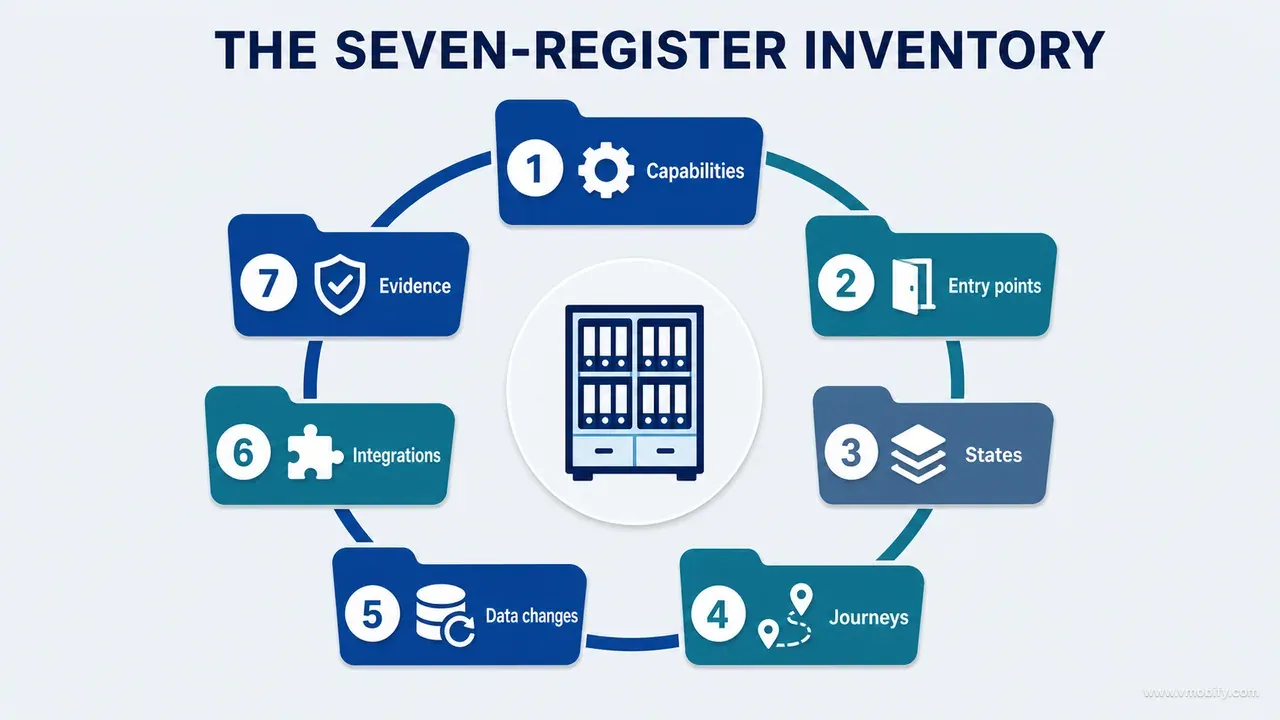
Because a complete product inventory is seven connected registers — capabilities, routes and surfaces, states, journeys, critical data, integrations and evidence — and a screen list is a partial answer to only the second of them. Before redesigning a product, you need an artefact that proves what exists. Not a list of filenames. Not a sitemap copied out of the main navigation. Not a folder of attractive screenshots.
The inventory is complete only when it answers nine questions for every meaningful part of the product:
- What can the user do?
- Where can each action begin?
- Which conditions change the experience?
- What data is read or written?
- What happens when the action fails?
- Which other surfaces must update?
- Which external systems does it depend on, and what happens when they fail?
- What proves that the behaviour exists?
- What remains unverified?
We built this method while reviewing a child-growth product implemented independently on iOS and Android. The Android project alone documented 51 screens and seven sheets, plus deep links, premium gates, authentication conditions and data-dependent states. A screen-by-screen visual review still missed important behaviour, because the same screen changed substantially depending on account, profile, entitlement, permission, network and data conditions. That build is the worked example throughout this series; the story of what it cost us is in our post on what shipping an AI-built iOS app taught us, and this post stays on the method.
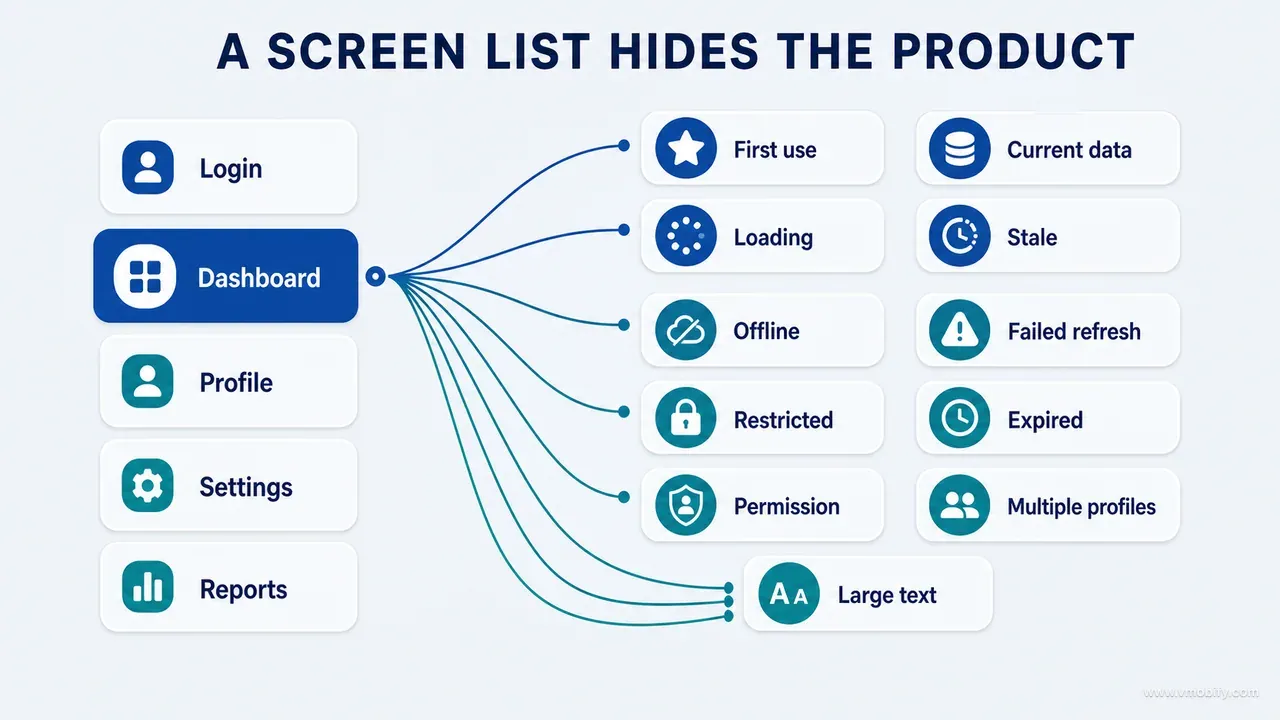
Consider what most teams start with: Login, Dashboard, Profile, Settings, Reports. Useful, and not an inventory. "Dashboard" is at least eleven distinct things — first use with no data, returning use with current data, loading, cached but stale, offline, failed refresh, restricted account, expired subscription, permission missing, multiple profiles, large accessibility text. "Settings" contains routes reachable only from a notification or an error message that never appear in its normal hierarchy.
Three specific confusions cause most incomplete inventories:
- Files are not surfaces. One file can implement several visual states. One surface can be assembled from four files. Dead files may represent nothing a user can reach. A dialog may be declared inline. Generating the inventory from source filenames produces false confidence, precisely because it looks exhaustive.
- Screenshots are not behaviour. A screenshot shows one moment. It does not reveal entry conditions, writes, asynchronous work, cancellation, recovery, or the four other surfaces that had to refresh afterwards.
- Navigation is not capability. A visible menu item can lead to incomplete behaviour. A fully implemented capability can hide behind a contextual long-press. Capabilities and surfaces therefore need separate registers, not one merged sheet.
This is part 03 of our AI product development methodology series, and it assumes you have already established what the product claims to do, which is the subject of part 02 on understanding an existing product before you point AI at it. The inventory is where those claims get tested against evidence.
Register 1 — what can users actually do?
Start with capabilities written as verbs, because a verb can be tested and a feature label cannot. "Reports" is ambiguous. Preview a report, choose a date range, generate a report, share a report, retry a failed generation and access a premium report are six capabilities with different preconditions, different failure modes and different owners.
A capability register for a typical product opens with entries like: create an account, create a record, edit a record, delete and undo, search history, export a report, enable AI assistance, revoke consent, purchase access, restore access, receive a reminder, switch profiles. For each one, capture nine fields:
Capability:            User-recognisable action or outcome, phrased as a verb
User:                  Who can perform it
Entry points:          Every place it can begin
Preconditions:         Auth, data, role, permission or entitlement
Main implementation:   Owning module or service
Data dependency:       Objects read or changed
Completion evidence:   What proves success to the user and to you
Failure behaviour:     How failure appears and how it recovers
Status:                Live / partial / hidden / UI-only / documented / deprecated
The status field carries more weight than it looks. UI-only is the entry that saves redesigns: a control that renders, responds to taps, and performs nothing. In our portfolio, every large audit has surfaced at least one of these, and they are almost always a control someone built ahead of a backend that changed direction. If a redesign polishes a UI-only control into something more prominent, you have amplified a dead end.
Separate creation from correction. Teams inventory "add record" and forget edit, delete, undo, import, restore and conflict resolution. Creation proves only the happy path. Trust is established during correction — the user who mistyped a value at 2am and needs it fixed is the user deciding whether your product is safe to rely on. Any capability whose correction path is missing from the register should be treated as incomplete rather than as done.
How you recognise a weak capability register: it has roughly the same number of rows as the navigation has menu items. Real products have far more capabilities than menu entries, because contextual actions, long-presses, swipe gestures, notification actions and recovery buttons all start work. If your capability count and your screen count are similar, you have inventoried the navigation twice and called it two registers.
Register 2 — where can every action begin?
The route and surface register catches every user-visible destination and every mechanism that can present it — and the entry points matter more than the parent route. A record-detail screen may open from search, history, a dashboard card, a notification, a deep link, or a home-screen widget. Each entry point passes different context and exposes different failures.
Discovery sources you must sweep, not just the navigation graph: route definitions and navigation graphs, tab declarations, sheet and modal calls, dialogs, deep-link handlers, notification actions, widget links, context menus, error-recovery buttons, authentication redirects and subscription gates. Deep links deserve their own pass — Android app links and iOS universal links both route around the navigation the design team draws on a whiteboard, and both routinely reach destinations that no longer exist after a refactor.
Use a fixed schema per surface:
Surface ID:
Display name:
Surface type:            screen / page / sheet / modal / dialog / popover / widget
Route or presentation mechanism:
Parent surface:
Entry points:
Exit points:
Deep links:
Authentication requirement:
Role requirement:
Entitlement requirement:
Permission requirement:
Primary capability:
Secondary capabilities:
Data read:
Data written:
Destructive actions:
Shared components:
Evidence:
Owner:
Assign stable surface IDs on day one. Names change during a redesign; IDs must not. Stable IDs let audit findings, screenshots, implementation tasks and tests all reference the same surface across a rename.
AUTH-01  Welcome
AUTH-02  Sign in
HOME-01  Overview
DATA-01  Record list
DATA-02  Add record sheet
SET-03   Privacy centre
The payoff is immediate: a screenshot named DATA-02-error-offline.png is understandable without opening it, and a finding that says "DATA-02 has no offline state" survives the screen being renamed twice.
How you recognise a weak surface register: every row has exactly one entry point, and it is the parent route. That is the shape of a register built from a navigation file. If an inventory records only "History → Detail", it will miss the notification route that has been broken since the parameter name changed, because nobody in the redesign ever taps a notification.
Register 3 — which conditions change the screen?
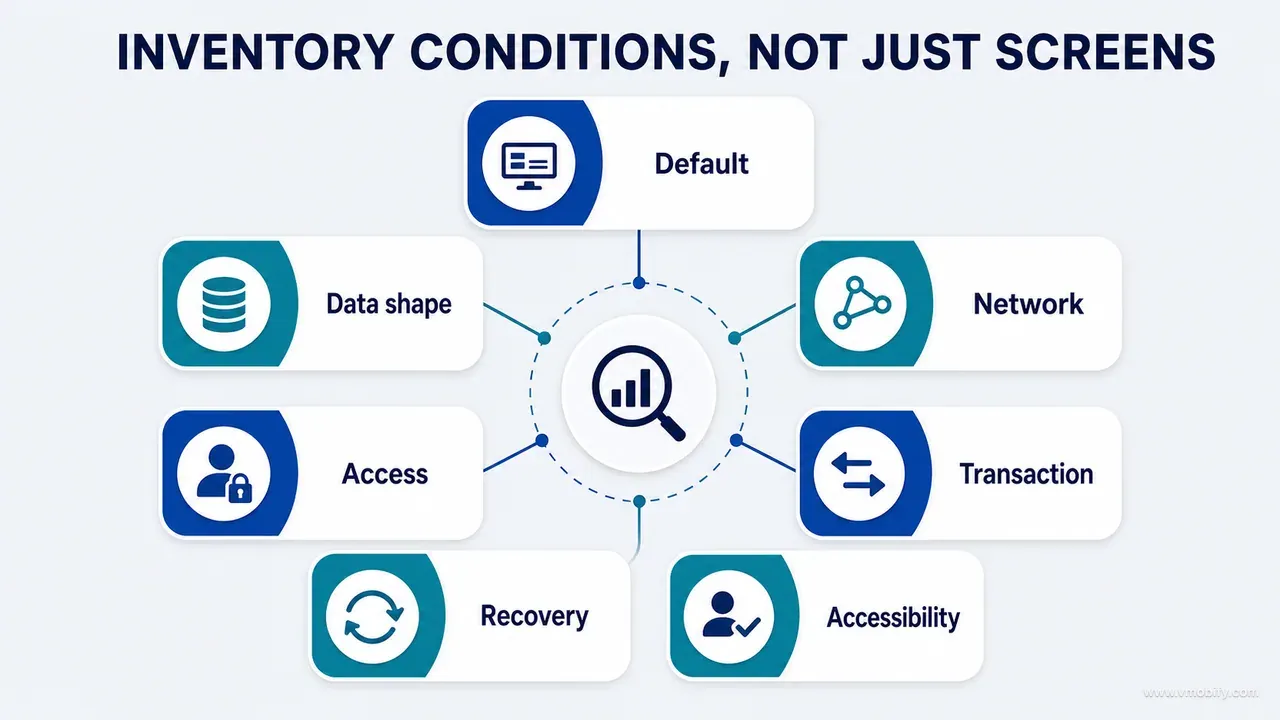
State coverage is where a basic inventory becomes useful, because states are what design boards often omit and what real users encounter constantly. Inventory states rather than screens and the amount of design and verification work rises sharply. That is newly visible scope, not inflated scope.
At minimum, evaluate eighteen: initial, loading, populated, empty, filtered empty, error, offline, stale, permission denied, authentication required, entitlement required, validation failure, processing, success, partial success, destructive confirmation, undo available, retry available. Not every surface needs every state. The register must mark applicability rather than assume it.
Build a surface-state matrix and forbid blank cells:
Surface        Loading  Empty  Error  Offline  Stale       Permission  Entitlement  Destructive  Verified
Overview       Yes      Yes    Yes    Yes      Yes         N/A         Partial      N/A          Partial
Record form    N/A      N/A    Yes    Yes      N/A         N/A         N/A          Cancel       Yes
Export report  Yes      Yes    Yes    Yes      Unverified  N/A         Required     N/A          Unverified
A blank cell is the single most dangerous mark in the whole inventory, because blank collapses three completely different answers into one symbol: the state is irrelevant, the state is missing, or nobody checked. Force the author to write N/A, required, not implemented or unverified. The Overview row above says something specific and uncomfortable — entitlement handling is partial and verification is partial — which is exactly the sort of statement a spreadsheet full of blanks lets a team avoid making.
Two state families are consistently under-inventoried. The first is presentation state: Apple's guidance on loading is explicit that a loading state is a designed state rather than a spinner you drop in, and error states have their own literature — Nielsen Norman Group's error message guidelines are the standard reference. Accessibility conditions are states too: WCAG 2.2 reflow makes largest-text and narrow-viewport rendering a requirement, not an edge case, and a matrix that omits them ships a product that breaks for the users who most need it to work.
The second is data shape, and it is the family most inventories skip entirely. Many interfaces fail because the register models UI state but never models what the data looks like. For a chart: zero values, one value, two values, many values, missing values, duplicate dates, extreme values, a long time range, mixed units. For a table: one row, hundreds of rows, very long names, missing optional fields, conflicting records. A growth chart with one measurement cannot draw a trend line; a chart with two measurements taken on the same day cannot sort them deterministically. Neither appears in a design board, because boards are drawn with the pleasant middle case.
Emerging-market conditions belong in this register rather than in a separate "India considerations" document that nobody reads. In our India-focused app work, four states recur often enough to require explicit rows: offline, stale-cache, failed-refresh and partial-success. On an intermittent network, stale data is an ordinary condition rather than an exotic edge case — so a surface whose stale cell says N/A, such as the record form in the matrix above, deserves a second look rather than a nod. The export report row is more honest: nobody has checked what it shows on a stale cache, and the cell says so.
Register 4 — how do journeys cross surfaces?
A journey connects several surfaces into one user outcome, and the register exists to expose the cross-surface consequences that per-screen review cannot see. The field that earns the register its place is "surfaces that must refresh" — it is where redesigns break products.
Journey ID:
User goal:
Starting condition:
Entry point:
Steps and decisions:
Data created or changed:
External dependency:
Success signal:
Surfaces that must refresh:
Failure branches:
Recovery path:
Exit or cancellation:
Analytics evidence:
Runtime evidence:
Inventory the recovery journey for every high-value happy path. If the main journey is create record, save, see updated overview, the register must also carry: create then validation fails; create then save fails then retry; create then cancel; create then save then edit; create then save then delete then undo; create then save locally then sync fails then recover. Six branches for one happy path is normal. A register that carries only the happy path describes a demo, not a product.
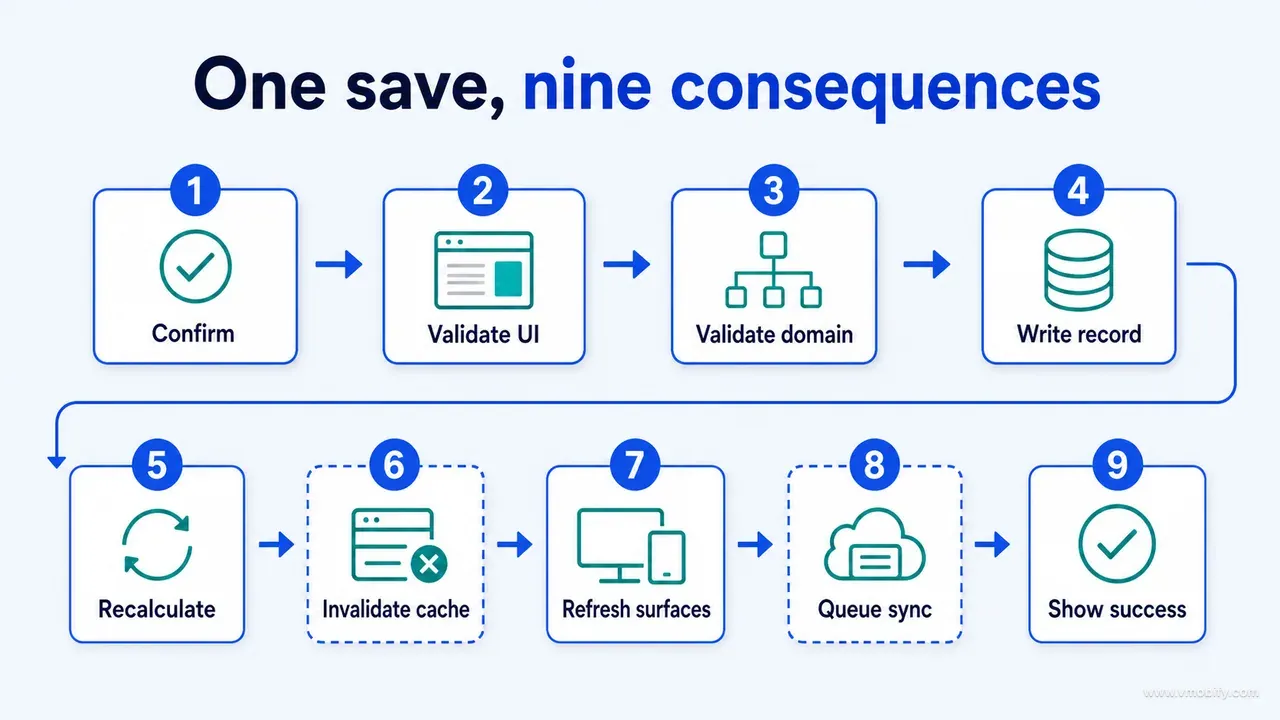
Distinguish user steps from system steps. Writing the background work out explicitly is what makes cross-surface defects visible before anyone opens an editor:
User confirms save
  -> UI validates input
  -> Domain validates invariant
  -> Repository writes record
  -> Derived values recalculate
  -> Cache invalidates
  -> Dependent surfaces refresh
  -> Sync queues
  -> Success appears
Read that chain and the questions ask themselves. Which dependent surfaces? What happens if the recalculation succeeds and the cache invalidation does not — does the user see the old number on the chart and the new number in the list? If the sync queue is enqueued in a task that the operating system can cancel when the app is backgrounded, the write is durable locally and invisible on the second device forever. That failure is impossible to spot from a screenshot and trivial to spot from the chain.
The analytics-evidence field is worth filling honestly rather than aspirationally. If a journey has no event at its success signal, you cannot measure the redesign afterwards, which turns the whole exercise into an opinion contest. What to instrument is a separate exercise with its own literature; for the inventory, the only question is whether the evidence exists today, and "we could add it" means no.
How you recognise a weak journey register: the journeys map one-to-one onto the tab bar. Real journeys cross tabs, leave the app for a payment or an authentication provider, come back through a deep link, and touch surfaces the user never sees.
Register 5 — where does critical data change?
Choose the three most important data objects and trace every path that can create, modify or destroy them — because this register catches the defects that screen discovery structurally cannot. Three, not thirty. A traced trio beats a shallow catalogue of everything.
For each object, build a data-path inventory across eight columns:
Operation  Entry point     Validation   Persistence       Derived effects    Failure          Recovery        Evidence
Create     Add form        UI + domain  Local store       Dashboard, chart   Write error      Preserve draft  Test + runtime
Edit       Detail action   Domain       Update in place   Recalculate        Partial failure  Retry           Test only
Delete     Detail / list   Confirmation Tombstone         Remove caches      Sync failure     Undo / retry    Unverified
Then list the hidden modification paths, because an object can change with no edit button anywhere in the interface: unit conversion, a change to a parent object, import, migration, server reconciliation, background refresh, restore from backup, conflict resolution, subscription downgrade, account switch. On the child-growth product, editing a profile's date of birth silently changed every age-dependent interpretation attached to that profile — a data change with no data screen involved. A screen inventory could not have found it. Tracing the object across its operations found it in one pass.
Two of those paths deserve permanent suspicion in any product with a subscription. Subscription downgrade is a data event dressed as a billing event: what happens to records created above the free tier limit when an entitlement lapses? Hidden, deleted, read-only, or still fully editable because nobody decided? Account switch is the same shape — Android's data-layer guidance puts the single source of truth and conflict resolution inside the repository, which is where this consistency has to be enforced, and in practice a cached view model that survives a sign-out is one of the most common ways one user sees another user's data.
Record the invariants explicitly. An invariant is a condition that must hold regardless of which path modified the object:
A record belongs to the active account and the active profile.
Stored measurement values use canonical units.
Derived outputs use the selected, verified reference dataset.
Deletion removes or invalidates every dependent cached result.
The register must then show where each path validates each invariant — and name the paths that do not. Import almost never does. Migration almost never does. That is the finding; write it down rather than fixing it mid-inventory. Auditing the data paths rather than the screens is a large enough subject to carry its own instalment — part 11 on auditing data rather than screens works through the three-object trace in full.
Register 6 — what do integrations hide?
External systems create product states that exist nowhere in your source code, so every integration needs its own row with a failure presentation and a local fallback. An integration you cannot see failing is an integration whose failure your users experience alone.
The sweep list: authentication, payments, notifications, analytics, crash reporting, cloud sync, AI providers, email, storage, search, feature flags, store configuration and reference datasets. Each gets the same schema:
Integration:
Purpose:
Provider:
Owning service:
Data sent:
Data received:
Consent requirement:
Local fallback:
Failure presentation:
Retry behaviour:
Environment configuration:
Production evidence:
Owner:
Never mark an integration verified because an SDK is installed. Require an active path, and for anything that affects money or trust, require external configuration evidence — the product in the provider's dashboard, the notification certificate in the right environment, the webhook actually receiving. We have seen a payment integration pass every code review and fail in production because the store product identifier existed in the sandbox configuration and not in the live one. No amount of reading the app would have caught it; one row saying "production evidence: none" would have.
Two fields do most of the work. Local fallback asks what the product does when the provider is unreachable, which for an AI-assisted feature is the difference between a degraded experience and a blank screen. Failure presentation asks what the user sees — and the honest answer is often "nothing, the spinner continues", which is a defect that no screen inventory will ever list because the design board has no frame for it.
The consent-requirement field is not paperwork. If an AI provider receives user content, consent state becomes a precondition on every capability that uses it, which means it belongs in Register 1 as well. Products handling health, financial or children's data carry stricter obligations and stricter review scrutiny, and the inventory is where you find out whether the product satisfies them before a store reviewer does.
For products distributed in India, add two rows that global checklists routinely omit: the payment path used for recurring charges, and any reference or regulatory dataset the product depends on. Both are configuration that lives outside your repository, both can change without a release, and both fail silently.
Register 7 — what proves the inventory is real?
The final register answers a question the other six cannot: how do we know this is true? Every entry in every register carries an evidence label, and the labels are not decorative — they determine what can be counted as coverage.
- Code-confirmed — the path exists in source and was read.
- Test-confirmed — an executed test exercises it. Not a test that exists; a test that ran and passed.
- Runtime-confirmed — observed in a build, in the stated state, with a capture.
- Externally verified — confirmed in a provider dashboard, store listing or server log.
- Inferred — reasonable from naming or documentation, and unproven.
- Unverified — nobody has looked.
Inferred and unverified entries never count towards verified coverage. This single rule is what stops an inventory from becoming a confidence document. An AI-generated first draft will produce mostly inferred entries, and it will phrase them with total assurance, which is precisely why the label has to be structural rather than a footnote.
Then reconcile seven independent discovery sources against each other:
- Routes found in navigation
- Screens found in source
- Capabilities described in documentation
- Surfaces observed at runtime
- Destinations referenced by deep links
- Screens depicted in design boards
- Journeys described in marketing or support copy
Every unmatched item becomes an investigation task, and the diagnosis is usually readable from the mismatch itself. A source surface with no route is dead, hidden or contextual. A documented feature with no source is roadmap or missing implementation. A runtime destination absent from the inventory is dynamic presentation you did not model. A board screen absent from requirements is visual exploration. A deep link with no valid destination is a defect, and it is the most common thing this reconciliation finds.
The last source is the one teams forget and the one that produces the sharpest findings. Marketing and support copy describe the product as customers understand it. When the store listing promises an export that the app can only produce for premium accounts, or a help article documents a recovery flow that was removed two releases ago, the reconciliation surfaces a live promise the product no longer keeps. That is a redesign requirement and a store-review exposure at the same time, and it came out of comparing two documents rather than reading any code.
Which four passes actually build the inventory?
Four passes, in order, and the fourth is the one that finds what the first three miss. Running them in parallel feels faster and produces a register that agrees with itself rather than with the product.
- Pass 1 — automated discovery. Search route declarations, screen patterns, modal calls, deep-link handlers, data entities and service definitions. Produce a provisional inventory with everything labelled inferred. This is the pass an AI agent does well and fast, and it is the pass most likely to be mistaken for the finished article. Budget an afternoon; across the audits in our portfolio this pass typically recovers most of the surfaces and almost none of the states.
- Pass 2 — documentation reconciliation. Compare project guides, requirements, previous audits, design boards and roadmaps against the provisional inventory. The instruction that matters here: mark disagreements rather than merging them silently. When the requirements say a capability exists and the code says otherwise, the inventory records both claims and an open question. Resolving it by picking the more plausible one destroys the finding.
- Pass 3 — runtime walkthrough. Traverse the high-value journeys in a real build and capture evidence in realistic states, not just the states that are easy to reach. This is slow and there is no substitute for it. Reaching a genuine offline-with-stale-cache state on a specific surface can take ten minutes of setup; that is the cost of knowing rather than assuming.
- Pass 4 — data-first reconciliation. Take the three critical objects and trace them across every operation and every dependent surface. This pass exists because the first three are all organised around what is visible, and the highest-severity defects are not. In our experience this pass produces the smallest number of findings and the most severe ones, consistently.
One discipline across all four: timestamp the pass and record the build it examined. An inventory of a five-week-old build presented as current is worse than no inventory, because it will be trusted. A large product inventory realistically takes a week of focused work for a two-platform app of the size described here, and the temptation at day four is to stop after pass 3 because the spreadsheet already looks impressive.
When is the inventory complete enough to stop?
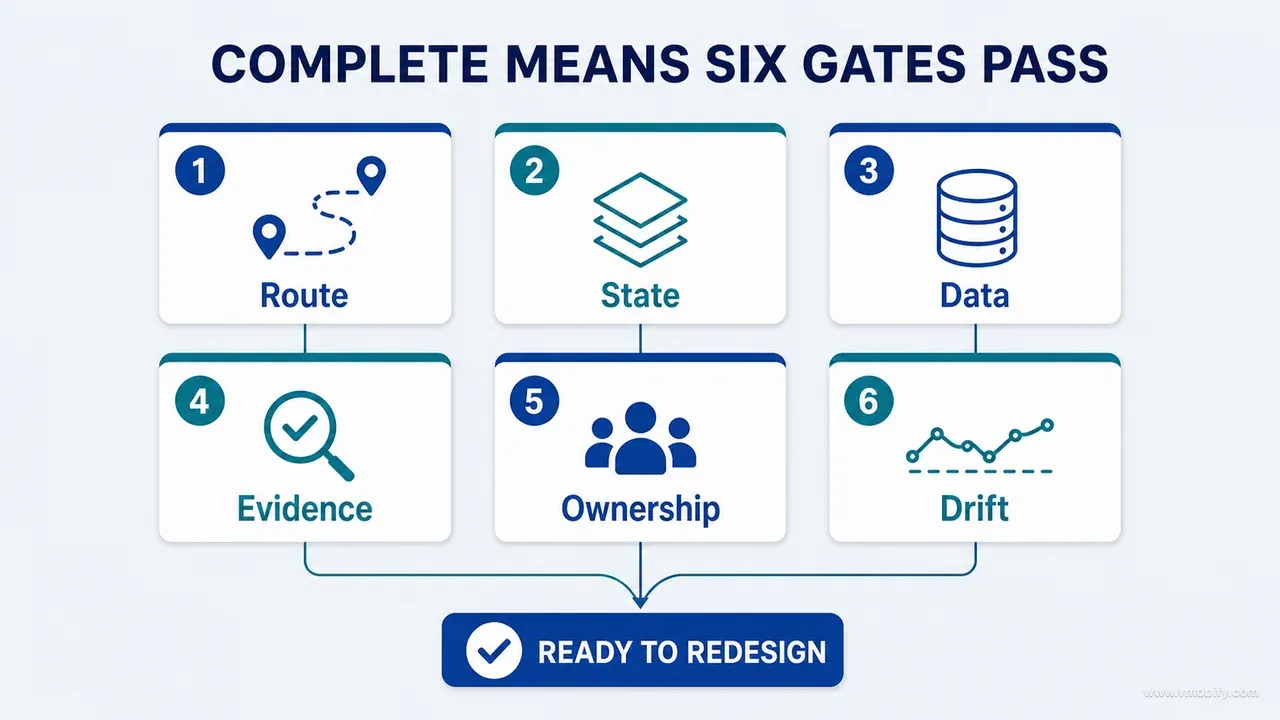
When six explicit gates pass — route, state, data, evidence, ownership and drift — not when the spreadsheet has an impressive number of rows. Gates turn completion into a reviewable decision instead of a feeling.
- Route gate. Every declared route, deep link, modal destination and notification destination maps to a known surface ID. Every surface marked reachable has at least one proven entry point. An orphan in either direction is a finding, not a rounding error.
- State gate. Every P0 and P1 surface has an explicit decision for loading, empty, error, offline, permission and recovery. N/A is acceptable with a justification; an unexplained blank is not.
- Data gate. Every create, modify and delete path for the three critical objects appears in the data register, and each path names its validation, persistence, dependent invalidation and failure handling.
- Evidence gate. Every claim about active functionality carries code, executed-test, runtime or external evidence. Inferred and unverified entries remain visible and stay outside the verified coverage totals.
- Ownership gate. Every unresolved P0 or P1 item has a named decision owner or evidence owner. "Needs investigation" with no name attached is not a plan; it is a note that will still be there at the next audit.
- Drift gate. The inventory states the repository revision, build number, environment and product version it describes. Without it, a correct inventory becomes quietly misleading the moment the product changes.
The gates also fix reporting, which is a bigger benefit than it sounds. "The audit is 80% complete" is an unusable sentence — 80% of what, verified how, and is the missing 20% cosmetic or the entire payment path? With gates, a team reports route coverage, state coverage and critical-data coverage separately, each with its evidence mix. "Route gate passed; state gate passed for 14 of 19 P0 surfaces; data gate open on delete paths; four P1 items have no owner" is a status anyone can act on.
Expect the ownership gate to be the one that stalls. It is the only gate that requires a person to accept responsibility for an unknown, and it is therefore the gate that reveals whether the redesign has a decision-maker or a committee. In our portfolio, inventories that stall for weeks almost always stall here rather than on discovery work — the technical questions were answered and nobody would own the product questions.
One thing the gates deliberately do not require: that everything be resolved. An inventory with 30 open questions, each labelled, owned and prioritised, is complete. An inventory with no open questions is either a very small product or a document that stopped asking.
How do you prioritise a large inventory?
Completeness does not mean equal attention — score every journey and surface on seven axes, then sort into three levels. A 200-row inventory with no priority column produces the same paralysis as no inventory at all.
Score on: user frequency, business value, data sensitivity, irreversibility, external dependency, failure impact, and current uncertainty. The last one is the axis teams leave out and the one that changes the ordering most. A surface you fully understand and rate medium-risk needs less attention than a surface you barely understand and rate medium-risk, because the second one might be hiding anything.
P0 — Trust, data loss, security, money, or a blocked core outcome
P1 — Important usability, recovery, accessibility or consistency problem
P2 — Polish, efficiency, delight, or a low-risk edge case
Two calibration rules keep the levels honest. First, anything irreversible starts at P0 regardless of frequency. A delete path used by 2% of users monthly outranks a layout inconsistency on the home screen, because the delete path can destroy something the user cannot get back. Second, the first meaningful outcome is always P0 — the moment a new user gets the thing they installed for. That is the activation moment, and the reason it earns permanent P0 status is covered in our post on finding an app's activation moment.
Resist the pull towards P0 inflation. If more than a quarter of the inventory is P0, the level has stopped carrying information, and the redesign will simply start at the top of the list and work down as if it were unprioritised. When we see an audit come back with 60% of items marked critical, the usual cause is that severity was assigned per-finding by whoever wrote it, with no pass to normalise across the whole register.
How should screenshots inherit inventory IDs?
Create screenshots from the inventory, not independently of it — every capture inherits its surface ID and state name from the register that produced it. A folder of unstructured captures is unusable within a fortnight, because nobody can tell which build, which state or which platform any of them shows.
SURFACE-STATE-PLATFORM-VERSION.png

HOME-01-empty-ios-v1.png
DATA-02-validation-error-android-v2.png
EXP-01-entitlement-required-ios-v1.png
The naming does three jobs at once. It makes a capture readable without opening it. It makes gaps visible by absence — if the state matrix says Export needs an entitlement-required state and no file matches EXP-01-entitlement-required, the gap is a missing filename rather than a conversation. And it survives a redesign, because the surface ID does not change when the screen is renamed.
For a serious audit, the deliverable set is six artefacts: a full surface contact sheet, a route map, a state matrix, one worked user-journey sequence, one critical-data path, and one coverage reconciliation example. Generated editorial imagery is fine for a cover; evidence must be real captures or deliberately reconstructed diagrams, clearly labelled as which.
Which states are worth capturing, and how many captures a surface actually needs, is the whole subject of the next instalment — part 04 on choosing screenshots for a serious product audit. The short version: the useful captures are almost never the ones that look good, and a contact sheet full of populated happy-path screens is a sign the inventory was ignored during capture.
Which prompt produces the first draft inventory?
This one — and its most important instruction is the first line after the task, which forbids the model from redesigning anything. An agent asked to inventory a product will drift into improving it within three paragraphs unless you close that door explicitly.
Create a complete evidence-backed inventory of this digital product.

Do not redesign or implement anything.

Produce seven connected registers:

1. CAPABILITIES
List every user-recognisable action using verbs. Include entry points,
preconditions, implementation owner, data dependency, completion evidence,
failure behaviour and status.

2. ROUTES AND SURFACES
Discover screens, pages, sheets, modals, dialogs, popovers, widgets and
conditional surfaces from navigation, deep links, notifications, contextual
actions, authentication and entitlement gates. Assign stable surface IDs.

3. STATES
For every surface, mark applicable initial, loading, populated, empty,
filtered-empty, error, offline, stale, permission, authentication,
entitlement, validation, processing, success, partial-success, destructive,
undo and retry states. Include meaningful data-shape states.

4. USER JOURNEYS
Map the highest-value user outcomes, correction paths and recovery paths.
Separate user actions from background system work. List every dependent
surface that must refresh.

5. CRITICAL DATA
Identify the three most important data objects. Map all create, edit, delete,
import, sync, restore, undo, cancel, migration and conflict paths. State each
invariant and where it is validated.

6. INTEGRATIONS
Inventory external providers, data exchanged, consent, fallback, failure,
retry, environment configuration and external evidence requirements.

7. EVIDENCE AND COVERAGE
Label each finding CODE-CONFIRMED, TEST-CONFIRMED, RUNTIME-CONFIRMED,
EXTERNALLY VERIFIED, INFERRED or UNVERIFIED.

Reconcile routes, source files, documentation, runtime, deep links, boards and
marketing claims. List every unmatched item and the next evidence required.

Finish with:
- P0/P1/P2 priorities
- inventory coverage summary
- unresolved questions and owners
- what this inventory method could not detect
The closing instruction is the one worth defending when someone suggests trimming the prompt. "What this inventory method could not detect" forces the model to state its own blind spots, and the answers are consistently useful: dynamically composed surfaces, server-driven configuration, anything gated behind a state it could not reach, and anything that only exists in a build it never ran.
Treat the output as pass 1 and nothing more. Every entry arrives labelled inferred, and the model will write inferred entries in the same confident register as confirmed ones. Demanding evidence rather than fluent explanation is the backbone of this whole series, and it is the single habit that separates an inventory you can redesign against from one that reads well.
Which mistakes cost the most here?
Seven, and every one of them produces an inventory that looks finished while describing a product that does not exist. They are worth reading as a review checklist before anyone signs off.
- Counting screens instead of mapping the system. The number is close to meaningless. The connections between surfaces, states and data are the whole artefact. An inventory that reports "51 screens" and nothing about how they depend on each other has measured the product the way a page count measures a book.
- Mixing current and future features. Board concepts and roadmap items inflate current capability coverage the moment they share a register with shipped behaviour. Label them explicitly and exclude them from coverage totals.
- Ignoring correction paths. Edit, delete, undo and restore reveal more about product quality than creation ever does, and they are the paths a redesign is most likely to quietly drop.
- Leaving cells blank. Blank means the team does not know whether the state is irrelevant, missing or unverified — three different problems wearing one costume.
- Treating platform parity as identical UI. Inventory capability parity separately from platform presentation. The same outcome legitimately requires different native patterns; the mistake is assuming that because the iOS and Android screens differ, the capabilities differ too, or that because they look the same, they behave the same.
- Capturing screenshots without IDs. Unstructured capture folders cannot be compared across builds, which means they cannot show whether a redesign fixed anything.
- Declaring completion without reconciliation. An inventory is not complete until independent discovery sources have been compared and every discrepancy has been investigated or explicitly deferred with an owner.
Underneath all seven sits one failure mode: an inventory that documents what the team already believed. If the finished register contains no surprises, it was almost certainly built from the same mental model that produced the product, and it will validate the same blind spots during the redesign. A useful inventory changes somebody's mind about their own product — usually about a capability nobody could reach, a settings screen that exists twice, or a recovery path that was never built.
So: a redesign without a complete inventory is a decision made against an unknown surface area. The team improves what it can see while breaking what it did not know existed, and the damage surfaces weeks later as a support queue rather than as a review finding. Build the capability, route, state, journey, data, integration and evidence registers first. Join them with stable IDs. Reconcile source, documentation, runtime and concept work against each other. Prioritise by risk and irreversibility rather than by visibility.
Once the product is genuinely mapped, the redesign becomes easier to scope, safer to implement, and much harder to fake with confident language — which is the entire point of doing it before anyone opens a design tool. If you want a second opinion on an inventory before a redesign starts, talk to our team.
Frequently Asked Questions
Should the inventory live in a spreadsheet or in the documentation repository?+
Use whatever supports stable IDs, filtering, version history and links to evidence. Markdown works well when it lives next to the code and gets updated in the same pull request as a feature; spreadsheets work better for filtering a large state matrix. The model matters far more than the tool — a spreadsheet with the seven registers beats a beautiful wiki with a screen list.
How often should a product inventory be updated?+
Update the affected entries as part of feature completion, in the same pull request that changes the behaviour. Run a broader reconciliation before a redesign, a major release or an audit. The drift gate is what makes this enforceable: if the inventory names the build it describes, everyone can see how stale it is rather than assuming it is current.
Does every small modal need its own inventory entry?+
Include it when it has unique behaviour, data, risk, recovery or test requirements. A confirmation dialog for a destructive action absolutely needs an entry, because it carries a destructive state and an undo path. A decorative popover that shows static help text can stay part of its parent surface.
How do you inventory a dynamic or server-driven screen?+
Inventory the surface once, then model its meaningful modes and data-shape states separately. The trap is treating server-driven content as unknowable and leaving the row blank. You may not control what the server sends, but you can enumerate the shapes it can send — empty, one item, many items, malformed, unsupported type — and each of those is a state that needs a decision.
Can AI generate the first product inventory automatically?+
Yes, and it should — automated discovery is genuinely fast at finding routes, screen patterns and data entities. Treat the output as a provisional discovery pass with every entry labelled inferred. Reconcile it against runtime, executed tests, documentation and critical-data traces before any of it counts as verified. The failure mode is that generated inventories are written in the same confident tone whether the model read the code or guessed.
What should be reviewed first once the inventory is complete?+
Start with P0 journeys that involve sensitive data, money, irreversible actions, or the product's first meaningful outcome. In practice that usually means the delete and undo paths, the payment and entitlement paths, and the new-user path to first value — in that order, because the first two can harm an existing user and the third only costs you a new one.
How long does a complete product inventory take?+
For a two-platform product of the size described here — roughly 50 surfaces per platform with deep links, entitlements and sync — budget about a week of focused work: an afternoon for automated discovery, a day for documentation reconciliation, two to three days for the runtime walkthrough, and a day for the data-first pass. The runtime walkthrough is the part people underestimate, because reaching one genuine offline-and-stale state can take ten minutes of setup.
Sources
- Android Developers — Navigation — Route and destination declarations used as a discovery source in Register 2
- Android Developers — Handling Android App Links — Deep-link entry points that bypass the navigation a design team draws
- Apple — Supporting universal links in your app — The iOS equivalent discovery source for deep-link destinations
- Apple Human Interface Guidelines — Loading — Loading treated as a designed state rather than a default spinner
- Nielsen Norman Group — Error Message Guidelines — Standard reference for the error state column of the surface-state matrix
- Nielsen Norman Group — Empty State Interface Design — Why empty and filtered-empty are distinct states worth inventorying separately
- W3C — Understanding WCAG 2.2: Reflow — Large-text and narrow-viewport rendering as a required state, not an edge case
- Android Developers — Data layer — Repositories as the single source of truth and the place conflicts between data sources are resolved
About the author
Amol Pomane — Founder, Vmobify
Amol leads Vmobify, a mobile app growth agency that has driven 30M+ downloads and ranked 54K+ keywords across 300+ apps since 2013. He writes about ASO, paid user acquisition, retention, and the operational reality of scaling mobile apps in India and global markets.