How to Build a Project Bible for AI Coding Agents
An AI agent can solve a hard problem today and recreate it next month, because the lesson stayed in the conversation instead of the repository. A project bible is the smallest durable knowledge system that stops that happening — eight layers, each one routed, dated and owned, with a check attached to every rule that matters.
On this page
- Why does a project bible beat chat history and a large README?
- Why does ordinary documentation fail AI workflows?
- Principle 1 — why a hierarchy rather than a monolith?
- Layer 1 — what belongs in the root entry instructions?
- Layer 2 — how do you map the product and the architecture?
- Layer 3 — how do you write data invariants an agent can check?
- Layer 4 — how do you preserve UI/UX and content decisions?
- Layer 5 — what makes a decision record worth writing?
- Layer 6 — how do you turn verification into an executable guide?
- Layer 7 — how should you record known risks and unknowns?
- Layer 8 — what does the update protocol have to enforce?
- How do authority labels tell an agent what to trust?
- How do you scope local instructions without creating drift?
- How do you test whether the bible routes correctly?
- What makes an instruction executable rather than aspirational?
- How do you stop the bible becoming a dumping ground?
- How do you bootstrap a bible from an existing project?
- What does the ready-to-use project bible prompt look like?
- Which completion checklist should every AI task pass?
- Which mistakes cost the most here?
- Frequently Asked Questions
Why does a project bible beat chat history and a large README?
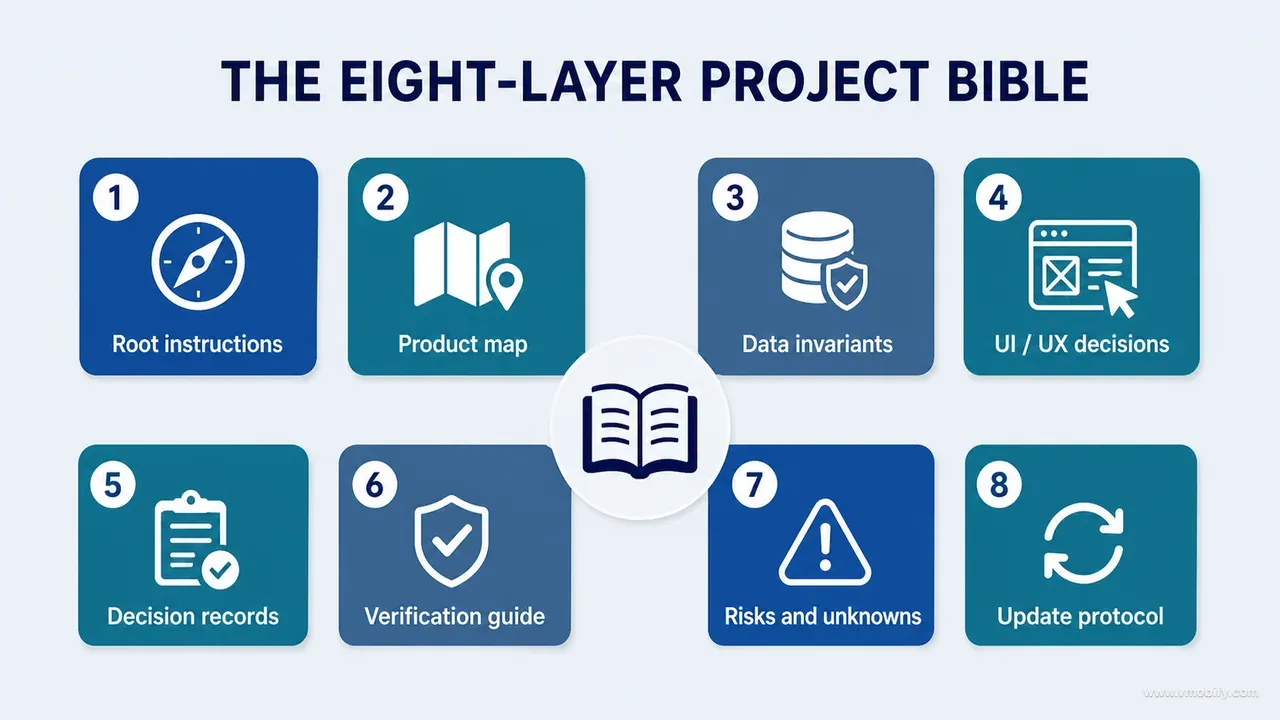
Build the project bible as eight layers — entry instructions, product and architecture map, data invariants, design and content principles, decision records, verification commands and evidence, known risks and unknowns, and an update protocol — because chat history is not project memory and a single large README has no authority, no dates and no proof. Everything below is detail on those eight layers.
An AI agent can solve a difficult problem today and recreate the same problem next month if the lesson stays trapped in the conversation. That is the whole failure in one sentence. The reasoning that produced a good decision lives in a transcript nobody reopens; the repository keeps the old instruction; and the next agent, working faithfully from what it can read, does the wrong thing confidently.
A giant README does not fix it either. Once setup instructions, abandoned ideas, current architecture and eighteen months of audit notes share one file, nothing in it carries authority. A proposal sits beside shipped behaviour. A concept board sits beside a runtime screenshot. The agent has no way to tell which one wins, so it picks whichever paragraph is written most confidently.
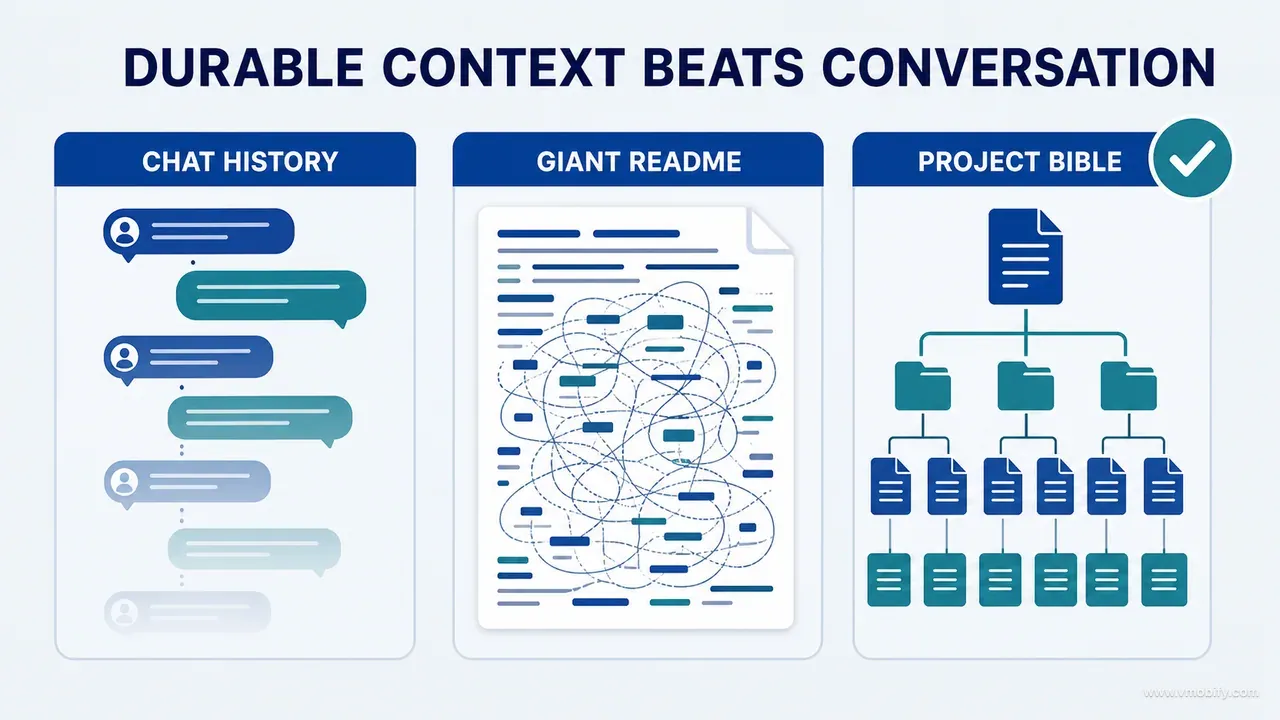
A project bible is the smallest durable knowledge system that tells both humans and agents what the product is, what must always remain true, where authority lives, how the system is organised, how to work safely, which decisions are closed, which commands prove a change, which mistakes must not return, and what is still unknown. That last item matters more than teams expect.
We needed this after repeated audits and redesigns of a real iOS and Android child-growth product — the same build documented in our post-mortem on shipping an AI-built app, which is the worked example this method came from rather than the method itself. The work spanned product inventory, UI/UX strategy, design boards, data invariants, reference validation, AI privacy, subscriptions, exports and release checks. Without durable records, each new session rediscovered the repository, reopened settled design questions, or trusted documentation that had drifted from what the running product actually did.
The rest of this series builds the practices; this final part is where they get written down so they survive. If you are arriving here first, the evidence-first method that opens the series explains why every rule below is expressed as something you can check rather than something you can agree with.
A useful project bible tells an agent what to discover, what to preserve, what to verify, and when to stop.
Why does ordinary documentation fail AI workflows?
Ordinary documentation fails agents in six specific ways: it mixes authority levels, records outcomes without reasons, contains no executable proof, grows too large to be read selectively without loss, never expires its claims, and is not updated after the work that changed it. Each failure is fixable, and each one has a distinct symptom you can recognise in a review.
It mixes authority levels. A proposed roadmap sits beside shipped behaviour; a design concept sits beside a runtime capture; a comment cites a reference version that was replaced two releases ago. The symptom is an agent citing your own documentation to justify a change that contradicts the running product.
It records outcomes without reasons. "Use component X" is fragile the moment nobody remembers which accessibility, state-handling or platform constraint required it. The symptom is a later agent proposing component X's replacement as though the original trade-off had never been considered.
It contains no executable proof. "Always normalise units" is useful advice. A named test command that fails the moment normalisation disappears is durable knowledge. The symptom is a rule everyone agrees with and nothing enforces.
It becomes too large to use. When every audit is appended to one file, important rules disappear into history. Agents read selectively under context pressure — they always have — and the section they skip is not the section you would have chosen. The symptom is a correct rule, present in the file, ignored anyway.
It never expires claims. Prices, libraries, platform rules and external references change. Undated documentation is silently misleading rather than loudly wrong, which is worse. On mobile this is acute: store policy shifts on its own schedule, and a rule written against last year's App Store Review Guidelines reads exactly like a rule written against this year's.
It is not updated after the work. The conversation contains the final reasoning; the repository retains the superseded instruction. This is the failure that recreates solved problems, and it is entirely a process defect rather than a writing one.
Documentation survives contact with agents when it is focused, dated and attached to a check wherever the claim matters. Volume alone does not make it authoritative or usable.
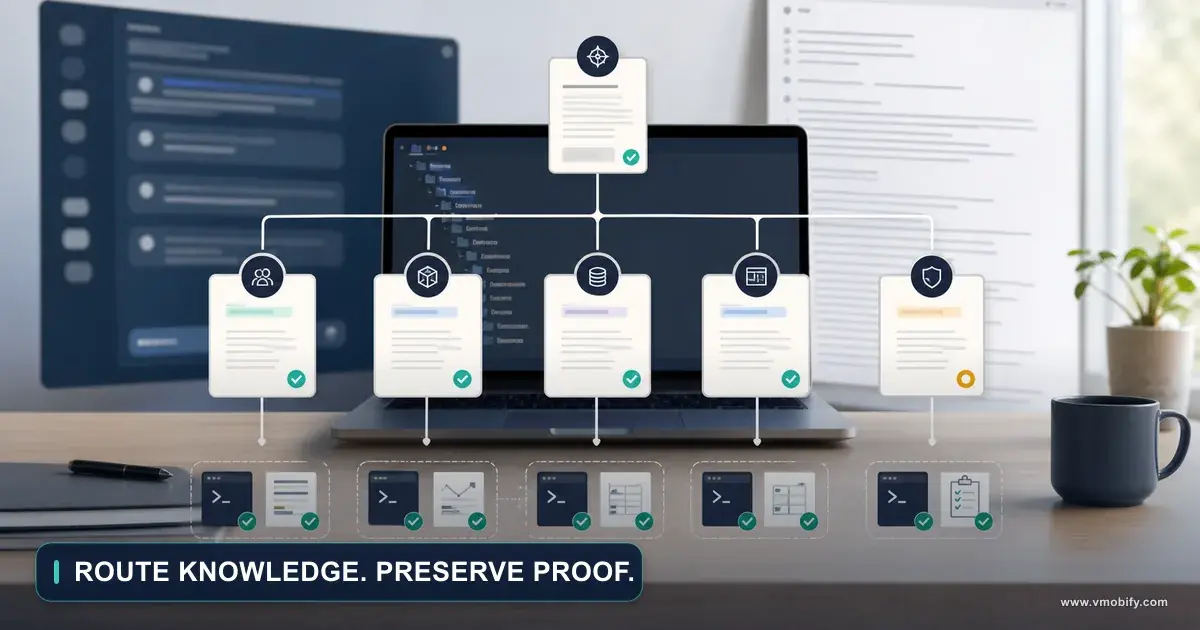
Principle 1 — why a hierarchy rather than a monolith?
Because the root entry file is loaded or consulted for most tasks while the detail is needed for only some of them — so a hierarchy keeps entry context small while making depth reachable, and a monolith forces every agent to process knowledge it will not use. The separation is the point; the exact filenames are not.
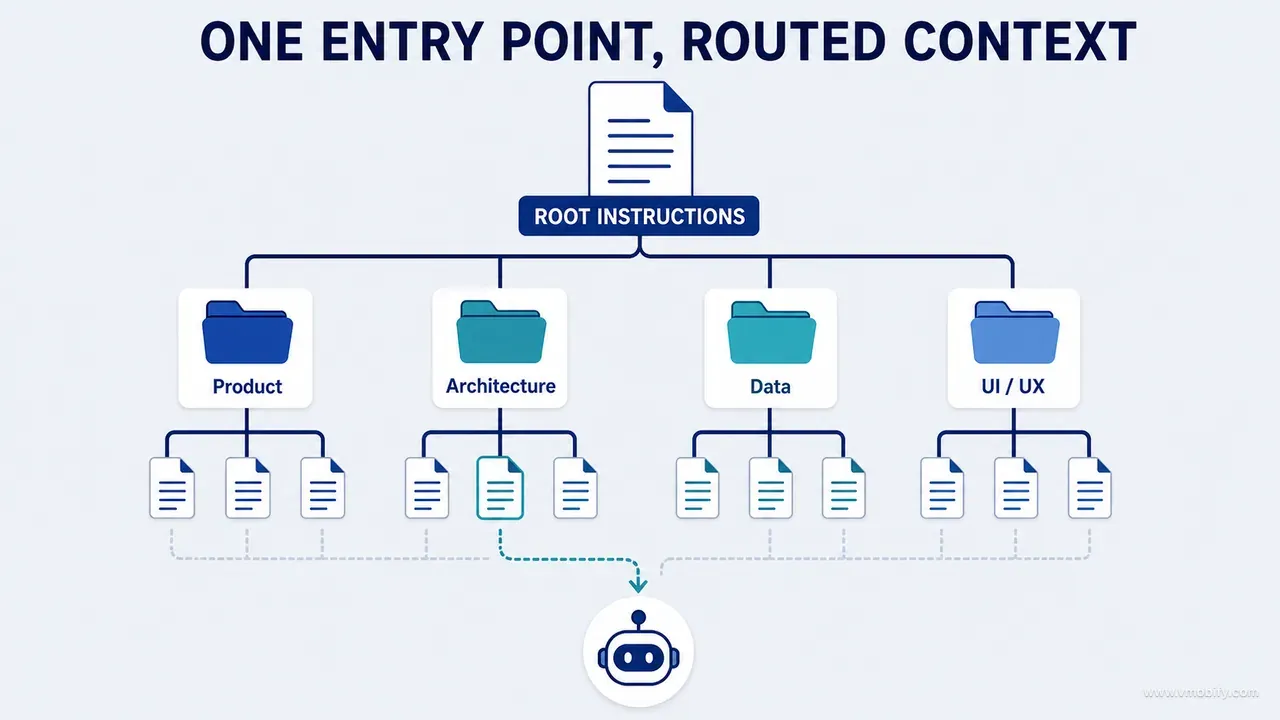
A practical structure:
/AGENTS.md or equivalent root instructions
/docs/project/
  PRODUCT.md
  ARCHITECTURE.md
  DATA-INVARIANTS.md
  UIUX-STRATEGY.md
  CONTENT-AND-TRUST.md
  VERIFICATION.md
  KNOWN-RISKS.md
  decisions/
    ADR-001-...
    UX-001-...
    DATA-001-...
  audits/
    inventory.md
    evidence-ledger.md
The root file routes work. It should not contain every detail. Think of it as a switchboard: its job is to get an agent to the three documents that constrain the current task within the first minute, and to state the handful of rules that apply to every task regardless.
There is a second, less obvious reason for the split. Separate files have separate change histories. When DATA-INVARIANTS.md changes, that is a reviewable event with a diff you can read in isolation. When line 1,840 of a 4,000-line README changes, it is noise inside a commit about something else. Reviewability is what keeps documentation honest over a year.
Size discipline is worth stating numerically, because "keep it short" is not actionable. In our own build the root rules file reached roughly 45KB across 23 sections, and at that size agents were demonstrably reading it partially. Our working rule now: if the root file cannot be read attentively in under five minutes, the next thing you add to it should go somewhere else and be linked.
Do not over-index on the folder names above. Some teams put all of this under a single docs directory; some put invariants next to the module that owns them; some keep decisions in an issue tracker with stable IDs. All of that works. What does not work is one file, or eight files with no routing between them.
Layer 1 — what belongs in the root entry instructions?
The root file answers seven questions in under five minutes: what an agent must do before editing, which safety rules are non-negotiable, which commands to run, which documents constrain the current task, where to find out what this repository is and how it is organised, how unrelated work must be preserved, and what evidence is required before it may claim completion. Nothing else earns a place there.
A working example:
# Repository working contract

Before editing:
1. Read the closest scoped instruction file.
2. Check working-tree status; preserve unrelated changes.
3. Discover the owning files, state flow and tests.
4. Report conflicts with product, data or design constraints.

Core rules:
- Runtime evidence outranks visual concepts.
- Domain invariants must be enforced below presentation code.
- Do not change real-world formulas or reference data without
  full-range verification.
- Do not claim a bug class fixed without a regression protection
  and a valid failing mutation.
- Do not invent product, privacy, entitlement or destructive behaviour.

Validation:
- Build: [command]
- Unit tests: [command]
- Integration tests: [command]
- Lint and static checks: [command]
- Runtime checklist: docs/project/VERIFICATION.md

Routing:
- Architecture → docs/project/ARCHITECTURE.md
- Data rules → docs/project/DATA-INVARIANTS.md
- UI and UX → docs/project/UIUX-STRATEGY.md
- Decisions → docs/project/decisions/
Every line in that file is either a routing instruction or a rule that applies universally. There is no architecture description, no product history and no rationale — those live one hop away, where they can be read by the tasks that need them.
Tool-specific entry files are a real problem and worth handling deliberately. The AGENTS.md convention is supported across a range of coding agents, while Claude Code reads project instructions from CLAUDE.md files, and other tools have their own filenames. Pick one canonical source, then prefer an import over a copy: Anthropic's own guidance for a repository that already uses AGENTS.md is to create a CLAUDE.md that imports it, so both tools read the same instructions without duplicating them, with any tool-specific rules added below the import. Where a tool has no import mechanism, generate its entry file from the canonical source and say in the generated file that it is generated. Two hand-maintained entry files can silently diverge, leaving an agent to follow whichever stale instruction its tool happens to load.
One rule we would now add to any root file on day one: state that the agent must preserve unrelated work. An agent operating in a repository with uncommitted changes, or alongside another branch in flight, will quietly revert or reformat work it was never asked to touch. That has to be forbidden explicitly, because from the agent's point of view tidying is helpful.
Layer 2 — how do you map the product and the architecture?
Split it in two: PRODUCT.md stops an implementation agent from inventing feature strategy, and ARCHITECTURE.md stops it from inventing boundaries — and both should link to code rather than duplicate volatile implementation detail. The two files fail in opposite directions, so they are worth keeping apart.
PRODUCT.md records the product promise, the priority users and the situations they are in, the critical journeys, the capability boundaries, the terminology, the business model and entitlement semantics, the privacy and safety posture, and the behaviour that is explicitly out of scope. That last section does the most work. An agent asked to improve onboarding will cheerfully add a feature; a written capability boundary is what makes it ask instead.
ARCHITECTURE.md records the module map, the dependency direction, state ownership, data sources and repositories, navigation, background work, integrations, configuration and environments, shared components and tokens, and the testing layers. Reference the platform's own architecture guidance where it exists, as a shared vocabulary, rather than restating it in your own words, which only creates a second thing to maintain.
Explain why the important boundaries exist. "Presentation must not touch the DAO" is a rule an agent can follow; "presentation must not touch the DAO because unit normalisation and profile ownership are enforced in the repository, and bypassing it produced two data-integrity defects" is a rule an agent can apply to a case you did not anticipate.
Then add discovery cues, which is the technique that turns documentation from something to trust into something to audit:
Claim: Measurement writes pass through MeasurementRepository.
Verify by: search for constructors and direct DAO insert/update calls.
Expected exceptions: migration and test fixture modules.
Three lines, and the document now teaches an agent how to prove itself wrong. The "expected exceptions" field is what stops the check producing false alarms and being abandoned. We have found this pattern to be the single highest-yield addition to an architecture document, because it converts an unverifiable assertion into a repeatable search — and a repeatable search survives a refactor that a prose description does not.
Layer 3 — how do you write data invariants an agent can check?
Write one entry per critical object with a fixed set of fields — identity, source of truth, privacy class, invariants, mutation paths, derived values, downstream consumers, conflict policy, protections, known gaps and an owner — and give every invariant an ID, a protection and a mutation that proves the protection works. DATA-INVARIANTS.md is the highest-value file in the whole system.
The template per object:
Object:
Canonical identity:
Source of truth:
Privacy classification:
Invariants:
Mutation paths:
Derived values:
Downstream consumers:
Conflict and retry policy:
Protections and tests:
Known gaps:
Owner:
And one invariant written properly:
Invariant M-04: Retrying a measurement write is idempotent.
Authority: Repository plus storage uniqueness policy.
Protected by: MeasurementRetryIntegrationTest.
Verify: [command]
Mutation proof: Changing retry to allocate a new ID fails the test.
Decision: DATA-007.
Known gap: Not exercised against the offline sync queue.
That is enormously more useful than "be careful with duplicates". It gives an agent an ID to cite, a test to run, a way to confirm the test is real, a decision record explaining why the rule exists, and an honest boundary on what has not been checked. Part 13 of this series covers why the mutation line is non-negotiable: a protection nobody has watched fail is a protection nobody has tested.
The mutation-paths field is the one teams skip and the one that catches real defects. Enumerate every route a value can change by: create, edit, import, sync, restore, undo, retry, merge, delete. Critical objects often have more live mutation paths than the documentation names, and those omitted paths are where integrity protections are most likely to be bypassed. Part 11 on auditing data rather than screens works through why a screen review structurally cannot see this.
Derived values deserve their own discipline, because they are where silent divergence starts. Record whether the derived value is recomputed on read or stored, which inputs it depends on, and what happens when one of those inputs changes retroactively. A stored percentile, a cached total, a denormalised counter and a formatted currency string are all the same bug waiting for a different trigger.
One India-specific note, since a large share of the products in our portfolio ship here first: reference tables that vary by region are a standing invariant risk. GST slabs, state-level fee structures, PIN-code serviceability and vernacular number formatting are all lookup data that somebody typed in once. Each of them belongs in this file with a source, a version and a full-range comparison script, not in a constants file that a reviewer will read as plausible and move on.
Layer 4 — how do you preserve UI/UX and content decisions?
Preserve the durable decisions and the observable rules they translate into — not screenshots of every iteration, which age badly and teach an agent nothing about why the screen looks the way it does. UIUX-STRATEGY.md is a rules document that happens to be about design.
It should carry the product experience promise, the priority journeys, the information-hierarchy principles, the interaction and state principles, the visual qualities translated into observable rules, the anti-principles, the platform consistency contract, the accessibility expectations, the motion rules, the design-system routing, and the process by which a board is compared against an implementation. Part 5 on writing the UI/UX strategy before redesigning screens covers how to arrive at those; this layer is about keeping them.
The phrase doing the most work there is translated into observable rules. "Calm and trustworthy" is unusable. "No more than one primary action per screen; numeric values never move position between loading and loaded states; error copy names the recovery action" is a specification an agent can implement and a reviewer can check. Adjectives describe a feeling; observable rules describe an outcome.
Accessibility expectations should be stated as thresholds with a reference, not as an aspiration. Naming the specific success criteria you hold yourself to — from the WCAG 2.2 quick reference — plus the platform's own guidance turns "accessible" into a list of things that either pass or fail. Anti-principles matter just as much: writing down what this product deliberately will not do prevents an agent from importing a pattern that is perfectly good elsewhere and wrong here.
Keep screenshots in an evidence manifest, not in the strategy file. Binaries buried inside a rules document make it unreadable and undiffable. A manifest row should carry the surface, the state, the platform, the build identifier, the evidence label and the redaction status — so that an agent comparing an implementation against a baseline knows whether it is comparing like with like. Two captures of the same screen from different builds, with different fixture data, prove nothing at all.
CONTENT-AND-TRUST.md is the companion file and is routinely forgotten. It holds terminology, voice by state, unit, date and value formatting, source and uncertainty language, AI labelling and limitations, consent language requirements, and prohibited claims. On any product touching health, money or children, that last line is a compliance artefact rather than a style preference, and it is the difference between a store review that passes and one that does not.
Layer 5 — what makes a decision record worth writing?
A decision record is worth writing when a future agent could plausibly reopen the decision — which means the test is not importance but reversibility, and the two fields that do the most work are the rejected alternatives and the review trigger. Everything else in the template is bookkeeping that makes those two usable.
Use short records across five categories: architecture (ADR), product, UX, data and reference, and privacy or security. The architecture decision record convention is a reasonable starting shape and worth adopting rather than inventing, because its stable IDs and supersession semantics are exactly what an agent needs to cite.
ID and title:
Status: proposed / accepted / superseded / rejected
Date:
Owners:
Context:
Evidence:
Decision:
Rationale:
Alternatives considered:
Consequences:
Implementation locations:
Acceptance evidence:
Protections:
Supersedes / superseded by:
Review trigger:
Record the rejected alternatives. Briefly noting why an approach was turned down is what stops an agent presenting it back to you as a fresh discovery. For example: rejected — store the derived percentile as independent user-editable data, because it can then diverge from the canonical measurement and the reference version; reconsider only if versioned historical reproduction becomes a requirement. Three lines, and the same proposal stops arriving.
The review trigger is what keeps a decision adaptable without leaving it perpetually open. A decision with no trigger is either treated as permanent when it should not be, or reopened whenever someone feels like it. A trigger is a condition — "revisit if the reference dataset publishes a new major version", "revisit if offline write volume exceeds the queue design" — and it converts the decision from a rule into a rule with an expiry condition.
Two failure modes to watch. First, decisions written after the fact by an agent summarising a transcript: those record what happened, not why, and they are the ones that get overturned. Second, decisions with no implementation locations: if the record cannot name the files where the decision lives, nobody can tell whether the code still honours it. Both are caught by requiring the acceptance evidence field to be populated before a record reaches accepted status.
Layer 6 — how do you turn verification into an executable guide?
Give every command five fields — purpose, working directory, the command itself, expected result, and what it does not prove — and add a claim-to-proof map so that no claim can be made without naming the minimum evidence that supports it. The last field is the one that prevents test overclaiming, and it is the one nobody writes.
VERIFICATION.md should carry environment prerequisites, build commands, test commands by layer, lint and static checks, full-range reference validation, fixture setup, the runtime journey checklist, target devices and viewports, screenshot naming and comparison rules, accessibility checks, release-only checks, and any known flaky or currently unavailable check with an owner attached.
Purpose:
Working directory:
Command:
Expected result:
What it does not prove:
Worth being concrete about that last field. A passing unit suite does not prove the screen renders. A successful build does not prove a migration runs on a populated database. A green integration test does not prove the value survives a process restart. Android's own testing fundamentals guidance is explicit that the layers answer different questions, and writing the boundary down per command is what stops an agent presenting a build as evidence of behaviour.
The claim-to-proof map is a short table, and it settles arguments before they start:
Claim                  → Minimum evidence
Builds                 → Named build command succeeds
Data edit works        → Integration test plus persisted runtime outcome
UI matches intent      → Baseline, board and runtime comparison
Formula correct        → Authoritative source plus full-range oracle script
Bug class fixed        → Protection plus a valid failing mutation
AI privacy scope       → Payload allowlist test plus consent journey
Store policy compliant → Named policy clause plus the check performed
Notice that every row names something executed rather than something read. That is the whole design. Part 8 of this series covers the prompt-side half of this; the bible is where the map lives, so that every prompt does not have to restate it.
Full-range reference validation deserves a line of its own because it is cheap and almost universally skipped. Where a product ships a lookup table derived from a published source — a growth reference, a tax band, a conversion table — a throwaway script can compare every shipped value against every published value, and the comparison either matches or it does not. Sampling three rows and declaring the table correct is the most common false clean result we see in audits, and it costs an afternoon to close permanently.
Layer 7 — how should you record known risks and unknowns?
Record risks with eight fields — risk, evidence, consequence, current mitigation, missing verification, owner, target milestone, status — and record unknowns as explicit numbered entries that name the fixture and command required to close them. An unknown that is written down is routing information; an unknown that is merely absent becomes, in the next summary, a claim of correctness.
The unknown format:
UNKNOWN U-014: Restore behaviour for records written under schema
version X has not been executed on Android. Do not describe restore
as verified. The required fixture and command are listed in
VERIFICATION.md under "Restore — cross-version".
Owner: platform
Blocks: release checklist item R-06
Two things make that entry work. It forbids a specific sentence — "restore is verified" — which is far more effective than a general caution, and it names what would resolve it. An agent reading that knows exactly what it may not claim and exactly what it could do to earn the right to claim it.
The missing-verification field on a risk entry is the counterpart. Most risk registers record a mitigation and stop, which quietly implies the mitigation was checked. Separating "current mitigation" from "missing verification" keeps the difference visible. A mitigation that exists in code but has never been exercised against the failure it mitigates is a plan, not a protection.
Honest uncertainty is what prevents the most expensive failure mode in AI-assisted work: a summary turning absence of findings into proof of correctness. On our own build the single costliest incident involved roughly 150 audit findings, a plan that claimed to contain them, and around 70 that were never scheduled, deferred or even contradicted — four rounds of review missed it, because reviewers check what was done rather than what was left out. A register with a mandatory status per item is the structural fix; the narrative of how we found that out sits in the post-mortem linked earlier.
Give every risk a target milestone even if the milestone is "not before v2". A risk without a milestone is either urgent or ignored, and in practice it is always ignored — right up until a store review or a support ticket promotes it.
Layer 8 — what does the update protocol have to enforce?
The update protocol has to make bible maintenance part of the definition of done, by requiring every meaningful task to answer seven questions before it can be closed. Without that, the other seven layers decay into an accurate description of the project as it was six months ago.
The seven questions:
- Did a stable rule change?
- Was a decision accepted or superseded?
- Was a new invariant discovered?
- Was a new command or fixture created?
- Did a verification claim change status?
- Did a known risk close, or a new one appear?
- Does an external source or version need a refreshed date?
Most tasks answer no to all seven, which is exactly right and takes fifteen seconds. The value is in the small minority that answer yes, because those are precisely the lessons that would otherwise stay in the transcript.
Put the questions where the work already ends. A pull-request template, a review checklist, an issue closing template — anywhere that is structurally unavoidable. A protocol that lives in a document about protocols is not a protocol. It is the same reasoning that makes code review work at all: the checks that hold are the ones embedded in the flow rather than the ones remembered by the reviewer.
Then assign ownership and review triggers per document, as a short header block:
Owner:
Last verified:
Applies to:
Review when:
Evidence links:
"Last verified" is deliberately different from "last edited". A file edited yesterday to fix a typo has not been verified; a file untouched for six months whose commands were all re-run last week has. Agents can and should be asked to report the last-verified date alongside any rule they cite, which makes staleness visible at the moment it matters rather than during a cleanup nobody schedules.
Time-sensitive claims need explicit review dates. Anything referencing a platform policy, an SDK version, a pricing tier or an external dataset gets a date and a trigger. In our portfolio the claims that go stale fastest are store-policy claims and third-party SDK behaviours, in that order — both change without a release note that reaches your repository.
How do authority labels tell an agent what to trust?
Eight labels — Canonical, Observed, Verified, Documented, Inferred, Proposed, Superseded and Blocked — tell an agent whether to preserve a statement, verify it, or challenge it, which is the decision it otherwise makes by guessing. Applied consistently, they are the cheapest quality mechanism in the entire system.
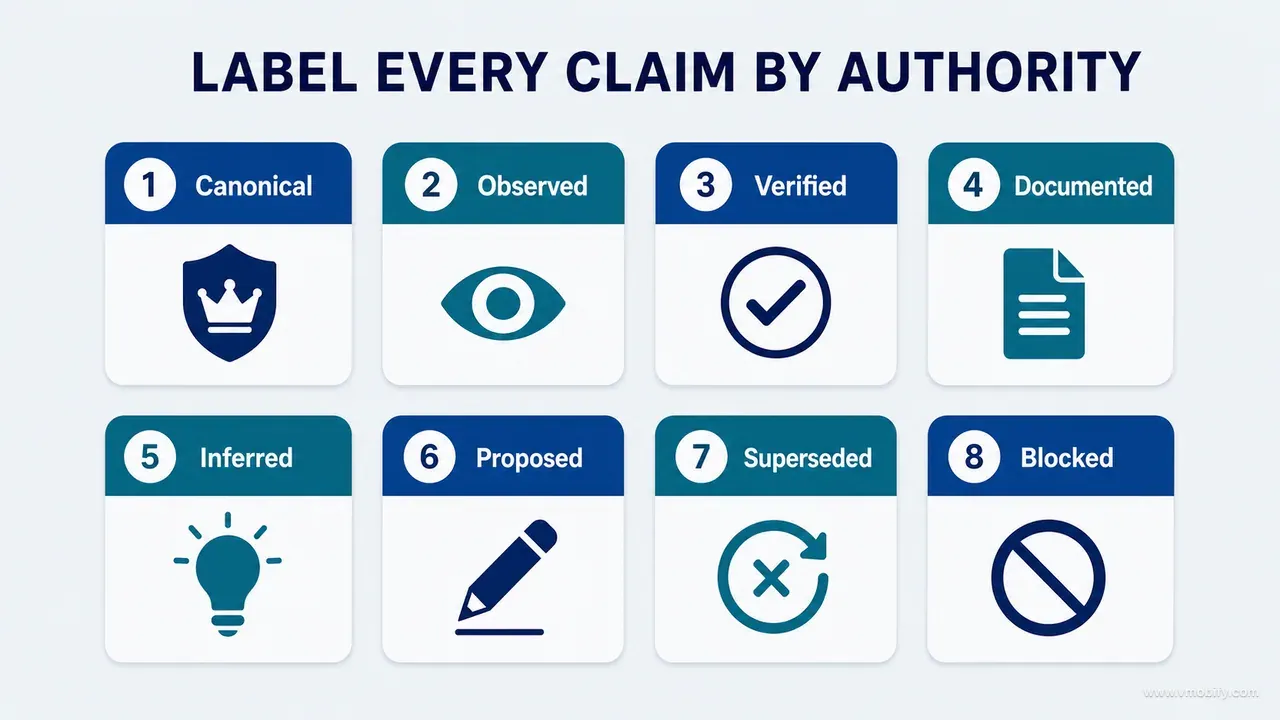
- Canonical — an approved rule or the current source of truth.
- Observed — runtime evidence, captured under stated conditions.
- Verified — an acceptance condition that was actually executed.
- Documented — described, but not recently reconciled against the code or the runtime.
- Inferred — plausible, incomplete, and not yet checked.
- Proposed — awaiting a decision; carries no authority.
- Superseded — historical only, retained for context.
- Blocked — cannot be established without missing authority, access or environment.
The two that change behaviour most are Documented and Inferred. Documented is a polite way of saying "this may have drifted", and it authorises an agent to check rather than assume. Inferred is what an agent should be forced to write when it is reasoning rather than observing — and the moment a project starts labelling inferences, the volume of confidently wrong statements drops sharply, because the label is uncomfortable to attach to a guess.
Blocked is the label teams add last and regret not having sooner. An agent that cannot verify something has three options: guess, silently omit, or say it is blocked. Only the third is useful, and it only exists as an option if you name it.
Label at the level of the claim, not the document. A single architecture file will contain Canonical boundaries, Documented module descriptions and one Inferred sentence about a background job nobody has traced. Labelling the whole file Canonical is worse than not labelling it, because it launders the weak claim with the authority of the strong ones.
How do you scope local instructions without creating drift?
Let the root file own everything universal and let module files add only what is genuinely local — stack-specific commands, local architecture, component rules, tests and known hazards — and never copy a global rule into a folder, because a copied rule is a rule that will drift. Duplication is the failure mode here, not omission.
Root            → universal safety, evidence and routing rules
iOS module      → Swift and platform conventions, build and test commands
Android module  → Compose and architecture conventions, commands
Reference engine→ domain invariants and oracle verification
Content module  → terminology and trust rules
The test for whether a rule belongs in a scoped file is simple: would it be wrong, or merely irrelevant, in another module? Irrelevant rules can live at the root harmlessly. Wrong ones — a lint command that only exists on one side, a naming convention that contradicts the other platform's idiom — must be scoped, or an agent working on the other module will follow them and produce a mess that passes review because it followed the written rule.
Cross-platform products make this sharper than single-platform ones. In our portfolio the iOS and Android sides of the same product routinely need genuinely contradictory instructions on navigation, state restoration and permission timing, because Apple's platform guidance and Google's differ on purpose. A single shared rule forces one platform to be wrong. Two scoped rules, both linking back to one root principle, keep the intent shared and the implementation native.
Track repeated agent mistakes as a signal about the instruction set, not about the agent. If several agents independently make the same wrong assumption, exactly one of four things is true: the instruction is missing, it is present but badly routed, it is contradicted somewhere else, or it exists but nothing enforces it. Each of those has a different fix, and none of them is telling the next agent to be more careful.
Keep a short running list of those repeat issues in the root file. Ours became one of the most load-bearing sections we had — a scar record rather than a style guide, where every entry existed because something specific went wrong first.
How do you test whether the bible routes correctly?
Give a new reviewer three representative tasks — a UI hierarchy change, a critical data mutation, and a real-world reference update — and observe whether the documentation leads them to the right constraints and the right commands without help. Documentation usability can be tested exactly like product usability, and almost nobody does it.
Run it as a think-aloud session in the style of any ordinary usability test: give the task, say nothing, and write down where they go. The three tasks are chosen because each one should route to a different layer, so between them they exercise most of the system.
UI hierarchy change
- Should route to: UIUX-STRATEGY.md, the relevant design decision record, and the screenshot comparison rules in VERIFICATION.md.
Critical data mutation
- Should route to: DATA-INVARIANTS.md, the mutation-paths list for that object, and the named integration command.
Real-world reference update
- Should route to: the source hierarchy, the full-range oracle script, and the decision record that fixed the reference version.
The failure signals are specific and easy to spot. The reviewer searches a large root file rather than following a link — your entry file is too big. They miss a scoped invariant — routing is wrong. They run the wrong test — the claim-to-proof map is missing or unfindable. They ask you a question — that answer belongs in a file.
Do the same with an agent, because agents fail differently. A useful variant: give the agent a task and require it to list, before doing anything, which documents it consulted and which rule from each one applies. If the list is empty or generic, the routing has failed regardless of whether the output looked fine. An agent producing good work while citing nothing is producing good work by luck.
Re-run the three tasks after any significant restructure. A reorganisation that makes a file tidier and a route longer is a net loss, and the only way to notice is to walk the routes again.
What makes an instruction executable rather than aspirational?
An executable instruction names an operation, a scope and a check; an aspirational one names a quality. Operational verbs outperform adjectives, and the rewrite is usually mechanical once you can see the difference.
Weak: maintain high quality and follow best practices.
Strong: before modifying a measurement writer, enumerate the create, edit, import, sync, restore, undo, retry and delete callers; update the invariant matrix; run the measurement integration suite and record the command and exit status.
Weak: do not break the UI.
Strong: for a UI change, capture the baseline and implemented states using the same fixture and viewport; include the empty and error states; document any deviation from the approved board with a reason.
The strong versions are longer, and that is not a cost worth optimising away. Each extra clause removes a decision the agent would otherwise make silently and differently each time. "Using the same fixture and viewport" alone eliminates the most common false comparison in visual review, where two captures differ because the data differed rather than because the code did.
Three tests for any instruction you are about to write down. Can it be performed without further interpretation? Can two people independently agree on whether it was done? Does it name what to do rather than how careful to be? An instruction that fails any of those will be followed inconsistently, which is worse than not having it, because inconsistent compliance still reads as compliance in a report.
Prefer forbidding a specific sentence over requesting general care. "Do not describe restore as verified" is enforceable by reading the output. "Be careful about restore" is not enforceable at all. Across our portfolio, the instructions that survive contact with real agent work are overwhelmingly of the first kind: narrow, checkable, and slightly pedantic.
How do you stop the bible becoming a dumping ground?
Apply three filters before anything is added: will it guide a future decision or verification, is it stable enough to outlive the current task, and is this the canonical location or should it link elsewhere? Content that fails any of the three goes into an archive, an audit report or the bin — not into a canonical file.
What must never be promoted into the bible:
- Raw chat transcripts. Extract the decision, the evidence, the constraint and the open question; discard the rest.
- Temporary debugging logs, which are evidence for one incident and noise thereafter.
- Every rejected visual variant. Keep the decision and one representative comparison.
- Generated explanations with no evidence behind them, which is how an agent's inference quietly becomes a canonical rule.
- Duplicate setup instructions that already exist in a README or a build script.
- Unowned wish lists, which look like plans and behave like clutter.
Archive or link the detailed audit reports rather than deleting them — they are genuinely useful as evidence — but promote only the durable lesson into a canonical file, with a link back to the report it came from. A canonical file that contains an audit is not canonical any more; it is an audit with a misleading filename.
There is a growth pattern worth watching for. Bibles rarely become bloated through one bad decision; they bloat through a long series of individually reasonable additions, each of which seemed relevant on the day. The counter-pressure has to be scheduled rather than felt. Reviewing the bible during release preparation — removing obsolete routing, marking superseded decisions, revalidating commands, inspecting unresolved risks — is the cheapest slot to do it in, because you are already checking the state of the product.
A concise, current system is worth more than an impressive archive nobody can safely follow. If a file has grown to the point where an agent would read it partially, it has already failed, whatever it contains.
How do you bootstrap a bible from an existing project?
Run five phases in order — discover, reconcile, extract, protect, adopt — and resist the urge to start at extract, which is where every rushed attempt begins and why most of them end up canonising drift. The first two phases produce no documentation at all, and skipping them is the reason the third one goes wrong.
- Phase 1 — discover. Inventory every existing instruction file, documentation page, audit report, architecture note, command and recurring warning. Do not judge yet. Label each material claim by authority using the eight labels above. The output is a list, not a rewrite. On a mature codebase this phase alone regularly turns up two or three contradictory statements about the same behaviour, which is the finding that justifies the exercise.
- Phase 2 — reconcile. Compare documentation against source and against the running product. Where they disagree, mark the drift explicitly rather than silently rewriting the uncertain claim — because a silent rewrite is an unverified guess wearing the authority of an edit. Drift markers are temporary by design; each one becomes a task.
- Phase 3 — extract. Promote the stable information into the layered structure: product promise, architecture boundaries, data invariants, design principles, verification commands, accepted decisions, known unknowns. Anything that does not fit one of those seven buckets is probably not durable knowledge.
- Phase 4 — protect. Connect the consequential rules to tests, static checks, scripts or acceptance evidence. Expect to find that a meaningful share of your most-repeated rules have nothing enforcing them. That is normal and it is the most valuable output of the whole bootstrap, because an unenforced rule is a rule with a countdown on it.
- Phase 5 — adopt. Put bible updates into the issue, review and completion templates, so maintenance is structural rather than voluntary. A bible that depends on remembering will be current for about three sprints.
An agent can do most of phases 1 and 3 well, some of phase 2, and none of phase 4 unaided. Use it accordingly: let it inventory and draft at speed, then have a human resolve policy questions, stale claims and conflicting decisions before anything is marked canonical.
What does the ready-to-use project bible prompt look like?
The prompt has to forbid the summary, mandate the structure, and require the agent to report what it could not establish — otherwise you will get one enormous well-written file that reads beautifully and cannot be verified. This is the version we use to build or refresh a bible on an existing codebase, and it maps onto the five bootstrap phases above: the opening block covers discover and reconcile, the required structure is extract, the mandatory rules and the "rules lacking protection" output are protect, and the maintenance checklist is adopt.
BUILD OR UPDATE THE PROJECT BIBLE

Do not create one giant summary. Build a layered, navigable knowledge
system.

DISCOVERY AND RECONCILIATION — before writing any file
- Inventory existing instruction files, documentation, audits, tests
  and commands.
- Compare claims against current source and runtime evidence.
- Label each material claim Canonical, Observed, Verified, Documented,
  Inferred, Proposed, Superseded or Blocked.
- Preserve unrelated content and version history.

REQUIRED STRUCTURE — one item per layer
1. Concise root working contract and routing
2. Product promise, users, journeys and capability boundaries, plus
   the architecture, module, state and data map
3. Critical data objects and invariants
4. UI/UX, content, accessibility and platform principles
5. Decision records with rationale and supersession
6. Verification commands, fixtures, claim-to-proof map and blind spots
7. Known risks, unknowns, owners and review triggers
8. Update protocol: the seven update questions, a per-document
   owner, a last-verified date and a review trigger

MANDATORY RULES
- Link to code rather than duplicating volatile implementation.
- Convert warnings into executable instructions.
- Connect consequential rules to tests or acceptance evidence.
- Do not promote proposals or old audits to canonical truth.
- Do not record external facts without a source version and a
  review trigger.
- Keep the root concise; route detail to scoped files.
- Record rejected alternatives only where future agents may repeat them.

OUTPUT
- Proposed file map
- Conflicts and stale claims found
- Files created or updated
- Decisions needing owner approval
- Rules lacking protection
- Commands validated, and what each one does not prove
- Maintenance checklist
Two lines in that prompt do disproportionate work. "Do not promote proposals or old audits to canonical truth" is what stops the agent laundering a roadmap into a rule. "Rules lacking protection" as a required output field is what surfaces the gap between what you believe is enforced and what actually is — and on a first run, that list is always longer than the team expects.
Run it read-only the first time. The discovery and reconciliation output is worth reading on its own before a single file is written, because the conflicts it surfaces often need a product decision rather than an editorial one.
Which completion checklist should every AI task pass?
Ten items, applied to every task before an agent is allowed to say it is done — and the value is concentrated in the items about what was not done, because those are the ones no code review will catch. Keep it in the root file and require it in the output.
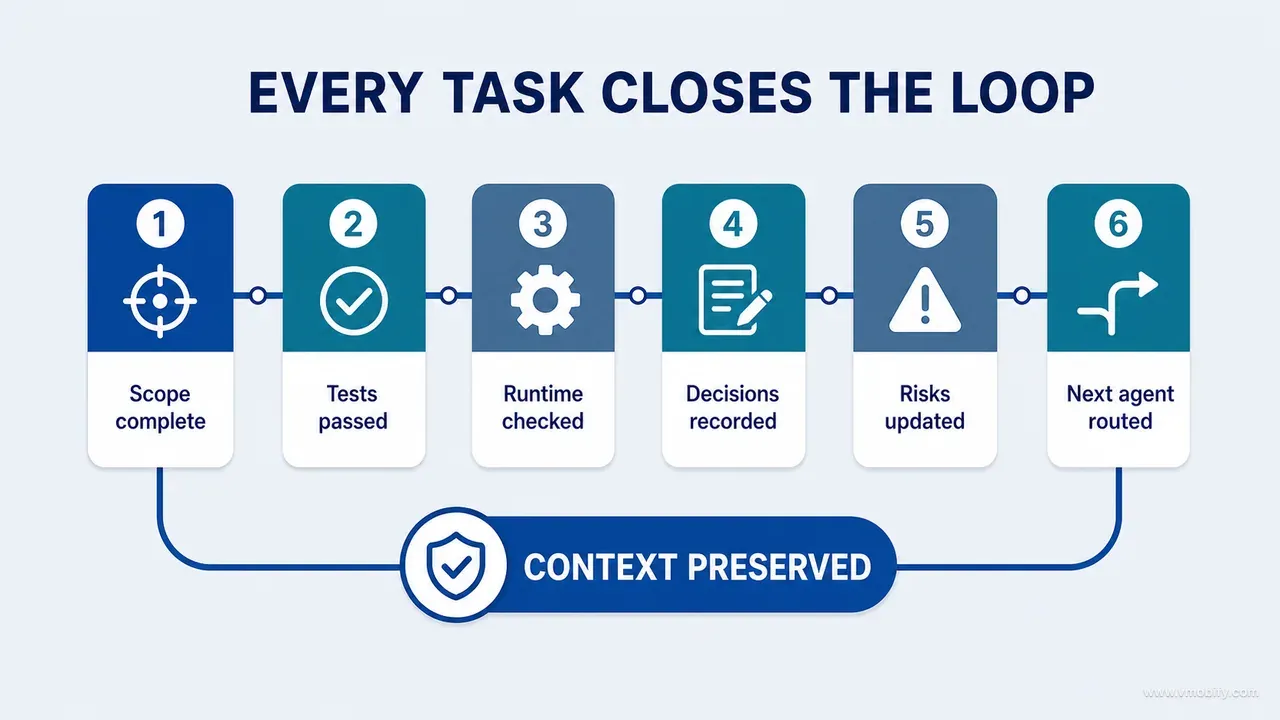
Before declaring done:
[ ] Relevant instructions were read.
[ ] Working-tree baseline preserved; unrelated changes untouched.
[ ] Product, data and design constraints were identified.
[ ] Named checks were run and their results recorded.
[ ] Runtime-only claims remain labelled if not observed.
[ ] New or changed invariants are documented.
[ ] Any accepted decision has a record.
[ ] Regression protection was mutation-checked where required.
[ ] Known risk and unknown statuses are updated.
[ ] Root or scoped instructions changed only if the lesson is durable.
The fifth item is the one that earns its place most often. An agent that has implemented a change and cannot run the app will, unprompted, describe the resulting behaviour in the past tense as though it had watched it. Requiring the label to survive into the final output makes that impossible to do accidentally.
The last item is a brake rather than a requirement. Not every lesson is durable, and a bible that gains a rule after every task becomes unusable within a quarter. The question to answer is whether an agent could get this wrong again in a way you would have to correct twice. If not, the lesson belongs in the pull request, not in the instructions.
Mobile teams should add one platform item to this list before a release build: any change touching entitlements, permissions, data collection or account deletion needs the relevant store-policy clause named and the check performed recorded. Those are the changes that turn into store rejections weeks later, and by then the reasoning that produced them has gone.
Which mistakes cost the most here?
Seven mistakes account for nearly every failed project bible we have seen: an enormous root file, chat history pasted in as documentation, rules with no protection, tool-specific files left to diverge, treating the bible as unquestionable, hiding uncertainty, and documenting activity instead of decisions. All seven are recoverable, and all seven are cheaper to avoid.
- Creating an enormous root file. Route to focused documents and keep entry context small. A root file that cannot be read attentively in five minutes is being read partially, whatever it says.
- Copying chat history into documentation. Extract the decision, the evidence, the constraint and the unresolved question. Transcripts are raw material, not records.
- Recording rules without protection. Attach a command, a test or acceptance evidence wherever it is practical. An unenforced rule survives roughly as long as the person who wrote it stays on the project.
- Letting tool-specific files diverge. Choose one canonical source and have the other entry files import it where the tool allows that; where it does not, generate them and mark the generated ones as generated.
- Treating the bible as unquestionable. It is authoritative because it is maintained and evidenced, not because it is a bible. Include review triggers and supersession, and expect to use them.
- Hiding uncertainty. Unknowns are routing information. Label them, name what would close them, and forbid the sentence they would otherwise permit.
- Documenting everything. Preserve the durable decisions, not the activity volume. Volume is what makes the durable parts unfindable.
One governance rule ties the whole system together, and it is the note to end on: no document becomes canonical merely because an AI created it. Canonical status requires an owner, evidence, an applicable scope and a review trigger. Equally, do not leave verified decisions buried in audit reports — promote the durable rule and link back to the evidence that produced it.
Treat missing or misleading project knowledge as a fixable system defect rather than an agent failure. When the same ambiguity is rediscovered three times, improve the routing, the ownership or the enforcement; do not write a sterner instruction. The purpose of a project bible is not to give an agent more text — it is to give the project durable judgement, so that the next agent starts from what the project learned rather than from a blank prompt. If you want a second pair of eyes on how this maps onto a product you are already shipping, tell us what you are building.
Frequently Asked Questions
Is a project bible the same thing as AGENTS.md or CLAUDE.md?+
No — those are entry points into it. AGENTS.md or CLAUDE.md is layer one: a short working contract that states the universal rules and routes the agent to the document that constrains the current task. The bible is the whole layered system behind that routing: product, architecture, data invariants, design and content principles, decision records, verification commands and known risks. Keep the tool-specific file short and let it link outward.
Should the project bible live inside the repository?+
Mostly yes. Repository-adjacent knowledge is easiest for coding agents to discover and it versions alongside the implementation it describes, so a rule and the code it governs move together in the same commit. Sensitive or organisation-wide material — commercial terms, security runbooks, personal data — can live elsewhere, but the repository should still contain the safe routing and the constraints an agent must respect.
How long should a project bible be?+
As long as it needs to be across focused files, and short at the root. Our working rule is that the entry file must be readable attentively in under five minutes; beyond that, agents read it partially and you cannot predict which part they skip. Depth belongs in the scoped documents, where only the tasks that need it will pay for it.
Who maintains it, and how do you stop it going stale?+
Ownership follows the subject: product, engineering, design, data or domain, and privacy each own their files. Staleness is handled structurally rather than by discipline — every document carries an owner, a last-verified date and a review trigger, and every task answers seven update questions before it can close. Release preparation is the natural slot for a full pass over routing, superseded decisions and command validation.
Can an AI agent write the first version of the bible?+
Yes, and it is good at the parts that are tedious: inventorying existing documentation, drafting the structure, and reconciling claims against source. What it cannot do unaided is resolve policy questions, adjudicate between conflicting decisions, or decide that an unenforced rule is important enough to protect. Have it draft, then require a human owner and real evidence before anything is marked canonical.
How do you know the bible is actually working?+
Four observable signals: new agents spend less time rediscovering structure, they propose previously rejected patterns less often, they run the correct checks without being told which, and they distinguish verified facts from unknowns in their output. The strongest test is the routing test — give a new reviewer a UI change, a data mutation and a reference update, and watch whether the documentation gets them to the right constraints unaided.
What is the single highest-value file to write first?+
DATA-INVARIANTS.md, on almost every product we have worked on. It is where silent corruption lives, it is invisible to both code review and screen review, and each entry gives an agent something concrete to cite and run. If you only ever write two files, write that one and a root working contract that routes to it — the rest can be added a layer at a time as tasks reveal the need.
Sources
- AGENTS.md — open format for agent instructions — The cross-tool convention for repository-scoped agent instruction files.
- Anthropic — Claude Code memory and project instructions — How project and user instruction files are discovered and applied.
- Architecture Decision Records — Conventions, templates and supersession semantics for decision records.
- Android Developers — Testing fundamentals — What unit, integration and instrumented tests each do and do not prove.
- W3C — WCAG 2.2 quick reference — Success criteria to cite when turning accessibility expectations into thresholds.
- Nielsen Norman Group — Usability testing 101 — The think-aloud method used here to test whether documentation routes a reader correctly.
About the author
Amol Pomane — Founder, Vmobify
Amol leads Vmobify, a mobile app growth agency that has driven 30M+ downloads and ranked 54K+ keywords across 300+ apps since 2013. He writes about ASO, paid user acquisition, retention, and the operational reality of scaling mobile apps in India and global markets.