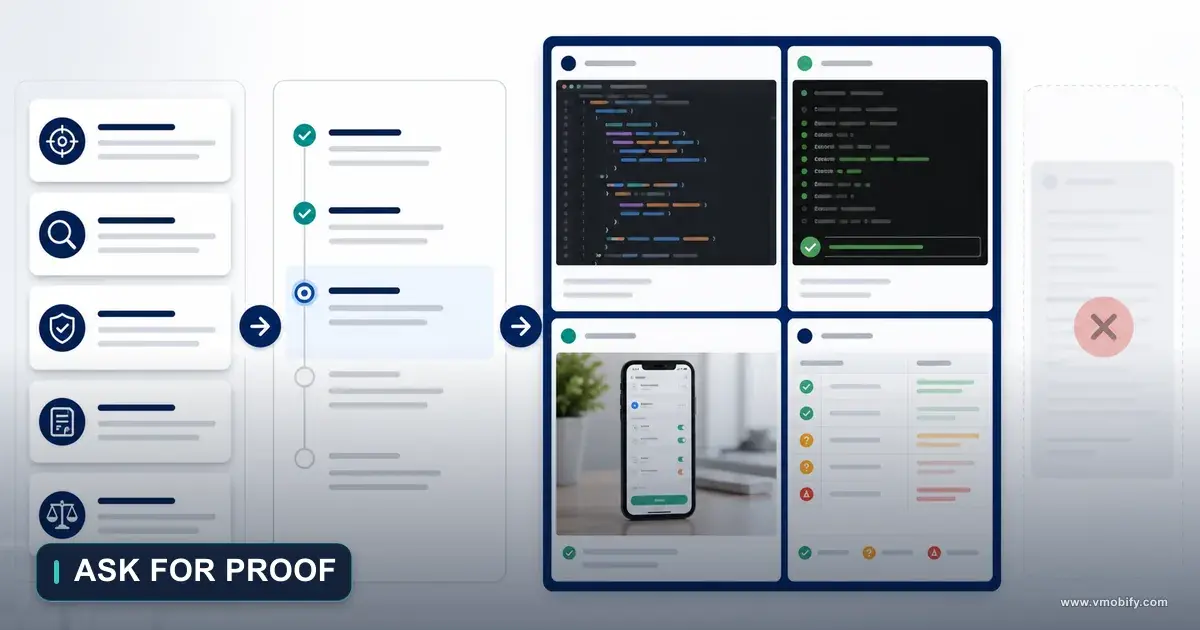
ChatGPT, Claude Code and Design Boards: What Each Tool Does
The strongest AI-assisted workflow does not ask one tool to think, design, build and verify. It splits four responsibilities — strategic synthesis, visual exploration, repository execution and independent verification — and defines what evidence each one is allowed to produce. This is part 7 of the AI Product Development Methodology series.
On this page
- Which four responsibilities should an AI product workflow separate?
- Why does "one agent does everything" fail?
- Role 1 — what should the strategic AI workspace own?
- Role 2 — what can a design board prove, and what can it never prove?
- Role 3 — what does a repository-native coding agent need before it edits?
- Role 4 — why must the verifier be separate from the implementer?
- How do you assign an authority type to every output?
- What does the eight-phase workflow look like end to end?
- Who owns which activity when four roles share one product?
- Which three handoff templates keep the chain intact?
- Which gates stop a polished output from forcing the next step?
- How should you score a new AI tool instead of arguing about brands?
- When should you use ChatGPT versus a repository-native agent?
- Which mistakes cost the most here?
- Frequently Asked Questions
Which four responsibilities should an AI product workflow separate?
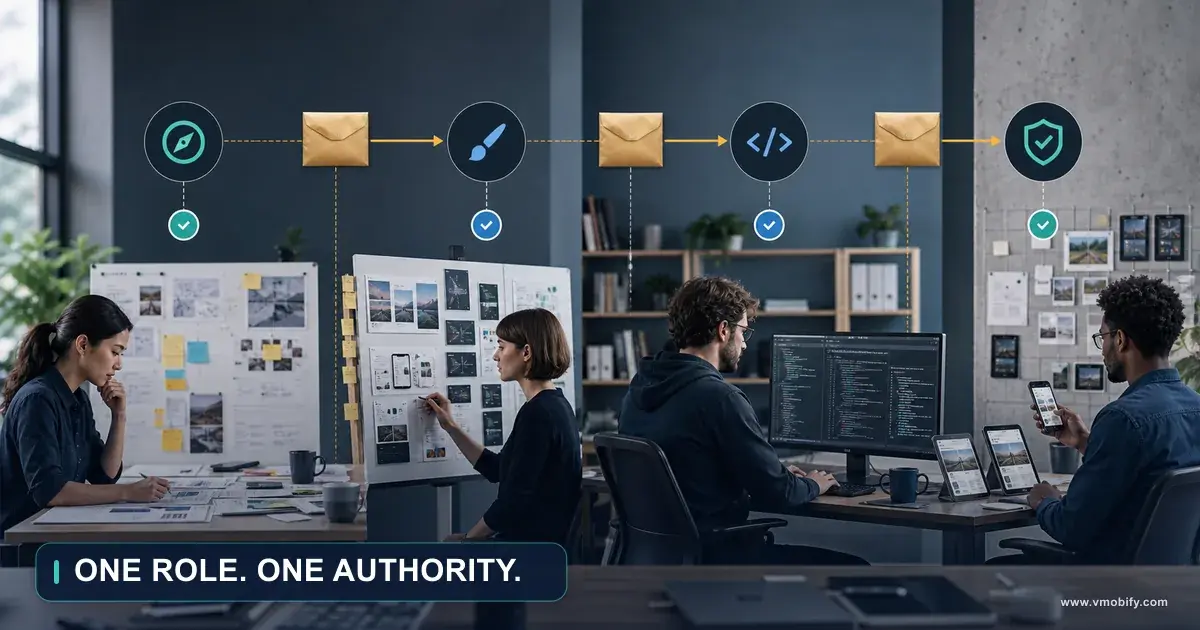
Use each tool according to the evidence it can directly access and the output it can verify — which means separating four responsibilities: strategic synthesis, visual exploration, repository execution and independent verification. The strongest AI-assisted product workflow does not ask one tool to think, design, implement and check everything. It gives each role a bounded job and a defined form of proof.
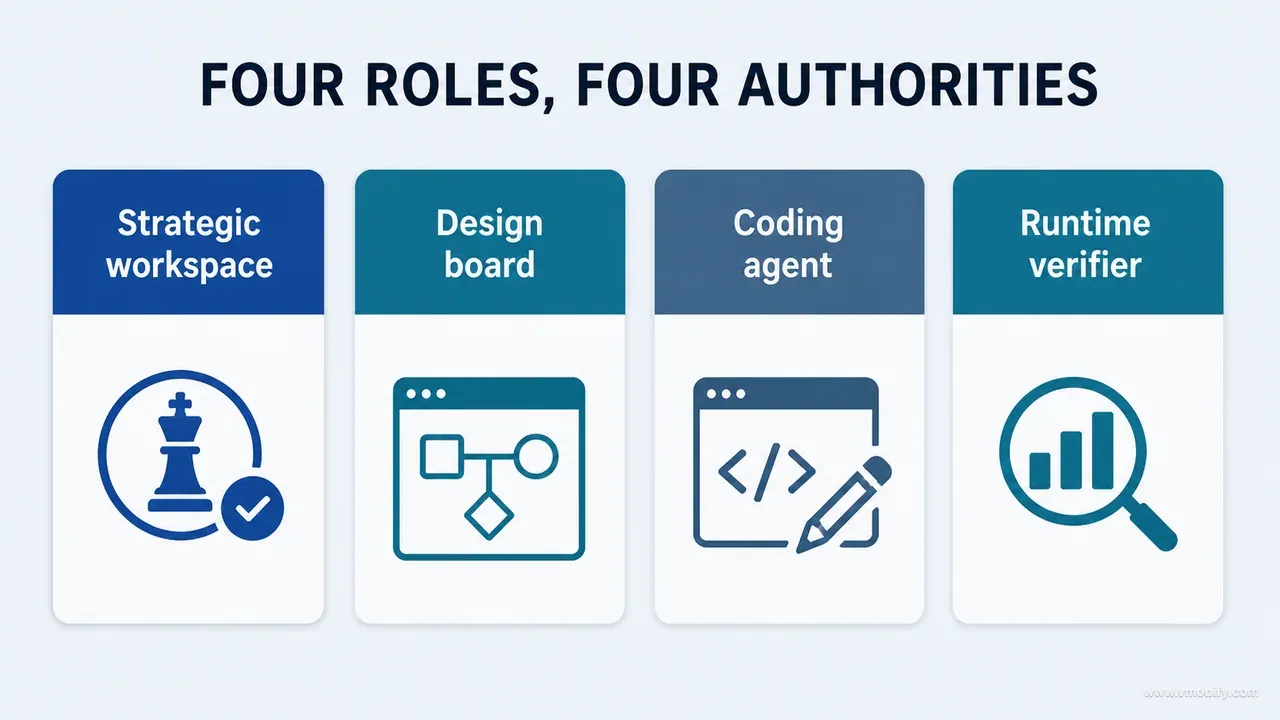
In the work behind this series we used a conversational reasoning environment such as ChatGPT for research synthesis, audit design, critique and structured artefacts; design boards for visual comparison; and a repository-native coding agent such as Claude Code or Codex for implementation, tests and code-grounded investigation. The exact products can change — and over a five-month build they did. The division of responsibility is the durable part.
Here is what each role is good for, and what it must never be the sole authority on:
Strategic AI workspace
- Best at: research synthesis, audit architecture, decision framing, prompt design, critique and documentation.
- Never the sole authority on: runtime behaviour it has not observed.
Design board
- Best at: hierarchy exploration, alternatives, visual comparison and state composition.
- Never the sole authority on: shipped functionality or technical feasibility.
Coding agent
- Best at: repository discovery, implementation, refactoring, tests, commands and diffs.
- Never the sole authority on: visual quality judged from code alone.
Runtime verifier
- Best at: real-device inspection, screenshots, journey execution, accessibility and outcome checks.
- Never the sole authority on: broad product strategy.
Read that list again as a single sentence and it becomes the operating rule: reasoning creates a testable decision, boards visualise it, coding agents implement it, and runtime evidence decides whether it worked. The handoffs between those four steps matter far more than which vendor you picked for any one of them.
Both major coding-agent ecosystems now document exactly this kind of project-context work. OpenAI's documentation describes Codex workflows including automated code review, project instructions and isolated environments. Anthropic's Claude Code documentation describes an agentic coding tool that reads your codebase, edits files and runs commands, available in the terminal, an IDE, a desktop app and the browser. Those capabilities are real. Neither of them makes visual intent or product truth automatic, and that gap is what the rest of this guide closes.
This post is part 7 of the AI Product Development Methodology series. Part 6 covered how we used design boards to improve a product screen by screen, which is the input to everything below.
Why does "one agent does everything" fail?
It fails because confidence leaks across evidence boundaries — a tool states something true about the evidence it can see, and the team hears it as a claim about the product as a whole. Nothing in that chain is dishonest. It is a category error, repeated until it becomes a defect.
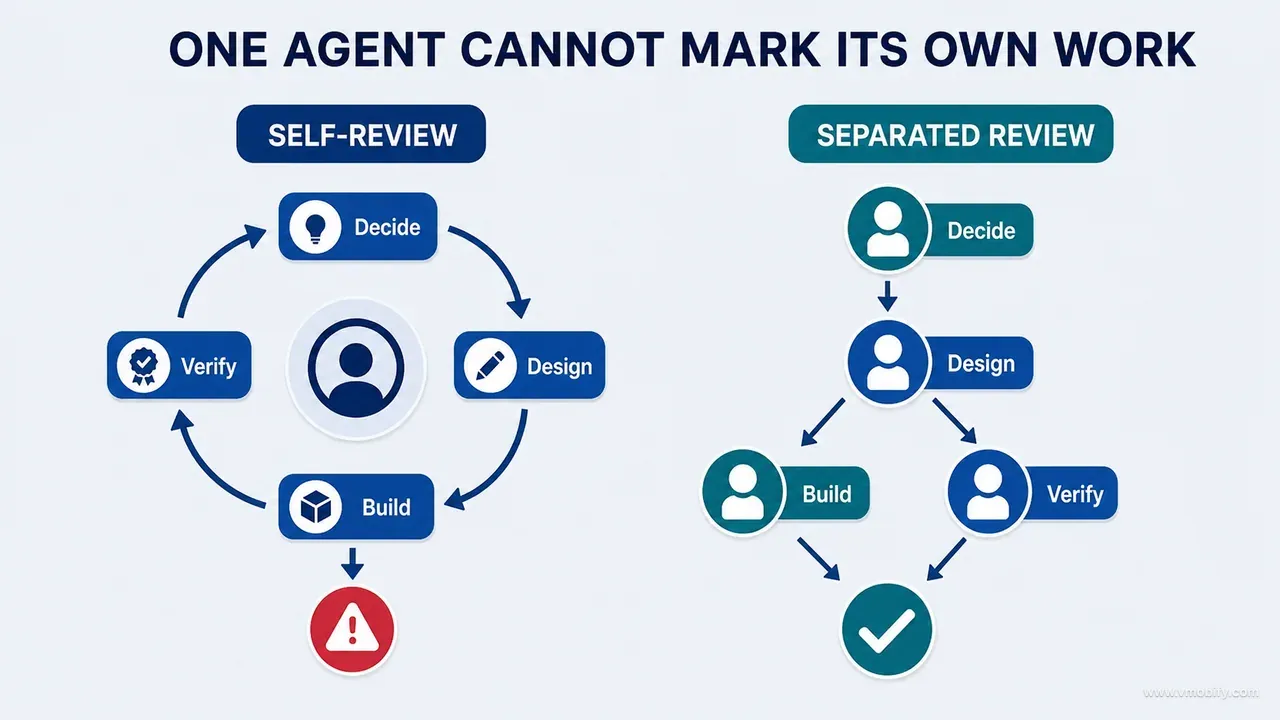
Consider what each role can and cannot observe. A coding agent may trace the repository accurately and still have no view of the rendered product. A visual model may generate a compelling screen while inventing controls and copy that no API supports. A strategic conversation may identify a genuine risk without any understanding of the local architecture. A screenshot may prove appearance and say nothing about persistence.
The failure has a recognisable grammar. Every one of these sentences sounds like a verified statement and is not:
- "The design matches" — based on component names and colour constants rather than a rendered comparison.
- "The feature works" — because an on-click handler exists in the diff.
- "The board is approved" — because it looks polished, not because the difficult states were drawn.
- "The calculation is correct" — because a constant resembles a published value.
- "The bug is fixed" — because the problematic line disappeared.
Each of those requires a different form of proof, and the cost of accepting the wrong one is not evenly distributed. In our portfolio the cheapest errors are visual: someone opens the build, sees the wrong spacing, and it is corrected in an hour. The expensive ones are silent — a write that never persisted, a sync that dropped a field, a restore path that only ran on a fresh install. Those survive every review that looks at code or at pixels, because neither surface shows them.
You can hear the same failure in how teams talk about it. "It looked fine" is a visual claim. "The tests pass" is a claim about the behaviours somebody thought to test. "The agent said it handled the migration" is not a claim at all — it is a report of an intention. Once you start labelling sentences this way, the missing evidence becomes obvious in the meeting rather than in the crash log.
Our own build is the worked example here, and we have written it up separately: what shipping an AI-built iOS app taught us covers what happened, what it cost and what we regret. This guide stays on the method, because the method is what transfers to a product that is nothing like ours.
Role 1 — what should the strategic AI workspace own?
The strategic workspace owns synthesis: turning scattered evidence into a decision that can be tested, and turning that decision into artefacts other tools can act on. It is strongest when a task needs broad context and structured reasoning across disciplines, and weakest the moment it is asked to assert a fact about a system it cannot see.
Use it to turn scattered audits into a coherent methodology; to compare product, UX, technical, privacy and growth concerns in one place; to build inventories and evidence matrices; to identify missing states and journeys; to frame decision questions; to critique design directions; to write implementation contracts and verification plans; and to research current official sources when facts may have changed. On our build this layer is what connected reviews that would otherwise have stayed separate — screen inventory, UI critique, data-path analysis, reference validation, privacy language, subscription behaviour and release readiness were all being examined by different passes, and none of them was a decision until something joined them up.
Its output quality is almost entirely a function of what you feed it. A useful input package contains the product inventory, repository evidence or linked source material, runtime screenshots, audit findings, the design strategy, business and safety constraints, decisions already made, evidence labels, and the open questions. A vague request with none of that does not retrieve accumulated project truth — it generates a confident average of everything the model has ever read about apps like yours.
What you should want back is not prose. It is operational artefacts that survive the conversation:
- Decision charter — the one question being answered, and the criteria that will settle it.
- Screen and state inventory — built in part 3 of this series and maintained from then on.
- Data-path matrix — where each value is written, read, migrated and displayed.
- Audit brief and board brief — bounded questions for the next two roles.
- Implementation contract, test matrix and acceptance checklist — the package the coding agent receives.
- Decision record and project-knowledge update — so the same question is not reopened next month.
And there is a short list of claims this role must never make unaided: that a screen is visually correct without seeing it, that a flow works without executing it, that an implementation is complete without inspecting current code, that a formula is right without calculation or an authoritative reference, or that a store policy still says what it said last year. Store policy moves quickly enough that it should be read at the source rather than recalled from memory. The strategic role organises inquiry. It does not substitute confidence for observation.
Role 2 — what can a design board prove, and what can it never prove?
A board proves what a direction looks like and what it trades away — and it can never prove that anything works. It is the visual reasoning layer: the place where a disagreement stops being adjectives and becomes a comparison you can point at.
Use boards to place the current screen beside the findings that condemned it, to compare two or three structural alternatives, to test information hierarchy, to explore composition, to represent default and difficult states together, to record platform adaptations, and to show the selected direction with its rationale attached. The value shows up in how arguments resolve. "The chart feels too technical" is unanswerable. The same objection expressed as three boards — source-forward, status-forward and action-forward hierarchies over identical data — is a decision that takes ten minutes. Nielsen Norman Group's work on parallel and iterative design is the long-standing evidence for why comparing several independent alternatives outperforms refining a single one, and generated boards make that comparison cheap enough to actually do.
A board deserves a bounded brief, exactly like a coding task. Give it the untouched runtime evidence, one design question, the fixed content and capabilities, the flexible visual dimensions, the forbidden changes, the required states and the comparison criteria. Ask for alternatives, trade-offs, a recommended direction, risks, required states and implementation notes in return. Label every board Proposed until something has been implemented and observed — a rendered mock circulating in a channel without that label is the single most common source of a team believing a feature exists.
The limits are absolute and worth writing on the wall. A board cannot prove that data saves correctly, that a subscription restores, that a chart uses correct reference values, that accessibility semantics exist, that motion performs on a mid-tier device, that keyboard and system flows behave, or that the architecture can support the idea safely. It communicates intent. Runtime decides truth.
Two of those deserve emphasis on mobile. Accessibility is invisible in a board by construction — a static image cannot show a missing label, an unreachable focus order or a contrast ratio, and both WCAG 2.2 and Apple's Human Interface Guidelines on accessibility describe properties of the running interface, not of the picture. And performance is invisible for the same reason: the board that looks best is frequently the one with the most simultaneous animation.
The India and wider emerging-market angle is a third blind spot. Boards are drawn at the size of the designer's screen, in the designer's language, on the assumption that data has already loaded. Four conditions deserve explicit coverage in those markets: a 360-dp device, a translated string that runs substantially longer than the English, an intermittent connection that leaves half the screen empty, and a first session on a device with almost no free storage. If they are absent from both the board and the verification matrix, users will discover them first.
Role 3 — what does a repository-native coding agent need before it edits?
It needs a bounded contract, repository-specific rules, and a discovery pass that it reports before it changes a single line. A coding agent is at its best when it can explore the actual project, trace code, make small changes, run commands and show diffs — and at its worst when it is handed an image and asked to infer intent.
The productive uses are narrow and deep: map relevant files and dependencies, trace routes, state and data flows, locate shared components and tokens, implement the approved contract, preserve architecture and platform conventions, add or update tests, run linters and compilers and test suites, report changed files and assumptions, capture implementation gaps, and update the durable project instructions when a new invariant is discovered. Your platform's recommended architecture is the kind of convention worth stating explicitly in those instructions, because an agent left to choose will pick whatever pattern dominated its training data rather than whatever dominates your repository.
Give it repository-level rules. OpenAI documents this through AGENTS.md; Anthropic's equivalent is a CLAUDE.md at the repository root. Whichever agent you use, the rules file is where architecture, commands, constraints, invariants and verification expectations live permanently — and part 14 of this series is entirely about how to write one that holds up.
The minimum package for a single task looks like this. Anything less and the agent supplies the missing parts itself, silently:
IMPLEMENTATION PACKAGE
Goal
Observed baseline
Selected board
Written rationale
Files/surfaces in scope
Capabilities and invariants to preserve
State behaviour
Platform constraints
Acceptance criteria
Tests and commands
Explicit exclusions
Require a matching shape on the way out: a discovery summary before edits, an implementation plan, the files changed, important decisions and deviations, tests added or updated, commands run with their results, remaining uncertainty, and the runtime states that still need human inspection. That last item is the one teams drop, and it is the one that makes the difference between a handoff and a hope.
The discovery-first rule earns its place quickly. In practice the most common cause of a wasted implementation round is not a bad patch — it is an agent editing the wrong file with complete competence, because the component it found by name was a legacy copy that nothing renders any more. Thirty seconds of reported discovery makes that visible before the diff exists.
Finally, there is a class of decision the implementer must not close on its own: unresolved product policy, health or safety meaning, privacy scope, pricing logic and major interaction strategy. An agent may surface any of these — and a good one will — but the owner has to resolve them. A pricing rule invented to unblock a build is indistinguishable from a pricing rule that was decided, right up until the first refund.
Role 4 — why must the verifier be separate from the implementer?
Because a verifier that shares the implementer's assumptions can only confirm them — its job is to challenge the claim, not to restate the explanation that produced it. The verifier may be a human reviewer with devices, an instrumented test environment, visual-regression tooling, or a separate agent that genuinely has browser or device access. What matters is that it observes rather than reasons.
The checklist is longer than most teams run, and every line on it exists because something once passed review without it:
- Entry path — reaching the surface the way a real user reaches it, not by deep link from a debug menu.
- Default and difficult states — empty, first-run, error, offline, partial data, maximum data.
- Interaction feedback and persistence — and then a relaunch, because an in-memory success is the most convincing false positive there is.
- Downstream refreshes — the other screens that should have changed when this one did.
- System permissions, keyboard and navigation — including the denied-permission branch, which is where most mobile flows quietly dead-end.
- Accessibility — screen-reader traversal, dynamic type, contrast, focus order.
- Layout across target viewports, motion and reduced motion, and error recovery.
- Visual comparison with the selected board, under the same fixture and the same data.
Automate what is mechanically checkable and reserve human attention for judgement. Instrumented UI tests can drive a journey and assert a persisted result far more reliably than a person repeating it thirty times. What they cannot do is notice that a label is technically correct and completely incomprehensible to the person it was written for.
One practical rule keeps this role honest: the verifier reports what it observed, not what it concluded. "Entered 4.2 kg, backgrounded, relaunched, value present, chart updated" is evidence. "Persistence works" is a summary of evidence, and summaries are where the qualifications go missing. When the observation is written down, the next person can disagree with it. Where the surface being verified is a funnel step rather than a screen, the same discipline applies to the analytics — a tracked event is only evidence once it has arrived in the tool, which is why our guide to mobile app funnel analytics treats instrumentation as a verification surface in its own right.
How do you assign an authority type to every output?
Label every output with the strongest claim it is actually capable of supporting, and never let a claim travel further than its label. This single habit removes most of the false confidence in an AI-assisted workflow, and it costs nothing but a word.
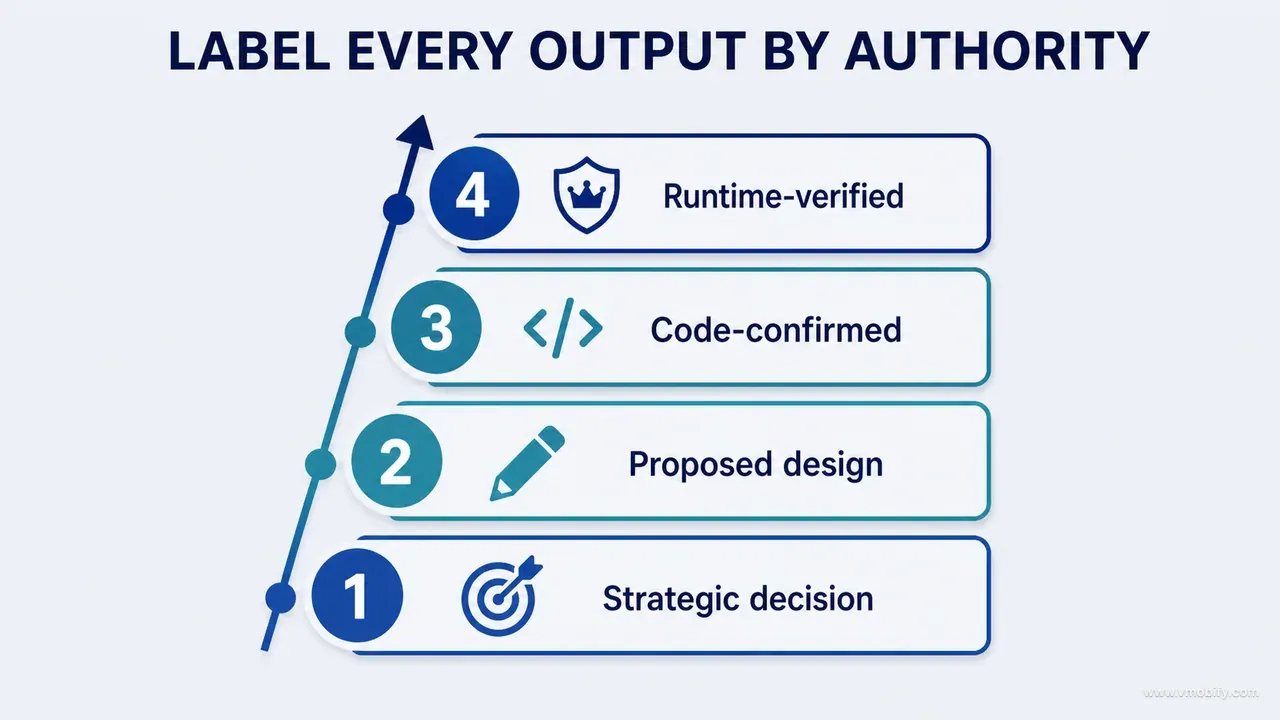
The mapping we use:
- Strategic recommendation → proposed decision. It has not been tested against the code or the user.
- Design-board direction → proposed visual intent. Nothing about it has been built.
- Source trace → implementation evidence. This is what the code does today; it says nothing about whether that is correct.
- Passing unit test → evidence for the tested behaviour only. Not for the behaviour someone forgot to test.
- Successful build → compilation evidence. It proves the types line up.
- Runtime screenshot → observed visual state. One state, one device, one moment.
- Completed journey with a persisted result → behavioural verification. The strongest routine evidence available.
- Authoritative reference plus an exhaustive script → real-world claim verification. Required for anything with an external truth: a medical standard, a tax rule, a currency conversion, a regulatory threshold.
Match the evidence to the claim rather than to the effort spent producing it. A passing build does not validate hierarchy. A screenshot does not validate a calculation. A test does not prove a label is understandable. And a beautifully argued strategic recommendation, however well reasoned, is still a hypothesis until something observed agrees with it.
The last category is the one teams under-invest in, and it is the one that produces the worst failures because the output looks right. If your product displays a number derived from an external standard — a percentile, an interest calculation, a dosage, a GST amount — spot-checking three values proves almost nothing. The verification is an exhaustive script over the published reference table, run in continuous integration, failing the build on any drift. That is a different activity from testing, and it belongs to a different role: the strategic layer designs the method, the coding agent runs it, and the owner approves the source. Part 12 of this series is about exactly this class of check.
The labelling cuts both ways, which is the part that makes teams adopt it. When a claim is labelled honestly as "proposed" rather than "done", the cost of being wrong collapses — somebody simply asks for the missing evidence. When it is labelled "done" and turns out to be proposed, the cost is a release.
What does the eight-phase workflow look like end to end?
Frame, explore, decide, discover, implement, inspect, reconcile, preserve — eight phases, each one owned by a single role and ending in an artefact rather than a feeling. The sequence matters because each phase produces the input the next one cannot function without.
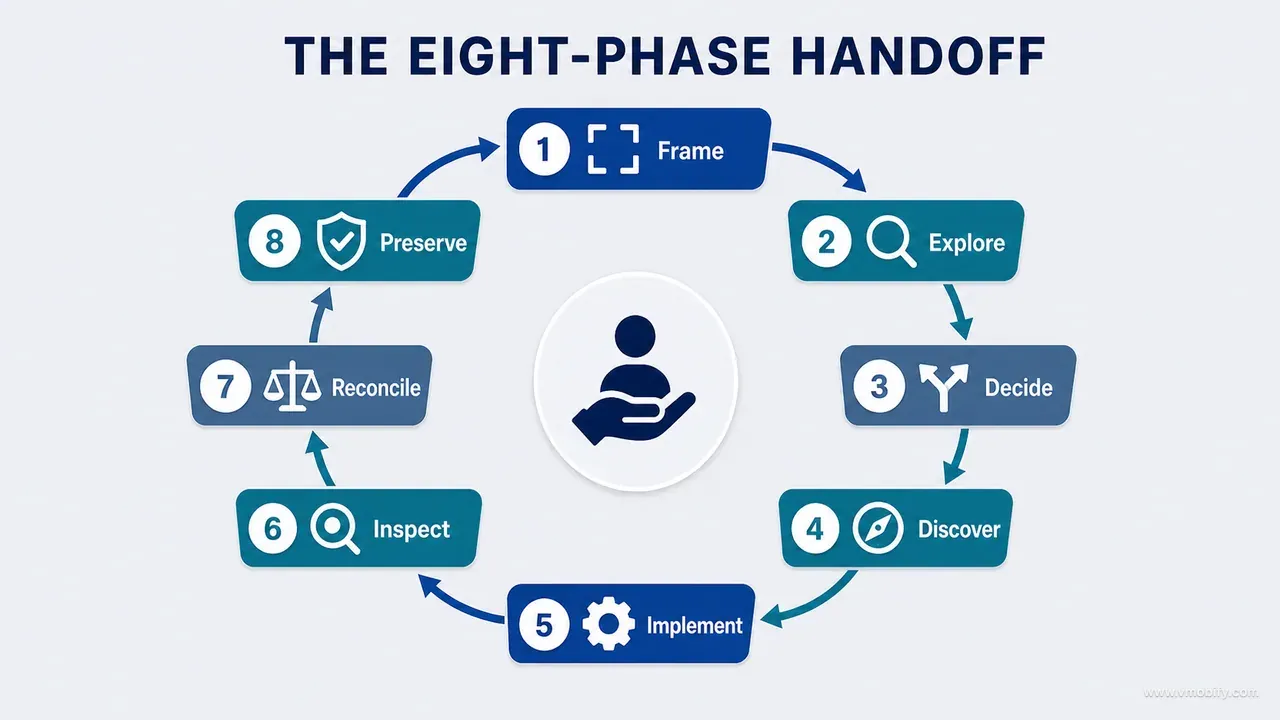
- Phase 1: Frame. The strategic workspace turns the inventory and evidence into one product question, the relevant constraints, the evidence that is missing, and the conditions that would count as acceptance.
- Phase 2: Explore. The design board tests two or three meaningfully different structural alternatives — and includes the highest-risk state in every one of them, not only the happy path.
- Phase 3: Decide. The team selects a direction against the strategy, records why, and converts the choice into an implementation contract.
- Phase 4: Discover. The coding agent inspects the repository before editing and reports the owning files, shared components, state flow, existing tests and risks.
- Phase 5: Implement. The smallest coherent change that satisfies the contract, with invariants preserved and the required protections executed.
- Phase 6: Inspect. The runtime verifier captures the real implementation in baseline-matched and difficult states, on a real device.
- Phase 7: Reconcile. Differences between board and runtime are classified, not argued about.
- Phase 8: Preserve. The decision, the test and the evidence go into the durable project documentation.
Phase 7 is the one worth slowing down on, because it is where teams lose hours to the wrong argument. Every difference between the board and the running build falls into one of four buckets, and each has a different owner: intentional adaptation (the platform convention won, and it should have), technical constraint (the architecture cannot support the board as drawn, so the board changes), board oversight (a state was never drawn, so the implementer invented one), or implementation defect (the board was right and the build is wrong). Naming the bucket first turns a taste debate into a routing decision.
Phase 4 is the cheapest phase to skip and the most expensive to have skipped. On a mature codebase, discovery routinely returns something that invalidates the contract — a shared component used by four other screens, a migration in flight, a working-tree change nobody mentioned. Finding that out before the patch costs a few minutes; finding it out after costs the patch.
Phase 8 has the worst return on the day and the best return over a quarter. Conversation context disappears when the session ends. A decision record, a regression test and an updated rules file are the only three things from this loop that will still be working for you in six months, which is why part 14 treats the project bible as a deliverable rather than an afterthought.
Who owns which activity when four roles share one product?
Authority follows evidence — so for every activity, the lead is whichever role can observe the thing being decided, and the approver is whoever carries the consequence. Written out as a responsibility matrix, the pattern is unambiguous.
- Synthesise evidence. Strategic AI leads; board and coding agent support; the owner reviews.
- Define the product decision. Strategic AI drafts, the board visualises, the coding agent advises on feasibility, the human owner approves.
- Explore hierarchy. The board leads, strategic AI critiques, the coding agent advises, the owner reviews.
- Change the repository. The coding agent leads. Strategic AI and the board do not touch it at all. The owner approves the scope.
- Validate compilation and tests. The coding agent leads and reports; strategic AI helps interpret; the owner reviews.
- Validate the visual result. The runtime verifier leads, the board supplies the comparison, the coding agent supplies the build.
- Validate real-world claims. Strategic AI designs the method, the coding agent runs the scripts, the owner approves the sources.
- Close the decision record. Strategic AI drafts, the board is attached as evidence, the coding agent reports what shipped, the owner approves.
The exact allocation can differ for your team. What cannot differ is the rule underneath it: no role approves its own evidence, and every handoff has one named decision owner. AI may draft recommendations and agents may report feasibility, but ambiguity about who approves product behaviour produces circular work — three roles each waiting for one of the others to settle a question none of them owns.
Name the owner for each of strategy, design, architecture, privacy, data rules and release evidence. The owner does not have to perform every check personally. They do have to understand the evidence that supports the decision they are signing, which is a meaningfully higher bar than reading a summary that says the work is complete.
One further discipline, and it is the one that improves the workflow rather than merely running it: periodically audit the process itself. Count the tasks reopened because the board was ambiguous, the implementations rejected because a repository constraint surfaced late, and the claims returned for missing runtime evidence. Each of those counts points at a specific role or gate that is under-specified. In our portfolio, a rising count in the second category has always meant the same thing — discovery is being skipped under deadline pressure.
Which three handoff templates keep the chain intact?
Three: strategy to board, board to coding agent, and implementation to verification — each one a fixed list of fields, because a handoff with optional fields becomes a handoff with missing fields. These are the most copyable part of the method, and they are deliberately boring.
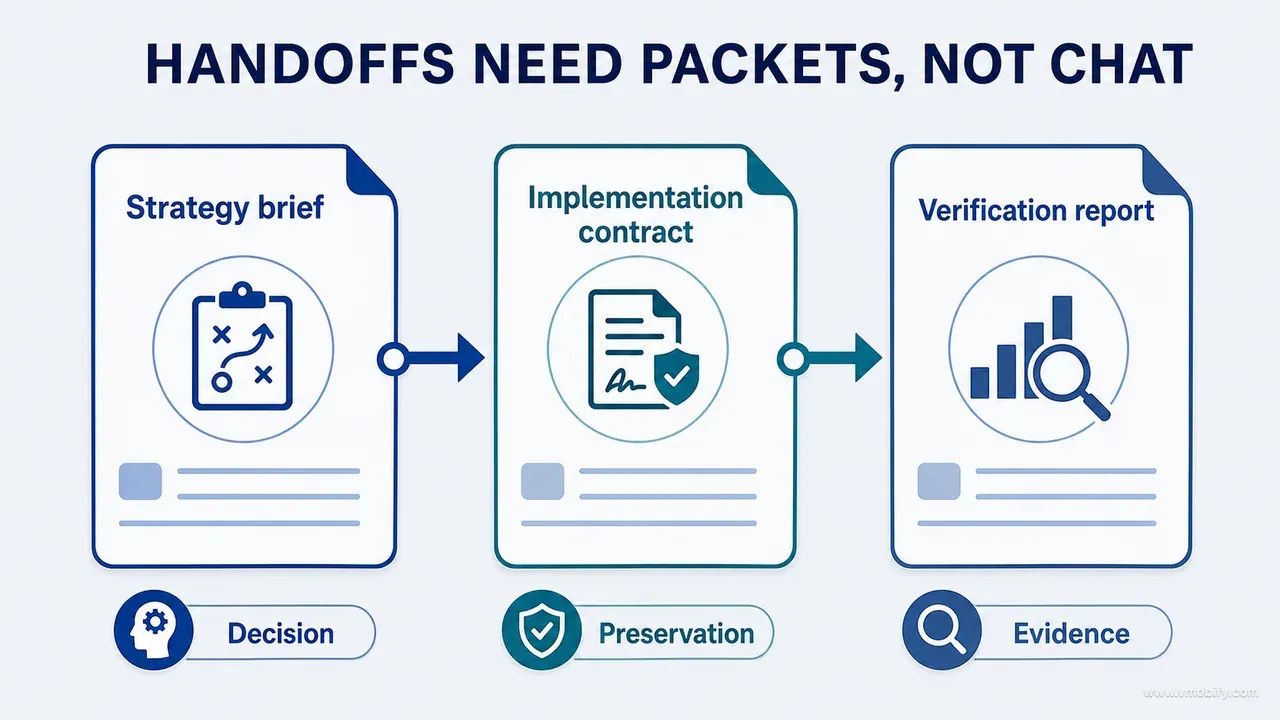
The first sends a bounded design question to the board. It should return alternatives and trade-offs, never code:
BOARD HANDOFF
- Decision question:
- Observed evidence:
- Priority user situation:
- Product promise implication:
- Fixed content/capabilities:
- Flexible design dimensions:
- Forbidden changes:
- Required states:
- Comparison criteria:
- Evidence still missing:
The second converts a selected board into something a repository agent can act on. The agent's first response should be its repository discovery and any conflict it found between the board and the real architecture — not a diff:
IMPLEMENTATION HANDOFF
- Decision ID:
- Selected board:
- Why selected:
- Surface/files in scope:
- Capabilities to preserve:
- Data invariants:
- State behaviour:
- Component/token expectations:
- Platform adaptations:
- Accessibility:
- Analytics:
- Tests/commands:
- Runtime captures required:
- Out of scope:
The third hands a build to whoever will challenge it. Note that it asks the implementer to declare its own deviations and remaining uncertainty up front, which is the cheapest quality control in the entire loop:
VERIFICATION HANDOFF
- Build/commit:
- Files changed:
- Intended behaviour:
- Known deviations:
- Test results:
- Baseline fixture:
- Default state:
- Highest-risk state:
- Persistence/downstream checks:
- Accessibility checks:
- Visual comparison conditions:
- Remaining uncertainty:
Two fields carry more weight than the rest. Out of scope is what stops a bounded change from becoming an opportunistic refactor of four neighbouring files — the most common way a small AI-assisted patch turns into an un-reviewable diff. Baseline fixture is what makes the visual comparison meaningful at all: the same seeded data, the same device class, the same locale. Compare a board drawn with three months of data against a build showing an empty state and you will conclude the implementation is wrong when the only thing wrong is the fixture.
Keep the filled templates with the decision record rather than in a chat thread. The handoffs are the audit trail, and their value is highest exactly when nobody remembers writing them.
Which gates stop a polished output from forcing the next step?
Five gates — evidence ready, direction ready, patch ready, verification ready, knowledge ready — each one a short list of conditions the next role can refuse to start without. Without them the handoffs become a conveyor belt, and a confident artefact at the front carries a weak premise all the way to production.
- Gate A — evidence ready. Before strategy work closes: the surface or capability exists in the inventory, runtime or source evidence has been identified, the user situation and its consequence are stated, and the unknowns are visible rather than smoothed over.
- Gate B — direction ready. Before implementation: the board question is resolved, the fixed, flexible and forbidden scopes are approved, difficult states are represented, product and privacy and data questions are closed or explicitly excluded, and the acceptance evidence is defined. Note the word explicitly — an excluded question is fine, an unnoticed one is not.
- Gate C — patch ready. Before any code mutation: the agent has mapped the owning files and state flow, existing working-tree changes are understood, contract conflicts have been reported, and the smallest coherent patch and its tests have been named.
- Gate D — verification ready. Before anyone says complete: the build and relevant tests have executed, a runnable build or environment exists, the fixture and comparison conditions are reproducible, and known deviations are disclosed by the implementer rather than discovered by the reviewer.
- Gate E — knowledge ready. Before closing the task: accepted decisions are recorded, new invariants or commands are preserved, regression protection exists where required, and any remaining claims are labelled accurately.
Gates are refusals, which is what makes them work and what makes them unpopular. The useful phrasing is not "this is bad" but "this gate is not met yet, and here is the missing item" — a specific, closeable request rather than a judgement. A gate that can only be passed by argument is not a gate.
There is a real cost, and it is worth naming honestly: five gates on a two-hour change is bureaucracy. Scale them to consequence. A copy tweak needs Gate D and nothing else. A change to a subscription, a permission, a migration or a displayed calculation needs all five, every time — those are precisely the areas where an AI-assisted change looks smallest and carries the most risk. Release-blocking policy gates deserve the same treatment; the fortnight described in our guide to Google Play's closed testing requirement is a gate of exactly this kind, imposed by the platform rather than by you.
How should you score a new AI tool instead of arguing about brands?
Score capabilities, not claims — and score the seven properties that determine what evidence the tool can produce, because those outlast every model ranking. Benchmark leadership changes every few months. Whether a tool can inspect your actual source, be bounded, and produce output another reviewer can check does not.
The scorecard, as seven questions:
- Context authority. Can it inspect the current source or runtime, or is it reasoning from what you pasted?
- Mutation control. Can scope and permissions be bounded — specific paths, specific commands, a review step before anything is written?
- Reproducibility. Does it expose the files, commands and outputs, so a second person can re-run what it did?
- Visual access. Can it inspect the actual rendered state, or only the code that produces it?
- Evidence quality. Can another reviewer verify its conclusion without repeating the whole task?
- Durability. Can results be written into project artefacts, or do they die with the session?
- Safety. Does it stop for protected or ambiguous actions rather than choosing a plausible default?
Run a real task through the scorecard rather than a demo. Demos are chosen to show the capability; your repository is chosen by history. The most informative test we know is deliberately boring: give the candidate tool a bounded change in an unfamiliar part of your own codebase, with a required discovery step, and read the discovery rather than the diff. A tool that reports the wrong owning file confidently has told you everything you need to know in ninety seconds.
Two dimensions are usually underweighted. Safety matters because the difference between a tool that pauses on an ambiguous instruction and one that picks the most likely interpretation is invisible until the interpretation is wrong — and by then the change is committed. Durability matters because a workflow whose knowledge lives in chat history restarts its learning every session; the same lesson gets rediscovered at full price, over and over.
What the scorecard is deliberately not is a ranking of vendors. Score the fit between a tool and the role you need filled. A tool that scores poorly on visual access is not a bad tool — it is a poor runtime verifier and possibly an excellent coding agent, and hiring it for the wrong role is your mistake rather than its.
When should you use ChatGPT versus a repository-native agent?
Use a strategic conversational workspace when the problem spans sources, disciplines or deliverables and you need synthesis before mutation. Use a repository-native agent when the answer depends on the actual codebase, or when files must change. The dividing line is not difficulty — it is whether the answer exists in your repository.
Questions that belong to the strategic workspace: what should this screen be for, which of these findings actually matter, what would we need to observe to know we were wrong, how do we structure an audit across seven concerns, what does this policy change mean for our release plan. None of those are answered by reading code, and a coding agent asked to answer them will produce a reasonable-sounding opinion grounded in nothing.
Questions that belong to the repository agent: which file owns this state, what happens to this value on migration, is this component used anywhere else, does this test actually cover the branch we think it does, what breaks if we remove this. None of those are answered by reasoning, and a strategic workspace asked to answer them will produce a plausible architecture that is not yours.
Use both when the strategy has to become a safe implementation, when a broad audit produces repository-specific tasks, when a visual decision must be reconciled with the architecture, and when findings have to become tests and durable documentation. That is most non-trivial work, which is why the handoff templates exist.
One rule prevents the most common misuse: do not paste a long strategic conversation into a coding prompt. The transcript contains abandoned branches, superseded conclusions and speculation that was never resolved — and the agent has no way to tell which paragraphs survived. It will implement the discarded option with total confidence. Distil the conversation into the smallest complete implementation contract instead. More context is not automatically better; the right context is.
The same restraint applies in reverse. A coding agent's full discovery output is not a strategy input. What the strategic layer needs is the two or three constraints discovery surfaced — the shared component, the migration in flight, the invariant nobody had written down — not four hundred lines of file listing.
Which mistakes cost the most here?
The expensive mistakes all share one shape: an output produced under one kind of evidence is accepted as authority under another. Seven show up repeatedly, and each has a one-line correction.
- Asking a coding agent to invent the strategy. It will fill the gap with plausible defaults, and plausible defaults are indistinguishable from decisions once they are in the code. Resolve product intent first.
- Asking a strategy tool to assert repository facts. If it has not inspected the current code, treat every statement as a hypothesis to be checked, not a finding.
- Treating the board as a ticket. Images do not specify state, persistence, analytics, accessibility or exclusions. An image plus a contract is a ticket; an image alone is a wish.
- Letting the implementer verify itself. It can and should run the tests. The visual and behavioural claims that matter deserve an independent observer.
- Passing the entire project history to every tool. Give each role the relevant evidence, constraints and decision record. Volume of context is not a substitute for selection of context.
- Debating which AI is best in the abstract. Model capability changes quarterly. Evaluate role fit, repository access, visual access, permissions, reproducibility and evidence output — the scorecard above.
- Skipping durable handoffs. Conversation context disappears. Decision records, tests and project instructions are what stop the same discovery being repeated at full cost next month.
Underneath all seven is the same trade-off, and it is worth stating plainly because it runs against the instinct that AI tooling is about speed: the objective is not maximum automation, it is a faster chain of accountable decisions. A human approval placed at the right boundary saves more time than an autonomous implementation built on an unresolved premise — because the implementation will be rebuilt and the approval will not.
So when the tools change, and they will, preserve the contracts and the evidence gates. Replace the capability provider, not the project's standard of proof. Do not build a workflow around personalities or brand loyalty; build it around evidence and responsibility. Use strategic AI to structure the problem, design boards to explore visible decisions, repository-native agents to discover and implement, and runtime verification to close the claim — then preserve the result in durable project knowledge so the next loop starts further along than this one did.
The next guide in this series covers how to write AI prompts that produce evidence instead of confidence, which is the mechanism that makes every role above testable. If you would rather have this operating model applied to your product than assembled from scratch, talk to us — we run this loop on client apps every week.
Frequently Asked Questions
Can one platform perform several of these roles?+
Yes, and increasingly they do — a single system may support research, file work, visual generation and runtime tools. Keep the roles conceptually separate even when the interface is shared. The question to ask at every step is not which tool am I in, but which evidence is available to it right now.
Is Claude Code better than Codex for implementation?+
This guide deliberately makes no universal ranking, because both evolve faster than any post can track. Evaluate them against your repository, stack, security requirements, tool access, review quality and ability to produce reproducible evidence — the seven-point scorecard in this post. The method works with either.
Should the coding agent see the design board?+
Yes, along with the written contract and the current runtime evidence. The board communicates visual intent and the contract resolves ambiguity. Sending the board alone is the single most common cause of an implementation that looks right and behaves wrongly, because the board cannot express state, persistence or exclusions.
Can AI approve its own work?+
It can perform useful self-review, and you should ask for it. But acceptance needs independent evidence and, for important decisions, a different review context or a human owner. An implementer reviewing its own patch shares the assumption that produced the defect, so it validates the assumption rather than testing it.
What belongs in permanent project instructions rather than a task brief?+
Stable architecture, commands, constraints, invariants, design rules and verification expectations belong in the rules file — CLAUDE.md, AGENTS.md or your equivalent. Temporary task detail belongs in the issue or the implementation brief. A good test: if it would still be true after this feature ships, it is permanent.
Is this too much process for a solo developer or a small team?+
Scale the gates to consequence rather than dropping them. A copy change needs one runtime check. A change to a subscription, a permission, a migration or a displayed calculation needs all five gates regardless of team size — those are exactly the changes that look smallest in a diff and cost the most when wrong.
How do we know the workflow itself is working?+
Audit it periodically. Count tasks reopened because the board was ambiguous, implementations rejected because a repository constraint surfaced late, and claims returned for missing runtime evidence. Each count maps to a specific gate. A rising count in the second category almost always means discovery is being skipped under deadline pressure.
Sources
- Anthropic — Claude Code overview — Agentic coding tool that reads the codebase, edits files and runs commands across terminal, IDE, desktop and web.
- OpenAI — Codex code review — Official documentation for agent-performed code review in the Codex workflow.
- OpenAI — AGENTS.md configuration — Repository-level instructions for coding agents.
- Nielsen Norman Group — Parallel and Iterative Design — Evidence that comparing independent alternatives outperforms refining a single direction.
- W3C — WCAG 2.2 — Accessibility success criteria that describe the running interface, not the mockup.
- Apple — Human Interface Guidelines: Accessibility — Platform accessibility expectations a design board cannot demonstrate.
About the author
Amol Pomane — Founder, Vmobify
Amol leads Vmobify, a mobile app growth agency that has driven 30M+ downloads and ranked 54K+ keywords across 300+ apps since 2013. He writes about ASO, paid user acquisition, retention, and the operational reality of scaling mobile apps in India and global markets.