Meta App Install Campaigns: The 2026 Playbook for Scalable Growth
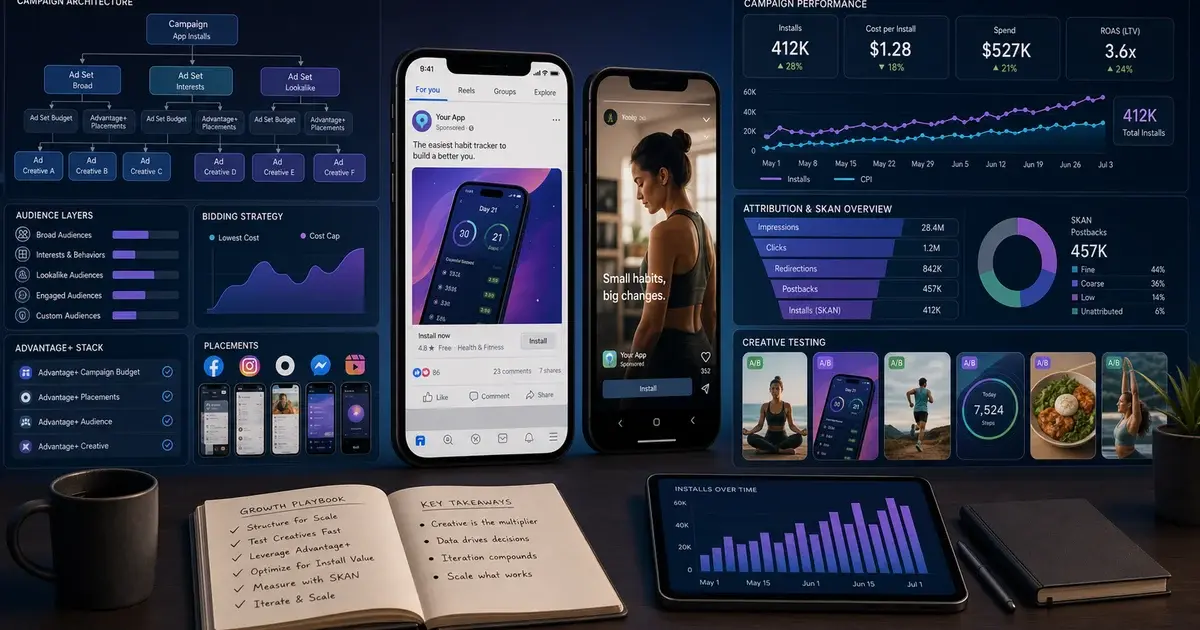
Meta remains the most powerful paid channel for consumer app installs at scale. This 2026 playbook covers Advantage+ App Ads, SKAN 4 attribution, creative strategy, audience structure, and bidding mechanics—everything you need to run campaigns that compound.

Why does Meta still dominate app install advertising in 2026?
Meta remains the single most scalable paid channel for consumer app installs in 2026 because its combination of audience scale, behavioural signal depth, and creative surface area is unmatched by any other platform. Reports from the AppsFlyer Performance Index consistently rank Meta among the top two paid UA channels by volume and quality across every consumer category globally.
Three structural advantages keep Meta at the top. First, audience scale: with over 500 million daily active users in India across Facebook and Instagram, and more than 3 billion globally, the addressable pool is simply larger than anywhere else. Second, signal depth: Meta's advertising system has access to billions of behavioural data points—content consumed, pages liked, real-world purchases, cross-app behaviour—that allow it to find users who mirror your best customers with a precision no interest-targeting system can replicate. Third, creative surface area: Facebook Feed, Instagram Feed, Reels, Stories, and the Audience Network give you five distinct placements, each with different user mindsets and optimal creative formats.
The iOS privacy changes introduced by App Tracking Transparency (ATT) reduced signal fidelity from Apple devices, and SKAdNetwork attribution added measurement complexity. But for Android-dominant markets like India, and for iOS campaigns that have migrated to SKAN 4-aware measurement, Meta's algorithm remains extraordinarily capable. The teams that abandoned Meta during the ATT turbulence are now watching competitors who stayed and adapted scale past them.
Across our portfolio of 300+ apps managed since 2013, Meta has delivered the largest share of scale-stage paid installs for consumer apps in fintech, e-commerce, gaming, health, and edtech. The channel rewards those who invest in creative systems, attribution hygiene, and algorithmic patience—not those who chase manual audience targeting levers that the algorithm outperforms anyway.
How do you set up Advantage+ App Ads the right way?
Advantage+ App Ads (AAA)—formerly Automated App Ads—is Meta's fully automated app install product, and in 2026 it should be the default campaign structure for any app generating more than 50 installs per day. You provide the app, the optimisation event, the budget, and the creative assets. Meta handles targeting, placement, bid optimisation, and audience expansion automatically.
The setup process via Meta Advantage+ App Campaigns follows this sequence:
- Connect your app. In Ads Manager, select the App Promotion objective and link your iOS App Store or Google Play listing. Confirm that the Meta SDK (or a connected MMP) is firing app events to Events Manager before you launch.
- Choose your optimisation event. Set the campaign to optimise for the deepest post-install event you have sufficient volume for. Start with App Installs if you are under 50 events/week, upgrade to App Events (registration, tutorial completion, first purchase) once you cross that threshold. The algorithm's quality ceiling scales with event depth.
- Set your budget at the campaign level. Advantage+ campaigns use campaign-level budget optimisation (CBO) exclusively. Start with a daily budget that can fund at least 10 installs per day—below that, the learning phase stalls. A starting budget of ₹500–₹1,500/day in India or $50–$150/day globally is reasonable for most apps.
- Upload creative in all supported formats. Advantage+ requires at minimum: one 9:16 vertical video, one 1:1 square video or image, one 1.91:1 landscape asset. Feed it 5–8 creative variants at launch. The algorithm tests all variants and automatically shifts spend to the best performers within 3–5 days.
- Set your geographic and age targeting. Age and location are the only audience parameters you should constrain in Advantage+. Leave interest, behaviour, and demographic targeting fully open—any restriction limits the algorithm's ability to find the optimal user pool.
A fintech app we work with switched from manual audience-based campaigns to Advantage+ App Ads in Q1 2026. Within 14 days of exiting the learning phase, CPIs dropped 28% and D7 retention improved 12%—the algorithm found a user segment their manual targeting had missed entirely.
One critical nuance: Advantage+ is not a set-and-forget campaign. The learning phase lasts 7–14 days and requires your budget and optimisation event to remain stable. Changing either mid-learning phase resets the clock and wastes the data accumulated. Once out of learning, the campaign enters a stable optimisation phase—but creative refresh is still needed every 2–3 weeks as frequency builds.
How should you structure iOS and Android campaigns separately?
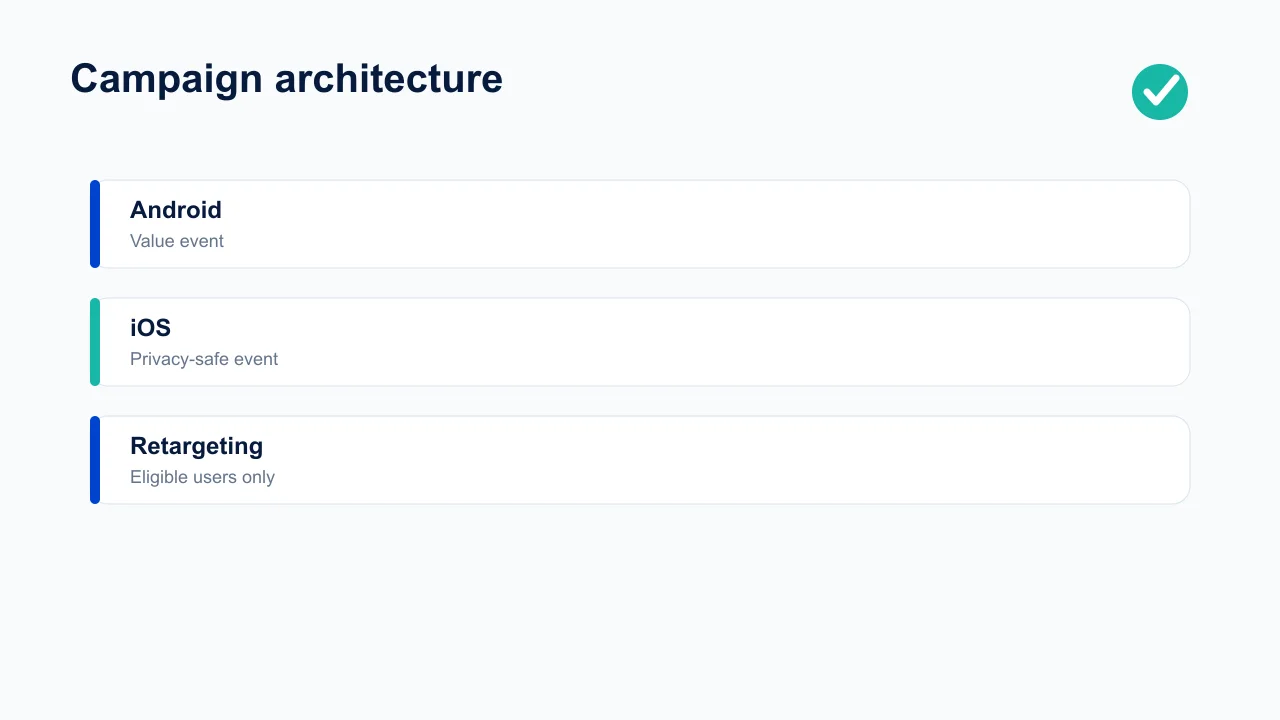
iOS and Android must run as completely separate campaigns with distinct creative sets, bidding strategies, and attribution stacks—running them in a single campaign conflates fundamentally different measurement frameworks and causes the algorithm to misallocate budget between the two platforms.
The structural rationale is attribution-driven. Android campaigns operate on deterministic click-based attribution via your MMP, with real-time signal feedback to Meta's algorithm. iOS campaigns post-ATT operate on SKAdNetwork (SKAN 4) and AdAttributionKit, with a 24–72 hour reporting delay and coarse conversion value reporting. Mixing these attribution streams in one campaign means Meta's algorithm is trying to optimise against two incompatible signal types simultaneously—and typically over-indexes on the Android signal because it is more immediate and granular.
iOS campaign structure
- Objective: App Promotion → iOS App
- Attribution: SKAN 4 + AdAttributionKit via MMP
- Optimisation: App Events (allow 48h signal delay in decisions)
- Creative: vertical video dominant, 6–15s hooks
- Bidding: tCPI 20% above target to accommodate SKAN 4 delay
- Reporting: use modelled MMP data, not raw Meta dashboard
Android campaign structure
- Objective: App Promotion → Android App
- Attribution: deterministic via MMP (AppsFlyer/Adjust)
- Optimisation: App Events once 50+/week; install-level early on
- Creative: can test wider format range including carousels
- Bidding: tCPI at or slightly above target
- Reporting: real-time MMP dashboard reliable
Beyond the attribution split, iOS and Android users exhibit different creative preferences and conversion behaviours. In our portfolio, iOS users in the US and UK respond more strongly to polished testimonial formats, while Android users in India and SEA over-index on problem-statement hooks delivered in vernacular languages. Shared creatives underperform the platform-native benchmark on both sides.
For apps managing both platforms, a practical campaign architecture looks like: one Advantage+ campaign per platform, one manual campaign per platform for lookalike testing, and one re-engagement campaign per platform for lapsed users. Six campaigns total is a manageable structure that keeps the algorithm's signals clean across all objectives. See our broader user acquisition service for how we implement this structure across client portfolios.
If your iOS CPIs look artificially low compared to Android, you almost certainly have SKAN 4 reporting incomplete. Meta's dashboard will show lower CPIs than your MMP reports because unattributed installs are not counted. Always use your MMP as the source of truth, not Meta Ads Manager, for cross-platform CPI comparisons.
What creative strategy drives the lowest CPI on Meta?
Creative is the primary performance variable in Meta app install campaigns—two advertisers with identical targeting and identical budgets regularly see 3–5x CPI differences driven purely by creative quality and format choices. In 2026, Meta's shift to a video-first algorithm means creative strategy has never mattered more.
The format hierarchy in 2026, ranked by average CTR performance across our portfolio:
- UGC-style vertical video (9:16), 6–15 seconds — consistently the top performer for consumer apps. Creatives that look like organic Reels—shot on a phone, natural lighting, no polished production aesthetic—achieve 40–60% lower CPCs than branded video on Reels placement. Hook the viewer in the first 1–2 seconds with a problem statement or unexpected visual. Do not brand the opening frame; that signals "ad" and triggers the scroll reflex.
- Demo walkthroughs, 15–30 seconds — screen recordings showing the app solving a specific problem. Lower CTR than UGC but higher post-install engagement because they self-qualify viewers. A user who watches a full demo walkthrough is far more likely to complete onboarding than one who tapped a hook video impulsively.
- Testimonial video, 15–45 seconds — authentic user-filmed testimonials ("I used to do X manually, now [App] does it in 2 minutes") outperform produced testimonials. Recruit 3–5 real users for ₹2,000–₹5,000 per clip with usage rights. Test raw versus lightly edited versions—raw frequently wins.
- Static images with bold benefit headlines — still highly effective on Facebook Feed and Audience Network. Cheaper to produce and iterate than video. Use for rapid creative testing when a new angle needs validation before investing in video production.
- Carousels — strong for apps with multiple distinct features. Each card highlights a different use case. Best suited to productivity, finance, and utility apps where feature breadth is the selling point.

Across our portfolio, 9:16 vertical video achieves 2–3x CTR versus static images on Meta Reels and Stories placements. The CTR gap narrows on Facebook Feed (1.4–1.8x) but never disappears. Video is the format Meta's algorithm rewards with cheaper distribution costs.
Creative testing cadence matters as much as creative quality. Every 2–3 weeks, introduce 3–5 new variants—fresh angle, different opening hook, new spokesperson, or new problem being solved. Monitor frequency (target: keep below 3–4 for your core audience) and CPM trends (a 20%+ week-on-week CPM rise signals creative fatigue). When fatigue sets in and budget is still available, the algorithm begins serving worn-out creatives to increasingly marginal audiences—a pattern we see repeatedly in audits of accounts that scale without refreshing creative.
For a deeper look at creative production systems for app campaigns, see our guide on mobile app creative strategy.
What is the audience playbook for Meta app campaigns?
In 2026, the winning audience strategy for Meta app campaigns is a two-layer architecture: Advantage+ broad targeting as the primary volume source, layered with manually constructed custom audiences and 1–3% lookalikes for higher-value cohort testing. The days of meticulously hand-built interest clusters as a primary audience strategy are over—the algorithm consistently outperforms them.
Layer 1: Advantage+ broad targeting. When running Advantage+ campaigns, set no audience restrictions beyond age range and location. This feels counterintuitive but consistently outperforms targeted approaches at scale because Meta's behavioural signals are richer than any manually constructed audience. The algorithm has access to cross-app and cross-web behaviour that advertisers cannot replicate through interest targeting. Broad targeting in Advantage+ is not the same as broad targeting in a manual campaign—the algorithm's targeting is highly precise; you are simply letting it choose who to target rather than constraining its choices.
Layer 2: Custom Audiences and Lookalikes for quality testing. Upload your existing user list to Meta to create a Custom Audience. Use this for three purposes:
- Exclusion from install campaigns — always exclude existing installs to avoid wasting budget on users who already have your app. This is a surprisingly common and expensive omission in accounts we audit.
- Seed audience for Lookalikes — create lookalikes from three distinct seeds: your top 5% highest-LTV users, all registered users, and your email waitlist. Test each in a separate ad set within a manual campaign structure.
- Re-engagement campaigns — target lapsed users (installed but inactive for 14–30 days) with a dedicated re-engagement campaign. Reactivated users typically have 2–3x better LTV than fresh installs because they already understand the product.
Start lookalike audiences at 1–2% (most similar, smaller pool) and expand to 3–5% as you scale. In India, even a 1% lookalike from a seed of 100,000 users gives an addressable audience of several million—more than enough volume to run a meaningful parallel test against your Advantage+ campaign.
Interest targeting: when it still makes sense. For new apps without an existing user base (under 5,000 installs), interest targeting is a valid starting point for generating the initial install data that seeds Lookalikes and Advantage+ learning. Choose 3–5 tight interest clusters—for a trading app: "Zerodha", "NSE India", "Sensex", "stock market investing". Avoid broad interests like "Technology" or "Finance"—they deliver volume but poor qualification. Once you have 10,000+ installs, deprecate interest ad sets and migrate fully to Advantage+ and Lookalike-based structures.
The audience architecture sits alongside and reinforces your App Store Optimisation work—a well-optimised store listing converts the audience Meta finds at a meaningfully higher rate, compounding the efficiency gains from improved targeting.
How should you bid and budget across the learning phase and scale?
Bidding strategy on Meta app campaigns has three phases: a learning-phase setup that prioritises stability over efficiency, an optimisation phase where you tighten bids toward profitability, and a scaling phase where budget increases must be gradual to avoid resetting learning. Most CPIs that blow out in Meta campaigns are caused by violating the rules of one of these three phases, not by Meta's algorithm failing.
Phase 1: Learning phase (days 1–14). Meta's campaign enters the learning phase when first launched and needs to accumulate at least 50 optimisation events to exit it. During this window:
- Set your target CPI (tCPI) bid 20–30% above your actual acceptable CPI to give the algorithm room to explore. Bidding too tight during learning phase causes delivery instability and extends the learning period.
- Do not edit the campaign—no creative swaps, no budget changes, no audience changes. Any significant edit resets the learning phase counter. Plan your creative uploads and budget setting carefully before launch.
- Do not judge performance during learning phase. CPIs are typically higher and less stable while the algorithm calibrates. The performance you care about begins after the campaign exits learning.
Phase 2: App Events Optimisation (AEO). Once you have 50+ post-install events per week (registrations, purchases, tutorial completions), switch from install-level to event-level optimisation. This is the single highest-impact configuration change in Meta app campaigns:
- AEO-optimised campaigns acquire users who are not just likely to install but likely to complete the target action. In our portfolio, AEO cohorts show 1.5–2x better D30 retention than install-optimised cohorts at equivalent CPI levels.
- Choose the deepest event you have volume for. If you have 200 registrations/week but only 30 purchases/week, optimise for registration—not purchase. The 50-event-per-week minimum is a hard floor below which the algorithm lacks sufficient signal.
Across our apps, the switch from install optimisation to App Events Optimisation (targeting first-session completion) has consistently reduced cost per retained user by 30–40%—even when headline CPI rises by 15–20%. The quality difference more than compensates for the cost increase when measured over a 30-day window.
Phase 3: Scaling without breaking learning. Budget scaling rules are critical and often violated:
- Increase budget by no more than 20–30% every 48–72 hours. Larger jumps—particularly increases over 50% in 24 hours—reset the learning phase and typically cause a 1–2 week CPI spike.
- If you need to scale faster than gradual increases allow, duplicate the winning campaign and run both in parallel rather than aggressively scaling the original. Two campaigns at the original budget will typically outperform one campaign at double the budget.
- Monitor cost per retained user (not just CPI) as budgets scale. As you exhaust the most efficient user segments, the marginal CPI of additional volume rises. Know your LTV ceiling before committing to large budget jumps.
Value bidding (ROAS optimisation) is the third bidding mode available for monetised apps. If your app has in-app purchases or subscriptions and you pass purchase value events to Meta, value bidding tells the algorithm to find users who are likely to spend more—not just likely to install. Requires at least 100 purchase events per week to work effectively but consistently delivers 20–40% better ROAS than event-level optimisation for apps with strong purchase signals.
How has SKAN 4 and AdAttributionKit changed iOS measurement?
SKAN 4 and AdAttributionKit have permanently restructured how iOS app install campaigns are measured and optimised—teams still running iOS campaigns on pre-SKAN 4 measurement frameworks are systematically underreporting performance by 20–40% and making optimisation decisions on incomplete data.
The key changes introduced by SKAdNetwork 4 that directly impact Meta campaigns:
- Multiple postback windows. SKAN 4 introduced three postback windows (0–2 days, 3–7 days, 8–35 days) versus the single 24-hour window in earlier versions. This means you can now receive conversion data across three phases of a user's post-install journey—registration, engagement, and purchase signals all become available over 35 days versus 24 hours. Configure your MMP's SKAN 4 conversion value schema to capture events across all three windows.
- Coarse and fine conversion values. Window 1 supports both fine (6-bit, up to 63 values) and coarse (low/medium/high) conversion values. Windows 2 and 3 support coarse values only. Design your conversion schema with this granularity in mind—high-value events should map to Window 1 fine values for maximum signal fidelity where the algorithm can use them.
- Reporting delay. SKAN 4 postbacks are delivered to ad networks with a 24–72 hour delay. This means Meta's algorithm is working with data that is 1–3 days stale when making real-time bid optimisation decisions. Build this lag into your decision-making: evaluate iOS campaign performance on a 7-day rolling window, not daily, to avoid reacting to noise.
- AdAttributionKit (AAK) for iOS 17.4+. Apple's replacement framework for SKAdNetwork on newer devices delivers deterministic attribution for devices where the user has granted ATT permission and probabilistic attribution for opted-out users. Singular and AppsFlyer both support parallel AAK + SKAN 4 reporting, which is now necessary for accounts with mixed iOS 16/17+ device audiences.
The practical implication for Meta campaign structure: set tCPI bids 20% above your target CPI to account for the SKAN 4 reporting lag. Under-bidding during the learning phase when signal is incomplete will cause the algorithm to under-deliver. Use your MMP's modelled attribution data—which combines SKAN 4 postbacks, AAK signals, and probabilistic modelling—as the performance source of truth, not Meta Ads Manager's self-reported numbers.
Meta Ads Manager shows all installs including those attributed via modelled data. Your MMP will show a lower (and more accurate) attributed install count because it deduplicates and fraud-filters. Use the MMP number for CPI calculations and the Meta dashboard only for creative and audience performance signals. Mixing the two sources creates a phantom CPI that is usually 15–25% lower than reality.
For a full comparison of how SKAN 4 affects attribution across Meta, Google, and TikTok simultaneously, see our guide on AppsFlyer vs Adjust vs Singular—the MMP you choose affects how accurately you can reconstruct iOS campaign performance from SKAN 4 postbacks.
How do you set up MMP integration for Meta app campaigns?
A Mobile Measurement Partner (MMP) integration is non-negotiable before scaling any Meta app install campaign—without it, you are attributing installs based on Meta's self-reported data, which double-counts and lacks the cross-channel deduplication needed for accurate budget decisions.
The measurement stack for Meta app campaigns has four layers:
- Meta SDK integration. The Meta SDK must be integrated into your app and configured to fire standard app events: fb_mobile_activate_app, fb_mobile_complete_registration, fb_mobile_purchase. Test event firing via Meta Events Manager before launch. Events Manager should show "Active" status for each event you plan to optimise against.
- MMP integration (AppsFlyer or Adjust). Your MMP sits independently between your app and all ad networks. It provides deduplicated, fraud-filtered attribution across Meta, Google, TikTok, and CPI networks simultaneously. Configure the Meta integration in your MMP dashboard—this creates the attribution channel that allows Meta to receive install and event signals via the MMP's postback mechanism rather than relying solely on the Meta SDK. Our analytics service handles MMP setup and validation for every client engagement.
- SKAN 4 conversion value schema. For iOS, configure your MMP's SKAN 4 conversion value mapping before launch. Map your highest-value post-install events to Window 1 fine conversion values. Typically: registration = 1–5, tutorial completion = 6–15, first purchase = 16–30, repeat purchase = 31–63. The exact mapping depends on your event frequency and LTV model—but the principle is consistent: use the higher-granularity Window 1 values for the events that best predict long-term retention.
- Deep link configuration. Configure Meta's Deep Link destinations so users who tap your ad open directly to the relevant screen within the app. A "Start investing" ad should deep-link to the account setup screen post-onboarding, not the app home screen. Deep links improve Day 1 retention consistently—users who land exactly where the ad promised retain at 15–25% higher rates in our portfolio data.
Named brand example: Duolingo integrated AppsFlyer with Meta and rebuilt its SKAN 4 conversion schema in 2024. The result was a 22% improvement in attributed iOS install counts and the ability to properly optimise Meta campaigns toward streak-completion events rather than raw installs—their most predictive retention signal. Their iOS CPI dropped 18% in the 90 days after the migration as the algorithm finally had clean signal to work with.
Fraud filtering is the underappreciated benefit of MMP integration for Meta specifically. While Meta traffic is generally lower fraud risk than CPI networks, install validation—confirming that installs are from real users who actually launched the app—is essential. Adjust's fraud prevention tools and AppsFlyer Protect360 both catch the category of fraud that Meta alone does not filter: click injection, SDK spoofing, and device farm installs that occasionally appear in Audience Network placements.
What is the weekly optimisation cadence for sustained performance?
Sustained Meta app campaign performance requires a structured weekly optimisation cadence—not reactive daily changes that reset the learning phase, and not passive monthly reviews that allow creative fatigue and audience saturation to compound unchecked. The cadence below is what we run across our portfolio of active Meta campaigns.
Daily checks (5 minutes per campaign):
- Delivery status — is the campaign active and spending normally?
- Budget pacing — is spend on track with the daily budget? Under-delivery signals an audience or bid issue; over-delivery signals auction pressure.
- Any automated alerts from Meta or your MMP that require same-day action (e.g., learning phase limited status, creative disapprovals).
Weekly review (30–45 minutes):
- Creative performance. Pull CTR, CPC, and CPI by creative. Any creative performing more than 30% above average CPI should be paused. Any creative performing more than 20% below average CPI should receive additional budget via a fresh ad set (not by editing the existing ad set, which can disrupt learning).
- Frequency and CPM trends. If frequency exceeds 3–4 for your primary audience, introduce new creatives. A 20%+ week-on-week CPM increase signals that you are running out of fresh audience within the current targeting parameters.
- Placement breakdown. Review CPI by placement (Reels, Feed, Stories, Audience Network). If Audience Network is driving disproportionate spend at above-benchmark CPIs, exclude it explicitly—it can absorb budget without delivering proportionate quality in some categories.
- Post-install event rates. Pull registration rate, tutorial completion rate, and D7 retention from your MMP. If post-install metrics are declining while CPI holds steady, audience quality is eroding. This is a signal to shift optimisation event upward (e.g., from install to registration) even if you are below the 50-event weekly threshold.
Set up automated rules in Meta Ads Manager for three scenarios: (1) pause creatives with CTR below 0.8% after 1,000 impressions, (2) flag ad sets with CPI more than 40% above target for manual review, and (3) send a budget alert if daily spend drops below 70% of the daily budget. These rules catch the most common failure modes without requiring constant manual monitoring.
Monthly review (2 hours):
- Cohort retention analysis: compare D1, D7, D30 retention by campaign and creative type. Identify which creative categories and audience sources produce the highest-retaining cohorts—these should receive disproportionate budget in the following month.
- LTV-to-CAC ratio by campaign type: Advantage+ versus manual, iOS versus Android, install-optimised versus event-optimised. Use this data to rebalance the campaign portfolio toward the highest LTV channels.
- Creative brief: commission the next month's creative batch based on the winning creative angles identified in the weekly reviews. A minimum of 6–8 new variants per month is needed to sustain Advantage+ performance at scale.
Running Meta campaigns at scale requires both algorithmic patience and operational discipline. The teams in our portfolio that achieve the lowest cost per retained user combine Advantage+ automation at the campaign level with rigorous creative systems and attribution hygiene—neither the automation nor the discipline alone is sufficient.
If you want an expert team managing your Meta UA end-to-end—campaign structure, creative production, MMP setup, and weekly optimisation—get in touch with Vmobify. Our user acquisition service covers full Meta campaign management for apps at every stage, from first ₹500/day to ₹50 lakh/month scale. See our results and case studies for the verticals and metrics we have delivered across 300+ apps.
Frequently Asked Questions
What is the minimum daily budget to run Meta app install campaigns effectively?+
You need a minimum daily budget that can fund at least 10 installs per day to avoid the learning phase stalling. In India, that typically means ₹500–₹1,000/day on a tCPI-optimised campaign. Globally, $50–$100/day is the functional minimum. Below these thresholds, the Advantage+ algorithm does not have enough signal to optimise, and you will see high CPI variance with no improvement over time.
Should I use Advantage+ App Ads or manual campaign structure?+
Advantage+ App Ads should be your default if you have at least 50 installs per day. Below that threshold, start with a manual campaign to generate the seed data that Advantage+ needs to learn from. Once you cross 50 installs/day, migrate to Advantage+ and run a 2-week parallel test. In our portfolio, Advantage+ consistently wins by 20–35% on CPI at scale—but it requires the learning phase to complete before you can see that performance.
How do SKAN 4 and AdAttributionKit affect my Meta CPI reporting?+
SKAN 4 introduces a 24–72 hour reporting delay and coarse conversion values for iOS installs, which means Meta Ads Manager will show lower CPIs than your MMP. The MMP number is the accurate one—it deduplicates, fraud-filters, and combines SKAN 4 postbacks with probabilistic modelling. Use your MMP as the source of truth and set tCPI bids 20% above your target to account for the attribution lag during the learning phase.
How often should I refresh creatives in Meta app campaigns?+
Plan for a creative refresh every 2–3 weeks per campaign. Monitor frequency (pause creatives when frequency exceeds 3–4 for your core audience) and weekly CPM trends (a 20%+ rise signals fatigue). A production pipeline that delivers 6–8 new creative variants per month per campaign is the operational minimum for sustained Advantage+ performance. Creative fatigue is the single most common cause of rising CPIs in accounts we audit.
What is App Events Optimisation and when should I switch to it?+
App Events Optimisation (AEO) tells Meta to find users most likely to complete a specific post-install action—registration, tutorial completion, first purchase—rather than just users likely to install. Switch to AEO once you have 50+ target events per week. The result is a 15–20% higher CPI but 1.5–2x better D30 retention. When measured as cost per retained user, AEO consistently outperforms install optimisation by 30–40% in our portfolio.
Can I run Meta app campaigns without an MMP?+
Technically yes, but you should not at any meaningful scale. Without an MMP, you are attributing installs purely from Meta's self-reported data, which lacks cross-channel deduplication and fraud filtering. You will double-count installs if running any other paid channel simultaneously, and you will have no reliable SKAN 4 conversion value schema for iOS. Set up AppsFlyer or Adjust before spending more than ₹50,000/month on Meta campaigns.
What are the most common mistakes in Meta app install campaigns?+
The five most common mistakes we see in audits: (1) editing campaigns during the learning phase and resetting the counter, (2) running iOS and Android in the same campaign and polluting attribution signals, (3) not excluding existing installs from audience targeting, (4) increasing budgets too aggressively (over 50% in 24 hours) and resetting learning, and (5) judging iOS performance on Meta Ads Manager numbers rather than MMP-attributed data. Any one of these inflates reported CPI by 20–50%.
Sources
- Meta Advantage+ App Campaigns — Official Meta product page for Advantage+ App Ads—formerly Automated App Ads (AAA).
- Apple SKAdNetwork docs — Apple's privacy-preserving install attribution framework—SKAN 4 postback windows and conversion value schema.
- AppsFlyer Performance Index — Annual industry benchmark ranking paid UA channels by install volume and quality across verticals.
- AppsFlyer State of App Marketing — Benchmark data on CPI ranges, retention rates, and channel mix by category and geography.
- Adjust resources hub — MMP documentation covering fraud prevention, SKAN 4 implementation, and attribution best practices.
- Google Ads App Campaigns Help — Reference for Android campaign benchmarks and cross-channel UAC versus Meta comparison data.
- Singular resources hub — SKAN 4 and AdAttributionKit implementation guides and parallel postback reporting documentation.
- data.ai State of Mobile — Annual global app market data on install volumes, category benchmarks, and consumer spend.
About the author
Amol Pomane — Founder, Vmobify
Amol leads Vmobify, a mobile app growth agency that has driven 30M+ downloads and ranked 54K+ keywords across 300+ apps since 2013. He writes about ASO, paid user acquisition, retention, and the operational reality of scaling mobile apps in India and global markets.
Free Growth Audit
See exactly how to scale your app with 13+ years of expertise behind you.
Get My Strategy