AppsFlyer vs Adjust vs Singular: Which MMP in 2026?
Choosing the wrong MMP costs you more than the subscription fee — it costs you campaign visibility, attribution accuracy, and the ability to optimise towards real revenue. Here is how AppsFlyer, Adjust, and Singular compare in 2026 across every dimension that matters for growth teams.

What Does a Mobile Measurement Partner Actually Do for Your App Campaigns?
A mobile measurement partner (MMP) is the independent third party that sits between your app and every ad network you run, verifying which network, campaign, ad set, and creative actually caused each install and post-install event. Without an MMP, every ad network tells you it delivered your best results — because each one is attributing installs using its own last-click data without cross-network deduplication.
The core problem MMPs solve is attribution fraud and double-counting. If you run Meta, Google UAC, and a DSP simultaneously, all three networks will claim credit for the same user if that user saw ads on all three before installing. An MMP applies a deterministic or probabilistic attribution model — with agreed priority rules — and assigns the install to exactly one source. Adjoe's comprehensive MMP guide explains the mechanics of this deduplication layer in detail.
Beyond attribution, modern MMPs provide:
- Fraud protection: Real-time detection of click injection, install hijacking, SDK spoofing, and device farm traffic before fraudulent installs are attributed and billed.
- Deep link routing: Deferred deep links that route users who installed from a specific campaign directly into the relevant in-app experience.
- Audience segmentation: Re-engagement audiences built from MMP-verified cohort data, synced to ad networks for retargeting.
- In-app event tracking: Post-install events (purchases, subscriptions, level completions) relayed to networks for value-based bidding.
- Raw data export: Full event-level data for your own BI stack, enabling LTV modelling beyond what any single ad network surfaces.
In short: without an MMP you are flying blind on attribution, overcharging your media budget on duplicate conversions, and unable to pass clean in-app events back to your ad networks for smart bidding. Across our 300+ app portfolio, every app generating more than ₹50K monthly ad spend has an MMP in place — the ROI improvement from accurate attribution alone typically exceeds the MMP cost within the first month.
For a deeper look at how attribution data feeds into your overall analytics strategy, see our guide on mobile analytics services.
How Does AppsFlyer Compare to Adjust and Singular in 2026?
In 2026, AppsFlyer leads on ecosystem breadth, Adjust leads on pricing transparency and SKAN 4 developer experience, and Singular leads on cross-channel cost aggregation and ROI visibility. Each platform has a genuine best-fit use case rather than one objectively superior option across all dimensions.
To make this easier to evaluate quickly, use the comparison below across the exact dimensions growth teams rely on day to day:
- Network integrations: AppsFlyer has 10,000+ certified partner integrations — the largest partner ecosystem in the industry by a significant margin. AppsFlyer's partner marketplace covers virtually every ad network, DSP, analytics tool, and CRM. Adjust supports approximately 2,000+ partners. Singular integrates around 2,000+ paid marketing sources, but differentiates by being the only MMP with native cost data API ingestion from every major network — not just click-based attribution data.
- Attribution accuracy: All three platforms use probabilistic and deterministic models with similar underlying logic. The practical difference is in their fraud protection layers: AppsFlyer's Protect360 and Adjust's Fraud Prevention Suite are both production-grade. Singular's fraud protection is solid but Protect360 remains the industry benchmark for enterprise-scale fraud detection.
- Reporting interface: AppsFlyer's reporting UI is the most feature-complete but also the most complex to navigate for new users. Adjust has a cleaner, more intuitive interface that smaller teams ramp up on faster. Singular's reporting is where it genuinely differentiates — its ROI index unifies ad spend data from cost APIs with MMP attribution in a single dashboard, giving you true cross-channel ROAS without manual stitching.
- SDK performance: All three have lightweight SDKs. Adjust is frequently cited for the smallest binary footprint. AppsFlyer's SDK is larger but this is rarely a meaningful differentiator for most apps.
- India + South Asia support: AppsFlyer has the deepest presence in India with local sales, solution engineering, and support teams. Both Adjust and Singular operate in India but with less local coverage. For Indian apps integrating CleverTap or MoEngage — both very common in the Indian market — all three MMPs have official integration partnerships, though AppsFlyer's CleverTap integration is the most mature and widely deployed in our portfolio.
RudderStack's independent MMP analysis provides a useful neutral perspective on how attribution models differ in practice across all three platforms. See also our mass user acquisition strategy guide for how MMP selection affects campaign architecture at scale.

Which MMP Has the Best SKAdNetwork 4 and Privacy Sandbox Support?
All three MMPs support SKAN 4 in production, but Adjust has the cleanest implementation and the most developer-friendly conversion value configuration tooling for teams managing SKAN 4 for the first time.
SKAN 4 introduced two fundamental changes from SKAN 3 that every MMP had to adapt to:
- Coarse + fine-grained conversion values: SKAN 4 supports both a coarse value (low/medium/high) and a fine-grained 0-63 value in the first postback window. This lets you encode more meaningful post-install signals — for example, mapping "low" to registration-only, "medium" to first purchase, and "high" to subscription — rather than wasting conversion value bits on noisy early signals.
- 4 postback windows: SKAN 4 provides a 0–2 day window, a 3–7 day window, a 8–35 day window, and optionally a longer window — compared to SKAN 3's single 24-hour window. This gives MMPs the ability to capture D7 and D30 revenue signals, which dramatically improves the quality of SKAN campaign optimisation signals for subscription and high-LTV apps.
How the three MMPs handle SKAN 4 in practice:
- Adjust: Adjust's conversion studio tool provides a no-code interface for mapping your in-app events to SKAN 4 conversion value schemas. The tool pre-fills recommended schemas based on app category, which reduces the implementation risk for teams unfamiliar with conversion value optimisation. Their SKAN 4 documentation is thorough and actively maintained.
- AppsFlyer: AppsFlyer's SKAN 4 implementation is equally capable but configured through its conversion studio, which is more powerful but more complex. For teams with a dedicated MMP engineer, AppsFlyer's flexibility is an advantage. For teams self-serving their MMP setup, Adjust's UX is smoother.
- Singular: Singular handles SKAN 4 competently and their aggregated SKAN reporting integrates cleanly with their broader ROI dashboard. If your primary SKAN 4 goal is understanding true revenue attribution rather than running A/B tests on conversion schemas, Singular's aggregation layer is the most useful view.
On the Android side, the Privacy Sandbox's Attribution Reporting API (ARA) is progressively replacing GAID-based attribution as Google deprecates GAID across Android versions. ARA provides aggregate attribution reporting using differential privacy, similar in spirit to SKAN but with a broader reporting API. All three MMPs have ARA support in production as of 2026, though the ecosystem is still maturing. AppsFlyer's ARA integration is the most widely adopted given its network partner breadth. For teams planning iOS and Android launches simultaneously, see our iOS vs Android launch comparison for how attribution strategy differs by platform.
How Does MMP Pricing Compare Across AppsFlyer, Adjust, and Singular?
Adjust is the most transparently priced MMP with published flat-rate tiers; AppsFlyer prices on a MAU + event volume model that scales with your app's growth; Singular prices on tracked conversions with a free tier available for early-stage apps.
Detailed breakdown of each model:
- AppsFlyer: Pricing is based on a combination of monthly active users (MAUs) and attributed event volume. Enterprise customers negotiate custom contracts. Starter plans cover apps up to approximately 5,000 MAUs. Mid-market plans start from approximately $0.02–0.04 per attributed conversion at scale, with volume discounts above 1M monthly events. The pricing is not publicly listed and requires a sales conversation, which creates friction for teams trying to budget accurately before committing. Fraud protection (Protect360) is an add-on cost rather than included in base plans.
- Adjust: Adjust's pricing is structured in published tiers — a free plan for early-stage apps (limited events and networks), a growth plan with flat monthly pricing, and enterprise tiers for large-scale apps. This flat-rate model is a significant advantage for startups and scale-ups: you know exactly what your MMP costs as you grow your ad spend, without the risk of a surprise bill when a campaign scales quickly. Core fraud protection is included in all paid plans.
- Singular: Singular offers a free tier covering up to 5,000 monthly tracked conversions — generous enough for pre-scale apps to get real attribution data before committing. Paid plans start from approximately $0.05 per tracked conversion for small volumes with flat-rate enterprise options available. Singular's key pricing differentiator is that its cost aggregation features (ingesting spend data from all your networks into one view) are included in paid plans — equivalent features from AppsFlyer or Adjust require additional integrations or manual data pipelines.
For Indian-market apps, one additional pricing consideration: both AppsFlyer and Adjust charge in USD, which means INR-denominated budgets are exposed to exchange rate risk on MMP fees. Singular similarly prices in USD. This is a minor factor for most teams but worth noting for apps with tight INR cost structures. For how MMP costs fit into your overall LTV economics, see our LTV/CAC calculator guide.
Which MMP Should You Choose Based on Your App Type and Team Size?
The single most useful decision framework is matching MMP to your stage and primary attribution need — not chasing the most feature-complete platform.
Use this shortlist by app profile:
- Early-stage app (pre-scale, < ₹2L monthly ad spend): Start with Singular's free tier or Adjust's free plan. At this stage, the most important thing is getting attribution data in place before you scale — not optimising which MMP has the best fraud detection. Both free tiers are sufficient for validating your attribution setup and ensuring events are firing correctly before you commit to paid plans.
- Mid-stage app (₹2L–15L monthly ad spend, running 3–6 networks): Adjust is the default recommendation here. The flat-rate pricing removes budget uncertainty, the SKAN 4 tooling is developer-friendly, and the network coverage is sufficient for most mid-market stacks. If your team includes a dedicated MMP engineer, AppsFlyer's additional flexibility becomes worth the pricing complexity.
- Scale-stage app (₹15L+ monthly ad spend, running 10+ networks globally): AppsFlyer is the safest default at this scale. The 10,000+ network integrations mean you will never outgrow the partner ecosystem. Protect360's enterprise fraud protection justifies the cost at large monthly event volumes. Most major Indian apps and global apps scaling across South East Asia, MENA, and Western markets run AppsFlyer at this tier in our experience.
- ROI-focused performance team (any spend level, primary goal is cross-channel ROAS visibility): Singular is the clear recommendation. If your team's bottleneck is stitching together cost data from 8+ different networks to understand true blended ROAS — a common pain point we see in our portfolio — Singular's native cost aggregation solves this problem at a platform level rather than requiring custom ETL pipelines.
- Apps using CleverTap or MoEngage (common in India): All three MMPs integrate with both platforms, but AppsFlyer's integrations are the most battle-tested in production. If you are already an AppsFlyer customer, the CleverTap or MoEngage integration requires minimal additional configuration. For teams evaluating the full stack, see our analytics services page for our recommended MMP + CRM pairing by app category.
- Gaming apps: AppsFlyer is the dominant choice for mobile gaming given its deep integration with ironSource, AppLovin, Unity Ads, and every major gaming DSP. Adjust's gaming network coverage is solid but narrower. Singular is less commonly used in gaming due to its weaker coverage of gaming-specific ad networks.
In our portfolio, we run all three MMPs across different client apps. There is no universally "best" MMP — but there is a clear best fit for each app profile above.
What Are the 5 Critical Attribution Events to Configure Before Launch?
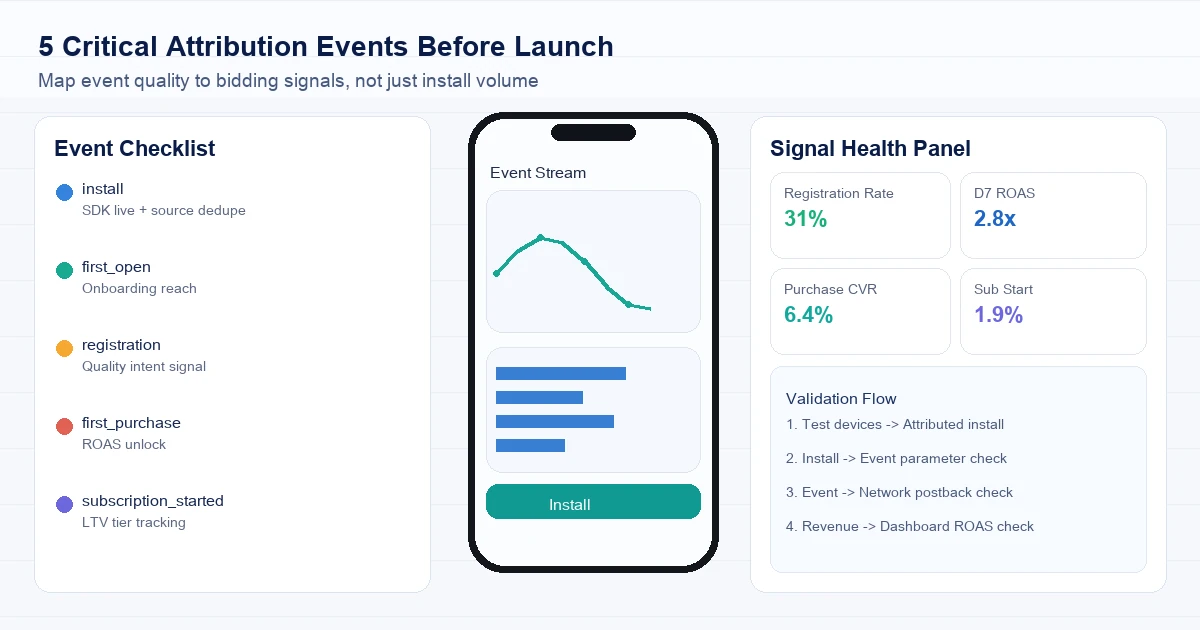
Regardless of which MMP you choose, the 5 in-app events below must be configured and verified in your MMP before any paid campaign goes live. Missing even one of these events means you are sending incomplete signals to your ad networks, paying for conversions you cannot optimise towards, and accumulating incorrect attribution data that is very difficult to backfill.
The 5 critical events to validate before launch:
- install: Automatically fired by all three MMP SDKs on first app open post-install. You do not configure this event — you verify it is firing correctly in the MMP dashboard before launch. Confirm you see first-open events within 24 hours of test installs before declaring the SDK integration live.
- first_open: Distinct from install in that it represents the first time a user actively opens the app after install (as opposed to the install event which fires at the SDK initialisation point). Critical for apps where the install-to-first-open gap is measured to understand onboarding drop-off. Map this event in your MMP and confirm it appears in the attribution timeline for test users.
- registration: The completion of account creation / sign-up. This is the first event that separates "people who installed" from "people engaged enough to create an account." Configure this as a conversion event in your MMP and pass it back to both Google UAC and Meta as a custom conversion. Google's smart-bidding and Meta's Advantage+ both use registration as a quality signal for optimising towards retained users rather than raw installs.
- first_purchase: The first completed in-app purchase or payment event. Configure with revenue value so your MMP can calculate attributed revenue per network. Without revenue value on purchase events, your ROAS reporting is empty and you cannot run value-optimised bidding on Google or Meta. This is the single most commonly missed event configuration in new MMP setups we audit in our portfolio.
- subscription_started: For subscription apps, this is your highest-value conversion event — worth configuring separately from first_purchase because the LTV signal is different. Pass the subscription tier and duration as event parameters so your MMP can segment subscribers by plan. This allows you to identify which campaigns are driving annual subscribers vs monthly subscribers — a critical distinction for LTV modelling. See our LTV/CAC calculator for how subscription cohort data feeds into MMP-based ROAS targets.
After configuring all five events, run a full end-to-end test across both iOS and Android test devices before any paid campaign spend. Confirm each event appears in your MMP dashboard with the correct event name, correct attribution source, and (for purchase events) correct revenue value. A misconfigured revenue parameter on first_purchase means months of campaign data without ROAS visibility — one of the most painful MMP setup mistakes to fix retroactively.

How Do You Avoid the Most Costly MMP Setup Mistakes?
The most expensive MMP mistakes are not integration bugs — they are configuration decisions made in the first week that silently corrupt months of attribution data. Across our portfolio, these are the five mistakes we see most frequently when auditing new MMP setups:
- Launching paid campaigns before SDK verification: The most common mistake. Teams integrate the SDK, see it "initialise" in the app, and launch spend the same day — without confirming that attribution is actually flowing. Always run 5–10 test installs using test device IDs registered in your MMP dashboard, verify each install appears in the MMP with the correct media source, and confirm at least one post-install event (registration or first_open) fires correctly before going live with paid spend.
- Forgetting to set up fraud protection before campaigns go live: Fraud protection needs to be activated before your first campaign, not retroactively. AppsFlyer's Protect360 and Adjust's Fraud Prevention Suite both operate in real-time — they reject fraudulent installs before they are attributed and billed. Turning them on after a campaign runs means you have already paid for and attributed fraudulent installs that cannot be reversed. Activate fraud protection rules during the SDK integration phase, not the campaign launch phase.
- Running the same MMP attribution window as your ad network attribution window: If your MMP is using a 7-day click attribution window and your Meta campaign is using a 28-day click window, you will see consistent discrepancies between MMP-reported and network-reported installs. The MMP attribution window should be set to match your primary network's default window, or you should actively decide on a shorter window and account for the discrepancy in reporting. Mismatched windows cause teams to incorrectly conclude their MMP is broken when the numbers are actually behaving exactly as configured.
- Not passing revenue values with purchase events: Covered in the events section above but worth repeating: if you fire a purchase event without the
af_revenue(AppsFlyer),revenue(Adjust), or equivalent parameter, your ROAS reporting will show zero revenue for all attributed installs. This is not recoverable retroactively — historical data cannot be backfilled with revenue values. This is the configuration mistake with the highest dollar cost across the setups we audit. - Integrating only your largest network partner and leaving smaller networks without MMP attribution: Teams sometimes integrate AppsFlyer or Adjust fully for Google and Meta but leave DSPs, affiliate networks, and CPI networks without proper MMP tracking links. Those channels then report self-attributed conversions that are not deduped against your MMP data — creating phantom conversions, inflated install counts, and broken ROAS reporting for everything outside your two primary channels. All networks driving meaningful spend must be integrated into your MMP with proper click and impression tracking links.
A preventable MMP setup audit takes approximately 2–3 hours with a checklist but saves weeks of debugging and months of clean data. For our full paid campaign setup process, see the Meta App Install Campaigns guide which covers MMP integration as part of the campaign launch checklist.

How Do You Switch MMPs Without Losing Campaign Data?
Switching MMPs is operationally risky if done incorrectly but entirely manageable if sequenced carefully — the key rule is always run both MMPs in parallel for at least 4 weeks before decommissioning the old one.
The reason parallel running is non-negotiable: attribution data from campaigns already running under your old MMP will continue arriving for weeks after you switch (due to look-back windows of 7–30 days). If you decommission your old MMP the day you launch your new one, you will lose all attribution data for those in-flight campaigns. Parallel running ensures every historical campaign completes its attribution window under the old MMP while new campaigns are tracked under the new one from day one.
Step-by-step MMP migration protocol:
- Phase 1 — Preparation (1–2 weeks before switch): Export raw data exports from your current MMP for all campaigns in the past 90 days. These serve as your historical baseline if anything goes wrong. Integrate the new MMP SDK alongside the existing one (both can coexist in the same app binary). Register test device IDs in the new MMP and run end-to-end verification of all 5 critical events.
- Phase 2 — Parallel running (4 weeks minimum): Launch all new campaigns using tracking links from the new MMP. Keep all existing campaigns running under the old MMP's tracking links until they complete their attribution look-back windows. Monitor both dashboards daily for the first week to confirm data is flowing correctly in both systems.
- Phase 3 — Network re-integration: Update your ad network integrations one by one to point to the new MMP. Google, Meta, and major DSPs all have documented processes for switching MMPs — typically involving updating the app's attributed partner settings in each network's dashboard. Do not switch all networks simultaneously; switch them one per day so any issues can be isolated to a single network.
- Phase 4 — Old MMP decommission (6 weeks after Phase 2 start): Once all legacy campaigns have passed their attribution look-back windows and all networks are integrated with the new MMP, remove the old MMP SDK from your app. Ship the SDK removal as part of a normal release cycle rather than an emergency update — this reduces the risk of a rollback being needed mid-transition.
One practical note for Indian apps: both AppsFlyer and Adjust have Indian-market solution engineers who have managed hundreds of MMP migrations. If your app is at significant scale (₹10L+ monthly ad spend), it is worth engaging them directly to assist with the migration rather than self-serving the process. For help structuring a managed MMP migration, speak to our team — we have managed MMP switches for apps ranging from early-stage to 10M+ MAU products without data loss.

Frequently Asked Questions
Is AppsFlyer better than Adjust for Indian apps?+
For apps at scale (₹15L+ monthly ad spend, 10+ networks), AppsFlyer is the stronger choice for Indian apps due to its larger partner ecosystem, deeper local support presence, and more mature integrations with Indian CRM platforms like CleverTap and MoEngage. For early-stage and mid-stage apps, Adjust's transparent pricing and cleaner SKAN 4 tooling make it equally competitive.
Do I need an MMP if I am only running Google App Campaigns?+
Yes — even running a single network. Google reports installs using its own attribution model which will inflate your install count by attributing any user who saw a Google ad, regardless of whether they actually came from Google. An MMP provides independent verification and deduplication. Additionally, you will need MMP-verified in-app events to run value-based bidding on Google UAC, which consistently outperforms install-only optimisation.
What is the difference between SKAN 4 and the Privacy Sandbox Attribution Reporting API?+
SKAdNetwork (SKAN) 4 is Apple's privacy-preserving attribution framework for iOS, providing aggregate conversion reports without user-level data. The Attribution Reporting API (ARA) is Google's equivalent for Android, progressively replacing GAID-based attribution as part of the Android Privacy Sandbox. Both serve the same goal — attribution without individual user tracking — but use different technical architectures. Your MMP must support both for a complete iOS + Android attribution strategy in 2026.
How much does AppsFlyer cost for a mid-stage app?+
AppsFlyer does not publish pricing publicly. For mid-stage apps (approximately 50,000–500,000 MAUs), expect to pay roughly $0.02–0.05 per attributed conversion at volume, with a typical annual contract in the $6,000–$30,000 range depending on event volume and add-ons like Protect360. Adjust's flat-rate plans are typically more cost-predictable at this stage.
Can I use Singular alongside CleverTap or MoEngage?+
Yes — Singular has official integration partnerships with both CleverTap and MoEngage. The integration allows MMP-attributed user segments to be synced into your CRM for personalised messaging campaigns. The integration is less mature than AppsFlyer's CleverTap integration, but it is production-grade and widely used for apps prioritising Singular's ROI reporting alongside CleverTap for engagement.
What happens to my attribution data if I cancel my MMP subscription?+
All three MMPs provide data export capabilities — raw event logs, attribution reports, and cohort data — before account termination. Always export your full historical dataset before cancelling. AppsFlyer and Adjust both provide 90-day data retention post-cancellation for export purposes. Singular retains data for 30 days post-cancellation. Export your data immediately upon making a cancellation decision; do not wait until the account closes.
Sources
- Adjoe — What is a Mobile Measurement Partner? — Comprehensive independent guide to MMP mechanics, attribution models, and deduplication
- RudderStack — Mobile Measurement Partners Guide — Neutral analysis of MMP attribution model differences across AppsFlyer, Adjust, and Singular
- AppsFlyer — Attribution Model Documentation — Official AppsFlyer documentation on deterministic and probabilistic attribution logic
- Adjust — Mobile Measurement Partners — Adjust's overview of MMP role in the mobile ecosystem and SKAN 4 attribution
- Singular — What is a Mobile Measurement Partner? — Singular's documentation covering cost aggregation, ROI reporting, and MMP selection criteria
- AlfahadHridoy — AppsFlyer vs Adjust Comparison — Independent practitioner comparison covering pricing, SDK performance, and attribution accuracy
- Meta Ads — App Install Campaign Attribution 2026 — Meta attribution window settings and MMP integration requirements for Advantage+ App Campaigns
About the author
Amol Pomane — Founder, Vmobify
Amol leads Vmobify, a mobile app growth agency that has driven 30M+ downloads and ranked 54K+ keywords across 300+ apps since 2013. He writes about ASO, paid user acquisition, retention, and the operational reality of scaling mobile apps in India and global markets.
Free Growth Audit
See exactly how to scale your app with 13+ years of expertise behind you.
Get My Strategy