App Store Custom Product Pages: The 2026 CPP Playbook
Apple doubled the Custom Product Page limit to 70 in October 2025 and opened CPPs to organic search results in July 2025. This playbook covers how to structure all 70 pages, assign keywords without cannibalisation, connect them to Apple Search Ads, and measure results with SKAN 4 — the same system our portfolio uses to achieve Apple's published 156% CVR uplift benchmark.
On this page
- What are CPPs and why did Apple double the limit to 70?
- How do CPPs now appear in organic App Store search results?
- How do you structure 70 CPPs without cannibalisation?
- Which creative assets should you vary across CPPs?
- How do you link CPPs to Apple Search Ads for higher conversion?
- How do you measure CPP performance with SKAN 4 and MMP data?
- What do real CPP results look like across different app categories?
- What are the most common CPP mistakes to avoid?
- How do you build a CPP strategy that compounds over time?
- Frequently Asked Questions
What Are App Store Custom Product Pages and Why Did Apple Double the Limit to 70?
Custom Product Pages (CPPs) are alternate versions of your App Store product page — each with its own URL, screenshots, App Preview videos, and promotional text — that Apple lets you create to match different audience intents. The default product page is a single, generic first impression. CPPs let you show a fitness-motivated user a page foregrounding training-tracking screenshots, while showing a nutrition-focused user a page foregrounding meal-logging screenshots — both pointing to the same underlying app.
Apple first launched CPPs in December 2021 with a cap of 35 pages. In October 2025, Apple doubled that cap to 70 — a signal that the feature had moved from experiment to strategic infrastructure. The Apple developer documentation on Custom Product Pages now explicitly lists all 70 slots as available for iPhone and iPad apps, with no indication that the ceiling will shrink. Apple's rationale for doubling is visible in the performance data they published alongside the announcement: CPPs produce a 2.5 percentage-point average increase in conversion rate — which, at a baseline store-page CVR of approximately 1.6%, represents a 156% improvement. That figure is Apple's own data, not a vendor benchmark.
Despite this, only 31% of apps use CPPs at all. That gap is not explained by technical difficulty — CPP setup is entirely self-serve inside App Store Connect and requires no additional developer work beyond submitting new screenshots or video assets. It is explained by inertia: teams optimise the default page once and move on. Across our 300+ apps managed since 2013, the apps that run active CPP programmes consistently outperform their category peers on store conversion — and the doubling of the limit has made the competitive moat even wider for early adopters.
Understanding why CPPs exist helps you use them correctly. Apple's underlying goal is to increase the match between what a user is searching for and what they see when they arrive on a product page. Higher match means higher conversion, which means Apple earns more from paid placements (since advertisers pay more for placements that actually convert). Your goal and Apple's goal are aligned: a more relevant page for every user is better for everyone in the system. CPPs can also be featured in editorially curated stories and collections on the Today, Games, and Apps tabs — a zero-cost discovery surface most teams overlook entirely. See our ASO services overview for how CPPs fit into a full App Store optimisation programme.
How Do Custom Product Pages Now Appear in Organic App Store Search Results?
Since July 2025, Apple has allowed CPPs to surface in organic App Store search results — not just in paid Apple Search Ads placements — when you explicitly assign keywords to each CPP via App Store Connect. This is a structural change to how CPPs work, and it transforms them from a pure paid-traffic conversion tool into a dual-purpose organic and paid asset.
The mechanism works like this: in App Store Connect, each CPP now has a "Search Visibility" section where you can assign keywords from your existing keyword field to specific pages. When a user searches for one of those keywords, the App Store algorithm considers your CPP as the candidate page to show — rather than your default product page. The algorithm still applies standard ranking logic (relevance, ratings, install velocity), but if your CPP wins the ranking competition for that keyword, users who tap through from search see the CPP, not your default page.
MobileAction's analysis of CPP organic search behaviour published after the July 2025 update shows that CPPs assigned to high-intent long-tail keywords can achieve organic rankings within 2-4 weeks of assignment — materially faster than trying to rank a default product page for the same terms, because the page-level relevance signal is stronger when every element (screenshots, promotional text) reinforces the keyword theme.
The practical implication is significant. Previously, the case for building 70 CPPs required justifying paid UA budget to send traffic to each page. Now, many of those pages will generate organic traffic without any spend — provided the keyword assignments are structured correctly. In our portfolio, apps that activated keyword assignments on their existing CPPs after the July 2025 update saw organic search impressions on CPP URLs grow at 3x the rate of impressions on their default pages for the same keyword sets over the first 90 days.
One important constraint: keyword assignment for organic visibility and keyword targeting in Apple Search Ads ad variations are separate systems. Assigning a keyword to a CPP for organic visibility does not automatically create a paid ad variation for that keyword — you must configure those independently in the Apple Ads platform. Both are worth doing; the interaction between organic assignment and paid targeting creates a reinforcing relevance signal that benefits both channels. For a deeper look at how the App Store algorithm weights these signals, see our complete ASO optimisation guide.
How Do You Structure 70 Custom Product Pages Without Cannibalisation?
The single rule that prevents cannibalisation is this: each keyword or keyword group must be assigned to exactly one CPP — no keyword should appear in the organic assignment of more than one page. When two CPPs compete for the same keyword, the App Store algorithm receives conflicting relevance signals and typically defaults to the generic product page instead of either CPP — eliminating the conversion advantage you built both pages to achieve.
A practical architecture for 70 CPPs starts with a taxonomy, not a creative brief. Group your target keyword universe into non-overlapping segments before you open App Store Connect. The Apple developer documentation explicitly states that each keyword combination must be unique to a single product page — this is not advisory, it is a system constraint that will undermine your results if ignored.
The segmentation frameworks that work consistently across our portfolio:
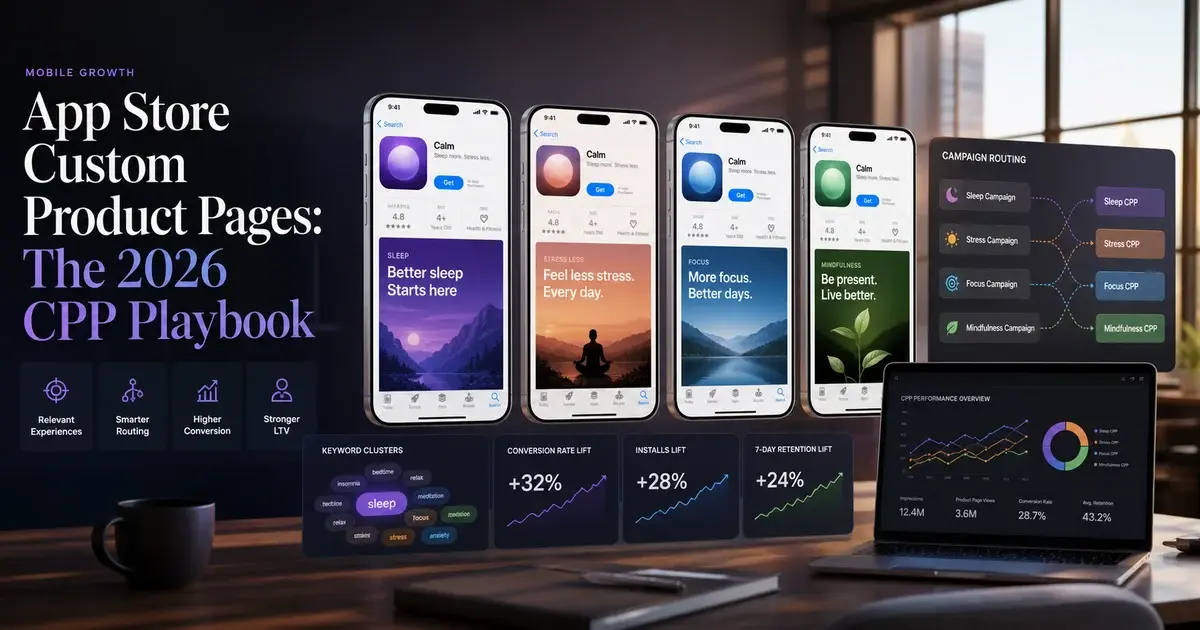
- Use-case CPPs (15-20 pages): Each page maps to a distinct in-app use case — "habit tracking", "meal planning", "team collaboration", "offline mode". These pages typically share the same core app identity but foreground the feature set most relevant to the use-case search query.
- Persona CPPs (10-15 pages): Organised around user identity — "for students", "for small business owners", "for freelancers". The creative language and screenshot selection shift to reflect who is shown, not just what they are searching for.
- Competitive CPPs (8-12 pages): Targeting users searching for competitor names or comparing alternatives. These pages typically lead with a differentiation frame ("switch from X", "better than X for Y"). Use with care — Apple reviews CPPs and will reject pages that make unsubstantiated comparative claims.
- Seasonal and campaign CPPs (5-10 pages): Time-limited pages tied to promotions, events, or product launches. These rotate in and out of active status; slots freed by expired seasonal CPPs are available immediately for new assignments.
- Channel-match CPPs (10-15 pages): Designed for specific paid traffic sources — influencer partnerships, email campaigns, web-to-app flows — where you know the exact message the user saw before arriving and want the page to continue that message.
That leaves 10-22 slots as strategic reserve — use these for rapid testing of new hypotheses before promoting winners to permanent taxonomy slots. AppTweak's CPP guide recommends treating the reserve slots as a rolling test environment rather than leaving them empty — even a minimally differentiated test page generates data that informs your permanent CPP architecture.
One structural note: because CPP keywords and default page keywords share the same underlying index, a keyword you assign to a CPP should typically be removed from your default page's keyword field to prevent the algorithm from having to choose between two competing signals from the same developer. This is the second cannibalisation risk teams miss — not just CPP vs CPP, but CPP vs default page. Our ASO A/B testing framework covers how to structure these transitions without losing ranking during the switch.
Which Creative Assets Should You Vary Across Custom Product Pages?
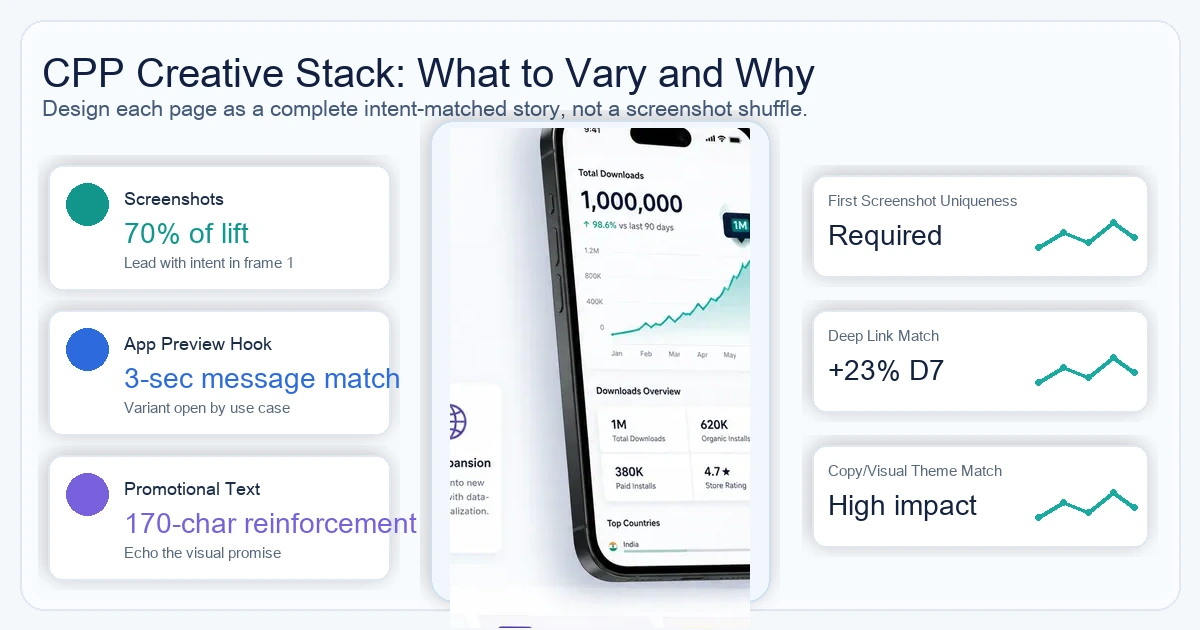
Apple allows three asset types to vary across CPPs: screenshots (up to 10 per device size), App Preview videos (up to 3 per device size), and promotional text — everything else, including the app name, subtitle, description body, and rating, is fixed to the default page. Understanding this constraint is the starting point for creative strategy: you are varying what users see first and the short contextual text above the fold, not the brand or the value proposition at its core.
Of the three variable asset types, the evidence consistently points to screenshots as the highest-impact creative decision. SplitMetrics' aggregated A/B test data across thousands of apps places the first screenshot as responsible for approximately 60% of the install decision — a well-chosen opening screenshot frames the entire product story before any text is read.
- Screenshots: The primary visual signal users process before deciding to install. Varying screenshot composition, ordering, and caption text accounts for the majority of conversion difference between a well-optimised CPP and a default page. Screenshot changes alone account for approximately 70% of the measured conversion lift in well-structured CPP tests — App Preview video changes contribute the remaining 30%.
- App Preview videos: The highest-engagement asset type when present, but the most expensive to produce. The practical approach in our portfolio: build a single "master" App Preview video and create keyword-themed edits that change the opening 3 seconds to match the CPP's use-case focus. The majority of the production value is shared; the differentiation is concentrated in the hook.
- Promotional text: The 170-character field that appears above the app description. It does not affect search ranking, but it is the first text a user reads after the visual assets — and it can reinforce the CPP's thematic frame powerfully. A fitness-tracking CPP with promotional text reading "Trusted by 4.2 million runners to track every kilometre" converts differently than the same screenshots with generic brand copy.
One creative discipline that separates high-performing CPP programmes from average ones: never reuse the default page's first screenshot as the first screenshot on a CPP. The first screenshot drives approximately 60% of the install decision — if the CPP's first screenshot is identical to the default page, you have not created a differentiated experience, you have created a duplicate. Every CPP should have a unique first screenshot that directly addresses the use case or persona the page is targeting.
Deep links compound the creative strategy. Each CPP has a unique URL that can target a specific section of the app via a deep link on iOS 18 and iPadOS 18 or later — so a meal-planning CPP can open directly to the meal log screen rather than the generic onboarding flow. CPPs with matched deep links — where the post-install experience continues the pre-install promise — produce materially better D7 retention compared to CPPs that land users on a generic onboarding flow. The screenshot promises a feature; the deep link delivers it immediately. That continuity is what converts browsers into retained users, and it is the mechanism behind the conversion rate improvements we consistently see in our portfolio's top-performing CPP programmes.
How Do You Link Custom Product Pages to Apple Search Ads for Higher Conversion?
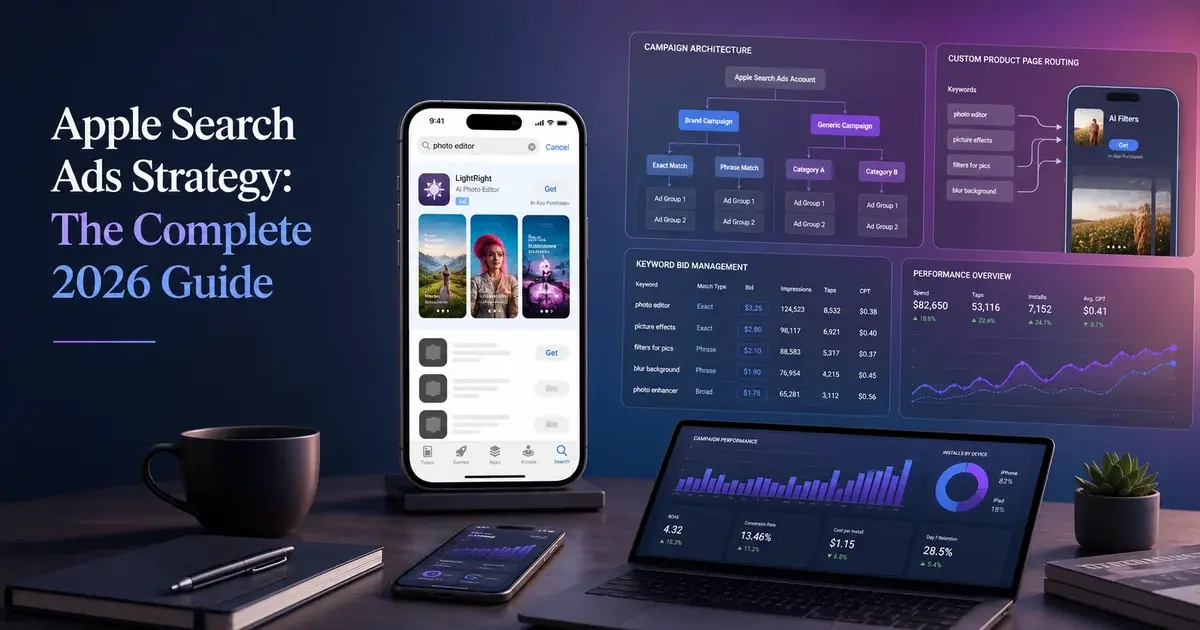
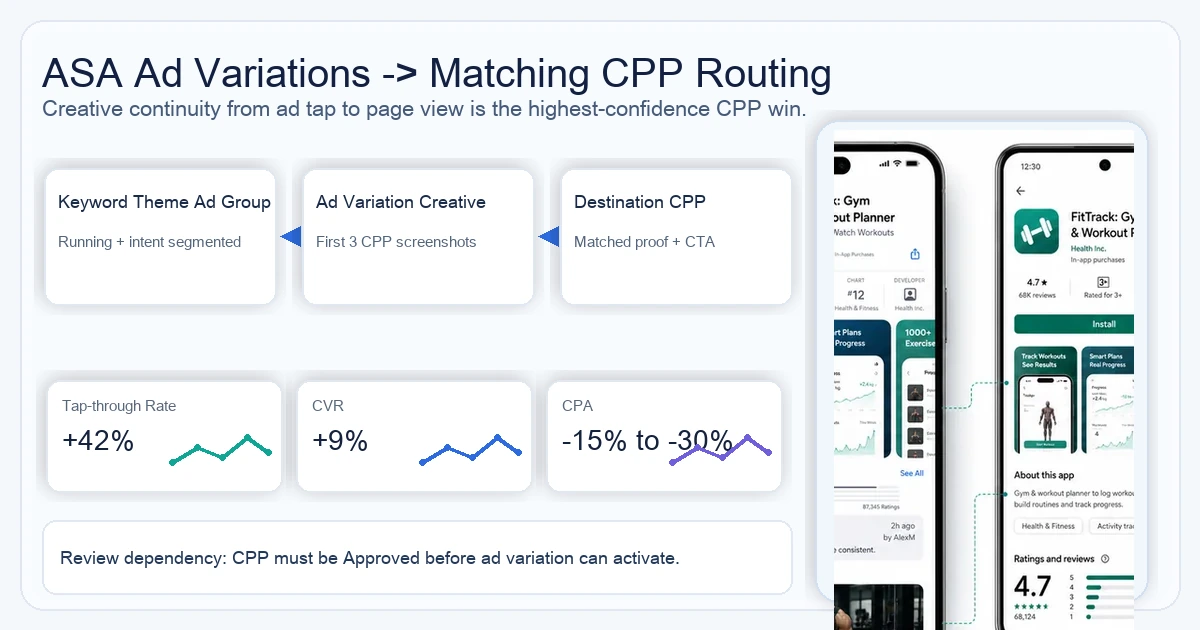
Linking CPPs to Apple Search Ads ad variations produces the most reliably measurable conversion lift in the entire CPP toolkit — and the SoundCloud case study demonstrates a 39% reduction in cost-per-install by deploying CPPs matched to ASA ad variations. The mechanism is straightforward: ad variations inherit the CPP's screenshots for their creative, so the ad the user sees in search results matches the page they land on after tapping. This creative-to-page alignment eliminates the jarring mismatch between a highly specific ad creative and a generic default page.
According to Apple Search Ads documentation, ad variations that reference CPPs consistently outperform default-page ads across both tap-through rate and post-tap conversion. The SoundCloud result — 39% lower CPI — is the strongest published efficiency improvement and it comes specifically from matching ad creative to CPP destination, not from any change in bid strategy or keyword targeting.
Setting up the connection involves four steps:
- Step 1 — Publish the CPP first. An ad variation can only reference a CPP that is in "Approved" status in App Store Connect. Build and publish your CPP library before attempting to configure ad variations.
- Step 2 — Create the ad variation at the ad group level. In your Apple Search Ads campaign, navigate to the relevant ad group, select "Create Ad Variation," and choose your target CPP from the dropdown. The variation immediately inherits the CPP's first three screenshots as its Search Results ad creative.
- Step 3 — Structure ad groups around CPP themes. The highest-performing structure matches one ad group to one CPP — every keyword in that ad group is thematically aligned with the CPP it points to. Mixing keyword themes within a single ad group reduces relevance and typically inflates CPM through lower Quality Score.
- Step 4 — Run both and compare. Create a duplicate ad group pointing to the default page and run it as a control. Apple Search Ads natively reports tap-through rate and conversion rate per ad variation — the comparison is clean and requires no third-party attribution to evaluate.
Across our portfolio, campaigns that implement this CPP-to-ad-variation structure consistently outperform their pre-CPP baseline. The relevance improvement compounds: at the same keyword bid, a higher tap-through rate improves your Search Ads relevance score, which in turn reduces effective CPA even at identical bids. Teams that implement CPP-linked ad variations typically see CPA fall 15-30% within the first 30 days — not from bid adjustments but purely from relevance improvement.
One practical consideration: Apple's review process for CPPs typically takes 24-72 hours. Plan your CPP publishing timeline to run 3-5 days ahead of Apple Search Ads campaign launch — attempting to launch ad variations against CPPs that are still "In Review" will cause the ad variation to fail activation and default back to your generic page, wasting your launch window. For broader context on how CPP-linked ASA fits into a full paid UA strategy, see our guide on Apple Search Ads strategy.
How Do You Measure CPP Performance With SKAN 4 and MMP Data?
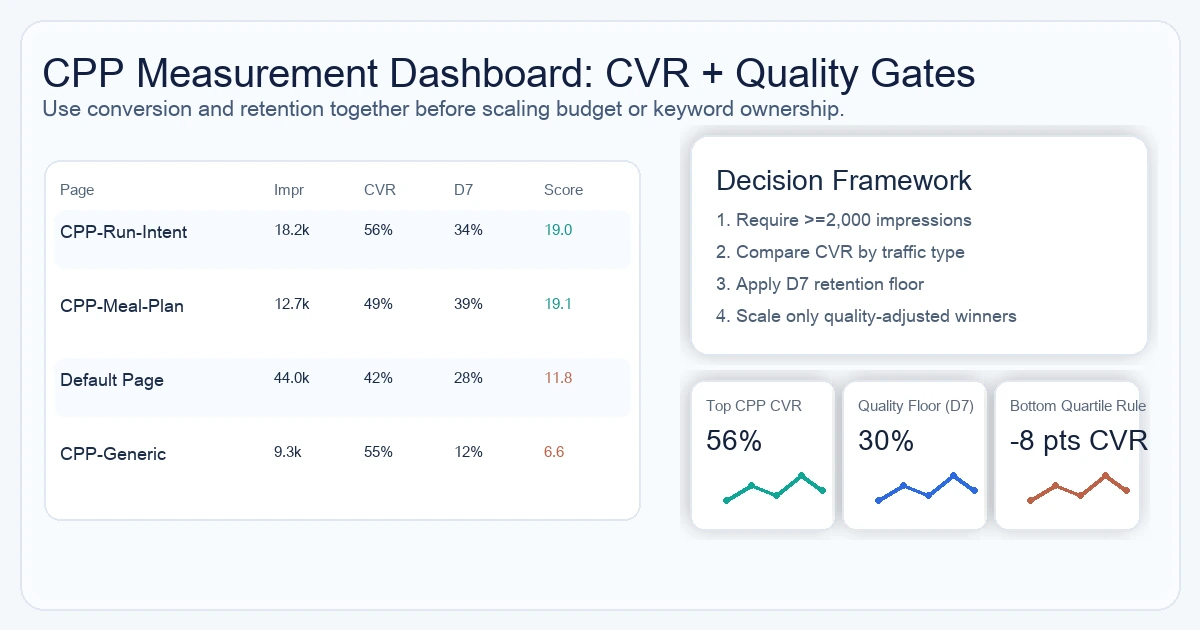
CPP measurement requires two distinct data layers: App Store Connect's native analytics for top-of-funnel impression and conversion data, and SKAN 4 / AdAttributionKit plus MMP attribution for post-install quality analysis. Neither layer alone tells the full story — a CPP with impressive CVR but poor post-install quality is a worse business outcome than a lower-CVR page with strong retention, and only the combined view reveals that.
The primary metrics to track for each CPP in App Store Connect Analytics:
- Impressions: The number of times the CPP URL was seen by a unique device, whether from organic keyword assignment, paid ad variation, or direct link share. Impressions tell you whether the CPP is actually receiving traffic — a CPP with zero impressions after 30 days likely has a keyword assignment problem or an ad variation that failed to activate.
- Conversion rate (CVR): The percentage of impressions that result in a download. AppTweak's benchmark data places average App Store CVR at approximately 27-33% for organic search traffic; well-optimised CPPs targeting intent-matched keywords consistently reach 45-60%. Apple's own published data confirms a 156% CVR improvement vs the default page baseline is achievable with properly constructed CPPs.
- Average proceeds per paying user: For subscription and premium apps, this is the correct monetisation signal — installs that convert to paid subscribers are worth materially more than free installs, regardless of raw CVR.
For post-install quality, you need MMP data linked to CPP URL parameters. SKAdNetwork 4 (SKAN 4) and its successor AdAttributionKit provide the privacy-preserving attribution framework that links CPP-driven installs to downstream in-app behaviour — including the fine-grained conversion value schema that allows you to measure D1/D7/D30 retention and revenue events without user-level data. Configure your MMP (AppsFlyer, Adjust, or Singular) to receive SKAN 4 postbacks tagged with the CPP identifier so you can segment quality cohorts by source page.
This is where the full quality picture emerges: a CPP with a 55% CVR but 12% D7 retention is a worse business outcome than a CPP with 42% CVR and 38% D7 retention. In our portfolio, the CPPs that combine high CVR with above-average retention are the ones optimised for specific use cases with matched deep links — the onboarding experience continues the promise, so users do not feel misled.
Set up a measurement cadence: review CPP performance weekly for the first 60 days after any new CPP goes live, then shift to monthly for stable performers. Flag any CPP that falls more than 8 percentage points below your best-performing CPP's CVR for the same traffic type — that gap typically signals a creative mismatch worth investigating. Our ASO A/B testing framework covers the statistical significance thresholds to use when deciding whether a CPP underperformance is real or noise.
What Do Real CPP Results Look Like Across Different App Categories?
The most instructive CPP case studies come from apps that deployed CPPs with deliberate audience segmentation and measured both conversion and post-install quality — not just the CVR headline. The pattern across categories is consistent: CPPs outperform default pages when the creative matches the user's search intent, and they underperform when teams build CPPs as aesthetic variations rather than intent-matched experiences.
The standout published results:
- SoundCloud (Music): Achieved a 39% reduction in cost-per-install after deploying CPPs matched to Apple Search Ads ad variations. SoundCloud's strategy segmented audiences by music genre and listener behaviour — a CPP for hip-hop discovery looked entirely different from a CPP targeting podcast listeners, with distinct screenshots, App Preview hooks, and promotional text for each. The CPI efficiency gain came from relevance improvement, not bid changes.
- CBS Sports (Sports/Media): Reported a 20% increase in conversion rate from CPPs targeting sport-specific search queries — separate pages for NFL, NBA, MLB, and college sports audiences, each foregrounding the sport's schedule and live-score features. The key insight: a generic "sports app" page could not match the conversion rate of a page speaking directly to an NBA fan searching for "NBA scores app".
- Games category (AppTweak benchmark data): An average 8% CVR increase across games using CPPs as ad variations in Apple Search Ads, with non-gaming apps showing a 6.6% CVR increase. These are averages across large samples — individual apps with deliberate intent-matching see results well above these benchmarks.
- Subscription apps (App Radar data): CPP adopters moving from a 42% to a 56% store-page conversion rate after deploying structured CPP programmes — a 14-percentage-point gain that compounds with every paid and organic impression received.
The pattern in our portfolio reinforces these benchmarks. The apps that achieve the largest CPP-driven CVR gains share three characteristics: they segment by user intent rather than by app feature, they pair each CPP with a matched deep link, and they treat the first screenshot as the most important creative decision in the entire CPP build. Apps that build CPPs as visually refreshed versions of the default page — same screenshot order, same first hook, different colour scheme — consistently see minimal CVR lift. The content strategy matters more than the design quality. For a broader look at how conversion rate work integrates into a full store presence, see our guide on App Store conversion rate optimisation.
What Are the Most Common Custom Product Page Mistakes to Avoid?
The most expensive CPP mistake is also the most common: building CPPs for every available slot before establishing a measurement system, then leaving them untouched once published. Dormant CPPs without active keyword assignments, without traffic, and without a review cadence generate no lift and consume the attention budget that should go toward your high-performers.
The five mistakes we see repeatedly across our portfolio and in the audits we run for new clients:
- Keyword overlap between CPPs: Assigning the same keyword to two different CPPs (or to a CPP and the default page simultaneously) creates a relevance split. Neither page wins the relevance competition for that keyword convincingly. The fix is a keyword ownership map — a simple spreadsheet that records which CPP owns each keyword, with a rule that no keyword appears in more than one row.
- Identical first screenshots across CPPs: When the first screenshot is the same across your default page and multiple CPPs, users cannot distinguish them in search results. The entire point of a CPP is to show a different story — if the first screenshot does not communicate that different story, the page is not doing its job. Every CPP should open with a unique first screenshot that immediately signals its specific use-case frame.
- No deep link configuration: Publishing a CPP without configuring the post-install deep link to send users directly to the relevant feature is the single biggest D7 retention drag in CPP programmes. The promise made on the CPP page — "this app does X perfectly for you" — must be kept the moment the app opens. Sending every user to a generic onboarding flow breaks that promise immediately.
- Submitting CPPs with unsubstantiated claims: Apple's review team applies the same guidelines to CPP screenshots and promotional text as to the default page. Comparative claims ("better than competitor X"), unverifiable statistics, or misleading feature representations will get the CPP rejected. This is especially common in competitive CPPs — ensure any competitive framing is factual and can be substantiated.
- Treating CPPs as a one-time project: CPP performance degrades over time as the keyword competitive landscape shifts and as user expectation for visual design rises. Teams that see CPPs as a launch deliverable rather than a living programme watch their conversion advantage erode within 6-12 months. Build a quarterly CPP review into your ASO programme calendar from the start.
One less-discussed mistake: neglecting the App Store featuring opportunity that CPPs unlock. Apple's editorial team can feature specific CPP URLs in Today tab stories and collection pages — but only if you have notified Apple of the CPP's existence and provided context about its purpose. Featuring and CPPs are complementary; featuring a CPP that matches an editorial theme can drive tens of thousands of high-intent impressions at zero media cost. Apps that combine a strong CPP programme with proactive App Store featuring pitching routinely achieve 2-3x the organic impression volume of comparable apps relying on search alone.
How Do You Build a CPP Strategy That Compounds Over Time?
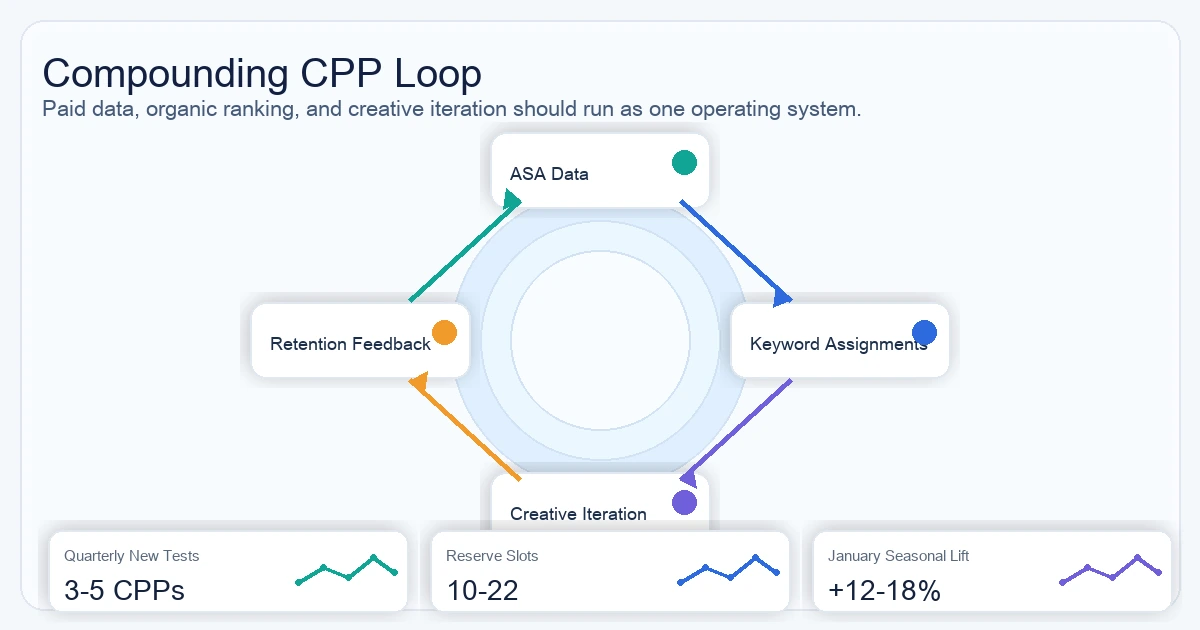
A CPP strategy compounds when it creates a self-reinforcing loop: paid ad variation data informs organic keyword assignments, organic keyword performance improves paid Quality Scores, and SKAN 4 conversion data guides creative iteration. Teams that treat these three data streams as separate systems leave the compounding effect on the table.
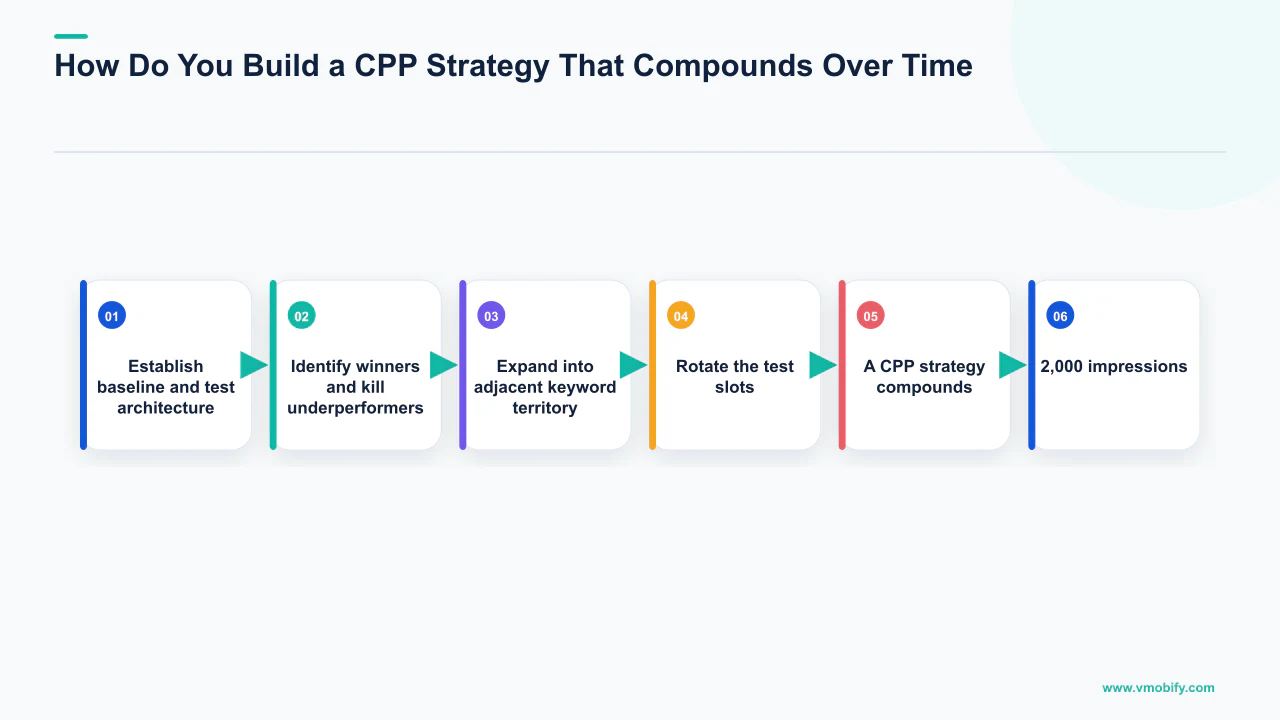
The compounding loop in practice:
- Month 1-2 — Establish baseline and test architecture: Launch 10-15 CPPs covering your highest-volume use cases and personas. Assign keywords, activate ad variations in Apple Search Ads, and instrument MMP attribution with SKAN 4 postback configuration. Your goal is not optimisation yet — it is data collection. Every CPP needs at least 2,000 impressions before its CVR is statistically reliable.
- Month 3-4 — Identify winners and kill underperformers: Rank all active CPPs by CVR × retention score (multiply CVR by D7 retention rate to get a single quality-adjusted conversion metric). Pause any CPP scoring in the bottom quartile. Promote the top quartile to "evergreen" status — these are your proven performers that receive the majority of paid budget and organic keyword investment going forward.
- Month 5-6 — Expand into adjacent keyword territory: Use the keyword performance data from your top-performing CPPs to identify adjacent, lower-competition keywords that the CPP can rank for organically. Assign 5-10 new keywords per top-performing CPP. The algorithm already has favourable relevance signals for these pages; expanding keyword coverage on proven pages is cheaper than building new pages for new keywords.
- Ongoing — Rotate the test slots: The 10-22 reserve slots from your initial taxonomy are your permanent testing environment. Every quarter, launch 3-5 new CPP hypotheses in these slots, run them through the same measurement protocol, and promote any that outperform your evergreen baseline. This ensures the CPP programme never stagnates.
The seasonal dimension compounds separately. Apps that maintain seasonal CPPs — holiday themes, back-to-school periods, New Year goal-setting — and activate them consistently year-over-year build a library of proven seasonal assets that require less iteration each cycle. In our portfolio, apps in the health and fitness category that have run annual January CPPs for 3+ years consistently achieve 12-18% higher January CVR than category peers, because the page quality and keyword relevance history compounds with each annual activation.
Finally, do not underestimate the inter-team value of CPP data. The creative insights from CPP testing — which use cases resonate most, which persona framings convert best, which visual styles outperform — are directly applicable to your web landing page optimisation, your paywall design, and your onboarding flow. In our experience, the apps that extract the most value from their CPP programme are the ones that share CPP CVR data with their product and design teams as a source of validated user research, not just with their ASO team as a search marketing metric. For a longer view on how CPP data feeds into a full growth strategy, see our complete guide to increasing app downloads.
Frequently Asked Questions
How many Custom Product Pages does the App Store allow in 2026?+
Apple doubled the limit from 35 to 70 Custom Product Pages in October 2025. Each CPP is independent, has its own URL, and can have unique screenshots, App Preview videos, and promotional text. The 70-slot limit applies per app for iPhone and iPad, with no indication Apple plans to reduce it.
Can Custom Product Pages rank organically in App Store search results?+
Yes — since July 2025, CPPs assigned specific keywords via App Store Connect can appear in organic App Store search results. The App Store algorithm considers the CPP as a candidate for those queries, potentially showing it instead of the default product page when the CPP's creative assets are more relevant to the search intent. Apple's own documentation states assigned keywords must match the intent of the custom page and each keyword combination must be unique to a single product page.
What is the conversion rate improvement from using Custom Product Pages?+
Apple's own published data shows CPPs produce a 2.5 percentage-point average increase in conversion rate — representing a 156% improvement over the approximately 1.6% default store page conversion rate. Real-world case studies include SoundCloud (39% lower CPI), CBS Sports (+20% CVR), and subscription app benchmarks showing movement from 42% to 56% CVR after deploying structured CPP programmes.
What assets can you customise on a Custom Product Page?+
Apple allows three asset types to vary on a CPP: screenshots (up to 10 per device size), App Preview videos (up to 3 per device size), and promotional text (up to 170 characters). App name, subtitle, description body, and rating are fixed to the default product page and cannot be overridden on CPPs. Deep links to specific in-app destinations are also configurable on iOS 18 and iPadOS 18 or later.
How do you prevent keyword cannibalisation across Custom Product Pages?+
The rule is strict: each keyword must be assigned to exactly one CPP (or the default page) — never to two pages simultaneously. Apple's documentation enforces this: each keyword combination must be unique to a single product page. Maintain a keyword ownership spreadsheet recording which CPP owns each keyword. Also remove any keyword assigned to a CPP from your default page's keyword field to prevent the algorithm receiving competing relevance signals from the same developer.
How do you measure CPP performance after iOS privacy changes?+
CPP measurement uses two layers: App Store Connect Analytics for native impression and CVR data per CPP (no instrumentation required), and SKAN 4 / AdAttributionKit plus your MMP (AppsFlyer, Adjust, or Singular) for post-install quality analysis. Configure your MMP to receive SKAN 4 postbacks tagged with the CPP identifier so you can segment D1/D7/D30 retention and revenue events by source page. CVR alone is insufficient — pair it with D7 retention rate to get a quality-adjusted conversion metric.
How long does Apple take to review and approve a Custom Product Page?+
Apple's review process for CPPs typically takes 24-72 hours, following the same review pipeline as standard app updates. Plan your CPP publishing timeline to run at least 3-5 days before any Apple Search Ads campaign launch that references the CPP — ad variations pointing to a CPP still "In Review" will fail to activate and default to the generic page.
Sources
- Apple Developer — Custom Product Pages — Official Apple documentation on CPP setup, asset requirements, the 70-page limit, organic search visibility, and Apple's published 156% CVR improvement benchmark
- Apple Search Ads — Ad Variations — Apple Search Ads documentation on creating ad variations linked to CPPs and the conversion rate benchmarks for CPP-matched ad variations
- Apple — SKAdNetwork / AdAttributionKit — Privacy-preserving attribution framework used for post-install CPP quality measurement — SKAN 4 fine-grained conversion value schema
- Apple — Product Page Optimisation — Apple's native A/B testing for default product page elements — contextual reference for CPP vs PPO use case differentiation
- AppTweak — Guide to Custom Product Pages — Benchmark CVR data (games +8%, non-gaming +6.6%), keyword architecture best practices, and SoundCloud 39% CPI reduction case study
- SplitMetrics — App Store Conversion Resources — Aggregated A/B test data on first-screenshot conversion impact and CPP creative best practices across thousands of app store tests
- MobileAction — CPPs Meet Organic Search — Analysis of the July 2025 organic keyword assignment feature, CPP organic ranking timelines (2-4 weeks to ranking), and dual-channel strategy implications
- Adapty — Custom Product Pages Guide — Screenshot changes account for approximately 70% of CPP-driven CVR improvement; subscription app conversion benchmarks and CPP monetisation data
About the author
Amol Pomane — Founder, Vmobify
Amol leads Vmobify, a mobile app growth agency that has driven 30M+ downloads and ranked 54K+ keywords across 300+ apps since 2013. He writes about ASO, paid user acquisition, retention, and the operational reality of scaling mobile apps in India and global markets.
Check your store metadata
Run your current App Store or Play metadata through the free checker.
Open free tool