AI App Studio: The 17-Agent Claude Code Plugin for iOS and Android
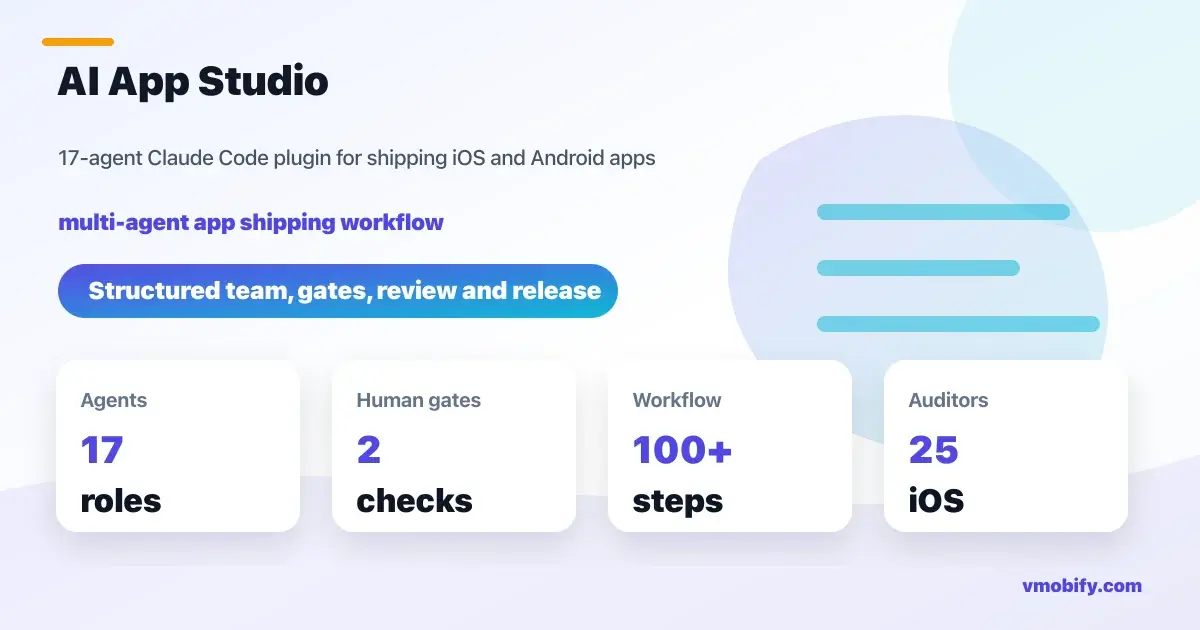
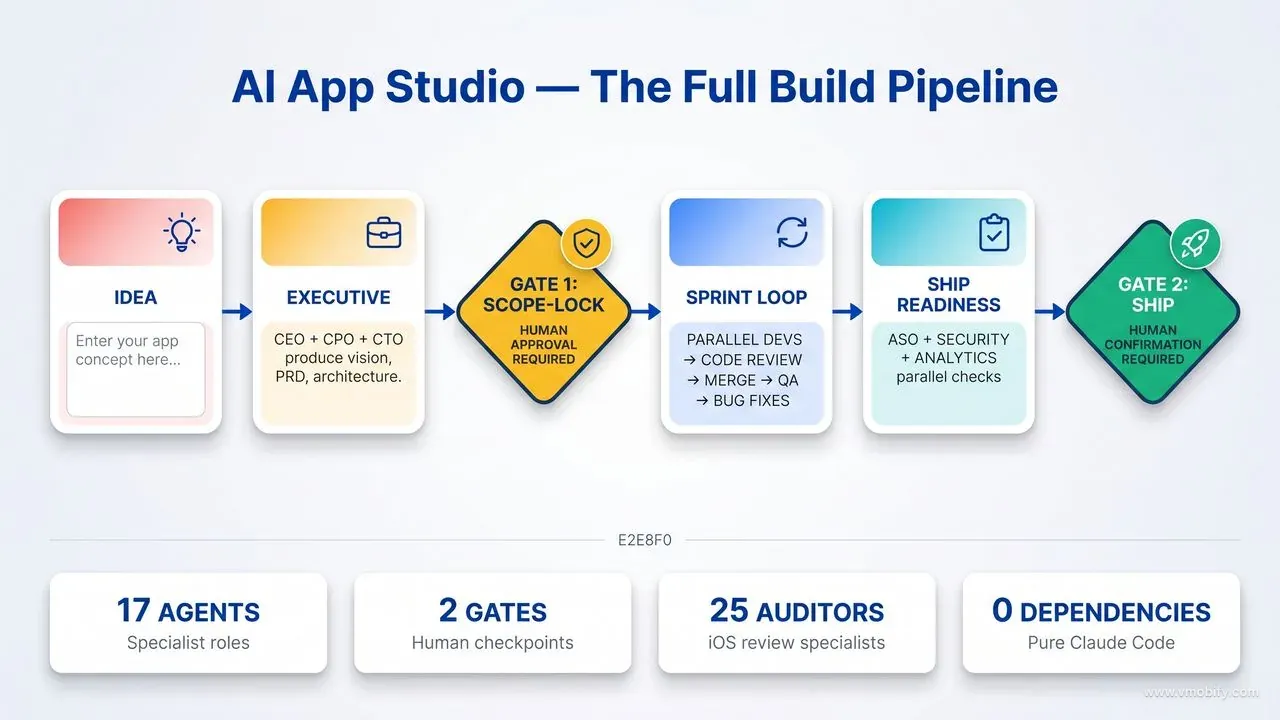
Most AI coding tools are a single agent improvising. AI App Studio is a structured 17-role team — CEO, engineers, code reviewer, QA, release manager — that takes your one-line idea from scope to shipped iOS and Android app, with two human gates and everything else running autonomously. This is the full playbook on what it is, how it works, and why it changes the economics of shipping mobile apps.
On this page
- Why does single-agent AI consistently fail to ship production apps?
- What is AI App Studio and what does it actually do?
- Who are the 17 agents and what does each role own?
- How does the two-gate autonomy model keep you in control?
- How do you install AI App Studio and run your first build?
- What does a greenfield app build look like step by step?
- How does brownfield mode audit and fix an existing app?
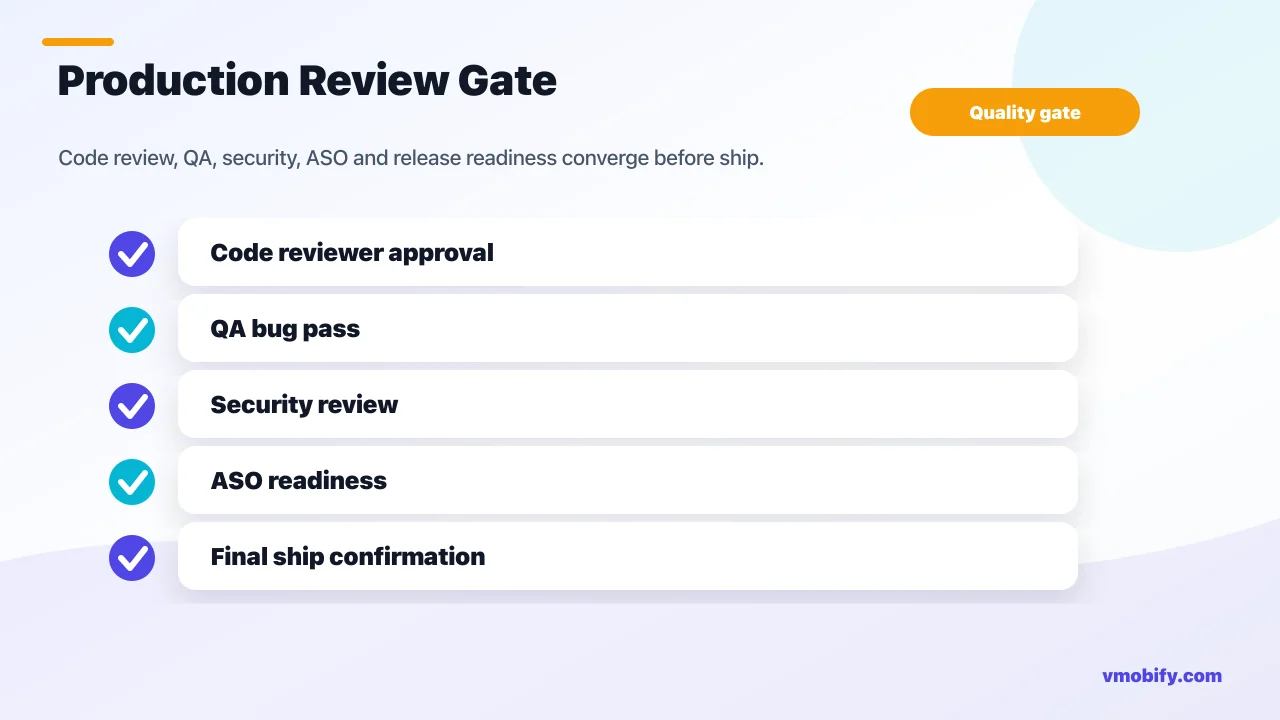
- How does the code review gate enforce production quality?
- What is the House Knowledge Base and why does it matter?
- How does the sprint board and ticket system work?
- How does the studio handle monetisation, paywalls, and ads?
- Who is this for and what are the real-world use cases?
- Which tools and plugins power the studio under the hood?
- How do you customise and extend the studio for your team?
- What are the honest limits and tradeoffs of this approach?
- Frequently Asked Questions
Why does single-agent AI consistently fail to ship production apps?
Every "AI builds your app" demo ends at the same moment: the code compiles, the UI renders, the excitement is real — and then you try to ship it. The agent forgot the plan. The architecture drifted between files. There are no tests. The store metadata is a placeholder. The code review never happened because no one was reviewing. And suddenly you are the project manager, the QA, the reviewer, and the debugger — the four roles you were trying to escape when you reached for an AI tool.
This is not a critique of any specific tool. It is a structural problem. A single AI agent improvising across a multi-week, multi-platform project is being asked to do something that no single human engineer does either. Real apps are built by teams — with roles, handoffs, review gates, conventions, and a manager who tracks state. The illusion that one all-knowing agent can collapse those roles into a single context window is the foundational error of the AI-app-builder genre.
The pathologies are predictable. A single agent has one context window, so it loses the spec by the time it reaches implementation. It has no peer reviewer, so every mistake ships. It has no agreed conventions, so the iOS and Android codebases drift into two unrelated dialects. It has no QA discipline, so regressions are silent. It has no release process, so "done" is whatever state the files happen to be in when you stop prompting. The output looks plausible right up to the moment a real user touches it.
Across our portfolio of 300+ apps managed since 2013, the biggest failure mode in AI-assisted mobile development is not bad code quality — it is bad process.
The code is usually passable. The absence of structure around it is what makes it un-shippable. The architecture document does not exist, so the next engineer (human or AI) cannot extend it. Acceptance criteria were never written down, so QA is impossible. Store assets are missing entirely. AI App Studio was built to solve the structure problem, because that is what blocks shipping — not code quality.
What is AI App Studio and what does it actually do?
AI App Studio is a Claude Code plugin — GitHub repository vmobifystudio/app-dev-team — that models a real software studio as a team of 17 specialist AI agents, each with a defined role, defined handoffs, and defined deliverables. Install is two commands. The entry point is one:
/app-run "A habit tracker for new parents, iOS + Android, freemium"That one command drives the full pipeline: requirements intake, vision, product spec, architecture, parallel iOS and Android development, automated code review (with up to 25 specialist auditors on iOS), QA, bug-fix loops, store asset preparation, security review, and a release-manager-led ship. The team stops for you exactly twice — once to confirm the plan before building, once to confirm before uploading to the stores. Everything between those two gates runs without you. The team writes its own standup reports after each round, so you can read in at any point without breaking the loop.
The studio ships as the app-dev-team Claude Code plugin. "AI App Studio" is the friendly product name; app-dev-team is the install ID and command prefix (/app-*). The plugin is pure Markdown — 17 agent definitions, 11 commands, 7 knowledge packs, and a set of skills — so there is no build step, no binary, and no black box. Every decision the team makes is written to plain Markdown files in your project directory: vision, PRD, architecture, implementation specs, sprint board, daily standups, code reviews, security audit, store-readiness report. You can read, edit, or override any of it at any point. If you disagree with the CTO's architecture decision, you edit the document. The next agent reads the edit and respects it.
The plugin works in two modes. Greenfield mode takes an idea in a single sentence and builds a production-grade iOS and/or Android app from scratch — starting with the executive layer (CEO → CPO → CTO), through the design and engineering layers, into the parallel sprint loop, and ending with the release manager confirming a store upload. Brownfield mode starts from your existing codebase, reverse-engineers its architecture and conventions, and runs a full audit against the studio's production standards — then remediates the gaps, safely and with your approval on anything risky. /app-run auto-detects which mode you are in based on the directory contents, so you can always start there without thinking about it.
The parallelism is real, not theatrical. One iOS developer agent and one Android developer agent work on independent tickets simultaneously inside a single Claude Code session — no extra terminals, no extra API keys, no cloud services. The Code Reviewer agent spawns the moment a ticket completes, without waiting for the other developers. The QA Engineer agent exercises merged work while the next sprint round begins. You manage none of this coordination — the Tech Manager agent does.
Who are the 17 agents and what does each role own?
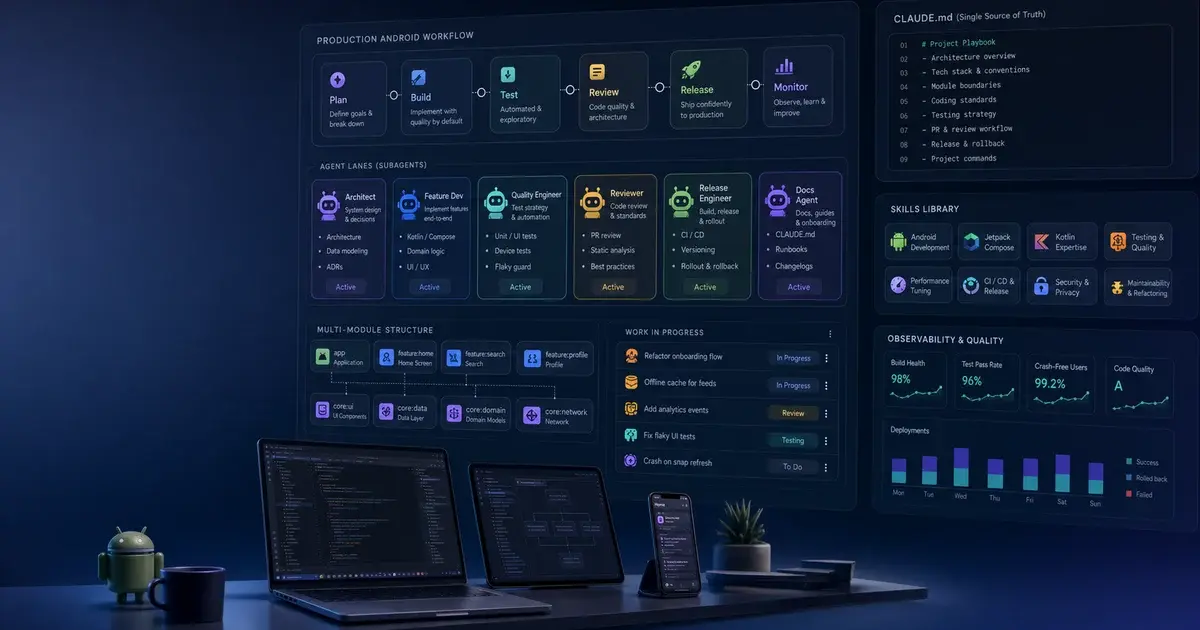
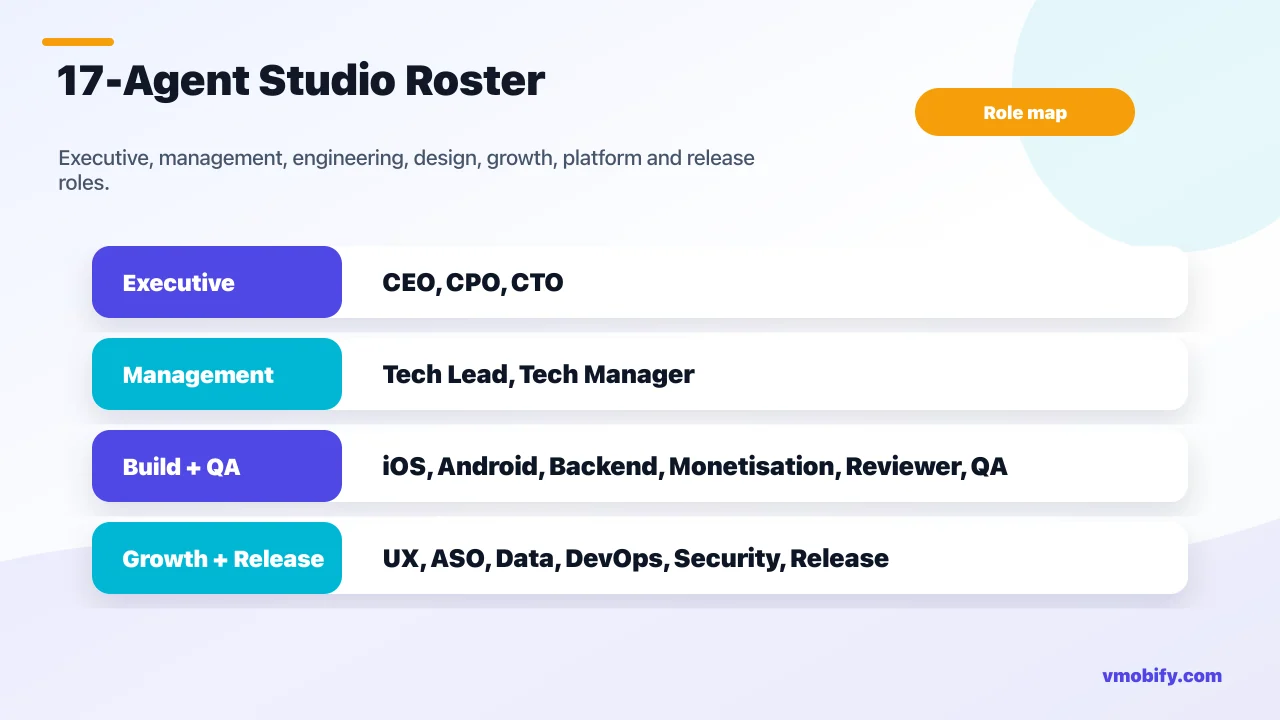
The roster is organised into five layers — executive, management, engineering, design and growth, platform and release — each layer consuming the outputs of the layer above and producing clearly defined deliverables for the layer below. This is not arbitrary structure. It mirrors how successful mobile studios actually work, and it is the structure that prevents context drift across a multi-day autonomous build.
Executive layer — CEO, CPO, CTO: The CEO owns vision, success metrics, and scope. Given your one-line idea, the CEO produces docs/00-vision.md — a 4-6 page document defining the north star, the target user, the success criteria, and the explicit non-goals. The CPO translates the vision into a Product Requirements Document (docs/10-prd.md) with user stories, Given/When/Then acceptance criteria, and a prioritised backlog (P0 through P3). The CTO defines the technical architecture (docs/20-architecture.md) — defaulting to the House Knowledge Base conventions unless there is a written reason to deviate. These three roles run once per project, not in a loop, and their outputs are the ground truth that every subsequent agent reads.
Management layer — Tech Lead, Tech Manager: The Tech Lead turns the architecture document into per-platform implementation specs (docs/22-impl-spec-ios.md, docs/22-impl-spec-android.md) — the layer-by-layer guide that tells each developer how to structure code, which DI pattern to use, which navigation pattern to follow, and how error handling is shaped. The Tech Manager is the conductor of the pod: it owns the sprint plan (docs/30-sprint-plan.md), the kanban board (docs/31-board.md), the daily standup (docs/daily/YYYY-MM-DD.md), and the merge gate. Nothing lands on main without Tech Manager approval after the Code Reviewer clears it. Default pod size is three developers; the Tech Manager scales up or down based on backlog volume, and is the escalation point for blockers the team cannot resolve autonomously.
Engineering layer — iOS Developer, Android Developer, Backend Developer, Monetisation Engineer, Code Reviewer, QA Engineer: The iOS Developer writes SwiftUI code routed through Axiom iOS skills — the community's most comprehensive iOS specialist toolkit for Claude Code. The Android Developer writes Jetpack Compose with Kotlin using Material 3, following the Clean Architecture multi-module structure from the House Knowledge Base. The Backend Developer is spawned only when the architecture document scopes a backend (most content apps use Firebase directly, no separate backend tier needed). The Monetisation Engineer implements the studio's two-door paywall gateway on iOS (StoreKit 2 native, no RevenueCat) and Play Billing on Android, along with AdMob integration and AdGate discipline for ad-monetised apps. The Code Reviewer is the gate — it is not advisory, it is a blocker, and nothing merges past a REQUEST CHANGES. The QA Engineer writes test plans against PRD acceptance criteria, files bugs to docs/51-bugs.md, and provides the ship sign-off.
Design and Growth layer — UX Designer, ASO Specialist, Data Analyst: The UX Designer produces user flows (docs/12-flows.md), design tokens (docs/13-design-tokens.md), and a component inventory (docs/14-components.md) before engineering starts — so developers are implementing against a defined design system, not inventing one as they go. The ASO Specialist — powered by the ASO skills and the aso-screenshots plugin — writes store copy, defines keyword strategy, generates store screenshots, and manages the store-readiness gate before ship. The Data Analyst designs the analytics schema, defining which events fire, what properties they carry, and how they compose into funnels and retention metrics — the same schema discipline our analytics work depends on. A paired APP-NNN-analytics ticket exists for every P0 feature so that instrumentation is never skipped — a discipline most teams forget until the first week post-launch when they realise they cannot measure anything.
Platform and Release layer — DevOps Engineer, Security Reviewer, Release Manager: The DevOps Engineer defines the git branch model, CI pipeline, signing conventions, and secrets hygiene from day one — so the project's keystore.properties, google-services.json, and API keys are properly handled before the first commit, not retrofitted later. The Security Reviewer runs a pre-ship pass against OWASP's Mobile Application Security Verification Standard (MASVS), producing severity-classified findings. The Release Manager handles versioning, signing, store upload, and release notes — and is the only agent that uploads anything to the stores, only after explicit human confirmation at Gate 2. No upload happens autonomously. Ever.
Each agent is a single Markdown file in the agents/ directory of the plugin repository. The file defines the agent's charter, inputs (which documents it reads), deliverables (which documents it writes), tools (which Claude Code tools it can invoke), and operating rules. Roles are not hard-coded — they are file-defined, which means you can edit them, add new roles, or remove roles your team does not need. Want to add a Machine Learning Engineer? Drop agents/ml-engineer.md with the right charter and the Tech Manager will spawn it when ML tickets appear. Want to remove the Backend Developer because you always use Firebase? Delete the file.
How does the two-gate autonomy model keep you in control?
The team is mostly autonomous, but "mostly" is the operative word — and the two gates are where the "mostly" lives. Between the gates, the studio drives itself: parallel engineers writing code, code review running on each completed branch, merge decisions, QA running on merged tickets, bug fixes looping back into the next sprint round, standups assembled from agent fragments. You are not involved. At the two gates, you are the only one who can proceed — there is no auto-approve, no default-yes, no "the agent decided".
Gate 1 — Scope-lock: After the executive layer completes its work and the management layer drafts the implementation specs, the team prints a one-screen brief: the vision in one paragraph, the P0 feature list, the architecture headline (stack choices, module structure, key tradeoffs), the rough effort estimate by sprint round, and the single biggest risk the team identified. It then asks explicitly: "Approve scope and proceed to build?" You review the plan and approve, request changes, or reject. The team does not interpret ambiguity here — it surfaces the exact plan and waits. With the --yolo flag, this gate is skipped and the team proceeds with the generated scope automatically. That flag is useful for rapid prototyping; not useful when building something you plan to ship.
Gate 1 is the single highest-impact moment in the entire build. Every clarification you make here prevents a downstream blocker. Precise scope ("a parent-targeted habit tracker, iOS-first, freemium with a single annual plan, no social features, no AI coaching") converges fast — the agents have nothing to invent. Vague scope ("a habit tracker, maybe with social features, maybe with AI") produces blockers because the agents will not guess per the operating rule.
Twenty extra minutes at Gate 1 typically saves three or four interruptions during the sprint loop.
Gate 2 — Ship: When the sprint board is drained and all S1 (critical) and S2 (major) bugs are closed, the team runs parallel ship-readiness checks: store asset review by the ASO Specialist, MASVS security pass by the Security Reviewer, instrumentation verification by the Data Analyst. The Release Manager then summarises the readiness state and asks for explicit confirmation before initiating any store upload. No upload happens without that confirmation. The model here is the same as Gate 1: surface everything, wait, do not guess. If you decline ship, the Release Manager records what was missing and suggests the next step — typically another sprint round to close the open items.
Between the two gates, the team escalates to you only in three specific situations. First, a blocker the team genuinely cannot resolve autonomously — usually a scope ambiguity the documents do not cover, or an external dependency (an API contract, a design asset, a credential) that the team needs from you. Second, the two-cycle review cap being hit on a ticket — if a developer agent has been asked to revise a ticket twice and the third REQUEST CHANGES comes through, the loop stops and the full reviewer + developer history is surfaced to you, because the signal is that something is architecturally unclear and a human decision is needed. Third, a scope or architecture conflict that the original documents cannot resolve. In each case, the team writes the blocker verbatim — not a paraphrase, not a proposed solution, the exact constraint — and surfaces it. This is the "never invent intent" rule that is baked into every agent's operating instructions.
For continuous development or validation runs, wrapping the command in /loop makes the studio entirely self-pacing: it decides when to proceed, surfaces standups after each round, and escalates only the true blockers that need a human answer. This is the mode that gets used for long brownfield audit-and-remediate runs, where the team is methodically closing 50+ accessibility gaps across a portfolio app and there is no value in human checkpoints between each fix.
How do you install AI App Studio and run your first build?
Installation is two commands inside Claude Code, and the plugin is active immediately — no build step, no configuration required, no external services to authenticate against.
Fast path: paste the two commands below inside Claude Code. The copy buttons appear on the code blocks automatically.
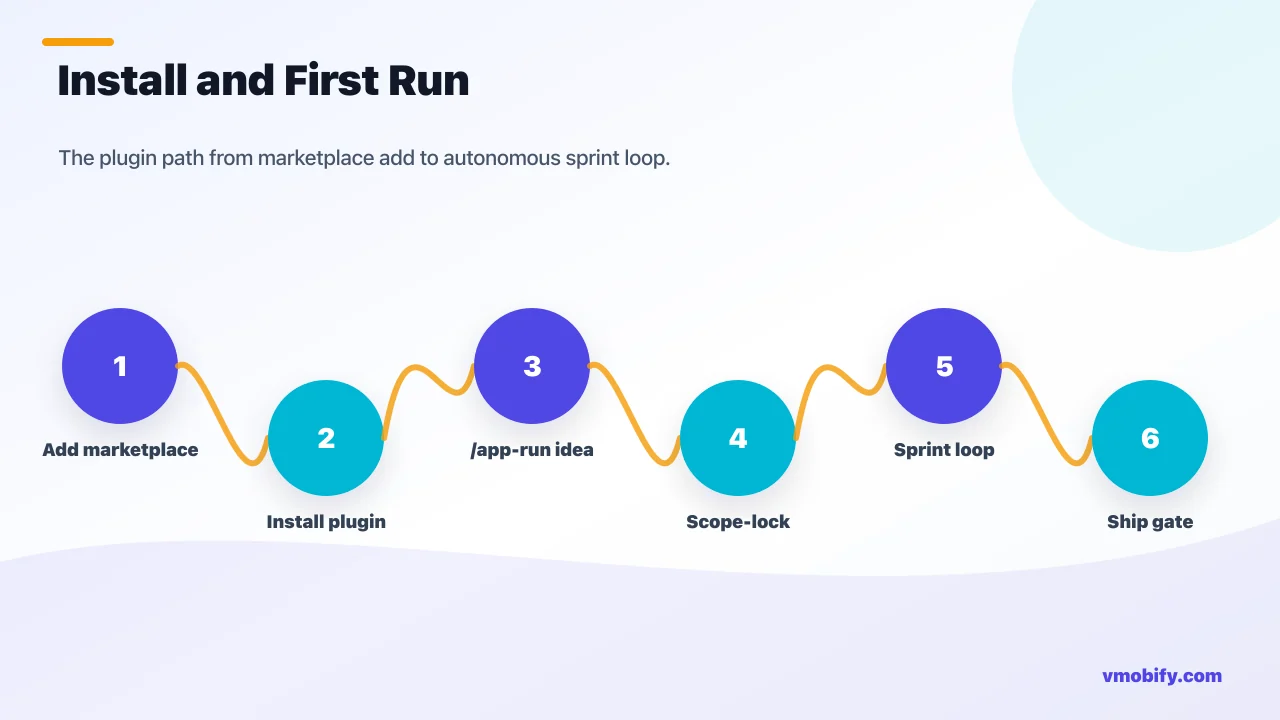
/plugin marketplace add vmobifystudio/app-dev-team
/plugin install app-dev-team@mobify-studio
After install, 17 agents, 11 commands, and all skills are available. Run /plugin at any time to browse, enable/disable, or update. To update to a new version, re-run both commands. The plugin also accepts a local clone for teams that want to customise the agent definitions or knowledge packs without forking the public repo:
git clone https://github.com/vmobifystudio/app-dev-team
/plugin marketplace add ./app-dev-team
/plugin install app-dev-team@mobify-studio
For a new app, create an empty project directory, open Claude Code in it, and run:
/app-run "A habit tracker for new parents, iOS + Android, freemium"The one-line idea is the only required input. The studio handles the rest — interviewing the idea through the CEO → CPO → CTO chain, generating the full document set, presenting Gate 1, building in parallel, and pausing again at Gate 2. The first time you run it, the executive layer typically takes 10-20 minutes to complete and produce the scope-lock brief. After your approval, the sprint loop begins.
For an existing app, open Claude Code in the project root and run:
/app-onboard    # reads the codebase, generates CLAUDE.md
/app-audit      # grades against House KB, builds remediation backlog
Or let /app-run detect the existing codebase automatically and route into brownfield mode. If you also pass an idea or upgrade goal, the team treats it as a new feature set and adds those tickets to the board alongside the AUDIT-NNN remediation tickets — so you can simultaneously close technical debt and ship new features in the same sprint round.
/app-run.The 11 commands cover every phase of the build lifecycle. The most important ones to understand before starting:
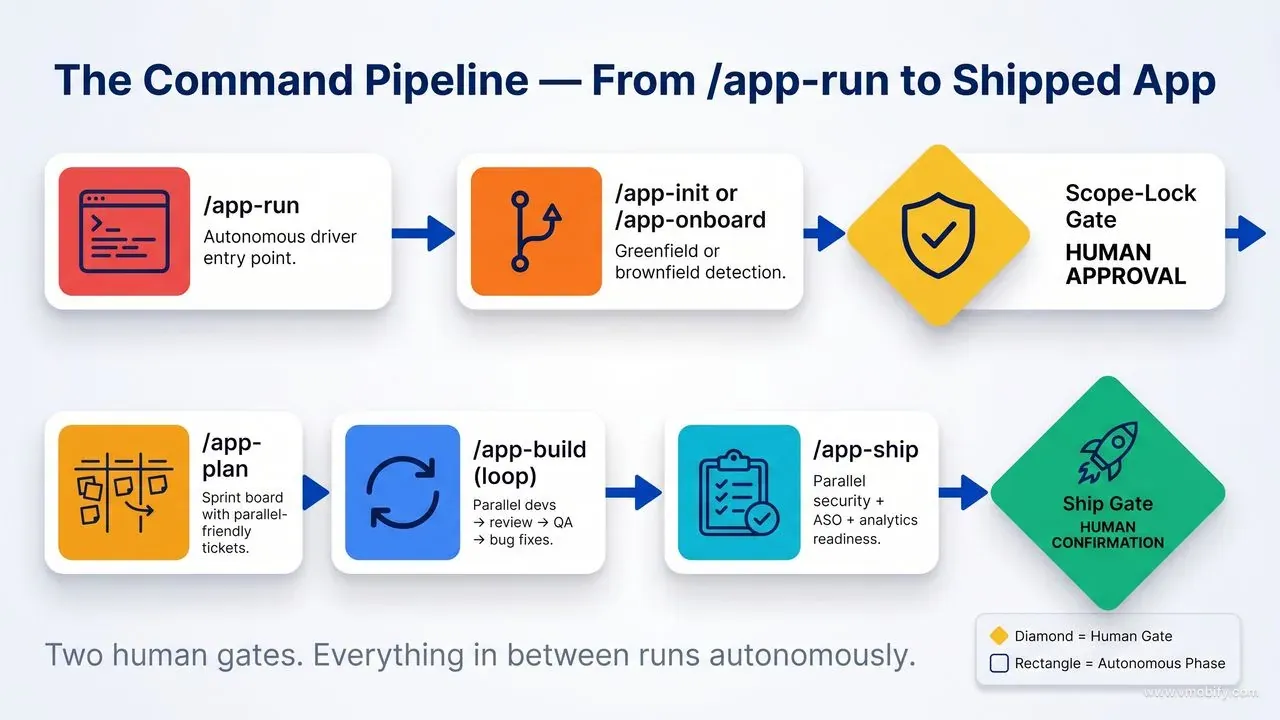
/app-run [idea]— the autonomous driver. Auto-detects greenfield vs brownfield. This is your primary entry point and the one you will use 90% of the time./app-init [idea]— manual greenfield init only. Runs CEO vision, then parallel CPO/CTO, then parallel ux-designer/tech-lead/devops-engineer. Useful when you want to control the build phase separately from the spec phase./app-onboard [path]— brownfield onboarding. Detects the stack, reverse-engineers the as-built architecture and feature inventory, generatesCLAUDE.md. Read-only operation — nothing in your codebase is changed./app-audit [dimension]— brownfield gap analysis. Severity-ranked, Safe vs Risky classified, remediation backlog written todocs/80-audit.md. You can scope the audit to a specific dimension (e.g.,/app-audit accessibilityor/app-audit monetization) if you want a focused pass./app-plan [focus]— sprint planning. Tech-manager turns the backlog into a parallel-friendly board. Run between sprint rounds./app-build [tickets]— one sprint round. Parallel developers → code review → merge gate → QA → bug loop. By default, picks up all ready tickets; pass specific IDs to scope the round./app-review <branch>— manual code review on a single branch. Useful for reviewing human-written PRs through the same gate./app-ship [version]— ship-readiness phase. Parallel security + ASO + analytics validation, then release-manager confirmation gate./app-status— vision, sprint goal, board summary, blockers, latest standup. The fastest way to orient a new session./app-learn <app paths>— mines a shipped app's conventions into the living House Knowledge Base. Run this after a successful ship to fold the new patterns back into the team's permanent memory./app-team— lists the current roster and the responsibilities of each role. Useful when you are customising the team and want to verify your edits are recognised.
What does a greenfield app build look like step by step?
The greenfield path takes a one-line idea through eight distinct phases, each producing a Markdown document that becomes the shared memory for every subsequent phase. Understanding what each phase produces helps you know what to review at Gate 1 and what to expect from the sprint loop.
- Phase 1 — Requirements intake and vision: The CEO agent runs a structured intake against your one-line idea, clarifying scope, target users, success metrics, and what "done" looks like. It produces
docs/00-vision.md— the north star that all other agents reference back to. This document is short but precise: 4-6 pages of vision, goals, scope boundaries, and explicit non-goals. The team never builds something that contradicts the vision document; if a requirement is ambiguous, it writes the blocker and surfaces it. The CEO also writesdocs/01-intake.md— the structured interview transcript — so the reasoning behind every vision decision is auditable later when you need to understand why something is the way it is. - Phase 2 — Parallel CPO and CTO: The CPO produces the PRD (
docs/10-prd.md) — user stories with Given/When/Then acceptance criteria, prioritised backlog (P0 through P3), and the feature inventory. Simultaneously, the CTO produces the architecture document (docs/20-architecture.md) — stack choices with written justifications for any deviation from the House KB defaults, the module structure for both platforms, the data model, the API surface (if applicable), the monetisation approach, and the analytics schema headlines. The CTO also writesdocs/21-engineering-principles.md— the project-specific principles that the Code Reviewer will enforce (e.g., "no force-unwraps on iOS", "no!!on Android", "all strings localised from day one"). These two documents run in parallel because they do not depend on each other; the CPO works from the vision, the CTO works from the vision. - Phase 3 — Parallel design and platform setup: The UX Designer produces user flows (
docs/12-flows.md), design tokens (docs/13-design-tokens.md), and a component inventory (docs/14-components.md). The Tech Lead writes per-platform implementation specs —docs/22-impl-spec-ios.mdanddocs/22-impl-spec-android.md— translating the architecture into layer-by-layer coding guidance for the iOS and Android developers. The DevOps Engineer produces the git strategy (docs/23-git-strategy.md) and bootstraps the projectCLAUDE.md,.gitignore, and initial branch model. All three run in parallel because the design work, the platform spec work, and the git/CI work do not block each other. - Gate 1 — Scope-lock: The Tech Manager prints a one-screen brief summarising vision, P0 features, architecture headline, rough effort (by sprint round), and the top risk. You read it, ask questions, request scope changes, or approve. This is the moment to push back if the CTO chose a stack you do not want, if the CPO scoped features you do not want, or if the architecture has assumptions you disagree with. Edits to the underlying documents propagate to subsequent agents automatically — if you change the architecture doc, the next agent reads the change.
- Phase 4 — Sprint planning: The Tech Manager turns the PRD backlog into a parallel-friendly kanban board (
docs/31-board.md). Each ticket has: a unique ID (APP-NNN), an owner, an impl-spec reference, acceptance criteria (copied from the PRD Given/When/Then), an estimate (XS through XL), status, and dependency chain. Every P0 feature has a pairedAPP-NNN-analyticsticket so instrumentation is never skipped. The Tech Manager also writes the sprint goal — one sentence describing what the sprint will produce — so the team has a shared north star for the round. - Phase 5 — Sprint loop: The Tech Manager spawns iOS and Android developers in parallel — one Task invocation per developer, each with their full ticket list for the round. Developers work simultaneously. As each developer completes a ticket, the Code Reviewer is spawned immediately for that branch — it does not wait for the other developers to finish, and multiple Code Reviewer instances can run in parallel reviewing different branches. Approved branches are merged through the Tech Manager's merge gate. Tickets with REQUEST CHANGES go back to the original developer for a revision cycle, capped at two cycles. After each round, the QA Engineer exercises the sprint's merged work against the acceptance criteria and files bugs to
docs/51-bugs.md. S1 and S2 bugs re-enter the sprint board for the next round automatically asBUG-NNN-fixtickets. - Phase 6 — Standup assembly: After each round, each IC agent drops a per-agent fragment (
docs/daily/YYYY-MM-DD-{agent}-{ticket}.md) summarising what they did. The Tech Manager concatenates the fragments into the canonical daily file (docs/daily/YYYY-MM-DD.md) and prints a three-line standup: counts per status, what merged, what is blocked. This pattern — fragments from ICs, assembly by the manager — prevents write-races between parallel agents trying to write the same file simultaneously. - Phase 7 — Ship readiness: When the board has no open todo items and all S1/S2 bugs are closed, the ASO Specialist, Security Reviewer, and Data Analyst run in parallel. The ASO Specialist verifies store copy, screenshots, keyword coverage, and Play Data Safety declarations. The Security Reviewer runs the MASVS pass — checking for hardcoded secrets, insecure data storage, missing transport security, weak authentication patterns. The Data Analyst verifies that every analytics event in the schema is actually firing through the codebase (no schema documented but never implemented). Their combined verdict goes to the Release Manager along with severity classifications for any open issues.
- Gate 2 — Ship: The Release Manager summarises readiness state, lists any deferred S3 (medium) and S4 (low) items that did not block ship, and asks for explicit confirmation. On confirmation, it handles versioning (bumping
versionCodeon Android,CFBundleVersionon iOS), signing, and store upload. On denial, it records what was missing and suggests the next step — typically another sprint round to close the open items, or a release-notes revision if the issue is documentation-level.
How does brownfield mode audit and fix an existing app?
Brownfield mode is the less-talked-about half of AI App Studio, and in our experience it is where teams extract the most immediate value — because every team with a production app has a long list of known technical debt they have never had bandwidth to systematically address. The audit-and-remediate workflow turns that backlog from "we'll get to it" into "the agent is closing it in the background while you sleep".
/app-onboard is the first step. It reads the existing codebase, identifies the stack and architecture, reverse-engineers the as-built module structure, feature inventory, and dependency graph, and generates a CLAUDE.md that gives every subsequent agent full context for how the project actually works — not how a fresh build would work. This is a read-only operation; nothing in your codebase is changed. The output is a baseline document the team uses to understand existing decisions before recommending changes. If your iOS app uses Combine and ObservableObject even though the House KB prefers @Observable, the onboarding step records that fact rather than treating it as a defect — the audit phase decides whether and how to remediate it.
/app-audit runs after onboarding and is the analytical core of brownfield mode. It fans out specialist and Axiom auditors across every dimension of the codebase — architecture, concurrency, memory management, data layer, monetisation, analytics, accessibility, security, store readiness — and produces a severity-ranked gap report at docs/80-audit.md. Each finding includes: what is wrong, which House KB rule it violates (by name and file path), a severity classification (S1 critical through S4 low), and a Safe vs Risky classification.
The Safe vs Risky classifier is what makes brownfield mode practical for production apps. It separates findings into two buckets:
Safe fixes
- Covers: Accessibility label additions, analytics event corrections, localisation gaps, lint clean-up, design token adoption (replacing hardcoded colours and spacing), missing tests for pure-logic code, formatting normalisation, dead-code removal.
- Approval: These are automated — the team fixes them without additional approval after the initial gate.
- The risk profile is low because none of these changes alter runtime behaviour in user-visible ways.
Risky changes
- Covers: Database schema migrations, concurrency model rewrites (e.g., Combine →
@Observable), billing logic changes, large architectural refactors, dependency major-version upgrades, navigation pattern changes, API contract changes. - Approval: Each of these gets a written remediation plan presented to you before any code is touched. The team does not make risky changes autonomously — ever.
- The plan includes the scope, the migration path, the rollback strategy, and the data-safety analysis.
The gate in brownfield mode asks: "Which gaps should we fix?" You review the scorecard and remediation backlog, grouped by severity and Safe/Risky, and decide. The team then fixes approved items in the same sprint-loop structure as greenfield — parallel developers, code review gate, QA sign-off. If you also passed an upgrade goal to /app-run (e.g., "add subscriptions to our existing fitness app"), those feature tickets run alongside the AUDIT-NNN remediation tickets on the same board. The Code Reviewer treats them identically: same acceptance-criteria check, same impl-spec check, same engineering-principles check, same Axiom auditor pass on iOS.
The output of a brownfield run is a healthier codebase, a full audit paper trail in docs/80-audit.md, and a residual backlog of deferred items for future sprints. We have used this mode on our own portfolio to systematically close accessibility gaps before App Store submissions, upgrade SwiftData schemas without data-loss incidents, migrate utility apps from XML to Compose, and add missing analytics instrumentation before campaign launches — all categories of work that are exactly the kind of careful, structured, context-aware remediations that are genuinely hard to do with a single improvising agent. The audit paper trail is also extremely useful for hand-offs: when a new engineer joins, docs/80-audit.md is the fastest way for them to understand what state the codebase is in and what decisions were made about its remediation.
A particularly powerful use case is running brownfield mode against an app you inherited or acquired. Within an hour, you have a comprehensive technical report on the codebase, a prioritised remediation backlog, and an estimated effort to bring it to production standards. This is the kind of analysis that traditionally takes a senior engineer two weeks of full-time review. Compressing it to an hour does not just save time — it changes what is possible. You can now do this analysis on five candidate codebases before deciding which to invest in extending.
How does the code review gate enforce production quality?
The Code Reviewer is the most important agent in the studio, and it is worth understanding exactly what it does, because it is what separates AI App Studio's output from every "single agent generates code and ships it" tool. Without a real review gate, AI-generated code accumulates the same kinds of subtle defects as un-reviewed human code — and AI defects are often harder to catch because the code looks confident and stylistically clean even when the logic is wrong.
The Code Reviewer's first instruction is: "You are not a developer's friend. You are the gate." That framing is deliberate. Polite reviewers approve too eagerly. The reviewer is configured to be adversarial in the productive sense — it is looking for reasons to reject, not reasons to accept. If it cannot find anything blocking, it approves. If it can, it blocks. There is no "approved with minor concerns" — concerns are either blocking or they are non-blocking notes.
The reviewer checks four things in order, every review, without exception:
- Does the diff satisfy every Given/When/Then in the ticket's acceptance criteria? The reviewer reads the ticket from the board, finds the acceptance criteria (which were copied verbatim from the PRD), and verifies that each Given/When/Then is covered by code and tests. If any criterion is not covered, the ticket is rejected regardless of code quality. This single check catches the most common AI-coding failure mode: the agent solved a related-but-different problem than what was asked.
- Does the implementation follow the impl spec? Folder layout matches the documented structure. View/ViewModel/Repository pattern (iOS) or MVVM/MVI shape (Android) follows the spec. Error model uses the project's defined error types. Navigation pattern matches what the spec says. DI wiring follows the spec's pattern. Drift from the impl spec — even working drift — is rejected, because impl-spec drift compounds across tickets and produces a codebase that future engineers cannot navigate.
- Does it follow the engineering principles? Tests exist for new logic (the reviewer checks for the presence and structure, not the depth — depth is a non-blocking note). No banned constructs (force-unwraps on iOS,
!!on Android,print/Log.ddebug noise,// TODOcomments without a ticket reference). All strings localised — no string literals in UI code. Accessibility labels present on all interactive elements. No dead code or commented-out blocks. - Code quality: Names say what the thing does, not what type it is. Functions do one thing, not three. Comments explain why, not what — the reviewer specifically removes comments that restate the code. Magic numbers are extracted into named constants. The reviewer is opinionated about this category in a way that consistent application across a codebase produces material readability gains over time.
On iOS branches, the reviewer spawns Axiom auditor agents as part of the gate — matched to what the diff actually touches. These are specialist agents from the Axiom iOS plugin ecosystem, each focused on one narrow domain:
- Concurrency or async changes →
axiom:concurrency-auditor(Swift 6 strict concurrency, actor isolation, Sendable violations, unsafe Task captures) - Retain cycles, timers, or observers →
axiom:memory-auditor(the six most common leak patterns) - Credentials, storage, or privacy →
axiom:security-privacy-scanner(hardcoded secrets, insecure AppStorage usage, missing Privacy Manifest, ATS violations) - SwiftData models or migrations →
axiom:swiftdata-auditor(struct models, missing VersionedSchema, relationship defaults, destructive-migration risks) - New or changed UI →
axiom:accessibility-auditorandaxiom:swiftui-performance-analyzer - Core Data changes →
axiom:core-data-auditor(thread-confinement, N+1 patterns, migration safety) - Networking changes →
axiom:networking-auditor(deprecated APIs, anti-patterns)
A blocking finding from any Axiom auditor is treated identically to a blocking finding from the reviewer itself — it is a REQUEST CHANGES, not a warning. The developer must address it before the ticket can merge. This is what "up to 25 specialist auditors" means in practice: not 25 agents running simultaneously, but a matched set spawned based on what the diff actually touches. A trivial change to a string constant triggers no auditors; a SwiftData migration triggers four (concurrency, memory, swiftdata, security).
On Android branches, the reviewer checks against the five ViewModel patterns from the House Knowledge Base (state-driven, event-driven, paging, search, list-with-detail), Room and DataStore rules (no fallbackToDestructiveMigration, foreign keys with CASCADE, indexed FK columns), and requires lint and detekt to be clean. There is no equivalent Axiom toolkit for Android (Axiom is iOS-focused), so Android review relies on the house conventions and the reviewer's own checklist.
The verdict is binary: APPROVED or REQUEST CHANGES. The reviewer does not give conditional approvals. It does not say "probably fine." It either clears the ticket — in which case the Tech Manager runs the merge gate — or blocks it with a line-level list of what needs to change and what the correct approach is. The two-cycle cap (if a ticket is still getting REQUEST CHANGES after two revision cycles, it stops and surfaces to the user) exists to prevent infinite reviewer/developer loops on tickets where the spec itself is unclear or the original architecture decision was wrong.
What is the House Knowledge Base and why does it matter?
The House Knowledge Base is the thing that separates "AI-generated code that looks reasonable" from "AI-generated code that a senior engineer would approve" — and it is the single most underrated feature of AI App Studio. Without it, even with the best agent prompts and the strictest review gate, the team would default to whatever the underlying language model considers "reasonable iOS code" or "reasonable Android code" — which is generally functional but lacks the specific, opinionated, production-tested conventions that distinguish a senior engineer's code from a junior engineer's code.
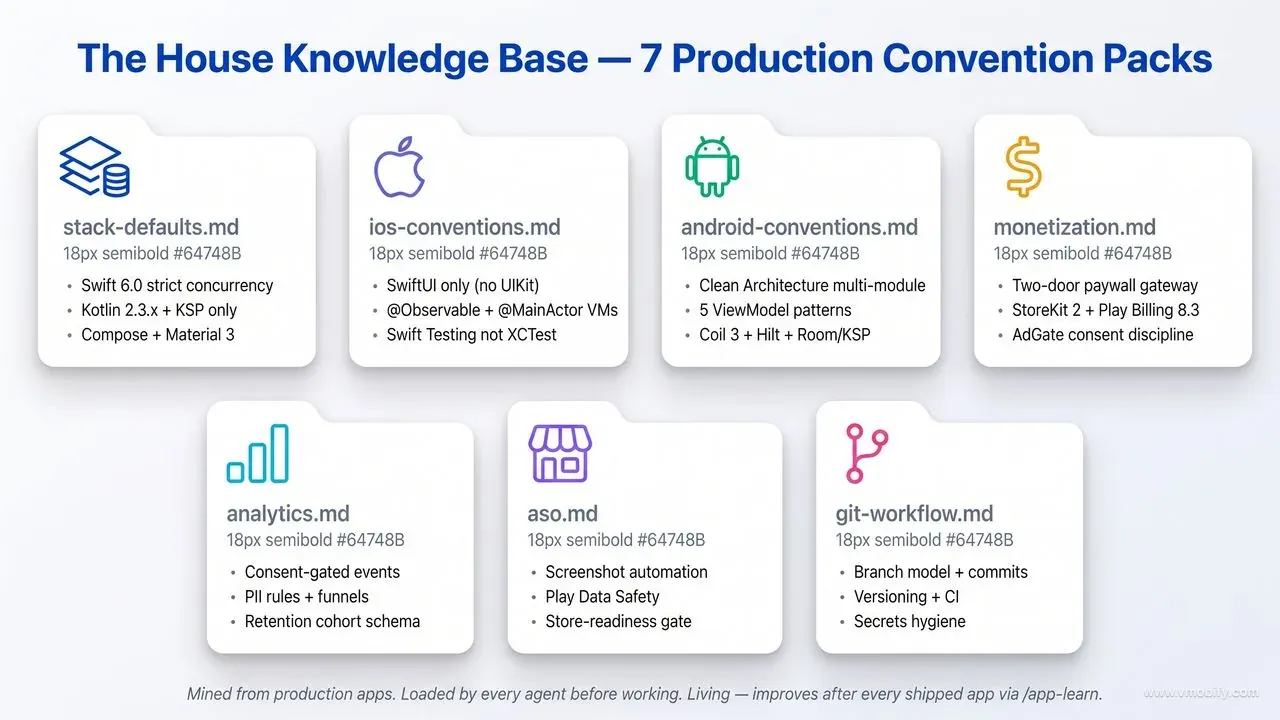
It lives in the knowledge/ directory of the plugin, organised into seven packs that cover every dimension of production mobile development. Every build agent loads the relevant pack before doing any work — this is enforced by the house-conventions skill, which is called as a mandatory pre-step in each IC agent's instructions. The skill fail-closes: if it cannot find the conventions pack, the agent stops with a blocker rather than silently using defaults.
The seven packs:
stack-defaults.md— Technology choices: Default languages, versions, libraries, SDK targets for both iOS (flagship and utility tiers) and Android (flagship and utility tiers). iOS flagship: Swift 6.0 with strict concurrency complete, SwiftUI only, iOS 18.0+ for utility / latest-1 for flagship, XcodeGen withproject.ymlas source of truth, MVVM + Service + Repository architecture. Android flagship: Kotlin 2.3.x with KSP (never KAPT), AGP 9.x with convention plugins inbuild-logic/, compileSdk/targetSdk 36, 100% Jetpack Compose with Material 3, Clean Architecture multi-module structure.ios-conventions.md— iOS patterns: Layering rules (View → ViewModel → Service → Repository → Persistence), Swift 6 concurrency rules (every@unchecked Sendableneeds an inline justification),@Observable+@MainActoron ViewModels only (no Combine, no@Published, noObservableObject), SwiftData for content apps with local-first migrations from day one, hand-rolled DI with protocol/impl/mock parity, Swift Testing (not XCTest), 90%+ coverage on pure-Swift domain engine packages.android-conventions.md— Android patterns: Clean Architecture modules (app,core/{designsystem,common,data,domain}, pure-Kotlin engine,feature/*,service/*), the five ViewModel patterns covering every common state-management scenario, MVVM + MVI-flavoredStateFlow<UiState>withcollectAsStateWithLifecycle(), Room with KSP and@ForeignKey CASCADE+@Index(neverfallbackToDestructiveMigration()), Hilt DI, Navigation 3 with@Serializableroutes andPredictiveBackHandler, Coil 3 (never the v2io.coil-ktpackage), Firebase BOM without the-ktxmodules.monetization.md— Paywalls, billing, ads: The two-door paywall gateway with direct (user-initiated) and eligible-only (automatic/interruptive) paths, session cap of 1 paywall per session plus 24-hour cooldown, 15 typed trigger sources mapped to paywall contexts. StoreKit 2 entitlement rules (derive fromTransaction.currentEntitlements, listen toTransaction.updates, optimistic grant with deterministic reconcile, ReentrancyGuard on Restore). Play Billing 8.3.0 behindBillingServiceInterfacewith Mutex-guarded impl and a stub for screenshot builds. AdGate discipline for ads (ad-free check → consent check, NO-AD zones, frequency caps via Mutex-guarded FrequencyCap, all formats including App Open / Interstitial / Banner / Native / Rewarded). Google test IDs ship by default; real IDs injected per flavor via BuildConfig for prod only — prod build fails fast ifADMOB_APP_IDis missing.analytics.md— Event schema and consent: Consent-gated events with all defaultsfalse, PII rules (no email/phone/precise-location in event properties), funnel definitions (impression → click → install → activation → conversion), retention cohort definitions (D1/D7/D30), UMP and ATT integration patterns, Firebase Consent Mode v2 wiring with denied-by-default storage. Every analytics event is paired with a documented purpose so the team does not ship vanity metrics.aso.md— Store optimisation: Screenshot automation patterns, Play Data Safety declaration templates, store-readiness gate criteria, keyword research workflow, A/B test cadence. The ASO Specialist agent reads this pack before producing store assets, so the output matches the conventions covered in our complete ASO guide rather than generic ASO defaults.git-workflow.md— Branch model and CI: Branch naming (feature/*,fix/*,refactor/*,hotfix/*), conventional commit format with scopes, versioning (versionCode = MAJOR*10000 + MINOR*100 + PATCHon Android), CI gates (lint, detekt, unit tests, screenshot tests), secrets hygiene (keystores,google-services.json, API keys via env or local files — never in the repo).
The knowledge base is living. The /app-learn command mines conventions from a shipped app and folds them into the relevant pack — with conflict detection. If a new learning contradicts an existing convention, the tool flags the conflict and asks you to decide, rather than silently overwriting a decision that was made deliberately. Over time, the knowledge base improves with every app the studio ships. The current version of the House KB encodes conventions mined from our own portfolio of shipped apps; teams that adopt the plugin can mine their own apps and progressively replace the defaults with their house style.
How does the sprint board and ticket system work?
The sprint board (docs/31-board.md) is the studio's shared memory during the build phase — a plain Markdown kanban that is the single source of truth for what is happening, what is done, and what is blocked. Every agent reads it; only the Tech Manager writes to it. This unidirectional flow eliminates write-races and keeps state consistent across parallel agent execution — the single most important property when 4-5 specialist agents are working concurrently inside one Claude Code session.
Tickets have a canonical shape — ID (APP-NNN, BUG-NNN-fix, AUDIT-NNN), feature reference (F-NNN from the PRD), verb-led title, owner (exactly one agent per ticket — parallel work happens across tickets, never within one), spec reference, acceptance criteria copied verbatim from the PRD, estimate, status (todo → in_progress → review → qa → done), and dependency chain. The Tech Manager enforces the dependency chain when distributing parallel work, so a developer is never asked to start a ticket whose blockers are unresolved.
The fragment-and-assemble pattern is the trick that makes parallelism safe. Each IC drops its own per-agent fragment (docs/daily/YYYY-MM-DD-{agent}-{ticket}.md) after completing a ticket. The Tech Manager concatenates the fragments into the canonical daily file (docs/daily/YYYY-MM-DD.md) and prints a three-line standup. No two agents ever try to write the same file simultaneously, because their fragment filenames are distinct. The canonical file has exactly one writer. This pattern generalises across the entire studio — anywhere parallel agents need to contribute to a shared document, they write isolated fragments and a single coordinator assembles.
The /app-status command surfaces a live summary at any point: vision headline, current sprint goal, board counts per status column, open blockers, and the latest standup. Run it from a fresh Claude Code session and the agent is re-oriented on the full project state in under a minute — useful when you come back to a project after a few days and need to remember where you left off.
The most important discipline encoded in the ticket system is the paired analytics ticket. Every P0 feature in the PRD automatically generates an APP-NNN-analytics companion ticket owned by the Data Analyst. The Code Reviewer checks that analytics events named in the spec are actually fired by the code. By ship, every P0 feature has both its implementation and its measurement in place — no retroactive "we should add some events here" sprint after launch, which is the single most common post-launch regret we see across our portfolio.
How does the studio handle monetisation, paywalls, and ads?
Monetisation is one of the highest-stakes areas in mobile development — bugs here directly cost revenue, and the platforms (Apple and Google) actively reject apps with broken billing or non-compliant consent — and it is one of the areas where AI App Studio's structured approach pays the biggest dividends. The Monetisation Engineer agent is dedicated specifically to this surface, and the monetization.md knowledge pack encodes production-tested patterns that close the most common failure modes.
The studio supports two primary monetisation models. Subscription/IAP for flagship content and AI apps (StoreKit 2 on iOS, Play Billing on Android, no RevenueCat). Ads (AdMob) for utility apps and ad-supported tiers, with mediation through AppLovin MAX and Meta Audience Network. The agent reads the architecture document's monetisation section to determine which model — or both — to implement.
For subscription apps, the implementation routes all paywall presentation through a single PaywallPresentationGateway with two doors. presentDirect(source:) is for user-initiated "Upgrade" taps — it bypasses the session cap and 24-hour cooldown because the user explicitly requested it. presentIfEligible(...) is for automatic or interruptive triggers — it enforces a maximum of one paywall per session plus a 24-hour cooldown persisted via the preferences service. A PaywallTriggerService (modelled as an actor for thread safety) owns the trigger policy and maps approximately 15 typed trigger sources (e.g. fifthMeasurement, exportTapped, secondChildAdded, trialDay25, aiCoachOpenedFree, deep-link variants) each to a PaywallContext. The trigger carries its source for analytics, so the team can later measure which triggers convert and which fatigue users.
The StoreKit 2 entitlement rules are non-negotiable in the House KB:
StoreManageris@MainActor @Observableand is the single source of truth for premium status. Entitlement is derived fromTransaction.currentEntitlements— a tri-statePremiumStatusenum that is cold-start safe.- Listen to
Transaction.updatesfor renewals, refunds, and Ask-to-Buy. - Optimistic grant when a purchase completes, then a deterministic re-scan reconcile, and a visible confirmation to the user. The user sees their entitlement immediately; the system reconciles in the background.
- Always call
transaction.finish(). HandlepurchasePendingfor Ask-to-Buy flows. - Use
transaction.offer?.type— not the deprecatedofferTypeproperty. - Disable Restore while a purchase or restore is in flight, via a
ReentrancyGuard. This prevents the most common StoreKit footgun: concurrent purchase/restore calls that produce duplicate transactions. - Bundle a
.storekitconfiguration file for testing. Typical product set: Monthly, Annual (best value), Lifetime (non-consumable), with a free trial.
The Code Reviewer enforces every one of these rules. If a developer agent submits StoreKit code that uses offerType instead of transaction.offer?.type, the review fails. If the Restore button is enabled while a purchase is in flight, the review fails. This discipline at the review gate is why monetisation code coming out of the studio reliably passes Apple's review — not because the developer agents always get it right on the first attempt, but because the reviewer agent catches the violations before they merge.
For ad-monetised apps, the AdGate discipline is the centerpiece. A central AdGate class enforces ordering on every ad request: ad-free check first (premium users see no ads), then consent check (treating .unknown consent as "suppress / ad-free" to be safe). No ad manager is called directly by feature code — every call goes through AdGate. Feature code that bypasses AdGate is rejected at review.
NO-AD zones are explicitly enforced by feature code never invoking ad managers in those screens. The standard NO-AD zones are: capture (camera/photo capture flows), route tracking, stamp/crop/rotate customisation, onboarding, and permission dialogs. The reasoning is straightforward: serving ads in these screens degrades the user experience at the exact moments the user is most invested in the app, and the conversion impact outweighs the ad revenue.
Frequency caps prevent the studio's apps from feeling like ad-spam. A FrequencyCapManager (Mutex-guarded for thread safety) enforces typical caps used in our production apps: interstitial = every 3rd capture / 5-day install threshold / 3-min minimum gap; app-open = session 2+ / 5-min minimum gap / 4-hour expiry, skipping Splash, Privacy, Language, and Intro screens. These caps are tuned over time based on revenue vs retention tradeoffs; the agent uses them as defaults and adjusts based on the app's monetisation goals.
Consent — UMP on Android, ATT plus UMP on iOS — runs before any ad or analytics init, with a roughly 5-second watchdog to prevent indefinite blocking on consent UI failures. canRequestAds() is the single source of truth for whether ads may load. All consent flags default false; Firebase Consent Mode v2 denies storage by default, granted only after explicit user consent. A "privacy options" / revoke path is required and validated at the ship gate.
The combination of these patterns — gateway-routed paywall, StoreKit 2 with reentrancy protection, AdGate with NO-AD zones and frequency caps, consent-first init — is what makes the studio's monetisation output reliably compliant with both stores' policies and reliably non-irritating to users. Most monetisation problems in shipped apps come from skipping one of these patterns; the studio cannot skip them because the Code Reviewer enforces them.
Who is this for and what are the real-world use cases?
AI App Studio is useful for any team where the gap between "idea" and "shipped app" is currently blocked by bandwidth, not by clarity — and that describes most mobile development situations we encounter in our portfolio. The use cases below are not theoretical; they are situations where we have either used the studio ourselves or recommended it to teams in our network.
Indie founders and solopreneurs: This is the use case the studio was designed around. You have a validated app idea, some product intuition, and the ability to make scope decisions — but you do not have a team of six engineers, a code reviewer, a QA engineer, and a release manager. The studio fills all of those roles. You approve the plan at Gate 1, you approve the ship at Gate 2, and between those two moments you do the work only you can do: validate the idea, talk to users, and make the product decisions that the team surfaces as blockers.
A realistic timeline for a well-defined app idea with clear scope:
This is not a demo timeline; this is what the studio actually produces when the conventions are loaded and the review gate is functioning. The cost per build is whatever Claude Code charges you for the API tokens consumed — typically much less than a single day of a contract developer's time.
Developers stretched thin across multiple projects: If you are one person maintaining three apps while also trying to ship a fourth, the studio offloads the scaffolding, boilerplate, store setup, review passes, and QA loops. You stay focused on the technically hard parts — the algorithm, the novel integration, the performance-critical path — while the studio handles the structural work that is boring but critical to not getting rejected from the stores. The brownfield mode is particularly valuable here: you can have the studio audit and remediate your existing apps in the background while you work on new features.
Small studios shipping multiple apps: The House Knowledge Base encodes your house conventions once. Every project that runs through the studio starts from those conventions, not from AI defaults. The output is in your style, not generic. And because the knowledge base improves with each shipped app via /app-learn, the studio gets progressively better at following your patterns. Over a year of using the studio across a portfolio of apps, the per-project setup time approaches zero — every new project picks up where the last one left off, conventionally speaking.
Teams with existing apps that need a quality pass: The brownfield audit mode is worth running on any production app that has accumulated technical debt. We have used it across our own portfolio to systematically close accessibility gaps before App Store submissions, upgrade data layer code to current conventions, add missing analytics instrumentation before a campaign launch, and migrate legacy XML Android UIs to Compose. The Safe vs Risky classifier makes this practical for live apps — risky changes never happen without a written plan and your approval, so you can run the audit on a production app without worrying that the agent will autonomously rewrite your payment flow.
Teams validating ideas before committing to a full build: Gate 1 — the scope-lock brief — is valuable by itself even if you never run the full build. Having three executive agents independently interpret your idea and produce a vision, PRD, and architecture document surfaces assumptions and ambiguities that typically take two weeks of internal debate to surface in a human team. Running that process in 30 minutes before committing to a sprint is useful even if you then hand the build off to human engineers — the documents that come out are directly usable as briefing material. The same applies to validating "what if there was an app that..." ideas before sinking weeks into a prototype that may not have product-market fit.
Agencies running multiple client projects in parallel: Each client project runs as its own Claude Code session with its own House KB customisations. The agency's general conventions live in the base House KB; client-specific tweaks (brand colours, preferred libraries, compliance requirements) live in project-specific overrides. The Tech Manager agent in each project tracks the board independently, so an agency can have five sprint loops running across five client projects simultaneously without cross-contamination.
Internal tooling teams building employee apps: Enterprises need a steady stream of small internal apps — expense reporting, conference room booking, employee directory, training quiz — that traditionally either consume scarce engineering bandwidth or get outsourced at high cost. The studio produces these autonomously with the same security review and MASVS pass as customer-facing apps. The security discipline matters here precisely because internal apps often handle sensitive employee data and historically receive less scrutiny than customer-facing ones.
Engineers learning mobile development: The studio is a powerful learning surface because every decision is written down. Read the vision document, read the architecture reasoning, read the code review notes, read the engineering principles being enforced — this is the kind of senior-team internal documentation that most learners never get exposure to. The output is meant to be read, not just executed. Across our 300+ portfolio, the engineers who level up fastest are the ones who study how senior engineers structure their decisions, not just what code they write.
Which tools and plugins power the studio under the hood?
AI App Studio has zero hard dependencies — it runs on pure Claude Code with no external services — but it is designed to integrate deeply with a set of specialist plugins that make its output significantly better when they are present. These are soft-routed: if a plugin is absent, the studio degrades gracefully to its House KB defaults. If it is present, the studio uses it automatically. Credit where credit is due — the studio's quality bar depends on these ecosystem contributions.
Axiom iOS: The largest and most comprehensive iOS specialist plugin for Claude Code. AI App Studio's iOS developer routes every implementation decision through Axiom skills — SwiftUI layout, data, concurrency, networking, testing, performance — and the Code Reviewer spawns Axiom auditor agents as part of the gate. The credit here is substantial: Axiom's community has built the most detailed iOS specialist knowledge base available for AI agents, covering Swift 6 concurrency, SwiftData migrations, SwiftUI performance, accessibility, security, and dozens of other narrow domains. AI App Studio's iOS quality bar is directly dependent on Axiom's depth. If you are building iOS apps with Claude Code, installing Axiom is essentially mandatory regardless of whether you use AI App Studio — it is the single highest-impact iOS-specific install you can make.
ui-design plugin skills (mobile-android-design, mobile-ios-design, react-native-design, web-component-design): Used by the UX Designer agent for platform-appropriate design guidance. The ui-design skills encode iOS Human Interface Guidelines and Android Material 3 conventions in a format that AI agents can apply reliably — producing design token systems and component inventories that match platform expectations rather than generic AI approximations. Without these skills, the UX Designer would produce designs that work but do not feel native to the platform.
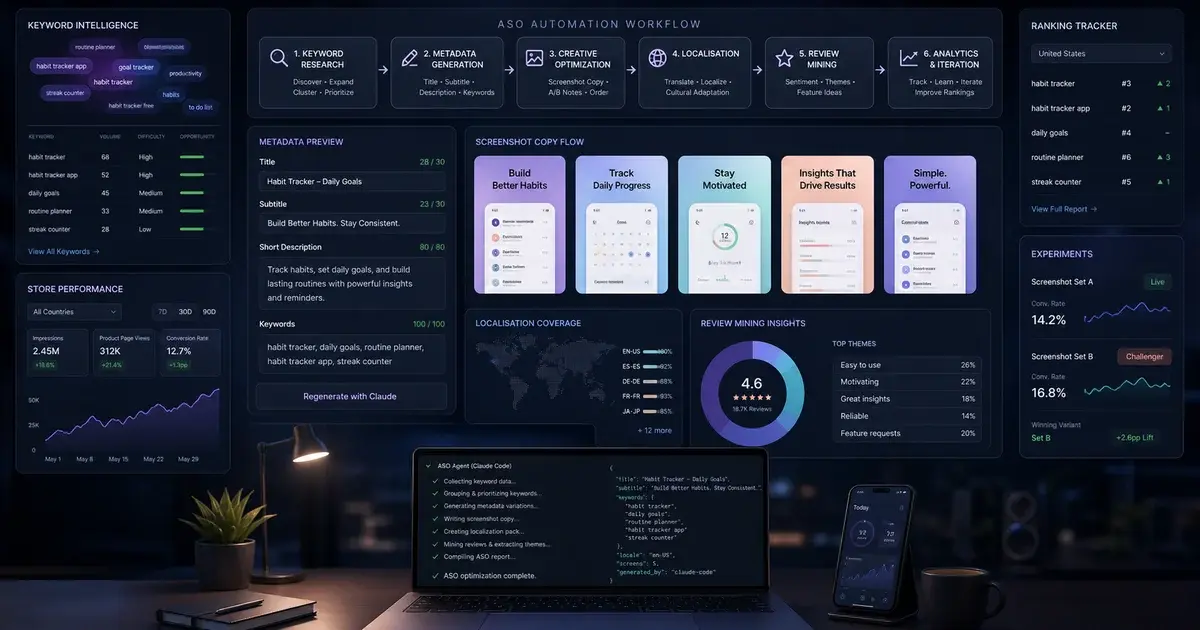
aso-screenshots plugin: Used by the ASO Specialist for screenshot automation and store-readiness validation. Store screenshots are the most impactful ASO asset — they drive approximately 60-70% of the install decision per Apple — App Store Product Page — and the aso-screenshots plugin ensures the assets the studio produces meet platform dimensional requirements (iPhone 6.7", iPhone 6.1", iPad Pro 12.9", various Android device sizes) and visual quality standards. Our ASO service team uses the same plugin in production for client work.
admob-android-integration plugin: Used by the Monetisation Engineer for ad-monetised Android apps. The plugin encodes the AdGate discipline, frequency cap patterns, UMP consent integration, mediation configuration (AppLovin MAX, Meta Audience Network), and ad unit ID management via BuildConfig in a form the agent can apply reliably — so ad-monetised apps ship with the discipline that prevents invalid traffic violations and consent compliance failures. The same patterns are documented in our monetisation service guides.
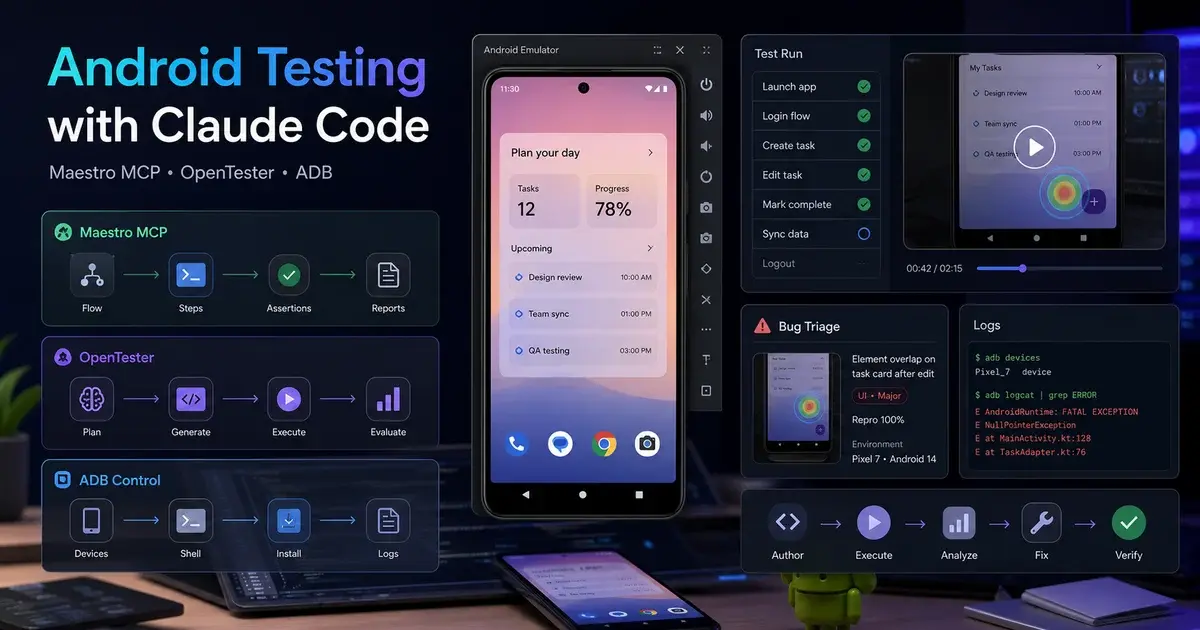
Maestro and its MCP ecosystem: The QA Engineer generates Maestro YAML flows for E2E testing when Maestro is installed. On Android, the Android developer can wire the android-mcp-server, mobile-mcp, and related ADB MCP servers for device-observation capabilities — the same toolchain covered in our Android Testing with Claude Code guide. Maestro's declarative YAML test format is uniquely well-suited to AI generation because the syntax is short enough to read out loud and resilient enough to survive small UI refactors, so AI-generated flows hold up over time better than imperative Espresso or Appium scripts.
Firebase ecosystem (Crashlytics, Analytics, Remote Config, Performance Monitoring): The studio's default backend choice for content apps is Firebase, and the Data Analyst agent integrates Firebase Analytics by default. Crashlytics provides the production feedback loop — when paired with the Firebase Crashlytics MCP, Claude can pull the top crash, propose a fix, write a Maestro regression flow, run it against an emulator, and open a PR, all inside one agent session.
StoreKit Configuration files (iOS) and Play Console testing infrastructure (Android): The Monetisation Engineer generates a .storekit configuration file as part of every iOS app with subscription support, so the team can test the full subscription lifecycle (purchase, renewal, refund, Ask-to-Buy) without involving real App Store accounts. The Android equivalent is a stub BillingServiceImpl that the agent generates for debug and screenshot builds, allowing UI development to proceed without Play Console integration.
Apple's official frameworks (SwiftUI, SwiftData, StoreKit 2, App Intents, Foundation Models): The studio's iOS choices lean heavily on Apple-native frameworks rather than third-party alternatives. SwiftUI is the only UI framework allowed (UIKit only via wrapper for specific gaps). SwiftData is the default persistence layer for content apps. StoreKit 2 native, no RevenueCat. This Apple-native bias is a deliberate House KB choice rooted in the observation that Apple-native code ages better across iOS releases than third-party-dependent code.
Google's official frameworks (Jetpack Compose, Material 3, Hilt, Room, DataStore, Navigation 3): Equivalent bias on Android. Compose for UI, Material 3 for design system, Hilt for DI, Room for persistence, DataStore for preferences (never SharedPreferences), Navigation 3 for navigation. The discipline here matches the iOS side: Google-native code with deliberate minimisation of third-party dependencies.
The studio is not a replacement for these ecosystem tools — it is an orchestrator that makes them work together. Credit for the depth of iOS specialisation goes to Axiom. Credit for the screenshot automation patterns goes to the aso-screenshots plugin maintainers. Credit for Maestro's declarative testing model goes to the Maestro team. AI App Studio's contribution is the meta-layer: the role definitions, the handoff protocols, the review gate, the House Knowledge Base, and the autonomy model that turns these individual tools into a coordinated team.
How do you customise and extend the studio for your team?
AI App Studio is designed to be tuned. Every default is a starting point, not a constraint, and the tuning surface is entirely plain text — no code, no build step, no configuration schema to learn. The customisation paths below cover the most common extensions teams make.
Changing stack defaults: The knowledge/stack-defaults.md file defines the default technology choices for iOS (flagship tier and utility tier), Android (flagship and utility), and cross-platform invariants. Change them once and every subsequent project follows. If you standardise on a different DI framework, a different image loading library, or a different minimum SDK target, that change belongs in stack-defaults.md. The CTO agent reads this file before making architecture decisions and deviates only with a written justification. Want to default to Koin instead of Hilt? Change one line. Want to support iOS 17 instead of 18? Change one line.
Adding or removing roles: Agents are Markdown files in agents/. Adding a new role — an ML engineer, a React Native developer, a localisation specialist, an SRE — means writing one new Markdown file that defines the agent's charter, inputs (which documents it reads), deliverables (which documents it writes), tools (which Claude Code tools it can invoke), and operating rules. The Tech Manager coordinates new roles automatically once they appear in the agents/ directory. Removing a role (e.g., if your studio always uses an external backend service) means deleting its file; the Tech Manager will not spawn it. The whole role system is loose-coupled by directory listing rather than by hard-coded enumeration.
Encoding your house conventions: The fastest way to load your team's existing conventions into the studio is /app-learn <path-to-your-app>. It mines the architecture, patterns, naming conventions, and library choices from a shipped app and writes them into the relevant knowledge pack. Running this against two or three of your best-structured existing apps gives the studio a much higher prior for producing code in your style. The conflict-detection system ensures that contradictions between apps are flagged for your decision rather than silently resolved in favour of whichever app was mined last.
Tuning pod size and parallelism: The default pod is three developers (iOS + Android + one other based on scope). The Tech Manager scales this at sprint planning based on the backlog volume. For very large scopes, you can add a second iOS or Android developer by adding a second agent file — e.g., agents/ios-developer-2.md — and the Tech Manager will distribute tickets across both. The practical ceiling is around 4-5 developer agents per sprint round; beyond that, the coordination overhead outweighs the parallelism benefit.
Adding custom knowledge packs: Beyond the seven built-in packs, you can add domain-specific packs to knowledge/. A pack for your design system token naming conventions, a pack for your backend API contract conventions, a pack for your localisation workflow, a pack for your specific compliance requirements (HIPAA, SOC 2, GDPR specifics) — all of these are valid and all of them are loaded by agents that read the relevant domain. The house-conventions skill is the loader; it searches the knowledge/ directory for packs matching the current platform and work type.
Adjusting autonomy: For production apps where you want more checkpoints, you can insert additional gate prompts into the commands/app-run.md command definition — adding a Gate 1.5 between sprint planning and sprint execution, or a Gate 1.8 after the first ticket completes to verify the developer pattern. For rapid prototyping and idea validation where you want less oversight, --yolo skips Gate 1. Wrapping any command in /loop makes the studio self-pacing — it decides when to proceed between rounds and surfaces only true blockers.
Customising the review gate severity: The Code Reviewer's checklist is editable. If your team has stricter rules — e.g., "no !Optional casting on Android, even in test code" — add the rule to agents/code-reviewer.md and the reviewer will enforce it. If your team has looser rules in some area (e.g., "comments restating code are allowed in onboarding documentation"), you can scope the rule with file-glob exceptions. The reviewer agent is a single Markdown file; its enforcement is exactly as strict as that file says.
Integrating with your CI/CD: The DevOps Engineer agent writes the CI configuration as part of project bootstrap (GitHub Actions or Bitrise depending on your preference). The default CI gate runs lint, detekt (Android), SwiftLint (iOS), unit tests, and screenshot tests. To add your team-specific gates — vulnerability scanning, accessibility testing, custom validation — edit the generated CI configuration directly. The agent will respect your manual edits on subsequent runs (it does not overwrite custom CI without your approval).
Hooking external tools: Anything Claude Code can call — MCPs, shell commands, file operations — the studio agents can use. If your team has an internal API for design tokens, a custom test runner, a proprietary analytics SDK, or a custom code-formatting tool, mention it in the relevant knowledge pack and the agent will use it. The Monetisation Engineer can be wired to your billing reconciliation API. The Data Analyst can be wired to your data warehouse for schema verification. These are extensibility paths, not built-in features, but the plumbing is straightforward because Claude Code's tool system is uniform.
What are the honest limits and tradeoffs of this approach?
AI App Studio is not magic, and it is not a replacement for human engineering judgement on the hardest problems. Being honest about what it does well and what it does not is more useful than overselling it. The limits below are observed from real use, not theoretical concerns.
Novel algorithms and performance-critical code: The studio handles structural work — scaffolding, boilerplate, conventions, review, store setup — reliably. It does not invent novel algorithms. If your app's core differentiator is a custom rendering pipeline, a proprietary ML inference path, a hand-tuned signal processing chain, or a performance-critical hot path, human engineering judgement is still required for those specific components. The studio can scaffold around them, build the surrounding app, and integrate them through clean interfaces, but the algorithmic content needs human design.
Genuinely novel UI interactions: The studio produces UIs that conform to platform conventions (iOS HIG, Material 3) at a high quality bar. It does not produce novel interaction paradigms — the kind of "we invented this new way of navigating a map" interaction that distinguishes a category-defining app from a competent one. If your app's core UX innovation is a novel interaction model, you will need a human designer for that specific layer. The studio's UX Designer agent is competent at applying convention; it is not a category-creating designer.
Domain expertise the agent does not have: The studio can build a habit tracker, an expense reporter, an e-commerce app, a food delivery app — categories where there are public examples of well-built apps that inform the agent's defaults. For genuinely novel domains where there is no public reference (a niche regulated industry, a category that does not exist yet, a B2B workflow specific to one company), the agent will need detailed input documents from you describing the domain. The PRD and architecture docs the agent generates from a one-line idea will be too generic for a niche domain.
Large-team coordination: The studio is optimised for one-human-plus-AI-team workflows. If you have five human engineers on your team and you want to use the studio alongside them, the integration model is "human engineers consume the studio's PRD and architecture docs, but write code themselves" — not "the studio's developer agents work alongside human developers in the same sprint". The latter is possible but requires manual coordination overhead that diminishes the studio's value.
Cost considerations: The studio consumes Claude Code API tokens, and a full greenfield build of a non-trivial app can run 100K-500K tokens across all agent invocations. At current pricing, this is typically much less than a day of human engineering cost, but it is not free. Long brownfield runs across large codebases can consume more. Wrapping the studio in /loop for autonomous overnight runs is the highest-token-consumption mode; budget accordingly. For most teams, the cost is trivially favourable; for very cost-sensitive teams, scope the studio's usage to specific high-payoff tasks rather than full autonomous runs.
The two-cycle review cap can hide real architectural problems: When a ticket gets REQUEST CHANGES twice, the loop stops and surfaces to the user. This is intentional — it prevents infinite reviewer-developer loops. But it also means that genuinely hard problems (where the developer agent cannot satisfy the reviewer in two attempts) bubble up to you instead of being autonomously resolved. This is the right behaviour, but it means you should not expect the studio to autonomously solve problems that are genuinely hard. It will instead identify them and ask for help.
Generated code is not always optimal — it is always reviewed: The studio's developer agents generate code that the reviewer approves. The reviewer enforces correctness, conventions, and acceptance criteria. It does not enforce "is this the most elegant possible solution". For most production code, that is fine — correct, conventional, and reviewed beats elegant-and-unreviewed every time. For the small percentage of code where elegance is materially valuable (e.g., a public API for a library others will use), human revision after the agent's first pass is usually worth it.
The studio assumes Claude Code as the runtime: The plugin runs inside Claude Code and uses Claude Code's tool system. It does not run in other AI environments. If your team uses Cursor, Continue, Cline, or another AI coding tool, you would need to port the agent definitions to those tools' formats. The Markdown files themselves are portable; the orchestration glue is Claude-Code-specific.
Brownfield mode quality depends on codebase legibility: The reverse-engineering step in /app-onboard works best on codebases that follow some discernible convention. Spaghetti codebases without consistent patterns are harder to onboard — the agent's as-built model will be less accurate, which makes the subsequent audit less precise. For very legacy codebases, you may want to combine the studio's audit with a human architectural review.
None of these limits are dealbreakers for the use cases the studio is designed for. They are tradeoffs to be aware of so you set realistic expectations. The honest framing: AI App Studio is exceptional at compressing the structural work of mobile development — the scaffolding, the conventions, the reviews, the QA loops, the store readiness — and competent at the standard implementation work. It is not a replacement for human judgement on novel algorithms, category-defining UX, or domains where the team genuinely lacks reference material. Use it where it is strong; use humans where they are stronger. If you want the shipped result rather than the toolchain, talk to us.
Frequently Asked Questions
Is this production-ready or just for prototypes?+
Production-ready is the target. The House Knowledge Base encodes the same conventions we use in apps that have shipped to millions of users — Swift 6 strict concurrency, SwiftData migrations from day one, Play Billing 8.3.0 behind an interface, never fallbackToDestructiveMigration. The Code Reviewer enforces every rule and runs Axiom auditor agents for every iOS branch. Where the studio is not a substitute for human engineering is novel algorithms, category-defining UX, and domains with no public reference material — for those, scaffold around the AI-built app and write the differentiator yourself.
How long does a full build take from idea to shipped app?+
For a well-scoped, single-feature MVP (one primary workflow, iOS + Android, subscription monetisation, standard analytics): Gate 1 in 30-60 minutes of autonomous document generation, first working build in 4-8 hours of sprint loop time, store-ready in 2-3 sprint loops with QA and ship-readiness steps. For larger scopes, the sprint loop scales by adding tickets and sprint rounds rather than running longer individual rounds. The bottleneck is almost always Gate 1 scope clarity — the more precisely you define the idea, the faster the build converges. Vague ideas produce vague scopes which produce frequent blockers during the sprint loop.
Can the studio handle both iOS and Android simultaneously?+
Yes — that is the default configuration. The iOS and Android developers are spawned in parallel on every sprint round, working independent tickets simultaneously. The architecture document defines the shared data model and API surface; the per-platform implementation specs define how each platform implements it. Where a feature must behave identically on both platforms, the Code Reviewer checks for cross-platform consistency and flags divergences as review notes. Where justified platform differences exist (e.g., StoreKit on iOS vs Play Billing on Android, or PredictiveBackHandler on Android with no iOS equivalent), the implementation specs document the divergence and the reviewer accepts it.
What happens when the team hits a blocker it cannot resolve?+
The team writes the blocker verbatim — the exact requirement that is unclear, the exact code paths involved, the exact question that needs answering — and surfaces it to you. It does not guess, paraphrase, or proceed. The blocker goes into the standup document and is printed to the session. This is the "never invent intent" rule that is baked into every agent's operating instructions. In practice, most blockers are scope ambiguities that Gate 1 should have caught — which is why a thorough Gate 1 review pays dividends throughout the sprint loop.
How does the studio handle app updates and new features after the initial ship?+
Post-ship development runs the same sprint-loop structure, starting from /app-plan to build the next feature board, then /app-build to execute the sprint. The CLAUDE.md and all docs/ files persist between sessions as the team's shared memory — the agents re-read them at the start of each session and pick up exactly where the last session ended. For significant post-ship work, /app-status gives you the current state of the board and the latest standup, so you can orient a new session in under a minute. The same Code Reviewer gate enforces quality on update tickets just as it did on the initial build.
What is the relationship between AI App Studio and the Axiom iOS plugin?+
AI App Studio uses Axiom as a component, not as a dependency. When Axiom is installed, the iOS Developer routes implementation decisions through Axiom's skills (SwiftUI layout, concurrency, data, testing, performance) and the Code Reviewer spawns Axiom's auditor agents as part of the gate. When Axiom is not installed, the iOS Developer falls back to the House Knowledge Base iOS conventions, which encode similar patterns but with less depth than Axiom provides. The quality bar is materially higher with Axiom installed. If you are building iOS apps seriously, you should install Axiom regardless of whether you use AI App Studio — it is the most comprehensive iOS specialist toolkit for Claude Code available.
How does pricing work and what does a typical build cost?+
AI App Studio is open-source MIT-licensed and free. The cost is whatever you pay Claude for the API tokens consumed during the build. A full greenfield build of a non-trivial app typically consumes 100K-500K tokens across all agent invocations. At current Claude pricing, this is meaningfully less than a single day of a contract developer's time. Long brownfield runs across large codebases can consume more. For most teams, the cost is trivially favourable compared to traditional development. For very cost-sensitive teams, you can scope the studio's usage to specific high-payoff tasks (e.g., just the audit, or just the ship-readiness phase) rather than full autonomous runs.
Sources
- AI App Studio — app-dev-team Claude Code plugin (GitHub repository)
- OWASP Mobile Application Security Verification Standard (MASVS)
- Apple — App Store Review Guidelines
- Google Play — Launch best practices documentation
- Maestro — declarative E2E mobile UI testing framework
- Apple — App Store Product Page
- AppsFlyer Performance Index — retention and ranking signals
- Apple Developer — SwiftUI framework documentation
About the author
Amol Pomane — Founder, Vmobify
Amol leads Vmobify, a mobile app growth agency that has driven 30M+ downloads and ranked 54K+ keywords across 300+ apps since 2013. He writes about ASO, paid user acquisition, retention, and the operational reality of scaling mobile apps in India and global markets.