XML to Jetpack Compose & Java to Kotlin Migration with Claude
Android migration backlogs stall because mechanical converters map syntax, not idioms. This guide shows how Claude skills — for XML-to-Compose translation, state hoisting, performance, and Java-to-Kotlin modernisation — collapse a six-month migration into weeks of focused, reviewable work.
On this page
- Why do mechanical converters fall short for XML-to-Compose migration?
- What makes Claude different from traditional conversion tools?
- How does the XML-to-Compose skill work in practice?
- Which Compose skills should you install for production-quality output?
- How do you migrate Java to idiomatic Kotlin at scale?
- What is the step-by-step migration workflow for a real Android app?
- What are the failure modes to watch for?
- How should you approach a 100k-line Java/XML codebase?
- Frequently Asked Questions
Why do mechanical converters fall short for XML-to-Compose migration?
Mechanical converters produce code that compiles but fails review, because they translate XML attributes into Compose modifiers one-to-one without understanding the declarative mental model that makes Compose different. Google's official migration documentation has described the phased-adoption strategy — start with new screens, use ComposeView inside legacy Fragments, port leaf components first — since 2022. The documentation is sound. It is not a tool. The translation step is where every team stalls.
Recompose, Sebastian Kaspari's experimental XML converter, was the first serious attempt at tooling that step. It parses Android XML and emits Compose source. The output compiles. It also looks exactly like the XML it replaced: every LinearLayout becomes a Column or Row with explicit Arrangement and Modifier chains that map attribute-for-attribute from the XML, because that is all the tool is doing. The same problem applies to xml2compose.dev, a polished web-based version of the same idea. You paste in XML. You get back Compose. The Compose is technically correct and aesthetically wrong.
The deeper issue is that Compose is not a new syntax for the same thing — it is a different mental model. View XML is imperative: you describe a tree of objects and mutate them at runtime by holding references. Compose is declarative: you describe what the UI should look like as a function of state, and the framework re-runs your composables when state changes. State hoisting, remember versus rememberSaveable, one-shot events as channels rather than boolean flags, stateful composables versus stateless ones — none of these have direct XML analogs. A converter cannot infer them from the input because they are not in the input.
This is why teams hand-port screens. And it is why hand-porting takes six to twelve months for a medium-sized app: the Compose learning curve sits on top of the translation work. Across our portfolio of 300+ apps managed since 2013, the migration backlogs we encounter are almost always at the same fifteen-to-twenty percent completion mark — enough done to prove the approach works, not enough done to retire the XML toolchain. The teams have run out of senior bandwidth, not intent. The opportunity for AI is not to be a faster mechanical converter. It is to be the first tool that ports XML into idiomatic Compose, the way a senior engineer would.
What makes Claude different from traditional conversion tools?
Claude produces idiomatic output rather than mechanical output because it can reason about intent, not just syntax — and because the skill ecosystem around it encodes the specific Compose patterns that the model needs to follow consistently. Without skills, Claude knows Compose the way it knows everything else in its training data: broadly, inconsistently, with the accumulated contradictions of three years of blog posts and Stack Overflow answers. With the right skills installed, Claude knows Compose the way the person who wrote those skills knows it — which, in the best cases, means the people who build Compose at Google.
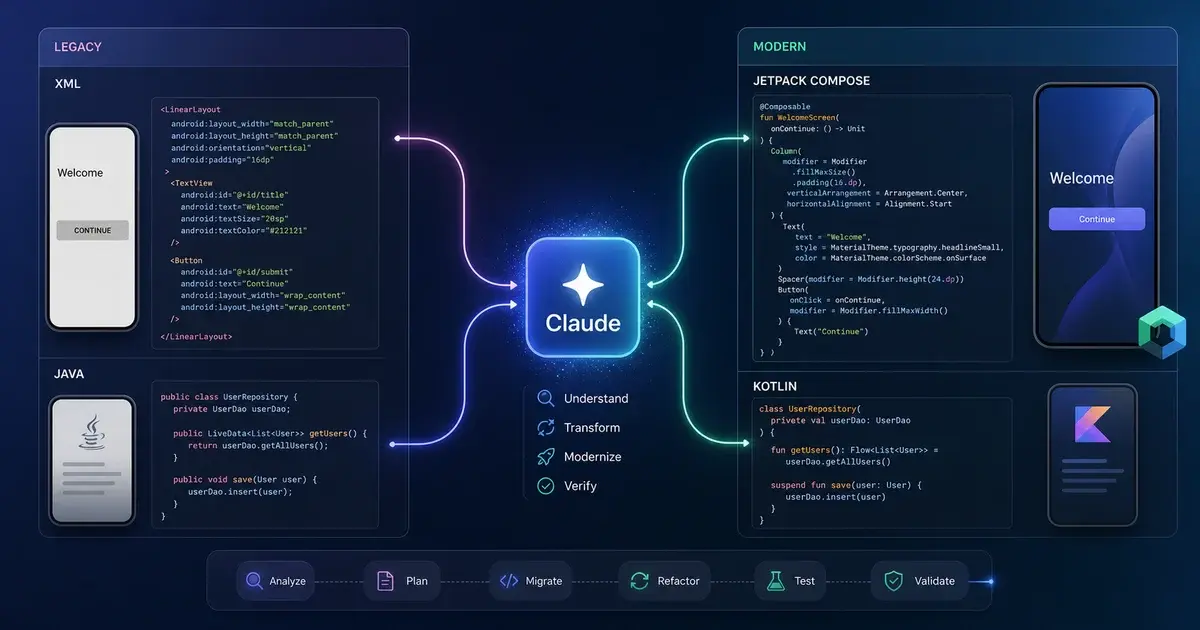
The key mechanism is explicit mapping rather than vague instruction. A well-designed skill does not tell Claude to "write idiomatic Compose." It tells Claude: when you see a layout_margin, there are no margins in Compose — decide between padding on the parent, a Spacer, or padding on the sibling based on the layout structure. When you see an ImageView without a local drawable resource, use AsyncImage from Coil because the original was almost certainly loading from a network URL. When you hoist state into parameters, always add a modifier: Modifier = Modifier trailing parameter so callers can customise layout. These are judgment calls that require context. A skill bakes in that judgment.
The broader Android Studio Java-to-Kotlin conversion documentation describes the same gap for language migration: IntelliJ's J2K tool has existed since 2017 and produces output that compiles but does not use Kotlin's structural idioms. Claude with the right prompting — or better, with a skill — recognises that a Java DTO with seven private fields, seven getters, setters, equals, hashCode, and toString should become a one-line data class, not a forty-line mechanical translation. That restructuring is the difference between a migration that makes the codebase better and one that makes it just differently wrong.
The net result is that Claude with skills is the first tool that can be described as having an opinion about the output. It produces code a reviewer would approve rather than code a reviewer would ask to redo. That is a qualitative shift, not a quantitative one, and it is why teams that have adopted the skill-based approach report collapsing six-month timelines into weeks rather than shaving a few days off.
How does the XML-to-Compose skill work in practice?
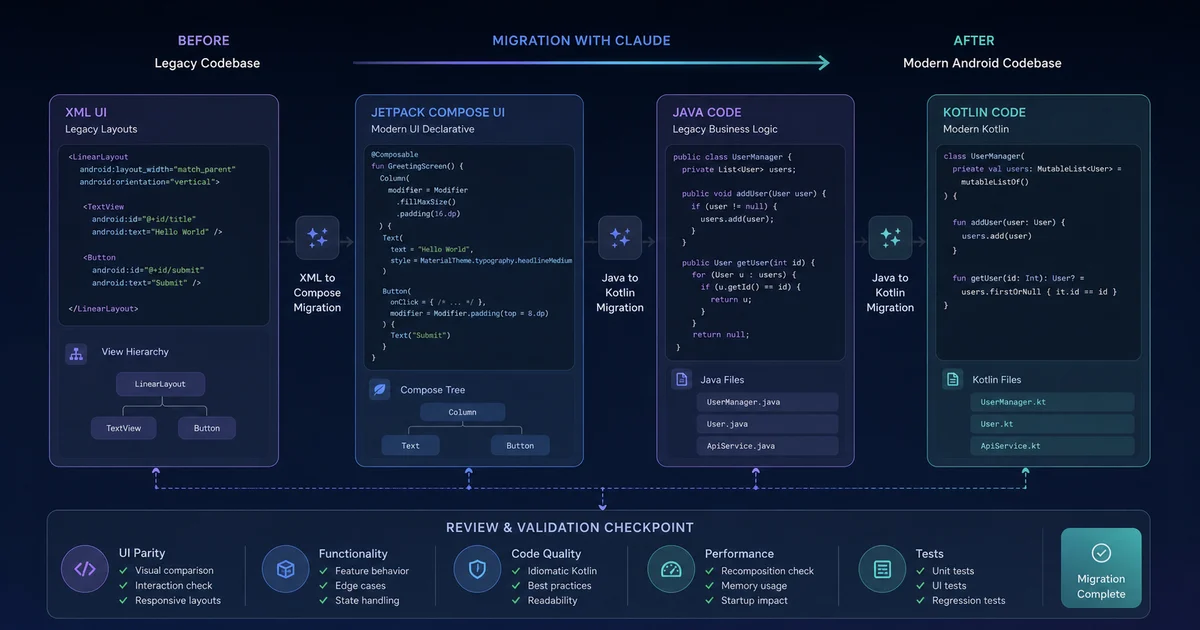
The singhsume123/xml-to-compose-skill works by providing Claude with an explicit mapping table of XML elements to Compose equivalents, attribute-level translation rules, and the idiom decisions that a mechanical converter cannot make — all encoded as skill context rather than per-prompt instruction. The mapping table covers every layout and view type you encounter in real production apps:
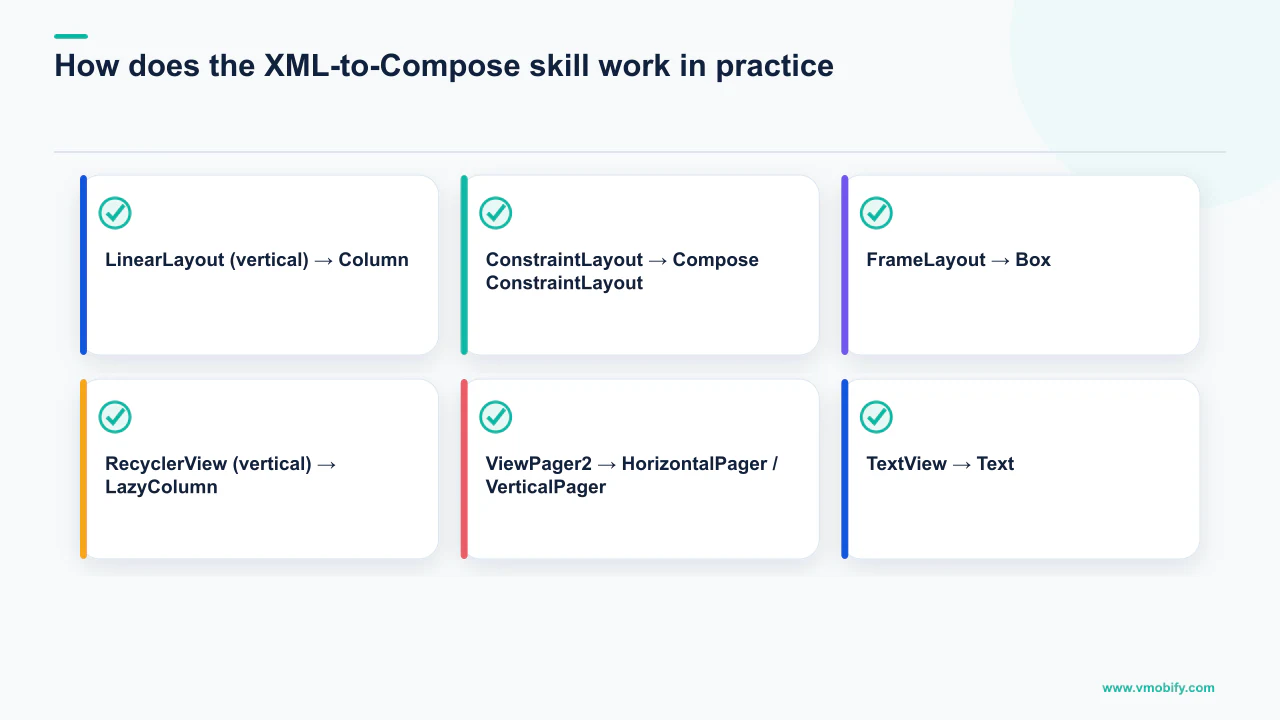
LinearLayout(vertical) →Column; (horizontal) →RowConstraintLayout→ ComposeConstraintLayoutFrameLayout→BoxRecyclerView(vertical) →LazyColumn; (horizontal) →LazyRowViewPager2→HorizontalPager/VerticalPagerTextView→Text;EditText→OutlinedTextFieldImageView→Image/AsyncImage(Coil for network sources)CardView→Card;Spinner→ExposedDropdownMenuBox
Attribute translation is equally explicit. match_parent becomes Modifier.fillMaxWidth(), fillMaxHeight(), or fillMaxSize() depending on context. layout_margin has no Compose equivalent — the skill tells Claude to resolve it as padding on the parent, a Spacer, or padding on the sibling based on the structure. ?attr/textAppearanceHeadlineSmall becomes MaterialTheme.typography.headlineSmall.
Here is a concrete before-and-after from a real screen — a profile header with avatar, display name, handle, and follow button:
<LinearLayout
    xmlns:android="http://schemas.android.com/apk/res/android"
    android:layout_width="match_parent"
    android:layout_height="wrap_content"
    android:orientation="vertical"
    android:padding="16dp">

    <ImageView
        android:id="@+id/avatar"
        android:layout_width="80dp"
        android:layout_height="80dp"
        android:layout_gravity="center_horizontal"
        android:contentDescription="@string/avatar_description" />

    <TextView
        android:id="@+id/display_name"
        android:layout_width="match_parent"
        android:layout_height="wrap_content"
        android:layout_marginTop="12dp"
        android:gravity="center"
        android:textAppearance="?attr/textAppearanceHeadlineSmall" />

    <TextView
        android:id="@+id/handle"
        android:layout_width="match_parent"
        android:layout_height="wrap_content"
        android:layout_marginTop="4dp"
        android:gravity="center"
        android:textAppearance="?attr/textAppearanceBodyMedium" />

    <Button
        android:id="@+id/follow_button"
        android:layout_width="match_parent"
        android:layout_height="wrap_content"
        android:layout_marginTop="16dp"
        android:text="@string/follow" />
</LinearLayout>
The skill produces the following idiomatic Kotlin:
@Composable
fun ProfileHeader(
    avatarUrl: String,
    displayName: String,
    handle: String,
    isFollowing: Boolean,
    onFollowClick: () -> Unit,
    modifier: Modifier = Modifier,
) {
    Column(
        modifier = modifier
            .fillMaxWidth()
            .padding(16.dp),
        horizontalAlignment = Alignment.CenterHorizontally,
    ) {
        AsyncImage(
            model = avatarUrl,
            contentDescription = stringResource(R.string.avatar_description),
            modifier = Modifier.size(80.dp),
        )
        Spacer(Modifier.height(12.dp))
        Text(
            text = displayName,
            style = MaterialTheme.typography.headlineSmall,
        )
        Spacer(Modifier.height(4.dp))
        Text(
            text = handle,
            style = MaterialTheme.typography.bodyMedium,
        )
        Spacer(Modifier.height(16.dp))
        Button(
            onClick = onFollowClick,
            modifier = Modifier.fillMaxWidth(),
        ) {
            Text(stringResource(if (isFollowing) R.string.unfollow else R.string.follow))
        }
    }
}
Notice what the skill did that no mechanical converter does. It hoisted all data — avatarUrl, displayName, handle, isFollowing — into parameters, because the skill knows state belongs at the call site. It used AsyncImage rather than Image because the original ImageView was almost certainly populated from a network URL. It mapped ?attr/textAppearanceHeadlineSmall to MaterialTheme.typography.headlineSmall. It replaced layout_marginTop with Spacer. It added the trailing modifier: Modifier = Modifier parameter — the convention every Compose codebase eventually adopts. And it correctly handled the button text toggling based on follow state, which the XML implied via setText() calls in the Activity but did not encode in the layout itself. None of those decisions exist in the input XML. All of them exist in the skill.
Which Compose skills should you install for production-quality output?
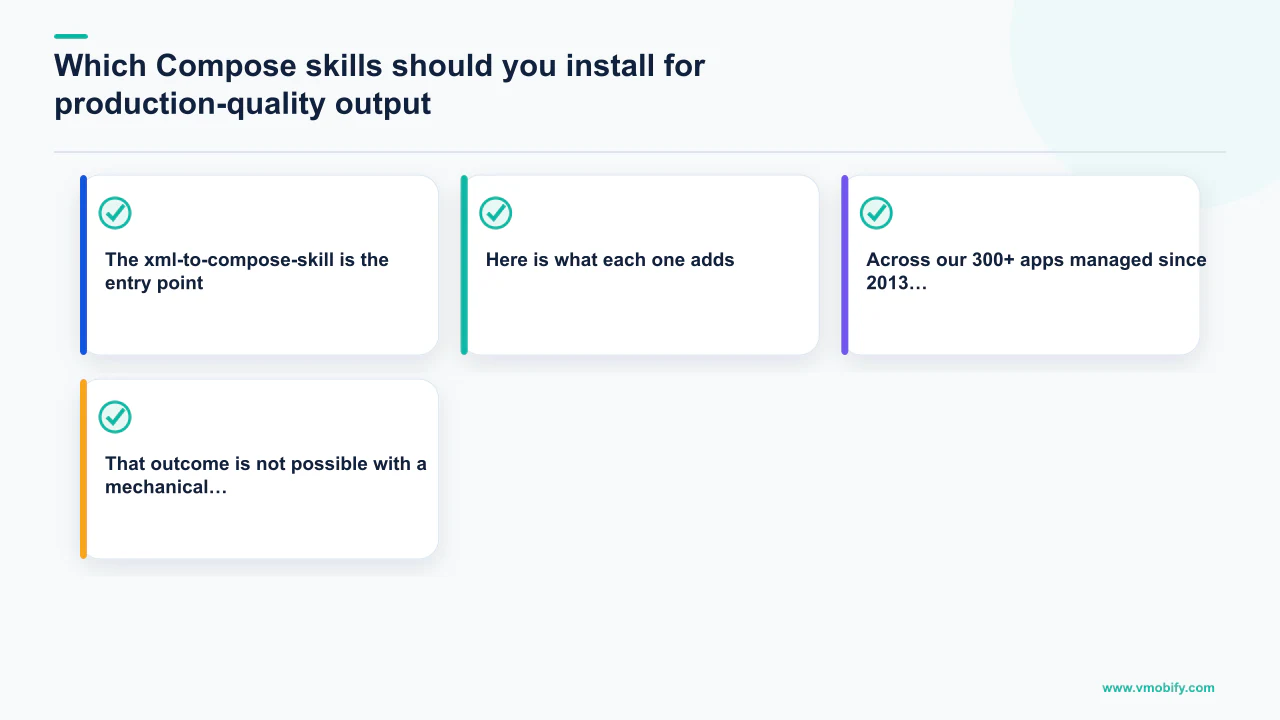
The xml-to-compose-skill is the entry point; chrisbanes/skills, skydoves/compose-performance-skills, aldefy/compose-skill, and hamen/compose_skill form the production stack that turns competent Compose output into code a senior engineer would ship without changes. Here is what each one adds:
- chrisbanes/skills — compose-state-hoisting: Enforces the single most important Compose pattern. Stateful composables hold state; stateless composables receive state and emit events. Without this skill, Claude will put
var name by remember { mutableStateOf("") }inside a composable that should receivename: StringandonNameChange: (String) -> Unitas parameters. The skill makes Claude check, before emitting any composable, whether the state belongs at this level or should be hoisted upward. - chrisbanes/skills — compose-state-holder-ui-split: Extends state hoisting to the ViewModel boundary. State that survives configuration changes — fetched data, pagination cursors, form drafts — belongs in a
ViewModelexposed asStateFlow. Purely visual state — dropdown expanded, tooltip visible — belongs in the composable asmutableStateOf. Without this skill, Claude defaults to scatteringmutableStateOfeverywhere, which fails on device rotation. - chrisbanes/skills — compose-side-effects: Enforces correct use of
LaunchedEffect,DisposableEffect,SideEffect,produceState, andrememberCoroutineScope. The differences between these are subtle and the failure modes are nasty.LaunchedEffect(Unit)on a composable whose keys actually change leads to effects not firing when expected. The skill encodes the decision tree. - chrisbanes/skills — compose-modifier-and-layout-style: Enforces Compose modifier conventions:
modifieris always the first optional parameter, modifiers chain in order (size → layout → visual → interaction), internal composables that don't need aModifierdon't receive one. Smallest skill in the stack, biggest cosmetic effect on output quality. - skydoves/compose-performance-skills: Jaewoong Eum's twenty-six-skill collection focused on Compose performance — stability analysis,
@Immutableand@Stableannotations, recomposition diagnostics,derivedStateOfversusremember, lazy listkeyandcontentTypeparameters, and baseline profiles for cold-start improvement. If you are migrating to Compose and you do not know these patterns, your app will be slower than the XML version and QA will notice. - aldefy/compose-skill: Verifies every claim against the androidx source. Every assertion about how a Compose API behaves comes with a pointer to the source file. Enormously useful when Claude tells you to use a modifier you have never seen — you want to know the actual androidx code says the same thing, not a two-year-old Stack Overflow answer.
- hamen/compose_skill: An audit skill. Point it at a Compose codebase and it produces an evidence-based report: which composables are not hoisting state, which are missing
modifierparameters, wheremutableStateOfis used outsideremember, whereLaunchedEffectkeys are wrong. It is the closest thing to a Compose linter that currently exists. Run it after every large migration pass.
The stack, taken together, makes Claude a competent Compose engineer rather than a syntactic translator. Across our 300+ apps managed since 2013, the teams that have adopted this skill set report the clearest before/after improvement in code review pass rates — fewer rounds, fewer rework cycles, fewer "this is correct but wrong" comments from senior reviewers. That outcome is not possible with a mechanical converter regardless of how fast it runs.
How do you migrate Java to idiomatic Kotlin at scale?
Claude with the right prompting delivers 20–47% code reduction compared to IntelliJ's J2K converter, because it recognises structural patterns — DTOs that should become data classes, callbacks that should become lambdas, AsyncTask that should become suspend functions — rather than translating line by line. Adjust's mobile app trends data consistently shows that Kotlin-native codebases have measurably lower crash rates than Java/Kotlin mixed codebases, partly because Kotlin's type system eliminates whole classes of null-pointer exceptions that Java's @Nullable annotations can only warn about.
The structural translations Claude gets right that J2K gets wrong:
- Java DTO → Kotlin data class: A Java class with seven private fields, seven getters, seven setters,
equals,hashCode, andtoStringbecomes a one-linedata class. J2K converts it method-by-method and produces forty lines. Claude recognises the pattern and produces the one line. AsyncTask→ suspend function: TheonPreExecute/doInBackground/onPostExecuteinheritance chain becomes a singlesuspend funcalled fromlifecycleScope.launch. J2K preserves the inheritance; Claude replaces the pattern entirely.- RxJava → Flow: J2K treats
Observable<T>as just another type. Claude maps most operators directly —maptomap,filtertofilter,flatMaptoflatMapConcatorflatMapLatestdepending on context — and produces aFlowpipeline that reads like Kotlin. - Single-method interface callbacks →
(T) -> Unitlambdas: J2K preserves the interface declaration; Claude replaces the type signature and updates every call site. Optional<T>→ nullableT?: JavaStreambecomes KotlinSequencefor lazy processing or a plainListfor small collections. Anonymous inner classes become trailing-lambda calls.
For Android specifically, the Sensor Tower data on top-grossing apps shows a clear correlation between modern tech-stack adoption and sustained ranking performance — not because Kotlin is magic, but because teams working in idiomatic Kotlin ship faster and have fewer regressions. The language migration is not cosmetic; it is the foundation that makes every subsequent change cheaper — including the paid UA efficiency improvements covered in our guide to getting your first 10k installs and our guide on buying Android app installs responsibly.
The VoltAgent kotlin-specialist subagent is worth installing alongside the skills. It is a subagent rather than a skill, which means it activates as a specialist when the conversation involves Kotlin and carries Kotlin-specific conventions — coroutines, sealed classes, the standard library, the typical pitfalls — without needing to be reloaded into every prompt. Using a skill collection plus a language specialist subagent is the pattern that produces the most consistent results for any Android team adopting Claude Code seriously.
What is the step-by-step migration workflow for a real Android app?
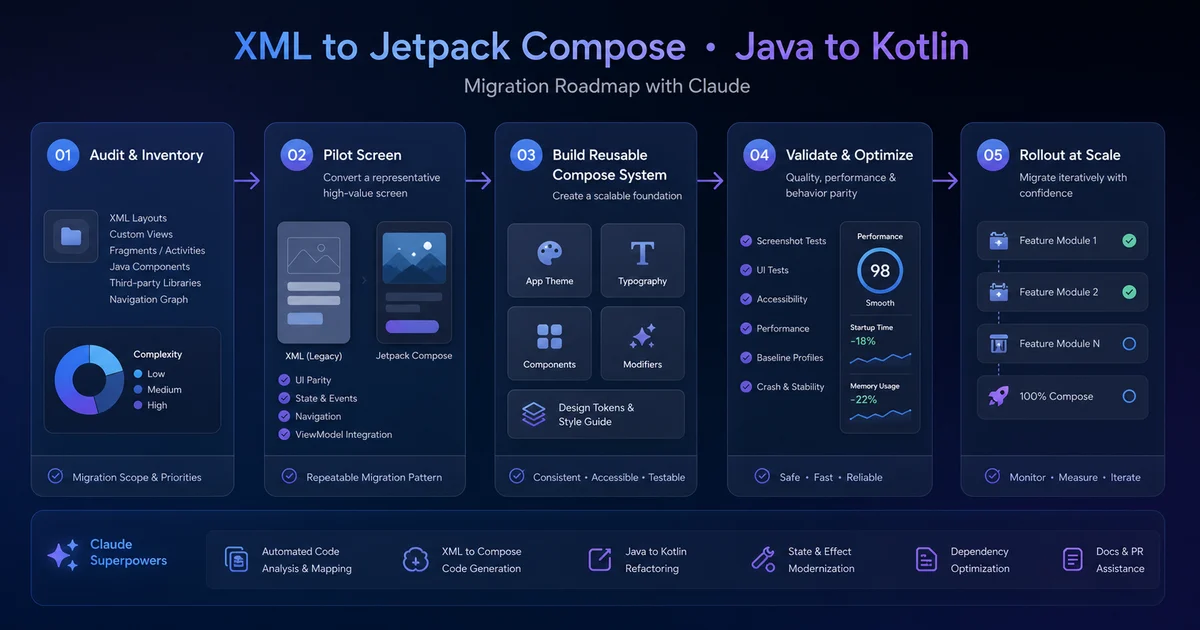
The migration workflow that consistently produces reviewable output in the shortest time is a seven-step loop: audit, pick a leaf module, convert with the skill, audit the output, generate tests, verify with Compose Preview, and review with the code-review plugin — in that order, every screen.
- Audit: Before touching any code, generate a file-by-file inventory of layout XML files and the Activities or Fragments that inflate them. Ask Claude to produce this as a markdown table with columns for the layout file, the inflating class, shared XML dependencies (includes, custom views), and a complexity score from one to five. This takes roughly ten minutes for a hundred-screen app and produces a document you can hand to a PM to estimate the migration timeline.
- Pick a leaf module first: A leaf module is one with no downstream consumers — settings screens, debug menus, onboarding flows. These are the correct first targets because their blast radius is small if something goes wrong, and because success builds team credibility and Compose familiarity. Teams that start with the main feed or checkout flow almost always bog down.
- Convert with the XML-to-Compose skill: Point Claude at both the layout XML and the inflating class together. The XML alone does not tell you where data comes from. The Activity shows you that
displayNamecomes fromviewModel.user.displayNameand that the click handler callsviewModel.onFollowClick()— without that context, Claude guesses at parameter names and the output is less idiomatic. - Audit the output with hamen/compose_skill: Even with the conversion skill applied, the first pass tends to scatter state inside composables that should receive it. Run the audit skill on the output as a second pass — flag any
var ... by remember { mutableStateOf(...) }that should be hoisted, and verify thatLaunchedEffectcalls have the correct keys. The two-pass approach consistently produces better output than trying to get everything right in one shot. - Generate tests: Compose testing uses
androidx.compose.ui.testrather than Espresso. The compose-ui-testing-patterns skill (part of chrisbanes/skills) encodes the patterns — how to usecomposeTestRule, how to find nodes by semantics, how to handle animations. Ask Claude to generate a test file for each migrated screen, covering the same assertions the original Espresso tests covered. - Verify with Compose Preview: Add at least one
@Previewfor the default state, and previews for empty, loading, and error states. The previews render in Android Studio without booting the emulator. You can see in real time whether the migration produced something that looks like the original. Without previews, you run the full app for every change — twenty seconds per iteration destroys flow. - Review with the code-review plugin: Open a PR with the migrated screen, run the plugin, and have it review the diff against the patterns the skills established. This catches modifier ordering, missing accessibility content descriptions, hardcoded strings that should use
strings.xml, and colour references that should use the Material theme. It produces the kind of review a senior engineer would produce in fifteen minutes, in about thirty seconds.
The whole loop — audit, pick, convert, audit, test, preview, review — takes roughly ninety minutes for a medium-complexity screen, versus the six to eight hours hand-porting used to require. The output is better, because the audit and review steps catch things that a single-pass approach misses. See our case studies for concrete before/after velocity numbers from teams that have run this workflow at scale.
What are the failure modes to watch for?
Claude with skills has real failure modes that the marketing around AI-assisted migration tends to omit — knowing them in advance lets you build the audit loop that catches them before they merge.
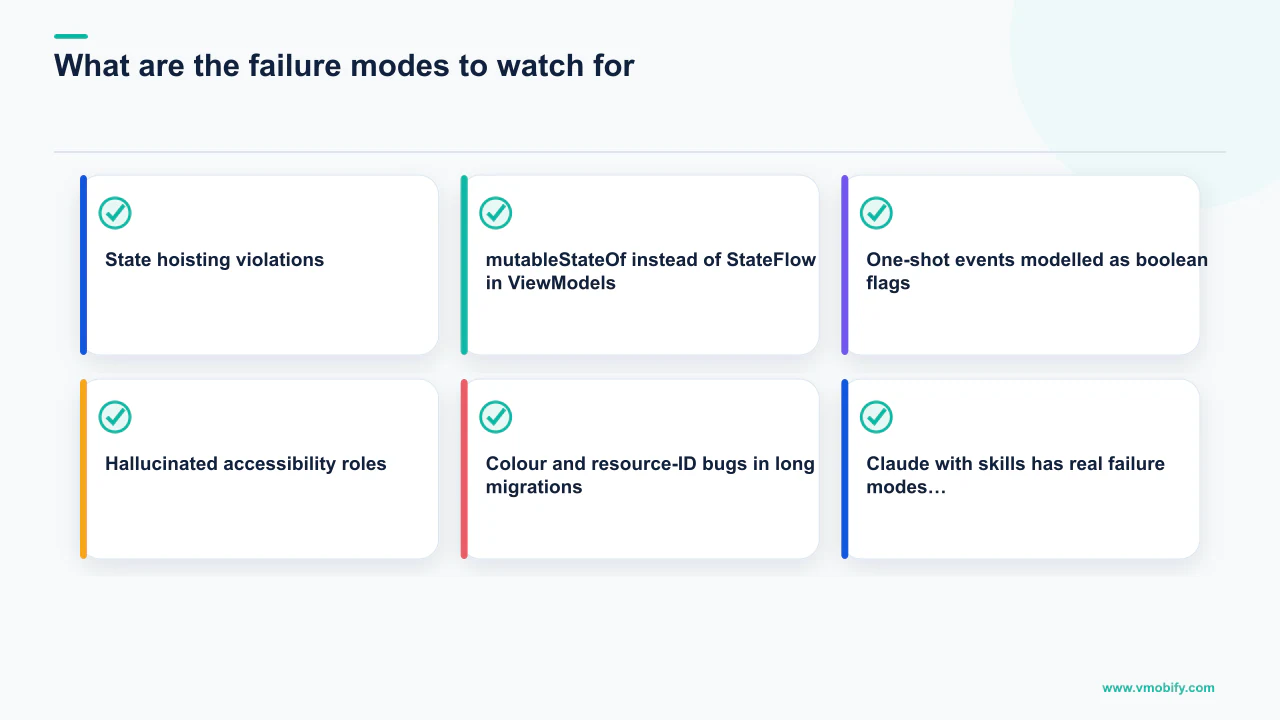
- State hoisting violations: Even with the compose-state-hoisting skill, Claude occasionally puts business logic inside
@Composablefunctions —LaunchedEffectblocks fetching data, scope-launched coroutines updating repositories, side effects that belong in the ViewModel. This compiles and runs. It also breaks every assumption Compose makes about pure composables and leads to fetches firing on recomposition. The hamen/compose_skill audit catches most of these, but review every migrated screen by hand for this specific pattern before merging. mutableStateOfinstead ofStateFlowin ViewModels: When Claude is uncertain about where state belongs, it defaults tomutableStateOfinside the composable. Fine for visual state; wrong for state that survives configuration changes or needs to be shared across composables. Grep migrated code formutableStateOfcalls that should have beenStateFlowand fix them before the PR lands.- One-shot events modelled as boolean flags: "Show this snackbar" is not state — it is a one-shot event. The correct Compose pattern is a
Channel<Event>collected withLaunchedEffect, orMutableSharedFlowwithreplay = 0. Claude often models it asvar showSnackbar by mutableStateOf(false), which must be manually reset after the snackbar shows, leading to snackbars that appear twice or not at all after configuration change. Check for this pattern specifically in code review. - Hallucinated accessibility roles: Claude knows accessibility roles exist and should be used. Claude does not always know which roles actually exist in the current
androidx.compose.ui.semanticspackage. We have seenModifier.semantics { role = Role.Heading }produced when no such role exists — the build fails, you fix it, you move on, but it is a consistent tax on migration throughput. Run a clean build after every batch of migrated files. - Colour and resource-ID bugs in long migrations: AppsFlyer's State of App Marketing research consistently shows that visual quality is one of the top conversion signals in store listings — and the same principle applies inside the app. Migrations where
@color/primaryis replaced withMaterialTheme.colorScheme.primarycan introduce subtle colour shifts if the original was a hardcoded hex that does not match the Material theme default. Migrations where a hardcodedStringbecomes astringResource(R.string.something)call against a key that does not exist compile and ship. Run visual regression tests (Paparazzi works well) on every migrated screen and review screenshot diffs carefully before merging.
None of these failure modes are reasons to avoid the Claude-based workflow. They are reasons to run the two-pass audit loop described above rather than treating the first-pass output as final. In our experience managing large migration projects, teams that skip the audit pass spend twice as long in code review as teams that run it — the savings are not in the conversion step, they are in not having to redo the conversion step.
How should you approach a 100k-line Java/XML codebase?
For a 100,000-line mixed Java/Kotlin, mixed XML/Compose Android codebase, the correct order is: scaffolding skills first, leaf XML-to-Compose migration second, Java-to-Kotlin data-layer sweep third, bulk feature-screen migration fourth, and Compose Multiplatform only after the Android codebase is stable. Stacking two migrations simultaneously — translating the language while redesigning the architecture, or porting Android while extending to iOS — is the fastest way to bog down. Sequence matters more than speed.
The detailed sequence:
- Scaffolding week (one week): Install chrisbanes/skills, skydoves/compose-performance-skills, singhsume123/xml-to-compose-skill, and hamen/compose_skill. Set up the code-review plugin. Get the team fluent in how skills load and how to combine them. This is a one-time investment that pays back for the entire migration.
- Leaf module migration (two weeks): Settings screens, debug menus, onboarding flows. Five to ten screens. The output of this phase is not just migrated code — it is your team's pattern library for what good Compose looks like in this codebase. Save the migrated screens as reference examples. Future migrations will be compared against them.
- Java-to-Kotlin data layer (three to four weeks): File-by-file, module-by-module, using the Reforge Refactoring Engine for batch passes and the kotlin-specialist subagent loaded throughout. Do not redesign the data layer at the same time as translating it. That is two migrations stacked on each other. Translate first, redesign in a later pass.
- Bulk XML-to-Compose migration (two to three months): The main feature screens, navigation graph, shared components. Use the audit-review loop on every screen. This is the heavy lift. Do not skip the audit pass to move faster — the time saved is repaid in bugs, review cycles, and rework.
- Compose Multiplatform — only after all of the above: If the company has an iOS app and your team has shipped Kotlin Multiplatform before, the skill ecosystem now supports CMP well enough to recommend it. chrisbanes/skills includes
kotlin-multiplatform-expect-actual, which is the cleanest treatment of theexpect/actualpattern available outside Google internal documentation. Sensor Tower's State of Mobile report shows that cross-platform apps built on shared business logic have meaningfully faster feature-parity cycles than teams maintaining separate codebases — the long-term argument for CMP is real. But if you go to CMP before the Android codebase is stable, you are debugging KMP and Compose issues simultaneously, and neither gets the focus it needs. Ship Android Compose, stabilise it, then revisit.
The six-month timeline that feels impossible with hand-porting becomes a realistic eight-to-twelve-week project with this workflow and the right skill stack. The teams that will benefit most from the next generation of tooling — skills that read codebases and generate migration plans grounded in the actual patterns they find — are the teams already partway through this process. The investment in starting now, even at a smaller scale, is the prerequisite for taking advantage of what comes next. Talk to our team if you want a structured migration plan for your Android codebase, or see our case studies for what these workflows have delivered in practice. For teams earlier in the app growth cycle, our pre-launch app marketing guide and ASO service are the parallel investments worth making alongside technical modernisation.
Frequently Asked Questions
Can I use Claude to migrate an XML layout to Jetpack Compose without any skills installed?+
You can, but the output will be a mechanical translation rather than idiomatic Compose. Claude without skills tends to produce code that compiles but places state in the wrong layer, misses the modifier parameter convention, and uses mutableStateOf where StateFlow belongs. Installing singhsume123/xml-to-compose-skill and chrisbanes/skills takes minutes and the quality difference is immediately visible in code review.
How long does a full XML-to-Compose migration take with Claude skills?+
With the seven-step audit-review loop, medium-complexity screens take roughly ninety minutes each versus six to eight hours for hand-porting. A fifty-screen app that would take three to four months by hand typically migrates in four to six weeks with two engineers using this workflow.
Is IntelliJ J2K not good enough for Java-to-Kotlin migration?+
J2K is fine for syntactic translation but produces output that uses var where val belongs, models nullability with !! where the Java was actually safe, and misses structural Kotlin idioms entirely — AsyncTask stays as AsyncTask rather than becoming a suspend function, RxJava chains stay as RxJava rather than becoming Flow. Claude with the right prompting or a Kotlin-specialist skill does the structural restructuring that J2K cannot.
What is the biggest risk in an XML-to-Compose migration?+
The most insidious risk is colour and resource-ID bugs that compile and ship — hardcoded hex values that do not match the Material theme they replace, or stringResource calls against keys that do not exist. Visual regression tests with a tool like Paparazzi, run on every migrated screen before merging, are the reliable catch for this class of bug.
Should we migrate to Compose Multiplatform at the same time as migrating from XML to Compose?+
No. Migrating Android to Compose and migrating to CMP are two separate migrations. Running them simultaneously means debugging KMP issues and Compose issues at the same time, with neither getting the focus it needs. Ship and stabilise Android Compose first, then evaluate CMP as a separate project.
Does Vmobify help Android teams with technical migration alongside app growth work?+
Our core services are app growth — ASO, paid UA, and user acquisition — but we work with engineering teams to ensure that technical modernisation investments are timed to support growth milestones. A Compose migration is often the prerequisite for the store listing improvements and performance gains that drive organic ranking. See our ASO service and results pages for context on how the technical and growth work connect.
What is the single biggest mistake teams make when starting an Android migration?+
Starting with a high-complexity, high-traffic screen — the main feed, checkout, or home tab — instead of a leaf module. The blast radius of a bug in a leaf module is small. The blast radius of a bug in checkout is a production incident. Always pick the simplest, least-depended-upon screen first, build the team's confidence and pattern library, then move to the critical paths.
Sources
- Google — Migrate XML Views to Compose — Official Google migration guide with phased-adoption strategy
- Android Studio Convert Java to Kotlin — JetBrains J2K converter documentation
- AppsFlyer — State of App Marketing in India — Annual mobile app growth benchmarks
- Google Play Developer Docs — Official launch guidance
- Adjust Mobile App Trends — Annual benchmark data
- Sensor Tower Market Intelligence — App store analytics
- Sensor Tower — Blog and mobile insights — State of Mobile annual report
About the author
Amol Pomane — Founder, Vmobify
Amol leads Vmobify, a mobile app growth agency that has driven 30M+ downloads and ranked 54K+ keywords across 300+ apps since 2013. He writes about ASO, paid user acquisition, retention, and the operational reality of scaling mobile apps in India and global markets.