Deep Linking & Deferred Deep Linking: A Practical Setup Guide
Deep links route a tap straight to the right screen inside your app, and deferred deep links carry that destination through an install. This guide explains how both work, how to set up iOS Universal Links and Android App Links correctly, and how to stop links silently falling back to the browser.
On this page
- What is deep linking and why does it matter for growth?
- What is the difference between direct and deferred deep linking?
- What happened to custom URI schemes?
- How do iOS Universal Links work?
- How do Android App Links work?
- How does deferred deep linking survive an install?
- How do you use deep linking for re-engagement and web-to-app funnels?
- How does deep linking tie into attribution?
- What is the step-by-step deep-link setup checklist?
- How do you test deep links before launch?
- What are the common failure modes and how do you fix them?
- Frequently Asked Questions
What is deep linking and why does it matter for growth?
Deep linking is the practice of sending a user to a specific screen or piece of content inside an app, rather than dumping them on the generic home screen — and for app growth teams it is the difference between a campaign that converts and one that loses people at the door. A web URL has always been able to point at an exact page; deep linking gives your app the same ability, so a tap on an ad, an email, an SMS, a referral link, or a QR code can land a user on the precise product, article, or offer you promised them.
The reason this matters is friction. Every extra tap between intent and destination bleeds conversion. If a user taps a link for a specific pair of shoes and your app opens to the home feed, they now have to search for that product again — and a meaningful share simply will not bother. A deep link removes that gap entirely. The promise made by the creative is kept by the landing experience, which is the whole point of a paid acquisition or re-engagement campaign.
There are two layers to the problem, and they are worth separating early. The first is routing when the app is already installed — that is straightforward in-app navigation triggered by a link. The second, and far harder, is routing when the app is not installed yet: the user taps a link, gets sent to the App Store or Play Store, installs, opens for the first time, and still needs to arrive at the right screen. That second case is deferred deep linking, and it is where most teams trip up.
Across our 300+ apps managed since 2013, deep linking is one of the least glamorous and highest-leverage pieces of growth infrastructure we set up. It does not have a dashboard that goes up and to the right on its own, but it quietly raises the conversion rate of nearly every channel that touches it — paid user acquisition, owned email and push, referral loops, and influencer links all perform better when the destination is exact. Get it wrong and you pay for clicks that never reach the screen you were promoting.
What is the difference between direct and deferred deep linking?
A direct deep link routes an existing user straight to an in-app screen because the app is already installed; a deferred deep link carries the intended destination through the App Store or Play Store install so a brand-new user still lands on that screen the first time the app opens. Same goal — the right screen — but two completely different mechanics depending on whether the app exists on the device at the moment of the tap.
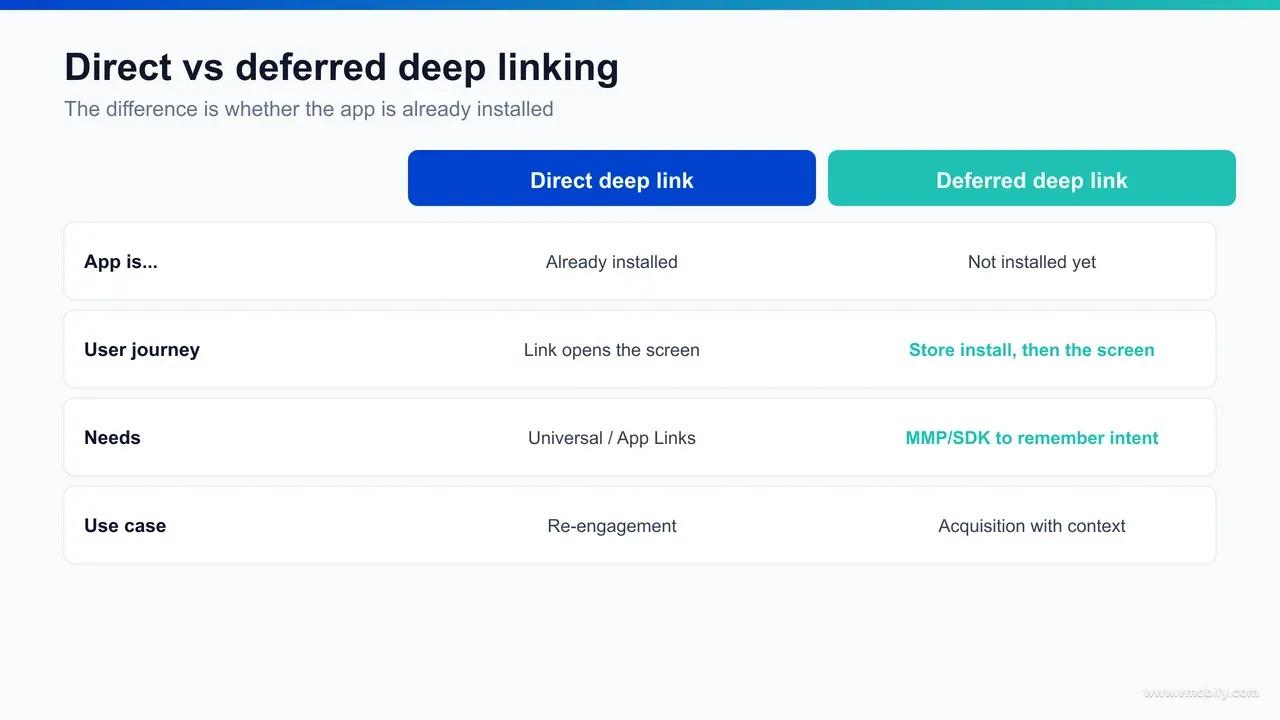
The direct case is the simpler one. The user taps a link, the operating system recognises that your app can handle that URL, the app opens, and your code reads the link and navigates to the matching screen. There is no install step and no waiting; the routing happens in milliseconds. This is what fires for your existing user base — the people you reach through push notifications, email, in-app messages, and links shared between users.
The deferred case is where the engineering gets interesting. When the app is not installed, the OS cannot open it — there is nothing to open. So the tap sends the user to the store, they install, and at that point the original link is gone. The store does not pass your destination through. Something has to remember "this user was heading to product X" and replay that intent when the app launches for the very first time. That memory is what the word deferred describes: the deep link is deferred until after installation completes.
Why does the distinction matter so much in practice? Because your two most valuable audiences sit on opposite sides of it. Existing users need direct deep links; new users acquired from a campaign need deferred deep links.
A setup that only handles the direct case will route your loyal users perfectly and silently break the first-run experience for every new install you paid to acquire — which is exactly the cohort whose first impression matters most.
What happened to custom URI schemes?
Custom URI schemes — links like myapp://product/123 — were the original way apps handled deep links, and they have been almost entirely superseded by verified HTTPS links (iOS Universal Links and Android App Links) because URI schemes are unreliable, insecure, and break badly when the app is not installed. They still exist, and you will still see them used internally, but they should not be your public-facing deep-link mechanism in 2026.
The original design was simple: an app registered a custom scheme such as myapp://, and any link starting with that scheme would try to open the app. The problems showed up quickly. First, there is no ownership verification — any app could register any scheme, so two apps could claim the same one, and a malicious app could intercept links meant for yours. Second, and more painful day to day, is the failure mode when the app is not installed. A browser asked to open myapp:// with no app to handle it throws an error or does nothing at all — the user hits a dead end instead of being routed to the store.
There was also the notorious confirmation prompt. To work around the security gaps, browsers and the OS started showing "Open in [app]?" dialogs, adding a tap and a moment of doubt to every link. For a growth team trying to remove friction, an unavoidable interstitial on every deep link is the opposite of what you want.
Verified HTTPS links solved all of this. Because the link is an ordinary https:// URL that you have proven you own, the OS can open your app when it is installed and silently fall back to your website when it is not — no error, no dead end, no scheme collision. The same link works in both states. There is still a legitimate, narrow role for URI schemes: internal navigation within your own app, or as a fallback some attribution providers chain behind a verified link. But as the thing you put in an ad, an email, or a QR code, custom schemes are legacy. Universal Links and App Links replaced them for good reasons, and in our portfolio we treat any public deep link still relying on a raw URI scheme as a defect to fix.
How do iOS Universal Links work?
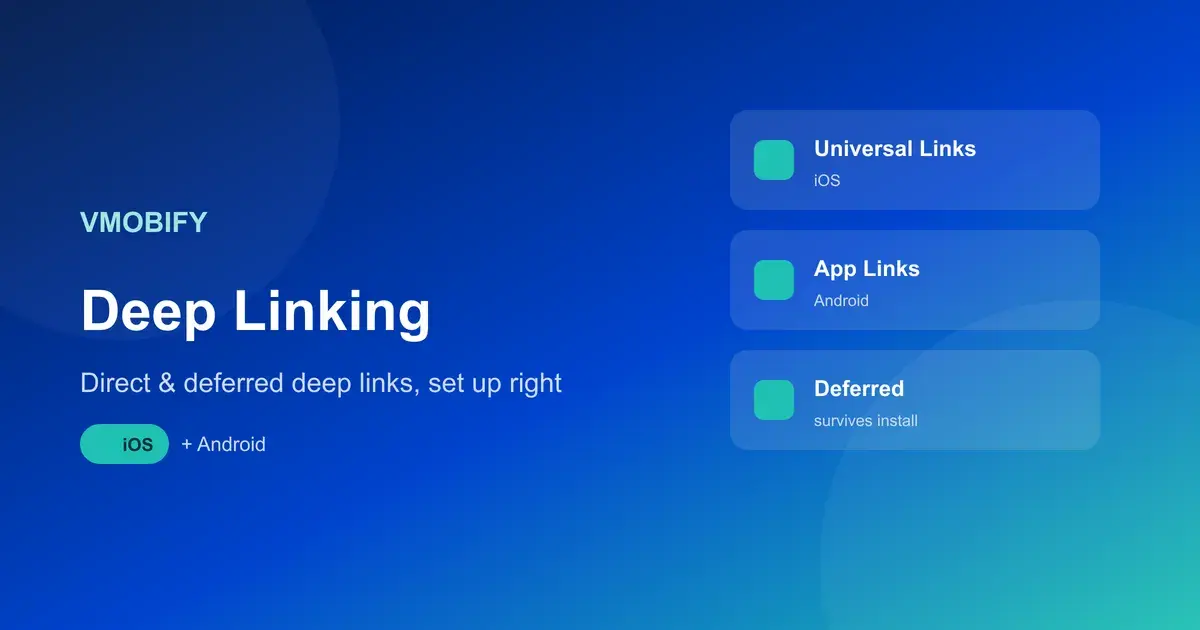
iOS Universal Links let a standard HTTPS URL open your app directly when it is installed and your website when it is not, by proving you own the domain through an apple-app-site-association (AASA) file plus an Associated Domains entitlement in the app. When both pieces are in place, tapping https://yourdomain.com/product/123 opens the app to that product with no scheme, no prompt, and no broken state.
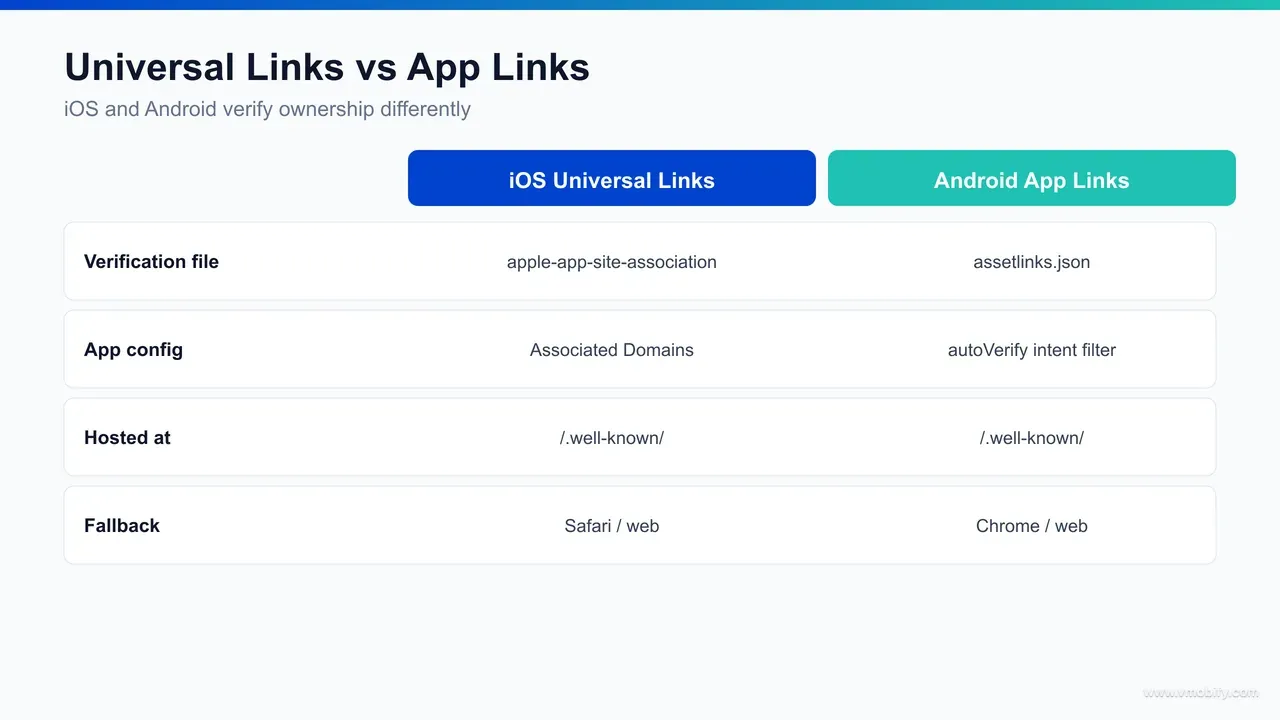
There are two halves to the setup, one on the server and one in the app. On the server, you host the apple-app-site-association file. It is a JSON file, served over HTTPS with no redirects and a Content-Type of application/json, placed at /.well-known/apple-app-site-association on your domain. Inside it you declare your App ID (your Team ID plus bundle identifier) and the URL paths that should open the app. iOS fetches this file to confirm that the domain and the app genuinely belong together, per Apple's Universal Links documentation.
In the app, you add the Associated Domains capability in Xcode and list your domain with the applinks: prefix — for example applinks:yourdomain.com. This entitlement is the app's side of the handshake: it tells iOS which domains the app is allowed to claim. When the app installs, iOS checks the AASA file for each associated domain to validate the pairing. Both sides must agree, or the link quietly falls back to opening the website.
The runtime side is the third piece teams forget. Routing the user to the right screen is your code's job, not the OS's. Your app receives the incoming URL through the relevant lifecycle callback (in the NSUserActivity / continue-user-activity flow, or the SwiftUI onOpenURL handler), and you parse the path to decide where to navigate. The OS gets the user into the app; your routing logic gets them to the screen.
A few practical notes save real debugging time. iOS caches the AASA file, so changes are not always picked up instantly — and on a freshly installed app, the link only works after the OS has fetched and validated the file. Universal Links also do not fire reliably when pasted into the Safari address bar; they are designed to work from taps in other apps, links, and search results.
We test from a real link in Notes or Messages, never from the URL bar, to avoid chasing a problem that is only an artefact of how Safari treats typed URLs.
How do Android App Links work?
Android App Links are the Android equivalent of Universal Links — verified HTTPS links that open your app directly without a chooser dialog — and they rely on a Digital Asset Links file named assetlinks.json plus intent filters marked with autoVerify in your manifest. Verification is the keyword: once Android confirms the domain-to-app relationship, your links bypass the "open with" prompt and go straight to the app.
On the server side you host assetlinks.json at /.well-known/assetlinks.json on your domain, served over HTTPS. The file declares your app's package name and the SHA-256 fingerprint of the signing certificate that signed the build users actually install.
That fingerprint is the part teams get wrong most often — if you ship through Play App Signing, the fingerprint that matters is the one Google uses to sign the delivered app, which you find in the Play Console, not your local upload key. A mismatch here is the single most common reason Android verification silently fails.
In the app's manifest you declare an intent filter for your domain with android:autoVerify="true", covering the https scheme and the host you own. At install or update, Android reads that flag, fetches your assetlinks.json, and checks that the package name and certificate fingerprint match. If they do, the domain is verified and your links open the app without a chooser, exactly as Android's App Links guide describes. If verification fails, the link still works but Android may show a disambiguation dialog or open the browser instead — functional, but with the friction you were trying to remove.
As on iOS, the runtime handler is your responsibility. The verified intent delivers the URL to your activity, and your code parses it and navigates. The platform guarantees the app opens for a verified link; it does not decide which screen to show. Newer Android versions also give you tools to inspect and manually reset link verification state on a device during development, which is invaluable when you are chasing a fingerprint mismatch — you can confirm exactly whether the system considers your domain verified rather than guessing from behaviour.
How does deferred deep linking survive an install?
Deferred deep linking is not a native operating-system feature — the destination survives an install because an attribution SDK or mobile measurement partner (MMP) records the original click and replays it on first launch, using a stored identifier, a matched click, or a probabilistic match to reconnect the new install to the link the user tapped. Neither Apple nor Google passes your custom destination through the store, so a third party has to bridge the gap.
The mechanics, stripped to essentials, look like this. A user taps a deep link that points first at a tracking domain. The provider logs the click — the destination, the campaign, a timestamp, and whatever device or session signals are available — then forwards the user to the App Store or Play Store. The user installs and opens the app. Your bundled SDK fires on first launch, calls home, and the provider matches this new install back to the earlier click. It returns the original destination, and your app routes the user there as if they had tapped a direct deep link. Branch's deferred deep linking glossary describes this same click-then-replay pattern in detail.
The matching can happen a few ways, and the differences matter for reliability. Deterministic matching uses a hard identifier — a pasteboard value, an install referrer, or a click ID carried by the store — to tie click and install together with high confidence. Probabilistic, or fingerprint, matching infers the link from softer signals such as IP address and device characteristics within a short window; it fills gaps but is less certain and is increasingly constrained by privacy changes. On Android, the Play Install Referrer is a robust deterministic channel; on iOS, the available signals are tighter, which is why iOS deferred links can be a touch less reliable than Android's.
This is the practical reason almost no one builds deferred deep linking from scratch. The click-logging infrastructure, store-redirect handling, match windows, and per-platform edge cases are a product in themselves — which is exactly what providers like AppsFlyer, Branch, Adjust, and Singular sell. We have seen teams spend weeks half-building a fragile version of this before adopting an MMP that does it reliably out of the box. If you are choosing between providers, our breakdown of AppsFlyer vs Adjust vs Singular covers how their deep-linking and attribution stacks compare.
How do you use deep linking for re-engagement and web-to-app funnels?
Deep linking is what makes re-engagement and web-to-app funnels actually convert, because it lets a push, an email, or a mobile-web visitor land on the exact in-app screen that matches their intent instead of a generic home screen that forces them to start over. Without deep linking, every re-engagement message is a coin flip on whether the user can re-find what you wanted to show them; with it, the message and the destination are one continuous experience.
Take re-engagement first. A win-back push that says "your cart is waiting" should open the cart, not the home feed. An email announcing a price drop on a saved item should open that item. A push about a new episode should open that episode. The copy makes a specific promise, and a deep link is the only way to keep it. Strip the deep link out and you have re-engagement messaging that creates intent and then strands it — the fastest way to teach users that your notifications are not worth tapping. Our guide to app re-engagement and win-back goes deeper on the messaging side; deep linking is the plumbing that makes any of it land.
Web-to-app is the other big use case, and deferred deep linking is its engine. A user browsing your mobile site finds a specific product, taps a "get the app" banner or a smart link, installs, and — if your deferred deep linking is set up — opens the app directly on that same product. The mobile-web context carries through the install. Done well, this turns your website into a high-intent acquisition channel for the app rather than a dead end that loses the user's place at the store.
Two practical points keep these funnels honest. First, respect the user who already has the app: a smart link should open the app directly for installed users (a direct deep link) and route everyone else through the deferred path — serving an install prompt to someone who already installed is a needless friction tax. Second, measure the funnel end to end, because the value of deep linking shows up in conversion and retention deltas, not in the link itself. In our portfolio, wiring deep links into re-engagement and web-to-app is consistently one of the cheapest conversion-rate improvements available, precisely because the traffic is already there — you are recovering intent you were otherwise losing at the handoff.
How does deep linking tie into attribution?
Deep linking and attribution are the same pipeline seen from two angles: the click that decides where a user lands is also the click that records who sent them, so the routing system and the measurement system share infrastructure and should be set up together. Every deferred deep link passes through a tracking click, and that click is exactly what attribution is built on — the destination and the credit travel in the same packet.
Look at the deferred flow again with an attribution lens. The user taps a link that hits a tracking domain; the provider logs the campaign, source, and creative alongside the destination; the user installs; the SDK matches the install back to the click. At that moment two things resolve at once — which screen to show (deep linking) and which campaign earned the install (attribution). They are not separate events; they are one matched click read for two purposes. This is why your MMP handles both: it would be wasteful and error-prone to run two independent matching systems over the same clicks.
The practical implication is that you should never scope a deep-linking project without considering attribution, or vice versa. Teams that bolt attribution on after building deep linking separately end up with two click systems that disagree about the same install. Set up the tracking links once, route through your MMP, and you get correct routing and correct credit from a single source of truth. For the full picture of how install credit is matched, modelled, and reported, our mobile attribution guide covers the measurement side end to end — this section deliberately does not duplicate it.
One caveat worth flagging without going down the rabbit hole: privacy frameworks have reshaped what signals are available for matching, especially on iOS, and that affects deferred deep linking and attribution together. Apple's AdAttributionKit and SKAdNetwork change how install credit flows for opted-out users, and the same constraints that limit attribution precision can limit deferred-link match rates. If your acquisition leans heavily on iOS paid channels, read our comparison of AdAttributionKit vs SKAdNetwork alongside this guide. The point here is simply that deep linking does not live in isolation from your measurement stack — it is the front half of it, and your analytics and attribution setup should treat the two as one system.
What is the step-by-step deep-link setup checklist?
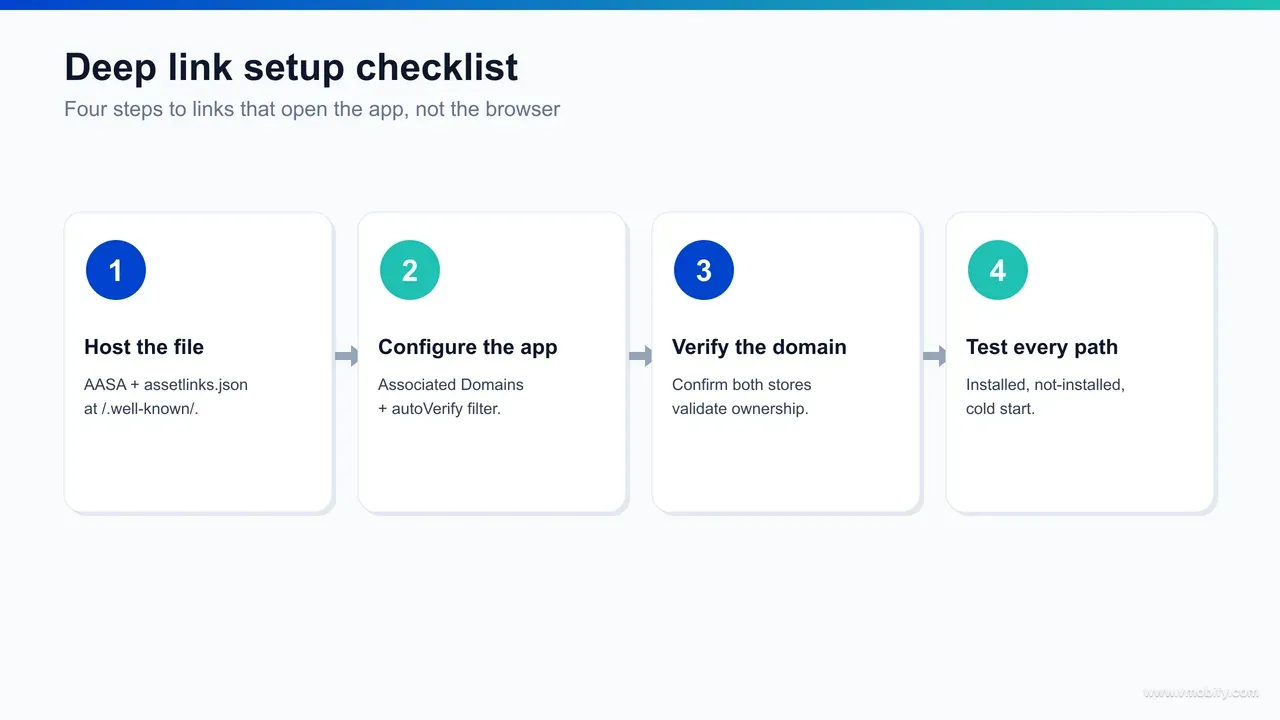
A complete deep-link setup has a predictable shape: verify your domains on both platforms, wire the runtime handlers, add an MMP for deferred links and attribution, define your link and path scheme, then test every state before you ship. Work through it in order — each step depends on the one before, and skipping verification is what causes most launch-day failures.
- Map your destinations and URL scheme: decide which screens are deep-linkable and design a clean, stable path structure (for example /product/{id}, /article/{slug}). Stable paths are what your AASA, assetlinks.json, and routing code all key off, so settle them before writing anything else.
- Set up iOS Universal Links: host the apple-app-site-association file at /.well-known/ over HTTPS with no redirects, add the Associated Domains entitlement with your applinks: domain, and confirm the App ID in the AASA matches your Team ID and bundle identifier.
- Set up Android App Links: host assetlinks.json at /.well-known/, list the correct SHA-256 fingerprint (the Play App Signing one if you use it), and add the autoVerify intent filter for your domain in the manifest.
- Implement the runtime handlers: write the code on each platform that receives the incoming URL, parses the path, and navigates to the matching screen — including a sensible fallback for unrecognised paths so a stale link degrades gracefully instead of crashing.
- Add an MMP for deferred linking and attribution: integrate your chosen provider's SDK, configure the deferred deep-link callback that fires on first launch, and make your routing code handle that callback the same way it handles a direct link.
- Build and test your links: create the tracking/smart links for each campaign, then test installed, not-installed, iOS, Android, and the web fallback before any of them go into a live campaign.
The discipline that separates a clean launch from a messy one is treating verification (steps 2 and 3) as a hard gate. If the AASA or assetlinks.json is wrong, nothing downstream works, and the failure is silent — links just fall back to the browser without any error to tell you why. Confirm verification passes on a real device before you build a single campaign link on top of it.
How do you test deep links before launch?
Test deep links across the full matrix of states — installed and not-installed, iOS and Android, direct and deferred, plus the web fallback — using real devices and real taps, because the most common failures only appear in the state you did not check. A link that works for your installed test phone can be completely broken for a brand-new install, which is precisely the user you are paying to acquire.
The states that must each pass:
- Installed, direct: tap a link with the app already installed and confirm it opens to the exact screen — on both iOS and Android.
- Not installed, deferred: remove the app, tap a link, install from the store, open, and confirm you land on the intended screen on first launch. This is the state teams skip and the one that matters most.
- Web fallback: tap a link on a device or browser without the app and confirm it opens your website cleanly — no error, no dead-end scheme prompt.
- Verification status: confirm iOS has fetched and validated your AASA and that Android reports your domain as verified, rather than inferring it from behaviour.
Use the right tools for each platform. On iOS, validate that your AASA file is well-formed and served correctly with Apple's published expectations in mind, and test taps from Notes or Messages rather than the Safari address bar, which does not trigger Universal Links reliably. On Android, use adb to fire intents at your verified URLs and check the system's link-verification state for your domain. Most MMPs also ship a link validator or test console that simulates the deferred flow without you having to publish a build to the store each time.
Two testing habits save the most pain. First, always test the not-installed deferred path on a genuinely clean device or a fresh install — leftover state from a previous install can make a broken deferred link look like it works. Second, retest after any change to your signing config, domain, or AASA/assetlinks.json content, because all three feed verification and any one of them can silently break it.
In our portfolio, a short pre-launch test matrix run on real devices catches the overwhelming majority of deep-link defects before a single ad rupee or dollar is spent against them.
What are the common failure modes and how do you fix them?
Nearly every deep-link failure traces to one of four causes — a malformed or uncached verification file, an unverified Android domain, links opening inside an in-app browser, or a missing runtime handler — and each has a specific, testable fix. Knowing the four lets you diagnose a broken link in minutes instead of guessing.
- Links open the browser instead of the app: this almost always means verification failed. On iOS, check that the AASA file is served over HTTPS with no redirects, the correct Content-Type, the right App ID, and that iOS has had a chance to fetch it (it caches, so a fresh install or reinstall may be needed). On Android, check the SHA-256 fingerprint matches your Play App Signing key and that autoVerify is set. Fix the file, reinstall, reverify.
- Broken or unreachable AASA: the file is missing, behind a redirect, blocked by auth, or malformed JSON. It must sit at /.well-known/apple-app-site-association, return 200 directly, and parse cleanly. Validate it before blaming the app — a single stray character breaks the whole handshake.
- Unverified Android domain: the manifest declares autoVerify but verification still fails, usually a fingerprint mismatch (local upload key versus Play-signed key) or a typo in the host. Pull the verification status on a device, correct the fingerprint in assetlinks.json, and reinstall to trigger reverification.
- Links opening in an in-app browser: taps from inside other apps' embedded webviews (some social and messaging apps) can swallow Universal Links and App Links and never hand off to your app. The fix is usually a provider smart link with a web fallback that detects the in-app browser and routes correctly, plus testing from the specific apps your audience uses.
- Missing or wrong runtime handler: the app opens but lands on the home screen, or the deferred callback fires and nothing happens. The OS did its job; your routing did not. Confirm your handler reads the incoming URL and the deferred callback and that both map to the same navigation logic, with a graceful fallback for paths you no longer support.
The meta-lesson behind all of these is that deep-link failures are silent by design — a misconfigured link does not throw an error, it just falls back to the web, so a broken setup can run unnoticed in a live campaign for weeks while you quietly pay for clicks that never reach the app.
That is why verification gating and a real-device test matrix are not optional polish; they are the controls that catch the failures the system will never surface on its own. If you would rather have this set up and validated correctly the first time — alongside the attribution stack it shares infrastructure with — that is exactly the kind of growth plumbing our team handles, and you can talk to us about your specific app and channels.
Google shut Firebase Dynamic Links down on 25 August 2025. Its own FAQ is blunt about the consequence: all links served by the service, on both custom domains and page.link subdomains, stopped working, and all links clicked "return a HTTP 404 status response to end users". Domain and link metadata were marked for deletion on the same date. If any campaign, email, QR code or printed asset still points at a Dynamic Link, it is a dead link today. Google's own migration guidance splits by use case: a third-party deep-linking provider for full feature parity, native App Links and Universal Links where you only need app deep linking, and updated Firebase Authentication SDKs for email-link sign-in flows.
Frequently Asked Questions
What is the difference between a deep link and a deferred deep link?+
A deep link routes a user to a specific in-app screen when the app is already installed. A deferred deep link preserves that destination through the app store install, so a new user who installs after tapping the link still lands on the intended screen on first launch.
Do I still need custom URI schemes?+
Not for public-facing links. Verified HTTPS links — iOS Universal Links and Android App Links — replaced URI schemes because they open the app reliably and fall back to the web instead of showing a broken error. URI schemes are now mainly for internal in-app navigation or as a provider fallback.
What is the apple-app-site-association file?+
It is a JSON file hosted at /.well-known/apple-app-site-association on your domain over HTTPS. It declares your App ID and the URL paths that should open your app, and iOS fetches it to verify that your domain and app belong together for Universal Links.
Why are my Android App Links not opening the app?+
The most common cause is an unverified domain, usually a SHA-256 fingerprint mismatch — if you use Play App Signing, assetlinks.json must list the Play-signed certificate fingerprint, not your local upload key. Check the device verification status and confirm autoVerify is set in the manifest.
Do I need a third-party tool for deferred deep linking?+
In practice, yes. Deferred deep linking is not a native OS feature — it requires logging the click, redirecting to the store, and matching the install back on first launch. An MMP or attribution SDK like AppsFlyer, Branch, Adjust, or Singular handles this far more reliably than a custom build.
How is deep linking related to attribution?+
They share the same pipeline. The tracking click that decides where a deferred user lands is also the click that records which campaign earned the install, so your MMP resolves routing and credit from one matched click. Set them up together rather than as separate systems.
Why do my deep links open in the browser instead of the app?+
This almost always means verification failed. Check that your AASA or assetlinks.json file is served correctly over HTTPS, that the App ID or signing fingerprint is right, and that the OS has fetched the file — a reinstall is often needed before a fix takes effect.
Sources
- Apple — Supporting Universal Links in Your App — AASA file, Associated Domains entitlement, and runtime handling on iOS
- Android Developers — Handling Android App Links — assetlinks.json, autoVerify intent filters, and Digital Asset Links verification
- Branch — Deferred Deep Linking glossary — How a deferred deep link survives an install via click-then-replay matching
- AppsFlyer — Resources and deep linking guides — MMP-side deferred deep linking, OneLink, and attribution mechanics
- Apple — Defining a custom URL scheme for your app — Legacy URI scheme handling and why verified links are preferred
- Android Developers — Verify Android App Links — Domain verification, signing fingerprints, and resetting verification state
About the author
Amol Pomane — Founder, Vmobify
Amol leads Vmobify, a mobile app growth agency that has driven 30M+ downloads and ranked 54K+ keywords across 300+ apps since 2013. He writes about ASO, paid user acquisition, retention, and the operational reality of scaling mobile apps in India and global markets.
Model an install budget
Turn CPI and activation assumptions into acquisition scenarios.
Open free tool