How to Do ASO for Your App: A Step-by-Step Guide for 2026
App Store Optimisation is the highest-ROI channel for sustainable app growth. This step-by-step guide walks you through every ASO lever — from audit and keyword research to A/B testing, ratings, and measuring results — so you can rank higher and convert more visitors into installs.
On this page
- What is ASO and what is it NOT?
- How do you run an ASO audit before touching anything?
- How do you do keyword research for ASO step by step?
- How do you optimise your metadata for both stores?
- How do you optimise your store creatives to convert?
- How do you run A/B tests on iOS and Android?
- How do you build rating velocity and recover from a drop?
- How do you measure whether your ASO is actually working?
- Frequently Asked Questions
What is ASO and what is it NOT?
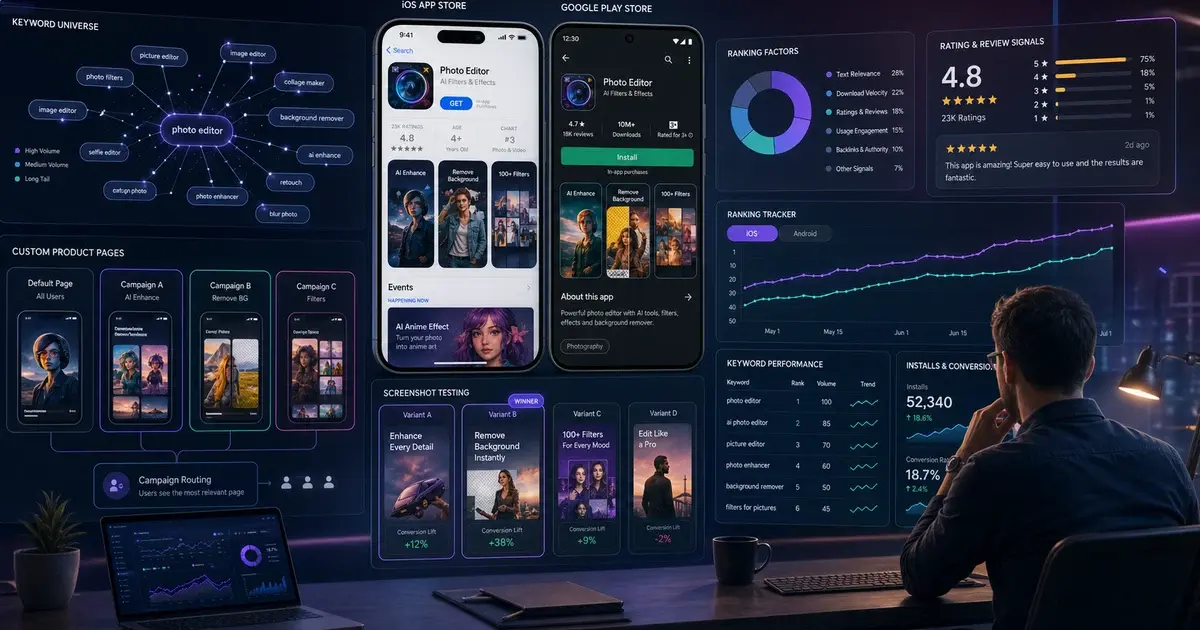
App Store Optimisation (ASO) is the practice of improving your app's visibility in the Apple App Store and Google Play so that more of the right users find, click, and install your app organically — and it is substantially more than just inserting keywords into a title. The mistake most first-time ASO practitioners make is treating it as a metadata exercise. In reality, ASO operates across three distinct levers that must all move together.
The first lever is discoverability — ranking higher in store search and browse so more users see your app. This is where keyword work lives: the terms you place in your title, subtitle (iOS) or short description (Android), keyword field, and long description directly influence which queries the store algorithm surfaces your app for.
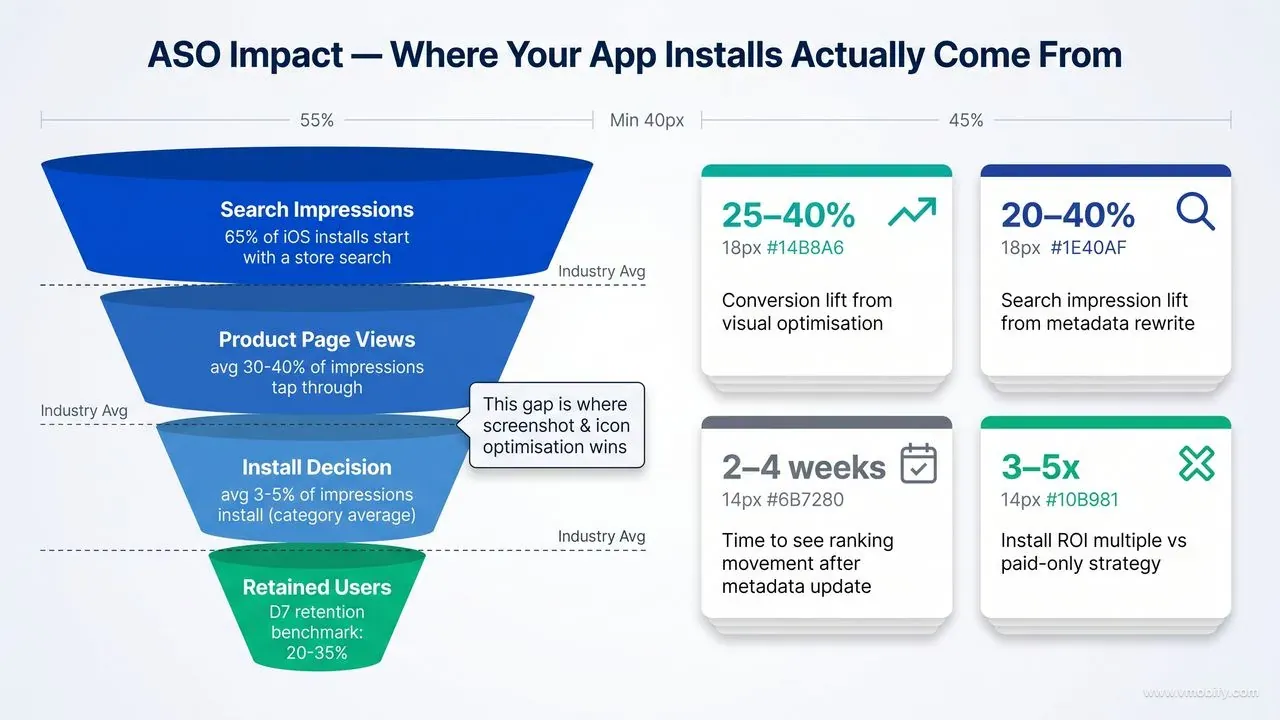
The second lever is conversion — the percentage of users who visit your product page and actually tap Install. A well-ranked app with weak screenshots, a confusing icon, or a cluttered description will bleed installs from every traffic source you have, including paid campaigns. Improving conversion by even 10% delivers free installs from all your existing traffic — organic, paid, and referral alike.
The third lever is reputation — your star rating and review velocity. Both stores use ratings as a ranking signal and as a trust signal to users browsing search results. A 4.7-star app outranks a 3.9-star app for the same keyword, and converts 30–40% better at the same ranking position.
What ASO IS
- Keyword research and strategic metadata placement
- Screenshot and icon optimisation for conversion
- Ratings and review velocity management
- Structured A/B testing of store listing elements
- Continuous measurement and iteration — monthly
- Localisation of metadata and creatives for each market
What ASO is NOT
- A one-time keyword-stuffing exercise
- A substitute for a product users actually want
- Guaranteed ranking overnight — median lift takes 6–8 weeks
- Buying fake reviews (both stores detect and penalise this)
- Identical on iOS and Android — the two stores index differently
- Set-and-forget — algorithms and competitors change monthly
Across our portfolio of 300+ apps, the apps that grow fastest are the ones where the founding team treats ASO as an ongoing discipline rather than a launch checklist. The ASO work we do at Vmobify runs all three levers simultaneously because optimising just one without the others is the most common reason ASO results plateau after the initial lift.
How do you run an ASO audit before touching anything?
The most expensive ASO mistake is starting with keyword research before you know where the actual conversion leaks are — an ASO audit diagnoses your current listing's weakest point so you fix the highest-impact problem first, not the most visible one. A proper audit takes two to three hours and covers five areas.
- Funnel analysis. Pull your impression → product page view → install data from App Store Connect or Google Play Console. Low impressions = discoverability problem (metadata/keywords). High impressions but low page views = browse and search result presentation problem (icon, first screenshot, title). High page views but low installs = conversion problem (screenshots, description, ratings). The funnel tells you which lever to pull first.
- Keyword ranking baseline. Use a tool like AppTweak or Sensor Tower to pull your current keyword rankings across your 20–30 most relevant terms. Note your position for each, and which keywords you rank for that you did not deliberately target — these are signal that the algorithm has found semantic relevance you can capitalise on.
- Metadata quality review. Read your title, subtitle (iOS) or short description (Android), and description out loud. Does the title naturally contain your primary keyword? Does the subtitle use its 30 characters on distinct keywords not already in the title? Is the iOS keyword field (100 chars) free of repeated terms? Is the Google Play description readable, not a wall of keywords?
- Creative audit. Screenshot your app listing on a mid-range device, then view it in a search results context. Do your first two screenshots work as standalone ads? Is your icon instantly recognisable at 60×60 px? Is the first line of your description compelling above the fold before the "more" truncation?
- Ratings and review health check. Note your current average rating, the volume of ratings in the last 30 days, and the ratio of 1–2 star reviews to 4–5 star reviews. A rating below 4.2 is an active ranking suppressor on both stores.
A fintech app came to us with solid keyword rankings but a 2.1% install-to-page-view conversion rate — about a third of the category average. The audit revealed the first two screenshots were feature lists with no benefit framing, and the icon was identical in style to three competitors. Fixing those two elements alone lifted conversion to 5.7% within six weeks — tripling organic installs from the same keyword traffic.
How do you do keyword research for ASO step by step?
ASO keyword research is a four-step sequence that moves from broad seed ideas to a prioritised, ranked list of terms you will deliberately place in your metadata — skipping any step produces a keyword list that is either too broad to rank for or too narrow to drive meaningful volume.
- Build your seed list. Write down the 5–10 phrases that best describe what your app does and the problem it solves — in the language your users would use, not your internal product language. A meditation app's seeds might be: "meditation", "sleep sounds", "anxiety relief", "mindfulness", "breathing exercises". These are your category anchors.
- Run competitor gap analysis. Identify your top 5 competitors. In AppTweak or Sensor Tower, pull the keywords each competitor ranks in positions 1–10 for. Create a matrix: keywords where all 5 competitors rank and you do not are high-priority gaps. Keywords where only 1–2 competitors rank indicate lower-competition opportunities.
- Expand with keyword tools and autocomplete. Feed your seeds into an ASO tool and record every keyword suggestion, related term, and long-tail variant. Also manually type each seed into the App Store and Google Play search bars — autocomplete reveals real user query patterns that tools sometimes miss. Aim for a raw list of 100–150 terms before you start trimming.
- Prioritise by volume/difficulty ratio. Score each keyword on three dimensions: search volume (how many monthly searches), difficulty (strength of current top-10 apps, 1–10), and relevance (does a user searching this term want exactly what your app delivers, 1–10). Calculate a simple priority score: (Volume × Relevance) ÷ Difficulty. Sort descending. Your top 20–40 terms are your working keyword universe.
From that prioritised list, bucket keywords by intent tier:
- Head terms (e.g. "budget app") — high volume, high competition, long road to page one but worth including in your title if you have traction.
- Mid-tail terms (e.g. "personal finance tracker") — medium volume, moderate difficulty — these are your 60-to-90-day ranking targets and should anchor your subtitle or short description.
- Long-tail terms (e.g. "budget tracker for students in India") — lower volume, low difficulty — achievable in 30–45 days and often convert better because they match high-intent, specific queries.
Refresh your keyword list every 4–6 weeks. The store algorithm re-weights terms as competitor metadata changes, new apps enter the category, and seasonal search patterns shift. A keyword that was difficult in January may be winnable by April if the top-ranking apps stopped updating their metadata.
How do you optimise your metadata for both stores?
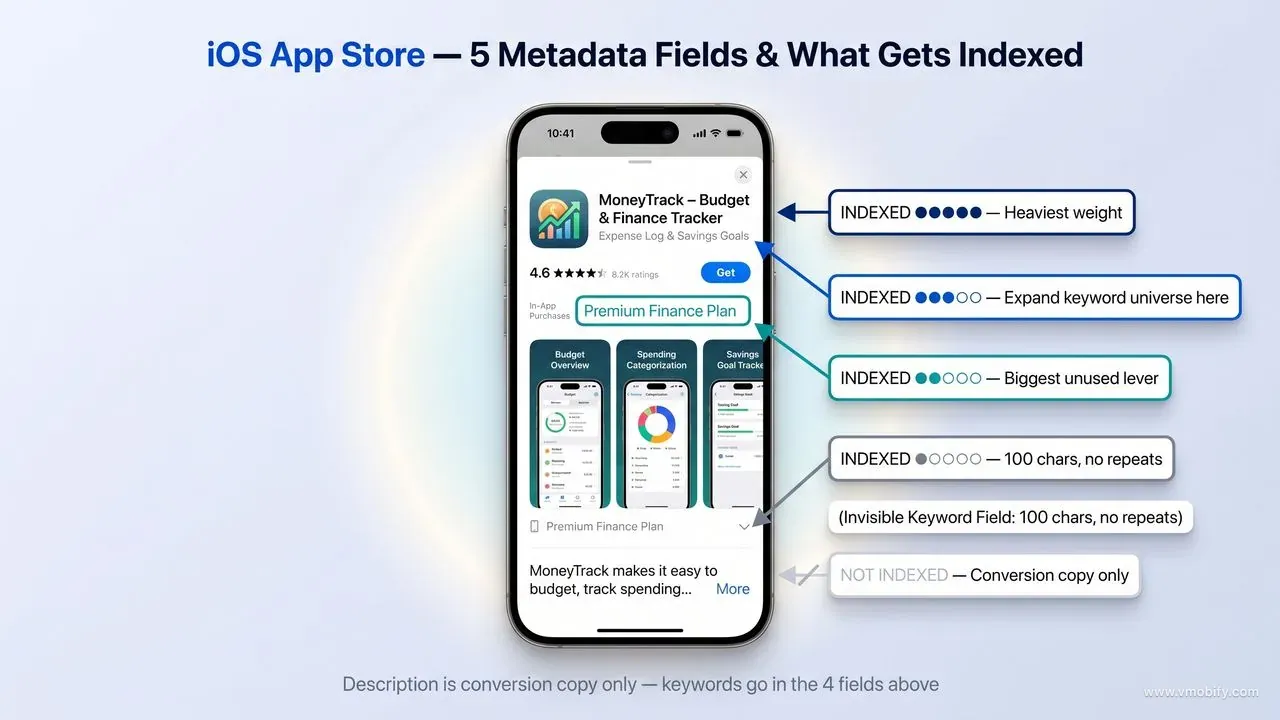
Metadata optimisation means strategically distributing your prioritised keywords across the specific fields that carry indexing weight on each store — and the field hierarchy is meaningfully different on iOS versus Android, so a single-template approach leaves significant ranking potential on the table.
iOS (App Store)
- App Name — 30 chars, highest indexing weight. Include brand + primary keyword.
- Subtitle — 30 chars, second-highest weight. Use for keywords not in the name.
- Keyword Field — 100 chars, indexed. Comma-separated, no spaces. Never repeat words already in name or subtitle.
- Description — 4,000 chars. NOT indexed for search. Write it for conversion, not keywords.
- What's New — Not indexed. Use for user engagement, not keywords.
Android (Google Play)
- Title — 50 chars, highest indexing weight. Include brand + primary keyword.
- Short Description — 80 chars, indexed + prominently visible. Treat as an ad headline with your second-priority keywords.
- Long Description — 4,000 chars, fully indexed by Google. Front-load keywords in the first 250 chars (above the fold). Repeat primary keyword 3–5× naturally.
- Category + Tags — Contribute to browse and editorial surfaces.
Three execution rules that separate disciplined metadata work from keyword stuffing:
Rule 1 — No repetition across fields (iOS). Every character in the iOS keyword field is wasted if the word already appears in your name or subtitle. The algorithm indexes those fields independently; repeating terms is literally throwing away ranking opportunities.
Rule 2 — The first 250 characters of your Google Play description are disproportionately weighted. Users see only the first three lines before the "Read more" tap. Write the first paragraph as if it were the entire description — your primary keyword, your core value proposition, and a secondary keyword, all in natural sentences.
Rule 3 — Localise metadata for each major market, not just translate it. A direct English translation of your title into Hindi often misses the actual high-volume search term Indian users type. Native-language keyword research for your top three markets is worth two to four times the ranking lift of a translation alone.
According to AppTweak's analysis of top-charting apps, 88% of top iOS apps localise their subtitle and 82% localise their description — yet fewer than 40% of the broader App Store does. Localisation is one of the clearest remaining white-space opportunities in ASO.
How do you optimise your store creatives to convert?
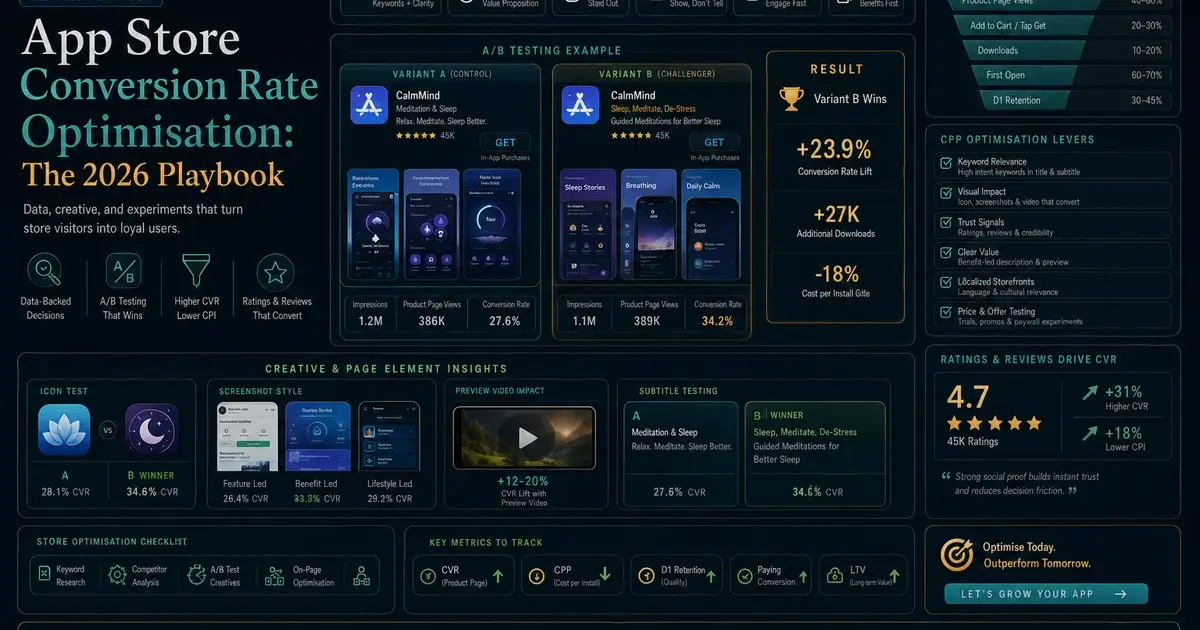
Store creatives — icon, screenshots, and preview video — do not affect keyword ranking, but they determine whether a ranked position converts into an install: weak creatives mean you are paying (in organic ranking effort or paid UA spend) to send users to a listing that loses them. Research from SplitMetrics documents single screenshot changes producing six-figure install lifts; the discipline is methodical, not artistic.
Icon. Your icon is the first visual element a user sees in search results, even before reading the title. Across the A/B tests we have run across our portfolio of 300+ apps, icon changes produce the largest single conversion swings — often ±15–25%. Test one bold colour variant (high contrast background, single hero element) against your current icon. Do not test two new variants simultaneously; you will not know which drove the change.
Screenshots 1 and 2. On iOS, your first two screenshots display directly in search results without the user tapping through to your listing page. They must function as standalone ads — a headline benefit and a visual that proves it, all legible at thumbnail scale. These two screenshots carry approximately 90% of the visual conversion weight for most apps because the majority of users who install never scroll past them. On Google Play, the feature graphic (the banner at the top of the listing) plays the same role.
- Lead with the outcome, not the feature. "Track every rupee automatically" beats a screenshot of the dashboard with a caption that reads "Dashboard."
- Use portrait orientation on iOS — portrait screenshots display larger in search results than landscape.
- Add short benefit captions in a large, accessible font. Apple's OCR now indexes text within screenshots on iOS, so clarity in caption copy has a secondary ranking benefit.
- Screenshot 3 is the highest-impact creative for users who do swipe through — use it to address the primary objection or showcase your most differentiated feature.
Preview video. An auto-playing video in search results is a double-edged asset. A strong video — hook in the first 3 seconds, real in-app footage, designed for muted playback with on-screen captions — can lift conversion meaningfully. A weak video will suppress conversion below your no-video baseline. Test having a video versus not having one before you test two video variants. Both Apple's Custom Product Pages and Google Play Store Listing Experiments let you run these tests against live traffic at no cost.
Localising your screenshots is not the same as translating the caption text. A screenshot designed for a Western audience with a premium, minimalist aesthetic often converts poorly in India, Southeast Asia, or MENA, where users respond to denser information and social proof markers like review counts. Design culturally, not just linguistically.
How do you run A/B tests on iOS and Android?
Both stores provide free native A/B testing tools — Apple's Product Page Optimisation (PPO) and Google Play Store Listing Experiments — and the teams that use them systematically outperform competitors who update their listings based on gut feel alone, typically by 10–25% in conversion rate over 12 months.
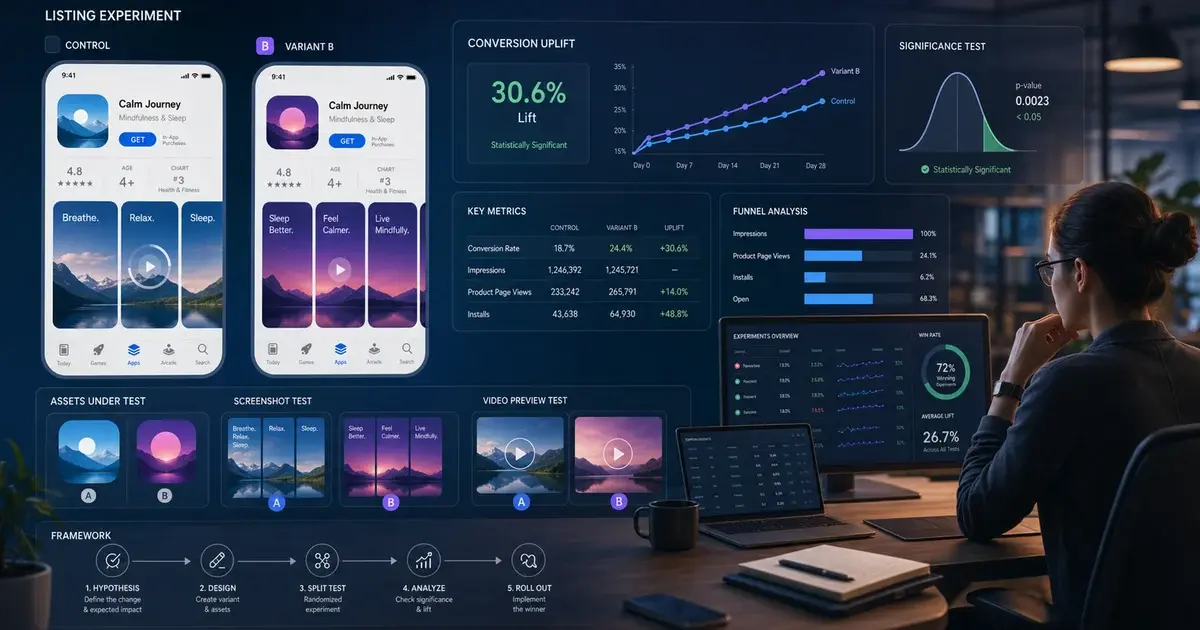
Google Play Store Listing Experiments let you test up to three variants of your icon, screenshots, feature graphic, or short description against your control listing. Google splits live organic traffic between variants and provides a statistical confidence score. Run experiments for a minimum of 7 days; Google's console will flag when confidence reaches 90%+. You can run experiments on a localised listing without affecting your default listing — which makes it low-risk to test aggressive creative changes in one market before rolling globally.
Apple Product Page Optimisation (PPO) lets you test up to three variants of your app icon, screenshots, and preview video against your default product page. Apple allocates a percentage of your organic App Store traffic to each variant. The minimum recommended test duration is 90 days for low-traffic apps; higher-traffic apps reach significance faster. You can also create Apple Custom Product Pages (up to 35 per app) that are tied to specific paid campaigns — these are not A/B tests but rather conversion-optimised landing pages for different intent cohorts.
The sequencing we run across our portfolio:
- Icon first. Highest visual weight in search results, highest conversion swing. Test a bold colour-contrast variant against your current icon before testing anything else.
- Screenshots 1 and 2 next. Once the icon is locked, test a benefit-led screenshot set versus a feature-led set. This is typically the second-largest swing after the icon.
- Preview video third. Test video present versus video absent before testing two video variants.
- Short description / description last. Smallest conversion swing, but worth optimising after the visual elements are locked.
Never run two A/B tests simultaneously on the same listing. If you change the icon and the screenshots at the same time, you cannot attribute the conversion change to either element. One test at a time is slower, but the learnings compound into a durable conversion advantage.
How do you build rating velocity and recover from a ratings drop?
Ratings are a direct ranking signal in both stores — apps with lower ratings are systematically deprioritised in search and browse, and the operative metric is not just your average star score but your recent rating velocity: a 4.8-star average built on three-year-old reviews is algorithmically worth less than 4.3 stars with strong recent momentum.
Building rating velocity. The most reliable way to accumulate ratings is to trigger the native in-app prompt at the right moment. On iOS, use SKStoreReviewRequest — Apple limits you to three prompts in a 365-day window, so use them carefully. On Android, integrate the Google Play In-App Review API. In both cases, trigger the prompt immediately after a moment of demonstrated success: the user completes their first workout, makes a successful payment, reaches a goal, or returns for their third session. Never prompt after an error, after a paywall rejection, or on first open.
What good looks like: Apps in our portfolio with strong ASO health maintain 50+ new ratings per month at categories with <50K downloads and 200+ per month at scale. Below 4.2 stars, both stores begin to suppress ranking. The most important range is 4.3–4.8: each 0.1-star improvement above 4.0 typically delivers a 3–5% conversion lift across all install sources.
Recovering from a ratings drop. A sudden drop — most commonly caused by a bad update, a payments or onboarding bug, or a policy change that frustrates users — requires two parallel actions:
- Fix the root cause immediately and push an update. Both stores weight recent reviews heavily; a fixed bug that was the subject of 1-star reviews will stop generating negative ratings as soon as the update ships.
- Respond to every negative review within 24–48 hours. A thoughtful, solution-oriented response to a 1-star review demonstrably causes a percentage of reviewers to update their rating to 4–5 stars after their issue is resolved. In our portfolio we have seen average ratings recover by 0.3–0.6 stars within 60–90 days of a structured response programme.
Never purchase fake reviews. Both Apple and Google use behavioural and device-fingerprinting signals to detect review manipulation. Violations result in review removal, app demotion in rankings, and in repeat cases, app removal from the store entirely. The ROI on review manipulation is negative once enforcement is factored in.
How do you measure whether your ASO is actually working?
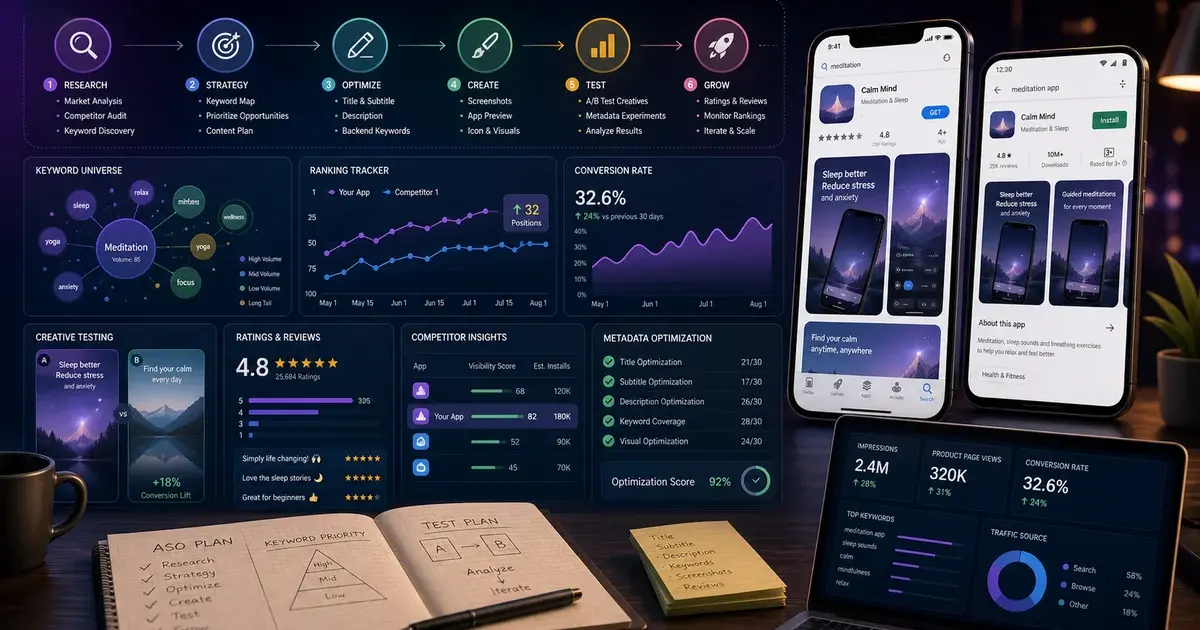
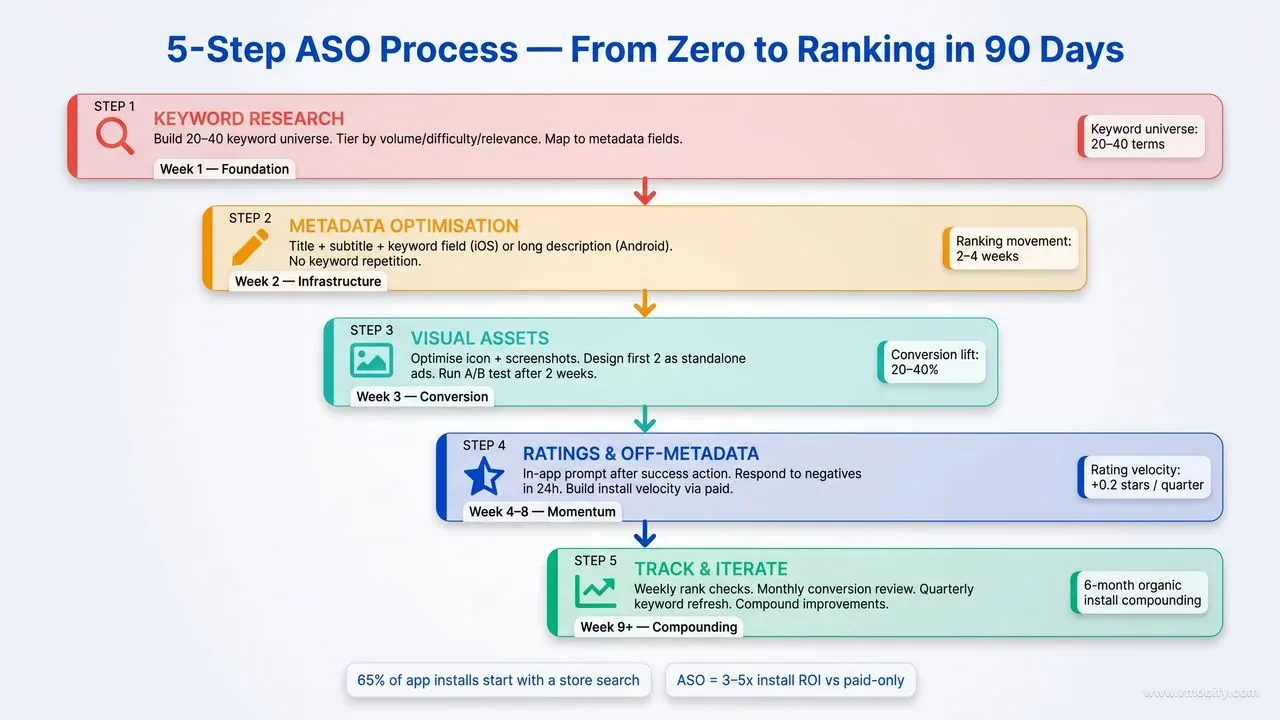
Without a measurement framework, ASO becomes a series of changes you cannot attribute — and you will either stop too early when results are just starting to compound, or keep running experiments that are not working because you cannot tell the difference. The dashboard we recommend across our portfolio tracks four metrics weekly and reports monthly.
Keyword rankings. Track your target 20–40 terms weekly in an ASO tool. Set alerts for significant rank changes (±5 positions) on your top 10 keywords so you can identify algorithm updates or competitor movements quickly. After any metadata update, allow 4–6 weeks before evaluating ranking impact — algorithmic re-indexing takes time and the signal is noisy in the first two weeks.
Conversion rate by traffic source. Pull your impression-to-install funnel from App Store Connect or Google Play Console, segmented by traffic source: App Store Search, App Store Browse, Referral (web), and Paid. A rising conversion rate from Search means your creative work is landing; a rising rate from Browse means editorial and category placement is improving. These are meaningfully different signals that warrant different responses.
Organic install volume. Track weekly organic installs as an absolute number and as a percentage of total installs. The goal of ASO is to grow organic's share of total installs over time — if paid is growing but organic is flat, ASO is not yet compounding.
Ratings trajectory. Track your average rating, the volume of new ratings per week, and the response rate on negative reviews. A healthy rating trajectory — average rising or stable, velocity growing — is the clearest proxy for product-market fit reinforcing your ASO work.
ASO Metrics Dashboard
- Keyword rankings — top 10 terms, weekly
- Conversion rate by traffic source, weekly
- Organic install volume and share of total, weekly
- Average rating + new rating velocity, weekly
- Impression volume by source (Search vs. Browse), monthly
- A/B test results — one active experiment at a time
Tools to track them
- AppTweak or Sensor Tower — keyword rank history
- App Store Connect — iOS impression/install funnel
- Google Play Console — Android funnel + experiment results
- AppsFlyer, Adjust, or Singular — multi-source attribution
- Spreadsheet or Notion dashboard — weekly trend lines
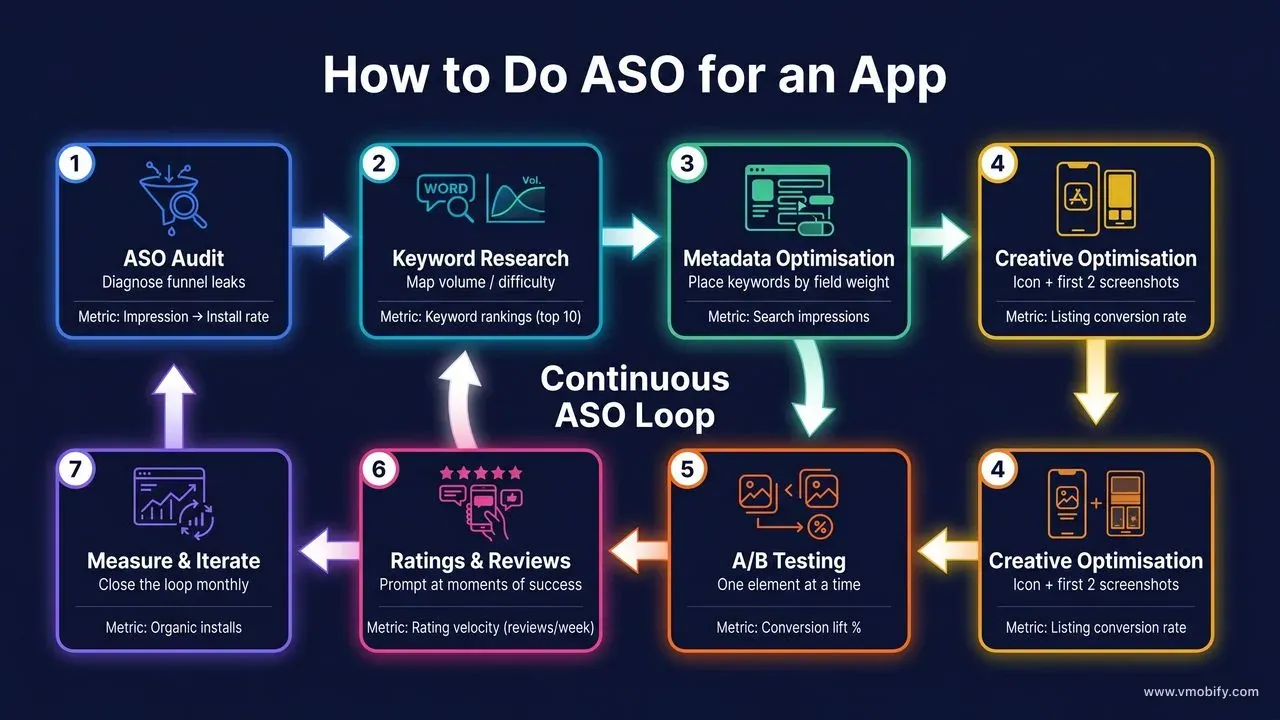
The pattern across every high-performing app in our portfolio is the same: ASO compounds over time because each improvement reinforces the next. Better keywords drive more traffic; better creatives convert that traffic more efficiently; more installs generate more ratings; stronger ratings reinforce ranking. The loop accelerates once all three levers are moving together.
If you want an expert team to build and run this framework for your app, get a free ASO audit from Vmobify. We have grown apps from zero to hundreds of thousands of organic installs using exactly this methodology. You can also read our case studies for category-specific examples, explore our full ASO service, or dig deeper into the measurement side with our analytics and attribution service. For the full optimisation playbook including A/B testing methodology, see our dedicated guide on ASO A/B testing frameworks.
Frequently Asked Questions
How long does ASO take to show results?+
Title and subtitle changes typically show ranking impact within 7–14 days on both stores. Description and keyword field updates take 2–4 weeks. Store conversion experiments need 2–6 weeks of live traffic to reach statistical significance. Expect a meaningful organic install lift — typically 20–40% — within 60–90 days of disciplined, sustained ASO work. The results compound: month-three gains are usually larger than month-one gains.
What is the difference between ASO on iOS and Android?+
The two stores index different metadata fields. On iOS, the app name (30 chars), subtitle (30 chars), and keyword field (100 chars) are the indexable fields — the description is not indexed for ranking. On Google Play, the title (50 chars), short description (80 chars), and the full long description (4,000 chars) are all indexed. For A/B testing, Google Play offers Store Listing Experiments natively; iOS offers Product Page Optimisation and Custom Product Pages. Treat iOS and Android as separate optimisation tracks with shared creative learnings.
Should I do ASO before or after launching paid UA?+
Always before. Paid UA drives traffic to your store listing — if the listing is unoptimised, you are paying to send users to a page that loses them. Across our portfolio we regularly see 30–60% of paid UA budget wasted on apps that have not tuned their store creatives. The sequencing is: audit and optimise your listing first, then launch paid. A well-optimised listing also reduces your effective CPI from paid campaigns because more of the traffic you pay for actually converts.
How many keywords should I target in my ASO strategy?+
A working keyword universe of 20–40 prioritised terms is the right size for most apps. Fewer than 20 and you are under-utilising the available metadata space; more than 40 and you are spreading your optimisation effort too thin to rank well for any of them. Within that list, focus your title and subtitle on your top 3–5 terms, your keyword field on the next tier of 15–20 terms, and your long description (Android) on semantic coverage of the full list.
My app has a low rating — what should I do before doing any other ASO work?+
A rating below 4.0 is an active ranking suppressor that will limit the impact of every other ASO improvement you make. Prioritise: fix the root cause of negative reviews (usually a specific bug, onboarding friction, or broken payment flow), push an update, respond to every 1–2 star review within 48 hours, and trigger the in-app review prompt at the right moment in the user journey. A focused 60-day rating recovery programme typically lifts average ratings by 0.3–0.8 stars and unlocks the ranking potential your metadata work has been building.
What ASO tools do you recommend for beginners?+
For a beginner with a limited budget, start with the free tools built into each platform: App Store Connect's analytics and search query data, and Google Play Console's store listing experiment tools and keyword performance reports. Both give you keyword impression data at no cost. Once you are ready to invest in a third-party tool, AppTweak and Sensor Tower are the most comprehensive; AppFollow is a strong option for review management and response workflows.
Does ASO work differently in India versus the US or EU?+
Yes — meaningfully so. In India, Google Play dominates market share, so Android ASO (description keyword density, short description, Google Play experiments) delivers a larger absolute impact than iOS ASO. Search volumes for vernacular-language keywords (Hindi, Tamil, Telugu, Marathi, Bengali) often exceed English equivalents for consumer categories. Conversion rates also respond more strongly to social proof markers like review counts and download numbers in Indian store listings than in Western markets. A localised ASO strategy for India is not optional for consumer apps targeting Tier-1/2/3 city growth.
Sources
- Apple — Custom Product Pages — Official Apple docs for PPO and CPP — up to 35 variants per app for source-specific conversion.
- Google Play — Store Listing Experiments — Official Google Play guidance on native A/B testing tools and in-app review API.
- Apple Search Ads — Apple-native iOS keyword advertising — highest-intent paid iOS installs.
- AppTweak ASO Blog — Industry ASO research including metadata localisation benchmarks for top-charting apps.
- SplitMetrics ASO Research — Independent research on store creative A/B testing — conversion lift ranges and methodology.
- AppsFlyer — State of App Marketing in India — Annual industry benchmark report on organic install share, CPI, and channel mix.
- Sensor Tower — State of Mobile — Global app download trends and store distribution benchmarks.
- Google Play In-App Review API — Official Android API for triggering native in-app ratings prompts without leaving the app.
About the author
Amol Pomane — Founder, Vmobify
Amol leads Vmobify, a mobile app growth agency that has driven 30M+ downloads and ranked 54K+ keywords across 300+ apps since 2013. He writes about ASO, paid user acquisition, retention, and the operational reality of scaling mobile apps in India and global markets.
Check your store metadata
Run your current App Store or Play metadata through the free checker.
Open free tool