Web-to-App Funnels: Convert Web Traffic Into App Users (and Revenue)
A web-to-app funnel routes the cheap, high-intent traffic you already win on the web — SEO, content, ads — into app installs and in-app revenue, instead of letting it die on a mobile site. This guide covers the mechanics (Smart App Banners, deferred deep links, QR, SMS), when web beats sending people straight to the store, why web purchase flows are growing, and how to measure the whole thing.
On this page
- What is a web-to-app funnel and why should you use one?
- What are the main web-to-app mechanics?
- Why are web purchase flows growing?
- What is the India opportunity for web-to-app?
- Should you send users to the app or straight to the store?
- How do you build a web-to-app funnel step by step?
- How do you measure web-to-app conversion?
- How do you carry onboarding context from web into the app?
- What are the most common web-to-app funnel mistakes?
- Frequently Asked Questions
What is a web-to-app funnel and why should you use one?
A web-to-app funnel is a deliberate path that takes traffic you have already won on the web — organic search, content, social, email, or cheaper web advertising — and moves it into your app, where retention and monetisation are almost always higher than on a mobile site. Instead of treating your website and your app as two separate worlds, you treat the web as the top of a funnel whose conversion event is an app install and a first session inside the product.
The economic logic is simple and it is the reason this matters. Web traffic is, channel for channel, cheaper to acquire than an app install bought directly through a store campaign. A page that ranks for a high-intent query costs you nothing per visit once it is published; a web ad click is typically far cheaper than a cost-per-install bid in a paid user acquisition auction. But the value lives in the app: push notifications, faster repeat sessions, biometric login, offline access, and subscription or in-app purchase flows all convert better in an installed app than in a browser tab a user will never return to. The web-to-app funnel is the bridge between cheap reach and high-value engagement.
There is a second reason that has grown sharper recently: store economics. Where regional rules permit, a web checkout lets you process a payment outside the store's mandated billing — avoiding part of the commission a store would otherwise take. We will treat that carefully later, because the rules genuinely vary by market, but it is now a live commercial reason to keep a web purchase surface alongside your app.
It also reframes channels you already run. SEO and content stop being a brand exercise and become an install engine; a web ad campaign stops competing in the expensive cost-per-install auction and instead buys a cheap click that the funnel converts into an install for less. Even your transactional and lifecycle emails — order confirmations, password resets, receipts — become web-to-app surfaces, because each is a page or message you can attach an "open in app" path to. The funnel does not require new traffic; it extracts more value from the traffic you already have.
Across our 300+ apps managed since 2013, the teams that win on web-to-app are not the ones with the cleverest banner — they are the ones who stopped thinking of their mobile website as a destination and started thinking of it as a funnel stage. A mobile site that converts a reader into an installed, logged-in app user is worth many multiples of one that simply renders content and lets the visitor bounce. This guide is about building that bridge so it actually carries traffic across, rather than dropping users in the gap between the browser and the app.
What are the main web-to-app mechanics?
There are four mechanics that do almost all the work in a web-to-app funnel — Apple Smart App Banners on iOS web, deferred deep links that survive an install, QR codes for offline-to-app, and SMS or email install links for owned audiences — and most good funnels use two or three of them together. None is exotic; all are documented and stable. The skill is in combining them and carrying context through, not in the individual pieces.
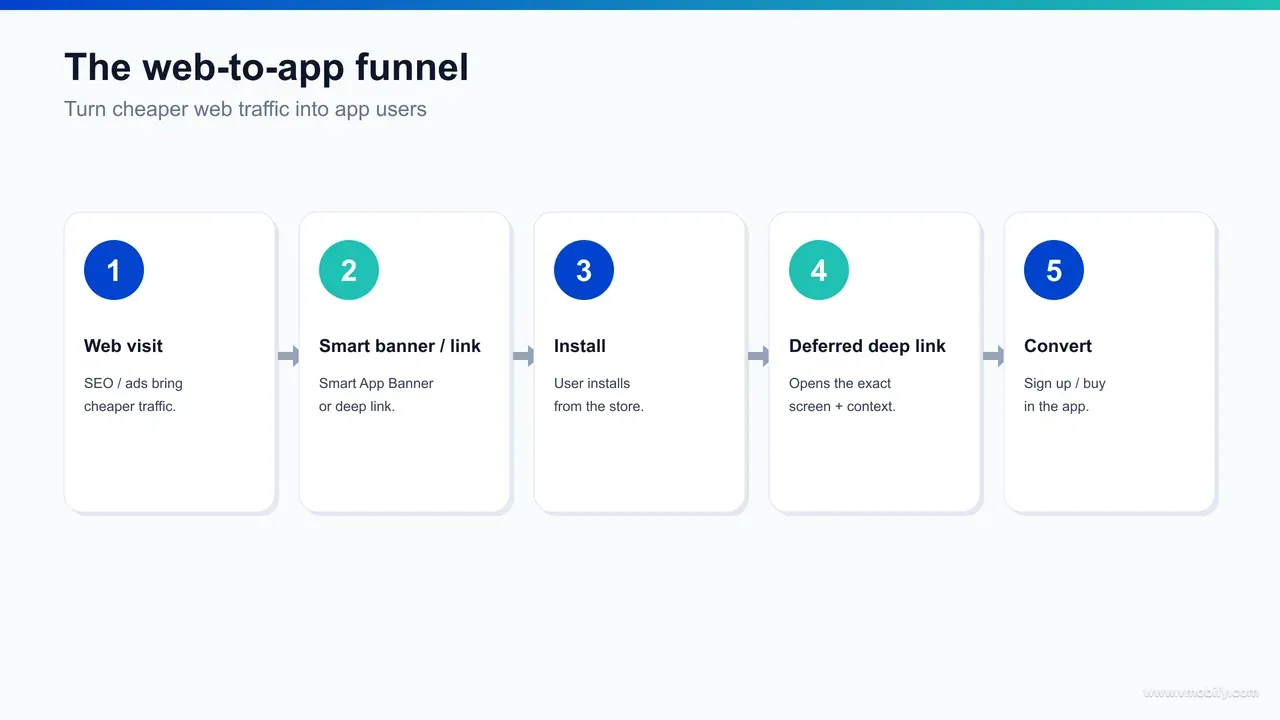
- Smart App Banners (iOS web): Apple's native banner sits at the top of a Safari page and offers to open your app or send the user to the App Store, with no custom JavaScript and no risk of being mistaken for an intrusive interstitial. You add one meta tag with your app ID and an optional deep-link path, and Safari renders the banner and detects whether the app is installed. Apple documents the exact tag in its Smart App Banners reference. If the app is installed it opens straight to the path you specify; if not, the banner routes to the store.
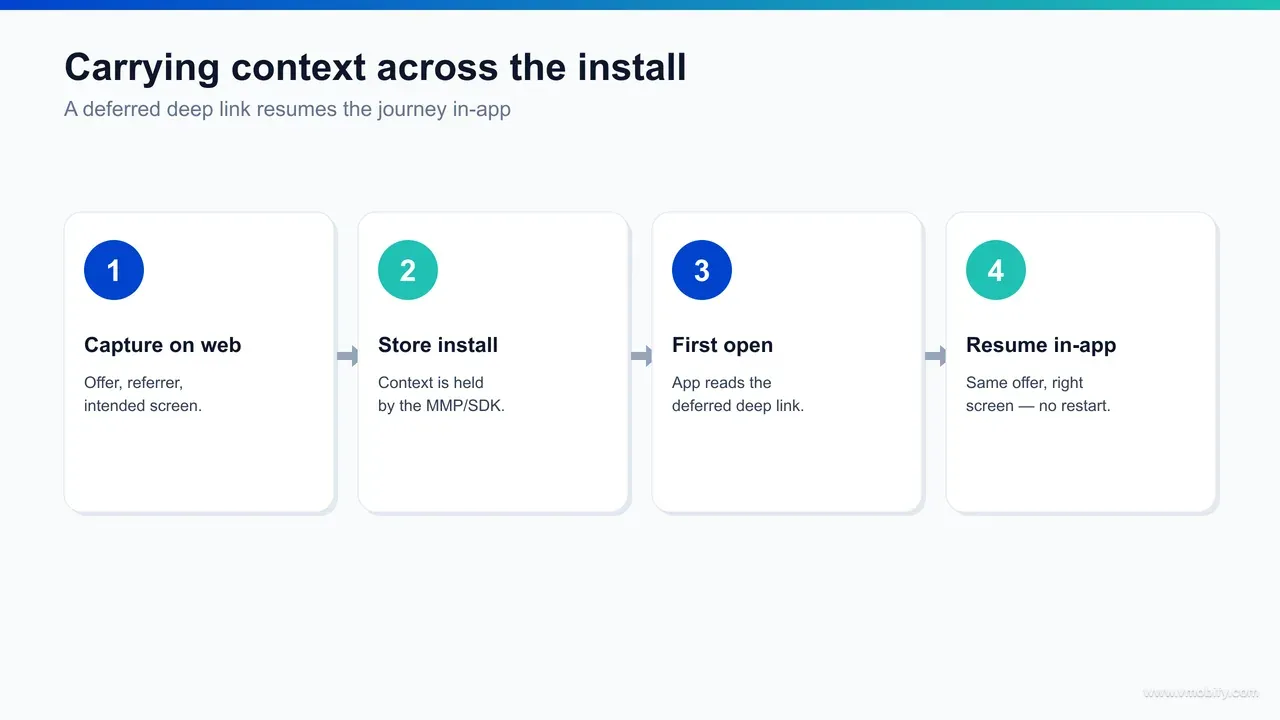
- Deferred deep links: the mechanic that makes web-to-app actually convert. A normal deep link routes a tap to a screen when the app is already installed. A deferred deep link preserves that destination through the install, so a brand-new user who taps a web link, installs, and opens for the first time still lands on the right screen. This is not a native OS feature — an attribution SDK matches the click and replays the destination on first open. We cover the full setup, including iOS Universal Links and Android App Links, in our deep linking and deferred deep linking guide, so this post links rather than repeats it.
- QR codes: the bridge from offline and desktop into mobile app. A QR on packaging, a poster, a receipt, an in-store sign, or a desktop web page lets a user scan with their phone camera and land on a smart link that resolves to the store or the app with context attached. QR turns physical and large-screen surfaces into the top of the same funnel.
- SMS and email install links: the highest-intent web-to-app surface, because the audience already chose to hear from you. A "continue in the app" link in a transactional email, or an SMS install link after a web sign-up, carries an identified user — and often a deferred deep link — straight into the app with the context of why they were contacted.
The thread running through all four is the same: a click on the web, a smart link that decides whether to open the app or the store, and a destination that survives the trip. Get that thread right and every one of these surfaces feeds the same measurable funnel.
Why are web purchase flows growing?
Web purchase flows — paying on your own website rather than through the app's in-store billing — are growing because recent App Store and Google Play policy changes have, in specific regions and under specific conditions, opened the door to external purchase links that route payment off-platform, where the store does not take its full commission. The motivation is margin: store commissions on digital goods materially shrink the economics of a subscription or in-app purchase business, so any compliant way to process some payments on the web is commercially significant.
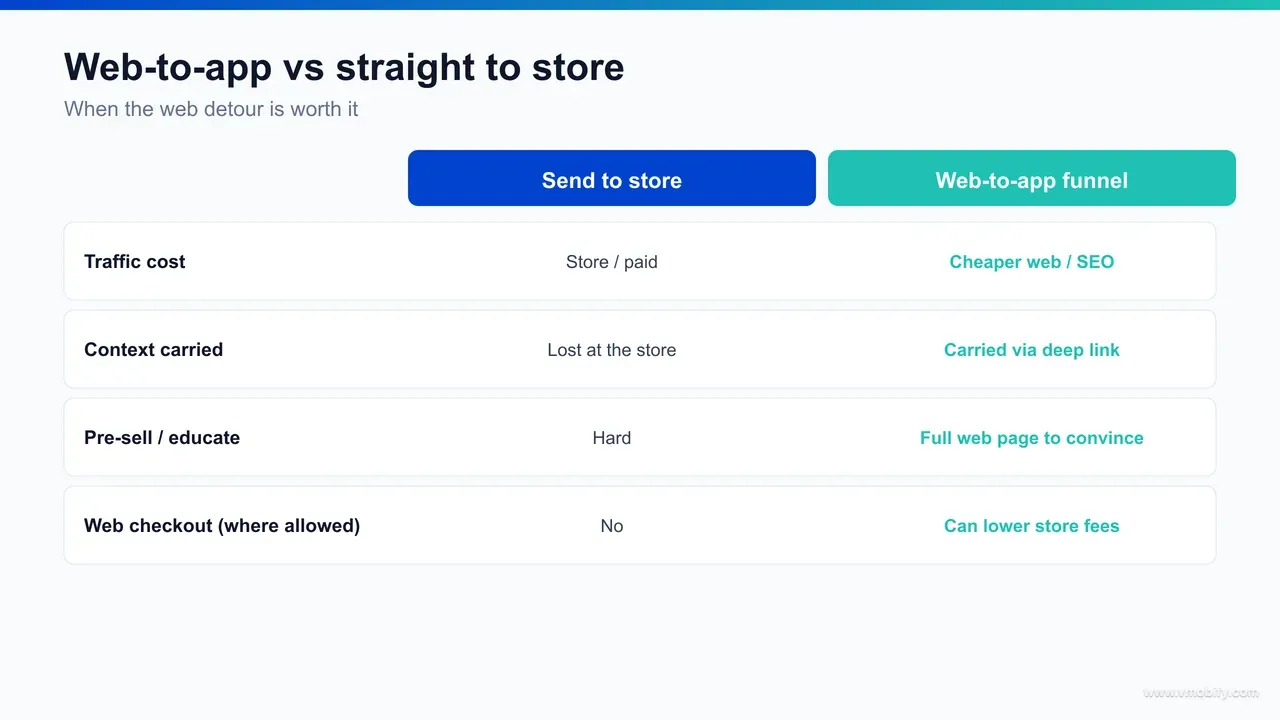
The crucial caveat — and it is genuinely important to get this right — is that what is permitted varies sharply by market, by platform, and over time. Different jurisdictions have reached different settlements and regulatory outcomes, so an external purchase link that is allowed in one region may not be allowed in another, and the conditions (disclosures, fees, entitlements) differ. Apple sets out the rules and entitlements in its App Store Review Guidelines, and Google maintains its own billing and external-offer policies; both change as legal cases resolve. Treat this section as a reason to investigate for your specific markets, not as a blanket green light.
Practically, the pattern that has emerged is a hybrid. Many teams keep in-app purchase available for friction-free conversion, while also running a web purchase flow — reached through a web-to-app funnel in reverse, or before the install — that captures payment at a better margin from users willing to complete it on the web. The economics of running both surfaces, and which goods to route where, is exactly the kind of decision our monetisation work models, because the answer depends on your price points, renewal rates, and the commission you actually pay.
Subscription tooling has followed the money. Platforms like RevenueCat have built out web billing and cross-platform entitlement products precisely so a user who pays on the web is recognised as a subscriber inside the app, and their engineering and billing blog tracks how teams are wiring web and app purchases into a single entitlement. The web-to-app funnel and the web purchase flow are converging: the same bridge that carries a reader into your app can carry a payment that the app then honours. The discipline is to build the bridge cleanly and to confirm, per market, what you are actually allowed to do at the checkout.
What is the India opportunity for web-to-app?
India is the clearest single market for a web-to-app funnel because three conditions line up — web traffic is unusually cheap, vernacular web content ranks against thin competition, and UPI web checkout has removed the payment friction that used to make web purchases a dead end. Each on its own is useful; together they make the web a genuinely viable acquisition and revenue surface for an India-first app, not just a brochure.
Start with cost. Cost-per-install in India is among the lowest of any major market, but the gap between a web click and an app install is still wide enough that earning a reader on the web and converting them to an install is materially cheaper than buying that install directly. A content page that ranks for a Hindi or regional-language query keeps delivering visits at no marginal cost, and those visitors are high-intent — they searched for the thing you do. Turning that cheap, intentful web reach into installs is the core web-to-app play, and it scales with content rather than with ad budget.
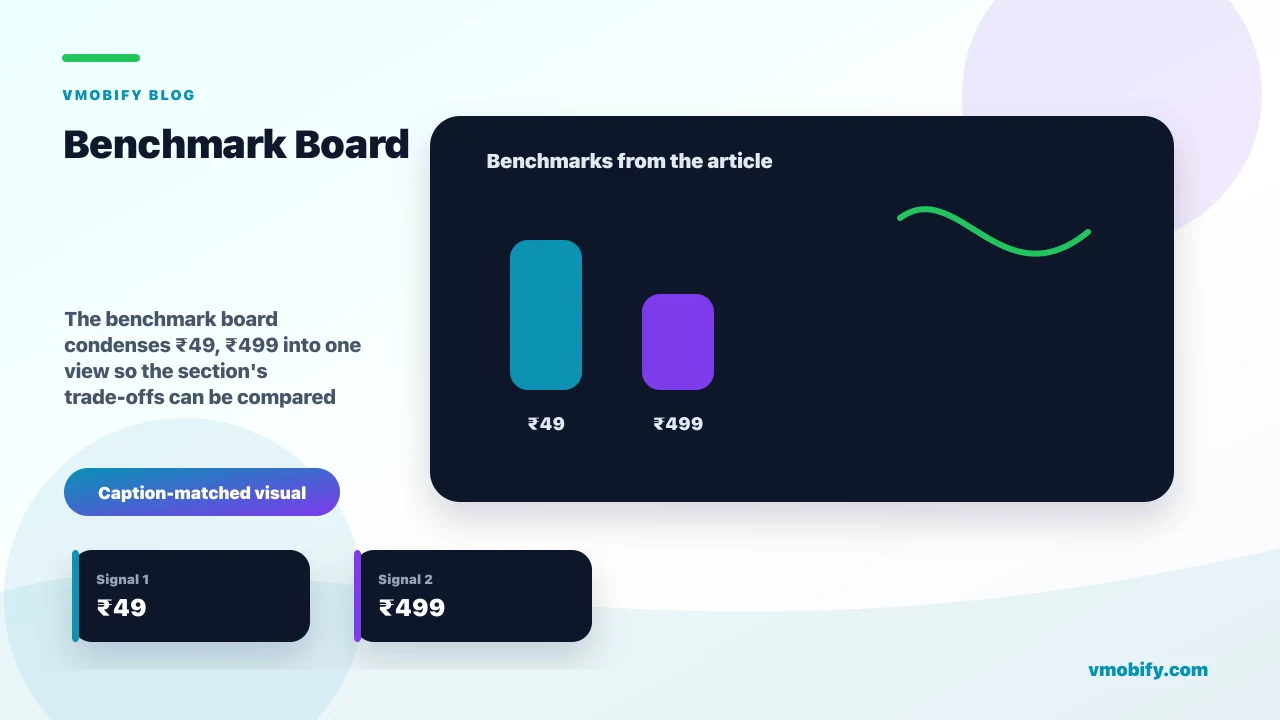
Then UPI. The reason web purchase flows historically failed in India was checkout friction — cards, OTP loops, abandoned baskets. UPI collapsed that: a web checkout can hand off to any UPI app and complete a ₹49 or ₹499 payment in seconds with a single approval. That changes the maths of a web purchase flow entirely. A user can now read a vernacular web page, tap to pay via UPI, and be carried into the app as a paying, entitled user — a path that was simply too lossy to bother with a few years ago. For an India-focused subscription or transactional app, UPI web checkout is what makes the web purchase surface worth building.
The offline-to-app angle is unusually strong in India too. QR codes are already woven into everyday Indian commerce through UPI — users scan to pay dozens of times a week without a second thought — so a QR on a poster, a kirana receipt, a delivery package, or an outdoor ad meets an audience that is completely fluent in scanning. That cultural familiarity makes QR a higher-yield web-to-app entry point in India than in markets where scanning still carries friction, and it turns physical retail and out-of-home media into measurable tops of the same funnel.
In our portfolio, the India apps that treat the web as a first-class funnel stage — rather than an afterthought behind the store listing — consistently lower their blended cost per acquired, retained user. The combination is specific to the market: cheap, vernacular, high-intent web traffic at the top; a Smart App Banner or QR or SMS link in the middle; UPI web checkout or a deferred-deep-linked install at the bottom. Few markets offer all three at once, which is why India rewards this funnel more than most.
Should you send users to the app or straight to the store?
Send users straight to the store when their intent is already maximal and there is no context worth preserving; build a web-to-app funnel when the web page captures qualification, personalisation, or a half-finished action that should carry into the app. Both are valid — the mistake is using one reflexively when the other fits the moment.
Sending straight to the store is the right call in a narrow set of cases. If someone taps a "Download" button on your homepage, they have declared they want the app and nothing else; routing them to the store with a clean attribution link is faster than detouring through a web experience. The same is true for an app-only product with no meaningful web content — there is simply nothing to capture on the web first. App-direct also avoids the extra failure points a deferred deep link introduces, which matters when the destination is just "the app, generically".
- App-direct wins when: intent is already complete (a download button, an app-store ad), there is no context to preserve, or you want the absolute fewest steps between tap and install.
- Web-to-app wins when: the web page does work the store cannot — qualifying a lead, collecting a preference, showing content that builds intent, starting a cart or a form, or capturing an email or phone number you can then re-engage. In each case the install is more valuable because it arrives with context attached.
- The losing middle ground: a web page that gathers context, then dumps the user at a generic store listing that forgets all of it. The user re-enters everything after install, friction spikes, and the funnel leaks. If you collect context on the web, you must carry it through — otherwise app-direct would have been better.
The deciding question we ask clients is blunt: does the web step earn its place? If the page meaningfully raises the value or qualification of the install, build the funnel and carry the context. If it just adds a tap before a download the user already wanted, go app-direct. We have seen teams lose conversion by forcing every visitor through a web funnel that added friction without adding context — and lose revenue by sending qualified, half-converted web users to a store listing that threw their context away. The right answer is per-surface, not per-company.
How do you build a web-to-app funnel step by step?
Build a web-to-app funnel in six steps — instrument your web entry points, add a Smart App Banner and smart links, set up deferred deep linking, wire attribution, design the carry-over into onboarding, then test every path on real devices in both installed and not-installed states. The order matters: the measurement and deep-link plumbing has to exist before you drive traffic, or you will scale a funnel you cannot see.
- Map and instrument your web entry points: list every page that should feed the app — high-traffic content, product pages, the post-signup confirmation, transactional emails. These are your funnel tops, and each needs its own smart link so you can measure them separately.
- Add the Smart App Banner and smart links: drop Apple's Smart App Banner meta tag on your iOS web pages with the deep-link path set, and place explicit "Open in app" smart links and QR codes where they fit the surface. On Android, use App Links-backed smart links so a tap resolves to the app or the store cleanly.
- Set up deferred deep linking: configure iOS Universal Links — Apple documents the entitlement and apple-app-site-association file in its Universal Links guide — and Android App Links, then connect an attribution provider so the destination survives an install. This is the load-bearing step — without it, every not-installed user lands on a generic home screen and the funnel leaks. The full setup is in our deep linking guide.
- Wire attribution end to end: ensure each web click writes a record your provider can match to the first app open, with the source, campaign and destination preserved. Deep linking and attribution are the same pipeline viewed from two sides — set them up together, not sequentially.
- Design the onboarding carry-over: decide exactly what context passes from web to app — the product they viewed, the plan they chose, the email they entered — and have the first app screen consume it. This is where the funnel converts or stalls.
- Test every state on real devices: walk each path on a physical iPhone and Android, in both app-installed and not-installed states, and confirm the deferred destination resolves after a fresh install. The not-installed path is the one teams forget to test, and it is the one that matters most.
None of these steps is heavy on its own. The reason web-to-app funnels underperform is almost never a missing feature — it is one of these six steps skipped or half-done, usually the deferred-deep-link plumbing or the not-installed test path.
How do you measure web-to-app conversion?
Measuring web-to-app is genuinely hard because a single journey crosses three disconnected environments — the mobile browser, the app store, and a fresh app install — and none of them shares an identifier with the next, so you need a deferred deep link plus an attribution provider to stitch the web click to the first app open. Treating web analytics and app analytics as separate systems is the single biggest reason teams cannot see this funnel.
The break points are specific. A user clicks a link in Safari or Chrome, which your web analytics sees. They are handed to the App Store or Play Store, which is a closed environment that returns almost no per-user signal. They install and open the app for the first time as, from the OS's point of view, an anonymous new device. The web visitor and the new app user are the same person, but no platform tells you that — you have to reconstruct it. That reconstruction is what an attribution SDK does, by matching the click to the install and replaying the destination, which is also what powers the deferred deep link.
- Use a dedicated smart link per entry point so each web surface — a content page, an email, a QR — is independently attributable, rather than collapsing into one "web" bucket.
- Track the full path, not just the install: web click → store arrival → install → first open → the in-app conversion event (signup, purchase, subscription). The install is a midpoint, not the goal; the goal is a retained, monetising user.
- Respect the privacy frameworks: Apple's SKAdNetwork and AdAttributionKit and the broader move away from device identifiers mean some matching is probabilistic and aggregated, not deterministic. Your measurement has to account for that, and providers publish guidance — see resources from MMPs like AppsFlyer on how web-to-app attribution holds up under current privacy rules.
One reporting trap is worth naming. Because some matching is now probabilistic, web-to-app numbers will rarely reconcile to the single user across every system, and that is expected — chasing perfect deterministic parity wastes weeks. What you need instead is a directionally reliable read of which web surfaces produce retained, monetising users, measured consistently over time so you can compare them against each other and against app-direct campaigns. Pick one source of truth — usually your attribution provider — and judge every web entry point by the same yardstick rather than stitching numbers across mismatched dashboards.
The mechanics of cross-environment attribution — how the click is matched, what survives privacy changes, and how to read the numbers — are the subject of our full mobile attribution guide, which we point clients to before they scale spend into any web-to-app path. The principle to hold onto here: if you cannot attribute the web click to the first app open, you are flying blind, and you will not know which of your web surfaces actually produce valuable app users.
How do you carry onboarding context from web into the app?
You carry onboarding context from web into the app by passing it through the deferred deep link — the product viewed, the plan chosen, the email entered, the referral code — and having the first app screen consume that payload instead of starting the user from a blank slate. This is the difference between a funnel that feels like one continuous journey and one that makes the user repeat everything they already did on the web.
Concretely, the deferred deep link can carry a small set of parameters that survive the install. When the app opens for the first time, your onboarding code reads them and adapts: if the user came from a page about a specific plan, open onboarding on that plan; if they entered an email on the web, pre-fill it; if they started a cart or a form, resume it. The mechanic is the same deferred deep link that powers the funnel — you are simply using its payload to personalise the first session rather than only to route to a screen.
The payoff is conversion. First-session continuity removes the most common reason web-to-app users churn before they ever convert in-app: being asked to re-enter context they already gave, or being dropped onto a generic home screen with no memory of why they installed. A user who lands on exactly the plan they were reading about, with their email filled in, is far more likely to complete signup than one who has to start over. The principles that make a first session convert — reducing steps, showing immediate value, deferring permission requests — are the subject of our app onboarding best practices, and web-to-app is where they pay off hardest, because the user arrived with intent you must not waste.
In our portfolio, the apps that treat the web-captured context as the opening move of onboarding — rather than discarding it at the store boundary — consistently convert a higher share of installs into activated users. The technical lift is small once the deferred deep link exists; the design decision is what to carry and how the first screen should change because of it. Make that decision deliberately, and the web-to-app funnel stops being two products bolted together and starts being one.
What are the most common web-to-app funnel mistakes?
The most common web-to-app mistakes are predictable and avoidable — skipping deferred deep linking, forgetting the not-installed test path, using intrusive interstitials instead of native banners, discarding web-captured context at the store boundary, and driving traffic before attribution is wired. Each one quietly drains a funnel that otherwise looks fine in a demo.
- No deferred deep linking: the cardinal error. Without it, every not-installed user — the majority of your web traffic — lands on a generic home screen after install, forgetting the destination you promised. The funnel looks built but leaks at exactly the point it should convert.
- Never testing the not-installed state: teams test "open in app" with the app already installed, it works, and they ship. The path that actually matters — tap, install, first open, arrive at the right screen — goes untested. Always walk it on a clean device after a fresh install.
- Intrusive interstitials instead of native banners: a full-screen "get our app" overlay annoys users, can hurt your web rankings, and converts worse than Apple's native Smart App Banner, which Apple documents in its Smart App Banners reference. Use the native surface; do not reinvent it as a popup.
- Discarding context at the store boundary: collecting an email, a plan choice, or a cart on the web and then dropping the user at a generic listing that forgets it. If you gather context, carry it through the deferred deep link — otherwise the web step added friction and gave nothing back.
- Driving traffic before measurement exists: scaling spend into a funnel you cannot attribute. You burn budget without knowing which web surfaces produce retained users, and you cannot optimise what you cannot see. Wire attribution first, then scale.
- Assuming external purchase is allowed everywhere: building a web purchase flow on the assumption that off-platform billing is universally permitted. It is not — the rules vary by region and platform, so confirm what is allowed in each of your markets before you route payment off the store.
- Optimising the banner instead of the destination: teams spend weeks tuning banner copy and placement while the post-install screen — the part that actually decides whether the user converts — stays generic. The banner only earns the click; the destination earns the user. Put the design effort where the funnel actually leaks.
If you want a web-to-app funnel built so these traps are designed out from the start — deferred deep linking, attribution, onboarding carry-over, and a measurement layer you can actually optimise — that is the kind of growth infrastructure our team sets up across user acquisition and monetisation, and you can talk to us directly about your specific funnel. The mechanics are not the hard part; building them so they hold together across the browser, the store, and the install is.
Frequently Asked Questions
What is a web-to-app funnel?+
It is a deliberate path that converts traffic you earn on the web — search, content, social, email, cheaper web ads — into app installs and in-app revenue, using Smart App Banners, deferred deep links, QR codes and SMS or email install links to carry users and context into the app.
Why send web users to the app instead of just keeping them on the mobile site?+
Because retention and monetisation are almost always higher in an installed app than in a browser tab. Push notifications, faster repeat sessions, login persistence and subscription flows all convert better in-app, and web traffic is cheaper to acquire than a direct app install — so the funnel bridges cheap reach to high-value engagement.
What is a Smart App Banner?+
A Smart App Banner is Apple's native banner that appears at the top of a Safari page and offers to open your app or send the user to the App Store. You add it with a single meta tag containing your app ID and an optional deep-link path, and Safari detects whether the app is installed.
Do I need deferred deep linking for a web-to-app funnel?+
Yes, if you care about not-installed users — which is most of your web traffic. A deferred deep link preserves the destination and any context through the store install, so a brand-new user still lands on the right screen on first open instead of a generic home screen.
Are web purchase flows and external purchase links allowed?+
It depends entirely on the region and platform. Recent App Store and Google Play policy changes have opened external purchase links in specific markets under specific conditions, but the rules vary and change as legal cases resolve, so confirm what is permitted in each of your markets before routing payment off the store.
How do you measure a web-to-app conversion?+
You use a deferred deep link plus an attribution provider to stitch the web click to the app install and first open, because the browser, the store and the fresh install share no identifier. Use a dedicated smart link per entry point and track the full path through to the in-app conversion event, not just the install.
Why is India a strong market for web-to-app funnels?+
Three conditions line up: web traffic is unusually cheap, vernacular web content ranks against thin competition, and UPI web checkout has removed the payment friction that used to make web purchases a dead end — so cheap, high-intent web reach can convert to installs and paying users.
Sources
- Apple — Promoting Apps with Smart App Banners — Official Smart App Banner meta tag, app-argument and deep-link path
- Apple — Supporting Universal Links in Your App — iOS Universal Links and AASA setup that underpins web-to-app routing
- Apple — App Store Review Guidelines — Rules and entitlements governing external purchase links and web checkout
- Google Play — Developer content and billing policy — Play billing requirements and external-offer policy for comparison
- Apple — External Purchase (StoreKit) — Region-specific external purchase entitlement and disclosure requirements
- RevenueCat — Engineering and billing blog — Web billing and cross-platform entitlement patterns for web purchase flows
- AppsFlyer — Resources — Web-to-app attribution and measurement under current privacy frameworks
About the author
Amol Pomane — Founder, Vmobify
Amol leads Vmobify, a mobile app growth agency that has driven 30M+ downloads and ranked 54K+ keywords across 300+ apps since 2013. He writes about ASO, paid user acquisition, retention, and the operational reality of scaling mobile apps in India and global markets.
Model an install budget
Turn CPI and activation assumptions into acquisition scenarios.
Open free tool